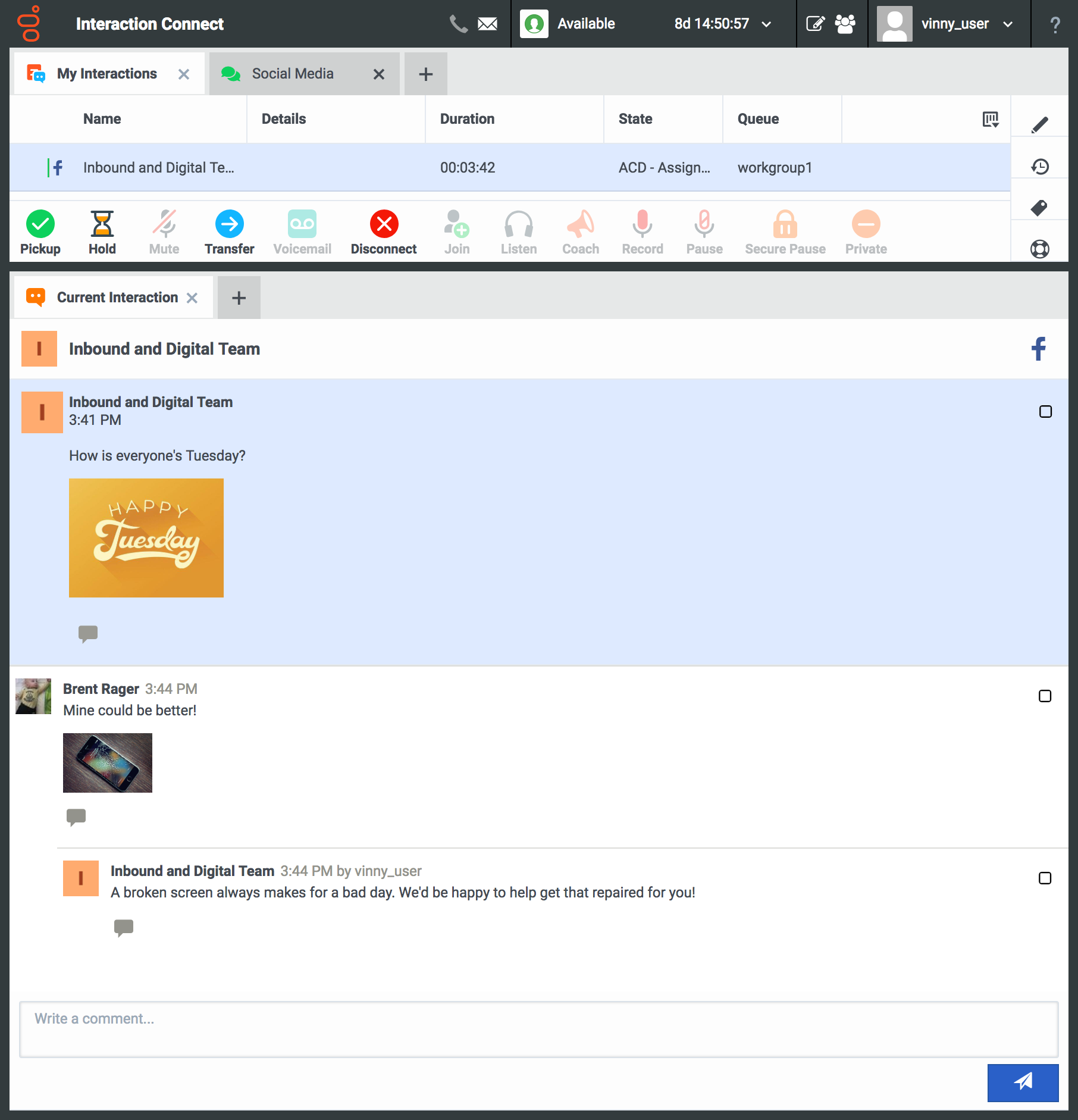
Genesys PureConnect was an omnichannel contact center platform that offered cloud-based or on-premise deployments. It featured a SIP-based architecture with VoIP capabilities, allowing companies to connect legacy voice systems and use existing phones. A legacy product, new users are encouraged to investigate Genesys Cloud.
N/A
GoTo Connect
Score 8.0 out of 10
N/A
GoToConnect, from GoTo, is a cloud-based business phone system with built-in web-based video conferencing solutions. It includes features such as call analytics, call recording, softphone, fax to email, voicemail to email, and desktop integration.
$27
per month per user
Webex Calling
Score 8.8 out of 10
N/A
Webex Calling is Cisco’s flagship cloud calling solution with over 12 million users worldwide. It delivers an enterprise-grade calling experience that enables customers to replace PBX hardware with a cloud calling solution. Webex Calling's connectivity and collaboration experience includes calling, meetings, messaging, contact center, and integrated devices.
$17
per month per user
Pricing
Genesys PureConnect (discontinued)
GoTo Connect
Webex Calling
Editions & Modules
No answers on this topic
Basic
Starting at $27
per month per user
Standard
Starting at $32
per month per user
Webex Call
$17
per month per user
Webex Suite: Meet + Call
$25
per month per user
Webex Enterprise
Contact Sales
Cisco Unified Communications Manager
Contact Sales
Offerings
Pricing Offerings
Genesys PureConnect (discontinued)
GoTo Connect
Webex Calling
Free Trial
No
Yes
Yes
Free/Freemium Version
No
No
No
Premium Consulting/Integration Services
No
Yes
Yes
Entry-level Setup Fee
No setup fee
No setup fee
Optional
Additional Details
—
No-obligation month-to-month account are available, or a long-term contract is available for better deals on service pricing and hardware. GoToConnect provides all features with unlimited use. Customer & Technical support is available 24/7 to resolve any issue. A dedicated onboarding team will help to the phone system set up for any plan.
Cisco Webex Calling has all the features we need. It has this delightful user experience. Very easy to set up. Amazing quality of support. Audio and video quality that it gives are superb. Desk-to-desk calls are pretty good and clear. Integration with other softwares is also …
CIC is best suited for business models that rely on heavily leverage Data Integration especially one like ours that require real-time and high-speed data access for billing and customer integration. CIC is not well suited for small organizations < 50 where they are only answering phones in the course of doing business VS. the business is the phone.
Go-To softphones have made my life as an IT manager significantly easier. Being able to take calls and listen to my voicemails on both my computer and mobile phone has been a game-changer. I also cannot recommend the "drag-and-drop" dial plan management system enough. It makes the entire process as easy as programming in Visual Basic and allows you to see exactly what is happening when someone dials into a line.
It seems quite able to handle the normal day to day voice call requirements quite well. Our previous Cisco phones had cameras that could do video calls, but if we need that we go to a Zoom session. Conference room use is not terribly convenient, although this might just be a case of us figuring out how to adapt the environment.
Call reports: You can see and review calls received from the first receptor until the last who attend this call, also you can review all calls make and received by your teams
Voicemail options: Availability to create some voicemail with multiple receptors
Devices option: with several options to change on your devices
Audio library: Multiple option to create your own audio library with or without ambien music
Internal calling can be done by searching user in directory or by dialing short code extensions for users. Pretty quick and easy to reach internal people.
Webex Calling integrated seamlessly with call recording solutions making it very useful for compliance call recording which is needed by customer service centres today.
Features like call forwarding, call transfer, conference, voice mail, etc are available.
User authorisation for different types of calls is available.
It provides basic call centre features as well so that companies requiring basic call centre features can use it within Webex Calling.
I think what it's doing is it is still the leader when it comes to being able to present calling platforms. And I mean I guess it's number one competitor from a software perspective is Microsoft Teams, Cisco is doing everything possible to provide open source to enable Microsoft and Cisco to work together, particularly when it comes to user room experiences so that no one is feeling like they're left alone or compromised or somewhat segregated when they're choosing one technology versus the other, which is a great thing.
We are so embedded on Pure Connect that we like to progress with it. For instance, we are looking into ways to provide different solutions to our customers, help our business to succeed, and work in a better CX.
One of the biggest advantages is that all is in one platform.
They are knocking it out of the park on all fronts. I love the service and support I am receiving and have no complaints. If they raised their prices substantially I would reconsider but I don't think that will happen anytime soon. They would have to mess up something consistently moving forward to make me want to move
The service can be intermittent and the call forwarding feature will not always work perfectly. There will be periods of time where the calling feature will not work at all and people on the other end can hear me but I am unable to hear them. It also requires a fairly strong signal which can be an issue if you work somewhere remote or a building without much service.
The interface is only semi user-friendly on almost every front. Agent experience is lacking and we have found many limitations within the system. Workforce forecasting is not as robust as expected. Quality continues to be a struggle. Interaction searches are not robust.
Overall, it's a decent product for the price. It has the basic features our company needed when it was brand new and was not overly difficult to set up. As we've grown, it's become increasingly difficult to build out the features we want to implement within the PBX, and customer support can be less than helpful. Many of the more advanced features (dial plans, queues, etc.) take a lot of research to understand how to implement. Some of the features we paid for weren't even available when we were attempting to set them up.
Cisco Webex Calling is an outstanding cloud collaboration that includes enterprise-grade cloud phone system designed for the modern hybrid workplace. Webex Calling integrates calling, messaging, and meetings into a single, intuitive platform, empowering your teams with unparalleled flexibility and productivity. Benefit from advanced features like HD audio and video, voicemail to email, call forwarding, and intelligent call routing, ensuring crystal-clear communication and efficient workflows from any device, anywhere. Webex Calling prioritizes security and reliability, offering redundant data centers and end-to-end encryption to safeguard your conversations. Its scalable architecture effortlessly adapts to your envolving business needs, providing a future-proof communication foundation. Enhance collaboration and streamline operations with a solution that's not just a phone system, but a comprehensive communication hub.
The application itself uses a hub and spoke model that can help isolate errors in one section of the application from the rest, creating a much more stable overall program. Of all of the outages that we've had with our contact center platform, I can count on one hand how often it was truly a Genesys issue rather than a network issue, server issue or issue with a platform relied upon for an integration (web services, db calls).
I have never experienced or heard of unplanned outages when it comes to GoTo Connect. Most of the time the unplanned outage is always local power at a site or internet service provider having an unplanned outage. GoTo's service has never failed any of our orgs yet that I know of.
I've not actually had it ever be unavailable when I needed to use it. As mentioned before, a network outage would take it down, but we have redundant systems for our network connections with automatic failover.
Some of the client applications take a bit of time on initial load, but with the move towards web based applications that issue is alleviated. You can tell that effort really isn't putting into the desktop apps any longer and that the client development effort is being put into bringing Interaction Connect closer to feature parity with the desktop (and bringing wholly new features to Connect). As far as IVR operations, web service calls, database operations: they all operate reasonably.
There is no lag in phone calls. There is no background noise or static/fuzz. Calls are crystal clear. With other dialers and phone systems, I have experienced delays between dialogue or delays with the caller picking up the phone and then being able to hear you. We do not experience this with Go To Connect.
I don't really see this impacting any other system performance at all. The client is very light use on resources, even on my iPhone. I don't know what else it connects to behind the scenes other then the campus directory, but I haven't seen or heard of any impacts. It seems fairly self contained except for wherever it interfaces with the general telephone system connectivity outside the campus.
Some cases are resolved quickly others are taking longer and the reseller sometimes has to chase support several times and explain the issue seen several times. While being a direct customer before, I recognise this and it seems that when a case moves to another engineer they don’t read the previous case notes or don’t understand what has been done. This, from a customers perspective, slows down resolution times.
One of the MOST challenging things in tech support is that some of the offshore agents "don't speak Texan/English", and are really hard to understand. GoTo Connect's support is usually someone who is VERY easy to understand their US/English, and are very helpful. In dozens of interactions for our business & our clients, we've only had a few tickets that couldn't be resolved on the first call
I have been working for a long time with Cisco as a provider and also Cisco TAC and Cisco Support Engineers. The support starts right beforehand in the documentation of the product you are interested in. From the start you have a good, complete, and detailed and easy to read datasheet and there's always someone available to answer any questions.
I liked the setup of the whole class. The instructor knew the topic well enough to answer questions from entry level to a more advanced one.
Instructor encouraged participation of the whole class and was able to engage every one. Also provided "real live" examples so everyone can relate to it.
The online training itself is good. You are provided resources and can self study to a certain point, but the pacing always felt off. Either snails pace or like trying to drink from a fire hose. I think this easily could have had to do with course material and my personal preparations, though. I would say my main gripe is that since the acquisition the team responsible for actually booking training is very unresponsive and often not knowledgeable about the courses they offer. Booking my last training was a real chore.
The training videos could be more in-depth. This would help our user base so that they can feel impowered to look up information that they need without having to ask our admins every time they have a question about the system. Online training videos are also inferior to an actual person explaining systems.
Don't try to go the perfect solution as a first target. Work on answer the more needs with a simple solution. Then analyse and try again to answer the most needs with adding a bit if complexity only if require. No needs to customise straight from the beginning or deployment takes too long.
One big lesson we learned is that training the team well makes a huge difference. It was easier when we started with the fundamental features, such as the way calls are handled. Getting staff involved early helped us set it up the right way. So I would say my experience with implementation was straightforward.
Call Manager, you had to buy all the components that are out of the box for PureConnect. The licensing model is more expensive on the Cisco side vs the Genesys PureConnect side. Lastly was on the Cisco side since you have to connect/integrate all the components on the cisco side you have to have so many vendors to install those parts. This drives the cost up even more so it was not worth going that route for our organization.
Avaya IP Office was for us a complicated and inflexible on-prem solution. It could be made to do a great many things similar to GoTo, however it was not flexible and scalable in the same way as GoTo, which is to be expected of a cloud solution. In particular, as we aimed to build out a contact center, IP office could not do it in a work-from-anywhere environment, and the softphone provided almost no information to the agent. GoTo solved all of the problems we were encountering with IP office, with the added benefit of not needing continously upgrading licensing - as GoTo is a one-license solution.
The company uses Microsoft Teams. They do use Microsoft Teams right now and for a long time a lot of the different practices have been using on-premise, contact Call Manager and Unified Communications Express. But Cisco WebEx, the cloud-based product is one of the new ones. And some of our other site practices are also using RingCentral. So cloud calling is not new to the company. For those of us who are familiar with Cisco products, the transition to WebEx calling is not as difficult as it might be for some other products. Going from on-prem to RingCentral, there is more of a learning curve with.
Genesys PureConnect's core and adjunct model allows for fairly easy growth in satellite locations via off site session managers, remote located media servers, remote content servers, etc to allow you to spread the infrastructure out while not pushing as much network traffic to your core data centers.
Its not readily apparent to me, other than cost, where you would run into any issues with larger scale deployments. When we went live on the product, the Jive team was always willing to do mass updates for us on our extensions, users, etc. in the system, so we didn't have to do too much manual one-by-one updates.
So far it has been very reliable, with very little down time that was associated with the product itself. We have had network outages due to external factors such as construction cutting a fiber link, but other than that kind of thing not much for failures.
We're improving our CX by optimizing our call centers, using additional attributes and keys to identify the best rep for the job.
We are also streamlining the journey of each individual customer by using PureConnect as the central interface for omnichannel interactions, allowing us to pick up the conversation where we left off.
Using additional attributes that start with the contact center interaction, we're able to track a student journey and proactively step in - increasing our individualized support to focus on the student outcome.
Cost Savings have been realized from reducing hardware .
We are all able to collaborate remotely and it has been seamless and easy to setup.
I'm able to pull reports, i wish there was improvement on the data analysis side. It has gotten better since LogMeIn, but something is a miss and can be improved.
Webex calling is a good solution for customer which are ready for cloud.
However some customers doesn't want to share their CDR to a UcaaS so Cisco shouldn't focus on cloud opportunity and up to me the gap of investment, marketing, evangelization is too big weighing the pros and cons for cloud too often