Overview
ProductRatingMost Used ByProduct SummaryStarting Price
Google Optimize
Score 6.7 out of 10
N/A
Google offers the Optimize A/B testing tool for testing website content and versions.N/A
Instapage
Score 9.7 out of 10
Mid-Size Companies (51-1,000 employees)
Instapage is a growth marketing platform that includes a builder for PPC, SEO, demand generation, A/B testing, personalization, and email automation. It is used to convert visitors into customers, engage them at every touchpoint, and optimize performance across the marketing funnel.
$99
per month per user
Unbounce
Score 8.3 out of 10
Mid-Size Companies (51-1,000 employees)
Unbounce is a landing page builder for marketers. Marketers can use the drag and drop platform to create customized, responsive landing pages for their marketing campaigns.
$99
per month
Pricing
Google OptimizeInstapageUnbounce
Editions & Modules
Google Optimize
Free
Create
$99
per month 15,000 unique monthly visitors
Optimize
starting at $199
per month starting with 30,000 unique monthly visitors
Convert
Custom Pricing
Build
$99
per month
Experiment
$149
per month
Optimize
$249
per month
Agency
Contact Sales
Offerings
Pricing Offerings
Google OptimizeInstapageUnbounce
Free Trial
NoYesYes
Free/Freemium Version
YesNoNo
Premium Consulting/Integration Services
NoNoYes
Entry-level Setup FeeNo setup feeNo setup feeOptional
Additional Details20% discount for annual pricing.All plans include: Unlimited conversions, Unlimited subdomains, 1000+ integrations, Built-in AI copywriting, and Customer support. Discount available for annual pricing.
More Pricing Information
Community Pulse
Google OptimizeInstapageUnbounce
Considered Multiple Products
Google Optimize
Chose Google Optimize
Other products probably are more in-depth, but also cost more money and require technical resources to install.
Instapage
Chose Instapage
Instapage is the easiest to use. It is also the cheapest. Instapage is the most flexible for customizing the mobile versions of your page (you can make changes on the mobile version without ever having it change the desktop version without you knowing). It also seems to be the …
Chose Instapage
Prior to using Instapage, I had only ever used Unbounce. I wanted to see what other tools brought to the table and Instapage was the one we went with at first. I prefer Instapage's interface to Unbounce, but the underlying functionality turned out to not be the best fit for our …
Chose Instapage
The Instapage editor is super flexible and easy to use. You can move any element to any spot on the canvas. Instapage and unbounce have better editors when it comes to flexibility and control. Leadpages and HubSpot offer visual drag-and-drop design but both of them are more …
Chose Instapage
I prefer unbounce to Instapage even though the end result may be a nicer-looking page, the pages are not the desired outcome. Lead generation and engagement trump design, for all intents and purposes. So don't focus on the best-looking page as long as the pages are good clean …
Chose Instapage
Instapage is a more complete package with an editor function, a large selection of multi-component templates, a reporting dashboard, basic SEO tools, customization functionality and excellent site speed and site performance standards. We choose Instapage because it had all …
Chose Instapage
Reviews were good and functionality was decent for the price.
Unbounce
Chose Unbounce
Unbounce is much more expensive than options like Leadpages and Instapage, but the polish of the platform and functionality are lightyears ahead. The user interface is much more intuitive, the visual editor makes changing designs and layouts simple, and the form builder seems …
Chose Unbounce
Unbounce is a robust tool that will allow users to continuously create and optimize landing pages as they grow. The product overall is easy to get started with, but it may take some time to set up and get used to the navigation. Support from tech, design and marketing teams …
Chose Unbounce
Unbounce seems to be more complete and better suited for non-programmers. While Instapage has a slick UI and feel to it, when you get into actually using Instapage you find yourself looking for features that are standard in Unbounce like lead handling and script management. On …
Chose Unbounce
Instapage is a very good product for landing page deployment. Unbounce has an advantage when it comes to site messaging. We are able to make site updates on specific areas of our web site that provide relevant content to very unique segments of our customer audience. The …
Chose Unbounce
Instapage offers a/b testing and supports AMP. I haven't verified if Unbounce does too. We used a product called instabuider prior to both, which is a WordPress plugin' , There's more control with Unbounce than other page builders. We also found that there are more usable …
Chose Unbounce
Instapage is like Unbounce, but Unbounce has more customization options and better ratings.
Hubspot on the other hand is a complete package, just that I think their Drag and drop builder is not easy to grasp and it is more complicated than Unbounce.
Chose Unbounce
Despite my review for unbounce being not the greatest review or score in the world, when stacked up against its two biggest competitors, I'd prefer Unbounce over Leadpages and Instapage. Leadpages drag and drop editor, integrations, and overall UI/UX is 10x worse than unbounce …
Chose Unbounce
Unbounce seems more robust while also being easier to use than other similar landing page creators. The interface is Unbounce's main strength, allowing just about anyone to create a page in as little as thirty minutes.
Chose Unbounce
We made the switch for tracking purposes, as well as the design elements. Better fit for our company.
Features
Google OptimizeInstapageUnbounce
Testing and Experimentation
Comparison of Testing and Experimentation features of Product A and Product B
Google Optimize
4.9
8 Ratings
52% below category average
Instapage
-
Ratings
Unbounce
-
Ratings
a/b experiment testing4.08 Ratings00 Ratings00 Ratings
Split URL testing2.08 Ratings00 Ratings00 Ratings
Multivariate testing4.08 Ratings00 Ratings00 Ratings
Multi-page/funnel testing1.06 Ratings00 Ratings00 Ratings
Cross-browser testing6.44 Ratings00 Ratings00 Ratings
Mobile app testing2.72 Ratings00 Ratings00 Ratings
Test significance1.07 Ratings00 Ratings00 Ratings
Visual / WYSIWYG editor3.07 Ratings00 Ratings00 Ratings
Advanced code editor2.07 Ratings00 Ratings00 Ratings
Page surveys5.02 Ratings00 Ratings00 Ratings
Visitor recordings10.01 Ratings00 Ratings00 Ratings
Preview mode3.06 Ratings00 Ratings00 Ratings
Test duration calculator9.03 Ratings00 Ratings00 Ratings
Experiment scheduler7.05 Ratings00 Ratings00 Ratings
Experiment workflow and approval8.93 Ratings00 Ratings00 Ratings
Dynamic experiment activation6.92 Ratings00 Ratings00 Ratings
Client-side tests7.04 Ratings00 Ratings00 Ratings
Server-side tests2.62 Ratings00 Ratings00 Ratings
Mutually exclusive tests8.02 Ratings00 Ratings00 Ratings
Audience Segmentation & Targeting
Comparison of Audience Segmentation & Targeting features of Product A and Product B
Google Optimize
7.0
8 Ratings
22% below category average
Instapage
-
Ratings
Unbounce
-
Ratings
Standard visitor segmentation6.08 Ratings00 Ratings00 Ratings
Behavioral visitor segmentation7.06 Ratings00 Ratings00 Ratings
Traffic allocation control8.07 Ratings00 Ratings00 Ratings
Website personalization7.07 Ratings00 Ratings00 Ratings
Results and Analysis
Comparison of Results and Analysis features of Product A and Product B
Google Optimize
8.2
8 Ratings
5% below category average
Instapage
-
Ratings
Unbounce
-
Ratings
Heatmap tool2.01 Ratings00 Ratings00 Ratings
Click analytics9.03 Ratings00 Ratings00 Ratings
Scroll maps9.02 Ratings00 Ratings00 Ratings
Form fill analysis8.01 Ratings00 Ratings00 Ratings
Conversion tracking9.06 Ratings00 Ratings00 Ratings
Goal tracking8.07 Ratings00 Ratings00 Ratings
Test reporting7.06 Ratings00 Ratings00 Ratings
Results segmentation10.04 Ratings00 Ratings00 Ratings
CSV export9.93 Ratings00 Ratings00 Ratings
Experiments results dashboard9.97 Ratings00 Ratings00 Ratings
SEO and Conversion Optimization
Comparison of SEO and Conversion Optimization features of Product A and Product B
Google Optimize
-
Ratings
Instapage
8.4
4 Ratings
34% above category average
Unbounce
7.6
17 Ratings
24% above category average
Landing page A/B testing:00 Ratings10.04 Ratings9.016 Ratings
Dynamic page text replacement00 Ratings7.33 Ratings8.311 Ratings
Real-time analytics dashboard00 Ratings7.04 Ratings6.116 Ratings
SEO tools00 Ratings7.73 Ratings6.814 Ratings
Optimization recommendations00 Ratings10.04 Ratings7.814 Ratings
Best Alternatives
Google OptimizeInstapageUnbounce
Small Businesses
Convert Experiences
Convert Experiences
Score 9.9 out of 10
Zoho LandingPage
Zoho LandingPage
Score 9.4 out of 10
Zoho LandingPage
Zoho LandingPage
Score 9.4 out of 10
Medium-sized Companies
Dynamic Yield
Dynamic Yield
Score 9.0 out of 10
LocaliQ
LocaliQ
Score 8.7 out of 10
LocaliQ
LocaliQ
Score 8.7 out of 10
Enterprises
Dynamic Yield
Dynamic Yield
Score 9.0 out of 10
Adobe Marketo Engage
Score 8.1 out of 10
Adobe Marketo Engage
Score 8.1 out of 10
All AlternativesView all alternativesView all alternativesView all alternatives
User Ratings
Google OptimizeInstapageUnbounce
Likelihood to Recommend
5.0
(10 ratings)
7.7
(28 ratings)
8.0
(54 ratings)
Likelihood to Renew
-
(0 ratings)
-
(0 ratings)
8.0
(10 ratings)
Usability
10.0
(1 ratings)
8.0
(2 ratings)
8.5
(6 ratings)
Availability
-
(0 ratings)
-
(0 ratings)
9.1
(1 ratings)
Support Rating
8.7
(4 ratings)
9.1
(1 ratings)
1.0
(5 ratings)
Implementation Rating
-
(0 ratings)
-
(0 ratings)
6.0
(1 ratings)
User Testimonials
Google OptimizeInstapageUnbounce
Likelihood to Recommend
Google
It is a little too limited for a full stack experimentation programme. Many times we required development support or tech advise but we were simply unable to get this due to it being google. This was a big problem for us. However it is quite good if you were looking to get started in experimentation and didn’t have the budgets for a wider tool
Read full review
airSlate, Inc
Well-suited for simple landing pages which don't have any complex functionality. Great for creating landing pages for lead generation campaigns - as it comes with tons of excellent templates and a variety of forms. Not great for pages that contain a lot of information and can potentially be very long. We found that Instapage is not a great fit for building pages that need to be updated frequently, like a blog page.
Read full review
Unbounce
As I am using this platform for a long time, I believe I am happy with the services I am getting from this outstanding software. It has made my landing page experience better than ever without any coding knowledge to apply. It has upgraded my business in a positive direction and I believe I am using this software for many years to come.
Read full review
Pros
Google
  • Easy to follow set up procedures. Once I walk a client through the process, it's effortless for them to emulate on subsequent tests.
  • Lots of geo and user attribute customization features to be able to drill down into specific targeted audiences — all based on the power of Google's immense data system.
  • Google Optimize is the logical choice for many people to start with since most are already familiar with and using GA.
Read full review
airSlate, Inc
  • Instapage makes it easy to frame out a landing page really quickly. They provide template blocks for various components of a landing page (header, features, testimonials, etc.) that you can easily modify for your own needs. Other tools provide whole-page templates, but I much prefer the section-level templating. It's more convenient to assemble a page this way and add the details on top of that versus taking a finished template and peeling away design and functional elements to get what I want.
  • Instapage's mobile auto-resizer works better than other platforms I've used. I found that I had many fewer adjustments on their auto-resizing of the full page than I've experienced with other tools. I still had to work with text size a bit, but they generally did a better job of ordering elements for mobile the way I would want and maintain proportionality of page elements better.
  • Instapage has a lot of integrations that marketers will love. I don't know if they particularly stand out in this respect, but this is a particularly important aspect of their tool that most marketers will care about.
Read full review
Unbounce
  • AB testing is simple to set up. Clone a page make your changes and pit one or more against each other. Set the number of views and you're told the winner once the test is done. Simple
  • Tracking code is easy to add. Follow the straightforward instructions in the back end
  • Easy to add multiple domains to your account. So you can use the landing pages you build on numerous sites if you so desire
Read full review
Cons
Google
  • Only works for browsers, not for the apps testing.
  • Missing possibility to test complicated features.
  • Audience division in groups is not always accurate.
Read full review
airSlate, Inc
  • There are only a couple of minor issues that I dislike. One is offering a Drupal community-approved update to their module. We are using a slightly older version of Drupal and it appears they don't have plans to offer a Drupal-approved update to their module for that version.
  • There are also random bugs when trying to format text. For example, sometimes a sans serif font appears as a serif and doesn't seem to want to change.
  • If you work with a template and some code, it can be challenging to edit the default coding.
  • The built-in forms can be a bit limiting.
  • The program will try to automatically reformat for mobile, but it may not always be exactly the way you want it to look, so there is a bit of redesigning required when going to mobile.
Read full review
Unbounce
  • One of the cons of Unbouncewas the learning curve. We are very familiar now with the ends and outs but in the beginning, it would have been super helpful to have some sore of learning up front.
  • The pricing structure is not great for our particular organization. We will never need unlimited page views but we do often need more landing pages we make it work but the pricing model could be improved.
  • The reporting could be a little better. We supplement with some of our own trackings but for the most part, the reporting from Unbounce is a basic level understanding of how the page is performing.
Read full review
Likelihood to Renew
Google
No answers on this topic
airSlate, Inc
No answers on this topic
Unbounce
The nonprofit discount makes it so affordable that my client was happy to continue their subscription all year round. They have used it to build landing pages to capture expressions of interest for their next recruitment window. It hasn't quite produced the sort of results we were hoping for, but I'm not sure that's Unbounce's fault.
Read full review
Usability
Google
Google has always been known to make easy-to-use products. The Google Optimize interface is intuitive and easy to follow for anyone.
Read full review
airSlate, Inc
I've tried all of the other landing page services on the market, and this is literally the easiest to use. I am not a designer or software developer, just a simple guy and if I can learn how to use it, anyone can. That's what won me over. Their support and pre-made templates are awesome, but the usability is what I love!
Read full review
Unbounce
Unbounce made it easy for my team to build landing pages for website and email. We gained valuable A/B testing insights and gathered information from visitors effectively converting them to leads. The Editor is straight forward and I was able to learn to use it on my own without instruction. CRM integration was easy and consistently worked.
Read full review
Support Rating
Google
Google has well-documented resources and unlimited use cases that can be found online. Plus, their support is always helpful and available.
Read full review
airSlate, Inc
Again, support is just awesome. I've never had any issues go over 24 hours and the people are friendly and speak English really well.
Read full review
Unbounce
Unbounce customer support is very strong. We have been able to connect with them via email and telephone mediums. They are very knowledgeable and can effectively help resolve difficult problems that are slowing us down. Overall Unbounce customer support is very professional. Our wait times have always been small or at least reasonable.
Read full review
Implementation Rating
Google
No answers on this topic
airSlate, Inc
No answers on this topic
Unbounce
Choose a subdomain that is appropriate for multiple types of pages. You don't want to have to keep changing it. Think about using Google Tag Manager to manage your Google Analytics code and event tracking. Build one landing page to completion. Then make a copy of it if you need to create variant pages.
Read full review
Alternatives Considered
Google
Google Optimize being part of the Google stack makes it great in reporting and analysis. Wish Google would add more features like dynamic tests, multi funnel tests, conversion calculator based on the total number of traffic of the page being tested instead of using the websites total traffic. Should integrate form analysis, heatmap, and page analytics.
Read full review
airSlate, Inc
HubSpot was terrible because it required a lot of coding experience if you wanted to work outside the given 4-5 templates. If you wanted a new template built, or to rebrand existing templates, they charged you. Very inflexible program and was very challenged by it. Our main website was built using WordPress, which is great for building webpages, but more difficult to build a landing page without the distraction of the top navigation menu. Instapage literally answered all the problems we were seeking to address: simplicity, customization, ease of use.
Read full review
Unbounce
Despite my review for unbounce being not the greatest review or score in the world, when stacked up against its two biggest competitors, I'd prefer Unbounce over Leadpages and Instapage. Leadpages drag and drop editor, integrations, and overall UI/UX is 10x worse than unbounce and unbounce really leads in the category of nice templates and quickness to a production landing page with much better options and integrations.
Read full review
Return on Investment
Google
  • We were able to increase our main KPI for conversions by almost 50% by testing button copy.
  • We were able to increase secondary KPIs for conversions by almost 30% by testing form design.
Read full review
airSlate, Inc
  • We've not had much of a conversion rate on some of our landing pages -- but this could be because we are relatively green with the marketing side of things and forget to send people to it. It's not easy for people to find on their own -- so I highly recommend you use some of the "hidden" SEO tools to increase the ROI. Without it, you're not going to be happy with your investment.
Read full review
Unbounce
  • Unbounce has positively impacted PPC Director's ability to provide clientele with the service of building informative, relevant, and high-converting landing pages. For instance, the traceable effectiveness of landing pages built by PPC Director in Unbounce remains directly correlated to long-term client retention.
Read full review
ScreenShots

Instapage Screenshots

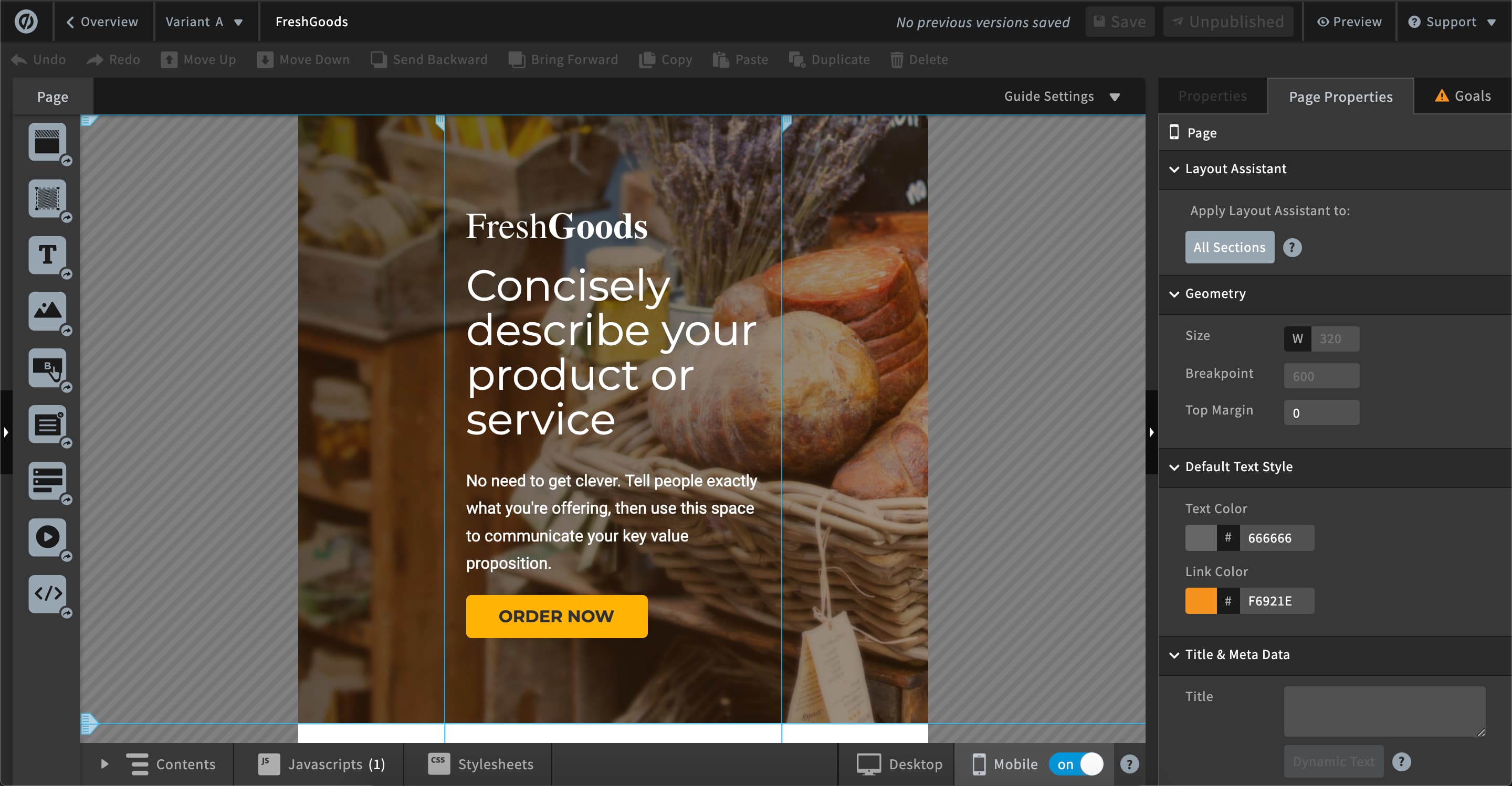
Screenshot of the Instapage landing page builder for desktop and mobileScreenshot of A/B testing for layoutsScreenshot of understanding consumer behavior through heatmapsScreenshot of an example of how to get feedback from a team and collaborate on edits, in Instapage.Screenshot of some of Instapage's available integrations.

Unbounce Screenshots

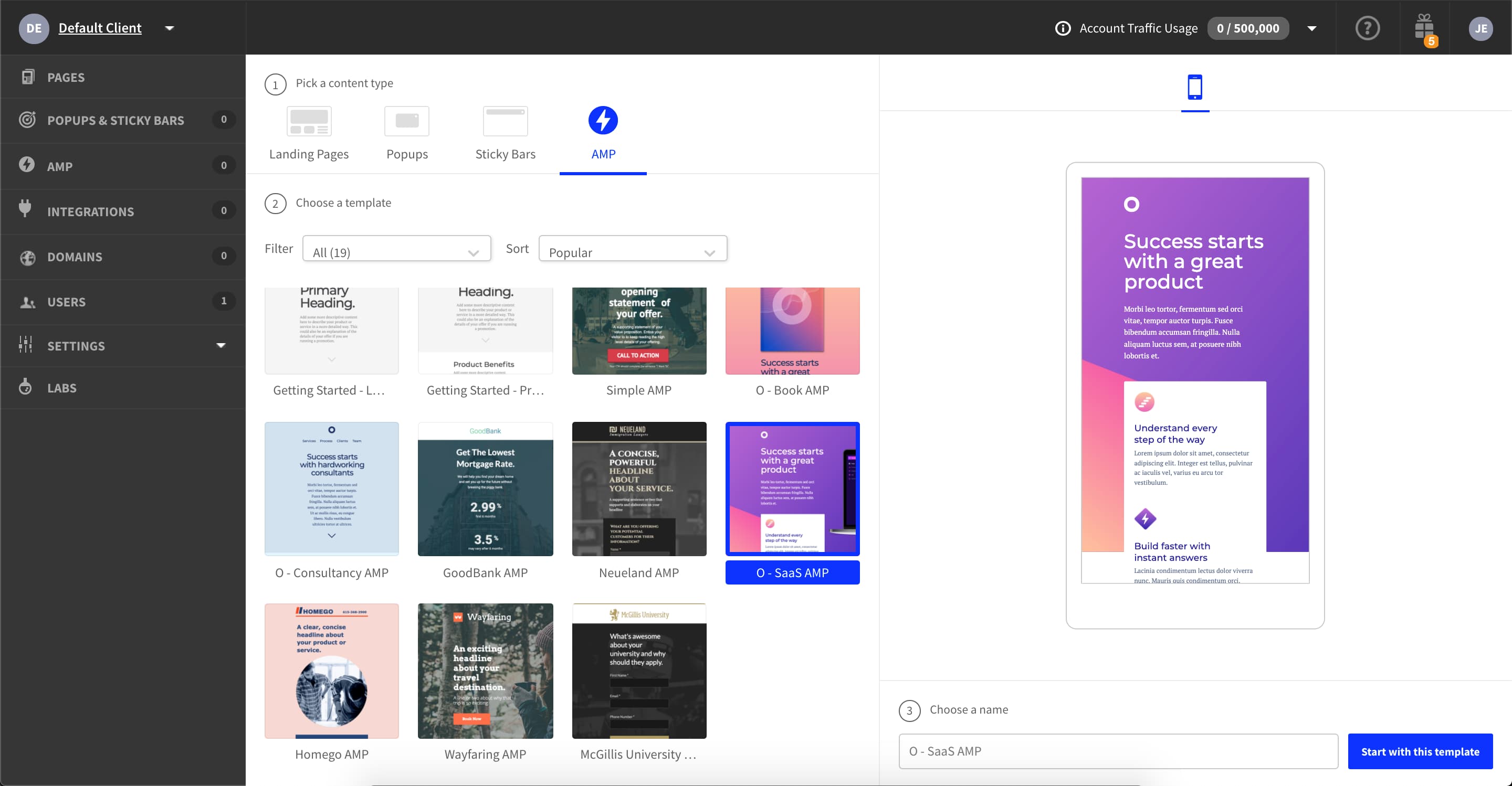
Screenshot of Screenshot of Screenshot of 100+ Landing Page TemplateScreenshot of Responsive Drag-and-Drop Landing Page BuilderScreenshot of Account Overview and Testing Features (Smart Traffic and A/B Testing)Screenshot of AMP Landing Page Templates