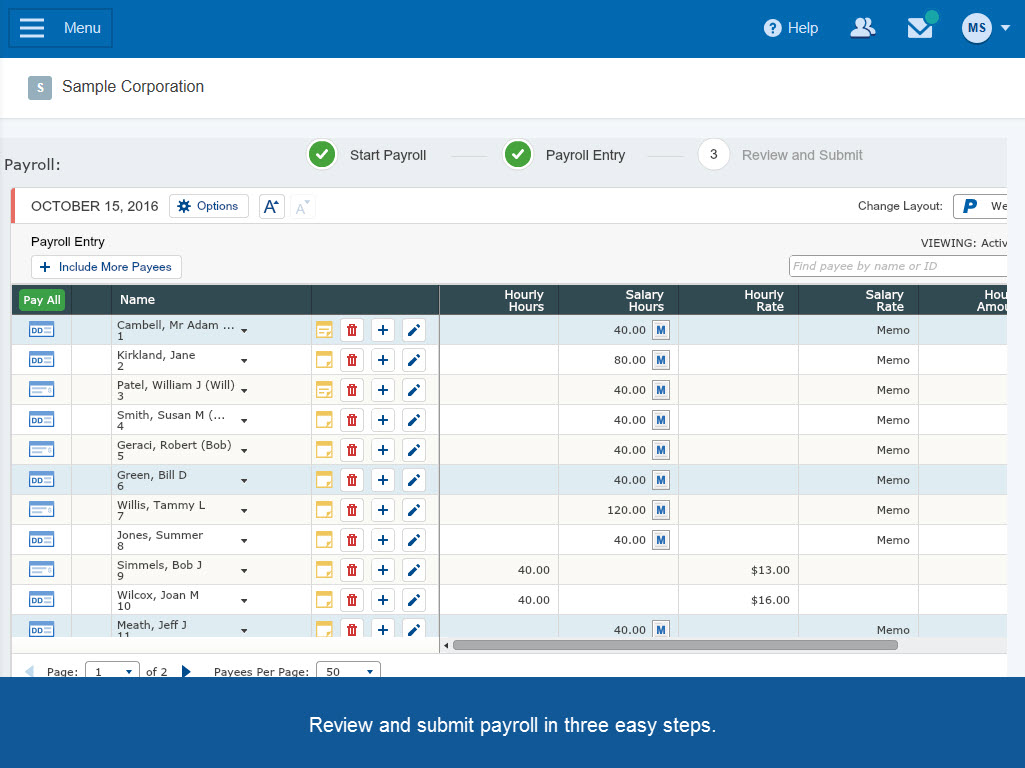
Paychex Flex, of Paychex' Online Payroll Services, is a cloud-based human resource management and payroll platform. Paychex offers core and specialized services, and scales to meet the needs of small businesses, SMBs, and large enterprises.
$59
per month/+$4 per employee
Rippling
Score 9.0 out of 10
N/A
Rippling’s platform for HR, IT, payroll, and spend management automates the entire employee lifecycle, ensures compliance, supports device management, and provides real-time financial visibility from a central dashboard.
$8
per month per user
Pricing
Paychex
Rippling
Editions & Modules
Paychex Go
$59
per month/+$4 per employee
Paychex Flex Service
Contact sales team
Paychex Flex Enterprise
Contact sales team
Recommended
$8.00
starting price per user, per month
Offerings
Pricing Offerings
Paychex
Rippling
Free Trial
No
No
Free/Freemium Version
No
No
Premium Consulting/Integration Services
No
Yes
Entry-level Setup Fee
Required
No setup fee
Additional Details
—
For additional pricing details visit the Rippling pricing page.
I far prefer Rippling to Paychex Flex, with its easy to navigate interface and user friendly model. I also appreciate the payday emails from Rippling and the paystub breakdown. It is also very easy and simple to request and view PTO in Rippling. I really dread having to use …
The ease of use and admin and employee interface of Rippling blows Paychex Flex out of the water. For a young and tech-oriented startup, Rippling is by far a better fit for our team!
Paylocity has some more nitty-gritty payroll editing and adjustment capabilities, which I hope …
Rippling is easier to use and the payroll comparison is a real benefit. Paychex did not have a system for tracking PTO, annual leave, etc., but Rippling handles it well.
Rippling blows all the rest of the payroll providers out of the water! The ease of use for employees to update info, and the reports that you can get from Rippling surpass any other payroll service provider
No comparison in my eyes. Rippling has so many options and tabs with various information at your fingertips. There is nothing in my eyes that Rippling can't handle. We used to spend a lot of time contacting the HR Department with questions regarding our insurance, scheduling …
Rippling has much better applications and functions integration, much better customer support. Rippling is very easy to use, check payroll, time management, 401 K investment and management, training and on-boarding, reimbursement and compensation management, talent recruitment …
Rippling is a dream to work with compared the above listed companies. I love how straightforward everything is with Rippling and how you are able to get what you need almost immediately without hassle. Employees know where to go and how to get what they need without having to …
Rippling is easy to set up and the various vendors like workers comp and 401K are well integrated creating ease of use. We used TriNet in the past and Rippling provides far greater control and transparency. The other are vendors we considered when we left TriNet and were …
The dealbreaker for us was that we have multiple companies / legal entities that all needed payroll company service. The companies are all interconnected, sharing office and lab space, equipment, contractors, and employees transfer between them. All other payroll companies we …
Rippling seemed to be much more user friendly. In speaking with fellow business owners, many of the other payroll companies I looked into had poor customer service reviews, and the costs were much higher than Rippling. I also am pleased that Rippling offers much more than …
I am a user - I didn't select Rippling for my company. However, as a user, Rippling was far easier to navigate, manage, and view my employment and benefits info.
Rippling's HRIS is similar in quality to BambooHR and Workday. However, where Rippling outshines those platforms is in its added functionality and connection to other portions of the platform as well as other applications. Being able to have our HRIS and Payroll Software on the …
Rippling was by far the better option. ADPs offerings were terrible and I would not recommend anyone to go with them. Aside from the poor support/service and inability to be fully customizable, there were glaring issues regarding compliance. When we were in a PEO Model …
Ultimately we selected Rippling because it felt like the most comprehensive, tech forward solution on the market. The system is fully integrated and unlike Paychex, it doesn't feel like a bunch of separate systems that were poorly pulled together. The user experience on the web …
Paychex is not as comprehensive, doesn't have as many tools or plugins, and is more clunky. There are a lot of things that have to be done manually, like benefit contributions, that result in higher human error. Rippling doesn't feel like a big company, and the customer …
The HR department made that decision. I'm not sure why. Rippling seems like a very helpful service, but I'm a new enployee, so I'm not sure why it was considered superior.
For the most part, Paychex Flex is a very good payroll system and is well suited for a small business. Most basic features are simple and user friendly. For businesses that have hourly employees, its timeclock system is a good feature. For businesses that have a large number of employees and more complicated rules and policies, it might not be as appropriate because of the difficulty to set up for these rules and policies
With Rippling, we get a one stop shop for all things HR. Our benefits, pay, PTO, and leave management are all under one umbrella. This simplifies workflow and limits the number of systems we need to access to take care of day to day HR tasks. Despite the one-stop shop aspect of it all, some processes ended up being more problematic than others, for instance, sometimes PTO requests that have been approved do not register as such - and sometimes duplicate notifications go out on those approvals. To be fair to Rippling, this is likely user error on our part with initial or continued setup issues, but it is also not (seemingly) easily remediated. Our overall experience with Rippling has been positive. The simplicity and ease of use definitely overcome the few nagging issues that we have experienced.
Three different options to view the hours you've worked in a pay period. All three are valuable in their own way! I love this and use each one every week.
Rippling has the option to retroactively log your hours later if you forget to log in before you start work. I love this because sometimes I take a work call on the go and don't have time to clock in first. Such a handy feature!
Rippling has also made putting in time-off requests (sick/PTO/etc) so much easier. I'm sure every HR team would appreciate this!
When it comes to audit reports, Paychex Flex could improve on helping clients locate the correct reports for audit purposes more easily
When a client receives a discount, it would be helpful if the discount were automatically provided each year, or if the Paychex rep proactively reached out to the client first, versus the client having to call and request that the discount continue.
It would be helpful if the invoice was emailed to the client versus the client logging in to access invoices.
Overall I like the features that Paychex Flex offers. I am sure that there are other features that I am unaware of, so I am excited to see if there is more that Flex is capable of to make my job easier. The basic features are really user friendly and easy to access. If there ever is an issue customer service is great
The AI assistant has always been able to direct me to the correct solution to any question i have about Rippling. Payroll is so easy, it takes about 10 minutes to go through the process.
Some things could be streamlined. For example, we could do custom options for the "add items" tab which has so many options that we never use. "Medical Pay" could be something that the system remembers for the applicable employees. Salaried employees' salaries should definitely be auto-filled. Overall the system works well but I think it could be improved to be easier to use and read.
Rippling has an easy-to-use user interface and so far, employees at my company have really enjoyed using it. I find the modules for payroll, performance management, personal information, and benefits easy to navigate and appreciate that so many different features are integrated into one product. I much prefer it to our previous HRIS, Workday.
We have not experienced any difficulties with unplanned outages. Notifications are always made for outages, and they do not effect normal business operations.
I like that the availability in using Rippling at any given time is useful to me. Getting on the site freely when I need gives me security of knowing that I can be in control of viewing health insurance and hours information. I have yet to get any errors in using the Rippling app.
Unless there is lag time within the internet, the Paychex Flex website loads exceptional fast, pages load quickly and reports that I need to print or download load quickly. If I need to create a specialized report, once I complete it I receive an e-mail telling me my report is ready to be downloaded. Changing between web pages is fast as well.
Rippling's performance has been great, no errors or glitches yet so far. I am confident that Going from one page to the next and all its complexity usage does not lag or times out, it works effectively and efficiently. While using Rippling and other apps it does not tend to slow it down, works great. No complaints.
Our dedicated representative is one of the main reasons we are sticking with Paychex Flex. If it were not for this person, other platforms could provide the same/similar functionality. It is the ability to speak with someone that understands our business and is willing to get questions answered in a timely fashion that keeps us with Paychex Flex.
When I did have to reach out to Rippling for assistance I was able to get quick help and my problem resolved in a time efficient manner with out any type of hick up. The customer support team is professional, kind and always available. This makes Rippling more welcoming to use on a daily basis.
It was easy to understand and follow along. I do like the informational videos that we can utilize before we opt to call in for customer service support. It has made a difference since sometimes that resolves the issue I may have had and saved myself a phone call to Paychex support.
Implementation was very smooth. The most cumbersome task was entering the current employees into the system during initial set up, but Paychex staff handled most of that and verified against prior system reports as well as internal reports provided to ensure 100% accuracy.
It's really easy to implement in comparison to other tools or applications. Different key points are easily configured and implemented as per need, having different configurations in systems. Implementation is something which binds the different parameters of an organization in a single row. Implementation of rippling is much easier, quicker, and error free than any other software. I recommend it strongly!
We still use QB Desktop Pro to maintain a Check Register / Overall Balance for the company, but once having tried QB Payroll Online for about 3 months prior to finding Paychex Flex I can tell you that there's just no comparison. QB online is VERY EXPENSIVE and not so user-friendly. I hated every minute of those 6 payrolls we ran through QB online.
Workday is built for large enterprises. Rippling is optimized for small to mid-sized businesses that want flexibility, fast execution, and fewer administrative hurdles. Rippling lets you pay only for what you use—payroll, benefits, device management, etc.—whereas Workday often comes as a large, bundled enterprise solution, which may be overkill for many organizations.
I generally do payroll at the office, however I have had to go remote due to internet issues and also had to take payroll on vacation with me. Very easy to log in wherever you are and manage your TAA and payroll
I can go on here and see all my hours and pto plus health benefits. I like to have the work handbook handy to refer to legal things. How to work my role within it's limits. Being able to put in my hours and view when they are approved is a huge benefit for me.
I do not believe we have saved anything additionally. The time we've had to spend to get things to hopefully work is sad. This is the reason we've had to turn off all extra "products" of Paychex Flex. Time and Attendance is horrible. Benefits management is horrible. The user experience is horrible.
One thing I do not understand is why are updates for states, cities, counties, school districts, etc. not automatically updated? Should we not get a big red flag if we have an employee living/working, being paid in CA, but they aren't set up for CA sick time? If it is required to be on the paycheck stub to show the balance of the sick time, why would we not be notified that we are out of compliance?
Routine things like PTO requests and document uploads now take a few clicks instead of hours of email back‑and‑forth. I’d estimate I spend at least half the time on those tasks compared to before, which frees me up to actually help employees.
What used to drag on for days now gets done in a morning - I've just asked them this now. New hires can log in, set up their tools, and start training almost immediately, so they’re productive much sooner.
Payroll and benefits errors used to pop up regularly, but now I almost never have to fix things or follow up on missing info. That means less stress for me and for everyone involved.
Having everything in one platform cuts out the “where did you send that?” and “who approves this?” questions. It feels like we’ve reduced our back‑and‑forth by at least a third.