Box is an online Intelligent Content Management solution that caters to individual users as well as businesses.
$20
per month 3 users (minimum)
Laserfiche
Score9.1 out of 10
N/A
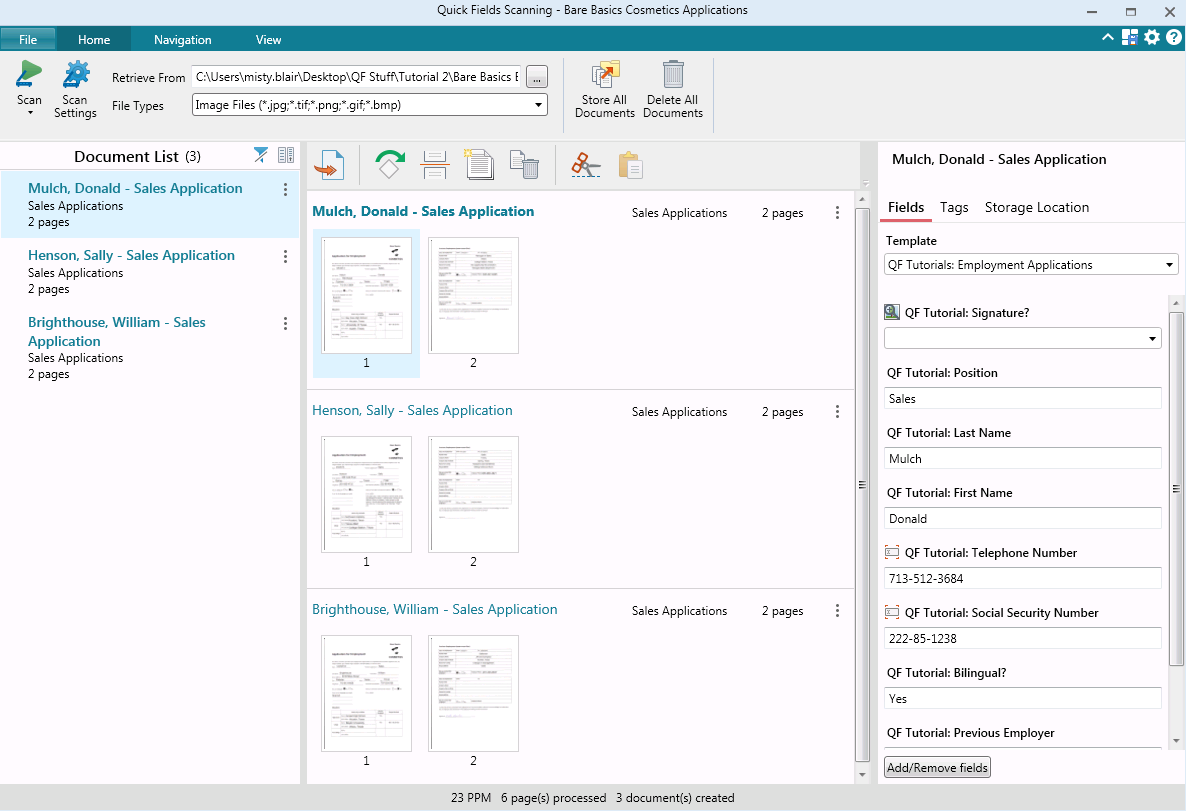
Laserfiche has two main editions: Rio and Avante: Laserfiche Rio is designed to meet the needs of large organizations that have more than 100 users. It combines content management functionality with business process management (BPM), security and auditing, unlimited servers and a thin-client interface. Add-ons include records management functionality, public Web portals and production-level document capture and processing.
Laserfiche Avante is an ECM suite for small to medium organizations with…
$540
per year per user
Tungsten Power PDF
Score9.8 out of 10
Small Businesses (1-50 employees)
Tungsten Power PDF (formerly Kofax) is an easy-to-use, secure and inexpensive solution to manage PDFs for businesses
and individuals. Benefits:
Ease of Use: Works
like Office desktop products, so it's easier to learn
Compatibility: Works
across devices and platforms, share documents in a storage cloud
…
$129
one-time fee per license
Pricing
Box
Laserfiche
Tungsten Power PDF
Editions & Modules
Business Starter
$7
per month per user (3 minimum)
Business
$20
per month per user (3 minimum)
Business Plus
$33
per month per user (3 minimum)
Enterprise
$47
per month per user (3 minimum)
Enterprise Plus
$50
per month (billed annually) per user (3 minimum)
Enterprise Advanced
Contact us
per month per user (35 minimum)
Starter
$540
per year per user
Starter
$600
per year per user
Professional
$710
per year per user (starts at 10 users)
Professional
$830
per year per user (starting at 5 users)
Business
$830
per year per user (starts at 25 users)
Business
$950
per year per user (starting at 25 users)
Enterprise
Custom
Power PDF Standard
$129
one-time fee per license
Power PDF for Mac
$129
one-time fee per license
Power PDF Advanced
$179
one-time fee per license
Power PDF Business
Get a Quote: Subscription and Perpetual available
per year per seat
Offerings
Pricing Offerings
Box
Laserfiche
Tungsten Power PDF
Free Trial
Yes
Yes
Yes
Free/Freemium Version
Yes
No
No
Premium Consulting/Integration Services
Yes
No
Yes
Entry-level Setup Fee
Optional
No setup fee
No setup fee
Additional Details
A discount is available for annual pricing.
—
Desktop licenses are buy once, own forever. No subscription fees.
Business server licenses are term-based or perpetual with optional maintenance & support contract.
Volume and upgrade discounts available.
I think Box is great for research teams or anyone that has a large number of files that need to be securely stored. Particularly in the case of social science research, where it is important to protect identifying data, Box is a great option. In cases where teams need a more reliable means for real-time collaboration, I would probably consider a different alternative
Laserfiche is well suited to the submission of simple routine reports to create a record repository. We use it for routine transport reports, audit reports, and anonymous citizen complaints. It creates a simple chronological record of routine events that can be reviewed and easily stored and recalled. Because the reports are in PDF format, it is not well suited to anything that needs to be imported into a common database or amended after submission.
A de minimis incentive was given to thank the reviewer for their time. The incentive was not used to bias or drive a particular response, nor was the incentive contingent on a positive endorsement. More Info
Tungsten Power PDF works well in all situations and scenarios where I work on PDFs. In my work, I create many forms where I need to let clients add information and sign (contracts, statements of work, scoping documents, project plans) and the form features are easy to use and I am able to request digital signatures. I also create resources such as role profile templates that I share, and the forms allow me to protect my IP while giving clients the ability to add their own situational information. The merging multiple documents, page organization, and extraction features make it easy to create individual resources but also package them together as a bundle without needing to recreate them.
A de minimis incentive was given to thank the reviewer for their time. The incentive was not used to bias or drive a particular response, nor was the incentive contingent on a positive endorsement. More Info
The main feature that I like the most in Box is that it makes collaboration seamless, workers can easily check the documents any time and make changes according to the needs.
Box manages and backs up all of your files on its cloud servers, and provides a very nice interface for creating, viewing, editing, and collaborating on the most commonly used file types (PDF, XLS, DOC, etc.).
Over the past few years, Box has built on top of its basic cloud storage management with a host of other tools, such as workflows, AI, monitoring, and analytics.
It is helping us to make good connections with clients and our workers themselves as to its syncing and viewing feature to all is very much helpful and easy to go.
A de minimis incentive was given to thank the reviewer for their time. The incentive was not used to bias or drive a particular response, nor was the incentive contingent on a positive endorsement. More Info
A de minimis incentive was given to thank the reviewer for their time. The incentive was not used to bias or drive a particular response, nor was the incentive contingent on a positive endorsement. More Info
Typewriter functionality is great, although can take some time to load. This allows you to fill in text wherever applicable without turning the rest of the pdf into editable text.
Fast load times
Has autogenerated text feature so anything in the pdf can become editable
A de minimis incentive was given to thank the reviewer for their time. The incentive was not used to bias or drive a particular response, nor was the incentive contingent on a positive endorsement. More Info
A de minimis incentive was given to thank the reviewer for their time. The incentive was not used to bias or drive a particular response, nor was the incentive contingent on a positive endorsement. TR verified that a representative sample of customers was invited. More Info
While Laserfiche has some powerful development tools, it is difficult to manage configurations while promoting code across environments. For example, SQL connections and other environment specific resources have to be manually configured in each environment.
Laserfiche forms are a newer addition to the product family and could use some product maturity. While easy to use for simple forms, once your forms become more complex, you need to accomplish tasks by heavy JavaScript coding.
A de minimis incentive was given to thank the reviewer for their time. The incentive was not used to bias or drive a particular response, nor was the incentive contingent on a positive endorsement. More Info
A de minimis incentive was given to thank the reviewer for their time. The incentive was not used to bias or drive a particular response, nor was the incentive contingent on a positive endorsement. TR verified that a representative sample of customers was invited. More Info
I like the security features and I like the website. It's easy to use and create and move things around as needed. The main reason for a lower rating is because the Box Sync app is just not a good program. It's a memory hog, it's slow, transfer speeds are slow, and it's not the most efficient route. If you have a large Box account and you need to get a computer up to speed on a large amount of data within Box, you are in for the long haul. Last time I had to do this, it took 3 days to sync all of the files and we are talking around 100 GB worth of data
We plan on renewing Laserfiche for the coming year but also have been considering a scanning and document management solution that can be purchased from our new accounting system company, we are implementing the accounting system this year. It will be a couple years before we make a decision to stay with Laserfiche or change.
A de minimis incentive was given to thank the reviewer for their time. The incentive was not used to bias or drive a particular response, nor was the incentive contingent on a positive endorsement. More Info
Tungsten Power PDF is easy to use, the staff all like it, and there are no issues with it on any level. It is a more cost-effective solution to our PDF needs than other products currently available on the market. This product works as intended and it fits our business needs perfectly.
A de minimis incentive was given to thank the reviewer for their time. The incentive was not used to bias or drive a particular response, nor was the incentive contingent on a positive endorsement. TR verified that a representative sample of customers was invited. More Info
Everything with Box is seamless. It can be integrated into virtually any other software or application. You can even get the app for your phone or tablet to work on the go. File syncing is so quick. The only reason I gave it a 9 is the issue I discussed earlier about the local file application rebooting and not continuing to sync files. Other than that, it's great!
A de minimis incentive was given to thank the reviewer for their time. The incentive was not used to bias or drive a particular response, nor was the incentive contingent on a positive endorsement. More Info
It has an intuitive design that feels very natural to any user that has ever used Outlook or Windows Explorer. There are multiple ways to perform every action in order to help users with various software experiences find the shortcuts and actions they seek quickly and effectively.
A de minimis incentive was given to thank the reviewer for their time. The incentive was not used to bias or drive a particular response, nor was the incentive contingent on a positive endorsement. More Info
It is fast and easy to get the hang of. It really didn't take a lot of effort to learn how to use this program and I appreciated that it was pretty "plug and play" and there wasn't a long learning curve.
A de minimis incentive was given to thank the reviewer for their time. The incentive was not used to bias or drive a particular response, nor was the incentive contingent on a positive endorsement. More Info
Yeah, it's always worked, I've never had any kind of connection issues, the only issues I've had it I've been on our end when the Internet hasn't worked.
A de minimis incentive was given to thank the reviewer for their time. The incentive was not used to bias or drive a particular response, nor was the incentive contingent on a positive endorsement. More Info
I am very satisfied with Laserfiche. I have found that certain larger jobs may are slow. This may also be related to our infrastructure environment. We have been able to tune Laserfiche to increase performance on larger jobs.
A de minimis incentive was given to thank the reviewer for their time. The incentive was not used to bias or drive a particular response, nor was the incentive contingent on a positive endorsement. More Info
Other that a PDF partially disappearing if left up for a long period of time - no issues. (If you close it and reopen it, it is all there. We have some PDFs that are 400-600 pages long.)
A de minimis incentive was given to thank the reviewer for their time. The incentive was not used to bias or drive a particular response, nor was the incentive contingent on a positive endorsement. More Info
The general operation and management of Box is very efficient, both when accessing the account, and when adding files, downloading or modifying any document directly. The web platform, mobile and desktop versions work really well and quickly, making all the work and process flow smoothly and without setbacks. So far I have not been able to observe any inconvenience
A de minimis incentive was given to thank the reviewer for their time. The incentive was not used to bias or drive a particular response, nor was the incentive contingent on a positive endorsement. More Info
Performance, of course, is largely dependent on the underlying environment. Laserfiche does its part with multi-threading, taking advantage of multi-core servers on scanning, workflows, and bots. A SQL-Server back-end is suitable for small to medium-sized company, but may not scale to large, where Oracle would be the better choice. Workflows can be poorly written and perform recursive work slowing down the system. It's better to run batch type workflows at night when possible.
A de minimis incentive was given to thank the reviewer for their time. The incentive was not used to bias or drive a particular response, nor was the incentive contingent on a positive endorsement. More Info
Pages nearly always load at the expected rapid speed. Some documents that print quickly from Adobe Reader print much more slowly from Power PDF. I have never generated a report - that's a feature I didn't know existed until now and do not know what it's for
A de minimis incentive was given to thank the reviewer for their time. The incentive was not used to bias or drive a particular response, nor was the incentive contingent on a positive endorsement. More Info
I found their support community lacking in clarity when I experienced a login issue. The error messaging was poor on my Box Sync application. I did not reach out to support staff for help, instead, I reasoned that I should try downloading the Box Sync application again and reinstall it. That fixed my issue, thankfully. I think a less computer-savvy user would've been much more frustrated.
A de minimis incentive was given to thank the reviewer for their time. The incentive was not used to bias or drive a particular response, nor was the incentive contingent on a positive endorsement. More Info
I have never had to wait for help from Laserfiche. If I cannot find the answer online, I can easily send an email to a customer support representative. I have always been helped the same day and my questions have always been resolved. The Empower conference is always a great learning opportunity and the online resources and webinars are top-notch.
A de minimis incentive was given to thank the reviewer for their time. The incentive was not used to bias or drive a particular response, nor was the incentive contingent on a positive endorsement. More Info
I have used it for 15 years and have only needed support once: a simple update that allowed me to use the software as intended. The support team was attentive and responsive, and I was on my way very quickly.
A de minimis incentive was given to thank the reviewer for their time. The incentive was not used to bias or drive a particular response, nor was the incentive contingent on a positive endorsement. TR verified that a representative sample of customers was invited. More Info
A de minimis incentive was given to thank the reviewer for their time. The incentive was not used to bias or drive a particular response, nor was the incentive contingent on a positive endorsement. More Info
I got an overview of the product from my predecessor who was about to retire from the job I now hold. He did not go into very many of the features and probably only knew about the ones he used most frequently.
A de minimis incentive was given to thank the reviewer for their time. The incentive was not used to bias or drive a particular response, nor was the incentive contingent on a positive endorsement. More Info
The documentation is good. Since Box is a popular service, there were also a number of YouTube videos and other sources that were helpful as we were considering the product and planning for deployment. Also, the ability to try the free version helped to prepare us.
Easily accessible 24/7 so am able to complete courseware whenever time allows: Commute to work; waiting for friends or family; at night while relaxing [with a delicious glass of wine!]; whenever and wherever time and circumstances permit. Courseware is well written and presented in an easy to follow and understand format.
A de minimis incentive was given to thank the reviewer for their time. The incentive was not used to bias or drive a particular response, nor was the incentive contingent on a positive endorsement. More Info
We watched the training videos and tested out the features and functionality side by side. Some features are not used on a regular basis is it is convenient to go back and review training on that particular functionality when needed.
A de minimis incentive was given to thank the reviewer for their time. The incentive was not used to bias or drive a particular response, nor was the incentive contingent on a positive endorsement. More Info
Be careful with settings. It is easy to get overwhelmed with updates. For example, you don’t want to be updated when doing historical data uploads. I recommend taking off notifications initially and then turn on post you have done your historical data upload.
Easy and quick, with no problems or support needed. Worked as intended right out of the box. E-signing was the only area that implementation was dificult and required support
A de minimis incentive was given to thank the reviewer for their time. The incentive was not used to bias or drive a particular response, nor was the incentive contingent on a positive endorsement. More Info
They are kind of the same. And both of them do their job as promised. But for company and project wise I think that Box slightly wins for some points. Which [makes him] win over Google Drive (don't forget that Google Drive is very easy to use and has a lot [of] nice features too).
The core infrastructure of Laserfiche, and the end user experience, is vastly superior. OnBase has a TERRIBLE UI and administration console by comparison. The core architecture of OnBase is also more scattered, while all Laserfiche processes go through a single service. Overall, the Laserfiche product is easier and more intuitive to install, maintain, and use.
A de minimis incentive was given to thank the reviewer for their time. The incentive was not used to bias or drive a particular response, nor was the incentive contingent on a positive endorsement. More Info
There is nothing to compare it to. Tungsten Power PDF is by far an easier and more efficient option. The one advantage of CutePDF is the functionality of overlay and underlay with headers and footers. The other functions in Tungsten Power PDF are much easier to use. Pricing is also an attractive option.
A de minimis incentive was given to thank the reviewer for their time. The incentive was not used to bias or drive a particular response, nor was the incentive contingent on a positive endorsement. TR verified that a representative sample of customers was invited. More Info
A de minimis incentive was given to thank the reviewer for their time. The incentive was not used to bias or drive a particular response, nor was the incentive contingent on a positive endorsement. More Info
Not really familiar since I'm the only person who uses it. But in the past it has been my understanding that Power PDF was offered only on a single-license basis, so it's been expensive for me to use it at home and at work because I had to pay for it on my own. In my current position management supports it so I at least only have to pay for it once.
A de minimis incentive was given to thank the reviewer for their time. The incentive was not used to bias or drive a particular response, nor was the incentive contingent on a positive endorsement. More Info
Box has been an only positive experience. It provides a seamless way for me and my team to collaborate on documents in such a way where we're not sending the document back/forth via email. It's a huge timesaver.
Box reduces the risk of sharing a sensitive document to the wrong person via email.
Box has provided a platform where my team can share notes in meetings - this has helped streamline and organize our meetings. Our meetings are more productive and actionable.
A de minimis incentive was given to thank the reviewer for their time. The incentive was not used to bias or drive a particular response, nor was the incentive contingent on a positive endorsement. TR verified that a representative sample of customers was invited. More Info
Laserfiche has increased the efficiency of our sales reps by giving making all of the historical sales deal information very simple and fast to retrieve.
Laserfiche has increased our efficiency with our AP department and gave department heads the ability to approve invoices where ever they are.
I would say the biggest ROI came with the transparency of the order process for new deals. Before there would be numerous phone calls made daily to find out where an order was within the process, and now you can simply look at all deals at any time.
A de minimis incentive was given to thank the reviewer for their time. The incentive was not used to bias or drive a particular response, nor was the incentive contingent on a positive endorsement. More Info
As a freelance desktop publisher and proofreader, I've reduced overhead by buying Kofax Power PDF instead of the competition. The fact that I have all the tools I need without worrying about subscription renewal costs is a relief. People who have tried other PDF apps will appreciate that Kofax Power PDF is a workhorse, totally reliable, and delivering on its promises.
A de minimis incentive was given to thank the reviewer for their time. The incentive was not used to bias or drive a particular response, nor was the incentive contingent on a positive endorsement. More Info