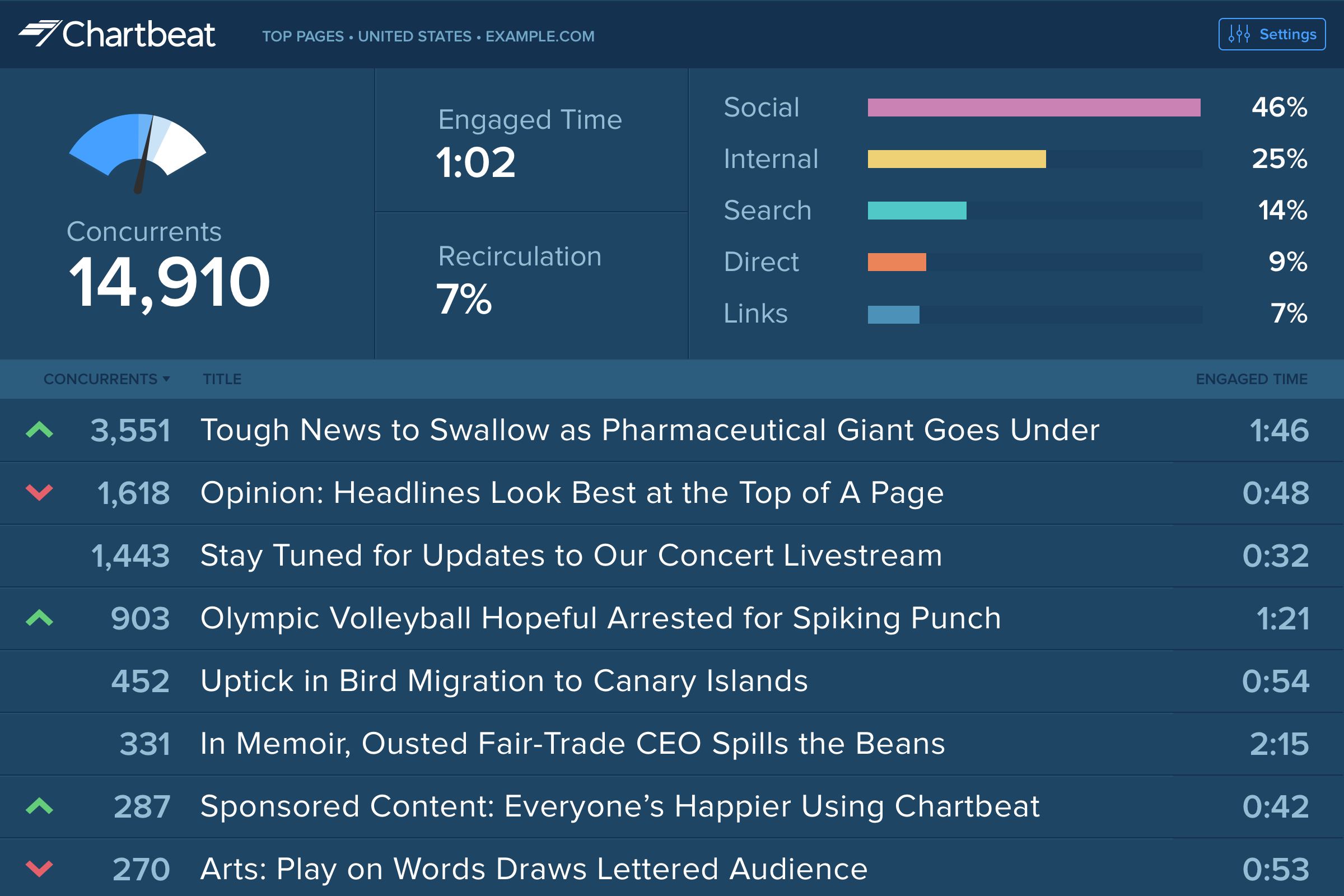
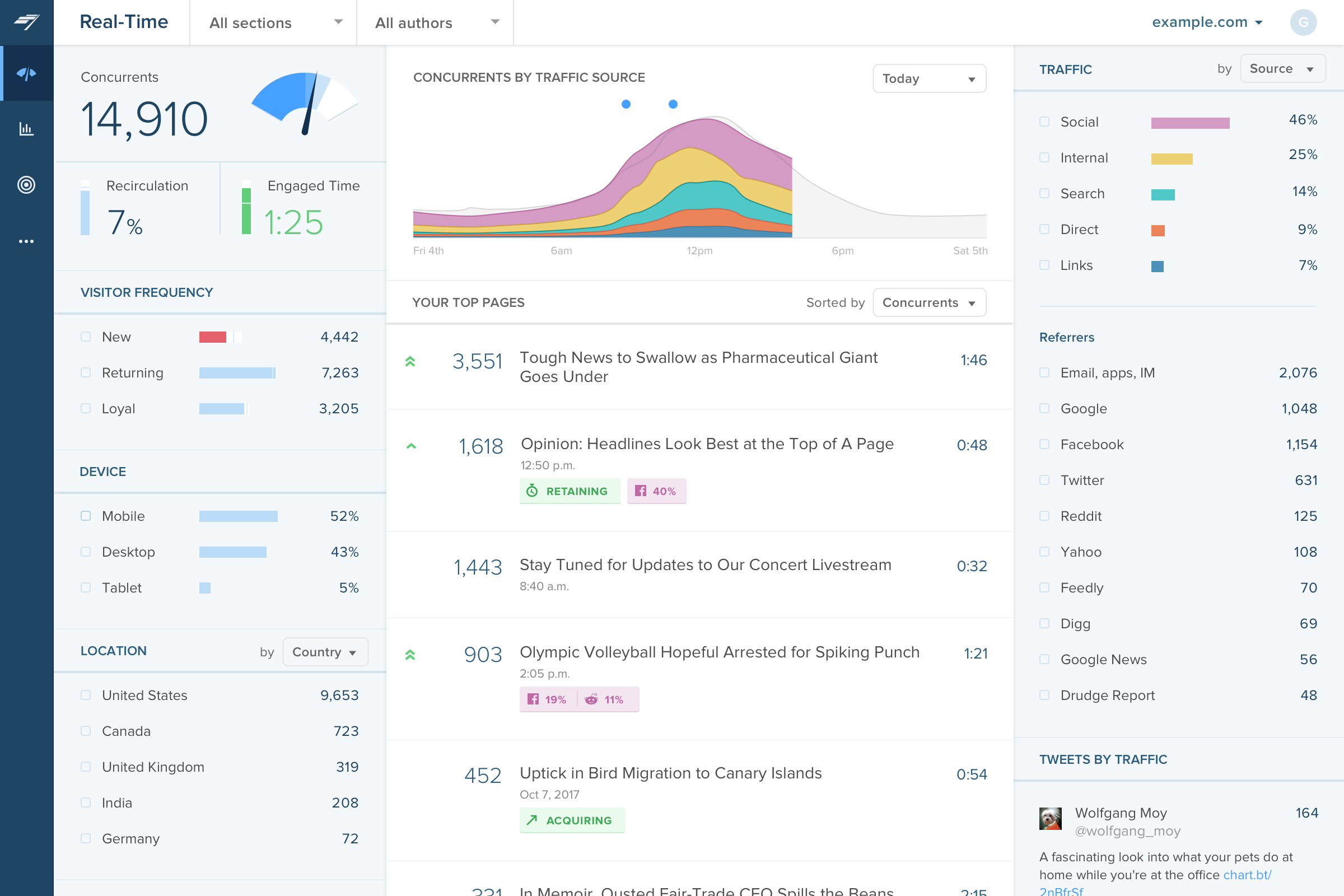
Chartbeat delivers real-time analytics, insights, and transformative tools for content teams around the world, to help improve audience engagement, inform editorial decisions, and increase loyalty.
N/A
Google Analytics
Score 8.2 out of 10
N/A
Google Analytics is perhaps the best-known web analytics product and, as a free product, it has massive adoption. Although it lacks some enterprise-level features compared to its competitors in the space, the launch of the paid Google Analytics Premium edition seems likely to close the gap.
$0
per month
Matomo Analytics
Score 8.6 out of 10
N/A
Piwik is an open source analytics platform that enables users to measure web and mobile apps as well as intranet portals. It protects the privacy of users through advanced privacy features and its approach to data ownership. Piwik offers On-premises and Cloud deployment options.
Available in over 50 languages, it is fully customisable and vendor-independent. Piwik offers over 70 integrations with Content Management Systems, Ecommerce solutions, Forums as well as other mobile and web platforms.…
$0
Pricing
Chartbeat
Google Analytics
Matomo Analytics
Editions & Modules
No answers on this topic
Google Analytics 360
150,000
per year
Google Analytics
Free
Free download (open source)
$0
Free 30 day trial
$0
limited to 30 days
Essential
$9
number of pageviews (monthly traffic)
Business
$29
number of pageviews (monthly traffic)
Enterprise
$199
your requirements and monthly traffic
Content Optimization Bundle
$579
per installation
Growth Bundle
$1,149
per installation
Premium Bundle
$1,499
per installation
Email Support Subscription
$2,090
per installation
Offerings
Pricing Offerings
Chartbeat
Google Analytics
Matomo Analytics
Free Trial
Yes
No
Yes
Free/Freemium Version
No
Yes
Yes
Premium Consulting/Integration Services
Yes
No
Yes
Entry-level Setup Fee
No setup fee
No setup fee
Optional
Additional Details
Chartbeat pricing is based on monthly site page views. Discounts are applied to multi-year contracts. The Basic Plan includes the Real-time Dashboard, Historical Dashboard, Heads Up Display, Reports, Big Board, iOS and Android app, and Real-time API endpoints.
The Plus Plan includes all of the Basic Plan features, plus ONE of the following Premium features: Headline Testing, Advanced Queries, or Multi-Site View.
The Premium Plan includes all of the Basic Plan features, plus ALL Premium features: Headline Testing, Advanced Queries, Multi-Site View, and enterprise-level support and custom trainings.
—
On-premise Edition is free to download and install on one's own servers.
Larger analytics suites like Google Analytics and Omniture simply do not provide the kind of real-time data that Chartbeat does. I have used Parse.ly which has some interesting real-time features as well; I would say Parse.ly is similar in terms of ease of use, though Chartbeat …
Google Analytics gives me a better overview of my site's performance, I think; however, when it comes to real-time insights, I always turn to Chartbeat.
In my opinion, Chartbeat should be paired with Google Analytics. Chartbeat is perfect for real-time results, an area GA lacks, and GA is best for long-term outlook.
Chartbeat stands out in terms of real-time tracking and information from which to manage homepages, I found this better than Smart Octo's equivalent. However, the ability to quickly explore past data does not go as deep as Google Analytics.
Verified User
Team Lead
Chose Chartbeat
Google Analytics has gradually become much more difficult to use, and much slower in its realtime reporting. It was the changes that came in with Google Analytics 4 that gave us the final push to work with Chartbeat - a product some of us were already familiar with from …
Google Analytics 360 had problems, but after it was discontinued, Google Analytics became a shell of its former self. An added benefit of Chartbeat is that it's more "live" (looking at live concurrents rather than in the past however many minutes) and tells you how that number …
Chartbeat is better than GA when it comes to ease of use and immediacy. The homepage layover that Chartbeat offers is unique from what I've seen and gives me an instant knowledge of what's working on my site and how to best arrange it.
Other products like Chartbeat that I've used are Parse.ly, GA, and Omniture. Parse.ly is the only tool, in my opinion, that offers more real-time data, but the interface is lacking and isn't as intuitive as Chartbeat.
Chartbeat is certainly better at visualizing content and segmenting the data all on one screen. We can filter by section, author, channel and more without leaving the main dashboard page. Combining properties together in roll up groups is another key feature. We're able to …
Chartbeat's realtime its superior to all tools we have. It really makes the difference. We are in calls with Chartbeat for raw data, this is a new product and it will be open a lot of interesting information with raw data in real-time.
Chartbeat really remains the gold standard in the tracking, measurement and display of realtime engagement metrics. If your site has sufficient audience benefit from immediate changes in content programming, display and design, it's a great tool with a highly refined and …
Honestly, I don't think any other options really stack up at all but these have a few great features... Matomo - planned integrations with Google Ads, Bing Ads, and Facebook Ads. Woopra - real-time, on-the-fly things like sending a message to a sales Slack channel right when a …
It's free, nothing beats that! It is easier to use than most other platforms I have used. You can create customized reports on the fly and they are high quality too. Despite the fact that there are so many other other analytics management platforms, Google Analytics remains a …
I like Google Analytics better than Adobe Analytics because it has a much better user interface. It is easier to use and is easier to set up reports. While these two can be used hand-in-hand I would prefer only using Google Analytics because I find that it is easier to find the …
Certicom maybe is more accepted for some agencies but the reporting and monitoring tools are way more limited. The code client is not that straightforward.
If it was my choice I would have used IBM Digital Analytics (DA) for everything. DA has it quirks but it really gives some deep analysis on the data and with a bit of development work you can really get all the data you could possibly want. If every website and newsletter was …
I've used both Piwik and Google Analytic. I still prefer Piwik for it's more user friendly interface compared to Google Analytic. For most users, Piwik would be sufficient to provide the statistics required for planning. Google Analytics has more functions that complicates …
Verified User
Engineer
Chose Matomo Analytics
When we were initially evaluating the replacement for our AWStats setup the first alternative we looked at was Google Analytics. The main reason we started with the Google product was because, well, it's Google, plus I had used the Google Webmaster Tools kit at several other …
To be honest, I did not notice much of a difference between Piwik and Google Analytics, but I only provisioned the installation and added the users. Another team was processing the data from Piwik.
We have used Google Analytics before for one of our online tools and we switched to Matomo for the other web applications we have. We did that because Matomo is free but mostly since we wanted us to own the data on these sensitive apps and not share it with third parties. Since …
Matomo's analytics tools have functions like the free Google Analytics.
It is easy to learn and has a good implementation guide. So, it is good for learning web analytics.
It is much more robust out of the box, easier to set up and more intuitive to use. The reports are set up already and it requires little to no setup after installation to start gathering insights.
Matomo Analytics offers the best of both worlds: detailed website analytics and the ability to be privacy-minded and compliant with data privacy regulations, up to and including GDPR. This allows for effective risk management, while also making compliance easy. And it doesn't …
I've described this above but Matomo compares very, very favourably with GA. This is personal opinion of course but the look and feel alone are much improved.
The main and the most important advantage of Matomo to its competitors is cost. Solutions like Adobe Analytics might have more options for analysts but in the end, you need to pay extra which is not necessary for all the businesses. I would recommend Matomo to all the users …
Most services do not give us the fine control over our own data. They have access to information they are choosing not to share with us, notably IP addresses. Even if it's anonymized (last digits dropped), we should have the access to this data!
I have used Google Analytics in the past and still do for our clients who wish to use it, although I am not absolutely familiar with its features. AWStats & Urchin of course analyze the raw server logs, but are not as feature rich or configurable as Piwik.
I have used Google Analytics, Site Catalyst, and Awstats as well as Piwik. There are some features that Google Analytics and Site Catalyst have that aren't available currently in Piwik, but most of those I don't currently need. Owning my data is more important to me than bells …
I have used a number of analytics products, including Google Analytics, Clicky and GoSquared. The winning feature of Piwik is the compact, rich data tables, which make it a good addition to the analytics mix. While I'm not throwing out the others, I've continued to find Piwik …
We are a pretty small company and even smaller Marketing shop. We use tools from both Google and Bing but have not had the financial freedom to explore additional tools out there. I have looked at Moz and would really like to evaluate that one at some point. For real hard-core …
Moz is not directly a competitor, but it lacked (and still lacks) Piwik integration. Compared with Google Analytics the most important advantage has been the different approach to Privacy, GA has long been not compatible with German law and data is not in your own hands. Second …
At the time we did try Google Analytics and Urchin, however, due to our need for the upmost privacy using a product hosted on Google was difficult to sell. If you are looking for something that you can maintain separately without giving your data to Google with most of the same …
I have used NewRelic in the past. Currently using Adobe Analytics. Overall, Piwik provides big volume of advanced data (just like its bigger competitors). Being easy to setup and maintain, as well as being free, is a huge plus. I liked the idea that I could access analytics data …
Features
Chartbeat
Google Analytics
Matomo Analytics
Web Analytics
Comparison of Web Analytics features of Product A and Product B
The main point of benefit is the realtime data. This is vital to our team as we are publishing a lot of content per day, so we have a busy homepage to manage and it's important to know which content is performing well. We also like to get an understanding as quickly as possible - which Chartbeat offers - of where traffic is coming from. Often we will see an example where a page is getting high traffic from Google, for example, and we know that might not need to be placed so prominently on the homepage because the traffic is arriving to us externally anyway. Without that depth of understanding what is performing best and why - updated immediately, unlike in Google Analytics now - our homepage would not be as well optimised for users coming to us direct
Google Analytics is particularly well suited for tracking and analyzing customer behavior on a grocery e-commerce platform. It provides a wealth of information about customer behavior, including what products are most popular, what pages are visited the most, and where customers are coming from. This information can help the platform optimize its website for better customer engagement and conversion rates. However, Google Analytics may not be the best tool for more advanced, granular analysis of customer behavior, such as tracking individual customer journeys or understanding customer motivations. In these cases, it may be more appropriate to use additional tools or solutions that provide deeper insights into customer behavior.
If you want to balance data-driven marketing and a privacy-minded approach to analytics, Matomo Analytics is for you. It's easy to be compliant with GDPR and other regulations while still having detailed (anonymized) analytics that help inform what content is resonating vs what content is not resonating. And of course you also get all of the rich referral, campaign, and goal conversion data to help you optimize your marketing.
One of Piwik's strengths is the provision of customizable widgets for different bits of analytics data. The ability to add and remove them, change dates and more makes this a flexible way to visualize data.
The visitor log section is also rich, providing date, keywords, actions and more in a single table, which makes it easy to identify your most effective content.
And the visitor actions table includes both bounce rate and time on site, so you can quickly tell which pages have the most engagement.
Data display is a strength for Piwik, as you have access to overview charts while simultaneously being able to drill deeper.
Source of traffic needs improvement. Search and social make sense, but "internal" and "links" is a grey area. It would be helpful to define those with an organization and provide an information icon so users can easily remember what each of those buckets is tracking.
More ways to customize the real-time board. For example, with video content, that's great that I can see a user has started a video, but what is the completion rate, was that only on O&O or can that track Facebook, too?
Would like to see demo (age) information included as a way to slice the data so I can see what's working with my older and younger demo.
From a user security standpoint it would be useful to provide users the ability to have two-factor authentication. While stats data is not necessarily sensitive in aggregate, some users may feel that certain portions need to be more secure.
It would be nice if there was a tighter integration with the Google search/referrer API so that "keyword not defined" would be replaced more often with the actual keyword that is being used to send a visitor to a site.
An easier branding method, maybe in the form of an API function set, that pulled branding URLs from a set of database fields would be great as well.
I gave Chartbeat a 5 for a renewal rating, because, while it delivers clear and understandable content, Google Analytics also provides many of the same features for free. For a small to medium website, I believe it would be more cost effective to use Google Analytics. A website with a high amount of traffic, however, could merit spending the money on Chartbeat to maximize their potential.
We will continue to use Google Analytics for several reasons. It is free, which is a huge selling point. It houses all of our ecommerce stores' data, and though it can't account for refunds or fraud orders, gives us and our clients directional, real time information on individual and group store performance.
At this point, there is not a single conceivable reason as to why we would not renew and continue to use Piwik Analytics. Especially since it is a free program and open source. The product will only get better over time as more people look into it and donate to cause so that development can continue.
I am able to "set it and forget it," keeping it up on my monitor for either constant checking or just keeping an eye on the numbers during the day. I'm also able to keep track of what times are perfect to post a story and which stories rack up the most traffic.
Google Analytics provides a wealth of data, down to minute levels. That is it's greatest detriment: find the right information when you need it can be a cumbersome task. You are able to create shortcuts, however, so it can mitigate some of this problem. Google is continually refining Analytics, so I do not doubt there will be improvements
Piwik succeeds in presenting me (and my associates and my clients...) large amounts of data in a user friendly way. The interface and functionality can easily be customized. While some enhancements do need technical background (API calls by programming language from the webserver or javascript), others are easy to use (goal / event tracking)
We all know Google is at top when it comes to availability. We have never faced any such instances where I can suggest otherwise. All you need is a Google account, a device and internet connection to use this super powerful tool for reporting and visualising your site data, traffic, events, etc. that too in real time.
This has been a catalyst for improving our site's traffic handling capabilities. We were able to identify exit% from our sites through it and we used recommendations to handle and implement the same in our sites. We have been increasing the usage of Google Analytics in our sites and never had any performance related issues if we used Analytics
I have had limited experience of support for Chartbeat but whenever I have needed help it has been there. Recently there was an issue of seeing different forms of data in real time - app and otherwise effectively, and the issue was being clearly dealt with and communicated back to us.
The Google reps respond very quickly. However, sometimes they can overly call you to set up an apportionment. I'm very proficient and sometimes when I talk to reps, they give beginner tutorials and insights that are a waste of time. I wish Google would understand my level of expertise and assign me to a rep (long-term) that doesn't have to walk me through the basics.
The best thing about the Matomo support is that they have a forum which basically you can find the answer to almost all of your questions and most of the time you don't need to contact them regarding your questions and problems but if you need help they will answer in a reasonable time slots.
love the product and training they provide for businesses of all sizes. The following list of links will help you get started with Google Analytics from setup to understanding what data is being presented by Google Analytics.
I think my biggest take away from the Google Analytics implementation was that there needs to be a clear understanding of what you want to achieve and how you want to achieve it before you start. Originally the analytics were added to track visitors, but as we became more savvy with the product, we began adding more and more functionality, and defining guidelines as we went along. While not detrimental to our success, this lack of an overarching goal resulted in some minor setbacks in implementation and the collection of some messy data that is unusable.
Omnilytics is more robust, detailed, and catered for an intermediate media user, while I think Chartbeat is a more user-friendly and beginner-oriented piece of technology. That being said, there is an impressive amount of lift for Chartbeat, and it's evident that simplicity is the key to using a software daily (which is absolutely the point in the content world).
I have not used Adobe Analytics as much, but I know they offer something called customer journey analytics, which we are evaluating now. I have used Semrush, and I find them much better than Google Analytics. I feel a fairly nontechnical person could learn Semrush in about a month. They also offer features like competitive analysis (on content, keywords, traffic, etc.), which is very useful. If you have to choose one among Semrush and Google Analytics, I would say go for Semrush.
It is much more robust out of the box, easier to set up and more intuitive to use. The reports are set up already and it requires little to no setup after installation to start gathering insights.
Google Analytics is currently handling the reporting and tracking of near about 80 sites in our project. And I am not talking about the sites from different projects. They may have way more accounts than that. Never ever felt a performance issue from Google's end while generating or customising reports or tracking custom events or creating custom dimensions