Overview
ProductRatingMost Used ByProduct SummaryStarting Price
Clear Analytics
Score 8.8 out of 10
Enterprise companies (1,001+ employees)
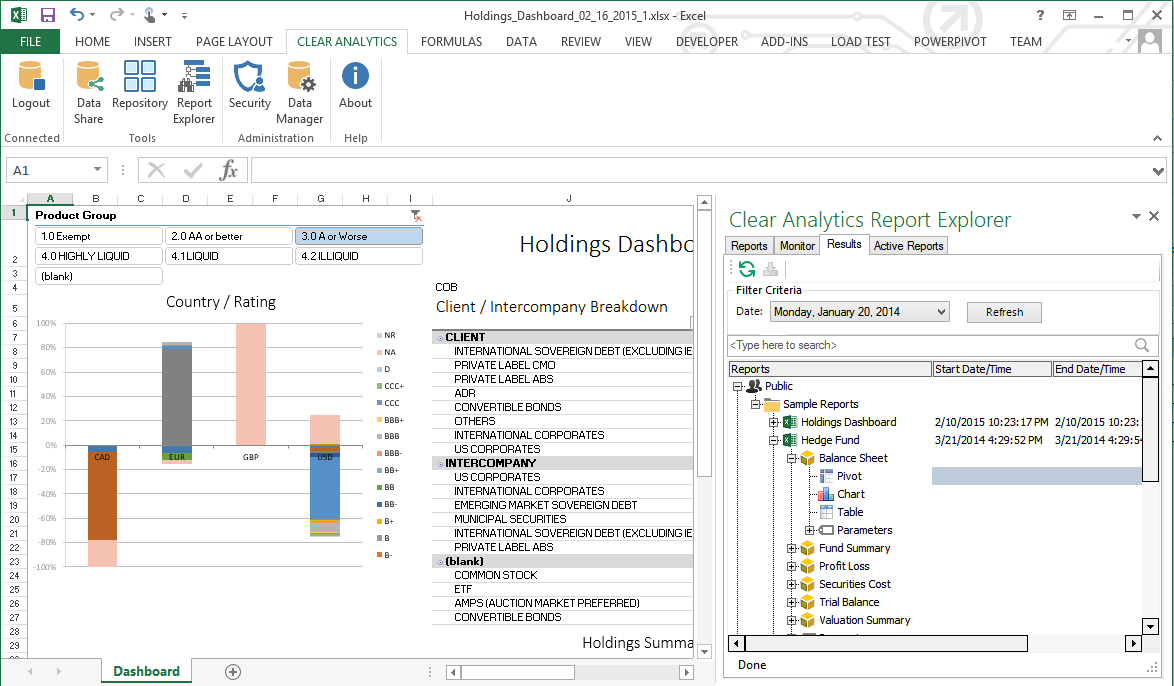
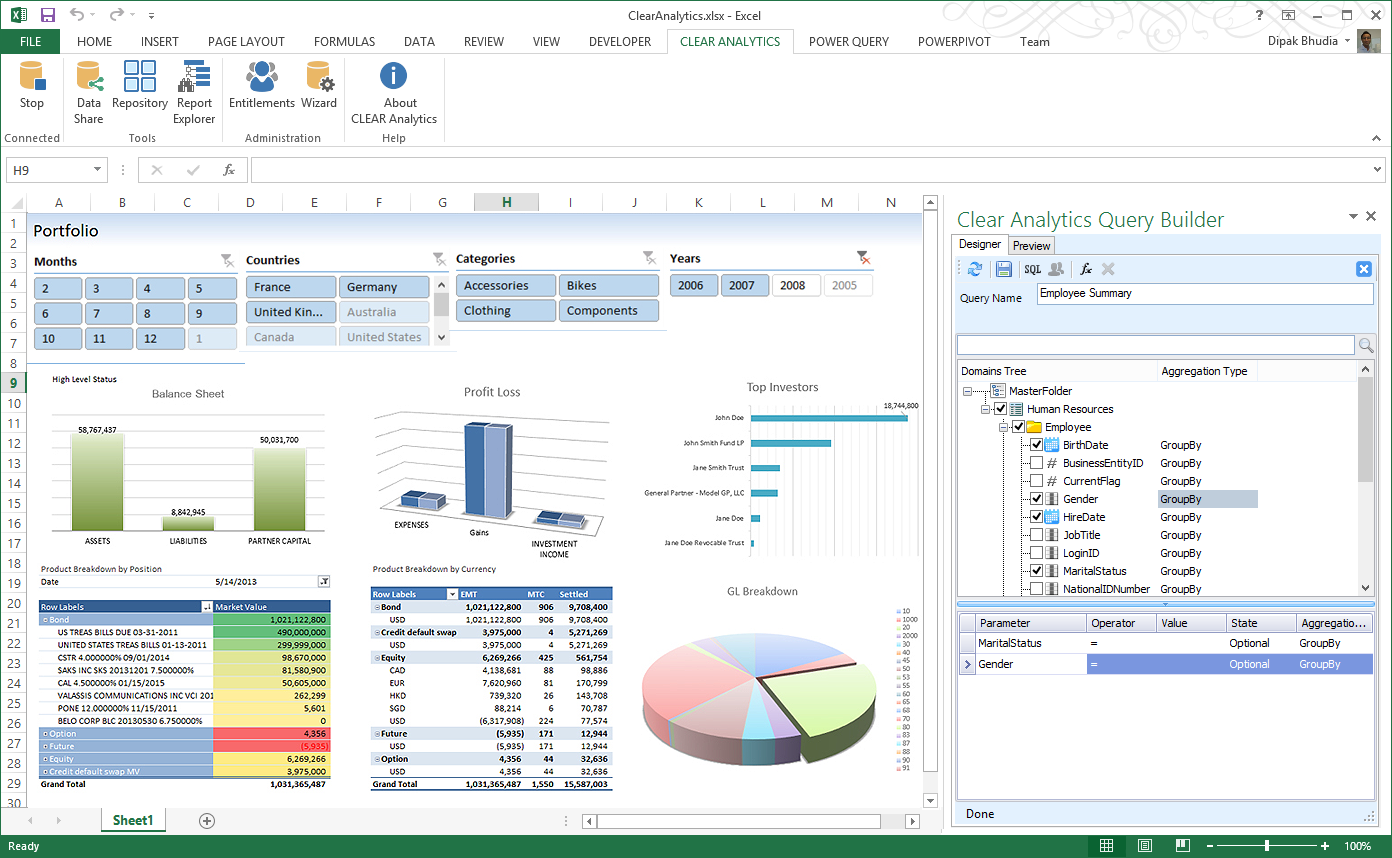
Clear Analytics is a business intelligence solution that enables non technical end users to perform analytics by leveraging existing knowledge of Excel coupled with a built in query builder. Some key features include: Dynamic Data Refresh, Data Share and In-Excel Collaboration.
$29
Per Seat per Month
Google Sheets
Score 8.9 out of 10
N/A
Google Sheets is the spreadsheet app available on Google Workspace, or standalone, with a free plan for personal use and accessible via mobile apps for iOS and Android.N/A
Microsoft Excel
Score 8.9 out of 10
N/A
Microsoft Excel is a spreadsheet application available as part of Microsoft 365 (Office 365), or standalone, in cloud-based and on-premise editions.
$6.99
per month
Pricing
Clear AnalyticsGoogle SheetsMicrosoft Excel
Editions & Modules
Personal
$29
Per Seat per Month
Team
$165
upto 10 Seat per Month
Department
$265
upto 25 Seat per month
Organization
$565
Upto 100 per seat per month
No answers on this topic
Excel with Microsoft 365
$6.99
per month
Excel for 1 PC or Mac
$139.99
perpetual license
Offerings
Pricing Offerings
Clear AnalyticsGoogle SheetsMicrosoft Excel
Free Trial
YesNoYes
Free/Freemium Version
NoNoYes
Premium Consulting/Integration Services
YesNoNo
Entry-level Setup Fee$800 Initial OnBoardingNo setup feeNo setup fee
Additional DetailsCertain Enterprise level features can be made available to Small Business edition at additional cost. Such services include Scheduler and OLAP connectivity. Custom adapters can also be created to connect to SaaS services.
More Pricing Information
Community Pulse
Clear AnalyticsGoogle SheetsMicrosoft Excel
Considered Multiple Products
Clear Analytics
Chose Clear Analytics
We didn’t choose this software because we found it didn’t adjust to what we really needed to do as a small business.
Google Sheets
Chose Google Sheets
Microsoft Excel in terms of singular user continues to be the best one in my opinion, but for collaboration I don't agree in that position, Google Sheets are better. Libre Office and WPS Office unfortunately are far away from the quality of Microsoft Excel and Google Sheets, …
Chose Google Sheets
Google Sheets is worlds superior to Microsoft Excel. Sheets in comparison has a seamless and user-friendly interface, not to mention it is free. Even in my college career thus far that includes (through my university) the entire Microsoft Office collection, I would not ever be …
Chose Google Sheets
Although I use Google Sheets more often than I use Microsoft Excel, I must admit that I frequently use them both. Google Sheets is my go to platform for a few reasons. I can easily use it offline when there's no connection. I don't have to have access to the Microsoft Suite in …
Chose Google Sheets
Google Sheets is best for collaboration, integration with google suite, and (at least compared to Airtable) formulas for calculations
Chose Google Sheets
Google Sheets is much better because it is already a part of our Google Workspace and we do not have to pay any extra for an extra server or software. We also use gmail for our internal communications and Google Slides for presentations, so it is easier for us to keep …
Chose Google Sheets
Excel definitely has more features, but as long as you are not a finance person, sheets has everything you need and then some! You can do most of the same things you can do with excel, but it is more intuitive and user friendly. The best thing is being able to collaborate with …
Chose Google Sheets
Google Sheets is the best at version history and collaboration, leaving comments, writing formulas, and simple usability.
Chose Google Sheets
Google Sheets is the easiest to access to use, and is arguably the most powerful with its third-party integrations. Additionally, Google Apps Script enhances the ability of Google Sheets to process data in custom ways. For instance, integrating zap year to connect via Web hook …
Chose Google Sheets
For my usage, I find these two products absolutely equivalent for personal use. Google Sheets has an advantage if you want cooperative sharing capabilities. Google Sheets is especially useful if you already rely heavily on the other google products and email system.
Chose Google Sheets
I have used monday.com and Trello for task and project tracking. Those tools are useful in the company-wide setting where multiple people need to have access, though the way I use Google Sheets is strictly for my own eyes. In that situation, I think Google Sheets is far more …
Chose Google Sheets
Google Sheets collaborative mode and integration with google drive makes it much easier to share data across teams or organizations, while also allowing for multiple users on the product. The functionality of equations, appscripts, and AI integrations make it invaluable …
Chose Google Sheets
Way better in terms of online collaboration and sharing.
Way better for simple use-cases that do not require a ton of data cleaning & manipulation, data integration and advanced calculations.
Way worse in terms of shortcuts for productivity.
Chose Google Sheets
It is better than Excel when you need to work with many users at the same file at the same time.

It is better than Excel when you need an web browser tool, since it is faster than the equivalent version of excel.
Chose Google Sheets
Google sheets allows the most cross-team collaboration in balance with the most user-friendly interface and data limits.
Smartsheet is a close second, however some of the interface and tools are trickier for people unfamiliar and it's not as UX friendly.
Excel is fantastic for …
Chose Google Sheets
I like Google Sheets over MS Excel mainly for the shareability, version history management and integration with Google Slides. Document loss vs. Excel is a non issue in Google Sheets. Also if you have an Excel file, you can easily open it in Sheets with virtually all features …
Chose Google Sheets
The ability to use Javascript which can be useful at many places and main thing it's easily accessible from anywhere and can be used by multiple people simultaneously
Chose Google Sheets
I’ve used Excel in previous roles. Compared to Excel, Google Sheets is stronger when it comes to real time collaboration, sharing, and ease of access. Excel is more powerful for advanced data modeling and handling very large datasets, but Google Sheets works better for dayly …
Chose Google Sheets
Sheets is just far easier to use. Excel feels like trying to pilot an aircraft at time and can be too complicated for it's own good. So, for using Sheets for not an overly complex use case, where I need my database tool to be clean, easy to use, and with the functionality I …
Chose Google Sheets
I prefer it over both other similar products I used - Excel is too complex for my liking, and there's always something wrong with the formulas there (at least in my limited experience). Confluence isn't exactly 1-to-1 similar, but I used it before and didn't like it much.
Chose Google Sheets
Ability to work in real time and different users with access to the files can see updates immediately. Also, comments can be added and assigned in the file that simplifies communication instead of sending different emails that sometimes track can be lost. In addition, if …
Chose Google Sheets
Way better than the competition in every way. I don't have to worry about storage space in my computer because it saves my documents on the internet. I can open it anywhere even if i change computers or on my phone. It saves automatically as well. No stress at all.
Microsoft Excel
Chose Microsoft Excel
I use Google Sheets when there is small [amounts of] data that i have to enter and share with somebody over my Google account. Other than that, i always prefer Microsoft Excel since it provides way more ease of use when compared to [Sheets]. It is a very good tool and I will be …
Chose Microsoft Excel
Excel is much better than Google Sheets. It has better features and compatibility, especially for windows. For mac, I don’t see a big difference as excel needs some significant improvement for mac os. The Cloud version of excel is very similar to mac and I don’t see a lot of …
Chose Microsoft Excel
Actually, Power Bi and Planful can be [used] with Excel, each solution has strengths, Power Bi is more focused on graphics, and Planful is more on the financial database, but compared with Google Sheets, Excel is better, first, you can use out of browser, it has a specific …
Chose Microsoft Excel
Google Sheets is a good spreadsheet software for it's online sharing capabilities, but Microsoft Excel is a much more loaded program with a lot more capabilities and functions. Excel to Google Sheets is like a MOAB compared to a bottle rocket in terms of functionality and …
Chose Microsoft Excel
Though Google Sheets is a good application but it requires additional effort from the users for doing the data related issues. Having the requirement of data connection made the sheets bit of tough for the users.
Chose Microsoft Excel
Excel is a far superior product compared to Numbers as far as it's usability, simplicity, and functions. I do like the ease of sharing that Google Sheets offers and that's an advantage, but otherwise, very similar. Often I use Excel over Google because of how user friendly it …
Chose Microsoft Excel
Out of Microsoft Excel, Microsoft Power BI, IBM SPSS, and Google Sheets, Microsoft Excel is by far the most common tool used for anything data-related across organizations. Accordingly, our organization has also implemented Microsoft Excel as a first-step tool. We recently …
Chose Microsoft Excel
Microsoft Excel is very easy to use and very very user friendly. While Google Sheets is also very simple, Microsoft Excel takes the lead when it comes to reporting and analysis with its different types of charts (line, pie, bar etc.). The only reason to use Google Sheets
Chose Microsoft Excel
Google Sheets is a comparable product to Microsoft Excel and it's more flexible when it comes to sharing because it can be shared with anyone who has the link or Google Drive access to it. However, Google Sheets does not have all the functions, especially when it comes to …
Chose Microsoft Excel
Microsoft Excel is legacy software and no one till now had matched the functionality of Excel. We can even automate daily tasks easily with help of macros. Also one can connect various data base to it and you are good to go without any other hassle. Google Sheets is …
Chose Microsoft Excel
Excel stands out from Google Sheets and Apple Numbers with its extensive range of advanced functions, including financial, statistical, and data analysis tools, surpassing the capabilities of its competitors. As the universally recognized industry standard, Excel offers better …
Chose Microsoft Excel
Like I've put in previous questions, Microsoft Excel seems more advanced. I'm always going to prefer using Microsoft Excel if it's just me working on a task. If I have to work with other then Google Sheets is going to be preferred. The online version of Microsoft Excel seems to …
Chose Microsoft Excel
Microsoft Excel has its "niche" use cases, but it was the other way around. Its been many years since Microsoft Excel became the niche, while Google Sheets now is the mainstream data analysis application. I use Microsoft Excel today only because I am forced by my company to do …
Chose Microsoft Excel
The integration Microsoft Excel has within the other Microsoft applications makes it top choice for me. I have worked in Google Sheets, however I prefer working in desktop version of software with full capabilities. Microsoft Excel provides this.
Chose Microsoft Excel
My preference will always be Google Sheets, however, as the interface in Sheets is faster, smoother, and more aesthetically pleasing. Excel is part of the package with Outlook, and that tends to be the main reason why I’ve encountered companies who choose Excel over Sheets, but …
Chose Microsoft Excel
Microsoft Excel It's the choice of professionals who delve into intricate financial models, statistical analyses, and other complex analysis. Its strength lies in its depth, offering a vast array of functions and features that can handle the most demanding tasks. Its pivot …
Chose Microsoft Excel
Microsoft Excel stacks up against them with better User Interface, this plays a more crucial role than any of the functionality that other software offers.
Its ability to have a lot of functions for handling day to day task and analyzing data and automating the task.
Microsoft …
Chose Microsoft Excel
Integrates well with Power BI, since the company for both apps is Microsoft.
Chose Microsoft Excel
It isn't as collaborative or detail oriented as other platforms, or at least it doesn't market itself to be used that way. But it is still useful in its own ways
Chose Microsoft Excel
Microsoft Excel is superior to these as it has a wider range of functions and is used corporately
Chose Microsoft Excel
Microsoft Excel is a powerful tool that is used for analyzing and organizing complex data. It offers advanced capabilities for data analysis, financial modelling and complex calculations. Excel can be used in offline form making it use flexible for users who want to use it …
Chose Microsoft Excel
We prefer [Microsoft] Excel because it integrates with other Microsoft applications we use and our employees are more familiar with it. We also find it to have vastly more capabilities in areas such as graphics, functions, formatting, statistical and analytical tools. We need …
Chose Microsoft Excel
We utilize Tableau and Alteryx in addition to Excel. We use Excel since we have a data dump that could be utilized in feeding for these two solutions. We select Excel for some manual work then plug the data into the other two tools for further analysis around text analytics …
Features
Clear AnalyticsGoogle SheetsMicrosoft Excel
BI Standard Reporting
Comparison of BI Standard Reporting features of Product A and Product B
Clear Analytics
9.0
8 Ratings
9% above category average
Google Sheets
-
Ratings
Microsoft Excel
-
Ratings
Pixel Perfect reports9.08 Ratings00 Ratings00 Ratings
Customizable dashboards9.18 Ratings00 Ratings00 Ratings
Report Formatting Templates8.78 Ratings00 Ratings00 Ratings
Ad-hoc Reporting
Comparison of Ad-hoc Reporting features of Product A and Product B
Clear Analytics
8.9
8 Ratings
10% above category average
Google Sheets
-
Ratings
Microsoft Excel
-
Ratings
Drill-down analysis9.28 Ratings00 Ratings00 Ratings
Formatting capabilities8.78 Ratings00 Ratings00 Ratings
Report sharing and collaboration8.98 Ratings00 Ratings00 Ratings
Report Output and Scheduling
Comparison of Report Output and Scheduling features of Product A and Product B
Clear Analytics
9.0
8 Ratings
9% above category average
Google Sheets
-
Ratings
Microsoft Excel
-
Ratings
Publish to Web9.08 Ratings00 Ratings00 Ratings
Publish to PDF9.17 Ratings00 Ratings00 Ratings
Report Versioning8.98 Ratings00 Ratings00 Ratings
Report Delivery Scheduling8.87 Ratings00 Ratings00 Ratings
Data Discovery and Visualization
Comparison of Data Discovery and Visualization features of Product A and Product B
Clear Analytics
9.0
8 Ratings
12% above category average
Google Sheets
-
Ratings
Microsoft Excel
-
Ratings
Pre-built visualization formats (heatmaps, scatter plots etc.)8.98 Ratings00 Ratings00 Ratings
Location Analytics / Geographic Visualization9.18 Ratings00 Ratings00 Ratings
Access Control and Security
Comparison of Access Control and Security features of Product A and Product B
Clear Analytics
9.3
8 Ratings
9% above category average
Google Sheets
-
Ratings
Microsoft Excel
-
Ratings
Multi-User Support (named login)9.48 Ratings00 Ratings00 Ratings
Role-Based Security Model9.08 Ratings00 Ratings00 Ratings
Multiple Access Permission Levels (Create, Read, Delete)9.48 Ratings00 Ratings00 Ratings
Mobile Capabilities
Comparison of Mobile Capabilities features of Product A and Product B
Clear Analytics
8.6
6 Ratings
10% above category average
Google Sheets
-
Ratings
Microsoft Excel
-
Ratings
Mobile Application8.54 Ratings00 Ratings00 Ratings
Dashboard / Report / Visualization Interactivity on Mobile8.76 Ratings00 Ratings00 Ratings
Best Alternatives
Clear AnalyticsGoogle SheetsMicrosoft Excel
Small Businesses
Yellowfin
Yellowfin
Score 8.7 out of 10
Stackby
Stackby
Score 8.9 out of 10
Stackby
Stackby
Score 8.9 out of 10
Medium-sized Companies
Reveal
Reveal
Score 10.0 out of 10
Microsoft Excel
Microsoft Excel
Score 8.9 out of 10
Airtable
Airtable
Score 8.6 out of 10
Enterprises
Kyvos Semantic Layer
Score 9.5 out of 10
Microsoft Excel
Microsoft Excel
Score 8.9 out of 10
Airtable
Airtable
Score 8.6 out of 10
All AlternativesView all alternativesView all alternativesView all alternatives
User Ratings
Clear AnalyticsGoogle SheetsMicrosoft Excel
Likelihood to Recommend
9.0
(8 ratings)
9.0
(40 ratings)
9.3
(76 ratings)
Likelihood to Renew
-
(0 ratings)
10.0
(2 ratings)
9.9
(7 ratings)
Usability
9.1
(8 ratings)
8.9
(4 ratings)
8.4
(22 ratings)
Availability
-
(0 ratings)
8.0
(1 ratings)
10.0
(2 ratings)
Performance
-
(0 ratings)
8.0
(1 ratings)
10.0
(2 ratings)
Support Rating
9.5
(8 ratings)
8.0
(1 ratings)
10.0
(2 ratings)
Implementation Rating
-
(0 ratings)
-
(0 ratings)
8.0
(1 ratings)
Configurability
-
(0 ratings)
9.0
(1 ratings)
10.0
(2 ratings)
Contract Terms and Pricing Model
-
(0 ratings)
9.0
(1 ratings)
-
(0 ratings)
Ease of integration
-
(0 ratings)
9.0
(1 ratings)
10.0
(2 ratings)
Product Scalability
-
(0 ratings)
9.0
(1 ratings)
10.0
(2 ratings)
Vendor post-sale
-
(0 ratings)
9.0
(1 ratings)
10.0
(2 ratings)
Vendor pre-sale
-
(0 ratings)
9.0
(1 ratings)
10.0
(2 ratings)
User Testimonials
Clear AnalyticsGoogle SheetsMicrosoft Excel
Likelihood to Recommend
Clear Analytics
Clear Analytics has almost all the features which are mostly required by the organizations for their data analytics and transformation activities. Clear Analytics is built on the support of a parallel query engine which makes it handle large volume requests and also provides optimized results. However, every solution has some limitations, Clear Analytics lacks advanced features such as Predictive Analytics which is a very demanding feature in the market as most organizations are adopting AI/ML automation for their businesses. Also, it needs to add a lot of advanced visualizations so that the user has the choice of selection. Overall a good solution to be recommended.
Read full review
Google
Google Sheets is well suited in two main areas: is free to use and you don't need to buy a license to use it, comparing to the most direct competitors ; collaboration is in my opinion the best advantage, with multiple people working together and seeing others working in real time. It's less appropriate in low connectivity environments (offline capabilities)
Read full review
Microsoft
I don't really know another program as powerful as Excel. I've used Google Doc programs but do not feel they come close. So far, anytime I've needed a table of some sort for data, whether it's budget oriented or information off a survey, the best system has been Excel. We do web audits on occasion and we create an Excel worksheet featuring every URL of the pages we're auditing, notes, data about the content, information about files attached to the page and other information to help us determine what pages need updating, deleting or otherwise. We also use Excel primarily to export our Google Analytics to in order for us to create reports for clients that need to see specific information about their traffic.
Read full review
Pros
Clear Analytics
  • Quick management of the data through Excel thanks to the tools Clear Analytics provides such as filtering different information for an easier view.
  • Ability to add new KPIs to measure different areas of our business.
  • Drag and drop tool which makes an easier usage of Excel.
  • Cost-effective. I find Clear Analytics to be affordable considering the number of features added and the unlimited sharing and editing it provides.
Read full review
Google
  • Collaborative planning : In the initial phase of project, Team leads and architects create a permission matrix along with the naming convention simultaneously, seeing who is editing / adding the details in real-time.
  • Cost tracking : We use this tool to track cloud resource usage monthly costs, so that we can analyse it and send out comms for high cost based resources. By storing cost data here, it's easy for use to store data of last couple of years.
  • Flexible documentation : For change logging of different scenarios we would need different / ad-hoc columns to be added on the fly, which makes using this tool much simpler then reputed third party tools.
Read full review
Microsoft
  • It is very good at embedded formulas and tying cells to one another
  • It allows me to compare deals terms on a side-by-side basis and talk my clients through it easily.
  • It is very helpful as well in terms of allowing me to filter/sort results in many different ways depending on what specific information I am most interested in prioritizing.
Read full review
Cons
Clear Analytics
  • For Charts and Graphs , getting the Power Point Deck would be helpful. As of now we use the data from Excel Reports
Read full review
Google
  • Ease of use - I collaborate with a lot of folks on these and a lot of them have trouble using it.
  • Would love more live features; for example, being able to have cells react to other inputs (checkboxes, etc) with reactive formatting
  • More cross-usability with other Google products; it's hard to think of drawbacks honestly, this is a pretty seamless software.
Read full review
Microsoft
  • Excel offers collaboration features that allow multiple users to work on the same spreadsheet, but managing changes made by different users can be challenging. Excel could improve its features by offering more granular control, better tracking of changes, and more robust conflict resolution tools.
  • Itcan be a barrier to productivity when importing and exporting data from other applications or file formats. To improve its features, it should offer better support for standard file formats and more robust error handling and reporting tools.
  • Excel can be challenging for finance students and working professionals, but it can be improved by offering more robust tutorials, better documentation, and more user communities and support forums.
Read full review
Likelihood to Renew
Clear Analytics
No answers on this topic
Google
I am not involved in the purchase/selection process, but my organization is a Google shop, and Sheets meets most of our spreadsheet needs and works seamlessly with our other tools. I don't anticipate our switching anytime soon.
Read full review
Microsoft
Excel remains the industry standard for spreadsheets and has maintained simple and straight-forward formula writing methods. Although there is a learning curve to do more complex calculations, there are countless help sites and videos on the Internet for almost any need.
Read full review
Usability
Clear Analytics
I have really enjoyed working with Clear Analytics. This platform has contributed to increased production and reliable data control processes. It has flexible user interface that can be operated by any organization member. Reports are shared on simple and transparent way in the dashboard for easy access. Data analytics from all departments have created manageable working environment that have increased production.
Read full review
Google
It can easily handle most uses and functions. It is only for very large datasets or advanced analysis that it either lacks the proper functions or performance begins to slow. Most employees who continue to use competitors' products do so out of preference, familiarity with the user interface, or other surface-level reasons.
Read full review
Microsoft
I'm giving it a 7 because it is my go to. But the fact other prefer Google Sheets when working with a team does get irritating. I've used the online version of Microsoft Excel that other teams can get into and it still seems behind Google Sheets. It's a little clanky and slow? If that's even a term.
Read full review
Reliability and Availability
Clear Analytics
No answers on this topic
Google
Like most Google products, Google Sheets rarely has outages or slowness, and when it does, connection is always momentarily restored. I can't recall a time when I've been unable to access Google Sheets but able to access other sites just fine. That said, errors aren't uncommon when handling large data volume. You know what they say about using spreadsheets as databases, but sometimes it's just the most convenient option, especially for smaller or one-off projects, and not being able to store large amounts of data hampers our ability to move quickly with scrappy prototypes or full solutions. It would be great if we could better integrate our data manipulation (Apps Script) with big data in the sheet.
Read full review
Microsoft
I have rarely, if ever, had issues with its availability.
Read full review
Performance
Clear Analytics
No answers on this topic
Google
Again, Google Sheets is no exception to Google's general high speed and reliability, but load times can be slow for larger amounts of data. I've used Sheets with Zapier and have used the Python API, and speed has never been an issue.
Read full review
Microsoft
Excel load and performs calculations immediately. It integrate well with all Microsoft Office applications and does not slow them down.
Read full review
Support Rating
Clear Analytics
I have had multiple scenarios where I had to reach out to the support team of Clear Analytics, be it access-related, general queries, during initial implementation, etc. My overall experience has always been good. I got the needed support every time without any delay. I can definitely recommend Clear Analytics simply on the basis of its excellent support team.
Read full review
Google
I have never contacted Google Sheets support, but Google Sheets makes it very easy to report an issue or suggest a feature from Sheets itself (Help > Help Sheets improve), and I've had mostly good experiences with support for other Google products.
Read full review
Microsoft
I have not had to use it often, but it is good.
Read full review
Alternatives Considered
Clear Analytics
There are other great tools that are out there but Clear Analytics is reasonable for our business and provides a lot of features that we specifically needed
Read full review
Google
I have found that I can do almost everything I could have done in Microsoft Excel faster and easier in Google Sheets. We recommend Google Sheets in 99.9% of our use cases and feel it meets the needs of our workers very well. I am sure there are other spreadsheet creation programs out there, but because we are already in the Google environment, adopting Google Sheets in very easy.
Read full review
Microsoft
Out of Microsoft Excel, Microsoft Power BI, IBM SPSS, and Google Sheets, Microsoft Excel is by far the most common tool used for anything data-related across organizations. Accordingly, our organization has also implemented Microsoft Excel as a first-step tool. We recently adopted Microsoft Power BI (the free version), and use it occasionally (mostly for creating dashboards), but it is less commonly understood by stakeholders across our organization and by our clients. Accordingly, Microsoft Excel is more user-friendly and because of its popularity, we can easily look up how to do things in the program online. Google Sheets is a comparable alternative to Microsoft Excel, but because it's cloud-based and we have sensitive data that needs to be protected, we chose against using this software. Finally, a few users (including myself) have access to and utilize IBM's SPSS. For my role, it's a helpful tool to do more rigorous analyses. However, because of its cost and limited functionality as a simple spreadsheet, we only use it for more complex analyses.
Read full review
Contract Terms and Pricing Model
Clear Analytics
No answers on this topic
Google
I'm not involved with the purchase, but I assume everything goes smoothly and that the pricing structure is predictable and reasonable. We do not get surprise fees.
Read full review
Microsoft
N/A I was not involved in this process.
Read full review
Scalability
Clear Analytics
No answers on this topic
Google
Google Sheets works very well with multiple users. It's convenient to see in real-time who is collaborating in a sheet, down to the specific cell that they're viewing/editing. Linking Sheets across departments is convenient with the IMPORTRANGE function.
Read full review
Microsoft
Each user can use it to whatever level of expertise they have. It remains the same so users can contribute to another's work regardless of whether they have more or less expertise
Read full review
Return on Investment
Clear Analytics
  • Super useful to get started immediately
  • Didn't have to rely on migrating data
  • Easy to add members
  • Easy to learn and build charts
Read full review
Google
  • Don't need to pay for windows 365 license as it is free
  • Has a positive impact since I am not cursing excel for annoying problems(I don't want the new Pivot table format, I want to use Classic and I don't want to expand/collapse arrows. "x$#%")
  • [Haven't] looked at return on investment on work, but has "simplified" for basic and medium spreadsheets.
Read full review
Microsoft
  • Excel has positively impacted the business as it has increased our efficiency.
  • It also saves us the time that we would have spent on making the calculations that it does for us.
  • Since it works on all devices and is compatible with both Windows and Mac, we do not have to invest in any other alternative.
Read full review
ScreenShots

Clear Analytics Screenshots

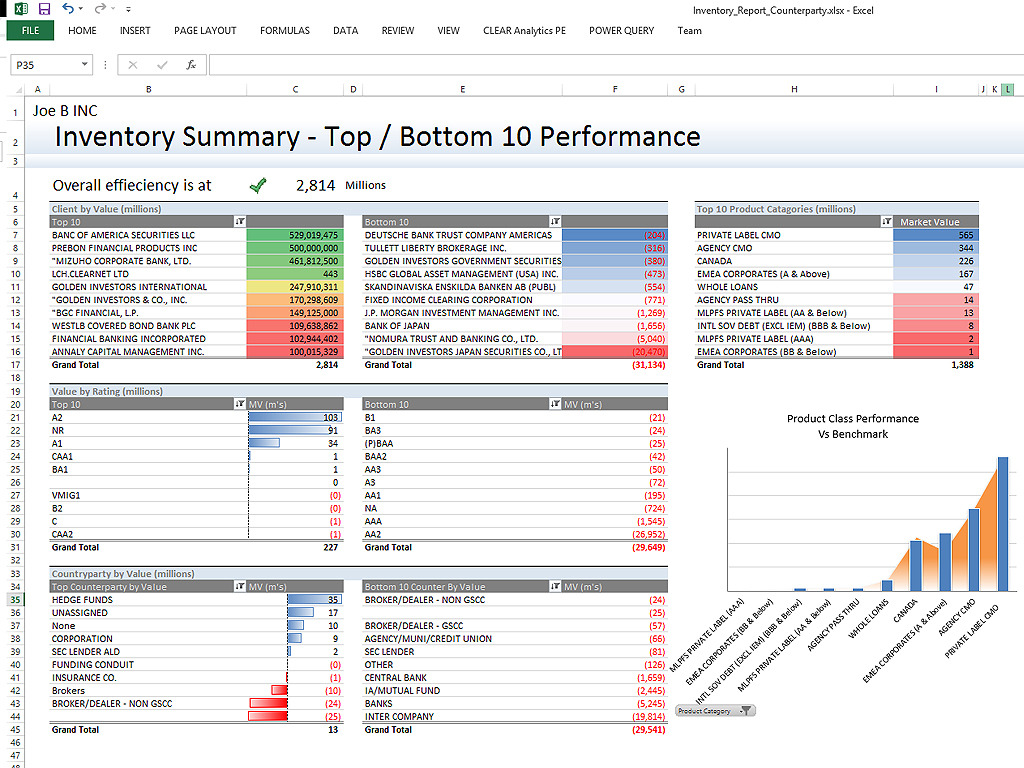
Screenshot of Clear Analytics integrated Excel panel essentially transforms standalone Excel into an enterprise strength, fully auditable, collaborative and centralized business intelligence platform.Screenshot of Users have the ability to dynamically query systems and render that data in any way they like.  No more waiting on IT to create reports.Screenshot of Your firms existing knowledge of Excel enables the firm to be product from day 1. Use the skills already present in your organization and don't pay for outside reporting consultants to create reports for you.Screenshot of Leverage the integration capability of Microsoft's Power BI to extend the reach of your data to web and mobile devices.Screenshot of Leverage all of Excels capabilities, from it's slicers to miniature spark-line charts to create incredibly informative and responsive dashboards.