Mailchimp is an email marketing and marketing automation platform. Beyond just tracking how campaigns perform, Mailchimp takes it a step further by analyzing data from over half a billion emails to show why campaigns perform, driving informed decisions.
$0
per month
Squarespace
Score8.4 out of 10
N/A
Squarespace is a CMS platform that allows users to create a DIY blog, eCommerce store, and/or portfolio (visual art or music). Some Squarespace website and shop templates are industry or use case-specific, such as menu builders for restaurant sites.
$25
per month
Zoho Campaigns
Score8.9 out of 10
N/A
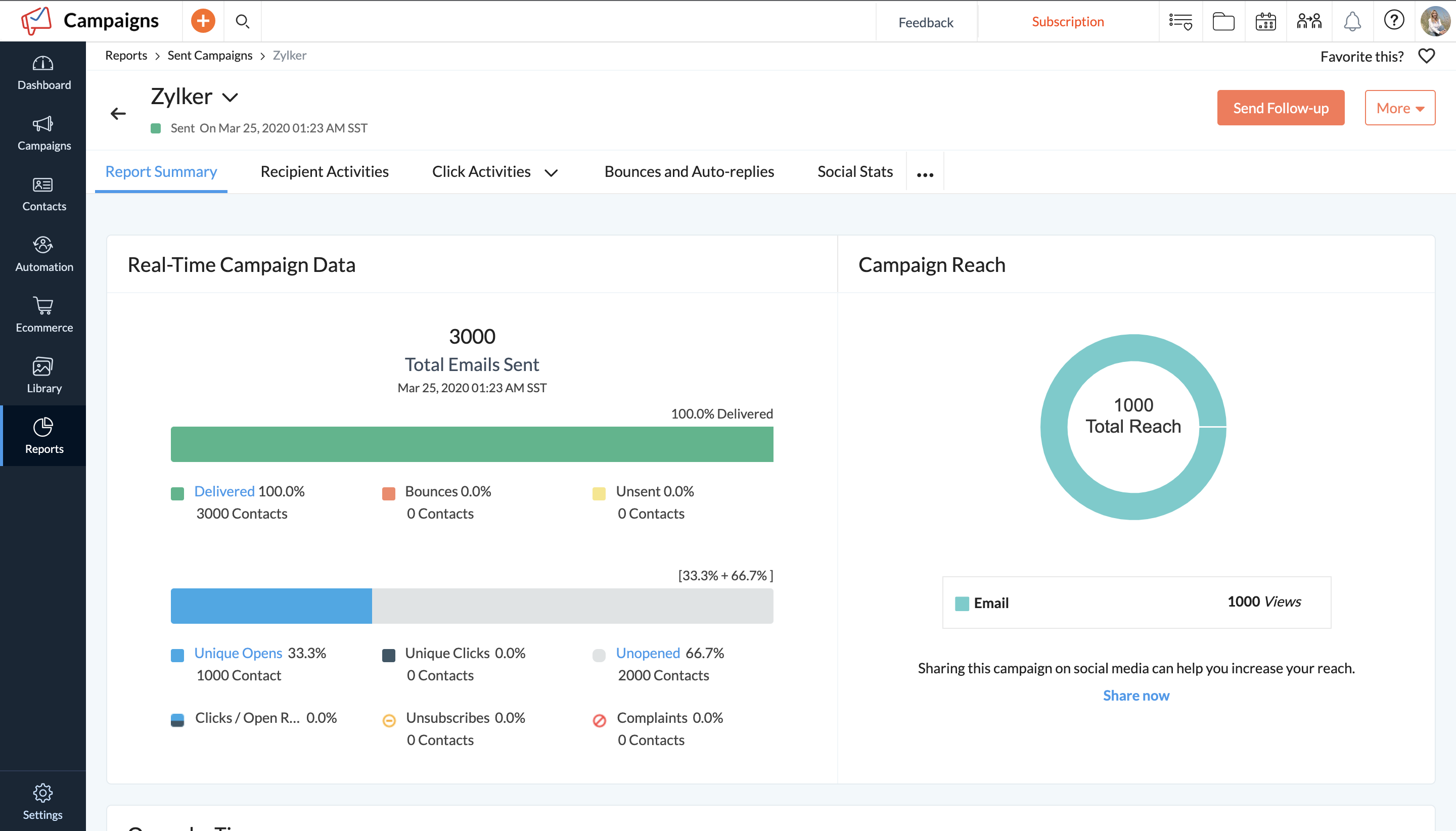
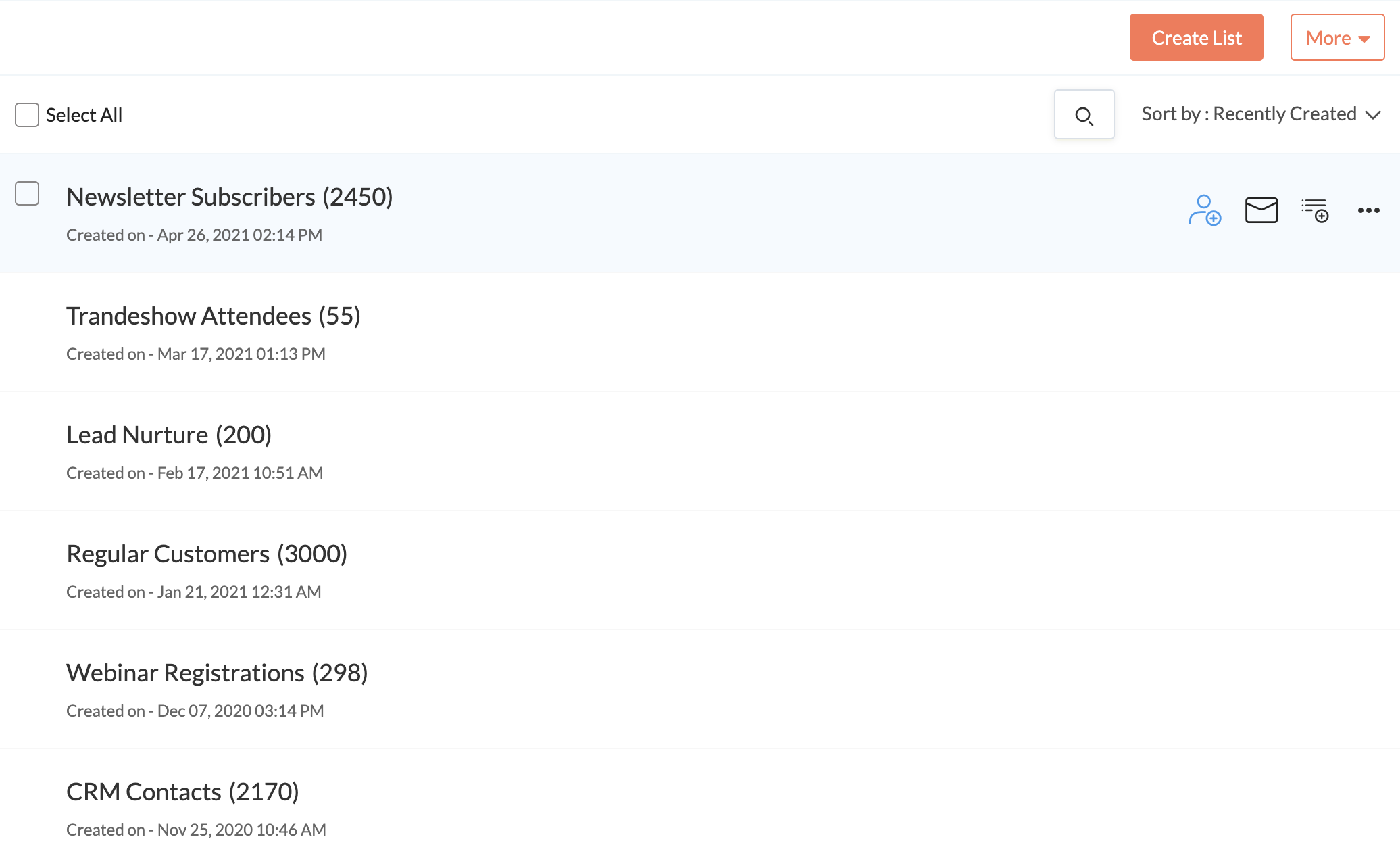
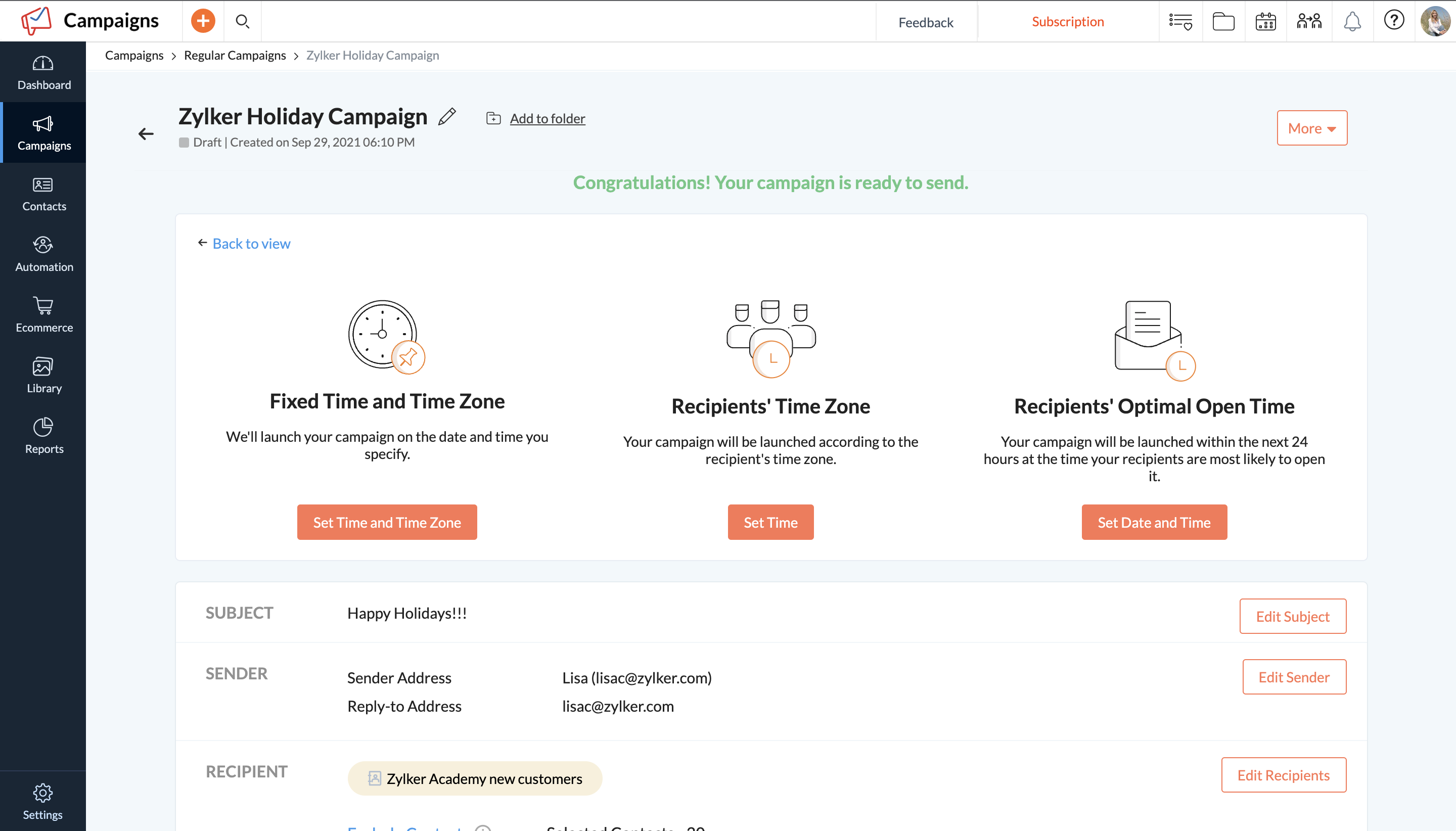
Zoho Campaigns is an email marketing and social networking campaigning tool for smaller companies that helps create, send, and track effective email campaigns. It features list management and segmentation, A/B Testing, tracking and reporting, automation, and mobile campaign management.
A de minimis incentive was given to thank the reviewer for their time. The incentive was not used to bias or drive a particular response, nor was the incentive contingent on a positive endorsement. More Info
Verified User
Chose Intuit Mailchimp
Mailchimp is on par with Zoho Campaigns in terms of functionality. Mailchimp and Zoho Campaigns are quite similar in terms of overall performance. When it comes to email marketing campaigns, I think Zoho Campaigns has a leg up on Mailchimp since it offers more and better …
A de minimis incentive was given to thank the reviewer for their time. The incentive was not used to bias or drive a particular response, nor was the incentive contingent on a positive endorsement. TR verified that a representative sample of customers was invited. More Info
Verified User
Chose Intuit Mailchimp
We also use Zoho Campaigns for CRM related emails and campaigns. It is definitely not as easy to use as Mailchimp but has the advantage of easily pushing emails in and out of our Zoho CRM.
We use Intercom for Drip user engagement. Again, it does not have the easy-to-use or …
A de minimis incentive was given to thank the reviewer for their time. The incentive was not used to bias or drive a particular response, nor was the incentive contingent on a positive endorsement. TR verified that a representative sample of customers was invited. More Info
Sales Specialist in Sales at Ogilvy (Internet, 10,001+ employees)
Chose Intuit Mailchimp
Mailchimp is a bit more expensive than its competitor, Squarespace, but their analytics capabilities are much better. For simpler projects, you can go with the cheap version but if you want to work on the big leagues and need a state of the art product then Mailchimp is …
A de minimis incentive was given to thank the reviewer for their time. The incentive was not used to bias or drive a particular response, nor was the incentive contingent on a positive endorsement. More Info
Verified User
Chose Intuit Mailchimp
I have used a lot of email marketing tools over the years and Intuit Mailchimp is one that I keep going back to, it simple and easy to use, no messing around and it does what it says one tin.
A de minimis incentive was given to thank the reviewer for their time. The incentive was not used to bias or drive a particular response, nor was the incentive contingent on a positive endorsement. TR verified that a representative sample of customers was invited. More Info
Verified User
Chose Intuit Mailchimp
Mailchimp is a little more complex and offers features that these other platforms don't have, which makes it ideal for creating high-quality email content. I also very much appreciate how you're able to track your engagement analytics through the Mailchimp platform, allowing …
A de minimis incentive was given to thank the reviewer for their time. The incentive was not used to bias or drive a particular response, nor was the incentive contingent on a positive endorsement. More Info
Verified User
Chose Intuit Mailchimp
Mailchimp was usually already in place and needed to be set up for growth. In general, I found that the lack of phone support at the lower tiers and the rigidness for opt-in rules made working with it long term not that easy.
A de minimis incentive was given to thank the reviewer for their time. The incentive was not used to bias or drive a particular response, nor was the incentive contingent on a positive endorsement. TR verified that a representative sample of customers was invited. More Info
Verified User
Chose Intuit Mailchimp
Mailchimp has an affordable, tiered pricing structure. Their UI, while not as strong as some of their competitors, is good enough to get the job done. With tech-savvy team members, newsletters and emails can easily be customized to offer consistent branding for any form of …
A de minimis incentive was given to thank the reviewer for their time. The incentive was not used to bias or drive a particular response, nor was the incentive contingent on a positive endorsement. TR verified that a representative sample of customers was invited. More Info
Director of Digital Marketing in Marketing at 407 Marketing (Marketing and Advertising, 1-10 employees)
Chose Intuit Mailchimp
Generally, Mailchimp is substantially cheaper for smaller companies compared to the Enterprise level email marketing systems. Additionally, Mailchimp offers the agency-focused advantages of programs like Campaign Monitor, but with an easier billing system and lower monthly …
A de minimis incentive was given to thank the reviewer for their time. The incentive was not used to bias or drive a particular response, nor was the incentive contingent on a positive endorsement. TR verified that a representative sample of customers was invited. More Info
Web Designer / Front End Developer in Information Technology at Island City Media (Retail, 11-50 employees)
Chose Intuit Mailchimp
I'll be choosing Klaviyo for the deep eCommerce interaction and product integrations, great reporting, and comparable pricing model. Mailchimp is in my experience more versatile and developed than Zoho, Constant Contact, or HubSpot offerings--more modern and more …
A de minimis incentive was given to thank the reviewer for their time. The incentive was not used to bias or drive a particular response, nor was the incentive contingent on a positive endorsement. TR verified that a representative sample of customers was invited. More Info
Verified User
Chose Intuit Mailchimp
Eloqua had long term contracts and the starter plans started as high as $2000. Also, unlike Mailchimp, it misses out on integration with Google Analytics and takes a while to fix issues with implementation.
A de minimis incentive was given to thank the reviewer for their time. The incentive was not used to bias or drive a particular response, nor was the incentive contingent on a positive endorsement. More Info
Verified User
Chose Intuit Mailchimp
Mailchimp is a solid platform that you can depend on. Also, it is very affordable, especially when compared to other tools such as HubSpot. Also, I can see that they are continually working to make the platform better and better. Lastly, we are able to do everything in-house …
A de minimis incentive was given to thank the reviewer for their time. The incentive was not used to bias or drive a particular response, nor was the incentive contingent on a positive endorsement. More Info
Digital Content Strategist in Social Media at GrowthWeaver (Marketing and Advertising, 11-50 employees)
Chose Intuit Mailchimp
Constant Contact is more expensive and hasn't (in the past) really had an A/B testing component. Despite that, it generally had better customer service. We decided to go with Mailchimp because of cost reasons and its more attractive formatting. I also think Mailchimp now …
A de minimis incentive was given to thank the reviewer for their time. The incentive was not used to bias or drive a particular response, nor was the incentive contingent on a positive endorsement. More Info
A de minimis incentive was given to thank the reviewer for their time. The incentive was not used to bias or drive a particular response, nor was the incentive contingent on a positive endorsement. More Info
Verified User
Chose Squarespace
Squarespace is the top of the pack when it comes to "set it and forget it" website builders. Wordpess is slightly more flexible but still requires a watchful eye from and administrative standpoint. Others, like Drupal, are more extensible but are better for larger websites that …
A de minimis incentive was given to thank the reviewer for their time. The incentive was not used to bias or drive a particular response, nor was the incentive contingent on a positive endorsement. More Info
Founder/CEO in Manufacturing at Gig Gear LLC (Music, 1-10 employees)
Chose Squarespace
It's hard for me to say how Squarespace stacks up against these other options as I've only recently just begun to look into other options. I selected Squarespace initially due to good marketing on their part to get me to look at them first, and also because we initially only …
A de minimis incentive was given to thank the reviewer for their time. The incentive was not used to bias or drive a particular response, nor was the incentive contingent on a positive endorsement. More Info
Verified User
Chose Squarespace
Wix has a lot more flexibility than Squarespace in designing really original web content, with the same front end, no code style that Squarespace offers. If you want to do something really unique with your site, you can drag and drop something anywhere on the page, similar to a …
A de minimis incentive was given to thank the reviewer for their time. The incentive was not used to bias or drive a particular response, nor was the incentive contingent on a positive endorsement. More Info
Verified User
Chose Squarespace
Much easier to use than WordPress, Umbraco, go daddy designs. Looks expensively built and beautifully designed.
A de minimis incentive was given to thank the reviewer for their time. The incentive was not used to bias or drive a particular response, nor was the incentive contingent on a positive endorsement. More Info
Graphic and Web Designer / Resume Writer in Professional Services at www.resumebynico.com (Design, 1-10 employees)
Chose Squarespace
Squarespace was much more modern in design and the templates more attractive. The customization options for each template are growing and some sites are almost 100% customizable. Weebly did not have as modern designs or nearly as many customization options.
A de minimis incentive was given to thank the reviewer for their time. The incentive was not used to bias or drive a particular response, nor was the incentive contingent on a positive endorsement. More Info
Web Developer at Cleveland State Community College (Information Services, 1-10 employees)
Chose Squarespace
WordPress.com is the closest competitor to Squarespace that I have used or recommended. WordPress offers significantly more options for templates, plugins, and customizations, but lacks the dead-simple and beautiful approach that Squarespace brings. It is easy to get lost in …
A de minimis incentive was given to thank the reviewer for their time. The incentive was not used to bias or drive a particular response, nor was the incentive contingent on a positive endorsement. More Info
Owner/Founder/Design Guru at Reaves Projects (Design, 1-10 employees)
Chose Squarespace
I find Wix to truly be a blank slate. The templates offered can be modified to give you more control over the finished product but the downside to this is the added step of formatting for responsive viewing. It is often overlooked by clients who want to maintain their site once …
A de minimis incentive was given to thank the reviewer for their time. The incentive was not used to bias or drive a particular response, nor was the incentive contingent on a positive endorsement. More Info
COO (Chief Operating Officer) in Social Media at Modern Neon Media (Internet, 1-10 employees)
Chose Zoho Campaigns
While we still believe that Mailchimp has more options for expansion at this point, Zoho Campaigns works better for us so we don't have to leave the Zoho suite of programs so much. Since our main e-mail is through Zoho Mail, the integration of both products is integral.
A de minimis incentive was given to thank the reviewer for their time. The incentive was not used to bias or drive a particular response, nor was the incentive contingent on a positive endorsement. More Info
Verified User
Chose Zoho Campaigns
If you are on a budget or already using Zoho's other products such as CRM, Zoho Campaigns is a good choice to get you up and running with email campaigns. Mailchimp is also affordable and has a lot more capability and customization of the templates and landing pages, but does …
A de minimis incentive was given to thank the reviewer for their time. The incentive was not used to bias or drive a particular response, nor was the incentive contingent on a positive endorsement. More Info
Director of Marketing in Marketing at Visage Mobile (Wireless, 11-50 employees)
Chose Zoho Campaigns
Zoho Campaigns is a clumsy attempt to further bring your customer management under the Zoho umbrella. Contact management and CRM integration need a lot of work. Master style definitions, custom templates, and deliverability statistics would be good improvements. On the other …
A de minimis incentive was given to thank the reviewer for their time. The incentive was not used to bias or drive a particular response, nor was the incentive contingent on a positive endorsement. More Info
Dueño principal in Customer Service at MiNuevoSitio.com (Information Technology and Services, 1-10 employees)
Chose Zoho Campaigns
In my experience, I liked MailChimp a lot because of the many features it has. In comparison with Zoho Campaigns, I feel that it is superior but what I find most helpful, and the main reason why I use Zoho Campaign, is that the applications I use can be integrated and I can see …
A de minimis incentive was given to thank the reviewer for their time. The incentive was not used to bias or drive a particular response, nor was the incentive contingent on a positive endorsement. More Info
Marketing Manager in Marketing at Rapid POS (Computer Software, 11-50 employees)
Chose Zoho Campaigns
Campaigns came with Zoho CRM, so that's the ONLY reason I use this product. I can't justify paying for MailChimp when I have a free product. BUT, if I paid for this I would have switched a long time ago. In fact, I would have never picked it because it doesn't even compare …
A de minimis incentive was given to thank the reviewer for their time. The incentive was not used to bias or drive a particular response, nor was the incentive contingent on a positive endorsement. More Info
Program Expert in Marketing at nLyten Media LLC (Management Consulting, 1-10 employees)
Chose Zoho Campaigns
We already use Zoho CRM so it made sense to use Zoho Campaigns to make importing from the CRM easier. MailChimp and Zoho both have an editor for editing HTML directly, so there was no clear advantage there. MailChimp was slightly more expensive than Zoho Campaigns (by about …
A de minimis incentive was given to thank the reviewer for their time. The incentive was not used to bias or drive a particular response, nor was the incentive contingent on a positive endorsement. More Info
Project Support in Customer Service at A1 Energy (Renewables & Environment, 1-10 employees)
Chose Zoho Campaigns
MailChimp is great, and probably a bit more intuitive, but the seamless integration with Zoho CRM won it over for us with Zoho Campaigns. That and the ability to choose from two different pricing structures. Another thing to mention, the saved template feature, which is a basic …
A de minimis incentive was given to thank the reviewer for their time. The incentive was not used to bias or drive a particular response, nor was the incentive contingent on a positive endorsement. More Info
Chief GTM - Go-To-Market and Strategy Officer & Manager - SEO & SMM in Information Technology at Maction Consulting Pvt. Ltd. (Market Research, 11-50 employees)
Chose Zoho Campaigns
Best part of Zoho Campaigns is that when you upload the email addresses it verifies that emails are valid or not. I have never seen this feature except in Zoho Campaigns. Mailchimp and Sender are good tools. But Zoho Campaigns outsmarts both of them. Zoho Campaigns needs a …
A de minimis incentive was given to thank the reviewer for their time. The incentive was not used to bias or drive a particular response, nor was the incentive contingent on a positive endorsement. More Info
Verified User
Chose Zoho Campaigns
We decided to try Zoho Campaigns in lieu of previous applications being used. For the most part, the setup was similar and straightforward but the nuances in the UX and difficulty finding features made it feel harder than it had to be. Overall we still prefer other CRM …
A de minimis incentive was given to thank the reviewer for their time. The incentive was not used to bias or drive a particular response, nor was the incentive contingent on a positive endorsement. More Info
Verified User
Chose Zoho Campaigns
It's about the automatons and the integration power.
A de minimis incentive was given to thank the reviewer for their time. The incentive was not used to bias or drive a particular response, nor was the incentive contingent on a positive endorsement. More Info
Verified User
Chose Zoho Campaigns
Zoho is not just the one application but actually is a suite of interconnected applications so I can use my Campaign and incorporate it into another application. I also have a little more flexibility with Zoho Campaigns like creating something in a different format then just …
A de minimis incentive was given to thank the reviewer for their time. The incentive was not used to bias or drive a particular response, nor was the incentive contingent on a positive endorsement. More Info
Verified User
Chose Zoho Campaigns
Zoho Campaigns is much less user-friendly than the other options I've tried. It doesn't seem to have great integrations with other systems either. For example, the forms they give you slow down websites and look terrible. Ultimately, the only time I've gone with Zoho Campaigns …
A de minimis incentive was given to thank the reviewer for their time. The incentive was not used to bias or drive a particular response, nor was the incentive contingent on a positive endorsement. More Info
Verified User
Chose Zoho Campaigns
Zoho Campaigns is honestly the worst email sender in the world. Anyone considering it should stay away. We have opted-in customers who are begging for emails from us and while we were using Zoho Campaigns (we are still moving away currently) no customer has received even one …
A de minimis incentive was given to thank the reviewer for their time. The incentive was not used to bias or drive a particular response, nor was the incentive contingent on a positive endorsement. More Info
Verified User
Chose Zoho Campaigns
Its easy setup and user interface made it one of our primary tool for sending newsletters and email campaigns. I don't always need to supervise my team on this tool. My team is well versed with the process involves in creating email campaigns on this tool. And the kind of …
A de minimis incentive was given to thank the reviewer for their time. The incentive was not used to bias or drive a particular response, nor was the incentive contingent on a positive endorsement. More Info
Mailchimp is fairly easy to onboard, even for those who would consider themselves less technologically inclined. It can be as simple as plug-and-play for simpler campaigns or scale up as needed. It also makes it easy to build, send out for internal review and feedback, and track all the needed changes.
A de minimis incentive was given to thank the reviewer for their time. The incentive was not used to bias or drive a particular response, nor was the incentive contingent on a positive endorsement. More Info
Squarespace is one of the best solutions out there for building a website or web experience that looks good, has great functionality and is cost-effective, even for smaller businesses. Although most people in marketing will find most of the elements intuitive, if the creator is struggling with any of the functionality, there are many, many support options and other users who can offer assistance.
A de minimis incentive was given to thank the reviewer for their time. The incentive was not used to bias or drive a particular response, nor was the incentive contingent on a positive endorsement. More Info
A de minimis incentive was given to thank the reviewer for their time. The incentive was not used to bias or drive a particular response, nor was the incentive contingent on a positive endorsement. More Info
Mailchimp allows you to manage your mailing list really well. You can subscribe people, unsubscribe people manage the mailing list directly into segments, and what not.
Mailchimp has features where you can create campaigns based on your mailing lists and send out newsletters to your subscribers based on a multitude of parameters that you can setup. Such as send email daily, weekly, monthly and they also have event based mails that you can send out.
Mailchimp also has a feature where you can design your emails. The look and aesthetics are very important when sending emails to your subscribers and all those needs are addressed here.
A de minimis incentive was given to thank the reviewer for their time. The incentive was not used to bias or drive a particular response, nor was the incentive contingent on a positive endorsement. TR verified that a representative sample of customers was invited. More Info
Stupid simple to use. I know very creative people who cannot code and this is probably the easiest ever platform for them!
Pretty website templates and great functionality with showing off portfolios.
They've already figured out what are the problems that non-coding people have when creating websites and they've figured out a simple solution for all of it.
A de minimis incentive was given to thank the reviewer for their time. The incentive was not used to bias or drive a particular response, nor was the incentive contingent on a positive endorsement. More Info
A de minimis incentive was given to thank the reviewer for their time. The incentive was not used to bias or drive a particular response, nor was the incentive contingent on a positive endorsement. More Info
A de minimis incentive was given to thank the reviewer for their time. The incentive was not used to bias or drive a particular response, nor was the incentive contingent on a positive endorsement. More Info
Zoho should start by throwing this tool in the trash and then recreate it from scratch. There are so many flaws I would be here all year trying to list them all. Start by the fact that creating templates is an absolute nightmare. You'll find over and over again that something that should be easily executed can't be done. It is NOT a plug and play program. Everything is trial and error.
The reporting SUCKS bad. It gives you basics, but if you want any real insights... I have to export all my data into my own spreadsheets to compare results from multiple campaigns.
Customer service is B.A.D. You'll spend HOURS upon HOURS with a tech support team that knows less than you. The only time anything gets accomplished is when you work with a programmer. BUT, you'll seriously waste 1-2 hours explaining a problem to someone who is only taking notes. You'll get so frustrated when they try to show you how they think it works and you respond with... "I know how this works because I have used it for a year - the problem is that it stopped working the way it always did before. They will argue with you. You will respond accordingly. They will close tickets without resolution. Speaking of tickets, you'll never get one. They say they will take care of it and a week later you will follow-up and no one will have any idea what is going on. You'll start from scratch and be even more frustrated. You will learn to "fix" it on your own or deal with it, broken.
After two years, I'm still not sure if my emails even make it to an inbox. When asked, you'll be told that you need to write better subject lines. I call bull****. Don't rely on this product to deliver your email. And don't question Zoho, as it will always be your fault.
You can't use this tool to send to ANY group email addresses. You can't even override the system. I have a lot of clients that use info@xxx.com or sales@xxx.com, etc. and I have to send them personal emails since this will not allow them to be sent. They say it is to protect them from getting blacklisted. I call bull**** again.
The templates offered by the system are crap - unless you only send holiday emails. Not a large selection of just generic templates. You'll be pulling your hair out trying to use their builder to create your own. In the end, you'll end up sending emails with nothing "pretty" about them.
A de minimis incentive was given to thank the reviewer for their time. The incentive was not used to bias or drive a particular response, nor was the incentive contingent on a positive endorsement. More Info
We've had Mailchimp for about ten years, I want to say. I started with the company about four years ago, and I don't see us ever diverting to another source. It's easy for us to use, and we have all our clients already built into the database. I imagine we'll use them for as long as we have the company.
A de minimis incentive was given to thank the reviewer for their time. The incentive was not used to bias or drive a particular response, nor was the incentive contingent on a positive endorsement. TR verified that a representative sample of customers was invited. More Info
A de minimis incentive was given to thank the reviewer for their time. The incentive was not used to bias or drive a particular response, nor was the incentive contingent on a positive endorsement. More Info
A de minimis incentive was given to thank the reviewer for their time. The incentive was not used to bias or drive a particular response, nor was the incentive contingent on a positive endorsement. More Info
It is easy, but some things you need to learn from their resources. Mailchimp is one of the most popular email marketing platforms because it combines email marketing, automation, audience management, and analytics into a single tool that's easy to use and scale. Simple solutions and drag-and-drop edits make it easy.
A de minimis incentive was given to thank the reviewer for their time. The incentive was not used to bias or drive a particular response, nor was the incentive contingent on a positive endorsement. More Info
It's simple to use for someone who is really good with computers as well as those who are not. I've been using my personal squarespace for years and have also helped clients build a starting page which they are later able to manage theirselves.
A de minimis incentive was given to thank the reviewer for their time. The incentive was not used to bias or drive a particular response, nor was the incentive contingent on a positive endorsement. More Info
Zoho Campaigns is a powerful email sending tool. Zoho Campaigns is highly user-friendly and intuitive software. Complex email marketing tasks are simplified by Zoho Campaigns. Best part of Zoho Campaigns is that when you upload the email addresses it verifies that emails are valid or not. I have never seen this feature except in Zoho Campaigns.
I have, in the 4+ years that I've used Mailchimp, never seen an issue that restricted the use of their software/tools. I don't know of a single time when they're system crashed or went down. I could be wrong, but I honestly haven't experienced any issues with outages, errors or unplanned downtime
A de minimis incentive was given to thank the reviewer for their time. The incentive was not used to bias or drive a particular response, nor was the incentive contingent on a positive endorsement. More Info
I haven't noticed any slow speeds from Mailchimp or their tools. I think the landing pages load quickly and look nice. The email reports and editing operates smoothly and doesn't take time to load. Additionally, when I use Mailchimp in conjunction with Zapier + Hubspot I don't notice any drag between any of these tools
A de minimis incentive was given to thank the reviewer for their time. The incentive was not used to bias or drive a particular response, nor was the incentive contingent on a positive endorsement. More Info
Website tools were easy to use and understand so a novice can easily meet or exceed their client's expectations! Loved that we were able to totally customize so that the e-mail we created conveyed our client's overall messaging consistent with their branding! Client love that we can provide turnkey services to support their sales and marketing teams!
A de minimis incentive was given to thank the reviewer for their time. The incentive was not used to bias or drive a particular response, nor was the incentive contingent on a positive endorsement. More Info
Help is available directly from the back end and uses full sentence searching to find answers to questions others may have asked before. With a ton of articles and support questions documents, it is very likely that your question has been answered. If not each page has the ability to open a direct email to support. Each case has a number and can be followed. Responses are often quick and have links and directions clearly stated
A de minimis incentive was given to thank the reviewer for their time. The incentive was not used to bias or drive a particular response, nor was the incentive contingent on a positive endorsement. More Info
It's pretty easy to get up and running! There's a slight learning curve on a few things, but once you find where everything is located, you can import your list and send your first email. It really makes our clients feel great to see how quickly they can get that first email out.
A de minimis incentive was given to thank the reviewer for their time. The incentive was not used to bias or drive a particular response, nor was the incentive contingent on a positive endorsement. More Info
I used Intuit Mailchimp, and I would say other software I used is equally good and competes with Intuit Mailchimp. Well, Intuit Mailchimp's reporting is better, and ActiveCampaign has more affordable pricing, so in the end, it all comes to what you need. What we needed was available in cheaper price in other software as well. But I would definitely say Intuit Mailchimp has its own advantages too.
A de minimis incentive was given to thank the reviewer for their time. The incentive was not used to bias or drive a particular response, nor was the incentive contingent on a positive endorsement. More Info
Squarespace was quicker to set up and more accessible to manipulate the theme, pictures, and content. The page layouts are more versatile and fluid. With WordPress, more time-consuming efforts go into making a template work the way you want it to (because of the lack of the drag-and-drop grids that Squarespace has).
A de minimis incentive was given to thank the reviewer for their time. The incentive was not used to bias or drive a particular response, nor was the incentive contingent on a positive endorsement. More Info
Zoho Campaigns is not for beginners to email marketing, but it’s an excellent choice for those who want to send out a lot of emails with few restrictions and great reporting. It’s a no-brainer if you’re already a Zoho user, as Campaigns is included in Zoho One subscriptions and integrates nicely with other Zoho apps.
A de minimis incentive was given to thank the reviewer for their time. The incentive was not used to bias or drive a particular response, nor was the incentive contingent on a positive endorsement. More Info
Mailchimp over the years I've used it has grown in leaps and bounds. They have added so many additional features than were previously available. They are truly an all-in-one marketing platform now. If you're a small operation and just want to add email to your marketing efforts, they're there for you. If you're a larger operation and want to start sending postcard advertisements, they can do that. If you'd good with that and want to kick up your marketing by going social, you can do that on their platform. They are truly able to be as small as you need, but also get quite large in whatever it is you'd like to do through their system.
A de minimis incentive was given to thank the reviewer for their time. The incentive was not used to bias or drive a particular response, nor was the incentive contingent on a positive endorsement. More Info
One of my retail web store clients was sending out email specials and notices about once a month. After clicking the send button, we would watch Google Analytics and the current site users would light up immediately. Often, the current site visitors would pop up to 20, 30 or more after the email was sent. On a normal day, seeing 1 or 2 online users would be OK.
Pretty much in all cases, we could see an uptick in positive activity after sending out a Intuit Mailchimp email to a list.
A de minimis incentive was given to thank the reviewer for their time. The incentive was not used to bias or drive a particular response, nor was the incentive contingent on a positive endorsement. TR verified that a representative sample of customers was invited. More Info
The cost is reasonably decent. My client says they spent about $20 a month or $240 a year. I asked her if she could add Google AdSense to her blog one day, and they believe they can. They said a custom site would cost them $3000-10,000 depending on who does it. And I agreed, but I found the website they created was on the lower end of that range.
A de minimis incentive was given to thank the reviewer for their time. The incentive was not used to bias or drive a particular response, nor was the incentive contingent on a positive endorsement. More Info
It allows us to communicate with all our customers or lists together or individually, and to track how successful our campaigns are.
Customer Service is a target area of why we use Zoho Campaigns, and it meets our needs greatly.
To date we have not really measured the ROI or impact that Zoho Campaigns has on our marketing efforts but with this product it certainly has the means to do such.
A de minimis incentive was given to thank the reviewer for their time. The incentive was not used to bias or drive a particular response, nor was the incentive contingent on a positive endorsement. More Info