PandaDoc headquartered in San Francisco offers their eponymous electronic signature platform for sales teams, containing sales proposal automation and CPQ (configure, price, quote) features, and integration with CRMs.
$35
per month per seat
Proposify
Score 8.9 out of 10
N/A
Proposify is an online proposal software designed to give users control and visibility into the most important stage of a sales process: the close. From deal design to sign-off, the vendor states users get the confidence and flexibility to dominate deals, and further states users will: Create impressive sales documents that stay consistent and error-free. Receive the insights to scale a process, make timely engagements, and accurately…
$0
per month
airSlate SignNow
Score 8.3 out of 10
N/A
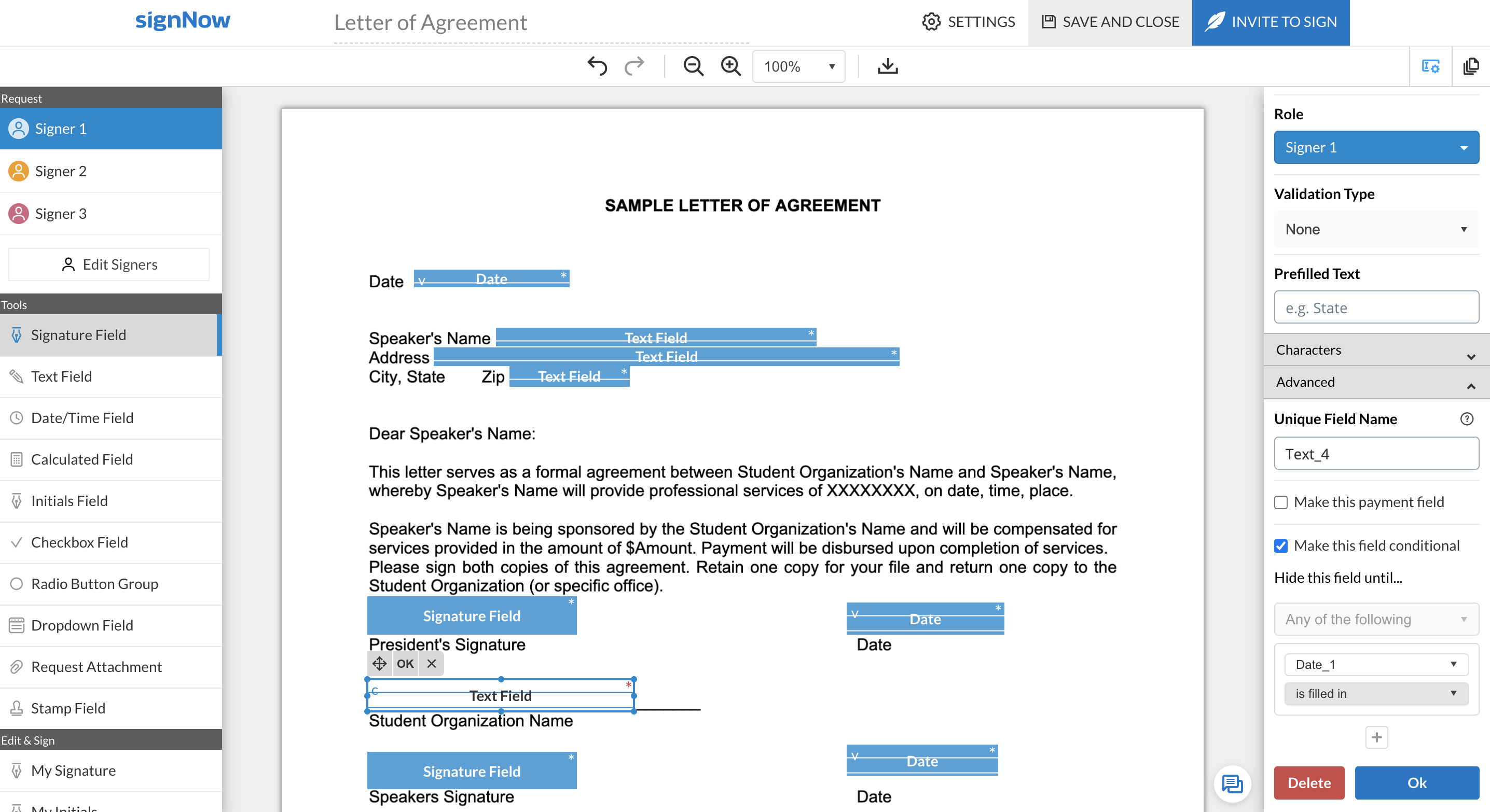
signNow is an eSignature solution with mobile apps for iOS and Android. signNow can be integrated into popular platforms and offers SaaS, public cloud, and private cloud deployment options with the same underlying API. This enables customers to leverage the power and usability of the signNow eSignature platform, while meeting their particular security and compliance requirements.
$1.50
one-time fee per signature invite
Pricing
PandaDoc
Proposify
airSlate SignNow
Editions & Modules
Starter
$35
per month per seat
Business
$65
per month per seat
Enterprise
Contact Sales
No answers on this topic
Site License
$1.50
one-time fee per signature invite
Business
$20
per month
Business Premium
$30
per month
Enterprise
$50
per month
Offerings
Pricing Offerings
PandaDoc
Proposify
airSlate SignNow
Free Trial
Yes
Yes
Yes
Free/Freemium Version
No
Yes
No
Premium Consulting/Integration Services
Yes
Yes
Yes
Entry-level Setup Fee
Optional
Optional
-$8 per user/month
Additional Details
PandaDoc offers a free eSign plan and 3 paid packages for eSigning and document automation. All plans include unlimited documents and eSignatures. Evaluations start with a free 14-day trial. Up to a 46% discount for annual pricing.
Get a free trial version of our Team Plan for 14 days. You're welcome to switch to our Free plan if you need more time with the product. No credit card required. No contracts. Pick the plan that meets your needs when you're ready.
All subscriptions include unlimited number of users. Up to a 60% discount available for annual pricing.
More Pricing Information
Community Pulse
PandaDoc
Proposify
airSlate SignNow
Considered Multiple Products
PandaDoc
Verified User
Partner
Chose PandaDoc
We explored a few different methods before deciding on PandaDocs: we thought about creating all of our proposals in one of the Adobe programs like inDesign and then just exporting them as PDFs. But 1.) that would be too much work and 2.) I think the option to add e-signatures …
Both are good for signature capture, but PandaDoc has a wide range of ability with allowing for electronic proposals with media presentations embedded to be sent along with agreements and signature capture capabilities. The functionality is so …
Based on our team's experience with Proposify, PandaDoc is very comparable and even has similar design elements. However, PandaDoc seems to be a bit more clean and user-friendly in their UX, which does come with its limitations in design. There are pros and cons to both, so I'd …
DocuSign and SignNow have a feature that allows you to create a signing link that you can send in an email or post on a website (like an intranet). When there are roles set up within a document, PandaDoc only allows you to complete the information from the interface and enter …
HelloSign required an extra step for users to get verified before signing (poor user experience) SignNow was a good alternative except for it lacked HubSpot integration. DocuSign was much more expensive. PandaDoc had the right features at the right price, plus the integration …
We briefly used Proposify, and it had some nice options for creating more ascetically pleasing proposals and contracts. However, it was far more time-consuming, and any gain in asceticism did not outweigh the significant loss in efficiency, simplicity, and reliability of using …
PandaDoc stacks up above and beyond. It's replaced having to create a document in Word, save it to PDF, and then upload it for signature in an e-sign tool. I can create my documents in the editor. Present proposals in presentation mode instead of powerpoint and send directly …
We also evaluated a product called "Better Proposals" that's not in the TrustRadius list.
Pandadoc won our business by virtue of having generally more flexible design and layout abilities. There are a lot of new contenders in the space of proposal/contract creation and …
To be honest the competition is quite tight but where PandaDoc has excelled was in the integrations with sales CRM/pipeline software and how easy it is to convert a sales lead into a contract, and automatically feeding this information back into your sales pipeline to retain …
PandaDoc was the only software that I tried that rang the most bells. From their 24 hour support to their full-size photos and content library, they stood above the crowd. Other products such as DocuSign were not intuitive or user friendly. PandaDoc is user friendly and …
The integration and service level for us is better with PandaDoc. We are able to adjust, embedded and showcase images, from the content library with ease and the tables allow us to tell our story without having to write too many paragraphs.
PandaDoc was 100% easier to use and looked way more professional. There wasn't much of a competition to be honest and I don't even have to bother looking anywhere else as [I'm] super pleased with what PandaDoc offers me.
We initially chose PandaDoc because it could do the basic things we needed to accomplish given the short amount of time we needed to search for a provider. Its price was the biggest factor, beating other competitors; however, with the sudden change in price, we needed to look …
We ended up choosing PandaDoc because of the integration with our own CRM that really expedites quick closures with little to no effort with just a couple of clicks, we create the opportunity, assign the document through PandaDoc and with just a few clicks more, we're good go …
PandaDoc's integration with Pipedrive and template design capabilities helped it win out over these other services. Again, the major complaint is not having a radio button in as a form element. It is desperately needed and still means we are hanging on to these other services …
Much greater design capabilities, more integration possibilities, and more complete solution for sales teams. PandaDoc is sales enablement software, not just digital document signing.
Quote Roller was fine, as were the platforms we used before it, but they were half the price (or less) of PandaDoc and included full export capabilities. The one area where PandaDoc stood out was that they built a "pick one of many options" feature for the pricing table …
Ultimately the decision to choose PandaDoc came down to the integration that it has with HubSpot, our CRM of choice. Since HubSpot invested in PandaDoc's Series B round of funding, the integration between both companies has and continues to grow.
Qwilr was interesting, but wasn't my favorite. It was cool in the fact that the proposals looked beautiful and interactive. But it was a bit much for my clients to figure out how to use. Kind of overwhelming for them. I really didn't like PandaDoc's functionality and UX when I …
Proposify stacks up well against its competitors. We tested all of these platforms. We found Proposify to be amongst the leaders in the look and feel of the software as well as the quality of the documents.
Where Proposify lacked in comparison to Conga and PandaDoc was in …
The most cost-effective platform for our size and needs. Some had barriers such as needing to download an application or not a household name, and thus, needed some more "pointing out" and following up with. SignNow also has a great, Incognito Alerts setting where you can …
Best suited for after demonstrations when requested by the prospect when they are looking for pricing with T&C. The data room is also great that acts like a drop box for opportunities and their contacts. Helps share pertinent information with others in the organization.
It is costly to properly set up Proposify and retain its use ongoing. If you have a plan to implement your proposals you can get some good cost-saving use from it. I cannot stress enough to have your assets, graphics, and snippets ready before you start. I also recommend that you fully understand templates and asset library or you will quickly be overwriting templates and themes with client-specific verbiage.
SignNow is particularly useful for simple documents, forms and contracts where there the fields are pretty standards- names, signature block, title. It would be helpful to have features that allow substitution of certain fill in the blanks such that allow you to use the same template but first have a dialog to integrate language for a person, corporation, partnership or LLP. I'm a lawyer and having the ability to assemble variation of this nature into one template would be helpful. Also (and it may do this) the ability to change the actual form/document within the a template would be useful.
TEMPLATES: The ability to work from customizable yet standardized templates allow for a consistent end-user experience for our clients, and elevates the perceived professionalism of our sales team.
ANALYTICS: Unlike merely sending estimates or proposals via email, the tracking analytics available within Proposify's dashboard not only enables our project managers to more strategically engage with clients, but also gives our upper management an objective way to track the effectiveness of our sales team.
EASE-OF-USE: Overall, Proposify's platform is easy to use and the UX is intuitive enough that the learning curve to use it is minimal.
Sometimes the fillable fields don't automatically map properly and you have to manually adjust.
Plan tiers and pricing recently changed, so now we get less value and less features (limited templates, no more pricing tables or invoicing/connected payment) for the same price, which is pricy for a small business.
Easier, integrated invoicing as an included feature (so we don't have to use a different software for invoicing/payment collection) would be ideal. You have to upgrade to the Business Plan for this.
When using shared templates, the option to rename the document is at the bottom of the signatures page. I would like that to be visible sooner as some of my team misses it and sends documents to clients with the templated name instead of the correct name because they forgot to scroll down far enough to see it.
CC'ed contacts used to show suggestions as you typed the email if you've sent that person a document before, but that functionality no longer shows on our account. I'd like to see that brought back.
It would be nice if we could add folders to our documents page so that we could sort sent and signed documents into individual client folders. The search feature works fine, but folders would help clean up the view for my team.
The reason I gave it a rating of 7 is because it's probable, but not for sure. This is because there are a few little things we don't love about pandadoc. Mostly that there is not conditional logic such as: they must either fill this field out OR this one. Also it's a little pricey. But we'll probably stay because it's good enough and a pain to switch to something new
The features are too limited. The biggest issue though is the flexibility for editing existing forms without having to create a whole new form. The other issues are its payment partner options, lack of automation, and logic flow. We plan to quit this software and use other software in its place.
Once you get the hang of it, it's very easy to use. There can be a slightly steep learning curve to get fully in on the system. The new editor v2 has really improved usability and allows us to collaborate on documents simultaneously. Once the templates and library items are set up, a new document, whether it be a sales or HR document, takes very little time to complete.
Overall it's great. There's definitely a learning curve, and I wish that some things were easier to use. For example, changing images isn't the easiest thing to do in it, but I'd love to be able to quickly add and change header images in my proposals. So far I've figured it out, but each time I do it I forget how it's done since it's not intuitive.
In terms of core functionality - adding options for signatures, text, dates, check boxes, etc., as well as customising the body of the request, the title of the request, follow-ups / reminders for signature, etc., SignNow is great. It's really easy to navigate and use in this regard. SignNow loses points when it comes to the end-user who needs to sign. There's an option for them to either use the app (which is most prominent in the page that shows when they open the request) or to sign using their browser (which is much smaller). I had my assistant create this step by step guide for our clients, so they can complete the request the way we need them to:https://docs.google.com/presentation/d/1FopYjlykHMFjIAQjgaNLtNIvSCQND_kb86-U9bA5M2A/edit?usp=sharing As far as I'm aware, you can't make it mandatory for them to draw their signature, and there's no option to remove the prompt for them to download the app when signing on their mobile device. I really wish these were options, but they don't take away from the fact it does what it is intended to do, and it does it well.
SignNow is always available when I need it. It seems that most updates occur outside of business hours so I have full functionality when I need it most between the hours of 8am-6pm EST. There has only been I time when I experience application errors when I need to use the system but it did not last long and the issue was resolved within a few hours.
The documents load quickly for the most part but sometimes if there are larger documents with a high number of variables it could take a bit longer to get the document to show up. Most of the time the document comes on the screen relatively quickly allowing for quick access to documents to be edited and sent out.
Recently I could not upload a pdf to a contract - support was very responsive and easy to work with. They got back to me the next day with an apparent fix - however when I opened the document nothing had changed. I then could not respond to the rep who was helping me because it was a "no-reply address", the problem still has not been solved and we had to make alternate arrangements to get this to the client. Never had it happen before and was only with this one contract.
I've actually never used Proposify support, so I'm unable to speak about it. I suppose that's a good thing. If I did need to use it, I would hope that they'd be responsive and intelligent, but, again, since everything has worked smoothly I don't really know how the support functions or how good it is.
781 / 5,000Translation resultsTranslation resultMy experience with airSlate SignNow support has been super ok so far. I only had to contact them once because a document got stuck when I was signing it, so I sent them an email and they responded the next day. They solved the problem, but I found it a bit slow... They could have more direct support, like live chat or even WhatsApp. I believe that if there was a subscription plan for dedicated support it would also be very interesting. For example, a large company with several signature routines, including important signatures that block important workflow processes and sometimes with high added value, these companies, due to the risks, do not want to stop a process because of a signature, so they would not mind investing a little more in dedicated support. Minha experiência com o suporte do airSlate SignNow foi super ok até agora. Só precisei entrar em contato uma vez porque um documento travou na hora de assinar, aí mandei um e-mail e eles responderam no dia seguinte. Resolveram o problema, mas achei meio demorado... podia ter um suporte mais direto, tipo chat ao vivo ou até WhatsApp, acredito que se houvesse um plano de assinatura para suporte dedicado também seria bem interessante, por exemplo uma empresa grande com varias rotinas de assinaturas, entre elas temos assinaturas importantes que travem procesos de Workflow importantes e as vezes de alto valor agregrado, essas empresas devido as riscos não querem parar um processo por conta de um assinatura, por isso não ligariam de investir um pouco mais em suporte dedicado.
It was nice to be shown the basics of the system and be able to see or understand the specific functions our company would need to use, such as the template creation, document grouping and document group templates. Being taught on how to use these functions, made learning them much easier.
Make sure you know exactly what you need before implementation and be sure to ask how to use the most important functions of the system that you will be using.
We used Dropbox back when it was still HelloSign. At the time, new templates were very hard to create. We had to upload a PDF and then add the fields from there. With PandaDoc, we are able to drag and drop the text, images, logos, and fields we need easily. This has saved our team an immense amount of time.
It was highly recommended by an associate and we have been on the receiving end of Proposify proposals and impressed by it. I don't recall if we looked at others but if we did they paled in comparison. There was no question as to using Proposify. It met all the needs, was easy to use, looks great and was exactly what we wanted and needed.
I chose airSlate SignNow over DocuSign primarily due to the superior ease of use and a more intuitive user interface (UI). airSlate SignNow's UI stood out with its simplicity and well-thought-out design, making the entire process of signing and managing documents much more straightforward.The drag-and-drop functionality and the ability to customize signature fields in airSlate SignNow were additional factors that tipped the scale in its favor. These features not only streamlined the signing process but also allowed for a more personalized and efficient document management experience.
The detailed proposal has saved me time explaining a game plan to potential clients.
They have customizable tables where the client can choose how many of a certain item they desire. For instance, if they want to buy graphics from you, they can choose how many. This allows for increasing profits by putting the choice in the customer's hand.
When you send a contract you are alerted when a customer views the proposal. This has saved me time and money trying to go back and forth with my customers.