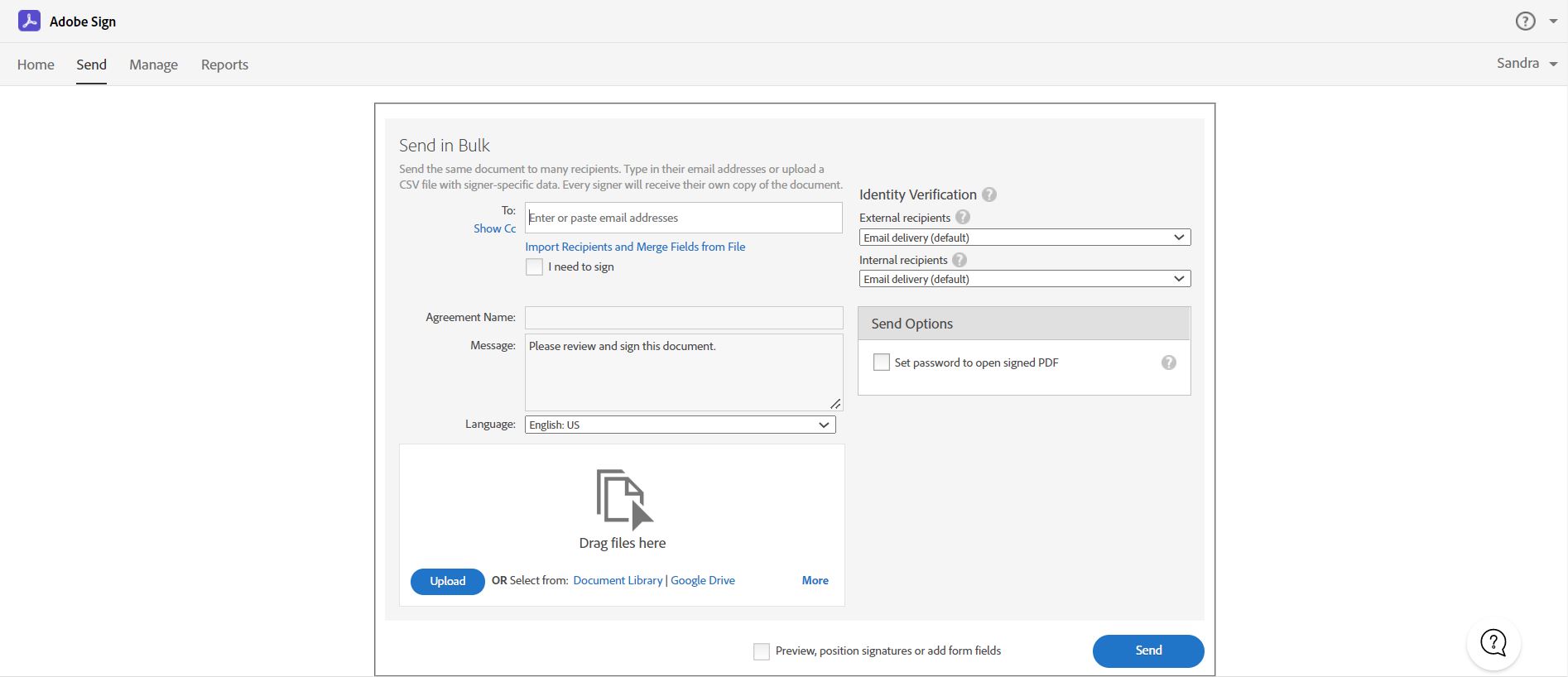
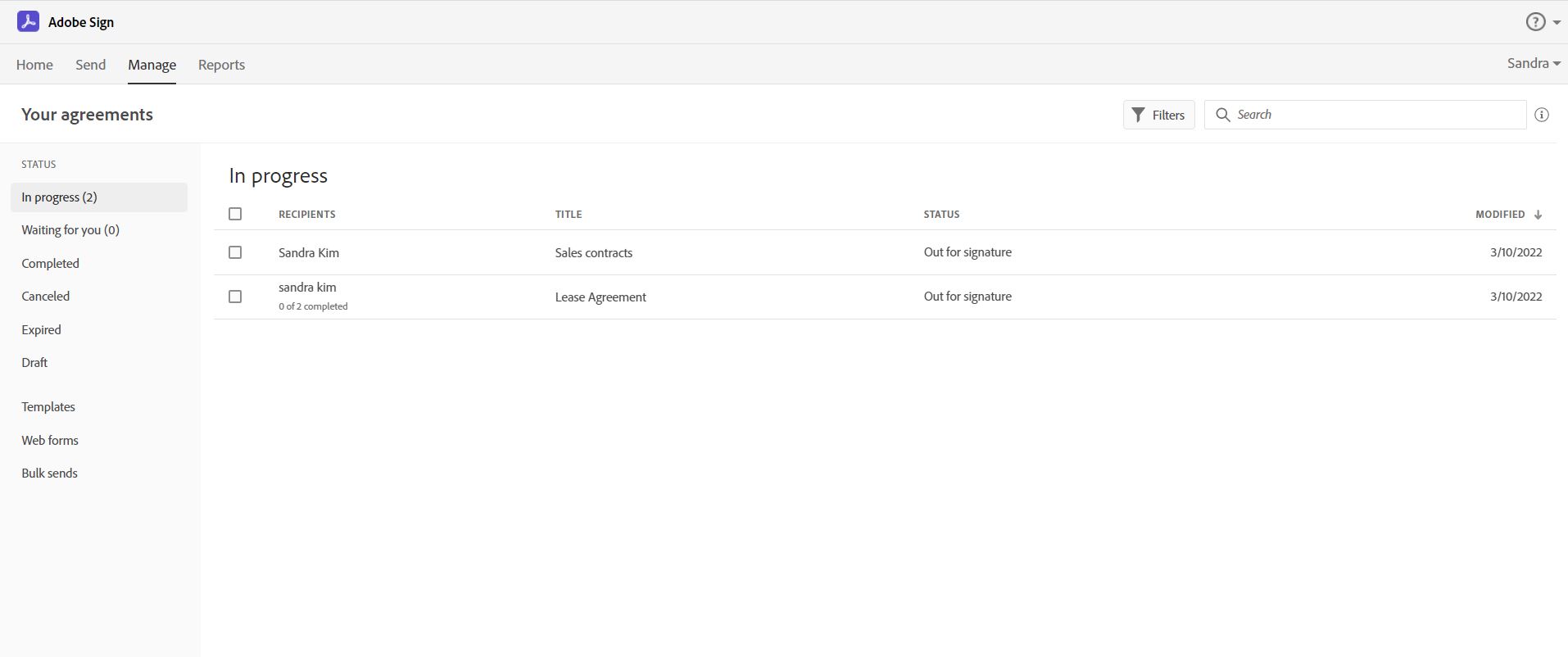
Acrobat Sign is an e-signature solution that combines simple and secure e-signatures with Adobe Acrobat. With Acrobat Sign, the user can create, sign, send for signature, manage, and track documents from one Adobe platform. The user can create signing experiences for customers and teams by enabling them to sign documents on any device or browser – anytime, anywhere. No additional software download or accounts are needed. As Microsoft’s e-signature solution, Acrobat Sign…
$14.99
per month license
Box
Score 8.6 out of 10
N/A
Box is an online Intelligent Content Management solution that caters to individual users as well as businesses.
$20
per month 3 users (minimum)
Slack
Score 9.0 out of 10
N/A
Slack is a group messaging or team collaboration app that aims to simplify communication for businesses. Features include open discussions, private groups, and direct messaging, as well as deep contextual search and message archiving, and file sharing. Slack integrates with a number of other tools, such as MailChimp, Dropbox, and Google Drive. Slack was acquired by Salesforce in December 2020.
The product is free to use, and also has paid plans with more features and greater controls.
The…
$8.75
per month per user
Pricing
Adobe Acrobat Sign
Box
Slack
Editions & Modules
Acrobat Standard DC for teams
$14.99
per month license
Acrobat Pro DC with advanced e-sign
$16.99
per month license
Acrobat Sign Solutions
Call 800-685-4192 for pricing
Business Starter
$7
per month per user (3 minimum)
Business
$20
per month per user (3 minimum)
Business Plus
$33
per month per user (3 minimum)
Enterprise
$47
per month per user (3 minimum)
Enterprise Plus
$50
per month (billed annually) per user (3 minimum)
Enterprise Advanced
Contact us
per month per user (35 minimum)
Free
$0
Pro
$7.25*
per month per user
Business+
$12.50*
per month per user
Enterprise
Contact Sales
Offerings
Pricing Offerings
Adobe Acrobat Sign
Box
Slack
Free Trial
Yes
Yes
Yes
Free/Freemium Version
No
Yes
Yes
Premium Consulting/Integration Services
Yes
Yes
No
Entry-level Setup Fee
$34.99 license per month
Optional
No setup fee
Additional Details
—
A discount is available for annual pricing.
*Per active user, per month, when paying once a year.
Pro is $8.75 USD per active user when paying month to month. Business+ is $15.00 USD per active user when paying month to month.
More Pricing Information
Community Pulse
Adobe Acrobat Sign
Box
Slack
Considered Multiple Products
Adobe Acrobat Sign
Verified User
Employee
Chose Adobe Acrobat Sign
Pricing was within the budget, user friendly and the entire team was aware about Adobe solutions and usage (brand awareness). They have Trusted Security Standards implemented which met our needs for compliance and the tool users Simple Signing Instructions which make the life …
Adobe Acrobat Sign is simple to use, streamlines document creation, and makes documents look better. It allows users to customize fields, set required and optional fields, and quickly generate web forms and PDFs. Templates can be saved to make sending the same document to many …
Adobe Acrobat Sign was, to me, simpler to figure out how to use and was a better value proposition for my firm's use cases than was DocuSign. When I have used DocuSign I found it to be less intuitive and at times confusing. Clients have commented on the simplicity of signing …
Box is more professional when comparing other alternatives
Verified User
Analyst
Chose Box
Simply put, having unlimited file storage is a clear differentiator. Furthermore, the number of integrations offered by Box is simply unmatched. If you are looking for pure document and file sharing, I don't think there is a better product on the market. The benefits from …
The unlimited storage with Box beats all the other options, along with the ease of sharing. With the other products, we found that we had the issue of having to clean up folders to make sure we had enough space to work with, and the ability to share links and files wasn't …
We have used Dropbox for a long time but we needed a secondary solution and that is when we started using Box. The features and benefits between the two platforms are very similar. If you are looking for team collaboration, Box offers a more affordable option. I appreciate that …
Box was superior to all of the cloud file storage systems I've used. It is easier to use, has more space available, and we rarely had any problems. Unfortunately, budget was the deciding factor that pushed us to a different product, but I have found myself wishing that weren't …
Merrill Datasite - 10x more expensive and no unlimited storage; Definitely felt a lot more stodgy, old-school, legal look to it, not as user friendly. One really cool feature it does have is optical detection - if you upload docs (scans of docs), you can get it to look for …
Slack has a great layout which makes it very user friendly. It is quite similar to Microsoft Teams and equally just as good. Better than Whatsapp Web as a stand alone app, so it doesn't have to be linked to your phone. The colors and fonts are welcoming as well.
Well we get Yammer with the Office 365 pack. So, Yammer is paid for and integrates well with Office. MS Office 365 does not have the type of ridiculous service interruptions that Slack seems to experience. Yammer does all the same stuff but without the bad user interface. I did …
It is much easier to use slack for internal communication than it is to use any other emailing platform (gmail or outlook). You get direct notification and the interface is made for intuitive fast communication, it is really a chat service with easy access to group chats, …
Acrobat Sign isn't quite as user friendly as other E-Sign platforms I have used. However, it offers a wide range of features that provide convenience and efficiency. For example, I can have multiple people receive the same document separately, or I can have multiple people receive and review the exact same document. I also like that I can choose to set a signing order or not, this is important for when I send Offer Letters and other things that require order of approvals.
I think Box is great for research teams or anyone that has a large number of files that need to be securely stored. Particularly in the case of social science research, where it is important to protect identifying data, Box is a great option. In cases where teams need a more reliable means for real-time collaboration, I would probably consider a different alternative
Slack is great for tracking commits to new coding projects. You can take parts of code that still need to be implemented later and easily search through the history of comments if there is something that goes wrong with a code commitment. It can be difficult for people that only like Teams to adjust to a new platform if you are using both to communicate.
Adobe Acrobat Sign tracks whether or not a signer has viewed a document
Adobe Acrobat Sign tracks when a signer has signed, and the document has been sent to the next signer
Adobe Acrobat Sign sends you confirmation emails and progress update emails along the way
Adobe Acrobat Sign provides a "confirmation of signing" page at the end of the document package you put together, to prove the signatures are authentic
The main feature that I like the most in Box is that it makes collaboration seamless, workers can easily check the documents any time and make changes according to the needs.
Box manages and backs up all of your files on its cloud servers, and provides a very nice interface for creating, viewing, editing, and collaborating on the most commonly used file types (PDF, XLS, DOC, etc.).
Over the past few years, Box has built on top of its basic cloud storage management with a host of other tools, such as workflows, AI, monitoring, and analytics.
It is helping us to make good connections with clients and our workers themselves as to its syncing and viewing feature to all is very much helpful and easy to go.
Builds on Adobe platform so it is easy to utilize, but many features require enterprise subscription.
Integrations available but your CRM integration is only available with enterprise license.
Lots of templates but there are additional templates with enterprise only and there was no drag and drop editor.
Adobe captures some analytical metrics but many of the analytics we required were not available - specifically metrics related to how the tool converts and reduces use time by our team and the impact on clients.
Would love a better integration with GitHub. For example, notifications when your PR is updated, when review is requested, @-mention in comments, etc.
Improved "Later" tab, for example the ability to create to-do lists or making the "Later" tab into a more powerful to-do list (annotate items with notes)
More powerful integrations, e.g. Google Calendar could render a calendar view within Slack, rather than sending the daily schedule
It is by far the easiest service we have used to obtain digital signatures from employees. In the past we had done it by hand (a process I would not recommend for 1500+ employees) and with another company that would not allow us to create our own forms and would charge us for each form.
I like the security features and I like the website. It's easy to use and create and move things around as needed. The main reason for a lower rating is because the Box Sync app is just not a good program. It's a memory hog, it's slow, transfer speeds are slow, and it's not the most efficient route. If you have a large Box account and you need to get a computer up to speed on a large amount of data within Box, you are in for the long haul. Last time I had to do this, it took 3 days to sync all of the files and we are talking around 100 GB worth of data
To be more transparent, I give 10 because Slack serves our collaboration needs. It provide us a good platform for team communication relaying important update within the company, it has even mobile app where you can install in your phone to monitor any updates within that team that needs your immediate attention and intervention.
I've had very little trouble with it in all my uses with it. I do wish the text boxes you add wouldn't cut off the text if you entered too many words and that it would adjust it's size to fit within the space you've provided. However, that just takes a little refining in the initial set up of the document before you send it out.
Everything with Box is seamless. It can be integrated into virtually any other software or application. You can even get the app for your phone or tablet to work on the go. File syncing is so quick. The only reason I gave it a 9 is the issue I discussed earlier about the local file application rebooting and not continuing to sync files. Other than that, it's great!
My rating was 7. Its intuitive interface and user-friendly features like channels, threads, and integrations make it excellent for team communication and onboarding. However, its usability is held back by the resource-intensive desktop app and cluttered feeling in large workspaces. The mobile app's performance and unreliable notifications have also been noted as weaknesses.
I would have rated this a 9 or greater had they not had had such critical outages. They have taken steps to resolve this so I may come in and revise this
Yeah, it's always worked, I've never had any kind of connection issues, the only issues I've had it I've been on our end when the Internet hasn't worked.
Yes, the app works 24/7. I don't even recall having any period that we could not use since the implementation. Even the maintenance periods are barely noticeable and our work is not impacted by it when it happens.
The Adobe Acrobat Sign's performance are excellent.
When we send electronic document by email for signature all the customers receive it regularly, nobody has any issue to open it and the signature phase was very easy. The user-friendly aspect of this product reduce or reset the call for IT support
The general operation and management of Box is very efficient, both when accessing the account, and when adding files, downloading or modifying any document directly. The web platform, mobile and desktop versions work really well and quickly, making all the work and process flow smoothly and without setbacks. So far I have not been able to observe any inconvenience
Slack is a soft app, we don't have many issues with it. I recall one or two people complaining about something during our usage period, but I didn't have a bad experience. When the app is slow, usually the problem is with my computer or my internet. The app works just fine.
It is a great tool to get signatures from the client and has reduced a lot of overhead that was caused before resulting in very long delays. With the integration of Adobe Acrobat Sign, we have reduced this delay making the process much smoother and more efficient.
I found their support community lacking in clarity when I experienced a login issue. The error messaging was poor on my Box Sync application. I did not reach out to support staff for help, instead, I reasoned that I should try downloading the Box Sync application again and reinstall it. That fixed my issue, thankfully. I think a less computer-savvy user would've been much more frustrated.
Whenever I've had to troubleshoot an issue with Slack (which, to be honest, has not happened very often), their online documentation has been easy to locate, easy to understand, and effective in resolving my issue. Slack's ever-growing popularity also means that there's a large community of practice out there that can be depended upon.
The best types of training are well integrated into the product and Echosign does this well. As mentioned earlier in my review - there are some areas of functionality that can be difficult to understand ("only I sign") for the novice user. Other areas such as macro usage, bulk signature and so on were easily learned and understood via the online tools.
The documentation is good. Since Box is a popular service, there were also a number of YouTube videos and other sources that were helpful as we were considering the product and planning for deployment. Also, the ability to try the free version helped to prepare us.
We did not use it in the manner that most companies do, so I am pleased with how our company handled implementation. We will be pushing the full company over into Echosign for various processes which will incorporate more of an implementation effect.
Be careful with settings. It is easy to get overwhelmed with updates. For example, you don’t want to be updated when doing historical data uploads. I recommend taking off notifications initially and then turn on post you have done your historical data upload.
They are just different. Adobe's number one feature that puts it above it's competitors is that your document, the signing process, all of it exists within Adobe. There is no need to go from Word, to Adobe, to DocuSign. It saves you time and makes life easy for you (and for your clients).
They are kind of the same. And both of them do their job as promised. But for company and project wise I think that Box slightly wins for some points. Which [makes him] win over Google Drive (don't forget that Google Drive is very easy to use and has a lot [of] nice features too).
I like Slack better than ClickUp, because I would spend 30-60 minutes a day updating my ClickUp tasks. The way ClickUp was used was very micromanaging. I billed by the hour, so I was willing to put in the time to alert the boss what tasks I was working on.
One of my jobs used Hive - I mostly just ran it in the background in case anyone messaged me. I did not use it often.
At the beginning we assigned Adobe Acrobat Sign just to Purchase Office Department because at that moment we needed a tool that supported us to avoid manual signature and was compliance with remote working.
Now we are using it also in other situation because it help us with time and we can also reduce cost
Box has been an only positive experience. It provides a seamless way for me and my team to collaborate on documents in such a way where we're not sending the document back/forth via email. It's a huge timesaver.
Box reduces the risk of sharing a sensitive document to the wrong person via email.
Box has provided a platform where my team can share notes in meetings - this has helped streamline and organize our meetings. Our meetings are more productive and actionable.
Slack has been incredibly helpful in connecting various tech apps and ecosystems, creating a more streamlined and responsive process.
Slack has made it significantly easier to communicate with our team members across multiple time zones, creating a more engaging environment for our all-remote team.