Adobe Marketo Engage (acquired by Adobe in 2018) is a marketing automation platform whose basic features include email marketing, drip nurturing, landing pages, and lead scoring, but other editions offer additional advanced features. Typical customers are B2B firms with complex sales cycles.
N/A
Airtable
Score 8.5 out of 10
N/A
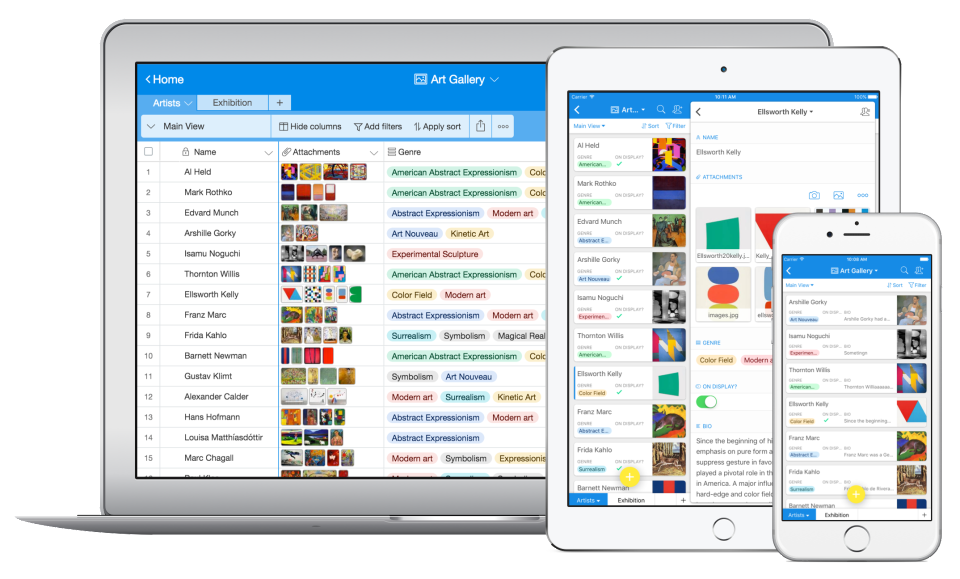
Airtable is a web-based application builder that combines spreadsheet usability with relational database architecture. The platform enables users to construct custom operational applications, configure automated workflows, and design tailored interfaces without traditional software development.
$24
per month per seat
Quickbase
Score 8.7 out of 10
N/A
Quickbase helps users tackle any project, no matter how complex. Quickbase helps customers see, connect and control complex projects. Whether it’s raising a skyscraper or coordinating vaccine rollouts, the no-code software platform allows business users to custom fit solutions to the way they work – using information from across the systems they already have.
$700
per month
Pricing
Adobe Marketo Engage
Airtable
Quickbase
Editions & Modules
Growth
Pricing based on database size.
per month
Select
Pricing based on database size.
per month
Prime
Pricing based on database size.
per month
Ultimate
Pricing based on database size.
per month
Team
$24
per month per user
Business
$54
per month per user
Enterprise
Custom Pricing
Enterprise
Full Customizable
per month/billed annually
Business
Starting at $2,200
per month
Team
Started at $700
per month
Offerings
Pricing Offerings
Adobe Marketo Engage
Airtable
Quickbase
Free Trial
Yes
Yes
Yes
Free/Freemium Version
No
Yes
No
Premium Consulting/Integration Services
Yes
No
Yes
Entry-level Setup Fee
Optional
No setup fee
Optional
Additional Details
—
—
Quickbase offers three key plans, with feature distinction, simple and consistent entitlements, and a flexible licensing model, giving users the option of either user based or usage based licensing across all 3 plans.
Airtable allows us to schedule out our planned social media posts for months at a time at no cost to our company. This is a distinct advantage over social media-specific tools we have used in the past. Currently, we use Airtable to plan our posts and Buffer to push them through …
Airtable beats these programs hands down!!! The two programs mentioned do not have the user-friendly interfaces available with Airtable. The learning curve is steeper with other programs. The graphics in Airtable are much crisper and relevant.
The other software I have used in a similar way would be excel or google sheets. Both allow collaboration in a spreadsheet or table format, but neither compares to Airtable at all. Airtable is easier to collaborate on and present. It is easier to teach and share and easier to …
We switched to Airtable and there are a few drawbacks that I immediately noticed with the new application. Airtable offers far less robust report-building options. Quickbase feels like the table-building aspect of Airtable but on steroids. Airtable is much faster to edit table …
When we started the process, we looked at Airtable. I think there's a couple of no-code platforms that we looked at, and I don't honestly remember. I had a consultant do a lot of that work for us and this was the one that was recommended.
Out of the box softwares come with out of the box assumptions that are difficult to mold your workflow to so companies generally adapt part of their workflow to how the software works and then when that fails revert to doing it outside of any system. Quickbase does the opposite …
Quickbase offered more flexibility, integrations, and performance better than any of the solutions we used or evaluated. While every solution has its merits, when you step back and look at the ROI and time to implement, Quickbase was a good fit for our organization. When you …
Adobe Marketo Engage is an excellent tool for hosting registration forms and sending out tokenized emails based on a particular person's information within your database. For example, if someone attends an event or webinar and indicates that they'd like to learn more about your product, then Adobe Marketo Engage can easily trigger a specific email template to that person that will be personalized with tokens about them. The pixel tracking that can be applied to any web page is also very helpful. If you want to focus on a more 1:1 type of follow up with a Lead, then the automated emails are not going to be as useful.
Airtable is an ideal platform for small and growing businesses to keep track of just about EVERYTHING they need to keep things running smoothly. It's a great way to keep tasks organized, and keep everyone on the same page with progress on all things. Our company finds the kanban particularly useful, as products go through a lifecycle from ideation to retirement, it's good to keep a database of what is in production, what's working, and what we've tried before. I can see the platform being challenging with much larger businesses, but for the small to medium businesses I've used the platform with, it is ideal.
I no longer think that Quickbase is the way of the future. They do not fix major bugs in a timely manner, and are releasing basic functionality behind a paywall. I believe that Enterprise Level Tier should be given certain things, like SLAs on Support and up-time. However, as a low-code no-code platform the majority of the accounts, "builders", and users are not going to be able to justify the cost of an Enterprise Tier Plan, and won't be able to use the features that Quickbase continues to advertise.
Adobe Marketo Engage excels at automating complex marketing workflows and delivering personalized customer experiences at scale.
Adobe Marketo Engage enables marketers to create targeted campaigns, schedule automated email sequences, and personalize content based on user demographics and interactions, resulting in more relevant customer engagement.
Adobe Marketo Engage provides robust analytics and reporting, allowing teams to track campaign performance, monitor conversion rates, and measure return on investment(ROI).
Airtable has capabilities commonly found in spreadsheet applications, but also has some of the features found in databases.
The ability to filter fields. I set up a filter on the status field, so when a project is marked, complete, on hold, or canceled, that record is hidden from my current projects table view. If it is marked complete, the record is moved to the completed projects table view. In this way I can easily access a record of past projects
Being able to duplicate tables and create alternate views
Collapse and expand records. When I collapse the rows, I can easily scan current projects, next steps, project status, and due dates. When I expand the row, or field, I can see more detailed information about that field or record very easily. I can also expand or open the entire record. This is is helpful, when I am entering a lot of information to multiple fields in that record.
I'd like to see a link on email notices that take you directly into said notice. On an app that only has 1 or 2 email notices firing, there's no issue. However, we have some tools that are so complex that they have about 20 email notices firing at any given time based on the action users take. In this case, if we have to go in to modify a notice, we have to guess or scroll down the long list of notices to see which one we need to customize. It would be great if Quickbase had the URL of said notice somewhere at the footer of that notice so when Administrators click on it, it takes them into the exact notice they need to update.
When filling out or reviewing a lengthy form, I'd like to see the Save & close button, as well as a Save & next option at the bottom of the form rather than having to scroll back up to the top of those forms just to click on those choices.
We will 10/10 renew the use of Airtable because it has brought great value to our team. Not only is Airtable affordable, but it's also user-friendly and helps our team be efficient. We no longer need to rely on Excel spreadsheets being passed from person to person via email. Furthermore, we aren't dealing with corrupt Excel spreadsheets and the need to salvage data when a file is accidentally altered.
For our use-case of QuickBase, there really aren't any other products out there that can offer us the same out-of-the-box solutions they provide to us. We're also so integrated with it in our daily processes that to move away from it abruptly would cause mass chaos, so it's going to be renewed for at least the next several years.
In some aspects, the tool can feel quite clunky in parts. But with the rich feature set it has, it's understandable. There is a lot of room for improvement for the user interface. The system itself doesn't have a slick or modern feel, so the usability could feel nicer to use with these areas considered.
IMO the usability of this product is its greatest asset. The UI is clean and the menus are intuitive to the point where I'd feel confident having a non-spreadsheety colleague take on building an Airtable for the first time with next to no training. I can't say that about every table-like software product that I've used such as Notion.
Quick Base has done everything we have asked it to do and then some. Our original goal was to have one system for CRM that encompassed both the sales process and the customer management. We have gone w-a-y beyond that with analytics, project management, system bug logging, and historical effort reporting.
Marketo provides different way and abilities to connect. If you are having product support or unexplained errors you can get someone on Marketo support 24 hours a day. One of Marketo's greatest assets in my opinion however would be the community. Often times our company is just looking for case success stories from someone else. In the community you can search for problems you are currently facing and see others having the same issue and solutions for those issues. If not, you can pose a question to the whole community and champions of the product and others can chime in to provide suggestions to fix your needs. The community is truly a 24/7 place to get your answers quickly.
I have rarely experience downtime, compared to other tools, and given how much time we spend on the tool. Even if there were to be, their updates on it are very timely, and our support team are able to provide any questions regarding
Once we did get Quick Base configured and customized it was reliably available when we needed it. We may have had one or two occasions when the product was inaccessible but those were few. The greatest challenge with its availability was its difficulty with integrating with our systems.
There are times when it is slightly slow for us, where we sit on a screen waiting for it to load. This could be our internet since we have had the same issue occasionally with other systems, but it is enough to make you crazy.
I never had any issues with load time, even with the integrations that we use today (google sheets) However, I'm curious if adding additional layers of integrations would slow down performance. We do carry quite a bit of data in Airtable, but, again, no impact on overall performance
Some of our tables that hold over a million records are starting to perform poorly, with some summaries taking over 20 seconds to load. This may be an indication that it is best to archive old data when reaching large volumes like this.
On multiple occasions we've had Marketo support (technical and license based) issues. Technical issues were minor and resolved within a day. License based issues (even things encouraged by Marketo for partners, like provisioning another license) took WEEKS. They actually took so long to respond that the client we were working with withdrew from the contract because they were no longer convinced Marketo was capable of supporting their business. As an agency trying to sell the software, you can only explain away so much before they just made us look silly.
Airtable has great support. They have a variety of support features to answer any questions. They have great self teaching instructions for templates and product tours. They also have support for teams and project management. They also have a fantastic customer help line. They are able and willing to answer customer questions and never have customers waiting long
If you utilize the community, the support is amazing. Unfortunately, I find their actual support system a bit underwhelming. They don't seem to have a great process for interacting directly with an issue and often sweep significant issues under the rug by categorizing them as "Enhancement" ideas or legacy items.
Our account rep stopped out in Lincoln, NE to ensure we were properly set up and running. This was very much appreciated. I was very, very new at this point, so I can't comment very much on the extent of what was taught because I was still brand new to the company and the system
I had never used Marketo prior to taking this job so online training was my starting point. I was able to follow along, it was interesting and quickly and efficiently taught me what I needed to know without a lot of fluff. It was far from boring and really helped me get my hands dirty with Marketo.
Recorded trainings were provided by the Airtable team. Great as an evergreen resources to new team members and for anyone that wants to refresh their Airtable knowledge
Quick Base already is having a separate portal of providing training to customers and it is very easy to use and updates as per the new features added in to the application
1. Have a content marketing plan to run in parallel with the marketing automation installation--you'll need a lot of content to make full use of Marketo's capabilities. 2. Work with sales (and ISRs) to define and document a workflow--build your Marketo installation around how you do business--not figure out how to apply your business to the tools 3. Spend time of data cleaning--both an initial project as well as a strategy for ongoing data management. We found some change manaement issues (no more appending ZZZ to the first name to identify contacts who have left the company, for example, or prohibiting the entry of "info@company.com" email addresses). 4. Find some champions in the sales and ISR teams. You'll have both fans and detractors--work with the fans to build some success stories
Training all users was an important part of the implementation, which did take considerable time and effort. At first glance without training, the content calendar can be overwhelming because of the amount of data. The features within Airtable seem to be endless but our team was able to identify the most important to be successful.
I was not directly involved with the initial account implementation, only a bystander. For the app I directly implemented for my department only, I wish I had know to create an app diagram first. I don't remember if that was suggested. I think that would be a great help tip tool when a new app is created, to have a page with a check list of what is needed or how to get started. If you are a regular app builder, then you can bypass it or have the ability to turn it off in the app settings.
Adobe Marketo Engage is one of the best email sending platforms I have worked with, because there is so much you can do on a lead scoring area and also then connect this to other platforms such as Salesforce. It allows for seamless reporting and working alongside sales colleagues. We chose Adobe Marketo Engage because it allows for more sophisticated audience segmentation and management of ongoing large scale nurture flows across a number of complex criteria.
Airtable was a really good fit for this specific use case as it provided a huge number of collaboration features in an intuitive and pleasant-to-use interface. The free tier worked initially with our work, and the upgrade pathway was fair and made sense for us.
Well, there's a plethora of low-code tools out on the marketplace and, you know, there's a reason that we've decided to partner with QuickBase because it has all the right balance of the ability to integrate with the ability for a citizen developer to create apps successfully. So if you look at something like Zo Ho's low-code offering, for example, yes, there are some similarities there, but they're really dependent on all of their other licensed products to get you where you want to be, where with QuickBase you have the ability to truly create something custom.
We look at scaleability in a few different ways. First, the speed while using Marketo has remained relatively the same as our database has grown. Though I would say Marketo is slow at times, it has not gotten slower over the last few years. If anything, it has improved, and they are working to improve it. Second, the amount of programs we have developed in Marketo has exponentially grown as well. Marketo has allowed us to drastically increase our output without having to drastically increase our headcount.
There are TONS of opportunity to scale, but I think it's a matter if you have the time and resources to do so because the initial setup can be fairly time consuming and prioritized dedication
It has evolved really well with our company, but there is a hard limit to the table size that has begun to affect us and not let us grow. The table size limit is set at 500 MB and we have had to jump through quite a few hoops to be able to get by.
Adobe Marketo Engage automation capabilities have reduced the amount of manual work required to execute campaigns, allowing our marketing team to focus more on strategy and customer engagement rather than repetitive administrative tasks.
The platform has helped us generate more qualified leads through personalized campaigns and lead scoring, enabling our sales team to focus on prospects with the highest likelihood of converting.
Through this platform, I always have the idea bout which of my team member is working on which particular part of the project, I can easily track their progress, and also I can easily correct them where it is required by adding sticky notes, by sending the attachments and URLs.
ROI is HUGE. Our company saved over 3.5 million in one year alone based on developments that year in Quickbase that saved time for many teams
Less user error - implementing automations and standardized workflows has led to less user error as was previously seen by maintaining spreadsheets or Smartsheets