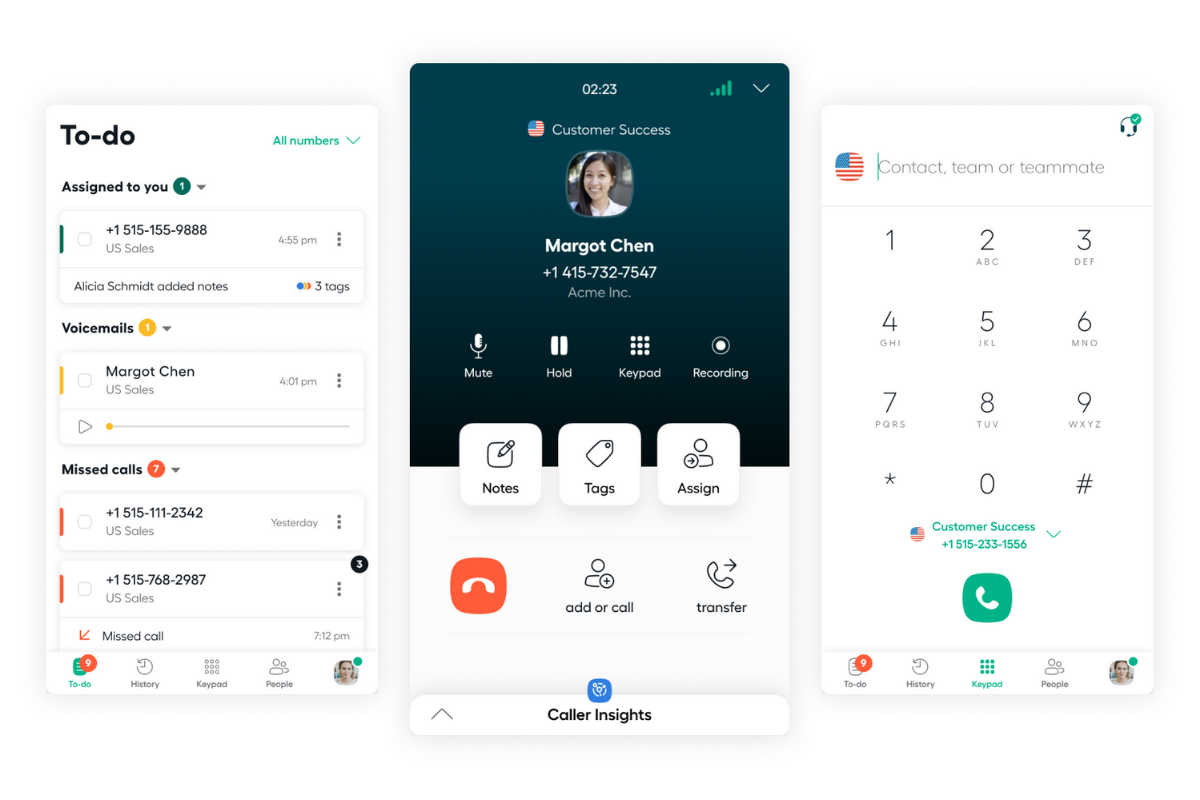
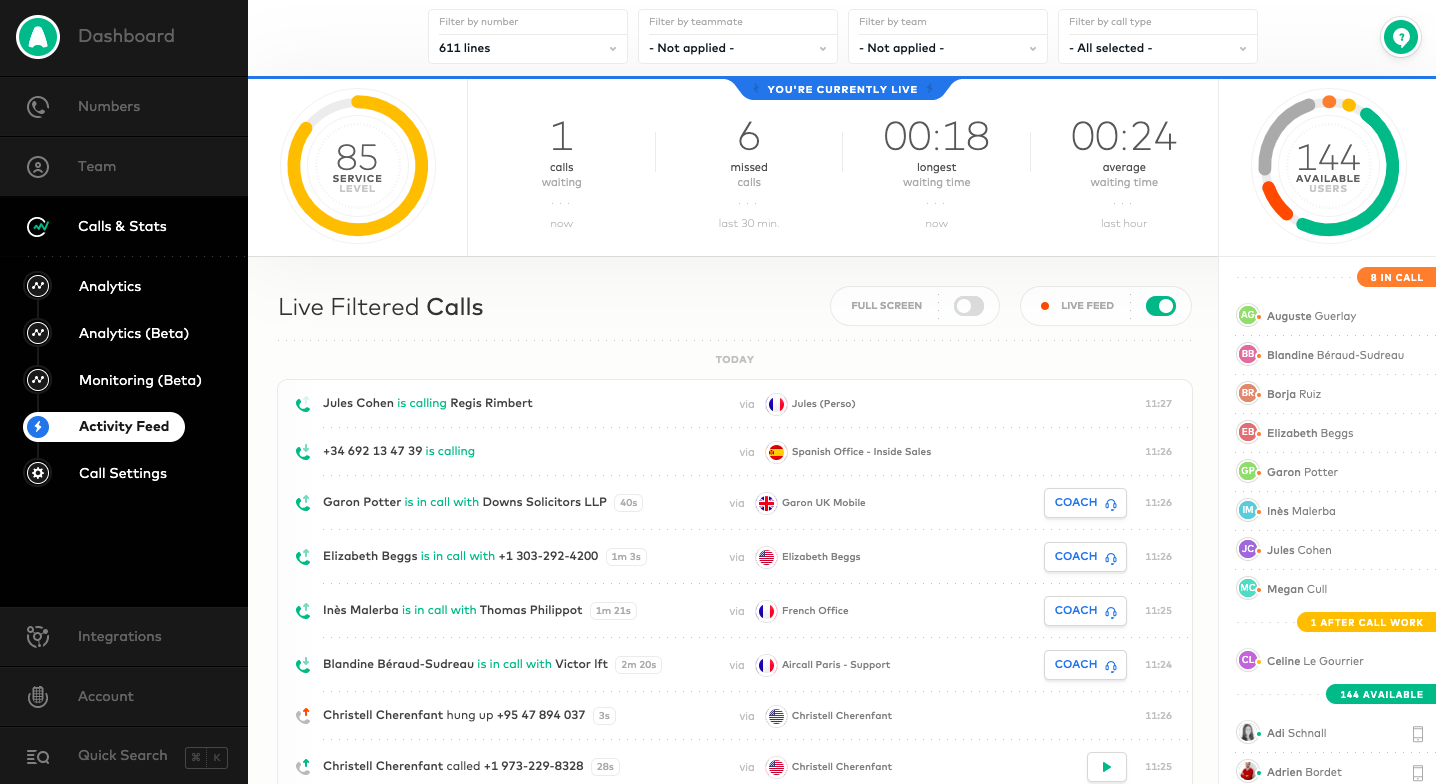
Aircall headquartered in Paris provides a VOIP system for business designed to support contact centers, featuring IVR and automated call routing, conference calls, shared call inbox and call notes, unlimited concurrent calls and call queuing, and many integrations with CRM or marketing systems to support a variety of support or sales purposes.
$120
per month for 3 licenses (minimum)
Fuze
Score 7.4 out of 10
Enterprise companies (1,001+ employees)
Fuze is a cloud-based unified communications platform that includes IP PBX voice service, video conferencing, and collaboration tools such as content sharing and instant messaging capabilities. It also integrates with a wide range of popular CTI, CRM, and click-to-call solutions.
$15
per month
Slack
Score 9.0 out of 10
N/A
Slack is a group messaging or team collaboration app that aims to simplify communication for businesses. Features include open discussions, private groups, and direct messaging, as well as deep contextual search and message archiving, and file sharing. Slack integrates with a number of other tools, such as MailChimp, Dropbox, and Google Drive. Slack was acquired by Salesforce in December 2020.
The product is free to use, and also has paid plans with more features and greater controls.
The…
$8.75
per month per user
Pricing
Aircall
Fuze
Slack
Editions & Modules
Essentials
$40
per month per license
Professional
$70
per month per license
Custom
Contact Sales
25 license minimum
US Outbound
$0.02
Per Minute
Fuze Meetings
$15
Per User/Per Month
Free
$0
Pro
$7.25*
per month per user
Business+
$12.50*
per month per user
Enterprise
Contact Sales
Offerings
Pricing Offerings
Aircall
Fuze
Slack
Free Trial
Yes
No
Yes
Free/Freemium Version
No
No
Yes
Premium Consulting/Integration Services
Yes
Yes
No
Entry-level Setup Fee
Optional
Required
No setup fee
Additional Details
Discount available for annual pricing.
—
*Per active user, per month, when paying once a year.
Pro is $8.75 USD per active user when paying month to month. Business+ is $15.00 USD per active user when paying month to month.
I am not the right person to answer this because I don't make the purchase decisions within our company. I have worked with several companies, and every one of them has their tools. I particularly liked Aircall among all of them because of the different reasons I have already …
We have used Aircall for so long that I cannot remember the name of the company we were using beforehand. I remember that we did make the switch to Aircall because the connection was stronger. We often had call quality issues with the other guys. While this does occur every now …
Groove was easily integrated with Salesforce CRM and meant that certain administrative tasks were a lot easier and less time consuming to do. The standalone dialer application (Windows) is easier to use than the Groove dialer, and uses far less resources. The addition of …
Teams and Slack where our predecessors to Fuze. Fuze is miles beyond both because the others lack the BPX integration to make them fully-featured. Teams did have a cleaner interface, and Slack did have a better team chat with replies and grouping. Overall, I think the loss of …
They all have different usages, Fuze makes it feel like we are using a phone even if we use it from our laptops. We also wanted to have one centralized VOIP system, for example, we have Webex as our meeting system and Slack as our instant messaging system. Definitely much …
Fuze does not stack up against NVM or Five9 at all. Fuze is such an inferior product to NVM. inContact and Serenova have great platforms as well but I haven't used them first hand yet. All these other plaforms plug into Salesforce well as Fuze does not. Fuze needs to …
We wanted to replace the legacy PBX systems across all US regions & we found Fuze is really interesting because of the cloud-based subscription-based model solution. We wanted to bring some change to our user to upgrade it to the next level & we found Fuze is very innovative …
Overall, Fuze is better organized, easier to navigate and faster to get up and running that GoToMeeting was. I strongly prefer Fuze from both an end user and also administrators perspective.
Our final selection came down to Fuze and RingCentral as the two vendors who met most of our organization's specific requirements. In the final selection it was a combination of Fuze's single user application format and their overall pre-sales handling of our account that won …
Having had a lot of experience with Google Chat and Teams, Slack is far and away the better option.
In comparison to Teams, Slack is much cleaner with a far more user friendly AI, Teams is far too clunky and feels tiresome to use, whereas it is super easy to pick up Slack and …
Aircall is a great fit for any SaaS organization for sales and support groups. Since I come from sales, I cannot talk about support, but for the sales team, it's a great help. It's intuitive and user-friendly. No need for formal training as it's very easy to access all the features you need. I particularly like the option of taking calls on my mobile phone while I am away from my desk or traveling, and also how I can easily manage my working hours and schedule. I also like its ability to interact with different CRMs and other useful tools like Slack, etc.
Fuze has way more capability than we need for our small office so it might be best suited for large installations, call centers, and complex environments. Our office is small and our needs [are] minimal, so when we need support we are challenged to understand the support person due to our lack of technical sophistication. We sometimes feel like we should switch to a solution more geared for consumers or SOHO. Nevertheless, Fuze provides reliable service at [a] reasonable cost that meets our needs, and because support is rarely needed we are happy with them most of the time, i.e. when support isn't needed.
Slack is great for tracking commits to new coding projects. You can take parts of code that still need to be implemented later and easily search through the history of comments if there is something that goes wrong with a code commitment. It can be difficult for people that only like Teams to adjust to a new platform if you are using both to communicate.
Aircall's integration with HubSpot is fantastic. I can call from anywhere in HubSpot and know that my call is logged automatically. During my call, I have easy access to a contact's record and can pull up any information I need in just the click of a button. The only limit I've found is that it doesn't (yet?) auto-log to tickets. This seems to be pretty common among other integrations so it wasn't seen as a con in our buying decision.
I really like the Aircall dashboard and being able to customize who has access to what number. We even have the ability to give outbound calling privileges only to certain team members. It's also great that you can set up each individual number's answer tree to ring to the correct person.
There's a lot of cool features that don't make sense for our particular business, but I think Aircall's metric tracking and coaching abilities would be really useful for a lot of teams. I remember in my first call hearing about a feature where a manager can listen in and "whisper" tips to a rep during a call that only the rep would be able to hear. I can see how this would add value in a coaching situation.
Support Team - the best I have ever worked with. They help 24/7 on any issue I could come across. Usually it is an item I could fix myself and they fix it and show me how to fix the same issue if I have it in the future.
Contact Center - We do Commercial Collections involving Sales and Collections. We have 50 people on the phone at one time. Contact Center lets a Manager listen live and gives help if the rep needs help selling or collecting.
Pandemic 2020 - without Fuze we would have been unable to work for 3 months. They saved our "rears" since we already had all their services up and running for years.
No feature to update more than one phone line at the same time
Admins don't have access to the timeline of a call to see with which agent it rang
Missing agent-specific stats when your phone lines are organized in teams
If calls are setup to ring to a first group and then a second, if the whole first group is already busy, it does not go to the second group but puts the customer on hold
Would love a better integration with GitHub. For example, notifications when your PR is updated, when review is requested, @-mention in comments, etc.
Improved "Later" tab, for example the ability to create to-do lists or making the "Later" tab into a more powerful to-do list (annotate items with notes)
More powerful integrations, e.g. Google Calendar could render a calendar view within Slack, rather than sending the daily schedule
I give this rating as aircall is very easy to use but also lacks a parallel dialing feature which makes it slower to use. aircall has a pretty seamless integration with salesforce which is helpful. For the cost it is definitely very reasonable but it also lacks a live coaching/listening feature which is very valuable as a manager.
Fuze is a solid application that is a great asset to the business for our sales staff to make daily calls to clients and candidates. Managers can monitor call data and times to keep up to date with team performance, as well as monitor calls for users on their team. The Fuze/MS Teams integration is an exciting prospect that would be very beneficial to us as a business, for seamless integration between the 2 platforms.
To be more transparent, I give 10 because Slack serves our collaboration needs. It provide us a good platform for team communication relaying important update within the company, it has even mobile app where you can install in your phone to monitor any updates within that team that needs your immediate attention and intervention.
I provide this rating based on my overall experience using Aircall. I have used it on my previous company as well and that being said, it is a proof that Aircall is a great tool to use in contact centers and with B2B businesses that has direct communication with clients.
Fuze was built with the end-user in mind. It was built to have a common interface on mobile and desktop. Fuze Web is new, and it also has the exact same interface as the desktop and mobile, and they are still working on the ability to make phone calls from the browser itself, currently it can do meetings just fine. Everything about Fuze was built with the end-user in mind.
My rating was 7. Its intuitive interface and user-friendly features like channels, threads, and integrations make it excellent for team communication and onboarding. However, its usability is held back by the resource-intensive desktop app and cluttered feeling in large workspaces. The mobile app's performance and unreliable notifications have also been noted as weaknesses.
We've had a few outages over the past year. More than other vendors I've used. They usually have outages fixed within an hour. The downside is they do not provide root cause of outages. If they do at takes them at least a month to get it to you
Yes, the app works 24/7. I don't even recall having any period that we could not use since the implementation. Even the maintenance periods are barely noticeable and our work is not impacted by it when it happens.
Since Fuze runs across multiple devices and platforms they really strived to make a lightweight interface that is optimized for phone calls, chat, and collaboration. The web client loads fast, the chat is always up-to-date, phone calls arrive on-time. The desktop client is the most feature rich and basically it just adds desktop sharing functionality as well as VoIP for calling, and the mobile client doesn't consume a lot of battery, and it stays running to get phone calls, chats, and can do meetings over Wifi, Cellular Data, or Cellular voice.
Slack is a soft app, we don't have many issues with it. I recall one or two people complaining about something during our usage period, but I didn't have a bad experience. When the app is slow, usually the problem is with my computer or my internet. The app works just fine.
We've enjoyed using Aircall so far and have had no issues with it. The platform is easy to use, looks nice, and makes it easy to keep track of everything.
Our experience with Fuze support has been overall very positive. Their technicians seem to be well trained and able to handle a variety of requests and issues without unnecessary delays or extensive troubleshooting. Fuze allows enough customer access to avoid the need to call support for every little issue but is ready to assist when issues are beyond our capabilities to resolve.
Whenever I've had to troubleshoot an issue with Slack (which, to be honest, has not happened very often), their online documentation has been easy to locate, easy to understand, and effective in resolving my issue. Slack's ever-growing popularity also means that there's a large community of practice out there that can be depended upon.
At many of our sites with more than 50 users, Fuze sent someone onsite to train. This worked surprisingly well, as the trainer allowed the users to set the pace and answered TONS of questions. Fuze has a very streamlined training process, their staff is very professional, very knowledgeable and very engaging.
Fuze has vast amounts of training videos and guides on how to use its products and services. There are literally endless-hours of training and I often point end-users to a particular video which addresses the specific needs of the user, for example: how to check voicemail. Or, how to share your desktop, etc.
Personally, I didn't have any trouble getting started with Fuze. It was installed on my computer on my first day and I was good to go! Little to no hiccups. I was not with the company when they first adapted Fuze so I can not speak to the implementation as a whole.
We used to answer phone calls on our fix line when at the office. The quality was very bad but we had in mind that a VOIP solution would be too expensive. When lockdown began last year, I had to redirect calls on my own mobile phone which was not efficient. Also I couldn't receive voicemails, have a history of calls or choose working hours.
Fuze was far more expensive and more complicated to set up. Our current platform took a few days to set up with SSO. Our contact center took a bit longer but works amazingly.
I like Slack better than ClickUp, because I would spend 30-60 minutes a day updating my ClickUp tasks. The way ClickUp was used was very micromanaging. I billed by the hour, so I was willing to put in the time to alert the boss what tasks I was working on.
One of my jobs used Hive - I mostly just ran it in the background in case anyone messaged me. I did not use it often.
Fuze does have scalability limits but most of that is how many end-points they can put on a virtual PBX, or VCX as they call them, I THINK its limit is somewhere between 2,000 and 5,000, but we've not had issues with that because we have put users into various VCXs some by location, some by department or function. Either way, we have 7,000 currently deployed, and are going to end up with over 15,000 when we are done, Fuze is VERY scalable.
Because of the lack of local partnerships with South African telecoms companies, calls to South Africa is very expensive. This was not originally apparent when opening the Aircall account.
Not having the option to display a local South African number in the CLIP, means that people are not always eager to pick up the phone when they see an overseas number ringing.
The only positive impact has been the collaborative experience and being able to maintain a virtual office
Slack has been incredibly helpful in connecting various tech apps and ecosystems, creating a more streamlined and responsive process.
Slack has made it significantly easier to communicate with our team members across multiple time zones, creating a more engaging environment for our all-remote team.