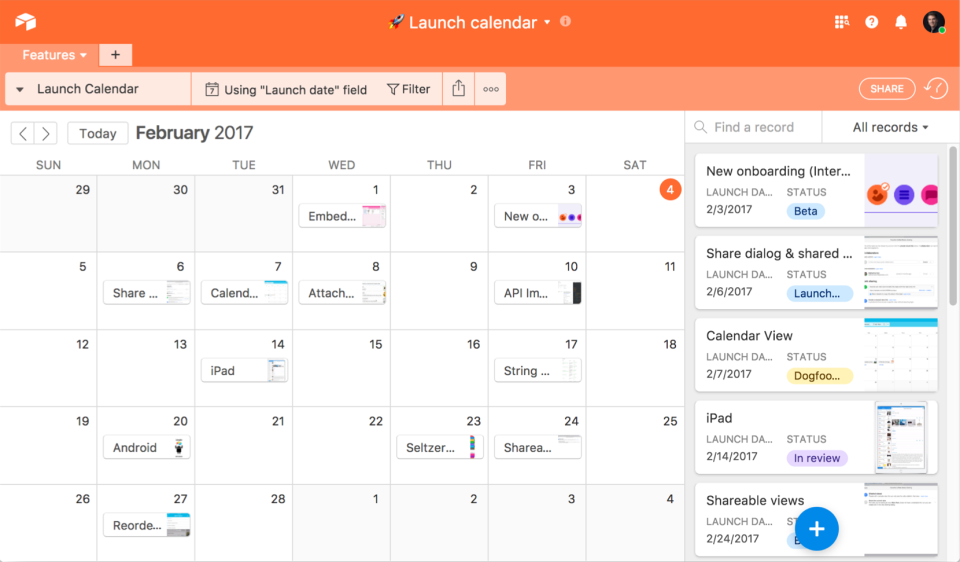
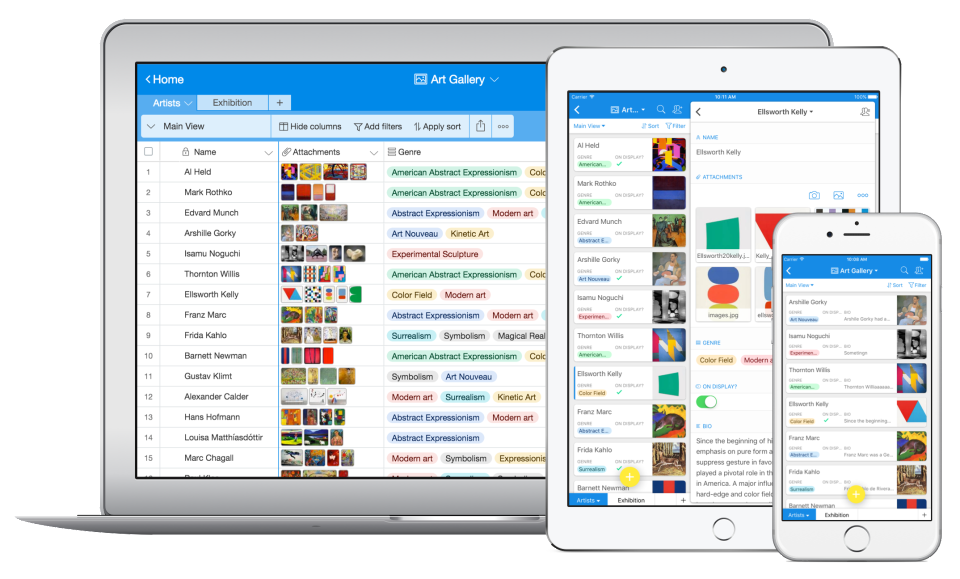
Airtable is a web-based application builder that combines spreadsheet usability with relational database architecture. The platform enables users to construct custom operational applications, configure automated workflows, and design tailored interfaces without traditional software development.
$24
per month per seat
Asana
Score 8.5 out of 10
N/A
Asana is a web and mobile project management app. With tasks, projects, conversations, and dashboards, Asana lets an entire team know who's doing what by when, enabling workload balancing. Users can also add integrations for GANTT charts, time tracking and more.
$13.49
per month per user
Planview PPM Pro
Score 9.0 out of 10
Enterprise companies (1,001+ employees)
Planview PPM Pro™ centralizes the management of projects and resources, facilitating governance, and providing visibility for improved decision making. Whether users are just getting started or advancing PMO to the next level, Planview PPM Pro is designed to provide the ability to collect, prioritize, and execute projects, enabling PMOs to focus resources on the work that delivers the most value.
N/A
Pricing
Airtable
Asana
Planview PPM Pro
Editions & Modules
Team
$24
per month per user
Business
$54
per month per user
Enterprise
Custom Pricing
Starter
$13.49
per month per user
Advanced
$30.49
per month per user
Enterprise
Contact Sales
Personal
Free
No answers on this topic
Offerings
Pricing Offerings
Airtable
Asana
Planview PPM Pro
Free Trial
Yes
Yes
No
Free/Freemium Version
Yes
Yes
No
Premium Consulting/Integration Services
No
Yes
Yes
Entry-level Setup Fee
No setup fee
Optional
Optional
Additional Details
—
A discount is offered for annual billing.
PPM Pro offers flexible pricing based on user types.
I enjoy using Asana for task lists, but I don't love the mobile app and I didn't get the most out of it since my projects are usually not collaborative. Smartsheet has a good gantt chart tool, but the UI is terrible and it isn't as dynamic as I'd have liked. Airtable combines …
Content Marketing Manager (Previously Manager of Creative Services)
Chose Airtable
We do use Social Studio and Sharepoint for other tasks, but for project planning across a wide variety of deliverables, there wasn't enough flexibility all the time. Asana was harder to use and get into and didn't provide an easy way to adjust views/sorts.
Airtable vs. Asana: Asana is for task management; Airtable is for data management. The difference between the two is important. Asana is NOT for long-term data storage. It does have more integrations with other apps, but if you're looking for a pure database, Airtable is the …
There's a load of free functionality available with Airtable, so it's less expensive. It's also way more intuitive and user-friendly compared to Insightly. As for Asana, I don't need that level of team collaboration at the moment, but I like that I can share whatever I create …
Airtable has a nice mix of all of the heat features found in both Trello and Asana. I find Airtable to be a bit more attractive than Asana. Although that's mostly cosmetic, I find that visual appeal is imperative to use experience and increased productivity.
As a whole, we elected to fully implement Airtable because of the vast amount of features and access controls for each user. Also, each user can create their own base and tie each one to the main Airtable base so teams can take an even deeper look into each project (with …
Asana can somewhat be used for this purpose as you can track clients by making each of these subtasks. However, you will not be able to compile all of these on one sheet like in Airtable. With the latter, we can download this as a CSV file and analyze it in Excel or put it in …
Airtable is as powerful, if not more than these competitors. It has a simple interface like Asana or Trello but has robust data functions and tracking of Jira or ShotGrid (now called Flow). While I haven't found it as profoundly integrated as Jira, Airtable feels much more …
Airtable is the most user-friendly and adaptive. It's UX/UI is the most aesthetically pleasing (which matters a lot if its what you're staring at every day), and the customizability of having different views and perspectives of the same record is extremely helpful.
Airtable beats these programs hands down!!! The two programs mentioned do not have the user-friendly interfaces available with Airtable. The learning curve is steeper with other programs. The graphics in Airtable are much crisper and relevant.
Airtable stack up against major market competitor tools as it provides a unique way of representing data in the form of spreadsheets, which is very easy to understand, and anyone can efficiently work on it. Also, its hybrid cloud provides enough data security. The unique …
Airtable was the preference of choice of the client we were working with so there wasn't much we could. However, internally we still utilized other options as Airtable was very cumbersome to use and took a while to find what you were looking for. The interface wasn't very easy …
Wrike is a very good platform for project management, however, it focuses more on marketing work which is not negligible, but for us it has worked better to manage with Airtable because it is made to manage projects using the primary information of the company that is none …
When using SQL database, there was no simple way to create tables and fields. It took time and a dedicated database administrator to take care of the database and updates.
For Airtable, you can easily create tables and fields. Tables can be deployed within minutes. Data can be …
Airtable is much more user friendly than Smartsheet in my opinion. Though Smartsheet has a lot of functionality as well, it comes off as cold and technical. Airtable is fun to use, and kind of addicting to be completely honest. I've also tried Sheets instead of Airtable, but …
I am very familiar with FileMaker Pro. I grew up on FMP. But unless you "grew up" with FMP, the learning curve for newbies is really steep. Also, we are a very small, start-up nonprofit and Airtable not only fits our immediate needs but it also will allow us to grow into the …
We need more light tools right now for PM, so big products aren't a fit. We looked at other smaller products/players but none have nearly the features and ease of use as Airtable. Airtable has more flexibility in its views (Kanban plus Grid, Calendar view, named custom views, …
It wasn't until I became aware of Airtable that we found a solution that allows us to implement the best features of a collaborative RDBMS with our staff who don't have any training. I had previously used Zoho Creator and found that it was difficult to onboard new users because …
I don't think there is a comparable product. Nothing I have seen is as intuitive to use and at the same time has such broad-reaching potential. I feel confident to onboard who have never seen Airtable only because it is so easy to use. At the same time, I feel we could spend …
Excel is only good for numbers, not words or relational database. Access is too complicated for a total novice to build databases from scratch. Task trackers and project planners like Asana have limited functionality.
We “beta” tested several softwares across our company. Asana was a great fit for our small corporate team. But when we rolled it out company wide, it didn’t stick. We eventually ended up using Airtable - which has worked out well for us.
Asana is amazing for a remote team, that we are currently as its accessible seamlessly to all our team member no matter where they are in the world. Its very easy to onboard new members to this platform as its very intuitive and easy for new people to get a hang of it. It has …
A few of our other teams at the office use these other programs and they work great for them! However, as a team that is trying to integrate two parallel services, it's incredibly important for us to have visibility into what the others are doing at a high level. This helps …
Asana has a task list, Trello doesn't. Asana has different views, Trello only has one. The Asana mobile app is amazingly easy to use. Trello can be confusing for some people. Trello is free for unlimited users, Asana requires payment for more users and integrations. Trello also …
Asana has a due time feature. While Trello, for example, is cheaper and looks much more simple, it does not have the time aspect. People work better when given deadlines and if you want to track your progress from the main deadline, for example, you will need timestamps to do …
There were a combination of factors that led us to decide on Asana, including ease of use and external system integrations, but primarily we could use it across geographically distributed offices successfully and incorporate a variety of end user work flows based on global …
Airtable is an ideal platform for small and growing businesses to keep track of just about EVERYTHING they need to keep things running smoothly. It's a great way to keep tasks organized, and keep everyone on the same page with progress on all things. Our company finds the kanban particularly useful, as products go through a lifecycle from ideation to retirement, it's good to keep a database of what is in production, what's working, and what we've tried before. I can see the platform being challenging with much larger businesses, but for the small to medium businesses I've used the platform with, it is ideal.
The usability of Asana is broad since it's available in a variety of platforms that are widely used nowadays. I think that it would be great for people who are constantly on the move and switching devices, since it has allowed me to work from my phone, too. I also think that Asana has proven itself to handle a large quantity of work
PPMPro is well suited for tracking new product introduction projects, as well as process changes. It serves to reliably track ongoing action items, issues, resource allocations for projects. Areas where PPMPro is less appropriate for use: Project to project dependencies, automating action item notifications on multiple platforms, integrations of PPMPro into other platforms PMO typically uses (like MS Projects, Teams, ppt, etc)
Airtable has capabilities commonly found in spreadsheet applications, but also has some of the features found in databases.
The ability to filter fields. I set up a filter on the status field, so when a project is marked, complete, on hold, or canceled, that record is hidden from my current projects table view. If it is marked complete, the record is moved to the completed projects table view. In this way I can easily access a record of past projects
Being able to duplicate tables and create alternate views
Collapse and expand records. When I collapse the rows, I can easily scan current projects, next steps, project status, and due dates. When I expand the row, or field, I can see more detailed information about that field or record very easily. I can also expand or open the entire record. This is is helpful, when I am entering a lot of information to multiple fields in that record.
Through it, we were able to communicate and cooperate with the rest of the team to complete the work in the required manner and at the appropriate time.
New request workflow/kanban board helps visualize where new requests are in the process of the quote to cash/request to completion
The time tracking tool is tied directly to project tasks for seamless integration of time tracking, estimates, and actuals
The reporting capabilities and ease of use has allowed us visibility to data that we never had before
The tool is easily configurable by Administrators. We can add fields, change reports, add new dashboards within hours vs. days of trying to track things manually
The base API is not a REST based interface and is difficult to use for integration with other systems in the enterprise.
The UI for the maintenance of the task schedule for projects can be a bit cumbersome , although the spreadsheet style editor helps somewhat. The Gantt view is not interactive.
The workflow engine is designed only for initial project intake, and does not allow for an integration of the work flow with the project from start to end, so it can't be used for routing artifacts like change requests, ancillary project approvals, etc.
We will 10/10 renew the use of Airtable because it has brought great value to our team. Not only is Airtable affordable, but it's also user-friendly and helps our team be efficient. We no longer need to rely on Excel spreadsheets being passed from person to person via email. Furthermore, we aren't dealing with corrupt Excel spreadsheets and the need to salvage data when a file is accidentally altered.
Because I never evaluated other tools, I would be open to considering others. Given our establishment with Innotas and the value it has provided us, separating from it would cause some organizational discomfort. However, if a tool existed with a more intuitive interface for manipulating the data and factors of projects and resources, I would be very interested.
IMO the usability of this product is its greatest asset. The UI is clean and the menus are intuitive to the point where I'd feel confident having a non-spreadsheety colleague take on building an Airtable for the first time with next to no training. I can't say that about every table-like software product that I've used such as Notion.
It is very user-friendly. Takes a new employee an hour to start figuring out how the system works. That's an important factor. You don't want to encounter the issue where employees need a week to understand how the system works. For example, JIRA, I tried using it for a week and I still don't understand the complicated layout. Asana has a simple interface. Once you see it, you get it type of program.
PPM Pro has very effective process capabilities around Project, Demand, and Resource Management as well as Reporting/Dashboards. Very stable platform, never any downtime. We now also have PPM Pro Sandbox which we have leveraged for any new major developments such as Request Management.
I have rarely experience downtime, compared to other tools, and given how much time we spend on the tool. Even if there were to be, their updates on it are very timely, and our support team are able to provide any questions regarding
I never had any issues with load time, even with the integrations that we use today (google sheets) However, I'm curious if adding additional layers of integrations would slow down performance. We do carry quite a bit of data in Airtable, but, again, no impact on overall performance
No issues with overall response time and performance. There have been some occasions where a Report could take few minutes to render but this is vary rare. No integration issues...
Airtable has great support. They have a variety of support features to answer any questions. They have great self teaching instructions for templates and product tours. They also have support for teams and project management. They also have a fantastic customer help line. They are able and willing to answer customer questions and never have customers waiting long
I haven't had to use their support so I can't rate it. The fact that I haven't needed them reflects the ease of use of the product. I would recommend that any new users schedule a complete demo of the product to ensure that they are using it to it's fullest (there's a lot of useful features).
Their ability to assist and answer questions when needed is incredible. They create innovative ways to share information and help customers trouble shoot. I didn't give it a ten because I believe they could do a better job of personally reaching out to customers and providing improvement guidance based on where the customer is at and their needs at the time
Recorded trainings were provided by the Airtable team. Great as an evergreen resources to new team members and for anyone that wants to refresh their Airtable knowledge
Training all users was an important part of the implementation, which did take considerable time and effort. At first glance without training, the content calendar can be overwhelming because of the amount of data. The features within Airtable seem to be endless but our team was able to identify the most important to be successful.
Airtable was a really good fit for this specific use case as it provided a huge number of collaboration features in an intuitive and pleasant-to-use interface. The free tier worked initially with our work, and the upgrade pathway was fair and made sense for us.
Asana is a top-tier project management software that helps us organize and track projects from start to finish. It allows us to apply tasks/to-dos to multiple projects without duplication, divide complex projects into smaller tasks, and track project progress. It also helps us organize work on Kanban boards or linear lists. It stands out from the crowd in a big way compared to the competition.
Microsoft Project does not integrate the data or provide meaningful dashboards. We needed a tool that could manage a portfolio of projects versus just a single project view. In addition we needed a tool to track financials and internal effort all integrated into one product. Planview PPM Pro addressed all of our needs
There are TONS of opportunity to scale, but I think it's a matter if you have the time and resources to do so because the initial setup can be fairly time consuming and prioritized dedication
We have always used PPM Pro across multiple Business Units and Business Functions and have never encountered any scalability issues. PPM Pro offers flexibility in how the various Entities are configured across the Enterprise
Very effective and flexible - we obtained a pool of consulting hours that we can use at any time over 12 month period. Consulting topics can vary as we explore new functionalities in PPM Pro. Very easy to schedule ad-hoc time with PPM Pro consultant
Through this platform, I always have the idea bout which of my team member is working on which particular part of the project, I can easily track their progress, and also I can easily correct them where it is required by adding sticky notes, by sending the attachments and URLs.