Overview
ProductRatingMost Used ByProduct SummaryStarting Price
Backlog
Score 8.7 out of 10
N/A
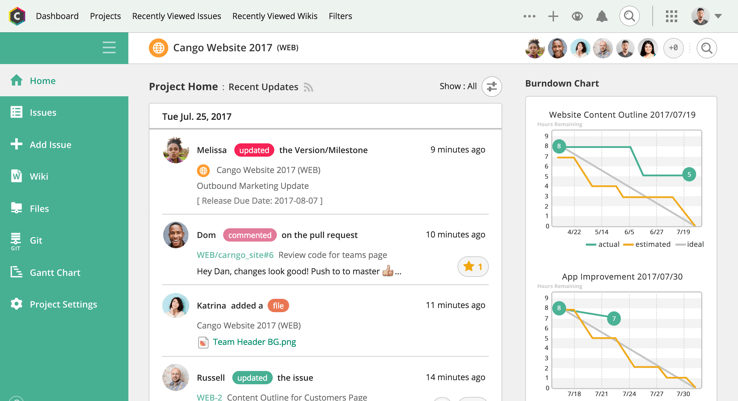
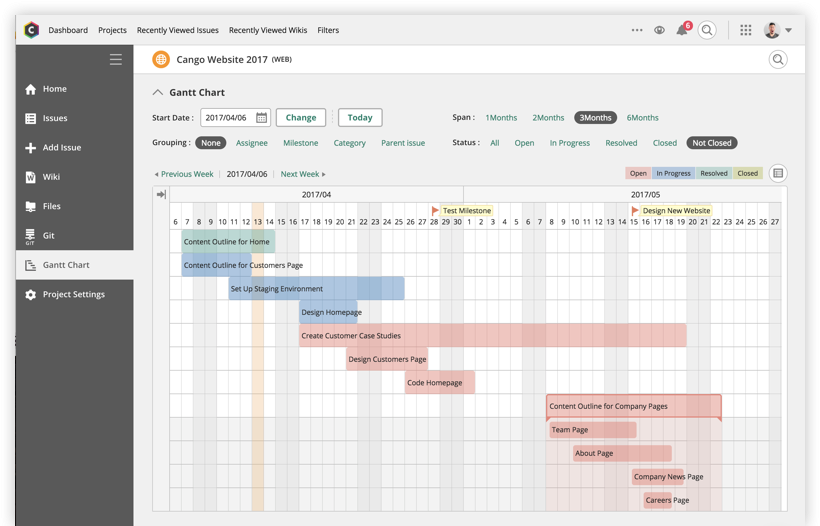
Backlog is a project management and bug tracking tool for teams that want higher productivity, greater visibility, and simple project tracking. Development teams can work together with Design, Marketing, IT, and more. Backlog is designed to get everyone on track by organizing work, teammates, projects and tasks. The activity feed and watchlist are designed to help users keep an eye on relevant work and deadlines. Gantt charts and burndown charts are designed to help users visualize project…N/A
Basecamp
Score 8.7 out of 10
N/A
Basecamp is a web-based project-management tool. Basecamp offers features standard to project management platforms, as well as mobile accessibility, unlimited users, and 3rd party integrations. Basecamp is priced by space requirements and concurrent projects.
$15
per month per user
ClickUp
Score 8.6 out of 10
Small Businesses (1-50 employees)
ClickUp is a productivity platform that brings together work apps, data, and workflows. Also presented as a Converged AI Workspace, ClickUp eliminates work sprawl to provide context and a single place for humans and agents to work together. The platform currently boasts over 20 million users worldwide.
$0
per month per seat
Pricing
BacklogBasecampClickUp
Editions & Modules
No answers on this topic
Basecamp Plus
$15
per month per user
Basecamp Pro Unlimited
$299
per month (billed annually)
Basecamp Free
Free
Limited Capabilities
Unlimited
$10
per month per user
Business
$19
per month per user
Enterprise
Custom
Offerings
Pricing Offerings
BacklogBasecampClickUp
Free Trial
YesYesYes
Free/Freemium Version
YesYesYes
Premium Consulting/Integration Services
NoNoYes
Entry-level Setup FeeNo setup feeNo setup feeNo setup fee
Additional DetailsDiscount available for annual billing.
More Pricing Information
Community Pulse
BacklogBasecampClickUp
Considered Multiple Products
Backlog
Basecamp
Chose Basecamp
Basecamp if far simpler than ClickUp. We use ClickUp to manage our internal task management, as it provides more customization, additional views and more room for extreme detail in tasks. We used Basecamp for clients because of its simplicity and ease-of-use. Basecamp requires …
Chose Basecamp
I've also used ClickUp and Asana. My personal favorite is ClickUp although it is limited in how it integrates with Slack which caused me to switch to Asana. ClickUp has a ton of features, including on their free plan and in my opinion is much better than Basecamp. Asana is …
Chose Basecamp
in my opinion, it is Inferior, clunky, ugly product as compared to the others. I only selected Basecamp on recommendations from someone else who was using it, and have moved on to ClickUp. This Basecamp app failed to notify myself, my teammates and the client so many times, …
Chose Basecamp
Trello is less expensive and the free version works pretty well. For the paid version, Trello is also a really great tool. Overall, I do like Basecamp better. It's a more simple layout and structure to the software. I like the communication threads better on Basecamp. Trello
Chose Basecamp
Basecamp is probably my least favorite. As a project manager, I'm always auditing our workflow and processes, so I try to run at least trials of project management software to get a feel for if they would help us do things more efficiently. I struggled the most with Basecamp.
Chose Basecamp
Basecamp is simple to understand, easy to use, and does not come with the bloat and complications of a solution like Teams. It is certainly more organized and easy to follow than simply having a group chat on Slack and Viber. If you need to easily find information, it can be …
Chose Basecamp
There is a simplicity that basecamp offers where most other project management systems seem to miss. They've worked hard at keeping the right things in place and not adding so many of the extra features that just get in the way of getting work done. The thing I liked most …
ClickUp
Chose ClickUp
Basecamp: ClickUp far outshines Basecamp in a number of ways, with the primary way being the innate flexibility of the platform. Basecamp has a much easier onboarding experience, but the ceiling of the platform is much lower. ClickUp can simply do more. Slack: ClickUp does not …
Chose ClickUp
Basecamp was a preferred product for resource management, but did not allow for the project management that comes with ClickUp.
Chose ClickUp
ClickUp captured all the best features from all those tools. The hierarchy beats them all. In Basecamp, Trello and Asana, you have to check each board or project to see what is happening there. The Butler automation in Trello does not match what ClickUp can do. Airtable is …
Chose ClickUp
We were limited with the way Basecamp was designed. ClickUp allowed us to fully customize the experience to fit our needs. This also helped us be able to identify projects with a unique number/letter sequence, which helped us to better archive completed work on shared servers.
Chose ClickUp
Prior to ClickUp, we were using another project management software (Basecamp) but things were never centrally organized. ClickUp has allowed us to locate all of our work in once place and put all of the details for every project in one, unified location. We don't have to …
Chose ClickUp
ClickUp Compared to like an Asana or Trello - it's ClickUp Hands Down! ClickUp gives you so many more features and tools to use that will help get and keep your teams on track. Your clients and staff will all be super happy once implemented.
Chose ClickUp
ClickUp works best as a central project management tool.
Chose ClickUp
I personally think ClickUp has the best flexibility and user interface of any similar programs i have used.
Chose ClickUp
Throughout my career, I have used at least a dozen different project management platforms and tools for keeping projects moving along. While I have used project management tools from some impressive names, I found that most of them weren't very impressive at all. In so many …
Chose ClickUp
Pricing. They simply can’t be beaten for what they offer.
Chose ClickUp
It has a friendlier interface, increases the number of available features, and is supported by integrations with third parties to meet all needs from a single platform. On the other hand, it is multi-device, and its tool for mobile teams offers everything that is needed to keep …
Chose ClickUp
It's give and take. ClickUp has some features that the others don't but it is also something that requires more education to use to it's fullest. Other products are more simplistic and we have had to really emphasis training on ClickUp so everyone feels like they are on the …
Chose ClickUp
ClickUp blows other products out of the water from what I've seen or been able to do with them in the past. It's not only super flexible, it also contains functions that may require you to duplicate information between different software's elsewise or at least need you to use …
Chose ClickUp
With each of the other platforms I've used, there was no one-stop-shop. We always had to use outside platforms or add-on processes to supplement what was missing. Sure they had good enough features but good enough wasn't good enough. We are an innovative company that operates …
Chose ClickUp
It has all of the capabilities of these other platforms and more (at least from what I remember when using these apps). There is also greater capabilities in customization and integrations.
Chose ClickUp
ClickUp has more features. I love the way to works and the amount of features that it has is great to make sure everyone is in the loop!
Chose ClickUp
Definitely a much more powerful tool with lots more functionalities.
Chose ClickUp
ClickUp just has it all and has never let me down.
Chose ClickUp
ClickUp has greater flexibility - particularly in the views than all the other software we've tried. The ability to see tasks for yourself or your team or multiple teams is incredibly powerful for accountability and focus on priorities.
Chose ClickUp
ClickUp is a project management tool that surpasses all of these. The other are basically to-do lists, but ClickUp can actually let you automate interaction between tasks with conditions. This alone makes it stand out significantly.
Features
BacklogBasecampClickUp
Project Management
Comparison of Project Management features of Product A and Product B
Backlog
7.0
3 Ratings
10% below category average
Basecamp
8.8
124 Ratings
13% above category average
ClickUp
8.3
716 Ratings
7% above category average
Task Management10.03 Ratings9.3123 Ratings9.3716 Ratings
Gantt Charts7.03 Ratings6.743 Ratings8.0520 Ratings
Scheduling10.03 Ratings8.599 Ratings8.5594 Ratings
Team Collaboration10.03 Ratings9.7123 Ratings9.2684 Ratings
Support for Waterfall Methodology5.03 Ratings8.748 Ratings8.5401 Ratings
Document Management10.03 Ratings9.6115 Ratings8.0616 Ratings
Email integration3.03 Ratings8.4101 Ratings7.6500 Ratings
Mobile Access1.03 Ratings8.8100 Ratings7.3574 Ratings
Resource Management00 Ratings9.1103 Ratings8.4566 Ratings
Workflow Automation00 Ratings8.672 Ratings8.2567 Ratings
Support for Agile Methodology00 Ratings9.351 Ratings8.6480 Ratings
Timesheet Tracking00 Ratings9.248 Ratings8.1479 Ratings
Change request and Case Management00 Ratings9.458 Ratings00 Ratings
Budget and Expense Management00 Ratings8.342 Ratings00 Ratings
Professional Services Automation
Comparison of Professional Services Automation features of Product A and Product B
Backlog
-
Ratings
Basecamp
8.0
42 Ratings
3% above category average
ClickUp
7.7
367 Ratings
1% below category average
Quotes/estimates00 Ratings10.030 Ratings00 Ratings
Invoicing00 Ratings10.026 Ratings00 Ratings
Project & financial reporting00 Ratings8.034 Ratings7.7367 Ratings
Integration with accounting software00 Ratings4.028 Ratings00 Ratings
Best Alternatives
BacklogBasecampClickUp
Small Businesses
Stackby
Stackby
Score 8.9 out of 10
Stackby
Stackby
Score 8.9 out of 10
Stackby
Stackby
Score 8.9 out of 10
Medium-sized Companies
InEight
InEight
Score 8.4 out of 10
InEight
InEight
Score 8.4 out of 10
InEight
InEight
Score 8.4 out of 10
Enterprises
InEight
InEight
Score 8.4 out of 10
InEight
InEight
Score 8.4 out of 10
InEight
InEight
Score 8.4 out of 10
All AlternativesView all alternativesView all alternativesView all alternatives
User Ratings
BacklogBasecampClickUp
Likelihood to Recommend
9.0
(3 ratings)
9.8
(150 ratings)
8.8
(678 ratings)
Likelihood to Renew
-
(0 ratings)
10.0
(26 ratings)
8.0
(33 ratings)
Usability
10.0
(1 ratings)
9.3
(20 ratings)
8.1
(30 ratings)
Availability
-
(0 ratings)
10.0
(5 ratings)
9.5
(6 ratings)
Performance
-
(0 ratings)
7.3
(4 ratings)
8.0
(5 ratings)
Support Rating
8.0
(1 ratings)
8.8
(28 ratings)
9.3
(46 ratings)
Online Training
-
(0 ratings)
5.0
(1 ratings)
10.0
(2 ratings)
Implementation Rating
-
(0 ratings)
7.7
(4 ratings)
7.9
(7 ratings)
Configurability
-
(0 ratings)
8.0
(1 ratings)
8.0
(2 ratings)
Contract Terms and Pricing Model
-
(0 ratings)
-
(0 ratings)
5.0
(1 ratings)
Ease of integration
-
(0 ratings)
-
(0 ratings)
7.0
(2 ratings)
Product Scalability
-
(0 ratings)
-
(0 ratings)
8.9
(6 ratings)
Professional Services
-
(0 ratings)
-
(0 ratings)
5.0
(1 ratings)
Vendor post-sale
-
(0 ratings)
-
(0 ratings)
5.0
(2 ratings)
Vendor pre-sale
-
(0 ratings)
-
(0 ratings)
5.0
(2 ratings)
User Testimonials
BacklogBasecampClickUp
Likelihood to Recommend
Nulab, Inc.
ticket management
Read full review
37 Signals
Basecamp is a wonderful tool for teams of varying degrees of technical knowledge, teams managing lots of different types of "agifall" and waterfall projects, and teams that are remotely distributed. It's probably less useful for more strictly agile-focused development teams, compared to other more flexible software applications like Jira and Asana.
Read full review
ClickUp
ClickUp has helped changed the way we do business on a daily basis. No longer do we have to rely on spreadsheets to help us keep track of the many projects and task. We can plan projects and assign tasks to specific persons and track an individuals progress. We can plan and prioritize projects and task to suit our needs. ClickUp has changed the way we work as a organization. It has brought us together in so many cohesive ways. It has made our work easier and more efficient.
Read full review
Pros
Nulab, Inc.
  • Backlog is one of the best management and collaboration tools available in the market for better managing of resources at the workplace.
  • I have been using this platform for a very long time and it has been helping me a lot to manage the business processes, manage employees, managing leads on different projects, and coordinating with colleagues.
  • It has been helping me a lot to check the issue in the project completion.
  • It gives me real-time status on the project/gives right insights of the system.
Read full review
37 Signals
  • Task management - It is very easy to add, organize and discuss tasks within Basecamp's interface.
  • The "Campfire" function is great for communicating when you just have a quick question for someone on the team.
  • Notifications - Basecamp lets you decide how often and about what you'd like to be notified. The ability to respond to messages in Basecamp directly via email saves a lot of time.
Read full review
ClickUp
  • Customization is huge for us! We do not have the aspects of standard project management, so having the ability to customize basically everything in ClickUp is amazing.
  • An outstanding free version of the software! We are a small nonprofit organization that cannot afford the robust levels of other software, so having access to SO MUCH for free is incredible.
  • The layout and organization of tasks, Spaces, folders, etc. is perfect. I love how I can see which task all of my subtasks belong to on my dashboard. And the option to change colors and icons for everything also really appeals to my obsessive brain.
Read full review
Cons
Nulab, Inc.
  • Price is very high for small teams and department of short term contracts.
  • GUI can be more intuitive.
Read full review
37 Signals
  • High Learning Curve. It's true that it can be easy to use, but to use well and effectively takes some time to learn. It's recommended to have an agreed-upon system in your team of what tools to use and when.
  • Notification Overload. If people aren't careful they could send a notification to everyone when only a couple people were meant to be prompted. And since emails are sent by default, you could have your mailbox overloaded with unnecessary updates. This is where it takes a bit of training in your team to have an agreed-upon system.
  • Lack of organization with Archived Projects. I will often need to reference an archived project to make a new one, but there is only a list of archived projects in alphabetical order, with no way to organize by archive date, or even search.
Read full review
ClickUp
  • I would like to see when scheduling a task for someone, their available hours, as I am scheduling instead of having to go back to the workload view
  • I'd like easier UX and understanding of what all of the different levels of folders, lists, tasks, can do and what they should be used for
  • Notifications can be cleaned up
Read full review
Likelihood to Renew
Nulab, Inc.
No answers on this topic
37 Signals
When I bring new people onto a project, it's immediately obvious how to use Basecamp. I don't have to worry about teaching them the features or walking them through it, it's just incredibly user-friendly. For this reason, I'll continue to renew my subscription even as new people are brought onto production jobs or the client changes.
Read full review
ClickUp
It has been a game-changer in terms of project tracking, as animation is a demanding product that requires multiple layers of analysis, revisions, tracking, scheduling, etc. ClickUp simplifies many approvals as anyone can easily add items, and you can tag the people who need to look at them.
Read full review
Usability
Nulab, Inc.
nice to use in the night as well
Read full review
37 Signals
It is easy to use, even for clients who have no experience with the platform. It can only get a little cumbersome to ensure that a client can't see certain documents you might want to keep in the Docs & Files folders. And sometimes, getting a client to actually use an unfamiliar platform can be a challenge.
Read full review
ClickUp
Far easier to use than any other PM tool. ClickUp is incredibly intuitive and had us saving time and energy within the first week of implementation. In my opinion, PM software should make it easier to focus on the deliverables - it shouldn't take all your time and energy to learn how to use the tool in the first place. ClickUp is a user-friendly tool that actually helps us focus on what's important.
Read full review
Reliability and Availability
Nulab, Inc.
No answers on this topic
37 Signals
I've never experienced downtime while using Basecamp, or been unable to access it when I needed it. That's not to say they've never had downtime, but I've been lucky enough not to encounter any, and I work odd hours, including late nights when maintenance is often undertaken.
Read full review
ClickUp
For over a year ClickUp was unavailable to us just twice for a couple of hours. I would say for a system this big and working globally that was a minor issue. They managed to fix all the issues within a couple hours and then it was back up and running perfectly fine.
Read full review
Performance
Nulab, Inc.
No answers on this topic
37 Signals
No answers on this topic
ClickUp
The speed of ClickUp is average to be honest. This is one of the biggest flaws of the system, sometimes it's also lagging a little bit but we also have a lot of documents, lists etc. on our workspace. However, with the next version of ClickUp I've seen they are planning to increase the speed by almost 500%, probably by changing the technology, so I am more than looking forward to it.
Read full review
Support Rating
Nulab, Inc.
I would give 9 but one less because of the high price.
Read full review
37 Signals
For the many reasons I've given, Basecamp is a very strong program. There are a few features I can imagine that might make it even better, but I don't have a basis for comparison to be able to say that there is definitely a better one out there. I've noticed that Basecamp has evolved a bit from the time I started using it until now, so that makes me think that the producer of this program values it and believes in continuous improvement. If you could use the features offered by Basecamp, I would think you could use it with confidence.
Read full review
ClickUp
I started using ClickUp when it was what most would consider a baby company. There were the occasional bugs that made working in ClickUp a little bit of a headache, but the support feature allowed me to chat with a real persona and communicate my issues. I would always get prompt support and someone willing to really help me, not just point me to FAQ pages. Not feeling like a number really makes a difference.
Read full review
Online Training
Nulab, Inc.
No answers on this topic
37 Signals
No answers on this topic
ClickUp
There are multiple guides on literally all of the functions you can find within the system, therefore it's easy to learn anything you'd really like to use, starting from project and people management, down to Gantts, mind maps, time tracking, inviting Clients as guests to work with you on the projects and so much more.
Read full review
Implementation Rating
Nulab, Inc.
No answers on this topic
37 Signals
Decide the process before implementation - i.e. when it's due 8/9 does that mean 8am, noon, 5pm, 11:59pm? Check your to-do list frequently Set-up templates - just not with the dates (they can be funky)
Read full review
ClickUp
Start small. Don’t try to build the most elaborate plans first. Resist the urge to get into Gantt charts if no one is used to them. Just get work written, add dates and assignees, and start getting used to it. If you did not use a work management tool before, you need to be gracious with yourself about the fact that you likely do not have the muscle memory for working this way yet. But you will get there.
And leverage people who know it if possible. Look for ClickUp experts and vendors. They can really supercharge your effectiveness at building the tool out and speed up the process.
Read full review
Alternatives Considered
Nulab, Inc.
Backlog has all of the top-notch features to increase productivity, visibility, and project tracking. Backlog is easy to use. I first just logged in to the platform and it was [ready] to go. I easily started working on it and it started giving me the bugs’ details on our project. Always available for queries. Listen to the queries very attentively and try to give a solution on the go if applicable. Otherwise, take some time and respond with the advanced workable solution in the limited time frame.
Read full review
37 Signals
Pretty good, but [Basecamp] has its drawbacks. Honestly I find the interface non-intuitive and sometimes have trouble figuring out how to change the status of a task. Perhaps it has something to do with the way it was originally set up by the admin, but I'm not sure. I liked Jira's drag and drop obvious functionality, but the project management side of the software was lacking. Smartsheet has excellent project management functionality, but the task management isn't as good.
Read full review
ClickUp
I used Salesforce at my last job and would recommend ClickUp if utilizing the product for more than just sales. My last company tried using Salesforce for a number of other actions, such as department project tracking, client documentation, and outbound communication which did not work well. ClickUp is far better at managing multiple levels of organization within a company.
Read full review
Scalability
Nulab, Inc.
No answers on this topic
37 Signals
No answers on this topic
ClickUp
Scaling with ClickUp is superb. If you create a workflow best suited for your organization then it's all about creating new accounts and teaching the new employees the workflow you're using. It's that simple. There is no black magic when it comes to Clickup.
Read full review
Return on Investment
Nulab, Inc.
  • SLA should be given by single candle
Read full review
37 Signals
  • It has saved me time when having to get the same message out to multiple restaurants
  • It has helped us make smarter operational decisions because we can all collaborate on an answer in a shorter amount of time (instead of calling a meeting!!!)
  • The calendar function allows us to plot out our marketing agenda for the month and add/change it together as needed. The chef will post his recipe, the managers will cost it out, the social media manager will post pictures on it, and ultimately we will get that information out on an info sheet to the staff by printing the page.
Read full review
ClickUp
  • Reduced walk-up work and miscommunications
  • We have been able to actually document time spent doing specific tasks, when before we were just guessing
  • We have been able to implement a rating system for projects that allows us to prioritize work more effectively
Read full review
ScreenShots

Backlog Screenshots

Screenshot of Projects home pageScreenshot of Gantt chartScreenshot of GitScreenshot of commenting in issuesScreenshot of subtasking

ClickUp Screenshots

Screenshot of Screenshot of Screenshot of Screenshot of Screenshot of