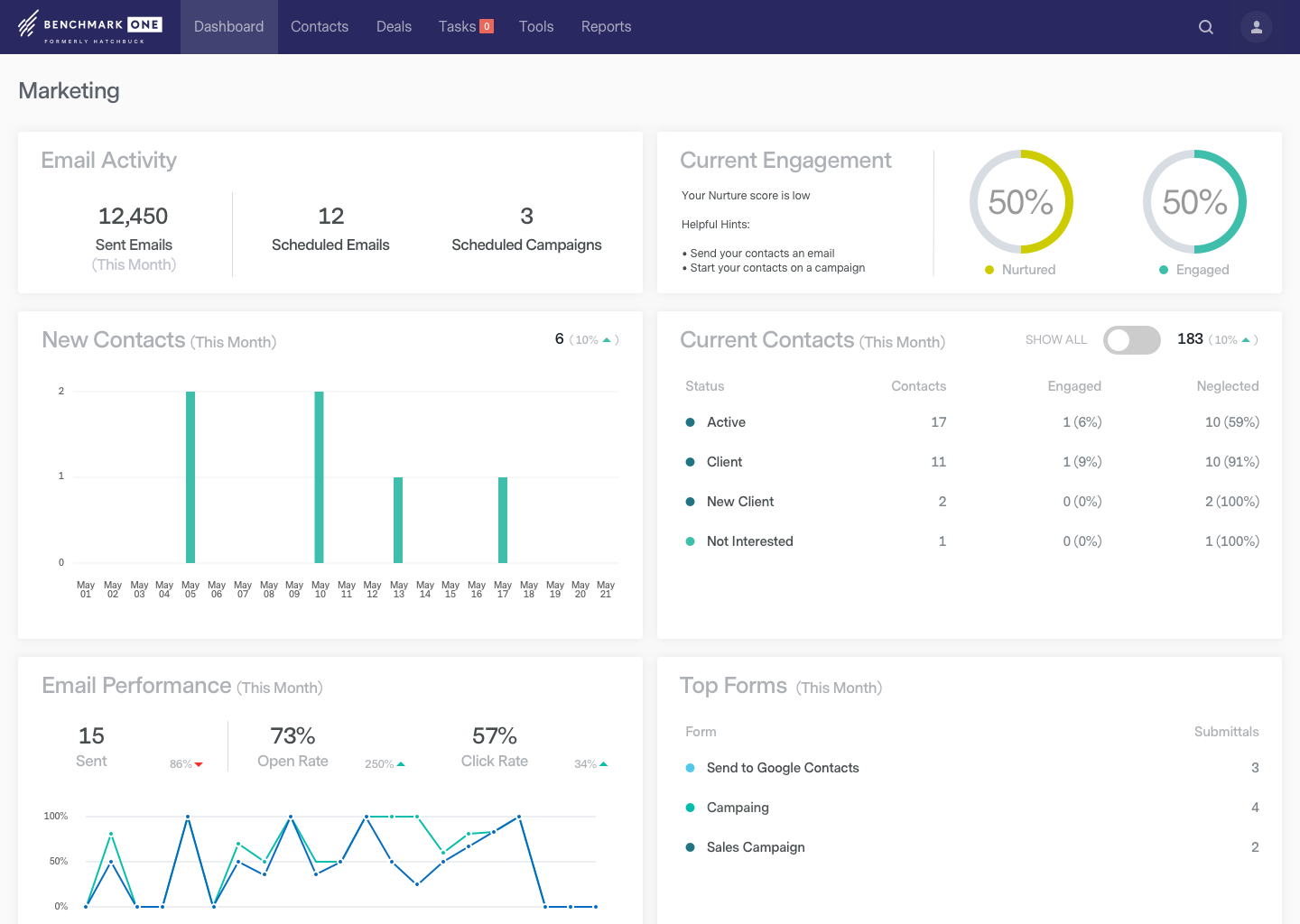
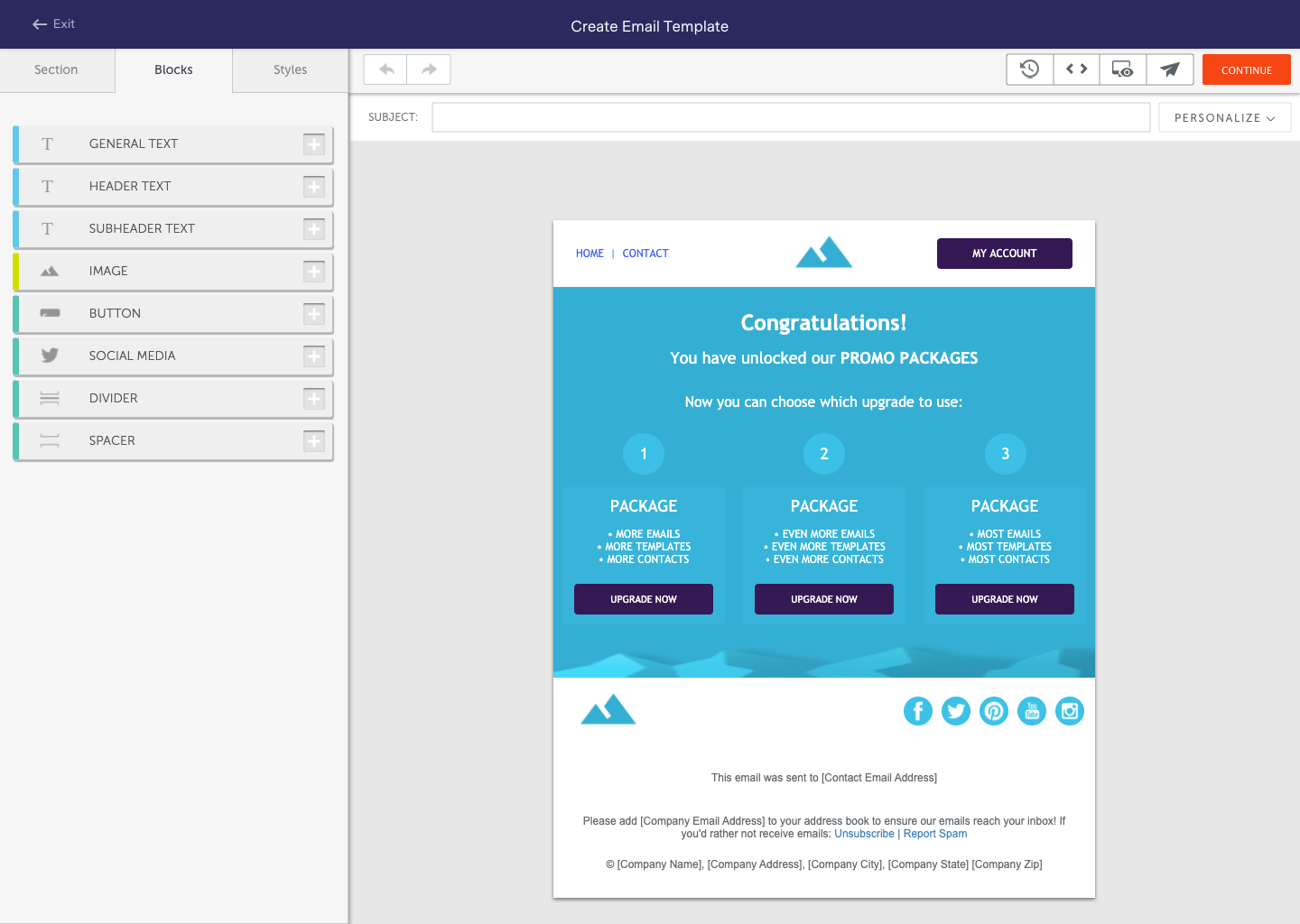
BenchmarkONE (formerly Hatchbuck) is an all-in-one sales and marketing software that includes CRM, marketing automation, and email marketing tools. Users can build online forms, manage and segment contacts, engage prospects with relevant follow-up, manage tasks, and track their pipeline.
$0
per month
LeadSquared
Score 7.4 out of 10
N/A
LeadSquared is a unified Sales Force Automation and Marketing Automation platform designed for high-velocity sales environments. The system utilizes machine learning (ML) models to automate lead distribution and prioritize customer interactions across sales, marketing, and field operations teams.
$50
per month per user
Zoho CRM
Score 8.4 out of 10
N/A
Zoho CRM is a simple, very low-cost CRM option for the smaller end of the SMB segment.
The product has several useful integrations with other products, including QuickBooks, and Google Apps and Google Docs.
The product also has an integrated project management module.
$14
per month
Pricing
BenchmarkONE
LeadSquared
Zoho CRM
Editions & Modules
Lite
$0
per month
Pro
$0
Agencies
Special Pricing for Qualifying Agencies
Sales Super
$50
per month per user
LeadSquared Sales Pro
$60
per month per user
Standard
$14.00
Per User/Per Month
Professional
$23.00
Per User/Per Month
Enterprise
$40.00
Per User/Per Month
Ultimate
$52.00
Per User/Per Month
Plus
$57.00
Per User/Per Month
Offerings
Pricing Offerings
BenchmarkONE
LeadSquared
Zoho CRM
Free Trial
Yes
Yes
Yes
Free/Freemium Version
Yes
No
Yes
Premium Consulting/Integration Services
Yes
Yes
Yes
Entry-level Setup Fee
No setup fee
Optional
$14 /user/month
Additional Details
—
Additional add-ons and modules available for expanded functionality.
We tried integrating Zoho CRM but couldn't integrate it well and get our agents to use it. So, we looked at many other options and finalized on LeadSquared.
LeadSquared is able to provide very important and informative reports and dashboards which is something we were looking for a long time and LeadSquared gave us all the things that we need. This is the main reason we selected LeadSquared against other alternatives.
Founder Director at MagnetMarketing.in (Online Marketer and Trainer)
Chose LeadSquared
We have to use ZOHO for CRM, AWeber or Get Response for auto responders and Leadpages for landing pages. LeadSquared is the complete package in one place. It saves time and improves quality and productivity.
For our organizations requirements, Zoho CRM fits for it and pricing to less than other products and it also has all suite plan where accounts team and marketing team use.
We researched the market a lot and heard that HubSpot and Zoho's integration worked really well. As we had our minds set on getting HubSpot (as we really liked its feature set), we had no choice but to go ahead with Zoho CRM. We have never rued our decision of going ahead with …
We jumped to Zoho CRM from previous trial periods with Hatchbuck and Insightly. Zoho CRM is better suited for larger, growing organizations as it has more capabilities and features than Hatchbuck and Insightly. We liked to think of those CRMS as "starters" for small businesses …
Features
BenchmarkONE
LeadSquared
Zoho CRM
Email & Online Marketing
Comparison of Email & Online Marketing features of Product A and Product B
BenchmarkONE
8.2
36 Ratings
3% above category average
LeadSquared
-
Ratings
Zoho CRM
-
Ratings
WYSIWYG email editor
5.332 Ratings
00 Ratings
00 Ratings
Dynamic content
10.027 Ratings
00 Ratings
00 Ratings
Landing pages
10.020 Ratings
00 Ratings
00 Ratings
A/B testing
10.016 Ratings
00 Ratings
00 Ratings
Mobile optimization
10.019 Ratings
00 Ratings
00 Ratings
Email deliverability reporting
10.034 Ratings
00 Ratings
00 Ratings
List management
10.036 Ratings
00 Ratings
00 Ratings
Triggered drip sequences
4.514 Ratings
00 Ratings
00 Ratings
Lead Management
Comparison of Lead Management features of Product A and Product B
BenchmarkONE
4.0
29 Ratings
64% below category average
LeadSquared
-
Ratings
Zoho CRM
-
Ratings
Lead nurturing automation
3.229 Ratings
00 Ratings
00 Ratings
Lead scoring and grading
4.329 Ratings
00 Ratings
00 Ratings
Data quality management
4.327 Ratings
00 Ratings
00 Ratings
Automated sales alerts and tasks
4.327 Ratings
00 Ratings
00 Ratings
Campaign Management
Comparison of Campaign Management features of Product A and Product B
BenchmarkONE
7.5
13 Ratings
5% above category average
LeadSquared
-
Ratings
Zoho CRM
-
Ratings
Calendaring
7.99 Ratings
00 Ratings
00 Ratings
Reporting & Analytics
Comparison of Reporting & Analytics features of Product A and Product B
BenchmarkONE
6.9
35 Ratings
2% below category average
LeadSquared
-
Ratings
Zoho CRM
-
Ratings
Dashboards
3.633 Ratings
00 Ratings
00 Ratings
Standard reports
10.026 Ratings
00 Ratings
00 Ratings
Custom reports
7.217 Ratings
00 Ratings
00 Ratings
Platform & Infrastructure
Comparison of Platform & Infrastructure features of Product A and Product B
BenchmarkONE
5.5
22 Ratings
33% below category average
LeadSquared
-
Ratings
Zoho CRM
-
Ratings
API
2.015 Ratings
00 Ratings
00 Ratings
Role-based workflow & approvals
8.013 Ratings
00 Ratings
00 Ratings
Customizability
2.621 Ratings
00 Ratings
00 Ratings
Sales Force Automation
Comparison of Sales Force Automation features of Product A and Product B
BenchmarkONE
-
Ratings
LeadSquared
-
Ratings
Zoho CRM
8.7
289 Ratings
10% above category average
Customer data management / contact management
00 Ratings
00 Ratings
8.7280 Ratings
Workflow management
00 Ratings
00 Ratings
8.6267 Ratings
Territory management
00 Ratings
00 Ratings
8.8197 Ratings
Opportunity management
00 Ratings
00 Ratings
8.4254 Ratings
Integration with email client (e.g., Outlook or Gmail)
00 Ratings
00 Ratings
8.4249 Ratings
Contract management
00 Ratings
00 Ratings
8.8204 Ratings
Quote & order management
00 Ratings
00 Ratings
8.9204 Ratings
Interaction tracking
00 Ratings
00 Ratings
8.9250 Ratings
Channel / partner relationship management
00 Ratings
00 Ratings
8.7193 Ratings
Customer Service & Support
Comparison of Customer Service & Support features of Product A and Product B
BenchmarkONE
-
Ratings
LeadSquared
-
Ratings
Zoho CRM
8.8
222 Ratings
13% above category average
Case management
00 Ratings
00 Ratings
8.7214 Ratings
Call center management
00 Ratings
00 Ratings
8.5173 Ratings
Help desk management
00 Ratings
00 Ratings
9.2190 Ratings
Marketing Automation
Comparison of Marketing Automation features of Product A and Product B
BenchmarkONE
-
Ratings
LeadSquared
-
Ratings
Zoho CRM
8.5
267 Ratings
9% above category average
Lead management
00 Ratings
00 Ratings
8.7262 Ratings
Email marketing
00 Ratings
00 Ratings
8.3220 Ratings
CRM Project Management
Comparison of CRM Project Management features of Product A and Product B
BenchmarkONE
-
Ratings
LeadSquared
-
Ratings
Zoho CRM
8.5
264 Ratings
10% above category average
Task management
00 Ratings
00 Ratings
8.3249 Ratings
Billing and invoicing management
00 Ratings
00 Ratings
8.6181 Ratings
Reporting
00 Ratings
00 Ratings
8.7243 Ratings
CRM Reporting & Analytics
Comparison of CRM Reporting & Analytics features of Product A and Product B
BenchmarkONE
-
Ratings
LeadSquared
-
Ratings
Zoho CRM
8.6
259 Ratings
12% above category average
Forecasting
00 Ratings
00 Ratings
8.7217 Ratings
Pipeline visualization
00 Ratings
00 Ratings
8.2236 Ratings
Customizable reports
00 Ratings
00 Ratings
8.8250 Ratings
Customization
Comparison of Customization features of Product A and Product B
BenchmarkONE
-
Ratings
LeadSquared
-
Ratings
Zoho CRM
8.4
278 Ratings
9% above category average
Custom fields
00 Ratings
00 Ratings
8.6276 Ratings
Custom objects
00 Ratings
00 Ratings
8.1223 Ratings
Scripting environment
00 Ratings
00 Ratings
9.1179 Ratings
API for custom integration
00 Ratings
00 Ratings
7.8204 Ratings
Security
Comparison of Security features of Product A and Product B
BenchmarkONE
-
Ratings
LeadSquared
-
Ratings
Zoho CRM
8.2
267 Ratings
3% below category average
Single sign-on capability
00 Ratings
00 Ratings
7.8232 Ratings
Role-based user permissions
00 Ratings
00 Ratings
8.7262 Ratings
Social CRM
Comparison of Social CRM features of Product A and Product B
BenchmarkONE
-
Ratings
LeadSquared
-
Ratings
Zoho CRM
8.5
166 Ratings
12% above category average
Social data
00 Ratings
00 Ratings
8.7165 Ratings
Social engagement
00 Ratings
00 Ratings
8.3157 Ratings
Integrations with 3rd-party Software
Comparison of Integrations with 3rd-party Software features of Product A and Product B
BenchmarkONE
-
Ratings
LeadSquared
-
Ratings
Zoho CRM
8.8
211 Ratings
15% above category average
Marketing automation
00 Ratings
00 Ratings
8.9208 Ratings
Compensation management
00 Ratings
00 Ratings
8.8139 Ratings
Platform
Comparison of Platform features of Product A and Product B
Hatchbuck is great for small to mid size businesses that are really looking to keep track of their progress with their sales leads as well as their existing customers, as well as tracking the activity their customers are taking from their communications, and automate their sales and marketing funnel as much as possible. We are a SaaS company (software as a service), with sales that range from teeny tiny to very big fish so it's been an easy tool to work with to make sure we are communicating with clients based on their size and needs.
1. Very suitable for an omnichannel business, as it can capture both online and offline lead sources and allows for follow ups. 2. Very suitable for call centers as lead and call tracking can be done very easily using LeadSquared. 3. Not very suitable for on field sales. Even though the mobile app does facilitate portability, the overall experience does not come close to the desktop version which is not feasible for an on field sales representative to use.
Interfacing with our target clients at the correct minute is crucial in today's society. Another valuable include is its capacity to coordinated with other programs. It helps me in keeping track of the every day work emails I send to my colleagues or get. Zoho CRM makes it straightforward to consequence or send out information agreeing to our needs. Zoho makes a difference keep in mind individuals by means of e-mail and pop-ups, which dispenses with the issue of overlooking follow-ups and reminders. This not as it were helps within the organization of this incredible instrument but moreover within the execution of data.
Call history is recorded like dialed calls, connected calls, total talktime in a daily, weekly, monthly, yearly, and on a custom basis.
The activity history of both customers, and employees are shown clearly, which help us a lot in understanding the interest of the customer, and their communication history with the organization.
Daily attendance history and man-days management can be done.
Sales performance and their values are mapped clearly.
Need some way to switch a field type without losing the pre-existing data.
The settings controls should be broken out differently - I don't like that I can't keep some users from exporting all contact records (i.e., the entire Contacts module) because if the export function is turned off, the export function of Reports for those same modules is also blocked.
Frustrating that only 3 custom lookup fields are allowed per module in our license.
In case you can't tell, we are in love with Hatchbuck software. Could it be improved? Of course it could, but, based on our current needs, and the needs of our existing and targeted clients so far, Hatchbuck presents the best fit option available. As a partner we are looking to grow with Hacthbuck into the future.
It is an excellent value for money solution and is fulfilling all our needs quite efficiently. They keep working on the product and each month sees an update allowing for a bug free experience and faster incorporation of newer tools. I see no reason why I would not like to renew the subscription for this fabulous product.
i have already renewed my subscription twice. I am in the 3rd Year now. I have been using it for a while and have been recommending to my friends as well.. have attended ZOHOLICs the annual program of zoho and it gave me new insights of managing the crm solutoin.
Hatchbuck offers on-boarding, training, and has a suite of videos, which makes it super easy to get started. As with any software that is the key. Have a plan, stay focused, and get started. Once, you begin to play with Hatchbuck you will see that it is very user friendly.
Having talked about all other things in detail in my previous responses, this question I feel is redundant but then I will highlight the points again - Easy to Use - Flexible - Robust System - Ever-evolving - Support & Service - Integrations with third party tools & technologies - LMS - Data Management & Reports - Landing Page Options
The methodology of the 'out of the box' user interface is fairly easy to learn. In some cases however, the interface is not consistent throughout the software. Upgrades to the interface has certainly improved some of this--- but now we are seeing the same kinds of inconsistencies across Zoho apps, particularly those more recently added to their platform. This issue is not major in that everybody on staff seems able to learn how to work the programs--- it's just annoying and less than efficient when inconsistent user interfaces or inconsistent terms are used in the programs and/or the requisite documentation.
There has never been any downtime for Hatchbuck, which is very reassuring for me as I market and recruit strenuously for the University at Albany's executive Weekend MBA Program. Hatchbuck team members have also been available when I have reached out to them with questions or issues. With one exception, where one of my e-mails became lost in the Internet "black hole," they have gotten back to me in very timely fashion!
In my many years using Zoho, I think there were only 1 or 2 days when there was something happening and I was not able to log in. Sure, it wasn't fun and we all panicked a bit, but right after that, all was well and work-life continued. Being cloud based, I'm never worried about losing my iPhone, iPad or Laptop as I know I can log in anywhere on any device and workflow won't stop.
I don't recall every having any issues with a page not loading due to it being a Zoho issue. Anytime I've had any issues with something being wonky, I clear cache and that has always solved the problem. Or a simply computer reboot and we're back, hard at work. Look, I don't expect any product to delivery 100%, 100% of the time but if I had any consistent ongoing issues, I would have left many years ago. I still keep my eyes open to what is new but after a quick evaluation, I know Zoho will long be my home.
I always get a response within 24 hours, unless I ask on a weekend. The team seems to work together to resolve my issues, answer my questions, and update me on changes. In fact, they have even connected [with] me to ask how they can improve the Hatchbuck software and their service. This is why I love them so much.
Great to work with and also Easy to work with Do not just listen to the problem but provide upfront solutions Always available and are ready to support on holidays Considerate of user's knowledge and always ready to explain the smallest / dumbest doubt a user can ask Always available to help with the internal tasks as well like creating automations, drip creations etc
We did the training and that was a huge waste of money. The information provided was basic and the instructor was sloppy (he even forgot to turn off his mic when he used the restroom - no one should ever hear what we heard). I offered up a 9 because we were able to find what we needed on your website.
I attended a Zoho-Holics event in Austin, TX, several years ago, and it blew my mind. So many industries were represented using Zoho in so many different ways. It was unbelievable all that I learned from that experience, as there were features that I wasn't aware of that I immediately started using. Best of all, the trainers were patient and knowledgeable
There is an endless supply of YouTube videos from Zoho and the many Zoho partners/consultants. Plus, Zoho has it's own library of training videos and webinars to learn from plus an entire community at the ready to answer any questions. While Zoho has been available for many years, there are constantly new training videos and webinars available for the novice and the experienced users.
When you switch CRMs, you can automatically assume everything isn’t going to match up correctly. We had used Salesforce for 10+ years and had a ton of data and customizations. It was not a clean transfer, but we were able to sort it all out. The only issue that really bothered me was Zoho support. Even simple questions couldn’t be answered over chat, and we would have some team members try for hours to find the right answer
In the past, I have used Getresponse. I found it very handy for Affiliate Marketing but not good enough for Corporate Marketing. I then incorporated Benchmark Email into my arsenal because it is good enough for both Affiliate Marketing and Corporate Marketing. With the upgrade costs on Benchmark Email not sustainable to a growing entrepreneur like me, I had to get SENDIO. I am learning to use SENDIO and I am discovering it's very cost-effective apart from giving me unlimited space for my contact lists. While SENDIO is the best for bulk emailing, Benchmark Email remains the best for Corporate Emailing, though I am keeping all three software.
I looked closely at Infusionsoft. While the nurturing/decision tree tool of Infusionsoft was far more sophisticated, the many negative reviews of Infusionsoft lead me to look elsewhere. Leadsquared had very positive reviews and aggressive pricing. It has less features, but the features they have were the ones I wanted to focus on.
Free user access was one reason to use it more than any other software. Also, for a mid-size organization, the Salesforce cost was a little higher, and Pipedrive was almost similar to Zoho. As we were already using Zoho, we found no urgency to switch.
I think Zoho CRM is priced at a reasonable amount. Simply put, you get what you pay for and Zoho does not disappoint. My organization is comfortable with what we pay and pleased with continually renewing the software. The billing frequency is just right. There are no complaints on our end
We're still in the early stages of scaling this across departments. We have high aspirations of doing this, but it takes time to migrate to the new system and to help people get acquainted of doing their work in a different way thru Zoho.
In addition to being a user of Zoho CRM, we are a reseller as well. Often, at times our Partners request for on-boarding the platform configuration for them. During such requirements, we have utilized the Professional services team directly from the Zoho CRM team. Our partner feedback was quite positive, throughout.
Automated Lead Nurturing helps reduce a lot of manual work.
A lot of our time goes into creating custom reports. Making the reporting feature more flexible and robust will help in saving a lot of time and energy.