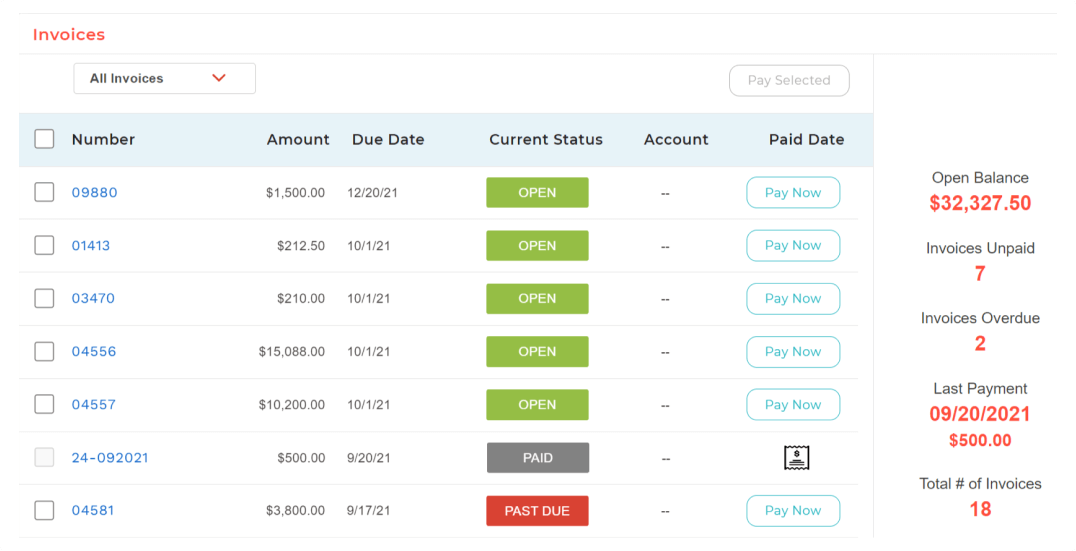
BigTime IQ is time and expense tracking software from Chicago-based BigTime Software.
$20
User per Month
Miro
Score 9.1 out of 10
N/A
Miro is the AI Innovation Workspace that brings teams and AI together to plan, co-create, and build the next big thing, faster. With the canvas as the prompt, Miro's collaborative AI workflows keep teams in the flow of work, scale shifts in ways of working, and drive organization-wide transformation.
$10
per month per user
Zoom Workplace
Score 8.4 out of 10
N/A
Zoom Workplace, Zoom’s open collaboration platform with an AI Companion, empowers teams to be more productive, and strengthen customer relationships throughout the customer lifecycle with Zoom’s Business Services for sales, marketing, and customer experience teams, including Zoom Contact Center.
$16.99
per month per user
Pricing
BigTime Software
Miro
Zoom Workplace
Editions & Modules
Essentials
$20
User per Month
Advanced
$35
User per Month
Premier
$45
User per Month
Projector
$60
1. Free - To discover what Miro can do. Always free
$0
2. Starter - Unlimited and private boards with essential features
$8
per month (billed annually) per user
3. Business - Scales collaboration with advanced features and security
$16
per month (billed annually) per user
4. Enterprise - For work across the entire organization, with support, security and control, to scale
contact sales
annual billing per user
Add-On Zoom Translated Captions
$5
per month per license
Pro
$16.99
per month per user
Business
$21.99
per month per user
Add-On - Conference Room Connector
$499
per year
Basic
Free
Enterprise
Custom
Add-On - Zoom Whiteboard
starting at $2.49
per month per user
Add-On - Large Meetings
starting at $600
per year
Add-On - Cloud Storage
starting at $120
per year
Add-On Audio Conferencing
starting at $1200
per year
Add-On Zoom Phone Power Pack
Starting at $300
per year per user
Add-On - Quality of Service Subscription
Contact Sales
Offerings
Pricing Offerings
BigTime Software
Miro
Zoom Workplace
Free Trial
Yes
Yes
Yes
Free/Freemium Version
No
Yes
Yes
Premium Consulting/Integration Services
Yes
No
Yes
Entry-level Setup Fee
Optional
Optional
No setup fee
Additional Details
—
Monthly billing also available at $10 per month for the Starter plan, or $20 for the Business plan.
Miro is leaps and bounds ahead of One note in terms of functionality, useability and collaboration. OneNote can be useful for taking basic notes or working on something individually but i would never use for anything visual or collaborative.
Miro fits arbitrarily into any communications platform, but the direct integration could be stronger. Miro is more full-featured than the whiteboard features in Zoom or Teams. draw.io and Visio are a more single-user experience.
Milanote doesn't offer the mind map functionality and is so rigid. Microsoft Visio is overpriced, does not have a collaborative feature, and was very clunky. Adobe PhotoShop is a great artistic tool, but it is not easy to use for brainstorming. I tried.
Zoom offered Whiteboards but not everyone was into that, so we don't use it. Figma also offers some Whiteboards, but is not evident for most of the mortals
Chief Reinvention Officer, Managing Partner, Senior Consultant and Accredited Trainer
Chose Miro
The Mural UI has improved dramatically but is still not comparable to Miro. The Whiteboard features of Zoom and Microsoft are limited and just an add-on to their videoconference tools. Miro is my preferred option for collaboration. I always open a Miro board to start a meeting …
Miro feels so much more expansive than Jamboard, which only seemed to allow a small, fixed area. Miro's features and templates seemed to be on a completely different level. Trello is a rather different product: well suited to a very set format, but it's not nearly as good for …
Miro is far better than both Lucidchart and Trello. Miros interface makes it easy for anyone to dive in and get started with the product in less than 5 minutes while I've found that other tools like Lucidchart are a bit more compelx and have a longer ramp time. Miro is far …
Miro offers more features that help me improve the user experience for remote trainings. I perceive a faster speed of delivery of new features or improvement of existing ones.
In Zoom and Teams only one person can operate at a time. In Miro, the entire audience can be working on a problem at the same time. It is completely live. It is like a classroom where everyone is working except that everyone can see your work. :)
Corporate IT pushed us away from MURAL and to Miro. Both seemed very similar initially, but Miro's integration with SSO seemed more straightforward. Zoom whiteboards became too difficult to manage after the meeting. Rather than become clear, they are liabilities because …
Zoom is a tool used for meetings and real-time conferences, academic, business, and also personality-wise. It complements Miro since both are collaborative. Even by sharing the screen in Zoom of Miro boards is something I often do.
we selected Zoom Workplace for the video chat feature more than anything else. It is the industry leader in the field and we always want to use the best tools for the job. Even though we are Microsoft-based, utilizing O365 for documents and presentations, we rarely use Teams.
Zoom is way better in video conferencing, desktop sharing and stability. Also having the ability to create rooms, so you can divide your team during the meeting to work on several projects is great! Also for me to be able to draw in order to explain or highlight on desktop …
Google Meet compared to Zoom has fewer functions, no whiteboard, no Q&A section, no possibility to grant screen sharing permission to other tools. But instead of it, Google Meet delivered together with other G-Suite products and tools so it has deeper integration possibilities …
I'd like to start by saying, I rarely give 10's on anything, almost always 9's, the main reason for my 10 rating is the support I've received from this team/company. BigTime Software has been well suited for our company b/c it's giving a window into the project budget and time frames to our Project Managers to proactively manage their projects and look for areas to improve and celebrate with support staff. I would say efficiency in time management. BigTime Software is not an accounting software and I love that about it. We were looking for a tool for staff to manage their projects and stay on budget and track time and generate invoices all in one place and we've found that with BigTime Software.
I first used Miro in a service design module at university, where we used it for personas, customer journey mapping, and more. I've since used it in marketing for SWOT analysis, RACI models, project planning, and more. I've yet to use it in a wider team setting, but from my experience, some team activities, even a SWOT analysis, for instance, where it is brainstorming-based, are better done in a physical space and then brought onto a digital tool, rather than done purely digitally.
Zoom Workplace is ideal for many businesses, more so because it saves money by uniting different functionalities into one app - meetings, messaging, phone, and scheduling. The tool keeps teams connected thanks to the amazing collaboration and communication features. In addition, Zoom Workplace is helpful for businesses with a hybrid team, thanks to its effortless connections.
Makes internal coordination between admin team and tutors extremely painless. It's like a single place where everyone can drop ideas, get updates and notes without loss of context which usually happens in long email threads.
Versioning and board history are handled very well, which drastically reduces the workload. They help me track how a policy or math guideline has evolved, and also make it easy to revert changes if something doesn't work.
Comments stick exactly where they are meant to, making internal reviews much clearer. Admins don't have to guess which note refers to which rule or section.
Exports are clean, so even non-Miro teammates get it instantly.
It offers amazing unified collaboration features, including Zoom whiteboard, Zoom team chat, and integrated mail and calendar.
Zoom is a great meeting solution, with features like smart recording, breakout rooms, and personalized video and audio, making it a functional business meeting tool.
It is equipped with amazing AI features that help summarize meetings, generate content, and provide quick catch-up, allowing one to ask AI questions without interrupting meetings.
For some types of projects, we are unable to use BigTime's invoicing feature. It would be nice if we could further customize invoices to fit our needs. We still have to use Quickbooks to complete certain invoices.
Being able to create Purchase Orders in BigTime would be extremely useful to us. We currently use Quickbooks for this.
As a designer, I miss some more creative features. I can't even get really into designing small things (like paths). Many of my colleagues have already switched to the Figma board because it is possible there.
Things often get lost in the workflow, especially in teams. Working on the same file often leads to misunderstandings and can be frustrating. For example, if text is accidentally deleted and cannot be recovered, or if images become distorted.
The scale on the board is missing, which often leads to size differences.
I don't think there is any malfunction in their solution; it's extremely convenient to use, be it creating a meeting invite, adding people, sending any extra stuff to them. It's quick, and this is the only tool that works seamlessly even on Androids.
Miro saves my day. I would spend at least 4x more time on documenting my projects and work without this tool. It support my day to day role and helps me be successful while saving my capacity. It is not only very easy to start working on it without additional training required, but also adapts to any use case that I might need to implement
We're sticking with Zoom for the foreseeable future--given its compelling feature set, ease of use, and advanced technology, there's just no other competition to be excited about. Plus it's a Gartner-recognized industry leader, so it's a rather easy choice.
Overall most areas of the software are easy to use. I tend to spend a lot of time in analytics and reports. Those are not as user friendly, in my opinion, and could use some improvements. I think it just takes time to get familiar with where items are stored in the program and what changes affect what.
It's very easy to use, while having endless features. When I start a new board, I know that there's almost nothing that I cannot put on it, whether these are builtin tools, like documents and diagrams, or whether these are 3rd party services that can be imported onto the board. Using Miro is very easy. When I'm onboarding a new user, I focus on what can be done and not on how, as everything is very intuitive.
Zoom is made for the non tech office. It has features that can be made to do what you need to run things on a day to day basis. Immediately we we able to get meetings going with remote employees. The ability to be able to add smartphone connected people was a big plus. Zoom met our needs at the time.
I have not encountered events where Miro is not available. It is quite nice and reliable to be fair, even on my freemium version (startup) I don't have reliability issues. It does have sometimes where the screen refresh or "freezes" or "consumes a lot of data" and we have to rewind windows and the likes, this instances are very less
There have been less than a handful of outages during our two years with Zoom, and whenever there was one, an email informing us of the outage went out immediately, and they had the issue resolved shortly thereafter.
I took the loading quickly to be related to availability which I commented on before, so ditto with those comment on load time here. Although to reemphasize, Miro doesn't crash or just refuse to load like some other programs. The weak point of Miro for me is integration of files like Word, Excel, or PowerPoint (especially the later two). When you embed these, it gets slow, and complicated to bring them up while you're in the application.
Zoom has among the best performance of any video conference platform, as I've mentioned several times. Besides that, their Chat platform works great, and their back end always runs smooth. It's unfortunate that reporting can now only be done by one month at a time, but nonetheless, it only takes a second to run any kind of Zoom report, whether it's an attendee report, Poll results, a user report, a list of meetings from the past month, etc.
The support is amazing! They are always available through the chat interface in the program. Each support person has fully answered my questions the first time. I have had a positive experience with each inquiry. It is very important to me that I am able to get instant access to help so that I can make the most of the software and all of its capabilities.
We have never reached out to or contacted support because Miro's platform has been incredibly intuitive and user-friendly. The comprehensive resources available, such as tutorials, documentation, and community forums, have provided all the guidance we needed. The seamless integration with our existing tools and the reliability of the platform have ensured that we rarely encounter issues that require external assistance. This self-sufficiency has allowed us to focus more on our projects and collaboration without interruptions. Overall, our experience with Miro has been smooth and efficient, eliminating the need for additional support
Because I got a response right away, and was assigned one specific individual to work with me from the beginning to the resolution. I had an actual email address and direct contact with this person without having to start over and over every time I contacted Zoom - this singular individual remained attentive and was well informed on the subject matter and quite able to resolve my needs.
There was a series of webinars which Miro hosted with our organization that went over the basics, then progressively became more advanced with additional sections. The instructors were knowledgeable, and provided examples throughout the sessions, as well as answered peoples' questions. There was ample time and experience on the calls to cover a range of topics. The instructors were also very friendly and sociable, as well as honest. Of course Miro isn't a "God-tool" that does absolutely everything, but the instructors were aware and emphasized the strengths where Miro had them and sincerely accepted feedback.
I touched on this briefly, in another survey section, but my implementation manager, Kevin, was exceptional. The actual implementation process took 3 months, not 1 before I was comfortable rolling it out to staff. We also had to wait/schedule time and coordinate for our custom xml. invoice to be generated and in a place we felt comfortable sending it out to clients. In the end I was very satisfied, but during the first few months it was challenging.
Easy to learn, Miro has a series of videos on YouTube that effectively taught this program to my team members and me. The program is drag-and-drop and works excellently. People pick up on how to use it efficiently, and it's great for organizing ideas more freely. This product is more challenging for some older audiences who are not accustomed to using a touchpad, but for most, it was very easy to use.
If you receive any pushback from higher ups, point to any of the various positive reviews like this one. Or show Zoom's excellent Gartner report, or articles describing Zoom's partnership with Sequoia capital. It's not difficult to show how Zoom is a trustworthy industry leader with best-in-class technology.
I liked the client management, but it didn't do time tracking, billing or syncing with quickbooks. It was too robust for my needs. I tried it for the client management and thought I might use it along with bigtime, but it was too cumbersome and would involve too much double entry. And it didn't track time or bill which are necessary functions
Both FigJam and ClickUp have similar features where we can do collective brainstorming and idea mapping. We have gone back to Miro from both of those platforms because of the intuitive nature and usability of the Miro interface. Surprisingly, we do still pay for ClickUp and Figma. Miro has not been able to replace either of these for us because we use them for different use cases. Our team expressed the most comfort and ease of use with Miro versus these two platforms, so we gladly have decided to stay.
Teams do not stack up to Zoom at all. My clients use Teamas because it is a corporate policy, and they use it most of the time between employees of the same company. It makes sense for this, NOT for me. Every time a Teams meeting is launched, since I am not part of this company, the meeting is laborious, the interface is not as nice as Zoom's, sharing documents is more difficult, etc., etc. Zoom is superior to Teams in every way!!!
The billing and price model is really fair for so many functions that they offer, our remote work requires each of the features that Zoom offers, so accepting payment for a tool like this is the least we can do. I like that billing arrives on time and that they offer opportunities and payment times.
The product is useful for faster billing and efficient timesheet logs. I do like the report features however there are many options and can be overwhelming for the user. It is most helpful to set up reports speaking to an agent to ensure the right fields are set, etc.
Maybe is possible now so... Could be useful to manage in some way source code for the projects? not to edit so when we make solutions with different components in MIro, maybe each component could redirect to the source code of this component
Because the Basic licenses are completely free, and because it's very easy to configure and install Zoom, and because anyone can join Zoom from a link without needing an account, scaling is a Breeze. There are absolutely no roadblocks. My company keeps adding more Zoom Pro license every week since it's so in demand. We were able to convert users from several different platforms onto Zoom with no trouble at all.
Zoom is perfect for our business. We use it to video chat with prospective clients. The name recognition alone gives us credibility and it is very easy to screen share and send content out.
Before BigTime, we were using Excel to track everything, creating invoices, and run reports. Getting on BigTime has saved us tons of time and effort which equates to dollars saved on labor.
From a legal standpoint, BigTime has allowed us to be organized and prepared in the event we would need to present financial details to anyone.
Miro allows me to plan work for the future without having to reference tedious spreadsheets. This gives me better insight into workload forecasting.
Just today, I was able to quickly put together a Miro to show a team member who was confused the workflow for a problem. The easy 'on-the-fly' tools let me create something quickly in real time.
Flowcharts often get a bad rap because people think they are too complicated, but Miro lets me get more work done quickly than just using a doc or sheet.
We are still early in our adoption of Zoom Workplace for business, so we don't really have any data to show cost savings.
The ability to take a call summary or meeting summary and add it to our practice management system have been remarkable. It's a quick copy/paste and it's in the system. Prior to this, we would have to scan in notes and save them into the system, if it even got that far. Mostly, attorneys would be searching through legal pads for the notes of a previous meeting or phone call.