
Laura McDonough, PMP
Vice-President, Business Applications, IT & Facility Operations
Chose DocuSign

| Product | Rating | Most Used By | Product Summary | Starting Price |
|---|---|---|---|---|
 DocuSign | N/A | DocuSign supports transactions with document sharing and electronic signature, as well as automated and guided data collection and entry, record updating across disparate systems and payment collection upon agreement, as well as analytics and reporting. | $15 per month | |
 PandaDoc | N/A | PandaDoc headquartered in San Francisco offers their eponymous electronic signature platform for sales teams, containing sales proposal automation and CPQ (configure, price, quote) features, and integration with CRMs. | $35 per month per seat | |
 airSlate SignNow | N/A | signNow is an eSignature solution with mobile apps for iOS and Android. signNow can be integrated into popular platforms and offers SaaS, public cloud, and private cloud deployment options with the same underlying API. This enables customers to leverage the power and usability of the signNow eSignature platform, while meeting their particular security and compliance requirements. | $1.50 one-time fee per signature invite |
| DocuSign | PandaDoc | airSlate SignNow | ||||||||||||||||||||||
|---|---|---|---|---|---|---|---|---|---|---|---|---|---|---|---|---|---|---|---|---|---|---|---|---|
| Editions & Modules |
|
|
| |||||||||||||||||||||
| Offerings |
| |||||||||||||||||||||||
| Entry-level Setup Fee | No setup fee | Optional | -$8 per user/month | |||||||||||||||||||||
| Additional Details | — | PandaDoc offers a free eSign plan and 3 paid packages for eSigning and document automation. All plans include unlimited documents and eSignatures. Evaluations start with a free 14-day trial. Up to a 46% discount for annual pricing. | All subscriptions include unlimited number of users. Up to a 60% discount available for annual pricing. | |||||||||||||||||||||
| More Pricing Information | ||||||||||||||||||||||||
| DocuSign | PandaDoc | airSlate SignNow | |
|---|---|---|---|
| Considered Multiple Products |  DocuSign Laura McDonough, PMP Vice-President, Business Applications, IT & Facility Operations Chose DocuSign  Michele Roy Special Education Teacher Chose DocuSign  Denitra McGraw Small Business Manager - Family Owned & Operated Chose DocuSign I actually have both. Docusign has better features. SignNow was a little cheaper so I kept them.  Kelly Wasden Enterprise Account Executive Chose DocuSign DocuSign is like Salesforce for CRM's. It just made sense as we were scaling as an organization and moving and adding new technology to our stacks. We really like Adobe Sign as a close second, but for what we were doing, DocuSign came back as a more professional sales org and …  Nicolas Costa Ossa Director of Customer Operations & Account Management Chose DocuSign Docusign probably feels more robust and a more corporate feel. They are pretty similar, however.  Olivia Crellin Corporate & Securities Attorney Chose DocuSign I think DocuSign is still the leader in this industry as pronounced by their superior customer service and quick development response time to changes in the industry. For simple users, DocuSign is user friendly and easy to navigate while adding significant benefit to small to …  Andrew Zockoll Account Executive Chose DocuSign They stack up very well. I was happy with other the other software. They lost us because of how expensive it was for clients to have access to their API. A lot of our clients cannot afford $200/mo. They can afford $50/mo which is what most of our clients pay. | PandaDoc  Karina Alvarez Administrative Manager Chose PandaDoc We looked at DocuSign before PandaDocs, and while they are a well-known and good product, we felt their basic content was lacking compared to PandaDoc. We felt we got more bang for our buck, and the navigation seemed better. Plus, we get a dedicated rep with PandaDoc.  Jasen Herr General Manager Chose PandaDoc There is no comparison. PandaDoc is far superior to any others I've seen. That's why I moved my company over when I saw the were using DocuSign  Phil Goldberg Attorney Chose PandaDoc PandaDoc is equal to DocuSign in every significant way except for its level of adoption; however, the pricing of PandaDoc is so much better that it's clearly the best choice for our firm.  Samuel Robinson Director of Partnerships Chose PandaDoc PandaDoc is a less clunky user experience, not only on the signature process and review, but also on the document creation process.  Jason Frazell Founder Chose PandaDoc I found PandaDoc's ease of use to be the superior solution to all of the other software I tried.  Steve Foster Vice President and CFO Chose PandaDoc PandaDoc provided similar features and functionality at a better price, but the "tipping point" was integrated e-signatures.  Chris Lee Managing Director Chose PandaDoc It was easier to set up and use than both of those products.  Daniel Bussius CEO (Chief Executive Officer) Chose PandaDoc PandaDoc is 1,000% better, hands down.  Eric Jessen National HR Director Chose PandaDoc Better  Mike Oliver Director Chose PandaDoc PandaDoc has a better editor and ease of use. | airSlate SignNow  Linda Corman HR Director Chose airSlate SignNow DocuSign is expensive for our limited signing needs. This is just as flexible and robust.  Robert Brown Designer Chose airSlate SignNow DocuSign has benefits as well but the pricing is prohibitive for what I need on a day to day basis. SignNow gets the job done at a price I can afford. Its value proposition is good and I have very few issues with it.  Jon Soucy President Chose airSlate SignNow  Gabe Hirsch Director of Strategy and Business Development Chose airSlate SignNow  Rachelle Smith Principal & Chief Positivity Officer, Professional Speaker & Author Chose airSlate SignNow DocuSign was robust and great, but was expensive.  Christopher Mafra Budget Analyst Chose airSlate SignNow In addition to SignNow, I've seen or used DocuSign, Adobe Sign, and DropBox. DocuSign is the most famous, but I found it a bit complicated to use at first. Adobe Sign is also good, but I felt it was more "heavy", with more stuff than we really need. I found Drobox to be very …  Jose Luis Reyes Graterol Vice President,Latin America Chose airSlate SignNow User-friendly. SignNow also has an affordable cost for individuals and small businesses while still including a top performance. Only one license works across many different platforms, and it's recognized and accepted across many countries.  Olivia Capizzi Office Manager Chose airSlate SignNow The most cost-effective platform for our size and needs. Some had barriers such as needing to download an application or not a household name, and thus, needed some more "pointing out" and following up with. SignNow also has a great, Incognito Alerts setting where you can …  Chris Ammann Exec. Vice President Chose airSlate SignNow SignNow was cheaper and offered the same features that I needed.  Jason Kolleda Branch Coordinator/Technology Specialist Chose airSlate SignNow We were comparing the two and in the end, we liked the ability to use the kiosk mode provided by SignNow and the pricing structure seemed more reasonable. |
| DocuSign | PandaDoc | airSlate SignNow | |
|---|---|---|---|
| Small Businesses |  Foxit eSign Score 9.3 out of 10 | Foxit eSign Score 9.3 out of 10 | Foxit eSign Score 9.3 out of 10 |
| Medium-sized Companies |  MSB Docs Score 9.4 out of 10 | MSB Docs Score 9.4 out of 10 | MSB Docs Score 9.4 out of 10 |
| Enterprises |  Box Score 8.5 out of 10 | DocuSign Score 8.7 out of 10 | DocuSign Score 8.7 out of 10 |
| All Alternatives | View all alternatives | View all alternatives | View all alternatives |
| DocuSign | PandaDoc | airSlate SignNow | |
|---|---|---|---|
| Likelihood to Recommend | 8.5 (161 ratings) | 8.6 (329 ratings) | 8.1 (128 ratings) |
| Likelihood to Renew | 7.0 (12 ratings) | 9.1 (18 ratings) | 9.8 (11 ratings) |
| Usability | 8.1 (19 ratings) | 8.3 (23 ratings) | 8.6 (13 ratings) |
| Availability | 10.0 (3 ratings) | 9.1 (4 ratings) | 10.0 (1 ratings) |
| Performance | 10.0 (2 ratings) | 9.6 (21 ratings) | 10.0 (1 ratings) |
| Support Rating | 10.0 (46 ratings) | 6.1 (23 ratings) | 7.0 (23 ratings) |
| Online Training | 10.0 (1 ratings) | - (0 ratings) | 10.0 (1 ratings) |
| Implementation Rating | 10.0 (5 ratings) | 6.3 (4 ratings) | 10.0 (1 ratings) |
| Configurability | - (0 ratings) | 2.8 (3 ratings) | - (0 ratings) |
| Ease of integration | - (0 ratings) | 9.0 (20 ratings) | - (0 ratings) |
| Product Scalability | 10.0 (1 ratings) | 8.6 (4 ratings) | 10.0 (1 ratings) |
| Vendor post-sale | - (0 ratings) | 9.7 (20 ratings) | - (0 ratings) |
| Vendor pre-sale | - (0 ratings) | 6.7 (4 ratings) | - (0 ratings) |
| DocuSign | PandaDoc | airSlate SignNow | |
|---|---|---|---|
| Likelihood to Recommend | DocuSign
| PandaDoc
| airSlate, Inc
|
| Pros | DocuSign
Michele Roy Special Education Teacher | PandaDoc
Phil Goldberg Attorney | airSlate, Inc
|
| Cons | DocuSign
| PandaDoc
| airSlate, Inc
|
| Likelihood to Renew | DocuSign
 Tony Woods, PHR, CIPD Director of Human Resources | PandaDoc
| airSlate, Inc
|
| Usability | DocuSign
 Emily Wallace Talent Acquisition Coordinator | PandaDoc
| airSlate, Inc
 Grant Millar Financial Planner and Money Coach |
| Reliability and Availability | DocuSign
| PandaDoc
| airSlate, Inc
|
| Performance | DocuSign
| PandaDoc
| airSlate, Inc No answers on this topic |
| Support Rating | DocuSign
 Erik Sheafer Enterprise Development Manager | PandaDoc
| airSlate, Inc
Christopher Mafra Budget Analyst |
| Online Training | DocuSign
| PandaDoc No answers on this topic | airSlate, Inc
|
| Implementation Rating | DocuSign
| PandaDoc
| airSlate, Inc
|
| Alternatives Considered | DocuSign
| PandaDoc
| airSlate, Inc
|
| Scalability | DocuSign
| PandaDoc
| airSlate, Inc No answers on this topic |
| Return on Investment | DocuSign
 Matthew McGinnis Managing Partner | PandaDoc
| airSlate, Inc
 Catherine Lind Montsinger Realtor Broker |
| ScreenShots | DocuSign Screenshots   | PandaDoc Screenshots      | airSlate SignNow Screenshots   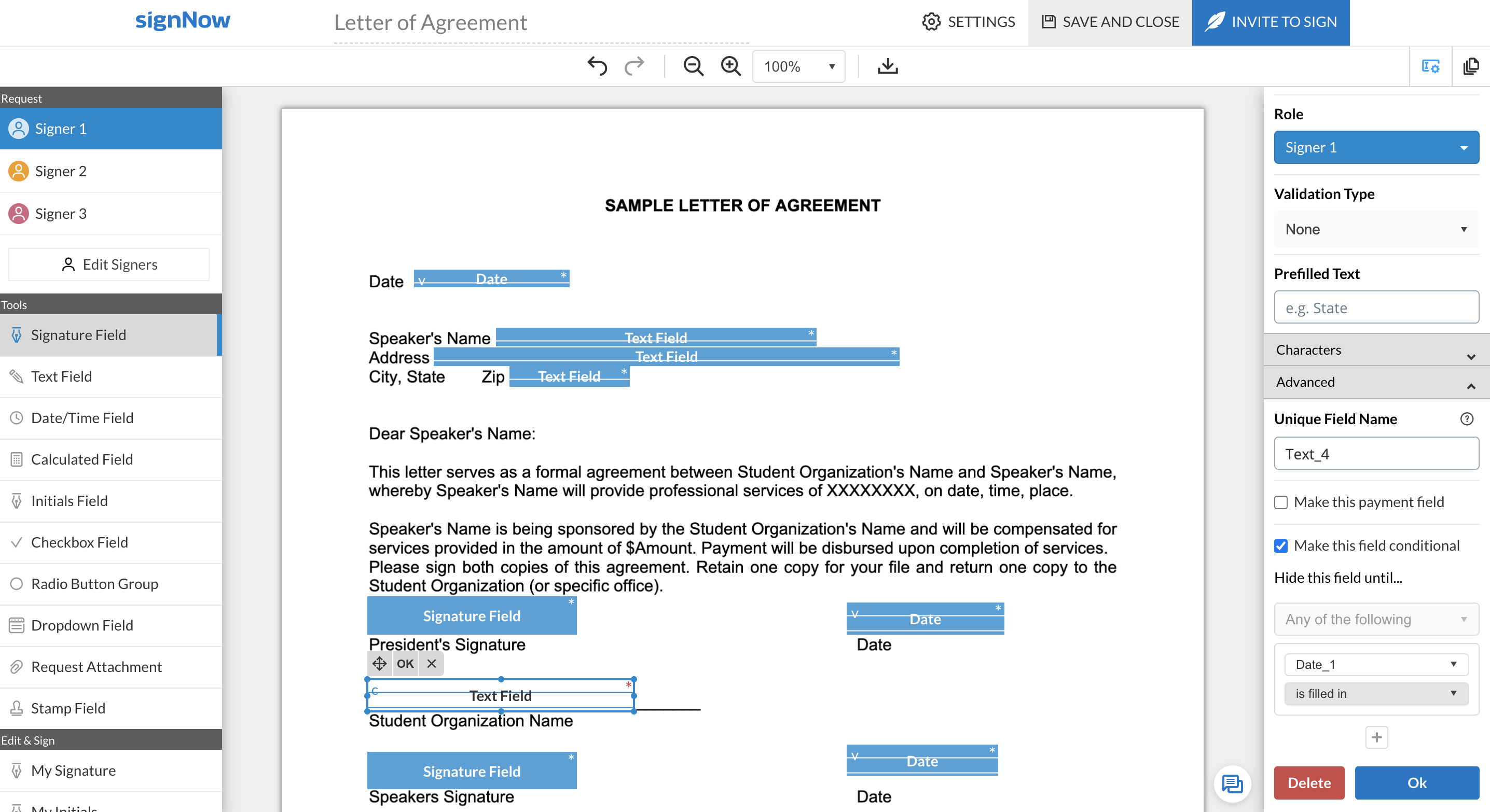 |