Overview
ProductRatingMost Used ByProduct SummaryStarting Price
Dovetail
Score 8.6 out of 10
Mid-Size Companies (51-1,000 employees)
Dovetail, headquartered in Sydney, aims to enable the world to create better products and services through deep customer understanding. Dovetail states they empower 45,000+ people, from agencies to universities to Fortune 100 companies, to make sense of their customer research in one collaborative research platform.
$0
per month
UXArmy
Score 0.0 out of 10
N/A
UXArmy is a remote user research platform designed to get user insights throughout the development cycle. Teams can run unmoderated usability tests, surveys, card sorting, tree testing, interviews and focus groups. Teams can test native mobile apps, live websites, prototypes, images, copies and videos. UXArmy offers recording of the full testing experience across both desktop and mobile devices, and native mobile app testing. Its multilingual…
$29
per month
Pricing
DovetailUXArmy
Editions & Modules
Free
$0
Professional
$15
per month
Enterprise
Contact Sales
per year
Starter
$29
per month
Pro
$99
per month
Organization
Custom
per year
Offerings
Pricing Offerings
DovetailUXArmy
Free Trial
YesYes
Free/Freemium Version
YesYes
Premium Consulting/Integration Services
NoYes
Entry-level Setup FeeOptionalOptional
Additional DetailsDiscount available for annual billing on the Professional plan.UXArmy panel participants are available across all paid plans, providing access to a diverse global audience for research. A discount is available for annual billing.
More Pricing Information
Community Pulse
DovetailUXArmy
Best Alternatives
DovetailUXArmy
Small Businesses
Smartlook
Smartlook
Score 8.5 out of 10
Smartlook
Smartlook
Score 8.5 out of 10
Medium-sized Companies
Optimal
Optimal
Score 9.1 out of 10
Optimal
Optimal
Score 9.1 out of 10
Enterprises
Optimal
Optimal
Score 9.1 out of 10
Optimal
Optimal
Score 9.1 out of 10
All AlternativesView all alternativesView all alternatives
User Ratings
DovetailUXArmy
Likelihood to Recommend
8.3
(23 ratings)
-
(0 ratings)
Likelihood to Renew
8.2
(1 ratings)
-
(0 ratings)
Usability
6.9
(22 ratings)
-
(0 ratings)
Availability
9.1
(1 ratings)
-
(0 ratings)
Performance
7.3
(1 ratings)
-
(0 ratings)
Support Rating
8.2
(1 ratings)
-
(0 ratings)
Online Training
8.2
(1 ratings)
-
(0 ratings)
Configurability
6.4
(1 ratings)
-
(0 ratings)
Contract Terms and Pricing Model
6.4
(1 ratings)
-
(0 ratings)
Product Scalability
8.2
(1 ratings)
-
(0 ratings)
Vendor post-sale
7.3
(1 ratings)
-
(0 ratings)
Vendor pre-sale
5.5
(1 ratings)
-
(0 ratings)
User Testimonials
DovetailUXArmy
Likelihood to Recommend
Dovetail
See 1st question answer for my use case, I went into depth there for the specific use cases we have. For less appropriate (touched on this earlier) the final report is not great in dovetail. The formatting options are not great and does not look professional because of the lack of customization and layouts. For my customer we wouldn't be able to present that data as it's constructed. So we have to copy and paste all the quotes and insights to a word doc. That's ok but then it means if we want to use Dovetail as a repository of data we have to then re-import a pdf of the report into the project page.
Read full review
UXArmy
No answers on this topic
Pros
Dovetail
  • The tagging, linking, and repository features make it simple to maintain a living library of knowledge, ensuring past work is never lost.
  • Dovetail enables our researchers and non-research partners to engage more directly with findings, fostering a stronger culture of evidence-based decision-making.
  • Dovetail makes it simple to track engagement metrics with research insights proving overall ROI.
Read full review
UXArmy
No answers on this topic
Cons
Dovetail
  • We should have a trust indicator for our insights, as it is difficult to quickly determine when they are trustworthy or not.
  • Chatbot analysis within different data, I mostly use it with a small sample and replicate the process instead of using the chatbot for more global analysis.
  • Insight creation, the format is not always really engaging, and you can't really create a presentation from it. It does not align with some stakeholder expectations and requires us to redo the work.
Read full review
UXArmy
No answers on this topic
Likelihood to Renew
Dovetail
Because we are really happy with the tool and it’s capabilities at the moment. The price increase is the main issue we can have but the features are getting better and better. It really saves a lot of time for our team and allow us to collaborate more efficiently with certain stakeholders that often did not réalise how much research we conduct. Now they can just have a look to it by themself!
Read full review
UXArmy
No answers on this topic
Usability
Dovetail
Very organized and user-friendly; however, the editing capabilities for the analysis report/insight doc could use some work. There was a recent update also causing it to be harder to find the in-project search bar and where to switch from the highlight list and highlight board view, which made the experience more challenging, especially since I was sharing my screen. Not only did it catch me off guard that it changed, but stakeholders and I were trying (on-call) to figure out how to access it and couldn't. After the call, I did more digging and finally found it, but that was after a bit of time. Outside of this and the editing for insight reports, I feel like the usability is actually very well thought out and effective.
Read full review
UXArmy
No answers on this topic
Reliability and Availability
Dovetail
I’ve never had any access issues with Dovetail, so I don’t see any problems in that area.
Read full review
UXArmy
No answers on this topic
Performance
Dovetail
Regarding performance, I would say it’s satisfactory. Adding data and transcriptions is really fast and efficient, and can be done in the background, so I’m never hindered by these aspects. However, all the new AI-generated features are still somewhat slow to run. It’s nothing major, but it should improve in the future.
Read full review
UXArmy
No answers on this topic
Support Rating
Dovetail
My customer success manager is very responsive and has always been able to answer my questions and resolve issues quickly. The collaboration is smooth, so I have no complaints in that regard.
Read full review
UXArmy
No answers on this topic
Online Training
Dovetail
The training went very well, and we co-built it to really address our needs. I also think it was beneficial to have feedback coming from someone other than myself (since I manage the tool), as it helped reinforce the points I wanted to highlight. The team’s feedback on the training was very positive.
Read full review
UXArmy
No answers on this topic
Alternatives Considered
Dovetail
Dovetail is the most stakeholder-friendly research tool we've used.
Its visual insights, highlight reels, and intuitive interface make it easy for non-researchers to understand and act on customer feedback. Stakeholders can engage directly without needing deep training, making it ideal for cross-functional teams.
Compared to other tools, Dovetail offers the best balance of depth for researchers and clarity for decision-makers.
Read full review
UXArmy
No answers on this topic
Contract Terms and Pricing Model
Dovetail
It’s very expensive, and we use a lot of features in beta. I think we could also be rewarded for our usage and frequent feedback on the tool.
Read full review
UXArmy
No answers on this topic
Scalability
Dovetail
Management is quite straightforward; it’s easy to change access if certain stakeholders need to use it. The repository features are accessible to all teams, making it a good entry point into the tool. The more people use it, the more powerful the tool becomes, so it seems truly scalable to me. The limits are more financial, in terms of accessing additional features.
Read full review
UXArmy
No answers on this topic
Return on Investment
Dovetail
  • Researchers and designers now spend less time digging through scattered notes or redoing similar studies. Centralizing everything in Dovetail has significantly reduced the time needed to prepare synthesis reports, align stakeholders, or onboard new teammates into past research.
  • With Dovetail, user insights are no longer abstract or anecdotal—they're traceable, searchable, and backed by real quotes. Product teams feel more confident making roadmap decisions based on what users actually need, not assumptions.
  • Dovetail has encouraged more non-designers to engage with user feedback directly. This democratization of insights helps align everyone around real user problems, which ultimately leads to better product-market fit and faster iteration loops.
Read full review
UXArmy
No answers on this topic
ScreenShots

Dovetail Screenshots

Screenshot of the Contacts interface, used to find, schedule, and incentivize research participants.Screenshot of a visualization of customer feedback, used to identify patterns before they become problems. Using LLM and ML techniques, Channels continuously classifies and tracks themes in large data sets like support tickets, app reviews, and feedback.Screenshot of an example of a conversational insight, available in Slack. Here, users can quickly ask questions to access automatic podcast-style updates for all related data across Dovetail in Slack and Microsoft Teams.Screenshot of the navigation and project interface, designed to makes it easy for everyone to get started and find what they need in Dovetail.

UXArmy Screenshots

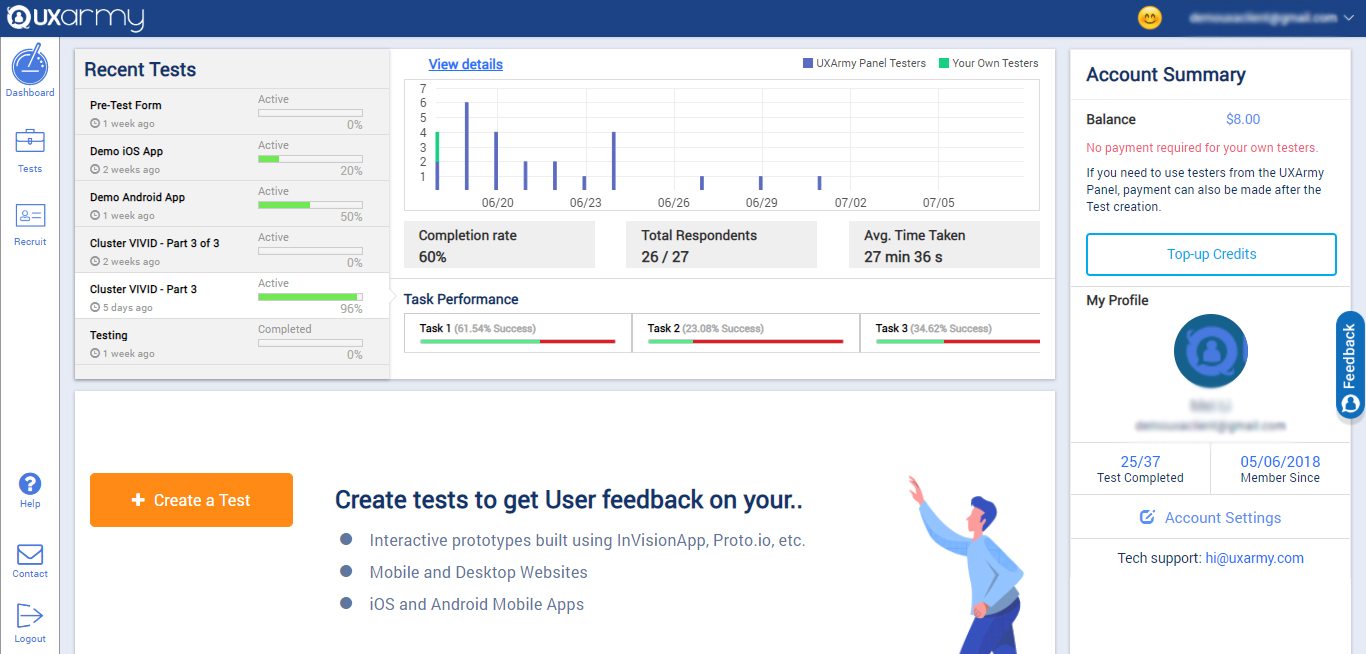
Screenshot of the client dashboard where clients can create tests for their prototypes, websites, mobile Apps, Mobile websites, web apps. They can check the overall progress of every test and they can also navigate to each test and see their progress and details as well.

They can check their account summary, top-up their account (via both PayPal and Debit/Credit cards) with credits to use in recruiting UserAdvocates to take the test.

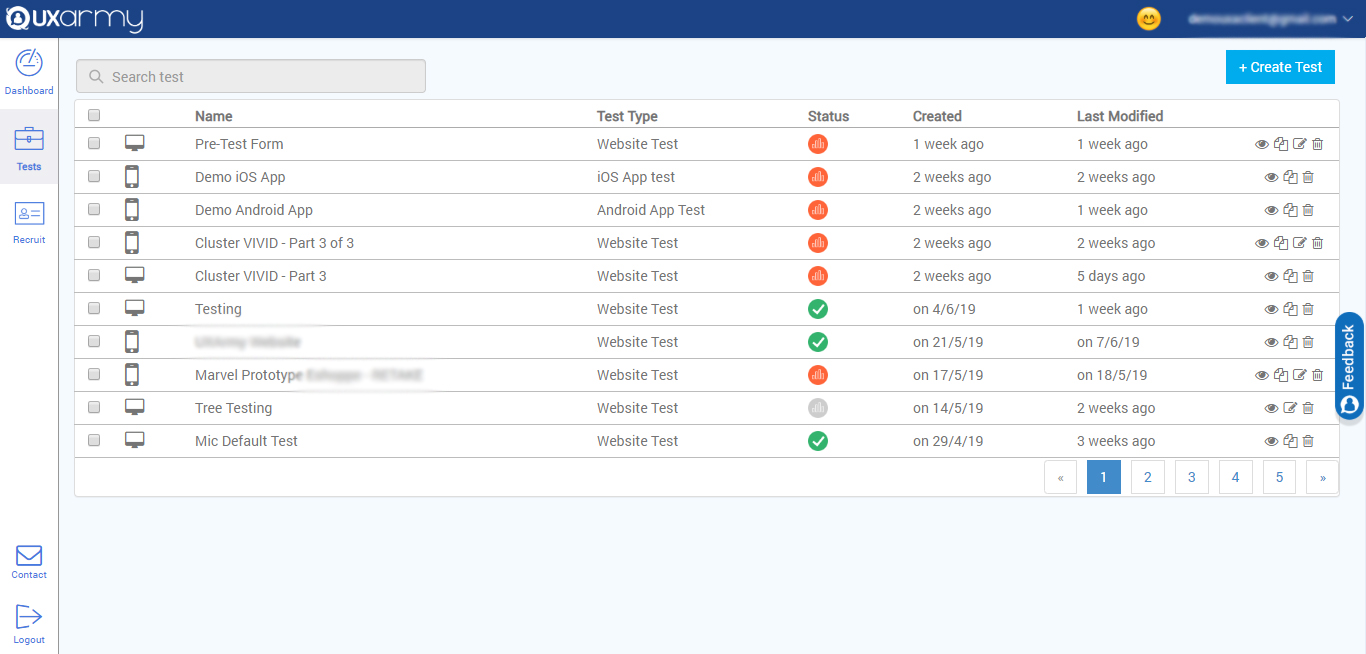
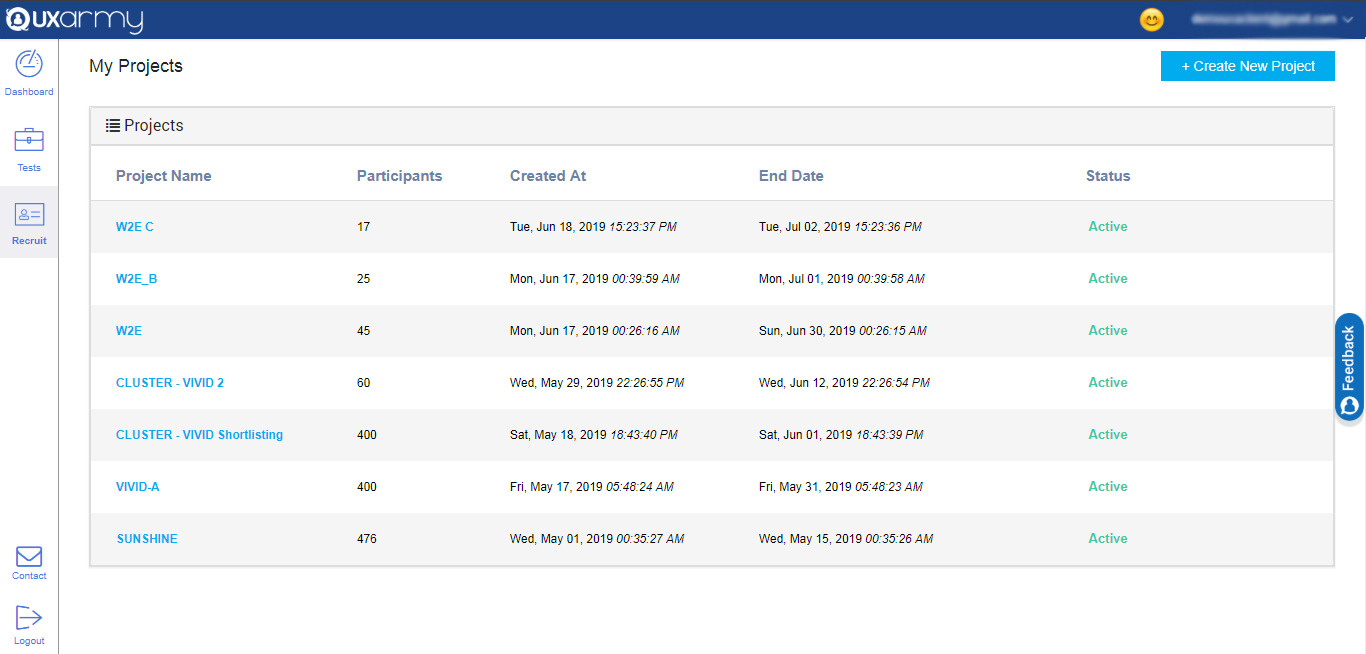
They can also navigate to account settings from the dashboard.Screenshot of a section that displays all the tests and any test can be selected to see the details of the response of the test. A new test can be created from here too by clicking on the "create test" button in the upper right corner of the screen.Screenshot of an example of the 2 ways to recruit for a test:

1. Up to 10  team members can take tests for free.

2. Testers can be recruited from the UXArmy's pool of testers from all around the world with a detailed demographic and behavioral filters like the country they live in or what language they speak, the mobile device they use, what gender they are, what shows they watch on TV, etc.