Overview
ProductRatingMost Used ByProduct SummaryStarting Price
Getscreen.me
Score 9.6 out of 10
N/A
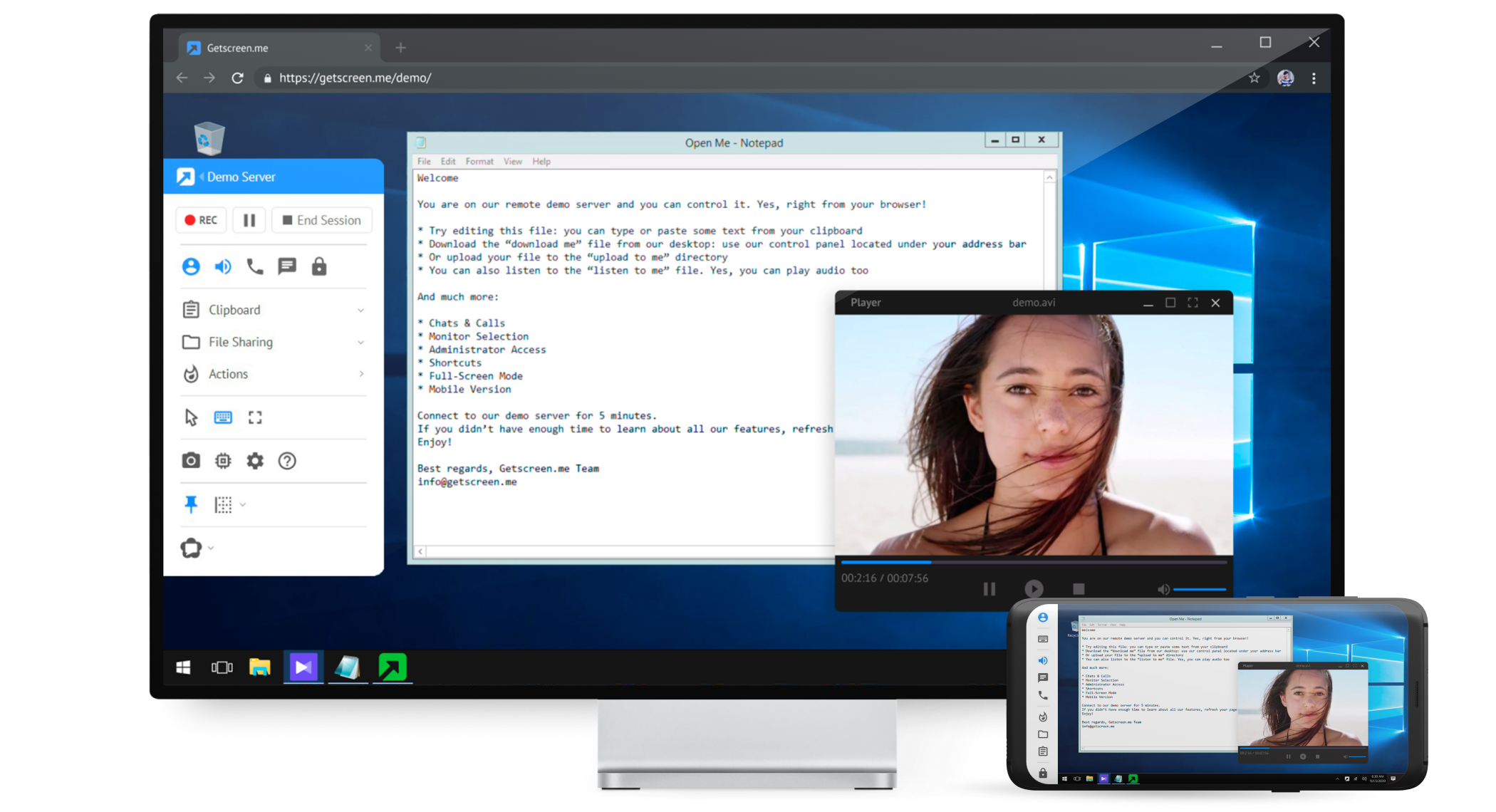
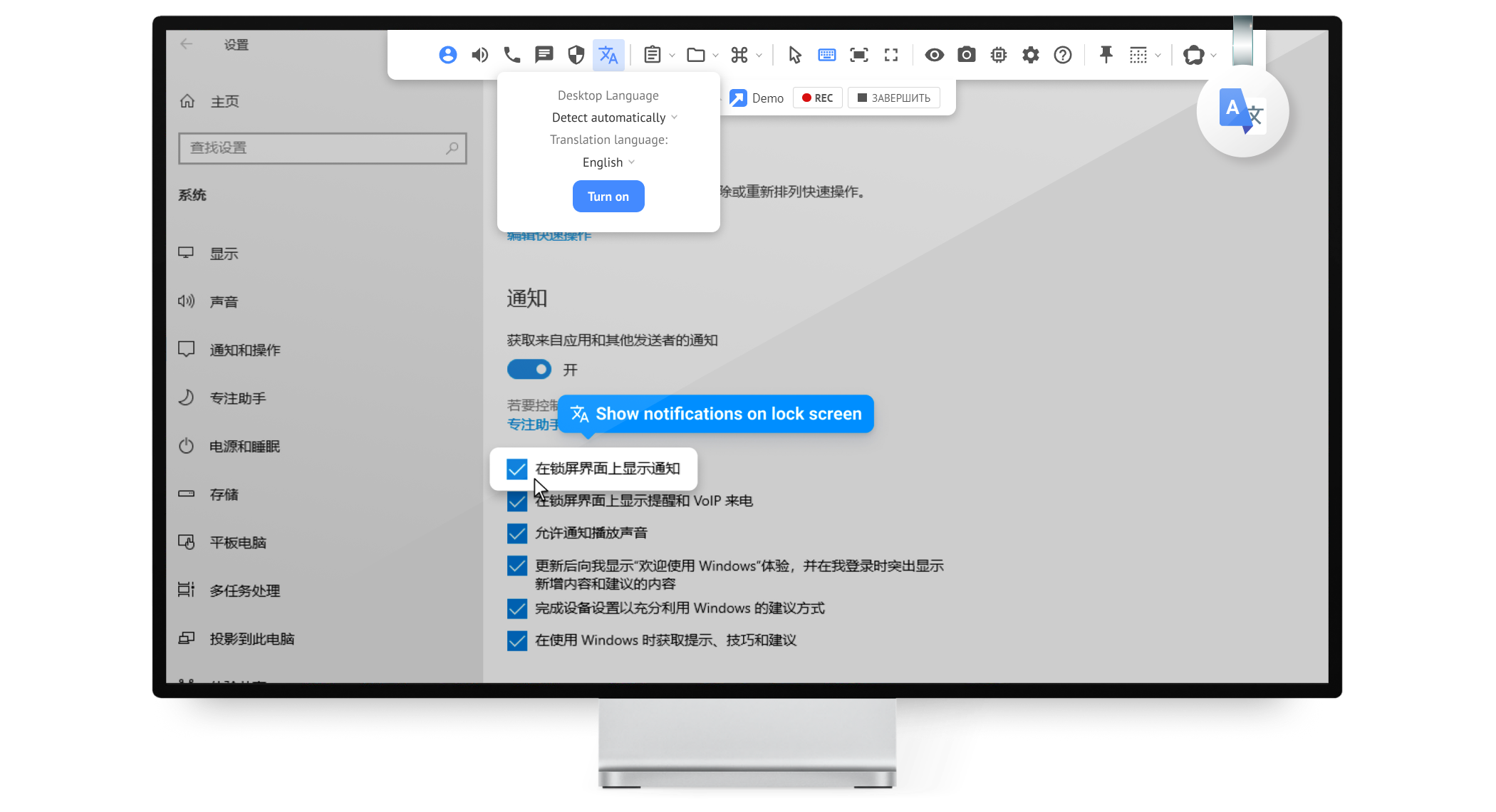
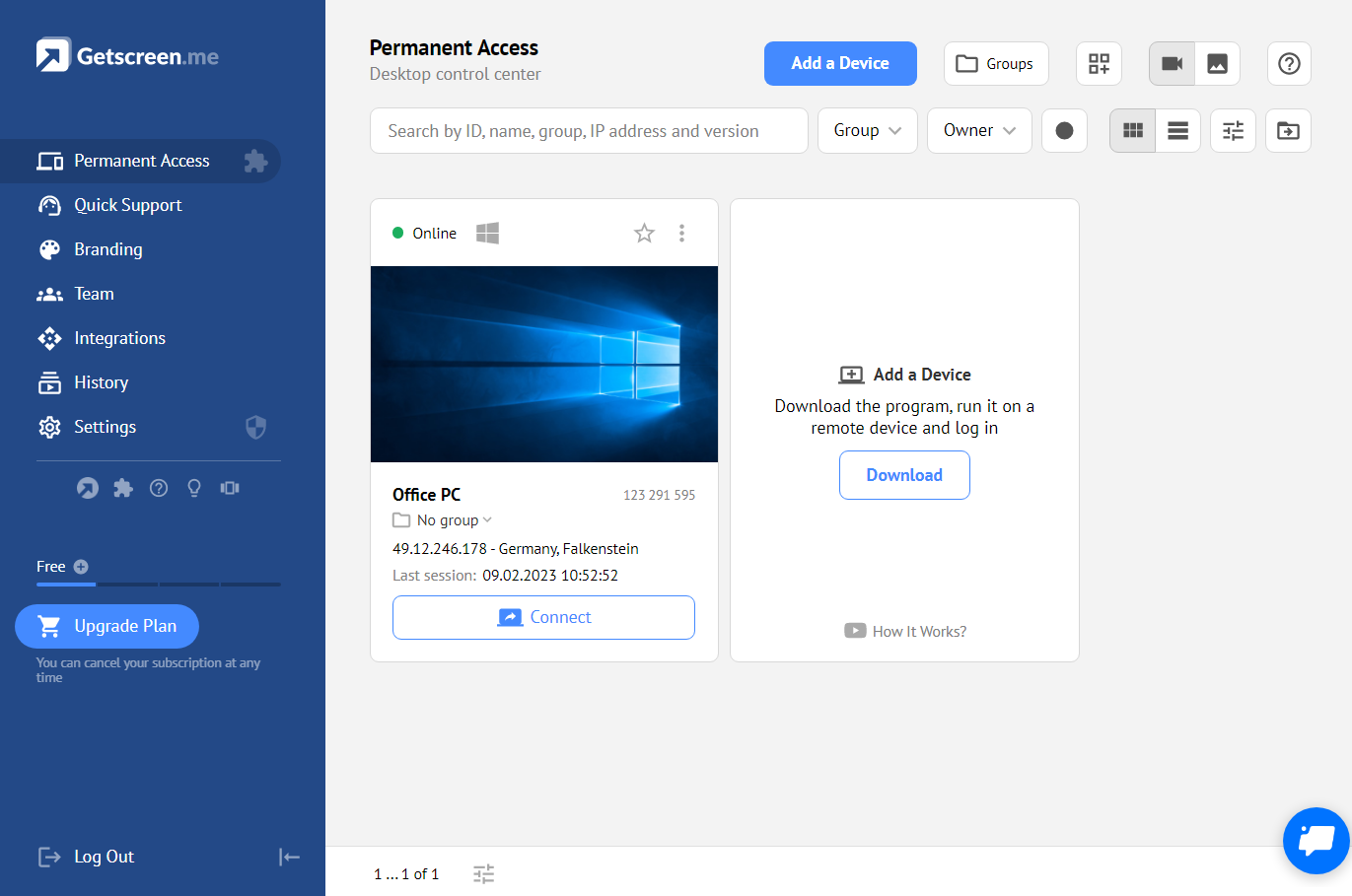
Getscreen.me is a cloud-based software for administration, technical support and remote work. Service provides remote desktop access from a browser, without any installation. It has permanent access and boasts quick support and instantaneous connection, with computers in the user's personal cabinet. The service works over the HTTPS protocol, which includes AES encryption.
$0
per user
Mikogo
Score 1.2 out of 10
N/A
Mikogo is a free screen sharing solution with built-in VoIP for online meetings, web presentations, web conferencing and sales demos.
$156
Annually
TeamViewer
Score 8.5 out of 10
N/A
TeamViewer provides software for both remote management and online collaborations. With TeamViewer, users have access to fully integrated online conference solutions for audio and video communication, including interactive screen sharing and remote access features.
$299
per year
Pricing
Getscreen.meMikogoTeamViewer
Editions & Modules
Free
$0
Standard
$5
per month per user, per device
Advanced
$8
per month per user, per device
Enterprise
$10
per month per user, per device
Basic Annual
$156
Annually
Professional Annual
$228
Annually
Professional Lifetime
$456
Lifetime License per User
Team Annual
$468
Annually
Team Lifetime
$936
Lifetime License [Unlimited Users]
Remote Access
$24.90
per month (billed annually) 1 Licensed User
Business
$50.90
per month (billed annually) 1 Licensed User
Premium
$102.90
per month (billed annually) 15 Licensed Users
Corporate
$206.90
per month (billed annually) 30 Licensed Users
Offerings
Pricing Offerings
Getscreen.meMikogoTeamViewer
Free Trial
YesYesYes
Free/Freemium Version
YesYesYes
Premium Consulting/Integration Services
YesNoYes
Entry-level Setup FeeNo setup feeNo setup feeOptional
Additional Details16% discount with an annual subscriptionEnterprise plans are also available for larger organizations, with a custom number of users, meeting participants, and channels. Master Administration and Web API integrations are also available. Contact Mikogo for further information.
More Pricing Information
Community Pulse
Getscreen.meMikogoTeamViewer
Considered Multiple Products
Getscreen.me
Chose Getscreen.me
This is a newer app and with work to do, but doesn't break the bank - especially like TeamViewer which goes up year on year.
Chose Getscreen.me
TeamViewer is more complicated than Getscreen.me. Plus I'm not sure it does the automatic IP resolution. More importantly, you can have permanent access to the computer without having the user to re-authorize anything. Once they've downloaded the software and run it, you have …
Chose Getscreen.me
First of all, I do not need to install anything, I can basically work everywhere even in-network where the internet is restricted like company networks. Cheaper than TeamViewer and more options were added frequently due to the high demand of features requested and the dev team …
Chose Getscreen.me
In my experience, Getscreen.me stacks up very well against other remote desktop software like TeamViewer and AnyDesk. One of the things I appreciate most about Getscreen.me is its competitive pricing. Compared to other remote control services like TeamViewer or AnyDesk, I find …
Chose Getscreen.me
Value for money is the main difference. For the cost - nothing touches Getscreen.me!
Chose Getscreen.me
Getscreen.me just works, and it works easily. There's no complex set up, no odd pricing, and the central management is wonderful.
Chose Getscreen.me
Occasionally I have to supply aid to friends or family members, or I desire to discuss how I want to share the television screen over the call in GetScreen.me. One click can create a key and share it; the sessions begin when it arrives. I'm keeping an eye on specific computers …
Chose Getscreen.me
Ease of use and cost made GetScreen.me the winner.
Chose Getscreen.me
Getscreen.me is so much cheaper tx to a lifetime deal i bought on appsumo. That's the main reason i switched!
Chose Getscreen.me
Getscreen.me works very well. The current feature set works well and I look forward to them adding more features. For ad-hoc support sessions, GSM works as well as anyone out there.
Mikogo
Chose Mikogo
Mikogo has simple features and is easy to use. If you don't need lots of bells and whistles and just want to screen share or video conference on a small scale Mikogo works best.
Join.me & TeamViewer are a bit confusing for the novice small business person.
My experience with …
Chose Mikogo
its a smaller tool than Teams and Skype and definitely don't have as much features. It is a tool for smaller organizations not big enterprises.
TeamViewer
Chose TeamViewer
Well, those these other programs are useful in their own ways, TeamViewer is the most well known and not for no reason. TeamViewer provides the ability to have the unattended access, the chat support, the mobile usage if necessary, and the speed at which you can connect to …
Chose TeamViewer
TeamViewer is a popular professional choice for remote management for external service providers and for getting team members in different locations together for online meetings. Market leader, TeamViewer, also has its limitations: especially in terms of security and image …
Chose TeamViewer
I also used VNC viewer and some other software. The best part about TeamViewer is the easy interface to connect and no network issues and no firewall issues. Some of the options only provide one of the features like internet call, chat, screen sharing, or file sharing, where …
Features
Getscreen.meMikogoTeamViewer
Remote Administration
Comparison of Remote Administration features of Product A and Product B
Getscreen.me
9.3
21 Ratings
16% above category average
Mikogo
-
Ratings
TeamViewer
8.5
534 Ratings
2% above category average
Screen sharing9.921 Ratings00 Ratings00 Ratings
File transfer9.919 Ratings00 Ratings8.8502 Ratings
Instant message10.016 Ratings00 Ratings8.6462 Ratings
Access to sleeping/powered-off computers7.916 Ratings00 Ratings7.3353 Ratings
Over-the-Internet remote session9.820 Ratings00 Ratings00 Ratings
Initiate remote control from mobile6.615 Ratings00 Ratings00 Ratings
Centralized management dashboard10.018 Ratings00 Ratings00 Ratings
Session record10.016 Ratings00 Ratings8.3361 Ratings
Multi-platform remote control9.216 Ratings00 Ratings00 Ratings
Annotations00 Ratings00 Ratings7.9126 Ratings
Performance & Compatibility of Online Events Software
Comparison of Performance & Compatibility of Online Events Software features of Product A and Product B
Getscreen.me
-
Ratings
Mikogo
3.1
4 Ratings
87% below category average
TeamViewer
-
Ratings
High quality audio00 Ratings4.14 Ratings00 Ratings
High quality video00 Ratings4.14 Ratings00 Ratings
Low bandwidth requirements00 Ratings1.14 Ratings00 Ratings
Mobile support00 Ratings3.22 Ratings00 Ratings
Screen Sharing
Comparison of Screen Sharing features of Product A and Product B
Getscreen.me
-
Ratings
Mikogo
6.0
4 Ratings
27% below category average
TeamViewer
-
Ratings
Desktop sharing00 Ratings2.24 Ratings00 Ratings
Whiteboards00 Ratings9.82 Ratings00 Ratings
Online Meetings / Events
Comparison of Online Meetings / Events features of Product A and Product B
Getscreen.me
-
Ratings
Mikogo
3.0
4 Ratings
92% below category average
TeamViewer
-
Ratings
Calendar integration00 Ratings1.12 Ratings00 Ratings
Meeting initiation00 Ratings1.24 Ratings00 Ratings
Record meetings / events00 Ratings2.14 Ratings00 Ratings
Slideshows00 Ratings7.63 Ratings00 Ratings
Online Events Collaboration
Comparison of Online Events Collaboration features of Product A and Product B
Getscreen.me
-
Ratings
Mikogo
2.1
4 Ratings
117% below category average
TeamViewer
-
Ratings
Live chat00 Ratings1.24 Ratings00 Ratings
Audience polling00 Ratings3.13 Ratings00 Ratings
Q&A00 Ratings2.13 Ratings00 Ratings
Online Events Security
Comparison of Online Events Security features of Product A and Product B
Getscreen.me
-
Ratings
Mikogo
1.5
4 Ratings
137% below category average
TeamViewer
-
Ratings
User authentication00 Ratings1.23 Ratings00 Ratings
Participant roles & permissions00 Ratings1.13 Ratings00 Ratings
Confidential attendee list00 Ratings2.13 Ratings00 Ratings
Security
Comparison of Security features of Product A and Product B
Getscreen.me
-
Ratings
Mikogo
-
Ratings
TeamViewer
8.5
48 Ratings
1% above category average
Role-based user permissions00 Ratings00 Ratings8.548 Ratings
Platform & Infrastructure
Comparison of Platform & Infrastructure features of Product A and Product B
Getscreen.me
-
Ratings
Mikogo
-
Ratings
TeamViewer
7.9
34 Ratings
1% above category average
Third-party software integrations00 Ratings00 Ratings7.934 Ratings
Remote Access
Comparison of Remote Access features of Product A and Product B
Getscreen.me
-
Ratings
Mikogo
-
Ratings
TeamViewer
8.3
59 Ratings
6% above category average
Attended device access00 Ratings00 Ratings9.058 Ratings
Unattended device access00 Ratings00 Ratings8.454 Ratings
Mobile device access00 Ratings00 Ratings7.651 Ratings
Virtual device access00 Ratings00 Ratings8.348 Ratings
Multiple-display support00 Ratings00 Ratings8.249 Ratings
Multiple concurrent sessions00 Ratings00 Ratings8.248 Ratings
Best Alternatives
Getscreen.meMikogoTeamViewer
Small Businesses
Remote Desktop Manager
Score 9.5 out of 10
Intermedia AnyMeeting Pro
Score 7.2 out of 10
Getscreen.me
Getscreen.me
Score 9.6 out of 10
Medium-sized Companies
Remote Desktop Manager
Score 9.5 out of 10
JioMeet
JioMeet
Score 9.8 out of 10
Action1
Action1
Score 9.5 out of 10
Enterprises
Remote Desktop Manager
Score 9.5 out of 10
Webex Meetings
Webex Meetings
Score 8.6 out of 10
Remote Desktop Manager
Score 9.5 out of 10
All AlternativesView all alternativesView all alternativesView all alternatives
User Ratings
Getscreen.meMikogoTeamViewer
Likelihood to Recommend
9.2
(21 ratings)
1.2
(4 ratings)
8.7
(557 ratings)
Likelihood to Renew
9.9
(2 ratings)
-
(0 ratings)
10.0
(64 ratings)
Usability
10.0
(3 ratings)
-
(0 ratings)
9.1
(57 ratings)
Availability
-
(0 ratings)
-
(0 ratings)
9.1
(5 ratings)
Performance
-
(0 ratings)
-
(0 ratings)
9.1
(5 ratings)
Support Rating
10.0
(1 ratings)
8.0
(2 ratings)
9.6
(50 ratings)
In-Person Training
-
(0 ratings)
-
(0 ratings)
9.1
(2 ratings)
Online Training
-
(0 ratings)
-
(0 ratings)
9.1
(4 ratings)
Implementation Rating
10.0
(1 ratings)
-
(0 ratings)
8.9
(119 ratings)
Configurability
-
(0 ratings)
-
(0 ratings)
9.1
(4 ratings)
Ease of integration
-
(0 ratings)
-
(0 ratings)
9.1
(5 ratings)
Product Scalability
-
(0 ratings)
-
(0 ratings)
9.1
(5 ratings)
Vendor post-sale
-
(0 ratings)
-
(0 ratings)
8.5
(5 ratings)
Vendor pre-sale
-
(0 ratings)
-
(0 ratings)
9.1
(5 ratings)
User Testimonials
Getscreen.meMikogoTeamViewer
Likelihood to Recommend
Getscreen.me
As long as there is internet connectivity, Getscreen.me is useful for connecting to your desktop or a server in order to work remotely. An example would be a dedicated machine for rendering video. We use Getscreen.me to log in and start the render. Connecting to a client desktop to provide on system support. There is the ability to log and record activity when the application is used, this would be helpful for monitoring activity of a remote desktop tech support team. Reporting is basic but provides enough information to track interactions.
Read full review
BeamYourScreen
Pros Mikogo is well-suited and cost-effective for the small business Simple & well-designed; easy to figure out. Works best for one-on-one client support. Cons No live customer support Free version has limited features (e.g. no invite meeting allowed) Trial version only 14 days
Read full review
TeamViewer
I think it works well for IT management and help desk support of end users. I find it very useful to help users and send files to their desktop. Remote Workers still run into some problems with MFA and updates, both to the TV Host app and OS updates. However, it does give us secure direct access without the need of a VPN.
Read full review
Pros
Getscreen.me
  • easy connection to new clients - both one time use and permanent
  • keep computers organized
  • support remote users from any device - even a cell phone with ease
  • multiple users with different subsets of computers
  • file sharing
  • block remote keyboard and mouse / monitor if needed
  • connection log
  • custom branding and personalized quick connection link
Read full review
BeamYourScreen
  • Inexpensive
  • Simple interface
  • Menus and prompts were clear
Read full review
TeamViewer
  • It is secure and eliminates the need for VPN for remote users.
  • It offers a 2FA to insure that security is strong for our system.
  • Can save time with file transfer syncs for labels, batches and other files.
  • It supports multi device and cross platform usage within our warehouse.
Read full review
Cons
Getscreen.me
  • Speed - the Getscreen.me solution is an all round winner - however I find that there is a slight lag when controlling a remote PC mouse - compared to the competitors products. If this can be improved on - the GETSCREEN.ME get a 10 out of 10 from us!
Read full review
BeamYourScreen
  • I'd like to be able to record a session easier.
Read full review
TeamViewer
  • With an iPad, you can't take control of the device, so you have to tell someone what to do. Which can be a challenge because the end user doesn't know what to do
  • With the free version of TeamViewer you cant enter Admin credentials because TeamViewer blocks the windows to fill in the credentials
  • The free version can be really limited which can be putting off people because they don't see the full potential of TeamViewer
Read full review
Likelihood to Renew
Getscreen.me
Value for money - Getscreen.me stands above the rest!
Read full review
BeamYourScreen
No answers on this topic
TeamViewer
We need this tool in our day to day business. It is what we do all day remoting into clients devices. In this day and age we can access devices all over the world as long as we have secure internet connection. It certainly saves money in gas, and even if you are away you can help.
Read full review
Usability
Getscreen.me
For what we need it to do, it just works. And I'm sure that we're not even using it to the full extent of what it's capable and designed to do. If we had the need, Getscreen.me has many more features that we could implement. If the need arises in the future, it's great knowing that we already have a tool to utilize.
Read full review
BeamYourScreen
No answers on this topic
TeamViewer
TeamViewer is a reliable and really strong tool for accessing remote IT platforms secure and fast. We don't know any product that provide us such strong functionality to make our life as a internationally recognized MES provider with DIAMES with an international clientele so easy. We look forward for any new TeamViewer functionality that supports us even more.
Read full review
Reliability and Availability
Getscreen.me
No answers on this topic
BeamYourScreen
No answers on this topic
TeamViewer
Always available if setup correctly.
Read full review
Performance
Getscreen.me
No answers on this topic
BeamYourScreen
No answers on this topic
TeamViewer
The application is built on VNC which is a very stable technology.
Read full review
Support Rating
Getscreen.me
When I did reach out at the early days of using Getscreen.me I got a pretty prompt response, and all of my questions were answered. Since then, I have never needed to contact support. This is a GOOD thing!
Read full review
BeamYourScreen
I do not have any experience with Mikogo's support as I have never experienced any problem with it.
Read full review
TeamViewer
the few times i have had to contact teamviewer support, they were very responsive and give me quick answers and seemed to understand my problems quickly and easily. I did not have to sit on the phone for hours on hold or get passed around to multiple phone support techs before finding a solution to my issues, so i would rate their support very highly.
Read full review
In-Person Training
Getscreen.me
No answers on this topic
BeamYourScreen
No answers on this topic
TeamViewer
As expected without any problem! Alternate in-person training is another efficient way to learn how a product works. There are many third party supporters for TeamViewer courses available that can give additional ideas how to use TeamViewer for specific functions and features as we did require in respect of our usage.
Read full review
Online Training
Getscreen.me
No answers on this topic
BeamYourScreen
No answers on this topic
TeamViewer
I have never used the online training either. I have watched a few informational videos that were helpful when learning how to do a specific procedure within TeamViewer and get the most out of the software by utilizing one of the many features that are available with the software. Again, 5 if for neutral.
Read full review
Implementation Rating
Getscreen.me
Easy, fast and worked every time to date!
Read full review
BeamYourScreen
No answers on this topic
TeamViewer
TeamViewer installation and deployment to other devices is pretty straightforward and does not require much technical know-how. This makes ease of use attractive when supporting both new and existing clients with limited technical knowledge. I think ease of use is a huge factor in getting new clients. TeamViewer handles that extremely well.
Read full review
Alternatives Considered
Getscreen.me
In my experience, Getscreen.me stacks up very well against other remote desktop software like TeamViewer and AnyDesk. One of the things I appreciate most about Getscreen.me is its competitive pricing. Compared to other remote control services like TeamViewer or AnyDesk, I find that Getscreen.me offers fantastic value for money.In terms of functionality, Getscreen.me has all the features I need, including cross-platform access, file transfer, and remote control. I also find the quick access function to be incredibly useful, as it allows me to connect to a remote computer in just two clicks.
Read full review
BeamYourScreen
Mikogo has simple features and is easy to use. If you don't need lots of bells and whistles and just want to screen share or video conference on a small scale Mikogo works best. Join.me & TeamViewer are a bit confusing for the novice small business person. My experience with LogMeIn has been that it's sluggish. GoToMeeting works great but is pricey for the small firm that mainly does one-to-one support/training. I couldn't get Zoom to work right.
Read full review
TeamViewer
TeamViewer's cost is much lower than that of other solutions, and its security is far superior to RemotePC's. TeamViewer is also a request-based remote session manager, unlike other software that allows indefinite connection time. TeamViewer's free version makes it even better for one end of the group to find support, while the other end has the paid version.
Read full review
Scalability
Getscreen.me
No answers on this topic
BeamYourScreen
No answers on this topic
TeamViewer
Stay up working. Easy to connect and disconnect. easy way to transfer files to another desktop
Read full review
Return on Investment
Getscreen.me
  • Cheap cost - I got it on Appsumo with no monthly fee.
  • The freedom to solve issues for transport companies given the high amount of data and control.
  • It works 100% of the time. There's never been any downtime from experience.
Read full review
BeamYourScreen
  • Zero positive impact
  • Spend just a little more with products like AnyDesk and get some real ROI
  • Short term, the product can be used on a trial basis (or at least it was available as a trial)
Read full review
TeamViewer
It took about 3 months.
  • Customer Support of our business has become more interactive with customers, leading to faster resolution of their problems.
  • Remotely accessing devices in our office allows employees to stay productive while working from home.
  • TeamViewer helps us to collaborate with other firms for projects we're doing.
Read full review
ScreenShots

Getscreen.me Screenshots

Screenshot of Screenshot of Screenshot of Screenshot of Screenshot of Screenshot of

Mikogo Screenshots

Screenshot of Screen sharing between two windows desktop computersScreenshot of Phone conference and participant list options

TeamViewer Screenshots

Screenshot of how TeamViewer lets users connect to devices and provide remote support.Screenshot of AI, automation and remediation.Screenshot of the interface to monitor and manage devices proactively.Screenshot of some of TeamViewer's integrations.