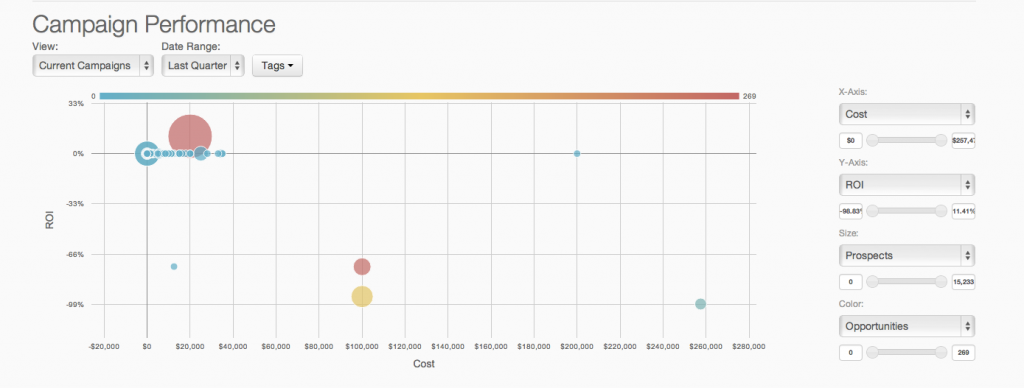
Adobe acquired Neolane in July 2013 and later re-named the product Adobe Campaign. Adobe Campaign provides both marketing automation and marketing resource management functionality such as spend & financial management, workflow, and asset management.
N/A
Constant Contact
Score 7.9 out of 10
N/A
Constant Contact is a full-featured email marketing solution with capabilities such as social media integration, drag-and-drop editing, and real-time reporting. It is a bulk email tool designed for SMB customers. Since 2019, Constant Contact also offers marketing automation features, a website and landing page builder, and other tools to support midsize businesses.
$12
per month
Agentforce Marketing
Score 7.7 out of 10
N/A
Marketing Cloud is a cloud-based digital marketing platform, used by marketers can segment their audience, deliver personalized messages, track campaign performance, engage leads and accounts, and optimize strategies based on real-time insights.
$1,250
per month per installation
Pricing
Adobe Campaign
Constant Contact
Salesforce Agentforce Marketing
Editions & Modules
No answers on this topic
Lite
Starting at $12.00
per month
Standard
Starting at $35.00
per month
Premium
Starting at $80.00
per month
Account Engagement
$1,250
per month
Engagement
$1,250
per month
Intelligence
$3,000
per month
Loyalty Management
$20,000
per month
Personalization
$100,000
per year
Data Cloud for Marketing
$108,000
per year
Offerings
Pricing Offerings
Adobe Campaign
Constant Contact
Agentforce Marketing
Free Trial
No
Yes
Yes
Free/Freemium Version
No
No
No
Premium Consulting/Integration Services
No
No
Yes
Entry-level Setup Fee
No setup fee
No setup fee
No setup fee
Additional Details
—
The SMS Marketing tool can be added to any Standard or Premium Constant Contact account. SMS is only available in the US for Standard and Premium paid plans. SMS can be added when logged in to an account after purchase. Plans start at $10/month for up to 500 messages.
Adobe Campaign Standard has a lot of segmentation options out of the box and a lot better analytics. Pardot is a lot more listbased, where with Adobe Campaign, you can do complete customized segmentation, such as all permissions in base A who are currently customers of this …
Verified User
Administrative Assistant
Chose Adobe Campaign
Because it's pricey, I've played around with cheaper alternatives when I didn't have access to it through work, such as Infusionsoft, ONTRAPORT & Pardot Marketing Automation. I found that all of them lacked the consistency and tools I needed to create strong results and as …
As we tried to centralise the marketing automation platform within the enterprise, Adobe Campaign can plug into several instances of Salesforce.com for lead management queues. All other marketing automation platforms can only plug into one instance of Salesforce.com.
Adobe Campaign improves your email marketing with personalized and contextually relevant messages. We use the native email capabilities in Adobe Campaign alongside our other marketing channels. With more complete data, it delivers better email personalization and improves our …
Adobe Campaign offers unmatched customization but is definitely the least intuitive and user-friendly marketing automation tool I have ever used. We selected Adobe Campaign because we use other Adobe Marketing Cloud Products (Analytics and Target) but the integration with those …
ACS is an Organizational tool, not a stand-alone email system. Having a single point for email addresses across ministries and being able to offer a tool with very high deliver-ability make ACS a very attractive tool to other ministries.
I would say that Constant Contact and MailChimp are fairly comparable in terms of features and uses. I've used both at several companies and haven't noticed a large difference between the two. By the time I was about to leave my previous company that used Constant Contact, we …
Salesforce Marketing Cloud is intuitive and does what it needs to do. The functions are easy to find, and the automation options work smoothly. You find an intuitive workspace in both HubSpot and Marketo Engage, and the options in these programs look similar to Salesforce Sales …
Overall, 80 percent of the features and boiler plate and standard across all these tools. Salesforce leads in integrations and global scalability. But lacks in User interface and ease of use.
Pardot offers equal or better performance when compared to other industry leaders. It's as user-friendly as Emma and Mailchimp and outpaces others like Blackbaud Luminate. The WYSIWYG (like all other email platforms) has some quirks to navigate around, but it's generally easy …
Pardot is pretty much on the same level. We chose Pardot because it integrates directly with Salesforce. We already use Contentful for landing pages, so we weren't too worried about using Pardot's builder. I really liked the simplicity of the visual email workflows. Coming …
Pardot is definitely one of the best tools out there. It's got a great UX and it is intuitive, easy to learn, and fast. Some of their naming conventions are a little bit confusing, like Users vs. Prospects. Published Templates vs. Draft Templates. List Emails vs. Sent Emails …
As stated earlier, Pardot is definitely the leader in marketing automation. In comparison to other competitors, it's the most expensive, but it provides the most efficient data for larger organizations. While it can be difficult to onboard, the customer service is excellent and …
I have used parts of the marketing cloud. While certain components of the marketing cloud are better (like social studio), the marketing automation and email marketing components of pardot are better and best suited for our business.
Multi-Channel Campaign Management: I have found Adobe Campaign to be excellent for managing campaigns across multiple channels, including email, mobile, social media, and web. Its centralized platform allows me to plan, execute, and track campaigns effectively, making it ideal for organizations with diverse marketing channels. For example, when I was running a campaign to promote a new product launch across email, SMS, and social media channels, Adobe Campaign provided me with the tools to orchestrate and track the campaign seamlessly. I could ensure consistent messaging and a cohesive customer experience across different channels.
Constant Contact is an excellent tool for sending out flyers and newsletters. However, I feel the content's appearance is typically all the same. When I receive an email from Constant Contact, I can immediately identify it - the templates usually all look the same. When sending out communications with images, it is easy to use Constant Contact and link webpages. However, the email layout is always vertical and can get very lengthy. I prefer a more flip-book approach with options to flip the page.
I think the product, by definition, is meant for marketing — and we use it exactly for that, for running campaigns. That’s the best-suited use case for the product. I don’t think it’s really meant to be used for anything else — that’s just not how it’s designed.
It allows me to capture leads through various sources, such as website forms or landing pages.
It offers a centralized repository where I can securely store and manage customer data, encompassing contact information, preferences, transaction records, and additional relevant data.
It provides robust analytics and reporting capabilities.
Market segmentation is great: my main segmentation is by region because that's how our sales team is divided.
Lists: making customized email lists is easy and intuitive; the custom fields allow some flexibility in case our fields don't exactly line up with Constant Contact's.
Campaigns: creating campaigns is quick and simple. I especially appreciate the 'resend to non-openers' option. I am constantly using this feature.
Subject line generator: I like using the recommended subject lines. I'm able to plug in their recommended ideas, or sometimes, this feature helps me generate my own ideas.
Adobe Campaign does not have a high enough sales intelligence to let us know which landing page format would be the most optimal for the proper development of our mass marketing operations, which in the long run would also help with customer collection.
Does not directly track the number of people who enter our website, beyond sending them automated messages depending on whether they entered a certain section of the site. This problem is important, because it does not allow us to get complete tracking results in that area.
The platform does not do social media marketing extensively enough to let us create dynamic evaluations on the results of interactions that are obtained within social networks, which creates a huge margin of error in our analytical results messages, and so we have stopped applying social marketing.
It would be nice if we had more customizable options for emails - like moving around pictures and text boxes, rather than a set spot for everything to go.
I would like it if multiple people could work on a document at one time. So if I'm in charge of graphics, I can get those updated while someone else is entering content, etc.
Once you go for Neolane you are a bit stuck with it, so we will most likely stay with Neolane. Cost of investment and training are the main factors at work here. We havesimply have invested too much in the product to stop using it after 2 years. That said, my score of 8 does not imply that the product is worthy of getting an 8 but reflects our willingness to renew. Given that upgrading to a new version will cost again a substantial sum, we most likely will keep using the current version we are on which is 6X.
There is no doubt that we are going to renew Constant Contact. We have not just invested a lot of time in learning and creating a great looking product but we have developed a strong database of information that allows us to track how we are doing for each newsletter. This supports our goals of creating products that residents desire and are excited to receive.
As of right now we have not seen any other program that integrates as seamlessly into our Salesforce platform. We have barely scratched the surface of all the features and use cases. It would be irresponsible to make a move to another platform in the near future. We have not come up against any limitations that would prompt a need to switch
Thanks to this tool we are taking more internal control of the creation and deployment of campaigns with less dependency on an ESP. We can pre-program marketing publications, being able to concentrate on the target audience. It helps me manage email campaigns with real-time tracking.
There is always room for improvement. I don't know how they test their systems, but they should invite not-so computer savvy people to test it. If I, as an expert have problems, they need to think like the technophobe. Since I've used Constant Contact in the past as part of my former employment, I have not viewed any of the tutorials and just jumped in to work on my client's newsletter. With that said, I found some areas easy and some a bit cumbersome
You won't find another solution that has as many features as Salesforce Marketing Cloud Interaction Studio. We all know Salesforce, we all know how big they are and it's not for nothing... Their tools do most of the things you want, need and even imagine. Using it is complicated, but the usability is infinite.
Upgrades and timing of the upgrades were communicated well and planned during off hours for our work. If we did have a campaign scheduled during that time, it would kick-off after the system was back active. There were a few unplanned system down times, but it was a rare occurrence and those times were also short in duration.
The system seemed quite slow sometimes. Specifically, there was sometimes a delay in sends if it was during a high traffic period. There were time-outs when uploading new code for an email, and a lag in reporting analytics which was sometimes as long as 72 hours
Though the make up of MA apps is not built this way today, it would be nice to see them become more real-time. The integration between Salesforce and Pardot is not a true real-time integration. If I modify something in Salesforce, those changes are not automatically reflected in Pardot immediately. There is a delay of about 15 minutes before the systems sync. This delay, although not long, is less than ideal We would love the systems to be integrated real time such that changes are propagated from one system to the other immediately.
Although there is a lot of material available on the internet to answer questions, I still feel a lack of commitment and delay in the responses of the support, but as a whole, it leaves nothing to be desired. I believe that, in the great majority, companies sin in the desired support, but we cannot generalize. But this one, in particular, has a wide range of specialists and well-qualified management, but I believe that it is not so bad.
I think the overall support for Constant Contact has always been incredible; I have nothing negative to say. Our customer support representative was attentive, easy to understand, and very knowledgeable. I never felt like I wasn't a priority of his and my issues, while very small, were fixed in a very short time frame.
They are really responsive and more than not solve the problem or give you insight to how you can manage the solution yourself. I do find however sometimes a long delay on the more complex issues when they need to loop in other departments. but overall a good experience with support
The trainers at the Pardot user conference (Elevate and Connections) were very knowledgeable and presented the material well. Again, the content was targeted to more of a new user audience, and was not really relevant for folks who had been using the product for 2+ years.
Pardot's online training touches on all topics briefly and vaguely without much indepth exploration into how a final outcome could look, such as Nurturing Campaigns, Email templates, landing page templates, etc... The only true way to uncover Pardot's full capabilities is to have Front End design and coding experience. Without this key skill set, I would not recommend Pardot to another business.
Implementation is very easy for someone who wants to send out the “batch and blast” type newsletters. If you want to use their templates with no customizations, the product works fine. However, the more customizations you get into involving link color, etc, that’s where things can get tricky for someone who may not be familiar with coding
From an IT perspective, once you set up the Javascript beacon and start collecting data there is a waiting game. During this time you can start labeling your site actions which can be labor intensive for a single person, but you don't really have the final end-users on the platform yet. We did a lot of training so users were experienced, but it wasn't until they had their first tasks to accomplish that they started using the system and had questions. I'd recommend setting up some immediate goals for an end-user to start segmenting for the purpose of displaying message campaigns so you can jump start end-user action.
As we tried to centralise the marketing automation platform within the enterprise, Adobe Campaign can plug into several instances of Salesforce.com for lead management queues. All other marketing automation platforms can only plug into one instance of Salesforce.com. Adobe Campaign was also able to handle the complexity and challenges of our enterprise data which are a result of years of legacy, mergers and acquisitions and data aggregation.
Constant Contact is much more intuitive for people who are not tech-savvy. Also, while sendgrid offered more options in it's drag and drop interface, it displayed differently across different email clients, which made it very cumbersome to use. It also took much longer to upload contact lists and it was harder to manage existing contacts. Performance in sendgrid was much slower as well, and the Preview feature was quite buggy. Our team initially chose sendgrid because of the integration options that it's API offered, but we ultimately switched to Constant Contact because it was much easier to build campaigns and better suited our requirements.
We use Salesforce Marketing Cloud for lead management, generating reports, tracking customer and dealer information, inputting orders, and more. I prefer HubSpot for email marketing and automation because it is easier to use and the emails are designed much better. We currently use Salesforce and HubSpot, and we are very happy to have both, as they have different pros/cons.
Not everything was great at all times. It was handled accordingly, pricing was reasonable for what was purchased. It was the best value on the market at the time of purchase.
Very reliable in sending email campaigns and controlling the recipients so that no contact is sent the same email more than once, even if they are on a resent list
Prior to this, we had no solution and literally were doing things on paper in a world where technology is outpacing paper. Having this process optimized has made it easier for the sales and marketing people to change information. From the training perspective, it has allowed us to see holes in where we could create additional support training, so the ROI here has been a lot more than just the optimization of a process.
Talking about profits can be subjective if you don't take into account the periodic variations between net and gross profit margins, but fortunately with Adobe Campaign, it is easy to notice these differences quickly.
Results have always seemed relative to us, as they vary greatly depending on how much is invested.
I have had nothing but positive impacts from using Constant Contact.
The church is large, and there are many subgroups and axillary groups within the church. Setting up specific groups based on responsibility, interest, member goals, and service needs allows me to send information quickly, saving valuable time for other tasks.
Constant Contact allows leadership to stay personally engaged with the members I work with, without over-taxing my time. It feels so seamless.
Salesforce Marketing Cloud allows us to more efficiently reach out to a higher number of prospects.
Salesforce Marketing Cloud allows us to nimbly communicate important messages in a timely fashion to facilitate conversion.
Salesforce Marketing Cloud allows us to track who is opening our messages so that we can stop sending to those not interested and focus on the most engaged audiences.