Asana is a web and mobile project management app. With tasks, projects, conversations, and dashboards, Asana lets an entire team know who's doing what by when, enabling workload balancing. Users can also add integrations for GANTT charts, time tracking and more.
$13.49
per month per user
Paymo
Score 9.0 out of 10
N/A
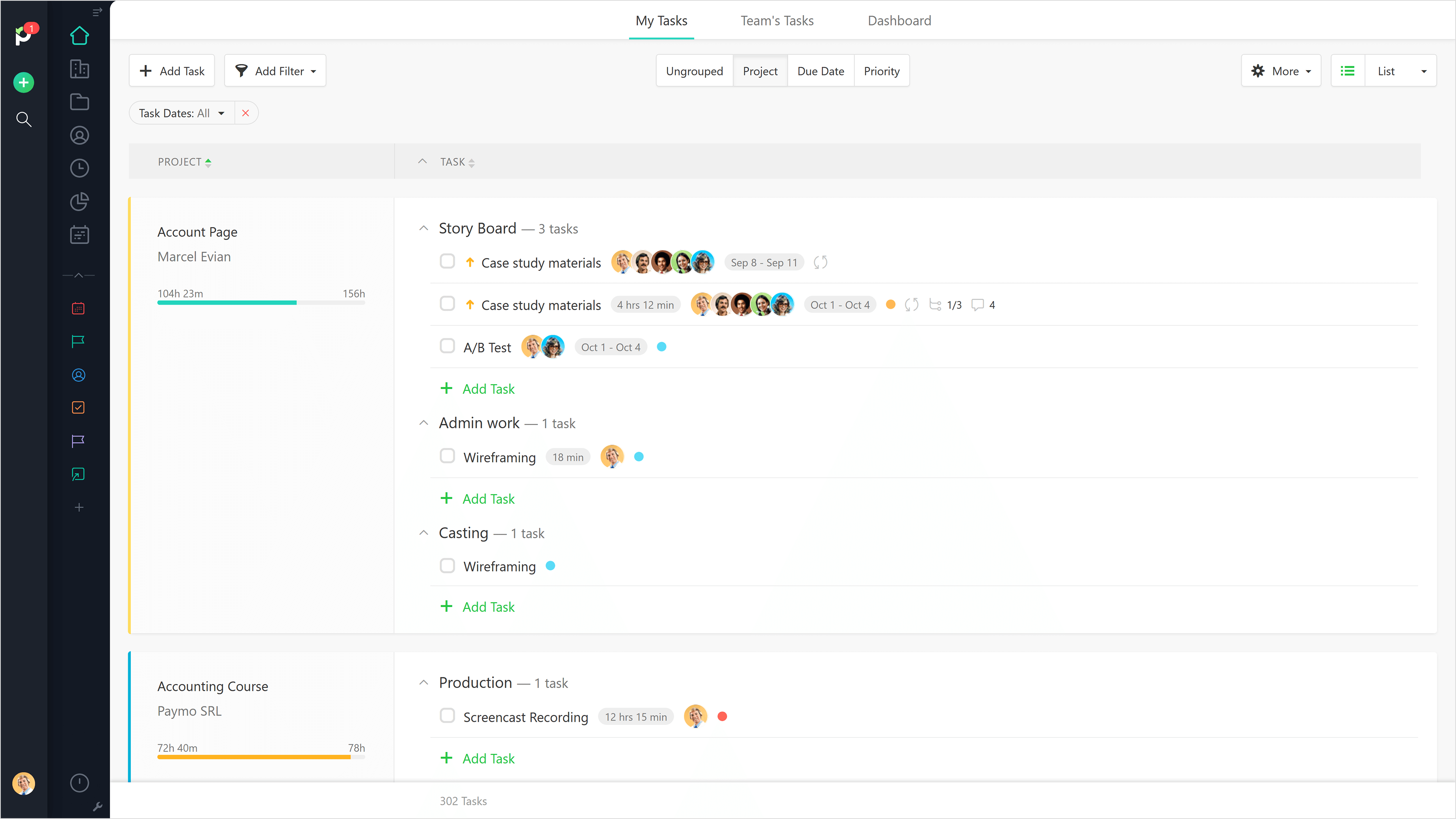
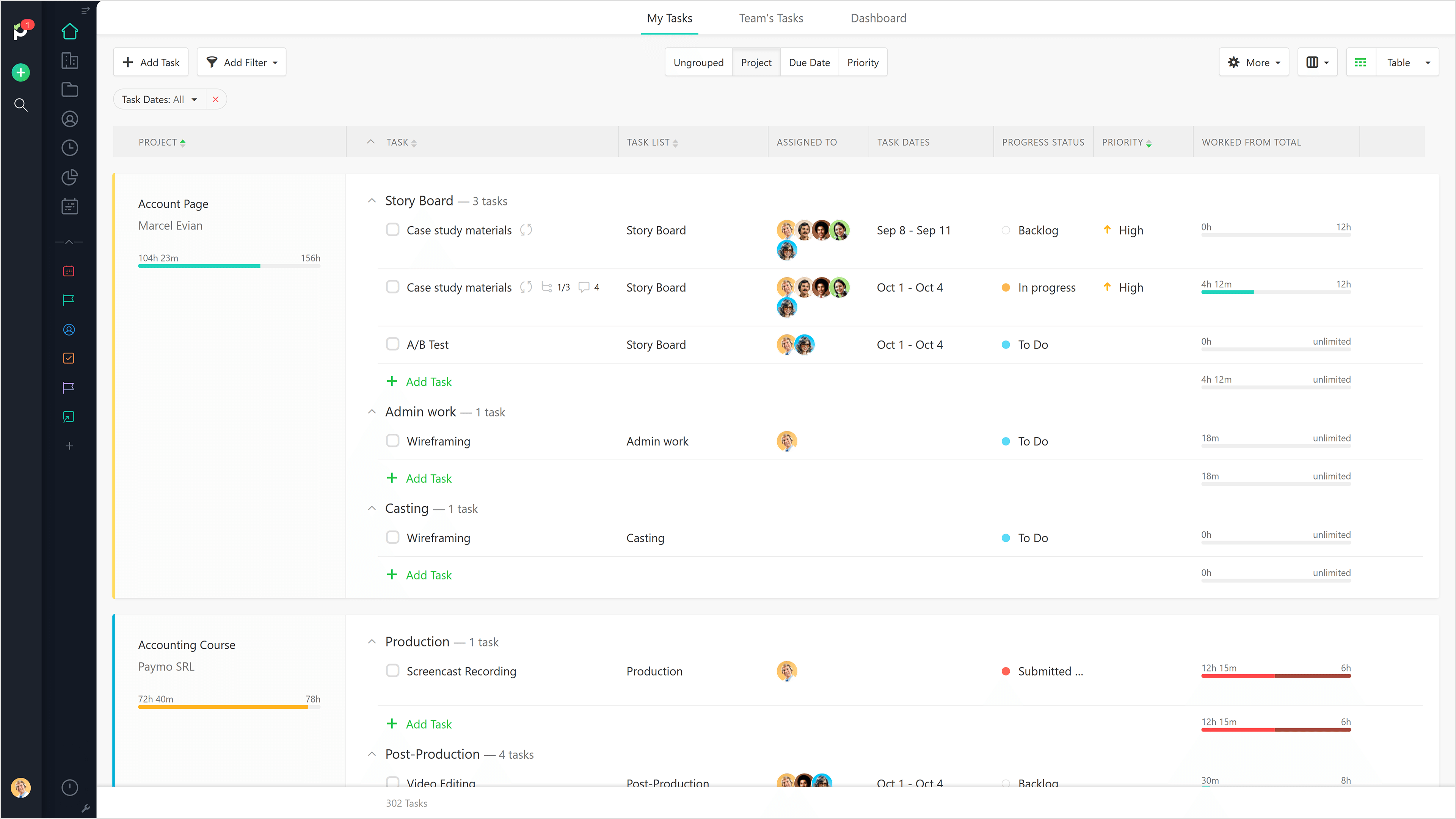
Paymo is a collaborative work management platform that helps track team progress, collaborate in context, and make smarter decisions. It acts as a single source of truth, where project planning, resource scheduling, file proofing, time tracking, and billing feed into each other to co-exist under the same roof.
$0
Up to 10 users
Rippling
Score 9.0 out of 10
N/A
Rippling’s platform for HR, IT, payroll, and spend management automates the entire employee lifecycle, ensures compliance, supports device management, and provides real-time financial visibility from a central dashboard.
$8
per month per user
Pricing
Asana
Paymo
Rippling
Editions & Modules
Starter
$13.49
per month per user
Advanced
$30.49
per month per user
Enterprise
Contact Sales
Personal
Free
Free
$0
Up to 10 users
Small Office
$11.95
per user/per month
Business
$18.95
per user/per month
Recommended
$8.00
starting price per user, per month
Offerings
Pricing Offerings
Asana
Paymo
Rippling
Free Trial
Yes
Yes
No
Free/Freemium Version
Yes
Yes
No
Premium Consulting/Integration Services
Yes
No
Yes
Entry-level Setup Fee
Optional
No setup fee
No setup fee
Additional Details
A discount is offered for annual billing.
Free version available for freelancers.
For additional pricing details visit the Rippling pricing page.
Before buying a license for this software we made sure that it had what it needed. Asana also has an unrivaled technical support team that helps with every problem that comes up, even with integration and adaptation. We were looking for software that would do the work of …
Toggle was confusing. I couldn't figure out how to work a task within a project and would mix up tracking different tasks along with projects. I didn't understand why tagging is needed. Paymo was super easy and intuitive, and I didn't want to bother spending time to learn how …
I would love compare Asana with Rippling. Both of them have different features. Rippling goes beyond project management and acts as a centralized HRIS and IT system. It allows businesses to manage employee records, payroll, benefits, devices, and software all from one platform. …
Much better reporting capabilities but harder to track employee history and changes. The Onboarding process and tasks are efficient and easy to follow- I feel like Rippling has all the info in one place while in Workday you have to dig for info. Rippling is much more intuitive …
Rippling is ahead of the curve on automation for HRIS systems. The others pale in comparison. If you need a system that functions as a multitool, this is doing the work that others cannot
It’s a much more intuitive and complete platform compared to others we explored. It also has a stronger reputation in the market. The partnerships we were able to build—and the post-sale support we received—made the entire experience much more robust.
I would really like to know why Workday didn’t work...
1 - I submitted my diploma. It was accepted, but for three months I kept getting an error message saying I hadn’t submitted it. I’d talk to support, and they’d say I hadn’t submitted the diploma, but after checking, they'd …
In my opinion, Paylocity was a pain in the [...] to navigate. The app was constantly buggy to outright broken. It made us remember an arbitrary code for login that password managers didn't support. To me, just felt clunky compared to Rippling in almost every way. It did have a …
We have previously used company-created platforms that have performed similar functions to Rippling, however, Rippling is in a league of its own. Instead of 2-3 applications, Rippling has seamlessly centralised it into one dashboard, allowing us to perform all of our previous …
Insperity is cumbersome and a chore to use. The paid time off section is quite confusing and does not show a friendly hour balance. It ends up causing more confusion than necessary. Also, implementing a mid-year qualifying life event change to benefits is not straight …
Although I cannot remember the names of other competitors, I can guarantee that Rippling is by far the most user-friendly, intuitive, efficient, and effective platform I have used in this space. It is a one-stop shop for all HR needs and couldn't be more helpful for staying …
I was not involved in the process of choosing our HR software. However, I am glad we switched to Rippling from Gusto because it's easy to use, and from an employee self-service perspective, it makes accessing my benefits, pay schedule, tax documents, and other HR needs easier …
Rippling provides a better user experience compared to the other product that I used in the past. It's more user friendly and easy to look up most of the features. Rippling also provides recommendations on other features that are not currently in use but available to be used if …
I find Rippling to be more user-friendly and simple to train employees and contractors on. As a department director, using Rippling provides efficiency and saves time monthly in reviewing and approving hours and pay.
Way better user interface and system design. ADP feels like a dinosaur compared to Rippling. Much better customer support and AI chat support. Night and day difference to ADP and hard to believe we previously used that payroll system.
Rippling is easy to set up and the various vendors like workers comp and 401K are well integrated creating ease of use. We used TriNet in the past and Rippling provides far greater control and transparency. The other are vendors we considered when we left TriNet and were …
Prior to Rippling, I was using Gusto. Gusto was a bit difficult to navigate benefits and the optimization of the servers would fail to load my benefits explanations, as well as time keeping and report approvals. It was inconsistent on when it would work well and when it would …
I have not used other products like Rippling. The closest was a timecard portal used by my previous creative agency, but this was not a full service dashboard.
I think Rippling is a lot easier to use and understand than Oracle is. I used Oracle in my previous job to perform similar tasks that I use Rippling for. However, the Oracle user interface was not as simple as the Rippling user interface. Rippling is self-intuitive, it is easy …
Traditional payroll software has a clunky user experience. They get the job done, but it's at the expense of more time spent by my HR team in supporting employees in using the software to find what they need. Rippling's self-service features work because it's intuitive and easy …
The usability of Asana is broad since it's available in a variety of platforms that are widely used nowadays. I think that it would be great for people who are constantly on the move and switching devices, since it has allowed me to work from my phone, too. I also think that Asana has proven itself to handle a large quantity of work
Beautiful interface throughout, easy setup, most natural progressions are fluid and easy to use. Browser functionality allows us to use it cross-platform. Very reasonable pricing model as well. We have had a little trouble using Paymo for the entire creative process to have proofs reviewed and approved. Also, have to use external forms to have work submitted from campus.
Rippling is extremely user friendly an allows our employees to help themselves in a lot of areas that previously required HR team assistance. Three areas I feel are not well suited for our organization is the inability to reset passwords manually, allocation of hours, and the software's inability to spot a rehire with a new application. We have several associates who moonlight/pick up shifts at other locations. This is infrequent so it woudn't make sense to allocate a percentage of their time to the properties where they're moonlighting. When we manually allocate those hours to the receiving property, the allocations do not take effect on the back end for our accounting department. It's creating a lot of journal entries and back-end corrections in our Accounting software. When it comes to applications, we have a new Director of Talent Acquisition who is not familiar with every previously-hired associate. This has caused duplication of profiles when we rehire an associate. If the DoTA isn't familiar with the associate and hires them in the "talent" portion of the website, it creates a new profile for them rather than recognizing their duplicated information (such as SSN or passport number). This has caused us to end up with dupliate profiles for several rehires. The system is very tech-y it should allow us to either merge the profiles or cause a notification/error to alert the hiring person that this associate/new hire is a rehire. Our previous software (UKG) was able to do this.
Through it, we were able to communicate and cooperate with the rest of the team to complete the work in the required manner and at the appropriate time.
The ability to code exactly what time I worked on a project enables me to bill clients more accurately and within different minimums, which besides more accurately tracking time, this has been extremely helpful as I negotiate contracts for services and offer different deals with potential clients. Some are billed to the minute, some in 15-minute minimums, and some in 20-minute blocks.
The live reports are great, showing time spent in the minimums that I've set, while also including as much detail as I wish to share.
I've now started just writing my notes into the tracker, which are then carried into the live reports - this eases my needing to send logs to clients, as well as helping me to keep projects on track.
It would be really helpful if on the timer tool, they asked you to switch projects when you stop the timer, so it could fill that time in right away for you.
I never use the 'My Tasks' because I don't fully understand how to integrate it to be useful to what our purposes are in Paymo. Some Youtube tutorials might be helpful
The overall look and feel of Rippling is dated; it looks like it's straight out of the 00's.
The could be more functionality in the LMS, expanded features, more options, it works, and it's basic, but it could be really great with a few added features.
The shift from using people's personal email to log in to their work email, not everyone wants to use their personal information to log into a work system.
The AI assistant has always been able to direct me to the correct solution to any question i have about Rippling. Payroll is so easy, it takes about 10 minutes to go through the process.
It is very user-friendly. Takes a new employee an hour to start figuring out how the system works. That's an important factor. You don't want to encounter the issue where employees need a week to understand how the system works. For example, JIRA, I tried using it for a week and I still don't understand the complicated layout. Asana has a simple interface. Once you see it, you get it type of program.
It is a complete, a bit overambitious app but with many features that are needed. I didn't need most of the features but managed to make the most of the two I was using. Also, I think it is a well-rounded app and I am considering moving some team collab there.
Very intuitive, user-friendly, and modern interface that doesn't make you cringe when you have to access it for anything. The admin navigation is easier compared to our previous system, and doesn't feel like a maze of complicated jargon. On the user side, the benefits enrollment process was a breeze, and felt so much more informative and efficient. Accessing the benefits post-enrollment is also very straightforward.
I like that the availability in using Rippling at any given time is useful to me. Getting on the site freely when I need gives me security of knowing that I can be in control of viewing health insurance and hours information. I have yet to get any errors in using the Rippling app.
Rippling's performance has been great, no errors or glitches yet so far. I am confident that Going from one page to the next and all its complexity usage does not lag or times out, it works effectively and efficiently. While using Rippling and other apps it does not tend to slow it down, works great. No complaints.
I haven't had to use their support so I can't rate it. The fact that I haven't needed them reflects the ease of use of the product. I would recommend that any new users schedule a complete demo of the product to ensure that they are using it to it's fullest (there's a lot of useful features).
Good! Fast, excellent, speedy responses. They always wanted to know why and how they could improve on something (good on receiving feedback, too). Not that they were much needed, but my limited experience with them is good; they were really keen to understand what the problem was really about and how they could help with it.
The highlight of my customer support experience was my first interaction with them: I had a small issue with my birthdate, and it was fixed very quickly—on the same day. It's pretty incredible to have things like that sorted out in the same day, which is a rare thing to see lately.
It's really easy to implement in comparison to other tools or applications. Different key points are easily configured and implemented as per need, having different configurations in systems. Implementation is something which binds the different parameters of an organization in a single row. Implementation of rippling is much easier, quicker, and error free than any other software. I recommend it strongly!
Asana is a top-tier project management software that helps us organize and track projects from start to finish. It allows us to apply tasks/to-dos to multiple projects without duplication, divide complex projects into smaller tasks, and track project progress. It also helps us organize work on Kanban boards or linear lists. It stands out from the crowd in a big way compared to the competition.
We still use Trello and Slack, but Basecamp and HubSpot are too much for our operation to manage or integrate. Paymo is missing some of the tracking features of HubSpot and isn't as universally used as Basecamp but we've been with them for 8 years and they seem to know what matters most to their user base
We chose Rippling primarily based on cost and feature set available. As a small organization, budget is a high priority. Rippling gave us enterprise-level features at an affordable cost for an early stage start up. We appreciate that we have the opportunity to expand our feature set within Rippling as our business and workforce grow.
I can go on here and see all my hours and pto plus health benefits. I like to have the work handbook handy to refer to legal things. How to work my role within it's limits. Being able to put in my hours and view when they are approved is a huge benefit for me.
Gives me more accurate time that I've spent on projects compared to older methods I've used.
Has data that I can pull together, for example my boss wanted to know the percentage of time I'd spent working on projects for one client compared to everything else - I was able to give them an accurate percentage.
Forces you to stay on top of jobs, which can lengthen the time to complete something
Our HR team used to spend almost three days doing payroll calculations before Rippling. This platform has cut that time down by 75%! Now they can devote the time they would've spent on payroll to other important tasks.
Rippling saves employees time by making time-tracking less of a headache.
Rippling has so many so many services that it's essentially a one-stop-shop for centralized HR solutions!