Asana is a web and mobile project management app. With tasks, projects, conversations, and dashboards, Asana lets an entire team know who's doing what by when, enabling workload balancing. Users can also add integrations for GANTT charts, time tracking and more.
$13.49
per month per user
Planview AdaptiveWork
Score 8.2 out of 10
N/A
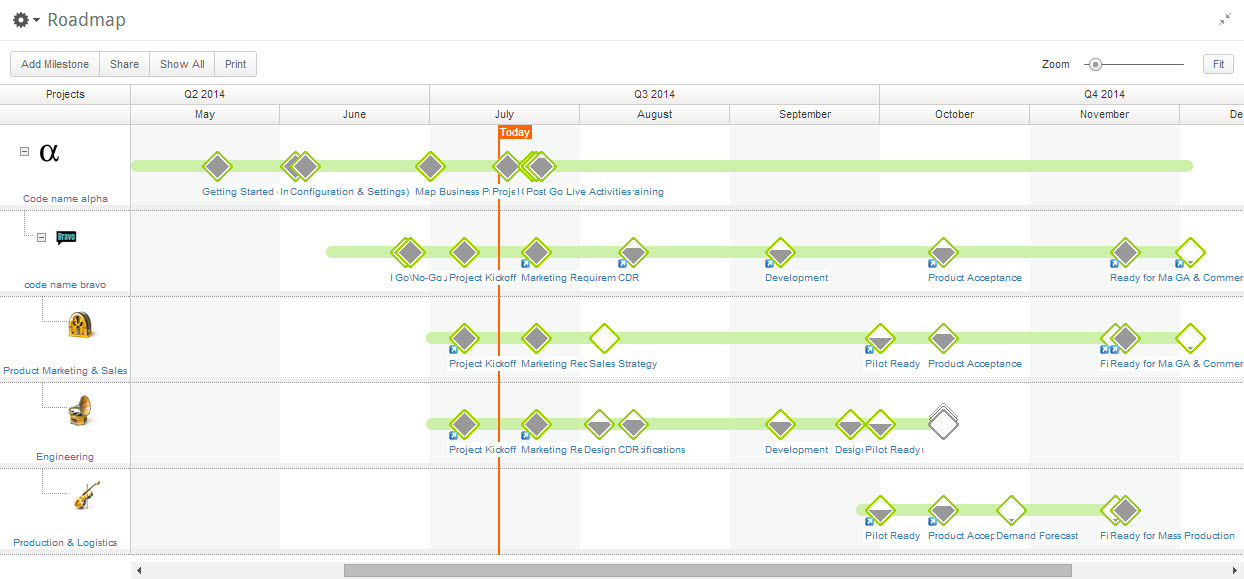
Planview AdaptiveWork is a web-based collaborative work management software. Planview AdaptiveWork enables users to connect employees and partners and create documents, reports and specialized workflow automation. Planview AdaptiveWork is designed to work across multiple teams to enable cross-company task, project, and resource management.
N/A
Trello
Score 8.4 out of 10
N/A
Trello from Atlassian is a project management tool based on a Kanban framework. Trello is ideal for task-management in a to-do list format. It supports sharing boards and cards across users or teams. The product offers a free version, and paid versions add greater automation, collaboration, and administrative control.
$6
per month per user
Pricing
Asana
Planview AdaptiveWork
Trello
Editions & Modules
Starter
$13.49
per month per user
Advanced
$30.49
per month per user
Enterprise
Contact Sales
Personal
Free
No answers on this topic
Standard
$6
per month per user
Premium
$12.50
per month per user
Enterprise
$17.50
per month per user
Free
Forever Free
Offerings
Pricing Offerings
Asana
Planview AdaptiveWork
Trello
Free Trial
Yes
Yes
No
Free/Freemium Version
Yes
No
Yes
Premium Consulting/Integration Services
Yes
Yes
No
Entry-level Setup Fee
Optional
Optional
No setup fee
Additional Details
A discount is offered for annual billing.
—
A discount is offered for annual billing and for larger numbers of users.
Trello has an interface so confusing that we ended up tracking our tasks in Excel or Google Sheets. The project management was poor, I think it's designed for companies that are not involved with so many clients like mine, and that don't need to track a lot of projects at the …
Cost and the lowest ramp-up time is always factored in while still meeting the needs of a very fast-paced environment. Asana has more capability than Trello or ClickUp and is a more visual tool than JIRA.
I currently use Trello to manage social content instead of Asana. It's very easy to view content, drag and drop cards/tasks and tag colleagues in items that need attention. However, I prefer Asana from a project management standpoint and think that it's a much superior platform …
It's been several years ago that I used it, but I didn't like Trello. I see why people like the visual layout, but I prefer the list view of Asana. Additionally, as a writer, I like being able to bold/italics/underline/bullet the formatting within tasks. In Trello, I couldn't …
Trello's look and feel could be more attractive for the creatives but Asana provides a more "logical" approach which is appealing to the technical types. It feels like Trello provides more degrees of freedom of use which could make collaboration a bit less structured and could …
Since I have tried the two applications and saw their advantages and disadvantages, I see that Asana is much better in terms of dealing with files, ease of use, and the many features and characteristics that it has. Also, I noticed that it does not consume much space on my …
Verified User
Manager
Chose Asana
I believe that Asana is more professional than Trello. I used Trello a long time ago, but it looked more suitable for a student project rather than for a professional team or business environment. I believe it has great features to help companies in different stages and of …
Asana is a highly effective instrument for managing teams and projects. The paid edition provides a multitude of features that can be tailored and used in accordance with the organisation's specific requirements.
Email integration facilitates notifications that remind team …
We have a lot of different software available and different teams are using different products. I think Asana is comparable to many of the other software that we use. It was slightly less intuitive than I would have expected, but it did help keep everyone updated on the project …
Asana is one of the good going project management tools in the market. It has a great user interface with high performance. Its project dashboard management is handy when compared to other products.
Verified User
Engineer
Chose Asana
Asana is a good and easy to use task management tool. There are better tools that provide similar functionality but the decision depends on your needs. If you are a small business , Asana might be a good solution, if you are an enterprise, I'm not sure. Asana's free service is …
We tried it as one my developers swore up and down how good it was at the startup... well it crashed in our office, since we didn't end up working the way they did. We are more of a dev ops company than a social media or open source
When we were researching project management systems for our small business, Asana gave us the most for free. It really allowed us to dive into the product before we committed to it. The features allowed us to customize aspects of the system to use it for projects as well as …
Asana is cross-platformed and is easy and quickly reachable via a web browser.
It has permissions, filters, reports, tags, comments, etc. All these features allow tracking day-by-day activities of the team as well as weekly/ monthly milestones and reporting.
I have used many tools for project management but Asana is the tool that has fulfilled my all requirements and given me satisfying and reliable services at a good price. I easily manage all projects and track them in
advanced ways. [I] highly suggest [this] tool, I assure you …
Asana is the best of both worlds because it allows multiple views of your tasks and dashboards for project managers to review. Some of the competitors only allow one way of working, which can be a roadblock for users who are less flexible in their workflow. Getting all users to …
Asana hit our sweet spot of easy to try, appropriate pricing for our mid size non-profit team, flexibility, and features. Lots of other platforms have very similar features organized in other ways, but Asana made sense and was fun to work with right off the bat. there were …
Asana has its proper place in task management. There are better tools that provide similar functionality but the decision depends heavily on the actual requirements. If you own a small business or a start up, Asana is excellent. If you are an enterprise level organization, …
Verified User
Consultant
Chose Asana
I view Asana as a lightweight PM tool, more for task management and collaboration.
A few of our other teams at the office use these other programs and they work great for them! However, as a team that is trying to integrate two parallel services, it's incredibly important for us to have visibility into what the others are doing at a high level. This helps …
Asana is lightweight and relatively inexpensive. For our marketing and advertising team, it works great. For teams with stricter needs (development teams, product teams, and other scrum teams), looking at other options might be worthwhile.
I did not select Clarizen but would not, given the task in the future. It was not user-friendly to the employees, as mentioned before, and seemed to have a lot of gratuitous features that go unused. We now use Open Air for time sheets and Slack for office communication and Trell…
We felt that Planview AdaptiveWork had the most potential to grow into the system and really liked that we could add on other Planview products if needed in the future. The system also felt more approachable for colleagues who might be less familiar with project, program, and …
We still use both of them, they both are good in different ways. Trello is great for everyday use for any tasks and projects, Asana is mostly used to manage big and more complex projects.
monday.com is by far my favorite project management tool out there. It's so powerful, customizable and the reporting is great. Trello works better for us currently because it's free. Asana is okay, but the overall UI is a bit confusing and boring. Airtable is good, but pales in …
Trello is visually more appealing and easier to understand by simply looking at it. When it comes to sharing my board with others, they can quickly (within seconds) see our progress, which gets them excited and buys me more momentum. Asana is great, but it takes a little bit of …
The price is the main reason why Trello stacks up against Asana. Asana is a great tool, but for non-profits with limited resources, costs always matters.
Trello can be viewed as the simplest form of task management, whereas project management would look more like ClickUp followed by Asana and JIRA. Trello is easy to view, easy to use, and easy to implement.
Both Trello and Asana are great. I'm happy to use either of them, depending on what the situation requires. In our case, the web developers were already using Trello, so that's what we use to collaborate with them. But for our internal tasks, I use Asana, as it seems a little …
Trello is very easy to use. It is an intuitive software that does not require prior learning to take advantage of it. Asana has a complicated interface, not very intuitive and difficult to use. Trello has an intuitive interface that I like very much.
On the free and basic version, Trello definitely keeps up with Airtable and Asana. It is easy to use and I like how team members can be added for no extra cost. Whereas, I know on Airtable, I am unable to add collaborators or team members without paying an additional cost. I …
Asana is awesome but it comes with a price. For a startup pricing hurts. ClickUp is so vast and has a lot of areas to get lost in, if you don't set some standards there are many ways to do it wrong. Slack is just a communication platform, you can collaborate and stuff but not …
Trello is more simple and not as "robust" as the other tools, but it's easier to use and manage and understand and ACTUALLY get stuff done with. It's simplicity is part of the beauty of using it. You don't need a million options that nobody uses, you just need to get stuff done.
Trello won becuase of the easy drag and drop feature that makes it simple for team members to jump on and use from day one. That said, Asans has way more features and for a tech-savvy person it would be the choice; it is still user-friendly. While it has a steeper learning …
I have been able to use the free version of Trello for many years and for the free version, this platform offers incredible value. I have not yet found such value in other free versions of similar platforms. This platform is also very easy to use as a first time user.
I got to know some project managing [software] but I choose Trello over them.
Verified User
Professional
Chose Trello
Compared to others, Trello is definitely one of the most economical options which makes it more appealing to freelancers. It is also more simple and visually engaging which makes it intuitively easy to use. However, it lacks advanced features such as timeline management, …
We were huge fans of Clarizen back in the bad old days of waterfall methodology. Clarizen definitely had more robust reporting capabilities, where Trello is completely lacking in resource and financial management capabilities and even basic dashboarding. That said, for simple …
Trello is a great tool for collaboration and has a lot of features for integrating other applications. Team members can then collaborate on the various cards on each board, and tag each other when necessary. It focuses more on working on tasks from a user experience …
Todoist - There's good functionality here but you really need the paid version to get the most out of it. This isn't set up for kanban. Remember the Milk is really for personal lists. Evernote - This is incredibly free form. I loved it at first but honestly, you can just use a …
We compared a few other project management programs and Trello was by far the easiest and most affordable to use. The fact that is is straight forward and simply made it even more compelling as we knew there wouldn't be a huge learning curve with our staff, while other …
The usability of Asana is broad since it's available in a variety of platforms that are widely used nowadays. I think that it would be great for people who are constantly on the move and switching devices, since it has allowed me to work from my phone, too. I also think that Asana has proven itself to handle a large quantity of work
I've been an AdaptiveWork (Clarizen) admin for the past 14 years, so I've seen much improvement since I started working with the product. I'm very happy we can utilize the hybrid mode by using the cards, I think this was long overdue but it works very well.
For teams or individuals with lots of individual tasks/details to track, Trello is perfect! It basically removes the need for a paper checklist. For those that need an overall project management tool that requires less tasks and more overarching goals, collaboration amongst various teams, and gantt charts I would suggest monday.com
Through it, we were able to communicate and cooperate with the rest of the team to complete the work in the required manner and at the appropriate time.
Many ways to acclimate to the system; documentation, videos, community, and contacts.
Planview provides scalable customization options tailored to the unique needs of each business unit or department. Easily add or remove fields in the system. As the admin, it was easy to learn how to configure.
Offers flexibility to adapt to existing systems and align with organizational workflows and processes. There are multiple ways to customize each part of the system to meet our needs.
When it comes to reports, it would be great if there was an easy way to roll-up the results instead of having to create configurations to summarize data.
The consultant experience has not been great when it comes to more advanced needs for configurations. The consultants are in a different timezone which limits hours to work together and it seems hours are spent trying to determine what the requirement is and when the initial thought is that the configuration is possible, it may result in not being able to assist.
Charts in the reports section are not able to be exported
When pulling a report together, you need to make sure you pull from the right "item" or level. If you decide you need data that resides in another "item" or level, you need to re-do the report from the beginning.
Because the system is so configurable and I imagine different clients use the system differently, when you need something automated in your account, where you need to pull a consultant or SME in, the person doesn't necessarily understand your configurations and how things work so they are unable to give recommendations on how to solve problems that don't impact other configurations you already have set up in the system.
Templates cannot be updated unless they are pulled into a project and then re-saved. In the templates module, you are not able to open a template and edit to re-save. Therefore, making updates to a template can be very time consuming having to find a project to use to pull it in, make updates, re-save and then pull out. It would be great if the templates module allowed you to edit the templates and re-save.
I give my renewal of this product a 9. It's only because we never know what product may come out next and how other factors in our office political environment may cause impact upon this. If I always had my way, this is what we'd settle on as our de facto project management system.
I am very likely to renew Trello, because it doesn't cost anything to do so. I am also very likely to use Trello's upgraded features in the future because a lot of my team's data is stored on there and they have already gotten used to the platform. Trello is very easy for new team members to pick up, making the onboarding and usability very streamlined.
It is very user-friendly. Takes a new employee an hour to start figuring out how the system works. That's an important factor. You don't want to encounter the issue where employees need a week to understand how the system works. For example, JIRA, I tried using it for a week and I still don't understand the complicated layout. Asana has a simple interface. Once you see it, you get it type of program.
It is easy to configure, intuitive. The customization process is in some ways better than Salesforce.com. It has a great UI. It does however depend on how it's implemented.
The design of it is generally fine, however the ability to data upload people from a spreadsheet is an obvious miss.
Trello is incredibly intuitive, both on desktop and mobile right away. It is also full of helpful features that make it even easier to use, and is flexible enough to suit almost any organizational need. Onboarding for the software is thorough, but concise, and the service is frequently updated with even more QOL improvements.
Sometimes it is slow when everyone is entering their time on Fridays or Mondays but other than that we rarely see downtime and maintenance notifications are well in advance.
Most Ancillary Pages: Quick to Reasonable (By "ancillary" I mean lesser used/master data maintenance pages - e.g. People, Customers, Individual Tasks, Milestones, etc.)
Work Plan (with 100 sub items): Reasonable to Slow
I haven't had to use their support so I can't rate it. The fact that I haven't needed them reflects the ease of use of the product. I would recommend that any new users schedule a complete demo of the product to ensure that they are using it to it's fullest (there's a lot of useful features).
It's a good experience overall. Clarizen was useful when needed. It's mostly needed for advice on how to do more sophisticated actions or how to change something that was set up administratively. It's seldom used otherwise. The product consistently works, the documentation is acceptable, and the generally intuitive product is easy enough for most staff to pick up without much issue.
I haven't reached out to their support very often and their support is very limited anyway for the free users. They do have tons of great articles and videos in their Help Center and constantly send emails with updates and add-ons to the product. The fact that I've barely ever had to contact their support team means that they've developed a great product.
• We worked with a Project Manager on their side. He was very good about developing a project plan to hit our goal. I think we had weekly or twice weekly calls – very steady cadence over 3 month period. • Their PM skills were great – kept us on task. For the last week, they sent 2 people on site and they did training for power users. After that a couple of them revisited here
Our trainer, Alex, is exceptional and knows the product really well. I swear he must have wrote the product himself! His manner with training is very easy going, gives you homework that is applicable to what you need to learn and stages it correctly for you. It was a pleasure to be trained by him.
We have been able to implement AdaptiveWork pretty easily but it requires updating of resource availability and continuous training as roles change and new people join the company. Other documentation is used such as spreadsheets for longer range planning and project approval
For our small business, getting a few of us started well on Trello was the key, I think. As long as a couple of us were really comfortable with the interface, we could lead others and help them with any questions. From now on, anyone who works with us just naturally uses Trello for information sharing - it's just part of what we do.
Asana is a top-tier project management software that helps us organize and track projects from start to finish. It allows us to apply tasks/to-dos to multiple projects without duplication, divide complex projects into smaller tasks, and track project progress. It also helps us organize work on Kanban boards or linear lists. It stands out from the crowd in a big way compared to the competition.
Planview AdaptiveWork was the right size, at the right price point that fit our customization and integration flexibility. It is intuitive to use but allowed us to add complexity as our needs grew
Trello is more simple and not as "robust" as the other tools, but it's easier to use and manage and understand and ACTUALLY get stuff done with. It's simplicity is part of the beauty of using it. You don't need a million options that nobody uses, you just need to get stuff done.
By implementing Planview AdaptiveWork on a company-wide level, we have been able to remove the other project management tools we have been using and consolidate our costs for technology down to a single tool
The ability to incorporate cross-departmental work and communication has streamlined our project management processes to a point where we can work seamlessly together without interruption trying to consider the gaps between tools
Reporting capabilities from the unified tool has given our leadership insight and the ability to make strategic business decisions more effectively than ever
Trello keeps me organized, focused, and on track. I could filter the Trello board to only see my issues and understand what I needed to work on and when.
Trello helped our team implement an agile structure. It's a very simple kanban method of viewing all of your team's tasks and statuses. You can completely customize the columns to your team's specific workflow and create tags relevant to your work.
Trello helps reduce unnecessary communications between teams. When I want to request translations, I simply create a card on the localization Trello board -- no need to directly message anyone on the team, and I can watch the status of the card change from "in progress" to "in review" to "translated," all without having to directly ask for updates.