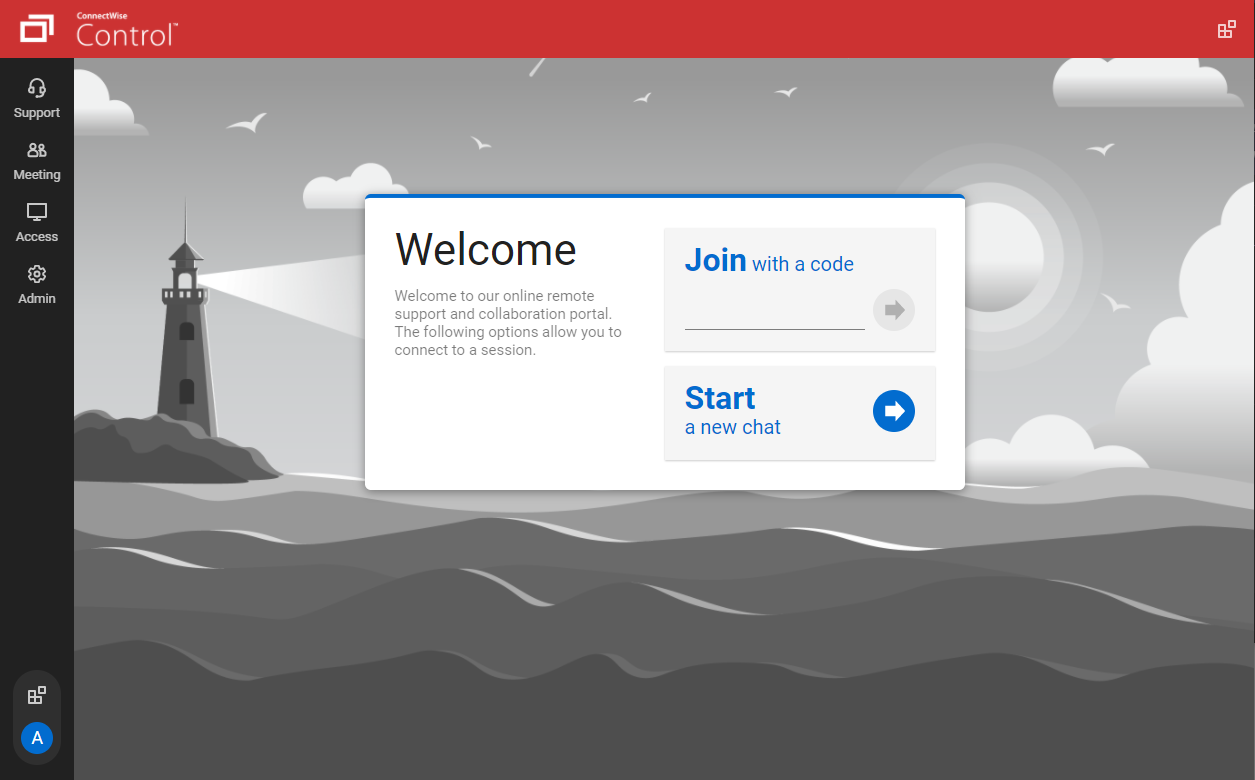
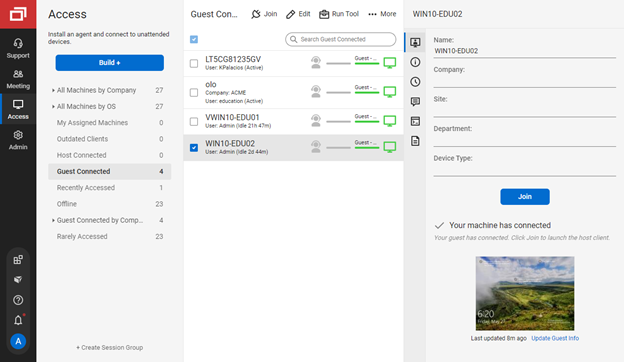
ConnectWise ScreenConnect is a remote support, access, and meeting solution. With it, users can utilize remote support and access to repair computers, provide updates, and manage machines. Users can also conduct online seminars and presentations using remote meetings.
$39
per month
Highfive (discontinued)
Score 7.1 out of 10
N/A
Highfive was a web conferencing platform acquired by Dialpad in 2020. Its functionality became part of the now obsolete Dialpad Meetings, the functionality of which is now contained in Dialpad Connect.
N/A
Skype (discontinued)
Score 7.0 out of 10
N/A
Skype (the personal edition or Skype free) was a web meeting, video conferencing, and VoIP software, now superseded by Microsoft Teams' free edition and unsupported from May 2025.
We have tried TeamViewer and Skype for our screen sharing needs, but the biggest reason ScreenConnect is better than those for our purposes is because it does not require the "Screen Sharing Computer" to allow access every time. In other words, once a computer is set up for me …
ConnectWise is comparable to the competition, but handles our firewall better than Chrome Remote Desktop. More of our staff is familiar with LogMeIn Pro. For simple screen sharing, Skype is the best tool, however.
We switched from using TeamViewer last year when we began using ConnectWise. We gained the ability to run scripts on remote computers which saves us time and site visits in some cases. This also allows us to more easily diagnose remote computers without interrupting the end …
ConnectWise Control offers more for less in all aspects compared to the competing platforms, plus features and services that would normally be unavailable otherwise and require the purchase of an overall package, which may include a lot of functions/services not required.
ConnectWise is one of the most cost-effective remoting software. Multiple sessions are really a great feature. support is also good for sessions.speed of remote connections not bad even for multiple sessions. A little less customization. I feel it is one of the best value …
ScreenConnect provides a more stable remote support portal than Instant Housecall and VNC. TeamViewer does have some available features that ScreenConnect does not they are very close in usability and features. The cost between using ScreenConnect over TeamViewer is …
We had trialed a few products before, but ConnectWise Control just seemed to be the most user friendly, seamless and easy to use software. It fit every need of our company to be able to support our co-workers while they are travelling.
Teamviewer seems to release major versions every year or so requiring users to continually pay more. LogMeIn seemed expensive comparatively. VNC doesn't have a lot of customizations or extras. Not as easy to configure for different user groups.
Replaced logmein and Rescue with ScreenConnect. Before we needed to connect to two consoles. Now we are able to a one off session or access computers with the ScreenConnect agent from the same URL.
I liked TeamViewer the best of the ones I evaluated because it can stay on a client's computer after installation and they can give me access with a password when needed. It is however too expensive and I prefer the fact that I can customize Screenconnect's logo, colors, name …
UberConference has its place. Skype integrates with Outlook and Microsoft Office 365, but if you don't use those services UberConference is a great stand alone service. WebEx is very costly and is difficult to deal with.
Uberconference is by far more reliable and has a better quality of service than the other providers in this space. I have never had a dropped call with Uberconference (unlike Skype and Hangouts). I do think they need to do more marketing because fewer people know about them …
Zoom is the winner of the space in my mind. It has all the features I want, works reliably, and the price is okay. Skype is a dumpster fire, has definite failures, and is a nightmare to admin. Hangouts is only suited to small companies and lacks recording, which is crucial.
They all have a free version. They all have clear audio and video. Skype has unlimited amount of time allowed where Zoom and now UberConference limit your calls to 45 minutes and then they just cut out.
This was a very affordable conference call solution. It was incredibly simple to set up and customize with each of our team members. The other software solutions that we evaluated were good, but few were quite as simple and affordable as UberConference. We've tried other …
I like the fact that UberConference does not require any downloads. Our being able to conference with clients and colleagues that may not be tech-savvy or may have their computers locked down by IT makes a huge difference to us. UberConference ease of use and free use tier are …
UberConference seems to be a more user-friendly program that the alternatives, GoToMeeting and GoToWebinar. The overall user experience on the program is much better than the darker look of the alternative programs.
UberConference is An excellent tool for communication. This program is simple and easy to use. A quick and easy way to hold meetings. If you need a simple and free conferencing system, you should try this platform.
UberConference is easy to schedule and set up for both me and other parties to the conference. I like that it has an iPhone app, and that it recognizes my various phone numbers. UberConference is far more reliable from a sound quality perspective than ANY of its competitors. …
When trying to video chat using other apps, and the call is breaking, after switching to Skype, usually the call/video quality is better. In comparison to UnerConference, uberconference has web client (no need to install software). Also has conference rooms, where you can log …
Skype provides much more facilities than UberConference.
UberConference lacks multi-team collaboration, which is the key feature of Skype.
Skype stacks up to UberConference in sharing of docs and other files for high quality representation for business meetings.
Features
ScreenConnect
Highfive (discontinued)
Skype (discontinued)
Remote Administration
Comparison of Remote Administration features of Product A and Product B
ScreenConnect
8.3
626 Ratings
5% above category average
Highfive (discontinued)
-
Ratings
Skype (discontinued)
-
Ratings
Screen sharing
9.9596 Ratings
00 Ratings
00 Ratings
File transfer
8.6569 Ratings
00 Ratings
00 Ratings
Instant message
8.2501 Ratings
00 Ratings
00 Ratings
Secure remote access with Smart Card authentication
7.074 Ratings
00 Ratings
00 Ratings
Access to sleeping/powered-off computers
6.5311 Ratings
00 Ratings
00 Ratings
Over-the-Internet remote session
10.0602 Ratings
00 Ratings
00 Ratings
Initiate remote control from mobile
7.2389 Ratings
00 Ratings
00 Ratings
Remote management of servers & workstations
9.1517 Ratings
00 Ratings
00 Ratings
Remote Active Directory® management
8.9172 Ratings
00 Ratings
00 Ratings
Centralized management dashboard
7.9479 Ratings
00 Ratings
00 Ratings
Session record
7.9316 Ratings
00 Ratings
00 Ratings
Annotations
7.7266 Ratings
00 Ratings
00 Ratings
Monitoring and Alerts
8.7188 Ratings
00 Ratings
00 Ratings
Multi-platform remote control
8.0399 Ratings
00 Ratings
00 Ratings
Performance & Compatibility of Online Events Software
Comparison of Performance & Compatibility of Online Events Software features of Product A and Product B
ScreenConnect
-
Ratings
Highfive (discontinued)
7.8
27 Ratings
1% below category average
Skype (discontinued)
6.7
138 Ratings
17% below category average
High quality audio
00 Ratings
8.527 Ratings
7.2135 Ratings
High quality video
00 Ratings
8.626 Ratings
7.6133 Ratings
Low bandwidth requirements
00 Ratings
6.323 Ratings
6.1130 Ratings
Mobile support
00 Ratings
7.922 Ratings
6.1118 Ratings
Screen Sharing
Comparison of Screen Sharing features of Product A and Product B
ScreenConnect
-
Ratings
Highfive (discontinued)
8.4
25 Ratings
6% above category average
Skype (discontinued)
6.4
119 Ratings
21% below category average
Desktop sharing
00 Ratings
8.825 Ratings
6.2118 Ratings
Whiteboards
00 Ratings
8.04 Ratings
6.660 Ratings
Online Meetings / Events
Comparison of Online Meetings / Events features of Product A and Product B
ScreenConnect
-
Ratings
Highfive (discontinued)
7.7
26 Ratings
6% below category average
Skype (discontinued)
6.3
118 Ratings
26% below category average
Calendar integration
00 Ratings
7.219 Ratings
6.385 Ratings
Meeting initiation
00 Ratings
6.825 Ratings
6.8106 Ratings
Integrates with social media
00 Ratings
8.05 Ratings
4.965 Ratings
Record meetings / events
00 Ratings
7.79 Ratings
7.077 Ratings
Slideshows
00 Ratings
9.09 Ratings
6.568 Ratings
Online Events Collaboration
Comparison of Online Events Collaboration features of Product A and Product B
ScreenConnect
-
Ratings
Highfive (discontinued)
7.5
12 Ratings
7% below category average
Skype (discontinued)
5.9
111 Ratings
31% below category average
Live chat
00 Ratings
7.712 Ratings
6.1110 Ratings
Audience polling
00 Ratings
6.01 Ratings
5.764 Ratings
Q&A
00 Ratings
8.76 Ratings
5.862 Ratings
Online Events Security
Comparison of Online Events Security features of Product A and Product B
ScreenConnect
-
Ratings
Highfive (discontinued)
6.1
17 Ratings
27% below category average
Skype (discontinued)
7.5
101 Ratings
7% below category average
User authentication
00 Ratings
6.216 Ratings
8.888 Ratings
Participant roles & permissions
00 Ratings
6.314 Ratings
7.183 Ratings
Confidential attendee list
00 Ratings
5.86 Ratings
6.560 Ratings
VoIP system collaboration
Comparison of VoIP system collaboration features of Product A and Product B
We often need to create an ad-hoc session with a device that is not under our management. We find ourselves doing this more than ever in the COVID world. Many people are working from home on personal machines with their employer, our client's permission and we are facilitating more support for these personal machines. Connectwise Control [(formerly ScreenConnect)] gives us a robust resource to control the device, navigate anywhere we need, execute various commands, and engage in an on-screen chat with the client. The session is very simple to create and very user-friendly to initiate. We do not recommend it for Android, Apple, or Chromebook applications. There is little to no support for these platforms.
The free version I would absolutely recommend, we've had some great use out of it for the past few years. Presenting, sharing screen, the conference line and some other features are all free. If we did need more analytics and more features, perhaps making it easier for the potential customer to share screen, we might re-start the search and we'd potentially rate UberConference lower, but for the free version it's been great for us.
Having interacted with a new replacement tool, Microsoft Teams, it is challenging to recommend Skype, as it lacks some essential features, such as being less equipped with the latest updates, and it is not platform-independent, causing issues on PCs and phones, as well as during calls that might hinder work.
The interface is easy to use and makes sense. It's easy to understand how to organize a large number of machines involving multiple clients. But, it's also applicable for smaller set of machines too.
The connection speed is very quick. I've used solutions in the past that take a variable amount of time to connect, or they just take a long time every time. Control is quick every time. It doesn't get in the way of being able to support the machines on the other end.
The connections are reliable. I haven't experienced random disconnects throughout hundreds of instances. It was a breath of fresh air coming from the previous solution we used. I consider Control a gold standard for what a great remote connection solution can be.
I appreciate being able to select a local phone number: it adds credibility and convenience for in-market clients/prospects.
I like being able to customize the hold music. One of our employees wrote and produced custom hold music for Anvil, which generates discussion and engagement as an ice-breaker.
The screen sharing is easy-to-use and is far more reliable than in the past. Prospects and clients do not have to download any app to make it work properly.
The instant chat function is great. Very straightforward, easy to use, easy to learn, no technical issues.
Video calls are pretty easy also, user friendly and a mostly stable connection with no issues.
Voice calls are easy also, eliminates the need for an external landline or the need to use your cell phone. Clear connections, not really any dropped calls.
I'd like to see the ability to selectively log off the remote machine via a button on the toolbar. Currently it's a setting to always lock on disconnect, or never lock on disconnect, requiring the tech to manually lock the machine if called for at the end of a session. Its a small time save that would add up!
The chat feature could be expanded to be a lot more useful. Allowing clients to start conversations, and have conversations ping an email address if no one is monitoring the dashboard would be extremely valuable.
Some clarity on licensing when providing host-passes to guest technicians would be a boon, especially for one-off support sessions with vendors.
I would recommend this product for both internal remote control of end user workstations and remote access to other clients over the internet. It provides a secure and feature rich product that allows me to complete any necessary tasks without ever leaving the office. I will continue to renew as I'm eager to see what they do next. I would however wish the cloud service had a better API to work in conjunction with team collaboration or chat services to make it easier to connect with end users who use multiple workstations. (Slack or Stride provide this functionality)
UberConference is more expensive than some of its competitors and we have not found a real advantage to using UberConference over certain less-expensive applications. UberConference charges per month per organizer and those costs add up quickly, so we will be moving forward with a more budget-friendly option in the coming months.
On the whole SC is a very powerful tool that is a vital part of the IT service arsenal. On-site visits are an "emergency" only type of scenario. Just "showing your face" is not winning any browny points for me. If my client sees my face, it's usually just to upgrade hardware or to deal other aspects of business. SC provides me and my client the bulk of the info I need to get projects done.
The interface is intuitive and stupidly simple, no complicated sub-menus or configuration settings. Easy to create a meeting space and then have others join with a link or dial-in PIN on the free tier. On the paid tier it's even easier with PIN-less joining and automatic reminder calls to get participants to join.
Skype is not as good as Facetime in terms of ease to glance at it and figure out how it works. I think that's a result of Skype trying to be too many things at once. A lot of the menu and UI could be streamlined, and I would jettison some of the additional functions that have been tacked on over the years to simplify. That being said, while some options are slightly hard to find, they all work flawlessly once found.
It performs well. It also has full control over windows security and does not get hung up like GoToMeeting when trying to install remote software at the prompt to install as admin / override. I have used TeamViewer, WebEx, LogMeIn and GoToMeeting. This is by far the best at spontaneous, remote control. It is also very easy to get a novice user connected to the session.
There have been two times when something has went wrong and I needed immediate assistance in order to be able to use Screenconnect to be able to help clients and response has not been immediate. The response time has been within 24 hours. Both times if there had been easier to navigate self help I would have been able to help myself. With better self help and a speedier response it would definitely be a 10 as they always respond and help. Just a little more difficult or slow than it should be at times
I haven't needed support for the most part, which is a positive for Highfive. It's intuitive and most features are straightforward to use. In the one instance that I did contact them, it took them longer then expected to respond, but they were able to answer my question once they did.
I am not aware of the current support level for Skype for business, as I have never used even though I have the product. However, the support for Skype's personal paid users is not where it could be. Users who pay for Skype features do not have a clear path to reach out to support. So, rating 6, can be better as soon as I need to use Skype for business support and get a good experience. I will say that I will renew Skype for Business subscription, which is a significant inconsistency on my end. The explanation is that Skype for Business comes bundled with Office for Business, with no additional cost, so why not.
I find ScreenConnect to be very simple and effective overall, with the main problem being that a number of my clients can't download the app due to existing firewalls and so on. Otherwise it does its job well, and I'm happy with it.
ConnectWise has done everything they could to help us in any situation. Great support team and their new updates are always providing features that we need. Its a simple solution that works the way we need it to. Their legacy pricing model is still much better than their subscription based model however it is still fair pricing
I have worked with Citrix, AnyDesk, LogMeIn, VNC Connect, and many others. I ultimately installed ConnectWise as a self-hosted solution, based on the incredible list of features and capabilities, and the pricing at the time. I continue to use the product as it is still one of the best solutions out there and is certainly capable of growing and expanding to meet the needs of my business.
Uberconference is by far more reliable and has a better quality of service than the other providers in this space. I have never had a dropped call with Uberconference (unlike Skype and Hangouts). I do think they need to do more marketing because fewer people know about them than others and sometimes people decline to use the service so we have to use one of the other platforms to connect.
We use Skype in combination with Grasshopper. While Grasshopper acts as a routing toll free number with extensions, if we are making calls directly, we do it through Skype. Skype's desktop and mobile apps are easier to use, and provide unlimited local calls at a flat, affordable rate. Allowing our team to use their existing mobile or desktop devices without additional hardware for business office phone calls is important, and Skype makes that possible
I have used multiple remote desktop support software in the past (Bomgar, Team Viewer, Logmein and Join.me) and this is far the easiest of the bunch to use. It is very easy to create a session and easy to maintain remote desktops from their access view (where you install the software and can get in at any time) I highly recommend this product from ConnectWise!
Instead of waiting 30+ seconds to initiate sessions, they initiate and display a desktop in two or three seconds. The amount of frustration this avoids is immeasurable.
Once installed it doesn't need more handholding, i.e., having the remote enter a username/password. It is always just there.
Our teams use this every day. It makes it easy to meet with clients and share a screen and display analytics.
Some of my clients thought that they need to register first to be able to contact me. It's bad that they are not notified in any way that it's enough just to enter its names and that's it.