
T. Blane McMichen
President
Chose Google Analytics
Campaign tracking requires more set-up in Webtrends, and the additional cost is hard to justify.

| Product | Rating | Most Used By | Product Summary | Starting Price |
|---|---|---|---|---|
 Google Analytics | N/A | Google Analytics is perhaps the best-known web analytics product and, as a free product, it has massive adoption. Although it lacks some enterprise-level features compared to its competitors in the space, the launch of the paid Google Analytics Premium edition seems likely to close the gap. | $0 per month | |
 Agentforce Marketing | N/A | Marketing Cloud is a cloud-based digital marketing platform, used by marketers can segment their audience, deliver personalized messages, track campaign performance, engage leads and accounts, and optimize strategies based on real-time insights. | $1,250 per month per installation | |
 Webtrends Analytics | N/A | WebTrends provides an enterprise web analytics platform and, according to Forrester, has a strong focus on support for mobile and social channels and a very open platform. Webtrends competes directly with Adobe Site Catalyst, IBM Coremetrics. and comScore DigitalAnalytix. | N/A |
| Google Analytics | Salesforce Agentforce Marketing | Webtrends Analytics | ||||||||||||||||||||||
|---|---|---|---|---|---|---|---|---|---|---|---|---|---|---|---|---|---|---|---|---|---|---|---|---|
| Editions & Modules |
|
| No answers on this topic | |||||||||||||||||||||
| Offerings |
| |||||||||||||||||||||||
| Entry-level Setup Fee | No setup fee | No setup fee | No setup fee | |||||||||||||||||||||
| Additional Details | — | — | — | |||||||||||||||||||||
| More Pricing Information | ||||||||||||||||||||||||
| Google Analytics | Salesforce Agentforce Marketing | Webtrends Analytics | |
|---|---|---|---|
| Considered Multiple Products |  Google Analytics T. Blane McMichen President Chose Google Analytics Campaign tracking requires more set-up in Webtrends, and the additional cost is hard to justify.  Alex Nejako Marketing Automation Manager Chose Google Analytics  Chris Elliott Client Marketing Manager Chose Google Analytics Google Analytics is the only tool of its kind (that I'm aware of). Other tools, like website builders, may have built-in analytics, but they're nothing compared to what Google Analytics offers.  Adam Hatfield Head of Digital Chose Google Analytics We have been using Google Analytics for over 10 years. Over that time we have periodically reviewed our analytics platforms a number of times. For us, it made more sense to stay with google analytics primarily because if we migrated to another platform we would lose the …  Meredith Lea Barber Senior Web Developer Chose Google Analytics  Billy Barker Creative Director Chose Google Analytics  Michael Baker Digital Marketing Manager Chose Google Analytics We tested Webtrends and purchased Omniture (which we used for 2 years). Webtrends wasn't a good fit overall. Omniture was too cumbersome and expensive. The support was HORRIBLE and for a paid product it lacked some basic, no-brainer features.  Jennifer (Utterback) Davis Vice President, Emarketing Chose Google Analytics We have used Omniture and WebTrends. WebTrends is an outdated analytics tool. Omniture, while robust is just not as customizable. Basically, if you have no intention or no need to do customization and you just want out-of-the-box reporting and not willing to spend the time in … |  Agentforce Marketing  Megan Lemons Inbound Marketing Specialist Chose Salesforce Agentforce Marketing Pardot out-ranks the competition in regards to the integration with Salesforce. It is hard to beat the ability to use your already-made customer profiles and contact information in your marketing campaigns. Where it is lacking is the usability. MailChimp is a much more user … Billy Barker Creative Director Chose Salesforce Agentforce Marketing We have only ever used Pardot. I was not in charge of purchasing Pardot but I believe our company also looked into Marketo.  Ben LaMothe Marketing Manager Chose Salesforce Agentforce Marketing The only other product we evaluated was HubSpot. We felt that for the cost, Pardot was a better option for us.  Shaimoom Newaz Digital Media Manager Chose Salesforce Agentforce Marketing We used HubSpot before and it performed well. However, as we were planning to adopt NetSuite as our ERP, we needed a marketing solution that integrated well with it. That's where HubSpot fell short. Pardot had a built in integration with NetSuite via a Pardot connector. Also, …  Vinny Poliseno Digital Marketing Manager Chose Salesforce Agentforce Marketing Eloqua, Marketo, Genius. Eloqua was too expensive. Marketo, is a very slick product, and the pricing they offered us for the lowest-level version (Small and Medium Business) was competitive, but still about $3,000 per year more than Pardot. One big issue with Marketo though was … |  Webtrends Analytics  Jaclyn Wallace Campaign Measurement & Reporting Coordinator Chose Webtrends Analytics I find Google Analytics to be very limiting. This may also be the way that the reports have been structured by our organization. It is viewed as an older way to obtain the metrics we are after and no new projects are implemented through Google Analytics.  David Cox Senior Business Intelligence Analyst Chose Webtrends Analytics We currently use WebTrends, Google Analytics, Kissmetrics and ClickTale. I would like us to consolidate our activities to be focused on just Webtrends as it covers all of the requirements we have very well.  Nathan Collins CRM Analyst Chose Webtrends Analytics Using Omniture at my current place of employment and using Google Analytics as a backup at both, Webtrends is the clear superior product. I go back to how easy the UI is to navigate and how simple it is to get user level data that isn't duplicated or doesn't try to pigeon hold …  Mary Kay Scott Web Developer III Chose Webtrends Analytics Compared to WebTrends, Google Analytics has a slicker interface, provides live site usage data, and is easier to jump into with basic usage. These days users expect to be able to create their own reports as needed, rather than have an "expert" do it for them. They are used to …  Matthieu Dejardins Head of Web Analytics & Testing Chose Webtrends Analytics Webtrends was selected because of the price for Google Analytics Premium ($110k per year) and Adobe Omniture Analytics (twice the price). Clearly, it needed the Visitor Data Mart to get additional capability that you would expect as part of a Web Analytics suite. In our case, …  Brian Mackintosh Director of eCommerce Chose Webtrends Analytics I have only had significant experience with Google Analytics (GA) and WebTrends in this space. Overall - it is easier to learn and modify GA reports as a casual user - I always struggled with the fact that GA only offered partial data (sampling based).  Chaim (Daniel) Arnstein Consultant (6+ Years) Sr. Systems Analyst - VP (7 Years) Chose Webtrends Analytics Have not use Webtrends competitors  Kevin Ornduff Marketing Analyst Chose Webtrends Analytics Webtrends is just an option, depending on client budget. It's a simple analytics tool that does the job but we always recommend Omniture whenever possible.  Adam Krause Manager of Web Analytics Chose Webtrends Analytics We evaluated Google Analytics, but we picked Webtrends as it offered better value for the price. |
| Google Analytics | Salesforce Agentforce Marketing | Webtrends Analytics | |||||||||||||||||||||||||||||||||||||||
|---|---|---|---|---|---|---|---|---|---|---|---|---|---|---|---|---|---|---|---|---|---|---|---|---|---|---|---|---|---|---|---|---|---|---|---|---|---|---|---|---|---|
| Web Analytics |
| ||||||||||||||||||||||||||||||||||||||||
| Email & Online Marketing |
| ||||||||||||||||||||||||||||||||||||||||
| Lead Management |
| ||||||||||||||||||||||||||||||||||||||||
| Campaign Management |
| ||||||||||||||||||||||||||||||||||||||||
| Social Media Marketing |
| ||||||||||||||||||||||||||||||||||||||||
| Reporting & Analytics |
| ||||||||||||||||||||||||||||||||||||||||
| Platform & Infrastructure |
|
| Google Analytics | Salesforce Agentforce Marketing | Webtrends Analytics | |
|---|---|---|---|
| Small Businesses |  StatCounter Score 9.0 out of 10 |  Vbout Score 9.9 out of 10 | StatCounter Score 9.0 out of 10 |
| Medium-sized Companies |  Optimal Score 9.1 out of 10 |  PFL Direct Mail Platform Score 9.0 out of 10 |  Siteimprove Score 9.1 out of 10 |
| Enterprises | Optimal Score 9.1 out of 10 | PFL Direct Mail Platform Score 9.0 out of 10 | Optimal Score 9.1 out of 10 |
| All Alternatives | View all alternatives | View all alternatives | View all alternatives |
| Google Analytics | Salesforce Agentforce Marketing | Webtrends Analytics | |
|---|---|---|---|
| Likelihood to Recommend | 8.5 (192 ratings) | 8.0 (328 ratings) | 7.1 (30 ratings) |
| Likelihood to Renew | 9.0 (51 ratings) | 8.1 (114 ratings) | 5.4 (25 ratings) |
| Usability | 7.4 (19 ratings) | 8.4 (37 ratings) | 5.4 (7 ratings) |
| Availability | 10.0 (4 ratings) | 10.0 (11 ratings) | 9.0 (4 ratings) |
| Performance | 10.0 (2 ratings) | 9.6 (9 ratings) | 8.2 (3 ratings) |
| Support Rating | 7.0 (42 ratings) | 7.0 (36 ratings) | 8.8 (8 ratings) |
| In-Person Training | - (0 ratings) | 5.0 (4 ratings) | 9.7 (3 ratings) |
| Online Training | 10.0 (2 ratings) | 8.1 (7 ratings) | 9.0 (4 ratings) |
| Implementation Rating | 9.0 (7 ratings) | 3.0 (17 ratings) | 9.9 (5 ratings) |
| Configurability | 6.0 (2 ratings) | - (0 ratings) | 7.1 (2 ratings) |
| Contract Terms and Pricing Model | - (0 ratings) | 5.0 (1 ratings) | - (0 ratings) |
| Ease of integration | 10.0 (1 ratings) | 7.0 (2 ratings) | - (0 ratings) |
| Product Scalability | 10.0 (2 ratings) | 7.3 (39 ratings) | - (0 ratings) |
| Vendor post-sale | 10.0 (1 ratings) | 8.0 (3 ratings) | 9.0 (1 ratings) |
| Vendor pre-sale | 9.0 (1 ratings) | 7.0 (3 ratings) | 9.0 (1 ratings) |
| Google Analytics | Salesforce Agentforce Marketing | Webtrends Analytics | |
|---|---|---|---|
| Likelihood to Recommend | Google
 sandro merkvilishvili Head of e-commerce deparment | Salesforce
| Webtrends
Chaim (Daniel) Arnstein Consultant (6+ Years) Sr. Systems Analyst - VP (7 Years) |
| Pros | Google
| Salesforce
 Juan Pablo De Sabato Contact Center Supervisor | Webtrends
 Mitchell Teixeira Consultant |
| Cons | Google
| Salesforce
| Webtrends
 Chris Grant Associate Director of Analytics |
| Likelihood to Renew | Google
| Salesforce
 Karol Clark Marketing Manager | Webtrends
|
| Usability | Google
 Victor Campos Web Developer | Salesforce
 Dérick St-Hilaire Digital Marketing Specialist | Webtrends
|
| Reliability and Availability | Google
| Salesforce
 Lisa Franks Marketing Manager | Webtrends
|
| Performance | Google
| Salesforce
| Webtrends
Adam Krause Manager of Web Analytics |
| Support Rating | Google
 Sarah Hoffman Media Director | Salesforce
| Webtrends
 Matthew Koppel Analytics and Insights Supervisor |
| In-Person Training | Google No answers on this topic | Salesforce
| Webtrends
Adam Krause Manager of Web Analytics |
| Online Training | Google
 Roy Morejon President | Salesforce
 Sean Marsh Digital Business Developer | Webtrends
Adam Krause Manager of Web Analytics |
| Implementation Rating | Google
 Joshua Van Horsen Marketing Manager | Salesforce
 Rob Sherman Software Engineering Manager | Webtrends
Mitchell Teixeira Consultant |
| Alternatives Considered | Google
| Salesforce
| Webtrends
|
| Contract Terms and Pricing Model | Google No answers on this topic | Salesforce
| Webtrends No answers on this topic |
| Scalability | Google
| Salesforce
 John Chavez Manager of Instructional Design | Webtrends No answers on this topic |
| Return on Investment | Google
 Heide Rembold Director of Marketing & Analytics | Salesforce
| Webtrends
 Lindsay Buescher Senior Manager, Analytics |
| ScreenShots | Agentforce Marketing Screenshots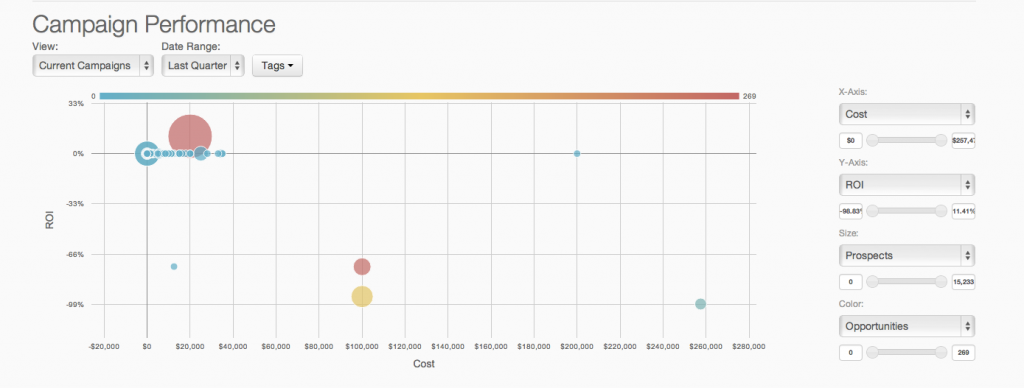  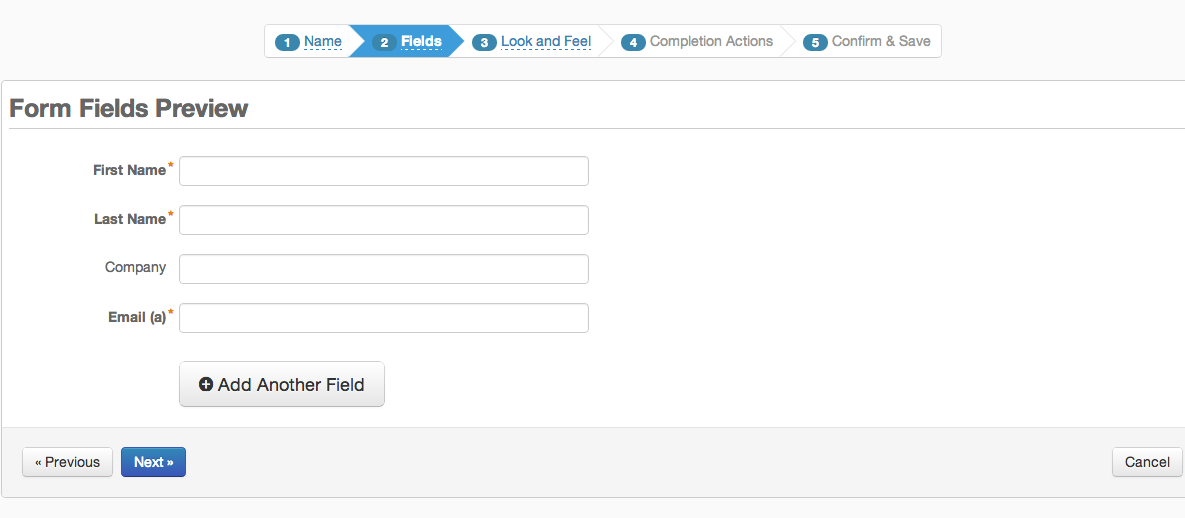  | Webtrends Analytics Screenshots  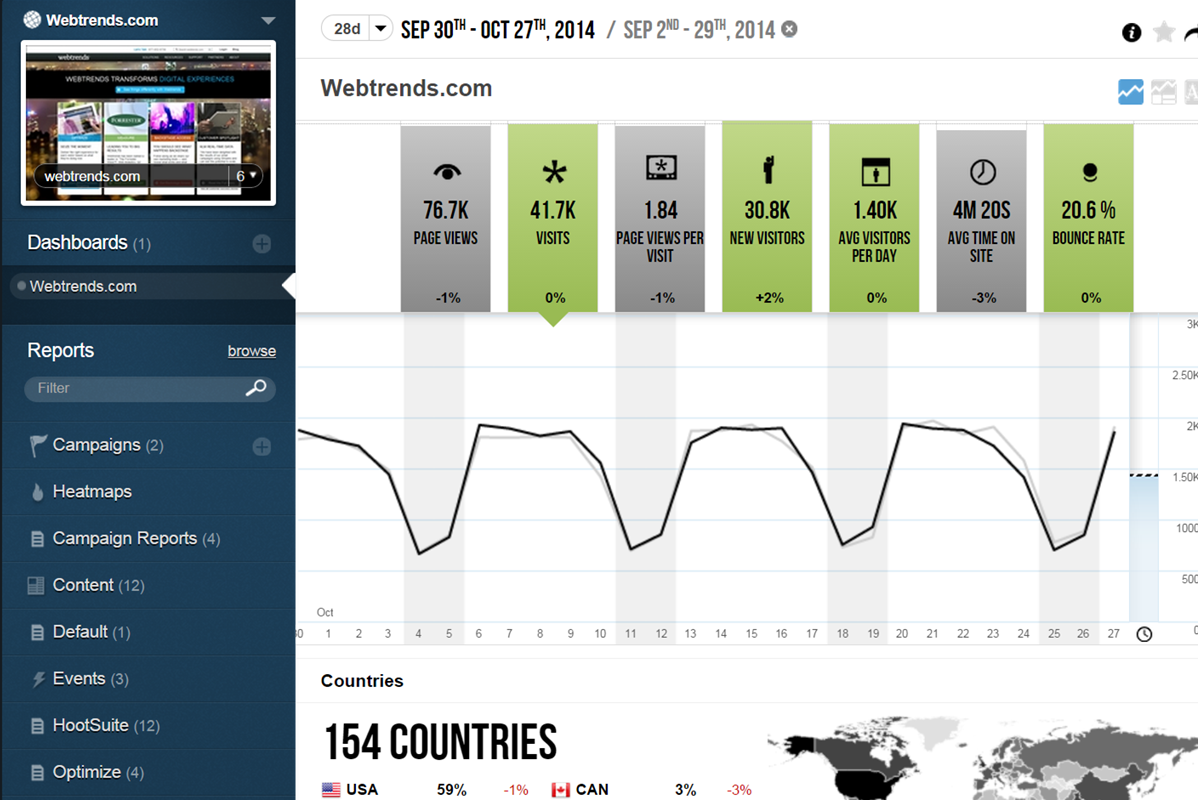 |
