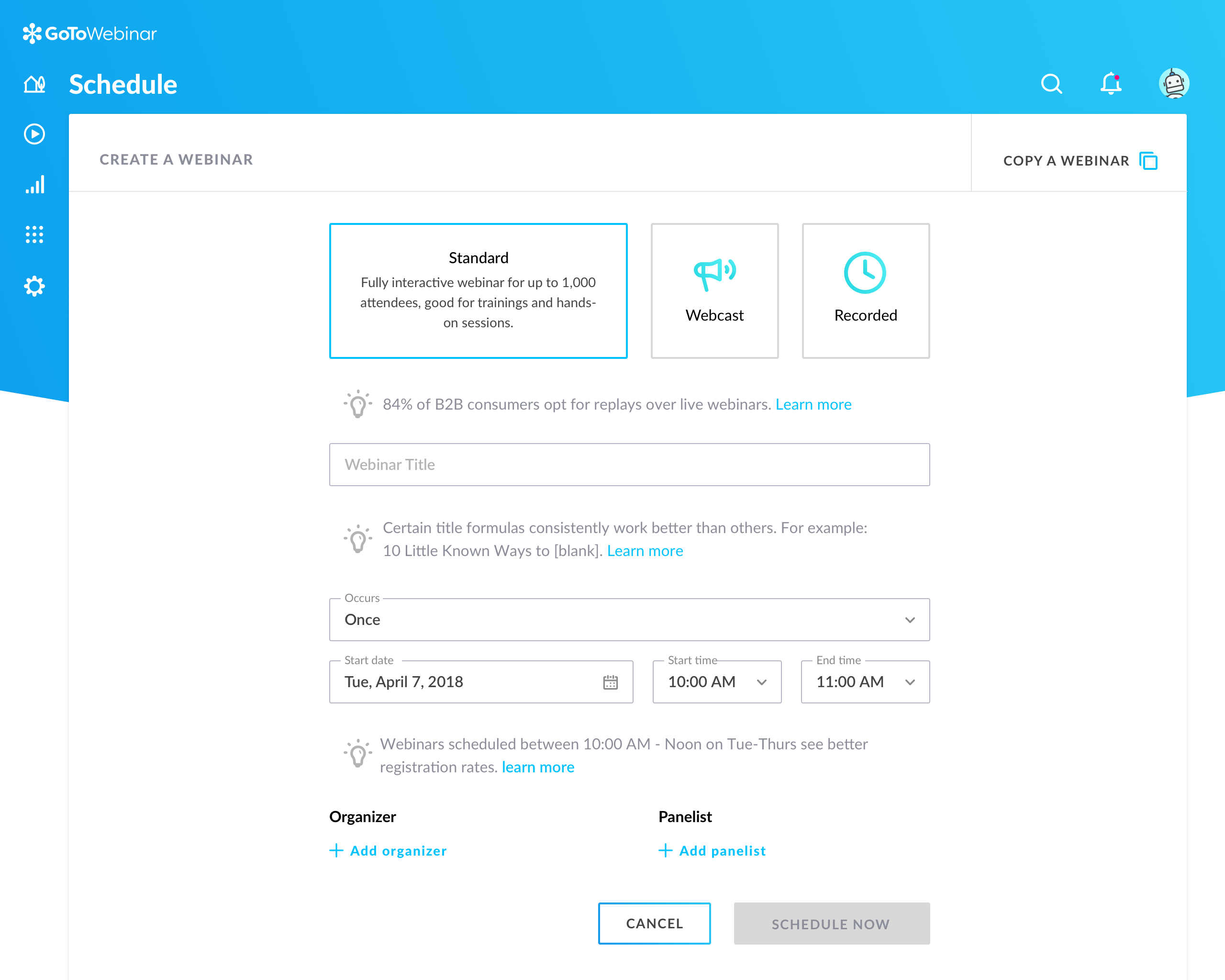
GoToWebinar is GoTo’s webinar and online conferencing solution, and offers features like audience polling and Q&A, flexible scheduling experiences, and webinar templates. It offers CRM integrations and reporting & analytics tools to help engage clients’ audiences.
$49
per month per organizer
Webex App
Score 8.6 out of 10
N/A
The Webex App brings together Webex Calling, Meetings, and Messaging into a single application, fostering collaboration and unlocking more productive ways to work.
$0
user/month
Webex Meetings
Score 8.7 out of 10
N/A
Webex Meetings is a video conferencing solution powering hybrid work. It enables a seamless collaboration experience and better results with meetings that are designed to give everyone the ability to engage no matter their location, language, or communication style.
GoTo Webinar has a more custom approach towards the user who is specifically looking to manage a Webinar or Digital Event with a larger capacity of participants.
I was only introduced to GoTo Webinar in my current role, I would always give this a 10/10 rating because it is a work from home workers friendly, easy to use and to set up. I am encountering any trouble using it. Just clicking the generated link and there, I am already in the …
Zoom scores well above GoTo and ON24 in brand recognition across mid to large enterprises. But GoTo scores well in SMBs. Regarding value for money and ROI, it's better than ON24. We selected GoTo because of the price point and to ensure that our partner-sourced SMB stacks do …
We had been familiar with the GoTo products and decided to stay with them since they meet our needs and work well. We have used Zoom on occasion but IT prefers the GoTo Webinar package.
Zoom is a great product, but isn't as easy to use and doesn't have all the features GoTo Webinar has. Pricing plans vary for each of them, but we've found that GoTo Webinar gives us an excellent value for the service on all of our key usage situations. It was just a better …
I can't compare GoTo Webinar with other products from the same company because I haven't tested them. However, I can compare it with similar products from Zoom, Cisco, and Google, and GoTo Webinar performs within expectations.
Zoom and GoTo Webinar are probably my 2 most commonly used hosting softwares. They are both quite intuitive and contain similar features and both have become quite user-friendly.
GoTo Webinar provides a better users interface and more reliable experience when participating in remote meetings. It allows high quality virtual meetings which means more people can participate in a virtual discussion.
It was already a component of the tech stack before COVID, but with the introduction of numerous new platforms that are utilized on a daily basis for purposes other than webinars, it is currently not the greatest option for marketers. It's a useful addition to the tech stack, …
GoTo Webinar works very much like Microsoft Teams for meetings. The features of each are very comparable. However, GoTo Webinar's pricing model is more affordable.
We used TeamViewer and Skype for Business before this and we had a tough time conducting webinars when the target audience was huge. Lack of integrations with 3rd party platforms, and no analytics capabilities limited ourselves from going to the next level in both sales and …
I can't say this clearly, because the scope of using is totally different. We use Anywhere for our internal company and support desk. GoTo Webinar we use it to assist some customers who have a problem, but demanding to use it for their issue instead of using our own solution.
All of the tools above are great but we’ve found they are only good for internal meetings and not external clients. The ease of use with GoTo Webinar is unmatched by any of the competitors so we choose to have 2 tools - 1 for internal engagement and 1 for external client use.
GoToWebinar has a user-friendly interface and intuitive controls. When comparing it with other platforms, assess how easily you can navigate through features, set up events, and engage with participants. Connection stability, audio and video quality seem pretty much ok. …
All of the other platforms are nice as well but something that has GoTo webinar is that it uses a software in your computer that makes the session to be more reliable and does not consume high ram or rom in your device. It has nice features to remind the people about the …
Zoom caters to a much higher attendee count. GoTo Webinar has more intuitive, user-friendly tools that most people can pick up on their own. Zoom is more tailored and customizable to suit your specific needs. GoTo Webinar is significantly cheaper with fewer add-ons....
GoTo provides features that others vendors don't have, analytics dashboard is exclusive for webinars sessions and it provides value to the complete solution, styling invite emails is another feature that will not find on other solutions. The advantage of other vendors is the …
Super-smooth video and fantastic audio with an extended range of volume control. Other vendors can claim their product is a superior choice; however, in my history of experiencing multiple options, GoTo Webinar gets my highest marks!
Livestorm is really good with integrations to other CRM tools but it has limitation in some niche tools we are using for our industry. users also often complain the reliability of livestorm on the client end.
Much better integration with phones and video terminals. End-to-end encryption and ease of use. Many things are much easier and more intuitive to do in Cisco Webex. Convenient management of security policies for the entire organization. Easily join a meeting from any device or …
The Webex App is much more intuitive to use. It allows us to connect wirelessly to a video camera much faster, with just one click. Furthermore, its integrations are very beneficial for our daily work.
We do use Teams for internal communications, but for external communications with vendors, contractors, etc., Webex has way more features to have productive meeting sessions. And aside from Teams, it has the lowest per-user cost with a great option for a full bundle of $25. It …
During a meeting, I can pause screen sharing without needing to remove it. Voice cancellation is amazing in Webex, whereas Teams includes all noises. The organization of teams and groups, as well as calling and messaging, is way better. more widely used and can be accessed even …
Slack is nice, but Webex App pairs better with my Dell computer in my opinion. It is really easy to use. All of my peers seem to enjoy it as well. It is very easy to compare notes, share feedback, and plan out a sales process from the confines of my own home.
Webex app is being adopted in our manufacturing organization from decade and they are very habitual to use Webex rather than using other new app. Instant chat, file sharing, video calls or even setup meetings are so up to mark and simple that users across organization are using …
I enjoy how it Webex can be used solely for phone calls or clients. I do use teams as my main source of communication for staff. So it is nice to have separate apps for different areas of my work life. I do wish there was a way to tell who was active or online. This would help …
Webex is the only product that allows us to integrate our existing infrastructure and collaboration solutions right out of the box. We use On-Prem Call Manager and Unity Connection for Voicemail. Everything integrates in Webex seamlessly. If we were to switch to one of the …
I'd say the adoption of the Microsoft Teams product really drove us away from Webex Meetings. I think just the ease of use of users using the Microsoft Suite and what teams initially went in for at our company, which was really just a chatting tool, and now it's turned into …
Webex Meetings had the immediate call functionality, where this functionality is lagging in GMeet and Zoom, where it stands on top among its competitors. Webex Meetings has good-quality audio and video. The screensharing option in Webex Meetings is also really good. The …
They all handle collaboration and meetings well and all offer various experiences. On the whole I wouldn't say any one of the products stand out against the other so it would have to come down to ease of integration, installation an costing. Webex Meetings holds its own well …
Webex Meetings is almost incomparable more so because of the integration options and its variety of features that makes teamwork, collaboration and communication smooth.
Overall, Webex does a pretty good job. Google meet ultimately ranks high because of how most schools utilize Google Apps to drive most of the digital learning environment and how teams integrates with a free LMS like Google Classroom. However, Zoom offers a lot of features and …
Webex compares well with GoToMeeting software. It has excellent options, the go-to meeting app. It works well with the quality of connected hardware controls, like audio and video services. The chat and recording services work better, making it stand out in the industry. Works …
Webex works best for my work against all the tools we use. Helps in communication as well as better collaboration with everyone. Especially meeting clients has been great via Webex Meetings. Project team uses it mostly and find effective at all times. Project managers use it to …
Webex interface is great and beats many other software available in the market. It has better audio and video controls and provides a great way to share screen. The team has not raised concerns using Webex and has been satisfied using it yet. I believe the Webex has helped us …
We still use a combination of a few collaboration softwares. Webex offers the most enterprise-grade tools compared to its competitors. Many of our top market clients recommend and insist on Webex primarily for security and privacy reasons. The experience has always been smooth …
I like them much better. I think Zoom caused us a lot of issues for people with time and people couldn't be their own manager. We just had a lot of problems with Zoom. That's what we primarily used before this. So it has caused us a lot of problems in the past. So WebEx is way …
We are using Webex Meetings from last few years. Webex emphasizes data security and offers a stable connection, which is crucial for enterprise communications. Webex offers a suite of tools including screen sharing, virtual backgrounds, breakout rooms, real-time captions, and …
It is great for big events like training or product demos. It's good for marketing webinars with features like polls and Q&A. It's not ideal for small, casual meetings. It can be too expensive for some businesses. For smaller events, other tools might be better.
It can be useful for organizations which uses hybrid and work from home model. By using this application we can seamlessly connect with each and every person in the organization. Used to conduct meetings about progress of project and can be able to present our data to others by screensharing option.
The first reason is the ease of use and availability, which makes WebEx work for all. The quality of audio and video is adorable. As a business development associate, I must make an impression on the other side, and WebEx helps me make first impressions. A few features are complex for new users but can be resolved.
We have a global and diverse team with different devices and operating systems. Webex works smoothly on all of them and everyone can collaborate in real-time saving a lot of time and effort, making meetings much more productive.
We can easily capture discussion points and decisions for future reference, without the need for manual note-taking. It helps us in smaller group discussions and brainstorming sessions within the main meeting itself.
I can even tailor the layout to suit the meeting's purpose and agenda. Webex is intuitive and easy to navigate, even for non-technical users, joining and scheduling meetings is a smooth process.
Dashboard for control are mostly intuitive but in some menus like the webcasting section can be cluttered
The current polling and survey capabilities are too simple. More advanced features, such as branching logic and real-time results, would make engagement more dynamic and insightful.
Although it's easy for organiser to use goto webinar, users have reported issues and long wait time on their end and they don't have much control over the session
GoTo Webinar is not boring at all. Its design is extremely intuitive and specific for what its name serves. It is a great software for webinars which have become the trend of "continuous learning". I like the way we can manage participants in the webinars, interacting with them while they cannot disturb the flow of the speech by intruding with the mic.
We really like the flexibility of jabber. With the exception of a few quirks that we have found, we see a bright future with it. We depend on it daily and will continue to do so for several years to come. As our team grows, more users will be using it and more screen sharing will be done. It it an indispensable tool that we simply could not imagine going without. It makes communicating so much easier when time is of the essence.
Webex is going in a direction which is going to make it incompatible with how we use it. They're more interested in developing the gimmicky AI features and leaving behind the core ability to share documents and allow participants to annotate and save annotated shared documents and other features that were what made it the best choice for classrooms.
GoTo Webinar's User Interface is simple and straightforward, which is what I, as an end user, prefer to interact with when I only use a software once or twice a month; I don't want to have to remember extra steps just to attend a webinar.
Webex is quite usable, and it is, in fact very easy to use as well. You don't need a lot of documentation to learn how to use the app as it's mostly self-explanatory. The user interface is easy on the eyes, and people can see buttons without issues. Overall, WebEx's front-end design is great and I don't have much issue with it.
Webex Meetings does not provide enough audio feedback for users with visual disabilities to properly navigate the tool. Students, faculty, and staff who are blind or have low vision may not be able to use Webex Meetings. Users with motor disabilities that navigate via keyboard, may not be able to navigate the web conferencing session enough to participate fully.
I rated GoTo Webinar a 9 out of 10 for availability because it generally performs reliably, with minimal application errors or unplanned outages. The platform’s high uptime ensures that it’s usually accessible when needed, supporting a seamless experience for scheduling and conducting webinars. While occasional minor issues may arise, they are infrequent and typically well-managed, contributing to a strong overall rating for availability.
I would say every time I open it, it is there, there are times that our users have to sign out and back in to get it to work or even do a full exit as the app will disconnect from the controlling the desk phone, but some easy steps to sign-out or fully exit the app gets the user back up and running quickly.
So personally I have never faced any kind of meeting unavailability issue while scandaling meeting with WebEx the bandwidth is really good and in terms of application performance the same is my opinion what I mentioned for availability it is good and the objective of communication is quite fruitfully achieved with a simple and effective product like WebEx which is often bundled with the purchase of course which is which we have at our company and great discount is being offered so it is easy on our pocket. I really don't have any specific errors which have faced I should mention over here the operation or application uses is quite smooth.
I rated GoTo Webinar an 8 out of 10 for performance due to its generally robust capabilities. Pages load quickly, and reports are generated efficiently, even for complex data sets. The platform’s integration with other systems typically doesn’t introduce significant latency or performance issues. However, during peak usage times or when handling very large data volumes, there can be occasional slowdowns. Despite these instances, GoTo Webinar consistently provides strong performance and reliability in its core functions.
On standalone it works fine, it used to consume a considerable amount of system resources in the past, but with updates and upgrades, this has improved quite a lot. As far as integrations with other systems, we have not come across any critical issues with the app.
We use browsers to join Webex Meetings and it is very good no issue also appears from Webex APP is very organized and does not consume more resources of PC so no issues appeared. We join audio and video in many ways, all of which are good. We integrated it with active Microsoft Exchange with easy deployment.
I was always able to get someone on the phone when I needed to. They were very thorough and ensuring my questions were answered. And if I was asking for a solution or request that they didn't offer, they told me so I could at least stop trying to search for it.
The support team is quick in reverting to the issues faced, and it has multiple language support, which would be very helpful for some instances. Their expertise in resolving queries is instantaneous. Most of the common lags/issues in the application are identified and fixed with regular updates.
The support cases can be opened instantly. The support engineers can support you via Telephone, E-Mail, WebEx Meetings, and My favorite WebEx application.24X7 Availability of the engineers. Step-by-step guidance is available by an engineer. https://help.webex.com/ - Great Site for instant FAQ's. https://status.webex.com/ - Is helpful to identify the updated schedule of WebEx or to know the server status of WebEx services.
I would rate the in-person training 9/10. The session was highly interactive, providing opportunities for real-time questions and hands-on experience, which made the learning process more engaging. The trainer was knowledgeable, addressing our specific needs and ensuring that all participants fully understood the material. The structured approach and practical exercises helped reinforce key concepts. However, allocating more time for hands-on practice and group discussions could have further improved the overall experience, making it even more effective.
In-person training offers the benefit of personalized instruction. Users have the chance to ask specific questions and work through any challenges directly with an instructor. This hands-on learning style can be incredibly valuable for those who learn better through interaction. With in-person training, participants can receive instant feedback and troubleshooting assistance for any technical issues they encounter during the session. This makes it easier to resolve issues on the spot rather than waiting for online support.
Very easy to create. All operations are done without any problems with our business growth. All people like the experience including me as an instructor. The tools that WebEx App offers us are very complete for working in a virtual classroom, whether it is sharing the screen, the different display modes, the whiteboard, or even the scoring tools on the screen, it allows me to do my job as an instructor as if I was face to face with the participants.
It was very interactive and well explained. The trainor is very much knowledgeable of the product. He was able to answer all of our inquiries in a timely and professional manner. There were lots of exercises done during the duration of the training to ensure that we have a better view on what to expect from the product.
I didn't participate in the implementation nor did my company. As far as I know we have an IT office running alla these projects and we just use the final products for our educational purposes. I also didn't notice implementation at any level while using the desktop interface, but would immediately recognize it, if so.
There was quite a bit of back and forth with TAC and Cisco Reps to get it fully up and running but we did get there. Some of which had to do with documentation was not fully understandable. But with Cisco TAC we were able to get fully up and running.
That we needed complex implementation that we didn't get tells me 2 things: 1) the product was not designed in a way that "just worked" like some of its peers (Zoom / BlueJeans) and 2) had our company defined actual user needs and validated / verified that they had bought something that matched those, we would have pursued features / designs more closely aligned with what the product actually does: screen share, sometimes video, definitely VOIP audio (always an option regardless of license), and easy recording and retrieval of meetings.
Zoom scores well above GoTo and ON24 in brand recognition across mid to large enterprises. But GoTo scores well in SMBs. Regarding value for money and ROI, it's better than ON24. We selected GoTo because of the price point and to ensure that our partner-sourced SMB stacks do not end up not engaging with us because of a lack of a proper medium.
Much better integration with phones and video terminals. End-to-end encryption and ease of use. Many things are much easier and more intuitive to do in Cisco Webex. Convenient management of security policies for the entire organization. Easily join a meeting from any device or browser. Support for additional features on local communication devices.
The ability to transfer multimedia files directly into the platform and a very robust free plan helped me make the decision to try out Webex Meetings. Easy to set up in a company environment and accessible once the learning curve and sign up process are complete. In-platform web navigating is also a nice feature when onboarding new staff or doing market research.
I rated GoTo Webinar an 8 out of 10 for scalability because it effectively supports deployment across multiple departments and sites with its flexible features. It allows for easy management of large-scale webinars and integration with various systems, accommodating a growing number of users and sessions. However, some users might find limitations in advanced customization or specific integration needs as their requirements become more complex. Overall, its robust capabilities and adaptability make it a strong choice for scalable webinar solutions.
Once everything is in place on the back end getting Webex on a user's PC is now very easy and with single sign-on, users are able to sign in without having to remember another password. Just make sure you have all the user settings in CUCM, CUC set right, and that they have the needed licenses in Webex Control Hub.
I can speak to multiple departments at my organization using Webex Meetings. It has been, and continues to be, our longest online meeting software. It has been deployed across the organization and each department uses it. As I have mentioned, our monthly all-organization Town Halls are hosted on Webex. We have also used it to broadcast a panel-based speaker event.
Good: We've been able to keep various client teams trained up on our product
Good: It helps us automate communication about the webinars, as well as follow-ups
Bad: There is a time suck that shouldn't exist surrounding the recurring scheduler which needs to be rethought and retooled with more than the most basic real world use cases in mind
Webex App has really helped in implementing virtual work or working from home, thereby increasing the productivity by saving the traveling time to office. So, it's hard to express it in some measurable matrix, but for sure it has increased the productivity and also, the better document sharing and presentation tools, helps the meeting to be very crisp and super productive.
Our clients and teams like the solution and have been using it for years.
Tiered pricing could improve the cost for SMBs, but the ROI is still great for what we use Webex for.
The install base using the product and its features saves us money in not using other solutions that are not as flexible, saving us money in annual license fees.
From a global meeting and conference perspective, no significant issues cause scheduling and participation problems.
We can grow usage of tool and not break the budget.
Team leadership finds it cost effective, but can be improved.