CrowdCompass is an event management software system offered by Cvent.
N/A
Eventbrite
Score 6.8 out of 10
N/A
Eventbrite is a global ticketing and event technology platform that provides creators of events with tools and resources to plan, promote, and produce live experiences. The vendor says event organizers can benefit from Eventbrite’s self-service event planning tools including email invitation creation, RSVP tracking, and ticket selling. Ticket sales can be managed online via the ticketing website or through integration with social media sites including Facebook, and real-time sales data…
N/A
Whova
Score 9.4 out of 10
N/A
Whova, headquartered in San Diego, provides what they describe as Intelligent Event Technology Solutions by creating authentic audience participation and engagement and simplifying the entire event process from planning to registration, networking, and follow-up. Whova's mobile engagement apps support both on-location events and virtual events.
N/A
Pricing
CrowdCompass
Eventbrite
Whova
Editions & Modules
No answers on this topic
No answers on this topic
No answers on this topic
Offerings
Pricing Offerings
CrowdCompass
Eventbrite
Whova
Free Trial
No
No
Yes
Free/Freemium Version
No
Yes
No
Premium Consulting/Integration Services
No
Yes
No
Entry-level Setup Fee
No setup fee
No setup fee
Optional
Additional Details
—
Only pay when ticket sales are made
Essentials plan: 2% + $0.79/ paid ticket
Professional plan: 3.5% + $1.59/ paid ticket
Premium plan: contact Eventbrite for a custom pricing plan
Free for free events
Eventbrite was geared more to a concert or general public event. Whereas CrowdCompass was a part of CVent which was more geared to a corporate event like ours. CVent and CrowdCompass had a lot more capabilities and potential customization than Eventbrite. Also, Cvent and …
Compared to Whova, CrowdCompass offered me way more functionalities even if not all of them were useful for me at the beginning. It was offering me more flexibility and evolution possibilities which ended up being needed quickly. Compared to EventMobi, two factors helped me make …
Just the simple fact that CrowdCompass would offer a much more seamless integration with the rest of our Cvent Event Management system is the main advantage and what sets it apart from other competitors in the industry and market.
To be perfectly honest, I felt that most of the companies out there offer very similar mobile apps, some might have 1 or 2 more features more than the others. To us we felt that CrowdCompass offered a tremendous value for both large and small scale apps, was user-friendly for …
Eventbrite is excellent for free events and does a great job with virtual events. Eventbrite does not offer an alternative to merchant processing. Freshtix and Passage allow me to use our own merchant processing systems. With Eventbrite, you have to use their processor and they …
Whova apps are okay (not great and not a dismal failure) and have functionality similar to CrowdCompass. Whova is a little more advanced in some ways than CrowdCompass because of its "one agenda delivered to the website/mobile app" philosophy. CrowdCompass was actually …
I have used Eventbrite for ticketing for reuinons and educational workshops. It is primarily a ticketing platform and does not have the interactive features of Whova. Whova is much better suited to a multi-day conference than Eventbrite.
CrowdCompass was the best part of Cvent each time I used it, from the ease of use to the customer service and handholding. I would recommend it for anyone using Cvent Event Management for an in-person event. I know Cvent just rolled out their virtual event hub though, so for virtual and hybrid events that are employing the Cvent family of tools, I would probably say CrowdCompass is unnecessary.
We're a nonprofit organization so we have a very lean time, labor, and money so the super easy self-explanatory nature makes it easy for our team to admin an event. The simple UI [of Eventbrite] keeps our focus on the event and avoids any headache-inducing tech hurdles. There're just enough user roles to handle multi-staffer admin. A less appropriate situation is an event that is huge in complexity with a custom workflow and processing which Eventbrite's not built to handle in-house such as multi-step registration, multiple item and category all-select options during registration, multi-event type (not just physical or ticket but virtual goods tracking), more HootSuite-like social media refinery, etc.
I think it works really well as a way to organize yourself while at a conference. As well, to network with said attendees I found it very valuable to remember names. Having an automatic rolodex with everyone I met and ensure I had their info to connect later
Provides attendees with their personalized schedules at their fingertips.
Facilitates networking through the ability to set appointments and send messages with other attendees, and inspires competition with The Game and Click challenges.
Gives attendees the ability to view handouts, take notes and download the information to their personal computers when they get back to their offices.
Event management--providing a detailed description of the event (date, time, place) plus details of the event (speakers, topic, sponsors, etc.)
Registrations--provides enough details about people who register, and tools to manage those registrations (add people manually who didn't pre-register, cancel orders, check-in of attendees)
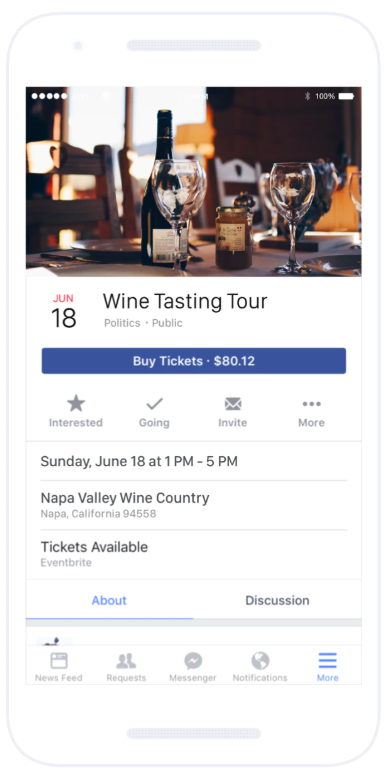
Event promotion--events created using Eventbrite can be found by searching Eventbrite for local events
Last year, the gamification did not allow much customization, which was a shame. I hope that by the time I am ready to build my 2020 app, this function has been expanded
The app to upload/edit push notifications was only available on iPhone so I had to have another team member handle that seems I have an android phone.
I'd like to see Eventbrite add more customization to the event page layout. It would be nice to be able to differentiate our event through more specific design.
I've had occasional problems with email formatting in the Eventbrite email builder. It would be nice to have a slightly more trustworthy builder.
Other than those two things, I think Eventbrite does exactly what it needs to do.
We have been using CrowdCompass for 3 years and it has all of the capabilities and functionality that we need, it's easy to use, and Cvent is always implementing new features and enhancements to keep up with the latest trends and technology.
Excellent platform and easy to use to create events. Eventbrite sets the standard for simple, effective and safe ticketing platforms. Our customers trust Eventbrite and we've always done well when we use this platform for ticketing. They have recently updated some of the virtual connectivity tools which make it even easier to set up and promote virtual events.
We already registered with Whova for our 2024 event and we will continue to use Whova for the foreseeable future as long as the price doesn't rise too high. It was a bit of a shock to see the difference between last year's price and this year's price - nearly 2k increase! We were able to negotiate, thankfully, to lower the price.
It is very easy to use as everything is very intuitive. Configurating an app does not take too much time at the end, especially as soon as you already have done one as you can dupplicate the entire content. This is very practical when you use the app for annual events. Also few elements are not updatable once the app is published. Of course you can't change the entire design and the security settings which is a good thing anyway, but the entire content can be updated which allows you to publish your app quite early in advance to boost the engagement without having to wait to have everything in your hands (for instance the speakers bios or abstracts). Plus by adding more content regularly it encourage your audience to come back also regularly to check what is going on before the event.
Great platform with so many incredible features. It streamlines workflow, communication, messaging, and analyzing data. I know of no other platform that can do what Eventbrite can do for the price or user-friendliness. They also offer great support for new users and integrate well with other platforms (i.e., social media and Sched).
Most of Whova's functions are intuitive and you can self-teach about 80% of it with ease. I really was impressive with the messaging, follow up meet-up capabilities and sharing of contact information. My only few concerns were about the lack of an archive or back up, [perhaps cloud-based?] of the meeting room and round-table's presentations
We had no performance issues with our event delivery. We did have some meet-ups that had some glitches for some attendees, but I believe they were quickly resolved and were more on the part of user error than anything. Once they got the hang of it, their meet-ups went more smoothly.
Once we paid for our apps, I felt like I was left to learn on my own. There are plenty of Help articles available, but no training sessions. I'm a visual learner and having to poke around and use trial and error to build the apps took way too much valuable time away from other parts of my job. It was frustrating and I brought it up with my CrowdCompass contact, but was told that they don't provide any training sessions and if I had questions I should refer to the Help articles or call support.
I haven't yet needed to contact customer support, but the information provided next to the various features has been exceptionally helpful. This info is located just to the right of most options, and it provides answers to frequently asked questions. At this point, that information has been enough to keep me from having to contact anyone.
I only had a single issue regarding a photograph that was handled immediately and a colleague somehow ended up with two profiles which was also handled right away. Those two instances are all I have to go by. Other than that it was smooth but I did have ample information regarding who to contact if I experienced an issue
Our training team walked us through the first set up which really helped me to learn where everything is located as well as all of the features available
Just jump in, don't over thinking it, doing it will net the very few basic questions you'll have. There's not much complexity so one doesn't need to plan as if moving a canal. It's as simple as can be.
I found Whova to be similar to many social media apps that I already use. It was easy to navigate. This was my second experience using Whova in my presenter role. I liked the icebreaker section to connect with other participants before the event started. I look forward to next year’s event.
Easier to use interface that directly links with our Cvent registration system. We switched due to this integration, the gamification improvements, the benefits for on-site check-in and session selections, and ease of design/use for our builder team. We have especially enjoyed the New Attendee experience over the look/interface of our previous apps
My "go to" for event registration has always been Constant Contact because they don't charge additional processing fees above the standard transaction. If it's a more basic event where I just need to capture name, email, and payment, I'll continue to use Constant Contact over Eventbrite. However, if it's more complex and requires marketing, I would choose Eventbrite.
We selected Whova for price, and ease of use. We would have chosen GoToWebinar but they did not have as many options for sponsor recognition. We will most likely use Event Rebels in the future for our needs. Tracking time and sessions viewed is a must for our industry as attendees rely on us to earn CEs to renew their licensing.
I especially liked the ease of communication, the ability to ask hard questions easily, and afterward the ability to survey all participants to see what we (and/or Whova) could do better going forward.
A dedicated URL for each event has been easy to use for tying events to editorial content, promotion and marketing.
For ticketed events, it has been an easy -to-use system without requiring a lot of training on a complicated technology. It is also competitively priced for transaction management.
Whether we have discovered any Eventbrite users via the Eventbrite site promotion, we appreciate it as a recommendation of our event for like-minded event attendees.
Whova made our virtual and hybrid events possible! Our virtual attendees loved the ability to interact and engage with each other, the exhibitors, the speakers and organizers of the event. It also allowed our in-person attendees to do the same, and navigate the conference on-site.
Whova made organizing the conference possible for our small staffed organization! We only have 1.25 FTEs and were able to pull off a hybrid conference in 2022. It wouldn’t have been possible without Whova!