Discord is an app designed to connect users with communities over voice, video, and text chat, via Discord servers, a gaming and game industry oriented app for growing communities around video games and allowing developers to communicate with their customer base; the app may yet also be used for business communications of other kinds.
N/A
Pulseway
Score 6.9 out of 10
Mid-Size Companies (51-1,000 employees)
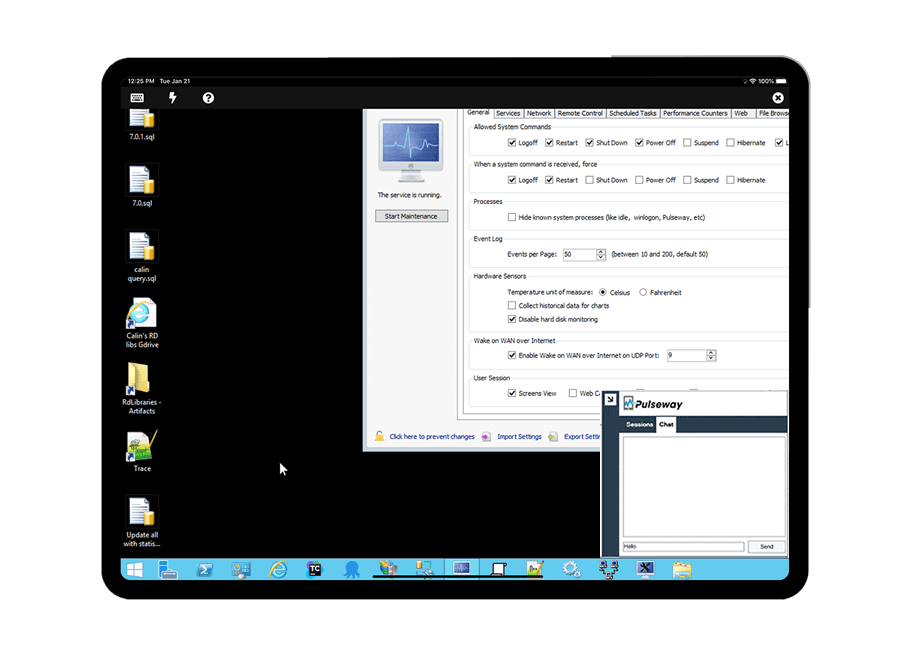
Pulseway is an IT monitoring and management solution that enables users to monitor, manage and control all systems and servers from a smartphone, tablet or browser. For system administrators, Pulseway sends a notification, so they can see an issue and sort it in seconds. Pulseway features: Automation: Auto-remediation workflows, so that IT issues are fixed before users even notice them. Mobile Access: Customers can monitor, manage, connect with…
$0.80
per month per installation
TeamViewer
Score 8.6 out of 10
N/A
Teamviewer offers secure remote access, IT support and device management on a scalable platform. It speeds up problem resolution, reduces downtime and enhances control through automation, unattended access and complete visibility of every device and location.
$24.90
per month (billed annually) 1 Licensed User
Pricing
Discord
Pulseway
TeamViewer
Editions & Modules
Discord Nitro
$0
Discord Nitro Classic
$0
Enterprise
$0.80
per month per installation
Remote Access
$24.90
per month (billed annually) 1 Licensed User
Business
$50.90
per month (billed annually) 1 Licensed User
Premium
$102.90
per month (billed annually) 15 Licensed Users
Corporate
$206.90
per month (billed annually) 30 Licensed Users
Offerings
Pricing Offerings
Discord
Pulseway
TeamViewer
Free Trial
No
Yes
Yes
Free/Freemium Version
Yes
Yes
Yes
Premium Consulting/Integration Services
No
No
No
Entry-level Setup Fee
No setup fee
No setup fee
Optional
Additional Details
—
No hidden fees or contracts. Term-based discounts.
The vast array of free features on Discord right out of the box makes it a stand-out in pricing from other chat platform options. Discord works phenomenally if you want a chat platform that is free, quick to set up, and very flexible in the ways you can start using it. It …
Slack`s free version doesnt save the conversations history, there is no voice channels, it doesnt bring people together with all the incentives for interaction like Discord have.
For small businesses, Discord by far works the same with less limitations compared to Slack. I understand Slack is built for enterprise-level companies, but for small businesses, Discord works better than Slack and Telegram. Telegram didn't really allow for specific …
The organization of groups and channels are better on Discord than Slack although the later is widely used in the tech circuit while the former is use in the gaming community. Maybe for that fact the online features are better on Discord making it better suited for coding. Not …
Not great, I would say overall the Teams suite has been very integrated into email, calendar, etc. Slack is about the same as Discord except I found it easier to access via my mobile phone. Now with teams on my mobile that is integrated into our whole organization I can simply …
Discord is generally very simple and easy to get started using, but still offers a great deal of customization and features. Furthermore, third party features and plentiful and well supported. On top of that, the amount of usability you get for the price is absolutely …
We used to use Telegram which is great for discussions and one to many communications but it doesn't have the ability to segregate different topics unless you start a brand new channel. Unfortunately it is then very difficult to keep those topics under the same umbrella to …
I like Slack for more professional settings, but Discord is excellent for casual groups, especially when a few people do not have iPhones. They're very similar, but I think there are a lot of Discord features I don't take advantage of, mainly because there seems to be so much …
Honestly, I would use Slack and Skype over Discord anyway because they are faster, easier to use, and easier to find conversations. Discord is great at times but, in our experience, having it continuously buffering and taking forever to load really slows down our team. However, …
Discord has better features and it gets updated constantly with new features. It gets popular everyday and the number of people using Discord gets increased. Discord has a better interface that is easy to use, it doesn't make you confused. Better voice and video quality. The …
Discord is better when addressing many people at once. I like how you can upload emotes, and it's just a lot more fun. I don't even use Whatsapp anymore. I'd rather text people than use Whatsapp for all intense and purposes. Discord also uses bots and I don't think Whatsapp does.
For our gaming nights, communication is vital especially in our multiplayer games , and the only voice product that worked smoothly is Discord. Skype's sound would cut out and Zoom's security was poor. Also Discord allows you to join public servers and there are roles which …
Previously, we all used Slack. However, Slack is expensive. It doesn't keep message history and you don't have the freedom Discord offers. I can use the same account for business and personal life without worrying about privacy concerns that I had with Slack (account owners …
Discord allows you to organize communication between many people, while not "mixing everyone together", but dividing them into appropriate groups. Thanks to the ability to work through the browser, Discord is easy to use on any device, without the need to install additional …
Discord and Slack have some very similar features. While Slack feels a bit more professional, Discord allows for the addition of voice chat rooms. While Discord feels a bit younger and more unprofessional, it's a great program for engaging with students and young people. Where …
The subdivisions through voice and text channels that can be elevated in Discord facilitate the organization of the company. Discord planned that the information not lost in the middle of the conversations, we managed to organize for the projects. Permission levels also help …
Not sure why we selected Discord, but I have found it a lot easier to use than the likes of Hangouts, or Teams. It's very intuitive and very good for off-the-cuff meetings or discussions. The ability to have a discussion quickly without the need for invites or starting meetings …
Discord is basically the version of Skype that you've always wanted. It makes it easy for you to chat with your friends, video call them, and make conference calls. It's a MUCH quicker system and does not seem to have such an impact on my hardware as well. Discord is doing …
Pulseway offers a reliable suite of tools at a reasonable cost. It has a lot of power in it if you are willing to put in the time to configure the automations and such in a way that works for you. They also integrate well with other tools offered by Kaseya.
The 2 major factors were: 1. The fact there was no contract at the time, though later on they pressured us bad to sign long term contracts. We believe vendors should have to validate the usefulness of their product and their support to their customers every day, not just 1 or …
I will admit, we started with Pulseway several years ago because we were able to start using it with a free account, which allowed us to install it on some in-house servers and gain experience with it. The other products we looked at all seem to require a considerable …
Pulseway has a more moderate learning curve compared to Nagios, which was overkill for our environment. Nagios also requires a server to run on, and we wanted to separate our monitoring from our hypervisor.
Pulseway has the most features, the best looking app with the best design and better usability than any others we evaluated. We liked the uniformity of the app design across all platforms (Windows, Android, Apple) and the notifications displayed on each platform. The price was …
Pulseway is by far the easiest to set up. The dashboard is very straight forward and has very little need for custom configuration. We use Pulseway to review basic server information and compare it to other similar servers to track outliers. It is very easy to see resources, …
TeamViewer does as much, if not more, for client connectivity. Both allow copious notes for each support connection. Client-based MDM would be a valuable addition for our specific needs.
TeamViewer offers more advanced features than AnyDesk e.g. TeamViewer Dex which automatically tracks user's system performance and provides proactive issue resolution. This feature helps to fix common IT issues automatically and reduces manual intervention.
I have used Anydesk for little over an year and currently using TeamViewer. AnyDesk is a very light software which doesn't require heavy RAM to run also its very stable than TeamViewer most importantly its cheaper than TeamViewer.
Although it is the most expensive on the market, it has many built-in features and, above all, resilience and security. It is much more practical to work with when there is a need to provide constant support to many users.On the downside, I see that it is very dependent on a …
1. AnyDesk stops working in between. And not many users use AnyDesk. It has a complex permission section where users are not able to give remote permissions easily, which consumes time. 2. Zoom Meetings is slow in remote access response and it's time bounded when it comes to a …
TeamViewer is a go-to product for almost all newbies and smaller organizations, allowing multiple simultaneous connections and the ability to transfer files, letting you serve multiple clients at once.
Apple Remote Desktop requires a VPN connection to the LAN to be useful, but it is still necessary to use it when TeamViewer will not connect. Datto RMM seems very solid, and I like it, though I only have access to it from our MPS. It can often connect when the TV cannot. …
TeamViewer is easier to use, has a better UI that I can control more easily than others, is faster, and I think it uses less bandwidth than others. Also, 5 stars for me, it has a better chat display that can be shown or hidden according to our needs during the remote session. …
Compared to the RMM features of NinjaOne, Datto RMM, and N-Able, TeamViewer's RMM toolkit is thinner and less automated. The TeamViewer RMM features are not as robust as those of dedicated RMM platforms, like the ones I mentioned above. This is an important point to keep in …
MS Teams is good, but not on all our devices. We also experience more latency issues with MS Teams. TeamViewer has a small footprint on the devices and just seems to work.
For mobile, TeamViewer was much better, especially since some of them don't support mobile devices at all. Performance seems to be generally better than AnyDesk and on par with ScreenConnect in both performance and the feature set. One system not in the list above is RustDesk. …
TeamViewer is superior with remote assistance when our user is at statile site where there is no VPN tunnel implemented. All we have to do instead is just send users an email with the invitation for remote access, and we can assist those who have trouble. Highly recommended …
TeamViewer is a little more robust than many of the other options that we have compared it to. The patching and package deployment option alone sets it apart. The ability to conduct file transfers from machine to machine also gives it an edge where other options have come up …
Pricing wise, the TeamViewer license is a lot more costly, but makes up for it in feature-richness and reliability. Pulseway has the benefit of having the possibility to keep an eye the IT infrastructure so you can catch things before they go wrong but our main focus was a …
Anydesk is a great tool but TeamViewer is already established at our organization and switch would require software re-installation for each managed computer.
Found TeamViewer expensive compared to other services, but it does work efficiently. LogMeIn has become incredibly expensive, hence moving away from them. Splashtop is more cost-effective but perhaps not quite so reliable.
End-to-end and transport encryption, Multi-factor authentication, Secure transfer of patches, logs, configuration files, and backups during support sessions or deployments.
TeamViewer's cost is much lower than that of other solutions, and its security is far superior to RemotePC's. TeamViewer is also a request-based remote session manager, unlike other software that allows indefinite connection time. TeamViewer's free version makes it even better …
Discord is completely suited for any tech server needs - and a million times better than Facebook. It's still lLess suited for non-tech but for sure it's getting better and with some support from Discord that could be fixed easily (just don't dumb-it down or take away features please). I have it open all day, on a separate monitor if I'm not using that one for something else. It'd be great - and maybe I've missed this - if there was a way to have an overview of messages posted in various channels. Despite using it for years now, I've never dug deeply into notifications, so maybe it's possible already. But it should be highly customisable - ie, put all messages from chosen slow servers in the feed, but only highlights from busy ones, and no messages from certain servers etc , so it remains manageable.
Pulseway is well suited for just about any situation where there is a need to remotely monitor and manage computers. The most basic features are available to anyone with a free account, so even a home user can set it up and use to keep an eye on computers. The more sophisticated features require a fairly inexpensive subscription, but are well worth the cost for a business wanting to monitor the health of their servers, etc. My experience with Pulseway is limited to using it in situations where there are fewer than a dozen or so computers/servers being monitored. I'm not really sure how well it scales up, so I can't say if it is a good solution for a large corporation with hundreds or thousands of machines that need to be monitored.
Helpful for organized IT teams supporting multiple manufacturing warehouse zones. Useful for training, auditing, and meeting ISO/quality or compliance documentation requirements. False positives can lock users out unexpectedly, particularly common when supporting remote home users. Session connections can be interrupted, which is painful when configuring warehouse automation systems and printers that require a restart.
One to many Communications to ensure that we can quickly get messages out when we have to.
Quick polling of questions and issues
The ability to gate channels so we can focus on folks that we know are stakeholders gives them an added feeling of belonging and that they have a say in the direction of projects.
There are a couple of computers that I keep ScreenConnect around for - as I lose connection with Pulseway and have to reestablish with ScreenConnect. I can't seem to get tech support interested in resolving this issue and it cost's me many $$ just to keep ScreenConnect running.
There is an issue with Webroot, their new endpoint solution. I can't get it to work - again, no help from Pulseway - they ignore my emails.
As long as I continue to provide remote support for my clients, it's a no brainier. For what I pay out, I probably make it back tenfold in the ability to provide remote support from wherever and whenever. Not to mention the saved gas money for a fix that only takes 5 minutes but it takes you 20 minutes to get there. As my business continues to grow, and I support more and more clients, my need for TeamViewer will only grow.
Because it is easy to use, its fun, it has everything you need to comunicate, voice, text, screen sharing, images, emojis, gifs, stickers, and even personalized ones. It also has comunication through integrations like games and music, that i think that brings people together. It is also great for keeping records of the conversations at work
The tool is easy to use however it is can be daunting with the amount of features available in it. Last I checked, their knowledge base was not very expansive and they relied a lot on the changelog for how to do some stuff. This can make it hard to learn how to do some more advanced things like the automation.
Compared to other products I've used (ConnectWise Control), TeamViewer is harder to set up and get connected. It is especially difficult to set up "permanent" unattended remote access, where you want to be able to connect to and control a remote computer without having to exchange codes and passwords every time you connect.
There is plenty of online documentation and knowledge base articles. As well as having an open API to be able to tie it into other products makes it a really viable solution for any business. I have never had to contact support, any questions which I have need answered can be found in the documentation,
I have never had to use the support for Pulseway. However, when initially starting out, we would receive emails every so often asking how we are doing and if there is any support that they can provide. I would imagine that any request would be supplied with the same great support!
The support from the Teamviewer team has always been top notch. Any support ticket that we have submitted has been handled very quickly and with the best possible resolution. We find in most cases, contacting for a support ticket is not even necessary, as the knowledge base is more than adequate.
As expected without any problem! Alternate in-person training is another efficient way to learn how a product works. There are many third party supporters for TeamViewer courses available that can give additional ideas how to use TeamViewer for specific functions and features as we did require in respect of our usage.
I have never used the online training either. I have watched a few informational videos that were helpful when learning how to do a specific procedure within TeamViewer and get the most out of the software by utilizing one of the many features that are available with the software. Again, 5 if for neutral.
TeamViewer installation and deployment to other devices is pretty straightforward and does not require much technical know-how. This makes ease of use attractive when supporting both new and existing clients with limited technical knowledge. I think ease of use is a huge factor in getting new clients. TeamViewer handles that extremely well.
The vast array of free features on Discord right out of the box makes it a stand-out in pricing from other chat platform options. Discord works phenomenally if you want a chat platform that is free, quick to set up, and very flexible in the ways you can start using it. It doesn't require a complex set of logins for different servers (such as Slack) or logins that are inconveniently tied to other products (like Microsoft). If you prefer to view full conversations all in one place without them "splintering" off into branches that are missed, such as is the case with Slack, Discord works great for this. If you feel seeing everything is too overwhelming or "busy", Discord may not be right for you. Discord is great for lean organizations or startup companies, but will likely not feel "professional enough" for larger, traditional "corporate" enterprises.
The 2 major factors were: 1. The fact there was no contract at the time, though later on they pressured us bad to sign long term contracts. We believe vendors should have to validate the usefulness of their product and their support to their customers every day, not just 1 or 2 months every few years. This is the same reason we allow our clients to leave at any time if we fail to meet their standards. 2. The ease of managing the product, we demoed other products that would have almost required a full time employee just to manage the RMM tool itself. The ease of use of Pulseway meant a tech could manage it as part of their other duties much improving the ROI. Note: We also felt NinjaOne met these same conditions but we evaluated it after having used Pulseway for a few years and while we found it a great product, possibly even superior, we originally didn't find enough reason to go through all the work and retraining to change over we Update: Eventually we did make the move to NinjaOne and have been very happy we did as we get much more value from it.
Apple Remote Desktop requires a VPN connection to the LAN to be useful, but it is still necessary to use it when TeamViewer will not connect. Datto RMM seems very solid, and I like it, though I only have access to it from our MPS. It can often connect when the TV cannot. ScreenConnect was not a good fit for us and did not seem to work well.
Problems can be dealt with more rapidly because I have access to systems from anywhere. I don't have to carry a computer with me nor do I have to find a location with potentially non-secure wifi to gain access to my systems.
I can handle 99% of my system admin tasks using Pulseway and never have to touch a system or connect to the console.
Pulseway gives so much control over a system that I don't need to spend extra money on other software to perform management tasks.