LinkedIn Sales Navigator is a sales intelligence software solution offered by LinkedIn.
$79.99
per month
Mailtrack
Score 9.4 out of 10
N/A
Mailtrack is a free email tracker for Gmail, boasting over 1,5 million active users. The vendor states users will Ffollow up with more accuracy, find out the moment emails have been read, track the…
N/A
Yesware
Score 8.3 out of 10
N/A
Yesware, from Vendasta since the October 2022 acquisition, is a service for salespeople that helps them close deals faster. An email service tracks email, templates responses and syncs to CRM.
$19
per month
Pricing
LinkedIn Sales Navigator
Mailtrack
Yesware
Editions & Modules
Professional
$79.99
per month
Team
$134.99
per license
Enterprise
Contact sales team
No answers on this topic
Pro
$19
per month
Premium
$45
per month
Enterprise
$85
per month
Offerings
Pricing Offerings
LinkedIn Sales Navigator
Mailtrack
Yesware
Free Trial
No
No
Yes
Free/Freemium Version
No
Yes
Yes
Premium Consulting/Integration Services
No
No
Yes
Entry-level Setup Fee
No setup fee
No setup fee
No setup fee
Additional Details
—
—
Annual plans save up to 23%.
More Pricing Information
Community Pulse
LinkedIn Sales Navigator
Mailtrack
Yesware
Considered Multiple Products
LinkedIn Sales Navigator
Verified User
Vice-President
Chose LinkedIn Sales Navigator
We went with LinkedIn Sales Navigator because of their reputation and international presence. LinkedIn Sales Navigator also acts as a social media platform, allowing us to post our news articles and successes.
Clearbit is bit more convenient to use to get simple contact information but doesn't give a whole picture of the contact from their screen. They will link out to social sites for your to do more research. LinkedIn SN allows for that full comprehensive picture all in one place …
I personally enjoy the user experience and overall quality effectiveness of Linkedin Sales Navigator much more than the other providers that I have worked with and utilized throughout my sales career. The ease of use of the system has made my life a lot easier and also for my …
I have not used any other product except Mailtrack. Previously MS Outlook had the feature of read receipt. This feature got lost when I switched to Web based Gmail which doesn't have this feature.
MailTrack is free to use in its limited use case, which is why it was it was selected before any other products at an individual capacity. It's super easy to use and I find it very accurate in doing what it's supposed to do. It's like the Apple of mail tracking, it just works. …
YesWare and ToutApp. Both great alternatives. ToutApp is what I'm using now and I can't recommend it highly enough.
Yesware
Verified User
Team Lead
Chose Yesware
Yesware has fewer capabilities compared to sequencing tools like Apollo or HubSpot Sales Hub but does manage email very well. If you need a tool that that is going to integrate with calling features, Yesware isn't for you. But if you just want email sequencing, Yesware is easy, …
Yesware had a lot more accurate tracking than sendgrid and had a great integration with Salesforce to track who was sent emails. sendgrid had no way of tracking and became hard to manage who we had sent emails. sendgrid did help to maintain domain health and allow for far more …
Yesware is much more efficient than its competitors and gives much more real-time results compared to SalesLoft for example that in my experience has lagged. Yesware is much more dynamically priced as well which makes it easy to fit any business's needs. We selected Yesware for …
All of these tools do what Yesware does, and more; but Yesware does the follow-up email portion best, in my experience. It is reasonably priced and is regularly adding new functionality to make it a sticky license for us to have. Yesware does not have predictive analytics or a …
Yesware shares a lot of the email campaign features but Mixmax has a lot of "enhance" options that make setting appointments, sharing collateral, and adding videos to messages a breeze. Mixmax is very robust and has tons of features if you choose there pro or enterprise …
We switched from Cirrus Insight which had similar features but was not great at logging emails to Salesforce. It slowed down every email because I had to check and make sure that it actually logged every time. I've also used Outreach but we found that we didn't need all of the …
Senior Enterprise Business Development Manager - North America
Chose Yesware
I honestly was lucky enough to use Yesware in my previous position so I am partial because I never looked for alternatives since Yesware is known to be best in class.
Outreach is a far more sophisticated solution with regard to emails at scale to highly segmented lists of contacts. I will likely replace Yesware with Outreach in the next 6 months.
LinkedIn Sales Navigator is hands down the best tool for identifying targeted contacts or leads. You can drill down on a company and look at its entire workforce, or search by the exact title that is your key target. The information is up to date, as people tend to keep their LinkedIn profiles current. In terms of other marketing functions LI Sales Navigator is extremely limited. BUT if you are looking to identify contacts for prospecting purposes, then this tool is what you need.
Mailtrack is great for tracking emails if you do not want to pay for larger more complicated tools that do the same thing. If you already love your system but just want to add some convenient read tracking, that's exactly what this is for. If you have a system that doesn't work well, I would take the time to evaluate alternatives that also include read tracking (Salesforce for example). This also applies if you're trying to use this for large outbound sales emails - there are a lot of applications that have email tracking built in (Outreach.io is a great example) so it may just be worth switching your whole system.
It works for my company and my problems. If you need a Sales CRM you can go for higher-end products that will give you what Yesware gives along with other stuff. Wherein we had specific problems we wanted to solve. -We needed a solution for a smaller team within our bigger sales team. -We needed a solution to be easy to use point and click and did not require any setup. -We needed to have a better solution to YAMM.
Search Functionality: LinkedIn Sales Navigator has one of the most powerful search functions. The filters are not unnecessary and some are very well thought of. You can drill down to finding a needle in a haystack of 20000 employee company when it comes to using LinkedIn Sales Navigator if done in the right manner.
Smart Links: Gone are the days of attached Decks. One can simply create their deck online using this feature on LinkedIn Sales Navigator, or even upload an existing ppt. A smart link is shareable as well as trackable for opens and clicks.
Fewer Clicks: With a single click, I can filter out decision-makers in any company. With a single click, I can import contacts from LinkedIn Sales Navigator to Salesforce. Lesser clicks are actually less stressful if you think.
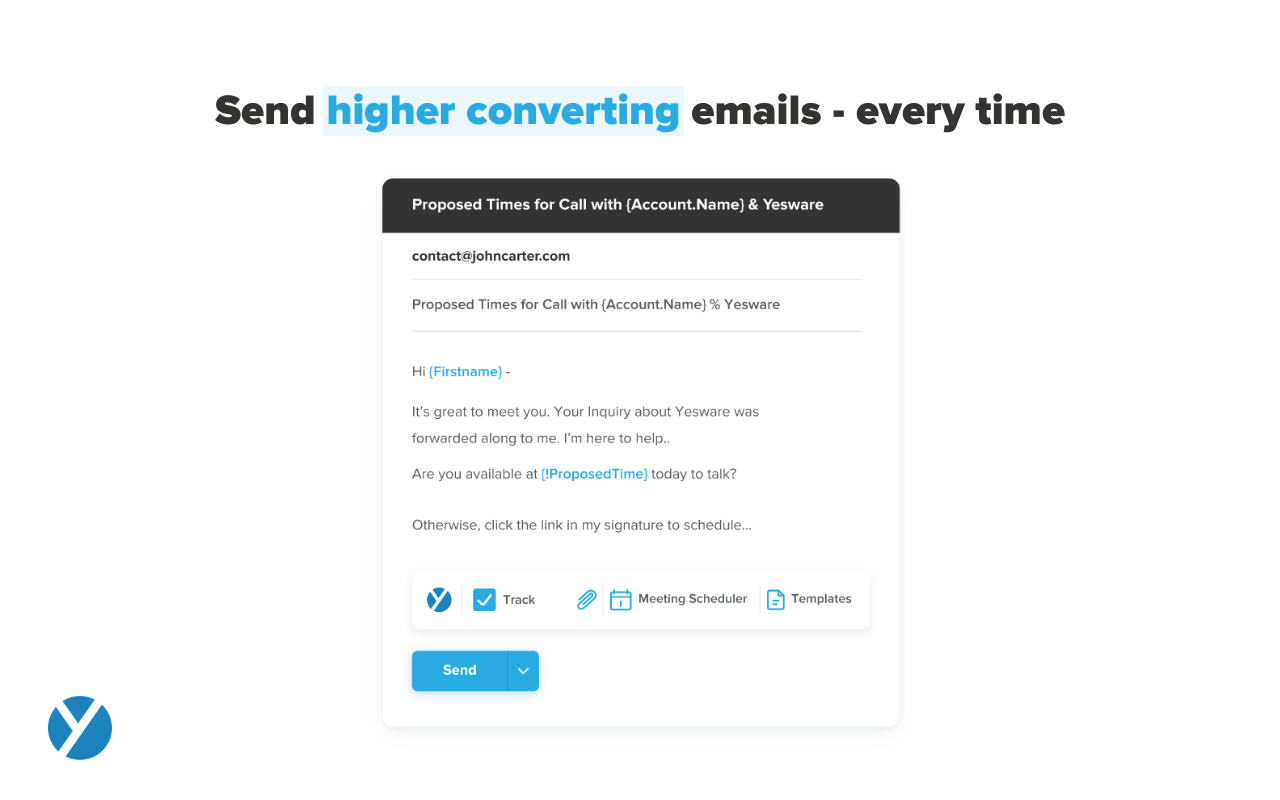
Tracking open rates, link click rates, and reply rates. This allows us to compare different templates in order to see which allows for the most interactions and meetings set directly from email engagement.
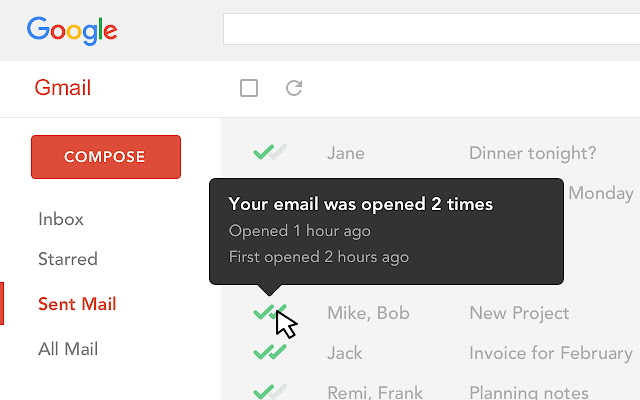
Seeing exactly when someone opens an email and whether it is in their normal location. Also if they are opening on a mobile device versus a computer to be able to organize the set up of the email in a more beneficial way.
Being able to save Templates for Mail Merges to avoid the duplication of effort that other mass email systems utilize.
The ability to unwrap iframe embeds on email (e.g. if I send a Vimeo link over email, have that video thumbnail show and link out to a video)
Removing recipients from a campaign. If my ruleset is to remove a contact from a sequence after he/she replies, sometimes a person will reply from another email and Yesware doesn't recognize it. (e.g. if I add jeff@amazon.com to my campaign and jeff.bezos@amazon.com replies to my thread, Yesware will still send an email to jeff@amazon.com unless he is manually removed)
This question is a no-brainer. The tool is the industry standard for anyone tied to sales and marketing. The name "LinkedIn Sales Navigator" is synonymous with streamlining relevant customer and account data in an easy to use format that is actionable and intelligent. The focus on continuous improvement and richer means of communicating with customers and prospects is evident each time new features are rolled out. The social component of the tool even includes a gamification component to ensure that peers remain relevant among each other, which is refreshing and enjoyable for those who engage the tool on a daily basis.
I like the product, but due to the limitations I don't love it. I'm curious to revisit other options, particularly in lieu of Yesware's recent price increases (although I'm on a legacy plan). Some of my challenges to be browser related (I'm on an older computer) -- I'll have to see how things go when I receive my new computer. If the glitches (especially with regard to tracking accuracy and send later feature) go away, I'd be much more inclined to renew
Overall, it's very user-friendly. It's hard for a tool to make sorting through loads of data easy, but Sales Nav does this very well. Its advanced search features enable us to be selective in finding the right people to talk to and connect with.
I would rate Mailtrack's overall usability as a ten out of ten. The reasons for this are actually quite simple. For now, only I have been using Mailtrack. However, looking at the rather easy to use characteristics Mailtrack has to offer, I would not hesitate to recommend it to the rest of my colleagues.
Yesware is easy to setup and get connected in existing systems. We were able to get started sending the day we puchased our subscription because of the addon for Gmail and easy connection to our CRM. It's also very easy to use in the day to day, kicking off campaigns and seeing their status to as about as easy as it gets. I have not concerns about usability
I would recommend LinkedIn Sales Navigator entirely. It has been the most user-friendly tool to use starting off in a sales role. I genuinely enjoy the navigation of the tool and how easy it is to save lists and see job changes within those lists. Generating leads and finding the most up to date information on prospects is all housed within this tool.
I didn't really need to use the customer support but the fact that they proactively make the installation process so easy by providing step by step instructions with videos and everything is kind of pro-active customer support that is needed. Good for them because at the end of the day, it's everyone's dream to use a product that they don't need support for.
Because it deserves this rating. The features and functionality provided are great. Our Sales team is very satisfied with this software as it integrates very well with our other software like Outlook, Salesforce, etc. Yesware provides great follow up with customers, which is essential for sales. Meeting scheduling is also flawless.
I am unsure of the rollout, as I was not involved. I was an early adopter, and I have had a lot of success with the tool personally at multiple organizations, but I have no idea whether the implementation process encountered any errors. I can personally say that it works, and that I have not encountered significant issues with the tool since adoption, although a few issues like messages showing up as being unread even though they have been opened have been an on-again/off-again issues throughout the past few years. Overall, the company is doing a great job, and our implementation seems to have been effective.
LinkedIn Sales Navigator is much more valuable than Dice or Cognism, as we do most of our prospecting on LinkedIn. Therefore, it means we can build lists of our prospects based on activity, connections, and buying intention. With Cognism and Dice, you cannot do this as they do not work alongside the LinkedIn platform and, therefore, lack the functionality that is essential to what we are using the platform for.
There's a free tier. Obviously, there are other things to love, like notifications about your email being read, the fact that if an email hasn't been responded to in some time it gets bumped up. The fact that if other people have Mailtrack you will actually get notified who read your email. But the fact that there is a free tier is HUGE.
All of these tools do what Yesware does, and more; but Yesware does the follow-up email portion best, in my experience. It is reasonably priced and is regularly adding new functionality to make it a sticky license for us to have. Yesware does not have predictive analytics or a particularly strong dialer solution, but it does provide team-wide and template efficacy tracking, and a basic dialer.
I'm currently using the free version so my investment was time spent downloading the browser extension. I would say it's worth the investment because I can make more value through each email by finding the right time to send replies or know when is the exact time I should follow up.
Knowing when an email is read multiple times helps me know the importance of the content in my email.
The paid version allows Mailtrack to tell you which recipient read the email if there was more than 1.
I think net positive ROI from generating meetings that lead to closed deals. Ultimately very difficult to quantify the ROI since it is essentially automating a lot of the manual prospecting done by BDRs/AEs - so ROI is likely higher than just that quantifiable number around deals closed.