Mailchimp is an email marketing and marketing automation platform. Beyond just tracking how campaigns perform, Mailchimp takes it a step further by analyzing data from over half a billion emails to show why campaigns perform, driving informed decisions.
$0
per month
Oracle Marketing
Score 7.0 out of 10
N/A
Oracle CX Marketing (formerly Oracle Marketing Cloud) is a solution designed to enable marketers to plan and execute automated marketing campaigns via email, display search, video advertising, and mobile while delivering a personalized customer experience for their prospects.
$2,000
per month
Webtrends Analytics
Score 4.4 out of 10
N/A
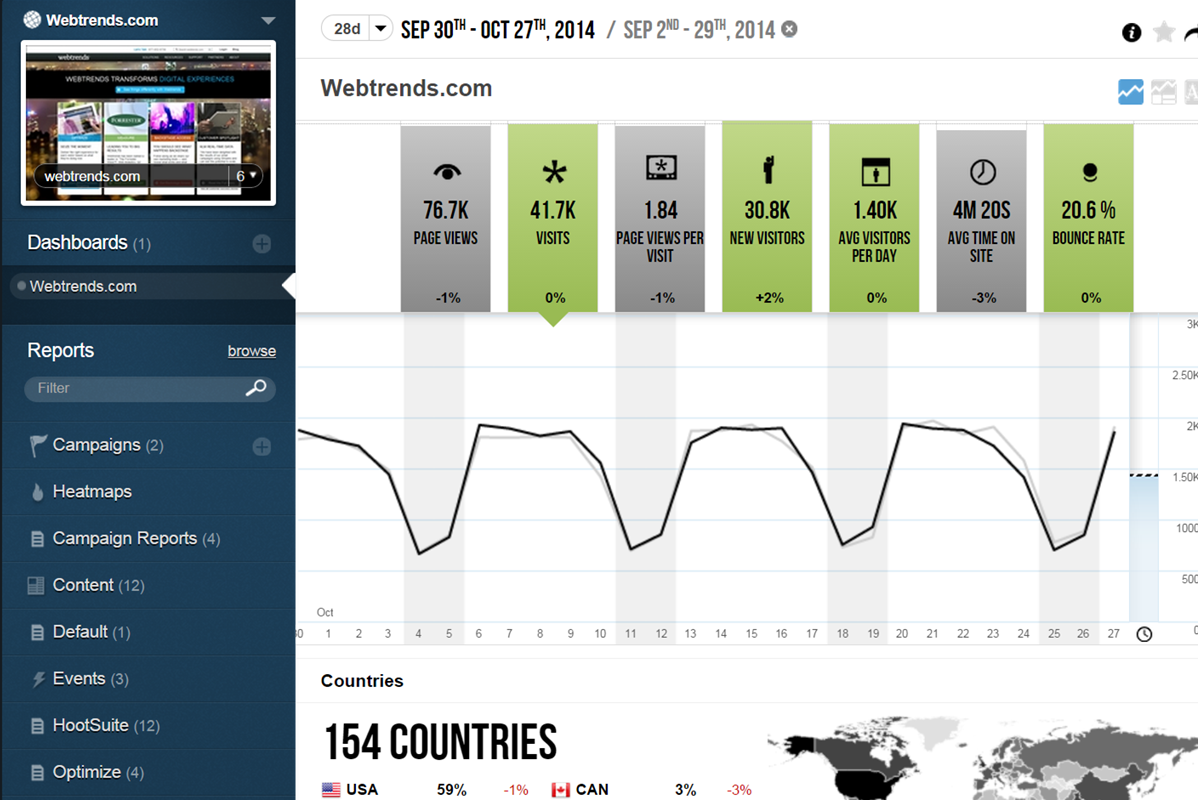
WebTrends provides an enterprise web analytics platform and, according to Forrester, has a strong focus on support for mobile and social channels and a very open platform. Webtrends competes directly with Adobe Site Catalyst, IBM Coremetrics. and comScore DigitalAnalytix.
Eloqua had long term contracts and the starter plans started as high as $2000. Also, unlike Mailchimp, it misses out on integration with Google Analytics and takes a while to fix issues with implementation.
Eloqua was easier for us to develop triggered campaigns with than MailChimp. MailChimp was good for monthly newsletters that went out to the full database. Eloqua allowed us to personalize our emails and deliver the right message to the right consumer at the right time. It …
Oracle CX Marketing (formerly Oracle Marketing Cloud)'s Eloqua stacks up fairly well with these other tools, as they all have similar functions and features. Pricing and how seamlessly the platform integrates with a company's CRM are the main deciding factors. The customer …
Oracle Eloqua has the best combination of features, scalability, visibility into campaign and lead activities, and user interface of any of the marketing automation software or email service providers I've used.
Salesforce does not have a search function which can be quite frustating to find your emails and find past insights on campaigns when you do not have a perfect naming structure.
Eloqua can scale. It has more flexibility in customizations of workflows, a larger pool of partners in their ecosystem, and can handle large volume sends without breaking a sweat.
Eloqua is a true enterprise level tool. It gives you what you need to get the job done, it is easy to use and you have a lot of support through communities, tutorials, documentation and events.
Oracle Eloqua is a more robust program than the other options that we considered and we are able to get much more out of the program as a company than we would have been able to from other products. The marketing, product, sales, and customer service departments utilize the …
For any E-commerce related needs, like you need to see a list of customers who have added products to cart but did not purchase, this can be done really easily, but if your e-commerce provider provides integration, then it is best suited. Most of the systems in the Market provide out-of-the-box integration. Their API is also very easy it can be integrated to any language. You can integrate it into your custom developed system and use the features, like adding customers to specific lists. Also, if your lists become really big, then their system can get a bit slow to respond via API, so you might need a strategy for how you are gonna fetch the data using API.
A duration of one and a half years is enough for us to recognize the capabilities of a tool and in my opinion, this one is just a great tool to manage marketing campaigns of even massive-sized firms. Its marketing automation tool and its way of managing campaign and the way it executes digital initiatives is enough to get an inkling of its abilities. Less favorable for the people who want to have something at a cheap price and are more dependent on the reports as its reports have nothing much in detail.
Scenarios 1. If you want to use web server log files as input to your web analytics, then Webtrends will provides a good product, with great ease of implementation. Don't even think about being cheap on hardware, and make sure Webtrends runs on real servers, not in a VM environment. 2. If you want to use Data Tagging, similar to Google Analytics or Site Catalyst, Webtrends has a powerful product, just be prepared to pay. 3. If you are new to Web Analytics, but it is the strategic direction, start with Webtrends on Premises. Questions to Ask 1. What are you trying to accomplish? 2. Can you place a dollar value on the benefit that you expect/need from Webtrends? 3.Can you live with Webtrends running SaaS?
Mailchimp allows you to manage your mailing list really well. You can subscribe people, unsubscribe people manage the mailing list directly into segments, and what not.
Mailchimp has features where you can create campaigns based on your mailing lists and send out newsletters to your subscribers based on a multitude of parameters that you can setup. Such as send email daily, weekly, monthly and they also have event based mails that you can send out.
Mailchimp also has a feature where you can design your emails. The look and aesthetics are very important when sending emails to your subscribers and all those needs are addressed here.
Control privacy, data sharing and competitive industrial knowledge using Webtrends on premises
Great control over custom reports, custom dimensions and metrics
Flexible tool which allows multiple methods of data capture. To my knowledge it was the first tool with a Tag Builder / Tag Management function built in via a supporting website.
Integration options outside of auto-syncs. I am currently having an issue trying to find an adapter to use with Eloqua to API into our data warehouse but keep the functionality on the Eloqua side.
To provide more transparency and visual details of the syncs (integrations of outside data) from any other system that is feeding Eloqua, like what is being updated or changed, better explanations of errors, drill down to newly created records.
Custom Objects - Need to have a way to create CDOs outside of just form submissions and uploading of lists, like if you needed to import a file nightly to feed that CDO data but automate the import and make sure it maps to a contact record.
Import of data from a file on SFTP - There is no way to filter or create logic to control what is being fed into Eloqua. Currently, that manipulation has to be done by the IT side first. Less flexibility.
Better auditing capabilities within the canvas. meaning, sometimes if something is changed or not working the problem may not necessarily show up in immediately, the pattern could take a while to present itself. For example, the feeders into the program. If there is a problem, I don't know that maybe contacts are not entering the program until we do reporting that month and realize there was a lull of contacts going through. Then we have a whole month of missed records or other potential data issues. When you get do large and your Eloqua machine is very robust, the harder it is to see everything
Be able to add more than 250 custom contact records. That definitely inhibits my organization in how we need to use that record.
The big downside, the elephant in the room, is that it does not (as of right now) have on-demand segmenting, drilldowns, etc. You have to think of what you want in advance and create those reports then analyze some data. This is huge. You can, of course, re-analyze old data after creating new reports but you still have to wait. (This deficiency may become obsolete with the release of Webtrends Explore later this month (May 2014).)
It has fewer mature integrations with other products and databases than competitors do, although I'm told it works with SharePoint better than anything else does.
Its attribution modeling capability is behind Google Analytics'. In my humble opinion, this could be changed quickly if Webtrends would make some tweaks to its standard visitor history files (i.e. preserve the order in which past visits were sourced beyond the single most recent one, rather than storing all those past sources as a randomized list).
It doesn't incorporate statistical tests, confidence intervals, or statistical associations. However, this same criticism can be applied to its competitors (other than A/B Testing products). It's a tabulation program, as they all are. In this respect, web analytics tools as a group are relatively primitive. Sorry to bring this up as a criticism of Webtrends but it's my pet peeve about the whole industry and I just have to say it. (p.s. take advantage of the heavy-duty Webtrends Scheduled Export functionality to get really granular data that you can feed to a stats program to get significances.)
Although the documentation, help screens, phone support and the knowledge base have improved tremendously in recent years, there is still a pretty steep learning curve because it is different from the tools that entry-level users may have already been exposed to. This can be a shock and many users are alienated at first because they just don't get some of the fundamentals at first. I'd like to see much better help screens that are thoroughly interlinked with the KB and documentation. Having superb online support would make a world of difference with the adoption of this basically powerful tool.
We've had Mailchimp for about ten years, I want to say. I started with the company about four years ago, and I don't see us ever diverting to another source. It's easy for us to use, and we have all our clients already built into the database. I imagine we'll use them for as long as we have the company.
We have been able to automate so many marketing processes with Eloqua over the past 5 years that the only direction would be to adopt the latest and greatest features Eloqua adds. The alternative would be to go back to the marketing stone-age and start over again. And we would rather move forward with increased automation and efficiency.
I would be willing to try Webtrends again AFTER some research from other users. I would need to see that users mention better and faster customer support on questions and issues that arise while using the software. The software is capable of vast and incredible things, but if it isnt properly set up and supported during use, it is just a big hassel and waste of everyones time and money.
The interface is a bit complicated, and I need to spend some time to learn new functions and understanding how it works. I don't like working with email templates because of the limited customization options. However, functions like AI for generating emails, segmentation, and analytics still work well and are very useful.
Personally, I find it quite easy to use. But for those members of our team who have little or no testing experience, it's been a bit more difficult. There's also training required for development teams in order to have your campaigns coded and set up in the most efficient way. Our developers have been able to do basic and intermediate tests with no difficulty, and they find the interface itself quite intuitive... it's just the extremely complex tests that require a bit more understanding.
If I could give it a 0, I would. Not having an intuitive user interface made it impossible to convince non-analytic business users to use the tool on their own. Even as a seasoned analyst, frequent calls were needed to get what should be simple tasks done. Account managers don't understand the tool either, and have to refer you to technical support
I have, in the 4+ years that I've used Mailchimp, never seen an issue that restricted the use of their software/tools. I don't know of a single time when they're system crashed or went down. I could be wrong, but I honestly haven't experienced any issues with outages, errors or unplanned downtime
I haven't noticed any slow speeds from Mailchimp or their tools. I think the landing pages load quickly and look nice. The email reports and editing operates smoothly and doesn't take time to load. Additionally, when I use Mailchimp in conjunction with Zapier + Hubspot I don't notice any drag between any of these tools
There are occasional complaints about slowness to refresh a screen or build a report. However, this is as much a factor of network access speeds as the system itself, since often the complaints occur when someone is accessing on a wireless network.
The v9 admin interface and v10 reporting interface work as well as expected, but have a tendency to be pokey, especially for bulky reports and whenever you're connected to wifi. I much prefer using the REST API for all reporting for this reason, which simply dumps out the data and doesn't bother with the user interface.
Website tools were easy to use and understand so a novice can easily meet or exceed their client's expectations! Loved that we were able to totally customize so that the e-mail we created conveyed our client's overall messaging consistent with their branding! Client love that we can provide turnkey services to support their sales and marketing teams!
We found that we often were telling support people how the system worked. Because we were on E9 that created a lot of support issues as well since few people on the support team seemed to know how E9 worked. That was mostly okay except when we had major system issues (like SSO preventing us from logging in after an update), it became really hard to get answers that weren't vague. It was always the issues that had the highest visibility within the organization (like with Sales) that seemed to take forever to resolve and didn't have a clear escalation path. When Oracle switched Eloqua over to the Oracle support portal it just got worse
I once went on to Twitter to ask for help from my network of analytics people, and Webtrends themselves responded. They have been an excellent partner in making sure that their product is being used to the best of it's ability and I greatly appreciate that. Both Omniture and Google Analytics, do not have that level of support over social media
They offer very basic classes which are required for master certification.
After having been through it, I would not consider anyone with a master certification any more qualified, unlike Salesforce.com certification which is a more difficult thing to acquire. For example, one of the classes towards certification was around social media. I would have expected examples of how to incorporate into campaigns in the product, with a demo and hands-on test. Instead, it was a powerpoint slideshow that went on way too long and covered really basic stuff like “what is Facebook, what is Twitter”
The in-person training was comprehensive enough to get you started, but I strongly recommend having a more experienced person when beginning with the tool.
Ok, so, this sounds like it could be horrible because it was all remote, but we loved it... the Adobe training environment was easy to use, and the trainers were engaging. It was simple to switch back and forth between the meeting and the hands-on exercises in their training instances. We took the fundamentals training early in our implementation-- before the consultants came onsite-- and I know this made a big difference in our implementation, because we were able to ask informed questions throughout
Webtrends provides several free webinars over the course of the year, many of which I would expect to pay for. The people providing the webinars seem to have a good feel for real-world application of the product.
It's pretty easy to get up and running! There's a slight learning curve on a few things, but once you find where everything is located, you can import your list and send your first email. It really makes our clients feel great to see how quickly they can get that first email out.
I give it a 10 because the only issue we had was a result of not following the guidance we were given. Maxymiser provided a customized implementation guide for each site where we were adding the code. On our site implementations when we followed that guide to the letter, it was extremely fast and easy and has worked very well.
Careful planning and patience. Use a non-public test site to fine tune tags and reporting. Despite best laid plans, there will be surprises when you collect the data, run the analysis and begin generating reports using the tool. Perform a tag audit to ensure tags fire as desired.
I don't think they are comparable; we use Google Ads to put our website at the top of the list when someone googles certain words. We use meta business to manage our social media. Google aims to gain customers, while Mailchimp is used to interact with both existing and new customers.
It was quite complex to generate segments with Adobe analytics and I wasn’t personally satisfied with the overall performance of Adobe Analytics and wasn’t enough flexible in any way. So we decided to switch to something else better than Adobe Analytics and is available in the market at a cheap rate and we ended up doing our research for the most suitable tool at Oracle Infinity and we don’t regret our decision.
Webtrends has its work cut out for itself considering you have the behemoth Google Analytics and Google Analytics Premium having a strong offering and brand recognition for the price of free. After reviewing the paid service I'd suggest you start off with GA as a cheaper alternative that is just as robust, if not much more flexible in regards to the reporting and goal tracking needs for our company.
Mailchimp over the years I've used it has grown in leaps and bounds. They have added so many additional features than were previously available. They are truly an all-in-one marketing platform now. If you're a small operation and just want to add email to your marketing efforts, they're there for you. If you're a larger operation and want to start sending postcard advertisements, they can do that. If you'd good with that and want to kick up your marketing by going social, you can do that on their platform. They are truly able to be as small as you need, but also get quite large in whatever it is you'd like to do through their system.
Eloqua is definitely good for larger companies that have 100,000+ contacts and complex marketing workflows and data. Personalization is fairly robust with Eloqua for larger campaigns with smart content and features. Scaling across channels is also seamless - as the platform has great options for non-email channels like SMS, Direct Mail, Chat, etc.
One of my retail web store clients was sending out email specials and notices about once a month. After clicking the send button, we would watch Google Analytics and the current site users would light up immediately. Often, the current site visitors would pop up to 20, 30 or more after the email was sent. On a normal day, seeing 1 or 2 online users would be OK.
Pretty much in all cases, we could see an uptick in positive activity after sending out a Intuit Mailchimp email to a list.
We are able to use it to help our clients scale through testing
We have been able to measure the impact of our events and sales events so we can determine which events to continue in the future and determine future investment
Launch a new brand out of Eloqua and measure awareness
Webtrends has had a positive impact on site visitation because it allowed us to understand the sources by domain for site traffic and find out ways to increase visits from those domains.
Webtrends has also allowed us to understand areas of optimization on the site, which has had a positive impact on the overall user journey on the site, likely leading to longer site duration and engagement.