Adobe Acrobat DC is the current version of the well-established document / PDF management solution, part of the Adobe Document Cloud (the other part being Adobe's eSign services based on technology acquired with EchoSign in 2011).
$29.99
per month per seat
Adobe Acrobat Sign
Score 8.2 out of 10
Mid-Size Companies (51-1,000 employees)
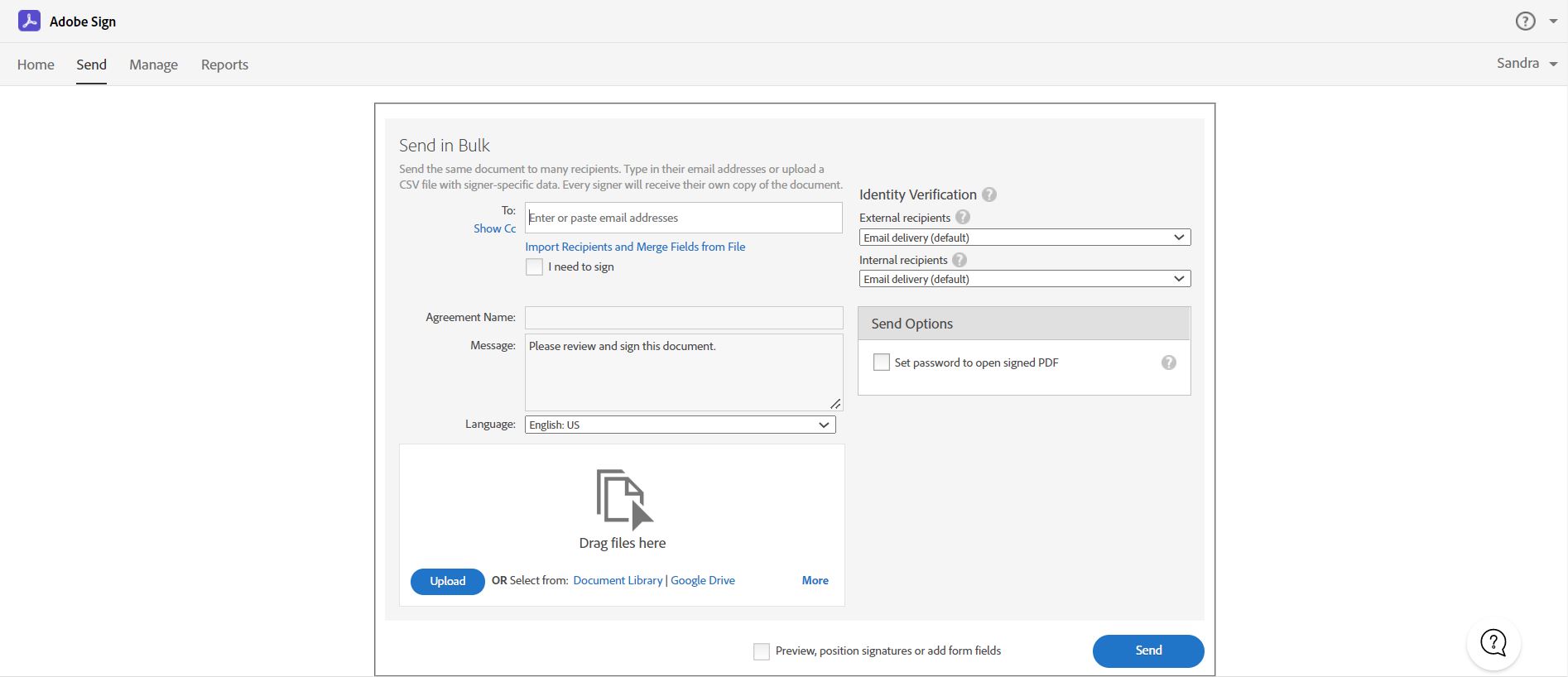
Acrobat Sign is an e-signature solution that combines simple and secure e-signatures with Adobe Acrobat. With Acrobat Sign, the user can create, sign, send for signature, manage, and track documents from one Adobe platform. The user can create signing experiences for customers and teams by enabling them to sign documents on any device or browser – anytime, anywhere. No additional software download or accounts are needed. As Microsoft’s e-signature solution, Acrobat Sign…
$14.99
per month license
DocuSign
Score 8.7 out of 10
N/A
DocuSign supports transactions with document sharing and electronic signature, as well as automated and guided data collection and entry, record updating across disparate systems and payment collection upon agreement, as well as analytics and reporting.
Overall, Adobe has a better reputation than Foxit PDF Editor; while many of my colleagues prefer the features of Foxit (over Adobe), Adobe remains more secure and provides our organization with a higher level of comfort. DocuSign is a great tool for requesting signatures on …
The pricing structure is not as great with DocuSign than with Adobe Acrobat. It would be nice if the entire company could use Adobe Acrobat rather than everyone having different platforms. It would also be nice to have an account that multiple users can use without paying so …
Acrobat is overall, the superior PDF creator, editor and compiler. However, DocuSign is easier and more reliable as a document signing program. This tool is Acrobat is much harder to use and has caused some errors in documents in the past. It also does not work well with a …
DocuSign has it's perks, for sure. DocuSign is easier to integrate into websites with extensions than Adobe Acrobat is but when it came down to it, we just didn't trust the brand. We felt that using a product with the Adobe name connected with it provided necessary peace of …
This isn't really a good comparison, but Adobe Acrobat is more of a program that works among all of these, and I'll keep using it as long as it's a part of Adobe CC. Otherwise, I see DocuSign as suitable for secure/private documents, and Dropbox file previews allows a pretty …
I feel like Adobe Acrobat does it all from converting files to and from PDFs while it preserves the formatting. although Adobe Acrobat Sign and Adobe Acrobat Reader are pretty self explanatory i just feel that Adobe Acrobat has and does it all. This is what i love the most.
To me, I just feel safer using Adobe Acrobat because I've been using Adobe for so long and I have familiarity with it, but DocuSign is good too. Adobe is just like home and when I get something from Adobe I'm less skeptical it's gonna be disasterous because I trust Adobe so …
We have not really worked with any other products. " If it ain't broke, don't fix it" is the old saying, and it rings true here. We love Adobe, and it does everything we need. Their engineers are always looking at the workforce to see what improvements can be made and where …
This is a feature I personally have had to use a lot as we have to contact inventors for their signatures on a lot of documents. The ability for them to sign digitally is extremely helpful. A manual signature is harder to get and contacting these individuals can be hit or miss …
PandaDoc is less customizable for creating/editing documents, less security but is much better when sending to a client and needing them to add text since the client would a paid subscription with Adobe Acrobat if I sent it that way
Adobe Acrobat allows licenses to stretch across one account rather than just one device, and works across both Mac and Windows, as opposed to some of the other options.
Being the industry standard, Adobe Acrobat exceeds other platforms as the common file format all parties can read and comment even with only the free reader version.
They have a superior product that works better and more reliably when it comes to working with PDF files. Adobes' Achilles heel is the restrictions and requirements imposed on the user and software by their administrative and legal teams that drag down what otherwise is a …
Adobe helps aid in keeping financial records in order when you organize documents digitally, which helps make it easy to search for items such as spreadsheets, receipts, payments, expense reports, and other documents for tax or billing information. Plus there is much more …
We are using both DocuSign and Adobe Sign. Both solutions are very valid for our scope, the replacement of manual process with electronic workflow. I think that if you must choose between DocuSign and Adobe Sign you have to look at the price (every month it changes or there …
For me, DocuSign is used when a standard form is already in play - nothing needs to be changed and it's a part of a larger template. Adobe Sign however is always used for forms which are unique to a client's particular situation, needs to be edited, or created from scratch. …
Both Adobe Acrobat Sign and DocuSign are prominent e-signature solutions on the market. Adobe Acrobat Sign has much better integration with other Adobe Suite products such as Adobe Acrobat and Adobe Creative Cloud which are also used at Uniper. It also has a more user-friendly …
I have prior experience at a previous company with DocuSign, and while that platform may provide a smaller set of features & functionality, it is also more intuitive for first-time users.
i am not a person selected Acrobat Sign as our company solution. i use both Acrobat Sign and DocuSign as end user. I am not comparing both feature but as end user, i think Adobe Acrobat Sign is easier to use since some menu on DocuSign is strange translation when i choose …
They are just different. Adobe's number one feature that puts it above it's competitors is that your document, the signing process, all of it exists within Adobe. There is no need to go from Word, to Adobe, to DocuSign. It saves you time and makes life easy for you (and for …
I feel Adobe Acrobat Sign holds their own to the DocuSign brand. I see more organizations using DocuSign, but feel I can easily use the toolset that Adobe Acrobat Sign offers. I really like the signature tracking feature that Adobe Acrobat Sign offers and combined with the …
The biggest difference in why we chose Adobe was because of the pricing structure. DocuSign has a "envelope" cost and you pay for certain amounts of envelopes. However, if you send more envelopes than you have paid for, either you have to a pay a premium or extend your contract …
Using DocuSign for years and then Adobe Acrobat Sign, the decision to try PandaDoc was a surprise but they quickly captured our teams interest and eventually our business. The analytics, drag and drop features for template creation and the ability to modify documents on the fly …
We did not evaluate any other products since we were already using Creative Cloud and specifically Acrobat, however I have received DocuSign files from vendors for signature.
Better integrates with our other systems, and allows employees to use it easier along other applications. We already use lots of adobe products so the decision was based heavily on that. I think Adobe Acrobat Sign can be a little clunky at times, but once a user has been …
We were thinking about using DocuSign because it integrates with our HCM system, but it was so astronomically expensive that we couldn't justify the purchase.
We utilize DocuSign over Adobe Acrobat Sign for e-signature purposes. The functionality of DocuSign is much greater in its' self-contained application; usability appears superior, and, to my knowledge, costing is more beneficial for the total value package.
DocuSign is a little more user-friendly and more updated that Adobe Acrobat Sign. Ultimately, we made the switch to Adobe due to their product offerings. By choosing Adobe, we can utilize other platforms within the suite that allow us to further edit documents. Which provides …
Verified User
Director
Chose Adobe Acrobat Sign
I chose Acrobat Sign over DocuSign based on cost. Having used DocuSign previously, it would have been worth the extra money to stay with them. PandaDoc seemed straightforward and cost-effective, but I wanted to use a brand that would have wider recognition.
I like that its incorporated WITH ALL Adobe products so I can create a PDF or edit one and attach my signature RIGHT there or send it off for signature all in one go.
Adobe Acrobat Sign is simple to use, streamlines document creation, and makes documents look better. It allows users to customize fields, set required and optional fields, and quickly generate web forms and PDFs. Templates can be saved to make sending the same document to many …
Verified User
Employee
Chose Adobe Acrobat Sign
Adobe is fully integrated with other Adobe products that the company uses already.
My benefits and frustrations with signing platforms are the same. Ease the preparation of documents or make template creation more intuitive, and this would be a big improvement on any e-signature product. I was not part of the selection process, but I'm sure Adobe brand …
I was looking for a tool which needs no approval (third party) as well as well aware of it. I was using acrobat so has fair knowledge of features and options
Adobe Sign is very even with the options evaluated in the top of tools for electronic signatures. One of the big things that set it apart is the previous implementation we had with other Adobe products. This greatly simplifies the implementation as well as the necessary …
Adobe Acrobat Sign is convenient if you need someone to sign documents but they don't have access to a printer. If you need to track timestamps or signatures, it works well for that, too. Adobe Acrobat Sign allows you to digitally sign and send documents without ever needing a …
Adobe Acrobat Sign is less user-friendly and more suited to small scopes, or one-off documents. It lacks the use of templates that DocuSign has, which is what ultimately streamlines and delivers the consistency and efficiencies for the business.
Very similar but did not have the backing of SAP SuccessFactors in terms of Integration. The Developer Environment allowed us to test and practice on very easily compared to Adobe Acrobat Sign. Both products can be connected to via Microsoft Power Platform to aid automation …
I don't think I've seen anything like DocuSign in the market. Well I think now Acrobat has a product similar to it, but it's not exactly same people can use it to sign. But it has come recently, not a long back. DocuSign has been in the market since long, so it still has the …
Adobe was not a good experience despite the lower cost. Constant crashing, slow to load and a simple feature like copy and pasting the same fields across pages was non existent. Our team celebrated the decision to move back to Docusign from Adobesign. We have never looked back …
I prefer DocuSign to Adobe Sign because of the workflow process. To me, DocuSign flows much easier and the interface is easier for me to locate the things I need. I also appreciate the templates that DocuSign allowed, especially because Egnyte had a direct integration with …
When viewing other competing products they didn't have the superior functionality that DocuSign had, nor the admin control. However, it should be noted that since making the selection, competing products have greatly improved.
I would say that DocuSign's biggest competitor and a most similar product is Adobe Sign. They both offer almost identical features with Adobe offering a slightly better interface. Adobe Sign is also less costly than DocuSign while offering templates that can be useful for …
DocuSign is the one we went with because of the majority of people who use it regularly. It's the first one that comes to mind when you think of electronic signatures. We do use AdobeSign with our HR platform because that is the one that is integrated with it, but standalone …
Adobe Sign has closed the gap between it and DocuSign in recent years. I still think DocuSign outclasses Adobe's offering in ease of use, and it makes less sense to go with Adobe Sign unless you are already steeped in the Adobe Creative Cloud ecosystem (e.g., Adobe Acrobat, …
Adobe Sign makes it harder to edit documents unless you have upgraded administrative accounts. It’s also harder to go in and cancel Adobe Sign documents.
We prefer DocuSign to Adobe Sign and HelloSign for its name recognition (important to those working with us), preferred interface, and ease of use, and safety. After exploring all three, DocuSign was the clear winner.
DocuSign is the system with the easiest way to add and remove fields. For most situations, you will have a template so you don't need to keep adding and removing fields. When those situations do come up, it's easy for DocuSign. For those other ones you need to go through a …
DocuSign is like Salesforce for CRM's. It just made sense as we were scaling as an organization and moving and adding new technology to our stacks. We really like Adobe Sign as a close second, but for what we were doing, DocuSign came back as a more professional sales org and …
DocuSign is far superior to anything on the market for my needs, and my needs varied in different roles across different industries: it is a better solution, and easier to use for client interaction. For statements of work, contracts, agreements of sale, commercial and …
I had used Adobe before and it is not a simple experience. The last thing you want is for your customers to have trouble signing an electronic document. It defeats the purpose.
HelloSign is a nice product, but may have been a bit overkill for what our needs were. And they were …
DocuSign seems to be a bit more of a user-friendly platform to work through. At the end of the digital signature, platforms are mostly the same as they accomplish one goal, get a contract signed safely and securely much sooner than if you were to get a physical signature. Adobe …
I originally tried using just a fillable Adobe PDF document for my clients to sign...but they struggled in figuring out how to complete it and if someone didn't have Adobe installed on their computer, then it was a problem. DocuSign makes it quick and easy and anyone can …
Adobe Sign is a good solution as well yet it lacks some of the functionality DocuSign offers. I also find DocuSign just a bit easier to use, or maybe I just prefer the UI.
I briefly used Adobe EchoSign briefly during a past job and was not a huge fan of the step by step functionality. The process never seemed sensible and I was never fully confident when submitting documentation to clients. DocuSign was established in my next role and I can truly …
DocuSign is much better at what it does with regard to securely getting signatures on paperwork. Adobe has lots of issues and it does not always translate well with other users depending if and how the end user has their Adobe setup. It is a very clunky process and does not …
We focused a lot on possibly doing this through OnBase natively. However there are a lot of things to consider such as security of the documents getting to and from the customer. DocuSign is able to act as a middle man, so that all you have to worry about is getting the …
When preparing artwork for print production from an application like Adobe Illustrator, Photoshop, or InDesign, the best way to preview and preflight the work is to export to PDF and use Adobe Acrobat's output preview to check process colors, spot colors, dielines, and any special requirements, like foil stamping or varnish. Adobe Acrobat is also where you make any needed final adjustments to ensure correct reproduction on press. Documents intended for screen viewing must be exported to PDF and edited in Adobe Acrobat so as to add and edit needed accessibility features critical for legislative compliance.
Acrobat Sign isn't quite as user friendly as other E-Sign platforms I have used. However, it offers a wide range of features that provide convenience and efficiency. For example, I can have multiple people receive the same document separately, or I can have multiple people receive and review the exact same document. I also like that I can choose to set a signing order or not, this is important for when I send Offer Letters and other things that require order of approvals.
This product is well suited in the use case that I provided before: when it comes to onboarding employees and providing a clear channel for decision making for human resources, this is an excellent tool to accomplish that. I would say the weak points is when you have back and forth communication with users that it might seem a little redundant to have that back and forth communication in that scenario.
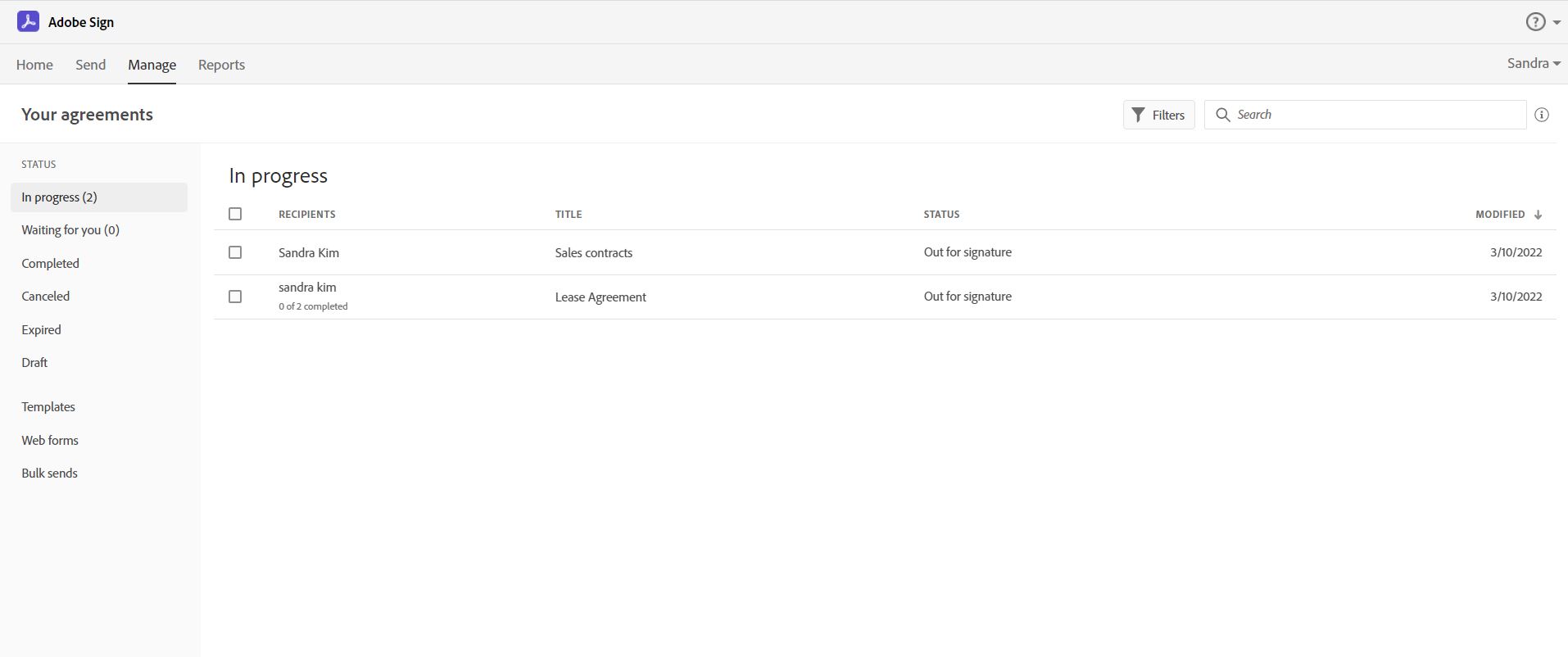
Adobe Acrobat Sign tracks whether or not a signer has viewed a document
Adobe Acrobat Sign tracks when a signer has signed, and the document has been sent to the next signer
Adobe Acrobat Sign sends you confirmation emails and progress update emails along the way
Adobe Acrobat Sign provides a "confirmation of signing" page at the end of the document package you put together, to prove the signatures are authentic
More printing settings, like being able to adjust the margins and place the print area on the page when the file size is larger than the page, and I only want to print one section. Illustrator has this feature. Often, we print from Illustrator instead, because of this limitation.
Builds on Adobe platform so it is easy to utilize, but many features require enterprise subscription.
Integrations available but your CRM integration is only available with enterprise license.
Lots of templates but there are additional templates with enterprise only and there was no drag and drop editor.
Adobe captures some analytical metrics but many of the analytics we required were not available - specifically metrics related to how the tool converts and reduces use time by our team and the impact on clients.
Tracking, particularly when collecting signatures through connected applications, such as an ATS, is not always clean or easily traceable.
Formatting documents to handle electronic signature types (signatures, initials, etc.) is not always easy, and highly dependent on the partner's technology.
It is not convenient to have to use DocuSign as a stand alone product if the signatures are required for 3rd party applications. It definitely excels on its own, but the scope of that usage, at least for us, is slim.
Adobe Acrobat works seamlessly with the other Adobe products we use that are industry-standard. We will certainly continue to use Adobe InDesign, Photoshop, and Illustrator, meaning it will always be convenient to work seamlessly with Adobe Acrobat for our organization. We are happy with the performance of Acrobat and it's meets our expectations.
It is by far the easiest service we have used to obtain digital signatures from employees. In the past we had done it by hand (a process I would not recommend for 1500+ employees) and with another company that would not allow us to create our own forms and would charge us for each form.
I can't imagine doing business without DocuSign now. I would never want to go back to the way we used to do things. The "new way" is "the way" is "the right way." We can honestly be proud of a "one right way" process and not have to suffer through "5 ways for 5 days."
It’s a very easy app to learn and software is essential. I feel like the app could load a bit faster but overall, is one of my go to apps. Makes reading and editing pdfs easy and I enjoy the usability of the app. It is definitely something I make sure to have downloaded on any computer I’m working from
I've had very little trouble with it in all my uses with it. I do wish the text boxes you add wouldn't cut off the text if you entered too many words and that it would adjust it's size to fit within the space you've provided. However, that just takes a little refining in the initial set up of the document before you send it out.
Generally user-friendly once you have command of the basics, but also has a lot of nuances that can make it difficult to train others on. DocuSign University is a helpful tool, but understandably a lot of content to get through to become a well-versed user. A lot of different functionalities but only a few I use on a weekly basis.
We have not had availability issues with Adobe Acrobat, or at least none that I am personally aware of. Some may encounter crashes of the software during outages of electricity in their city or neighborhood, which no one can plan for, but with generators in our organization, we have been lucky not to have outages
I would have rated this a 9 or greater had they not had had such critical outages. They have taken steps to resolve this so I may come in and revise this
One of the best features of Adobe Acrobat is its speed and stability. When dealing with massive multi-page files, having to reload a crashed program over and over again would slow down progress unnecessarily. And expanding on that, having the table of contents generated allows me to skip to different pages with ease, a necessary feature with exceptionally long files. word searches are even more helpful with text recognition.
The Adobe Acrobat Sign's performance are excellent.
When we send electronic document by email for signature all the customers receive it regularly, nobody has any issue to open it and the signature phase was very easy. The user-friendly aspect of this product reduce or reset the call for IT support
For a while, Acrobat DC crashed pretty frequently. I contacted Adobe Acrobat support about the problem. At first support was unable to provide a solution. After about a month Adobe's software engineers provided a fix. I just wish it had taken less than a month to solve the problem.
It is a great tool to get signatures from the client and has reduced a lot of overhead that was caused before resulting in very long delays. With the integration of Adobe Acrobat Sign, we have reduced this delay making the process much smoother and more efficient.
I'd give them a 10, but there has been 1 or 2 small cases that seemed to fall to the wayside, but I was able to call them up and get them resolved. We were having a bad implementation night (after midnight) and we needed assistance from Docusign. They were able to get an engineer to help us in the early morning hours
The best types of training are well integrated into the product and Echosign does this well. As mentioned earlier in my review - there are some areas of functionality that can be difficult to understand ("only I sign") for the novice user. Other areas such as macro usage, bulk signature and so on were easily learned and understood via the online tools.
Docusign is super easy to use, and apart from a few administration details, there was really nothing to train on. Post implementation, there were issues with configuration of auto-filled documents with the integrating 3rd party. That training required some time, because the DocuSign expert took the time to walk me through the 3rd party's configuration (how often does that happen?) so I could see how DocuSign should be best used to overcome weaknesses in the 3rd party platform. 10/10 expert care.
I was not involved with the implementation process, so I cannot answer this question. However, when it was installed on my computer system, they did so virtually. I just sat there while they took control of my computer over the network and watch them install it, lickety split
We did not use it in the manner that most companies do, so I am pleased with how our company handled implementation. We will be pushing the full company over into Echosign for various processes which will incorporate more of an implementation effect.
Until you get the hang of it, I recommend doing several internal tests before sending a document to a client. As I mentioned earlier, you have to go through a bit of trial and error at first to verify that the workflow works as expected.
In my opinion, both complement each other. Microsoft clearly has with Copilot the AI Edge. However, the visual dynamics of Adobe Creative are Outstanding and provide a balanced approach to creativity, utilizing both Excellent, user-friendly Tools.
They are just different. Adobe's number one feature that puts it above it's competitors is that your document, the signing process, all of it exists within Adobe. There is no need to go from Word, to Adobe, to DocuSign. It saves you time and makes life easy for you (and for your clients).
There has never been anything that we could really compare to Docusign. We have tried sending documents in a PDF version, but that was not nearly as efficient. DocuSign saves your signature in the system and uses that as it goes through your documents.
I find that many users aren't aware of many features of the software they use, nor may they be comfortable with learning multiple-step processes. For the simplest of PDF purposes (scanning, downloading, exporting), it gets a thumbs-up. For anything involving electronic signatures, meh--causes eyes to glaze over, or forgetting what all is involved.
At the beginning we assigned Adobe Acrobat Sign just to Purchase Office Department because at that moment we needed a tool that supported us to avoid manual signature and was compliance with remote working.
Now we are using it also in other situation because it help us with time and we can also reduce cost
Adobe Acrobat has saved us time in managing documents. In this day, everything is fast, moves fast, and keeping up with that pace demands software that functions at the same level. Adobe Acrobat does that. It has streamlined the steps I need to take to edit and create documents we need to manage our customers.
Adobe Acrobat removes the worry and stress associated with managing a large influx of documents. Something as simple as a document featuring an image that was sent to us upside down. Using the old method, I would have to open other software, click 'Edit', find the 'Rotate Image' button, click it a couple of times, save it as a JPEG, then attach it to Word, and finally save it as a PDF. It was a grueling process that consumed a great deal of time. Now, I simply open the image, and Adobe automatically recognizes it is upside down and fixes it for me. I can save and move on; it literally takes me seconds. Amazing.
Adobe Acrobat is intuitive and easy to use, and the additional apps are relevant to the needs that come up. If I have an idea, I can go to the available apps and find exactly what I need. Impressive and speaks to the years of experience this company has had to fine-tune its product and make it obvious that it is aggressive in staying on top.