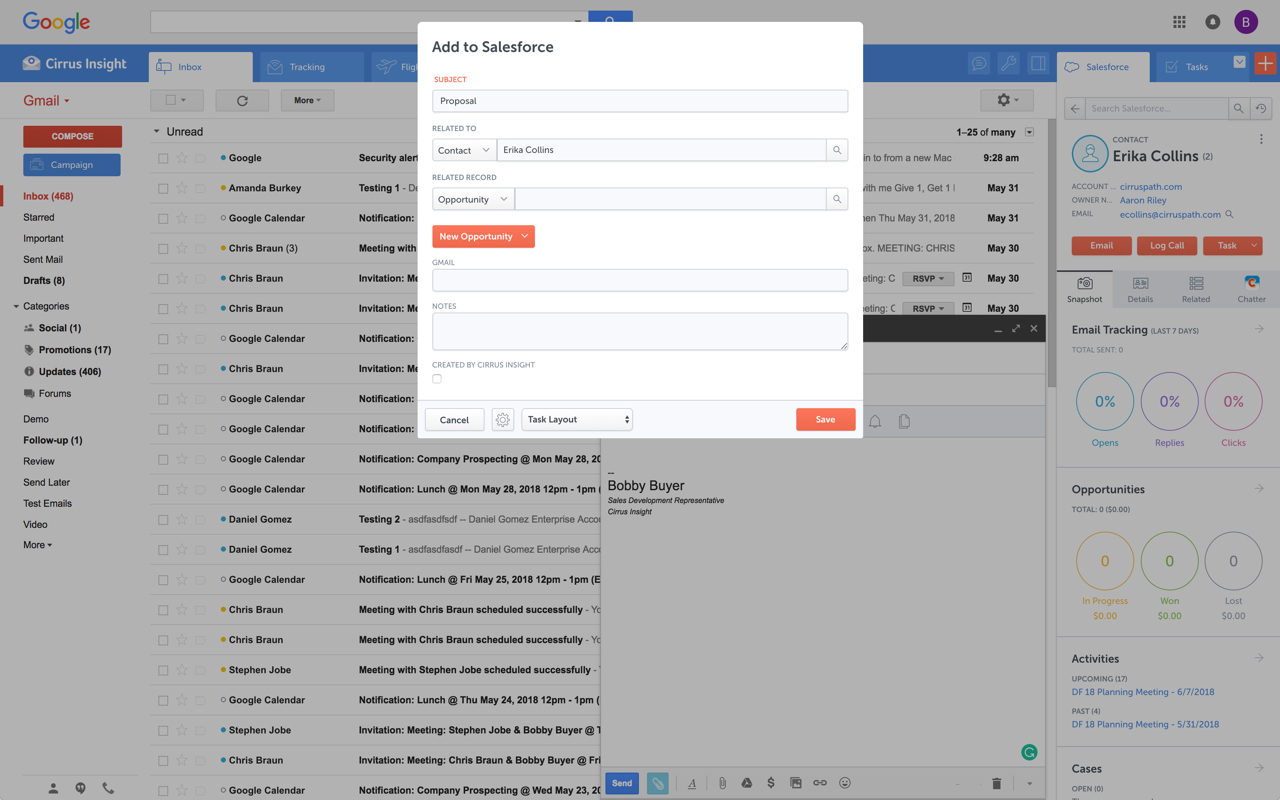
Cirrus Insight integrates Salesforce with Gmail, Google Calendar, and Google Contacts. Instantly View Contextual Salesforce Information in Your Inbox. Save Emails & Attachments to Salesforce with a Click. Sync Your Google & Salesforce Calendars. Create & Edit Salesforce Records on the Fly. Customize Your Salesforce Workflow in Gmail. Add Google Contacts to Salesforce. Salesforce Tasks Integration. Salesforce Templates Integrated with Gmail.
$15
per month
HubSpot Sales Hub
Score 8.8 out of 10
N/A
HubSpot Sales Hub is designed to eliminate friction by bringing tools and data together on one platform. The solution boasts email tracking and templates, and call tracking & recording.
$15
per month per seat
Salesloft
Score 7.7 out of 10
N/A
Salesloft’s Revenue Orchestration Platform uses AI to help market-facing teams prioritize and take action on what matters most, from first touch to upsell and renewal.
Cirrus Insight is a light-weight affordable tool that offers reasonable bang for your buck. However it does not have the reliability of other more enterprise-like platforms nor does it have the advanced features that are becoming of an email support tool - such as more advanced …
No other product holds a candle to what HubSpot Sales HUB can do. The usability, feature support, adaptability, scalability, and expandability; no compare.
Other solutions are either too specialized, or too out-dated.
HubSpot is easier and less expensive, both in use and especially that we manage it entirely in-house. HubSpot modules allow most of our organization to use it as a corporate-wide platform. The other products have more sales-specific and less company-wide benefits, except for Sal…
HubSpot is 10000x better than any other product like it. I have mentioned this before but it truly is easy to use and can be connected to almost anything. HubSpot also provides great training and certifications for all things sales so it helps the team grow their knowledge too!
I would [say] HubSpot is on par on many things. It works well, is easy to use and is priced similar to other products on the market today. Again someone might want to consider another product for a more outbound way of selling.
We actually use or have used pieces of Engagio (still using for ABM), ClearSlide and Intercom but we ended up migrating all of our team members to HubSpot sales because it covered all of our needs (email tracking, document tracking, etc.) and more - like scheduling meetings …
Salesloft
Verified User
Analyst
Chose Salesloft
In the past we used Cirrus Insight which lived inside of our email accounts. We had a number of issues with the functionality and inconsistency of that product delivering what we needed. After a number of complaints we decided to move away from Cirrus and over to Salesloft.
Prior to SalesLoft, we used Cirrus Insight. SalesLoft's overall platform is way more intuitive and easier to learn for new SDR team members. SalesLoft's overall integration options with our CRM were better as well.
Salesloft has been the most user friendly of the sales enablement tools we have evaluated. We rely on this to train our entry-level SDRs so that they can ramp up quickly to produce results.
Cirrus was so bad. It was slow and never properly added information from Salesforce into the merge fields. I always had to manually update my emails, which was awful. When we implemented SalesLoft and it actually added the merge data in, I couldn't believe it. I can send emails …
Just comes in through our emails. I have not done a deep dive into HubSpot Sales, but if someone requests a trial of our product, it goes through HubSpot. I have used Cloud Softphone in the past, and that doesn't even compare to SalesLoft. The way it integrates with my Outlook …
We really had our decision between SalesLoft and Outreach. Another person on our selection team had used Outreach in the past, and we knew we could set it up and maintain it easily with his expertise, but still decided on SalesLoft due to its robust features and the care the …
When it comes to email automation and dialing software a lot of the products could do the same things. They had slight alterations and functionality but the main core was basically identical. Saleloft's sales process, price point, and customer service were the main reason our …
Honestly, both Marketo and HubSpot offer great tools that get the job done well - similar to SalesLoft. But if you have Salesforce as your CRM, SalesLoft is your best option for optimizing the customer experience across your own account and sales teams. From lead management to …
We used HubSpot about a year ago for a few months as they just launched their Sales version. I know it was new but a lot of our emails being sent through HubSpot weren't being delivered. We switched back to SalesLoft after a few months.
For someone who uses both Gmail and Salesforce as part of their main role, this software is an invaluable connector for them both. Some of the features are also not Salesforce specific - such as the Meeting Scheduler, which has proved invaluable to me, and I would recommend to any Gmail user who frequently set up meetings (either internally or externally).
HubSpot Sales HUB is well suited for teams who want to run a sales team, grow their business, and continue to do so efficiently. The amazing elements of HubSpot Sales HUB is how the UI facilitates the work to begin with. Beyond the features and capabilities, the UI helps make what you and your team want to accomplish easy. The sales teams who have 2-5 people, teams of 20-50, or 500+, the HubSpot Sales HUB will adapt to how you and your organization are structured.
I find it to be the best resource for scheduling calls with clients. Specifically when the call includes multiple people using Salesloft, it's so simple and easy to use to send open times to client and then to be able to send active links to the client where with one click the calendar invite shows up on my calendar? it's the best most efficient tool I have in my toolbelt at the moment. When it comes to logging, it's also simple but I wish I could add a contact to SL from the Microsoft integration.
Log email to Salesforce. You click one button and it logs for you. This is easier than adding the BCC email address that Salesforce provides as a way to log email.
Track views and engagement on these emails. It's nice to know if the email was opened and if links were clicked.
Update quick fields in Salesforce directly from their inbox using Cirrus. This prevented reps from needing to click into Salesforce, wait for it to load, then update fields like the phone number or name.
If the rep did need to open Salesforce, Cirrus provides a quick button to navigate to the Lead/Contact/Opportunity page quickly.
The task feature of HubSpot has been super helpful for me to organize what activities I am focusing on throughout the day. Instead of having a generalized list of the activities that need to take place today, I can organize that list by calls, emails, to-do's, linked-in, etc. That way I can take an hour of my time and focus on only doing phone calls, only doing emails, etc. It has helped me increase my productivity by making 20 phone calls a day to 100 phone calls throughout the day.
Hubspot Sequences are also super helpful in order to plug and play contacts that need similar solutions. The automatic email feature allows me to not have to spend time sending a simple email template. Instead, it automatically sends that email out at the time that THEY would most likely respond.
This gives me more time to focus on the tasks that I can't automate, allowing me to be way more productive. I can also customize my sequences to automate when I am reaching out, and what activity I am doing.
Sequences give me the ability to create a highly customized approach, with the scalability of a plug and play format.
Outlook for Mac could use some work as an add-on because it's hard to read sometimes on my laptop. It's not a sidebar, like the Windows functionality, so it's harder to read.
Doesn't always find an opportunity, even though I know it's in our Salesforce system.
Randomly shuts down and doesn't log in properly at times. I've had to remove and re-download more than once.
I find the interface to be a bit unorganized and sometimes the information added about projects looks clogged which sometimes makes it difficult to access specific information.
Sometimes we have to deal with different currencies because we have clients all over the world but the exchange rate tool is not always accurate, causing us to slow down our work.
Would be nice to have custom reporting available. Coming from Salesforce, the included canned reports are useful but I like to roll my sleeves up and build exactly what I want.
Conversations will record meetings booked via MSTeams but requires the BDR/SDR to hit record. Other solutions (e.g. Chorus.ai) join as a participant and don't require a user hitting the "record" button. We have to change our flow to make this work and it is a bit clunky.
It is the best google to salesforce integration on the market. support is incredibly responsive and very helpful. They are constantly adding new features, and the current feature set is well beyond anything else that is currently offered in the market
Ease of use, ease of customizability, and ease of 3rd-party integration, especially to LinkedIn Navigator, all play a vital role in our increasing reliance of HubSpot Sales for our growing sales team. Also taking into account the great training and support for HubSpot Sales available from HubSpot, including HubSpot Academy.
SalesLoft is absolutely VITAL to our daily operations. We could not function without it or a program like it. Speaking as a Sales Person who has had to operate without a product like this, the difference is night and day. The ability to stay organized, automate tasks, easily log activities and notes, review calls, and coach team members is an absolute gamechanger.
Very easy to use. Everything opens in a familiar interface right inside the google apps sidebar. It brings in salesforce records, so as long as you know google apps / gmail and salesforce you'll be all set. It's point and click.
Since we launched HubSpot Sales Hub into our organisation's tech stack, we've experienced a smooth transition and implementation process for those using this solution. The ease of use and the interface experience is amazing and that was a main priority for us in the purchasing phase. So far, we've been nothing but very happy with the support, implementation, and ongoing development of our sales team adapting to the solution. Highly recommend it for usability and functionality!
Drift was extremely easy for both our demand gen team and SDR to jump right into. It was feature rich and purpose-built for marketers—it was remarkably easy to connect our marketing automation, CRM, and more to the platform and get everything to work together. Now the ability to create digital experiences and conversation landing pages is democratized—empowering our team to do better work and provide better prospect/customer experience.
The availability is pretty good, we do sometimes have errors or delays in syncing activities but nothing that has been too detrimental to our workflow. Most recently we had an issue with Lofting through Outlook due to a change in security token that took a few weeks to resolve but it is fixed now.
Yes timely and easy to use. The only delays we have are when we run our big month sales blitz and activities take some time to sync to the reporting as well as SalesForce
Oh my goodness HubSpot Support is just amazing. I submitted a question/issue to them yesterday and by this morning I had this response:
"Hi Stephanie, I hope this finds you well and thanks so much for your patience while I was working to update the extension with my team. We were actually able to push through an update yesterday afternoon which set the default lifecycle stage to lead in the sidebar. If you take a look now, that should be in place. If it has not updated yet, I would recommend uninstalling and re-installing the sales extension so an updated version and be pushed through. Again, I want to say that I sincerely appreciate that you took the time to reach out to us and help us iron this out. HubSpot really values constructive feedback with real use-case backing to help push it along. So, thank you!"
The support team was very responsive but at the end of the day they took a long time to fix our issue. The issue did get fixed, though, so that is what matters. Very nice people who are there to help in any way they can.
We had some virtual training with our CSM which was very well constructed. It took some time to get into the full swing of things but with a few weeks of hands on experience I was feeling confidant. The SL team was always available to answer questions or jump an a call to walk us through stuff. I also used the Customer Help Center for a few self guided learnings on how to use specific features related to reporting and team management.
The plugin is installed inside your internet browser as an extension/add-on. It can be found in most add on stores and is easy to install. Usually just a few clicks. It handles authorization for you once you sign in, and then takes care of all the rest. It couldn't be easier to get working right out of the box. You're up in running in less than 5 minutes.
It was not only SUPER easy to implement, we had some amazing support from HubSpot. They scheduled a call to go over each individual tool with our team and provided guidance and best practices plus answered any questions are new users had. It was wonderful and really helped them get started confidently
Yesware regularly sent me alerts that my emails had been opened by someone who I hadn't sent them to, from locations they couldn't possibly have been. I also don't recall its Salesforce activity logging working as smoothly, though I last used Yesware more than 12 months ago so my memory isn't as fresh as it could be
To be honest, there are great features in all of these competitors but they aren't quite as user-friendly or robust compared to Hubspot. Hubspot's Sales hub was able to add more features to it's platform while remaining very user-friendly and easy to use. I found myself getting lost navigating platforms like Zendesk or Salesforce, there is also a much nicer onboarding experience with Hubspot.
Salesloft blows outreach out of the water in all aspects. One of the biggest issues I had was their unwillingness to listen to customer feedback. I had requested several small changes to be made when I had previously used the platform that unfortunately fell onto deff ears. I am much happier using Salesloft and the positive results I've experienced are a direct result of that.
Prior to Hubspot, this was maybe 24 hours as an average. Now it is MINUTES. We immediately get back to clients and if we aren't able to then we will connect using email automation and sequences without lifting a finger. It's great!
Company Growth in difficult times:
Despite COVID causing issues on Residential Construction in Washington, we have continued to grow as a business, and part of that is thanks to our amazing Sales team, and part of that credit goings to Hubspot directly. If we didn't have Hubspot we would have shrunk or stayed the same as a company. Hubspot made sure we grew.
ROI [return on investment]
It's a hard thing to measure but our company has increased its revenue by more than 20% compared to last year. And that is saying a lot for our industry especially with COVID's impact on Residential Construction. I
can't measure it precisely but I know beyond any shadow of a doubt that HUBSPOT helped make this possible because our Sales and Marketing Teams are sharper and more capable than they have ever been thanks to this wonderful CRM.
I have been with a company that was using Salesloft, but moved to a competitor. I can't say it was exactly the competitors fault, as a lot of other internal changes were happening, (hence leaving the system that was working well), but we had the worst sales year in company history that year. Reps who consistently performed at or above quota were suddenly struggling to keep their pipelines in order, and the middle of the pack reps were going on PiPs and being let go.
Is it the dialer, or the leadership? You decide.
But the leadership also changed the dialer - so maybe it's both?