Overview
ProductRatingMost Used ByProduct SummaryStarting Price
ClickMeeting
Score 9.4 out of 10
N/A
ClickMeeting is a webinar solution formerly owned by GetResponse, an email marketing software company. ClickMeeting's online meeting and collaboration tools are designed to support the sales, marketing, e-learning, and training needs of business of all sizes.
$25
up to 25 attendees
ScreenConnect
Score 8.4 out of 10
N/A
ConnectWise ScreenConnect is a remote support, access, and meeting solution. With it, users can utilize remote support and access to repair computers, provide updates, and manage machines. Users can also conduct online seminars and presentations using remote meetings.
$39
per month
TeamViewer
Score 8.6 out of 10
N/A
Teamviewer offers secure remote access, IT support and device management on a scalable platform. It speeds up problem resolution, reduces downtime and enhances control through automation, unattended access and complete visibility of every device and location.
$24.90
per month (billed annually) 1 Licensed User
Pricing
ClickMeetingScreenConnectTeamViewer
Editions & Modules
Live 25
$25
up to 25 attendees
Live 50
$35
up to 50 attendees
Automated 25
$40
up to 25 attendees
Automated 50
$45
up to 50 attendees
Live 100
$60
up to 100 attendees
Automated 100
$75
up to 100 attendees
Live 200
$119
up to 200 attendees
Live 500
$139
up to 500 attendees
Automated 200
$145
up to 200 attendees
Enterprise
$165
500 - 5000
Automated 500
$179
up to 500 attendees
Live 1000
$239
up to 1000 attendees
Automated 1000
$279
up to 1000 attendees
One
$39
per month
Standard
$59
per month
Premium
$69
per month
Remote Access
$24.90
per month (billed annually) 1 Licensed User
Business
$50.90
per month (billed annually) 1 Licensed User
Premium
$102.90
per month (billed annually) 15 Licensed Users
Corporate
$206.90
per month (billed annually) 30 Licensed Users
Offerings
Pricing Offerings
ClickMeetingScreenConnectTeamViewer
Free Trial
YesYesYes
Free/Freemium Version
NoNoYes
Premium Consulting/Integration Services
NoNoNo
Entry-level Setup FeeNo setup feeNo setup feeOptional
Additional DetailsDetailed enterprise pricing on demand.
More Pricing Information
Community Pulse
ClickMeetingScreenConnectTeamViewer
Considered Multiple Products
ClickMeeting
Chose ClickMeeting
I have not used other webinar platforms extensively, so my choice was based on ClickMeeting’s features, ease of use, and reliability.
Chose ClickMeeting
ClickMeeting was designed with webinars in mind, and it's done well. It features built-in registration forms, automated emails, surveys, and analytics, making event management and tracking easier. Furthermore, joining a webinar is simple and doesn't require software …
Chose ClickMeeting
ClickMeeting is better suited for large group of people and it is available in Polish, which is quite important for my customer base.
Chose ClickMeeting
We chose ClickMeeting over zoom and teams because it’s better for running structured webinars and online workshops. Unlike Zoom, it has built-in tools for registration, reminders, and audience engagement without needing extra setup. Teams is great for internal meetings, but not …
Chose ClickMeeting
ClickMeeting stands out due to its more visually appealing interface and simplified usability. The layout feels more intuitive, especially for hosting webinars and interactive sessions. The platform is easier to navigate for both hosts and participants. Another strength of …
Chose ClickMeeting
For several years we have been using the ClickMeeting platform exclusively for our webinars. As for meetings within the organization - here we previously used other platforms. However, since we have ClickMeeting we also use this platform to organize meetings for our teams. …
Chose ClickMeeting
We selected ClickMeeting for its specialized focus on webinars and virtual events, which aligns with our organization's needs. ClickMeeting's dedicated webinar features and ease of use make it an ideal choice for hosting engaging and interactive online presentations and live Q&A…
Chose ClickMeeting
The interface is clear and legible, user-friendly. The quality of audio-video is outstanding, as with the other platform we sometimes encountered some issues. ClickMeeting has a lot better registration tools and other user engaging features (polls and surveys). The technical …
Chose ClickMeeting
I only use ClickMeeting to conduct online meetings and webinars. I don't need to change the program to another one. I am satisfied with the functionalities that the program offers. The ability to upload your own files and record meetings is very nice. The program helps a lot in …
Chose ClickMeeting
While Google Meet is a reliable product for small, internal meetings, the specific features and functionalities of ClickMeeting make it a better fit for the purposes of organizing large scale events and webinars. Whether through the ability to add multiple event managers, …
Chose ClickMeeting
ClickMeeting distinguishes itself as a standout EU solution primarily due to its GDPR compliance, a feature that sets it apart in the competitive market. Unlike Teams and Zoom, which often grapple with GDPR-related issues, ClickMeeting's adherence to these regulations makes it …
Chose ClickMeeting
In addition to its benefits for staff meetings and online courses, ClickMeeting offers a range of teaching tools that enhance the learning experience. These tools allow for interactive presentations, real-time collaboration, and engaging multimedia content. Furthermore, …
Chose ClickMeeting
While Google Meet is a reliable platform for simple meetings, ClickMeeting offers a more comprehensive set of features tailored for webinars and large-scale events. These include advanced event management, interactive engagement tools like polls and Q&As, and seamless screen …
Chose ClickMeeting
ClickMeeting won competition with other products becuse it gives ability to organise big events, has good support and takes care of clients.
Chose ClickMeeting
We chose ClickMeeting because this solution offers us the optimal basis for our language teaching. Working with the ClickMeeting platform comes in our opinion closest to the possibilities of a face-to-face language training. All classroom tools can be found on the platform, …
Chose ClickMeeting
Our organization considered using skype, but it did not seem safe in terms of data security. Skype also offered fewer features than the ClickMeeting platform. Clickmeeting is a very secure platform. It offers a number of different functions. There is a possibility to conduct …
Chose ClickMeeting
ClickMeeting is better priced, has post-event abilities that I am looking for. LOVE the automated webinars. Love being able to make a separate studio room for a tech check with guest presenters. Been using for so long, the product is very stable, tech support chat is really …
Chose ClickMeeting
Zoom is fine for education, however, it has no support for earning with it ClickMeeting gives us suport for conntact with clients, we can manage webinars easily, it's integrated with FB, it save our time fo administration and organizational work it's really adopted for need of …
Chose ClickMeeting
- does not require installation - clear interface - fast chat technical support - available in Polish language - provides a stable connection - it allows us to share presentations - we can also record the meeting - the process of creating the meeting is quick and easy also …
ScreenConnect
Chose ScreenConnect
Very inexpensive for agent licences annual, no costs per device and no on-site hardware to maintain.
Chose ScreenConnect
ScreenConenct is easier to use and simply allows you to connect easily. ScreenConnect also allows you to save the access session or make it a one off session. LogMeIn always wanted to save the session and sometimes the customer could get lost in the shuffle.
Chose ScreenConnect
AnyDesk, TeamViewer and Chrome Remote Desktop
Chose ScreenConnect
We prefer ScreenConnect as it is much better for an MSP with thousands of client machines, the other options don't provide an easy way of accessing a machine quickly enough. We have also had an issue with the other software's reliability to connect. ScreenConnect's integration …
Chose ScreenConnect
Although ScreenConnect is more expensive than the competition, you get what you pay for. ScreenConnect is easy to use as an admin, and end user. It is easy to set up and configure, and it allows you to quickly view the status of devices and access them remotely from one dashboard
Chose ScreenConnect
I used anydesk when i was in my previous company. I dont know much about anydesk, but it was almost similar to this. Most of the features that are there in ScreenConnect are also there in anydesk.
Chose ScreenConnect
Its lightweight and it is slightly cheaper than TeamViewer at least at the time of buying ScreenConnect. But we are exploring any desk and splash top again.
Chose ScreenConnect
For cost and management capabilities, I found ScreenConnect to be the best option. Some of the other services offered easier connection opportunities for my clients, but overall, I liked the tools and price point of ScreenConnect.
Chose ScreenConnect
TeamViewer is more more limited than what ConnectWise ScreenConnect offers. ConnectWise ScreenConnect has more trust built into it by installing running processes on the client computers. The tools work reliably and TeamViewer is not the better choice for use across multiple …
Chose ScreenConnect
I think ConnectWise ScreenConnect is by far the superior product to all of these. It is way ahead and does do not even come close. It has way more options and features and is much easier to use and manage.
Chose ScreenConnect
ConnectWise Control is far superior just on price alone. Logmein Rescue's pricing is ridiculous in comparison. The ease of use from the end user is similar with both products. However, the technician side of the software is significantly better on the ConnectWise Control …
Chose ScreenConnect
ConnectWise Control gives you a lot of the features that the other products provide, but nothing that you won't use. Nothing is worse than a clunky remote session where you are fighting for CPU/RAM resources, and ConnectWise Control beats them all hands down. This product is …
Chose ScreenConnect
ConnectWise Control was more reliable and cheaper than TeamViewer and LogMeIn however the support wasn't as good when there was an issue.
ConnectWise Control is a faster solution however we did experience crashes every now and again.
Chose ScreenConnect
TeamViewer is great functionality-wise, but for new users, it's difficult to install and start using it. Also it turns out to be very pricey.
Chose ScreenConnect
We have used Beyond Trust occasionally for one of our White Label clients, but have found it is not as robust as ConnectWise Control. The seamless integration of Control with ConnectWise Automate makes it the best and most effective choice for our technical teams to deploy and …
Chose ScreenConnect
ConnectWise Control does a better job with on demand access with our clients PCs, than BeyondTrust. However they have better access when it comes to PCs we dont have anything installed on and need them to go to our website to access their PCs.
Chose ScreenConnect
In terms of overall ease of use ConnectWise Control (formerly ScreenConnect), is so much easier to setup and use. Create and download the installer, and then run it once. I've never had any issues with remote machines being behind a firewall or having to be on the AD. There are …
Chose ScreenConnect
We like the functionality of ConnectWise and the ability to create custom groups and packages that help with deployment of the agent on our client workstations. Overall it's a more robust and flexible solution that suits our needs.
Chose ScreenConnect
ConnectWise is easy to implement, the software functions and feature support our users equipments. Deployment agents is simple, can be run on demand with url and email. Agent could be pre-install and provide constantly remote access to user PC or equipment. It also offer a …
Chose ScreenConnect
To be honest it holds it's own against Teamviewer, Teams, Timbuktu, Anydesk etc, but has nothing that makes it better or worse.
Chose ScreenConnect
RDP is fine for what it is, but there's a lot you can't usually do like connect from outside the network without opening up the firewall.
As for Kaseya, I can't recall what their remote options were, but they left a lot to be desired. One method was similar to an RDP session and …
Chose ScreenConnect
ConnectWise works very well. As well as any other remote connection software I have used. It's biggest draw back is lack of support for Chrome/Mobile OS's. This is something that a competitor I have used does very well and it be great if they added this in the future. I am …
Chose ScreenConnect
There's no comparison. ConnectWise Control is the clear winner. The interface is much more intuitive and easy to use.
TeamViewer
Chose TeamViewer
TeamViewer does as much, if not more, for client connectivity. Both allow copious notes for each support connection. Client-based MDM would be a valuable addition for our specific needs.
Chose TeamViewer
TeamViewer offers more advanced features than AnyDesk e.g. TeamViewer Dex which automatically tracks user's system performance and provides proactive issue resolution. This feature helps to fix common IT issues automatically and reduces manual intervention.
Chose TeamViewer
I have used Anydesk for little over an year and currently using TeamViewer. AnyDesk is a very light software which doesn't require heavy RAM to run also its very stable than TeamViewer most importantly its cheaper than TeamViewer.

But TeamViewer stands out in terms of loaded …
Chose TeamViewer
Although it is the most expensive on the market, it has many built-in features and, above all, resilience and security. It is much more practical to work with when there is a need to provide constant support to many users.On the downside, I see that it is very dependent on a …
Chose TeamViewer
1. AnyDesk stops working in between. And not many users use AnyDesk. It has a complex permission section where users are not able to give remote permissions easily, which consumes time. 2. Zoom Meetings is slow in remote access response and it's time bounded when it comes to a …
Chose TeamViewer
TeamViewer is a go-to product for almost all newbies and smaller organizations, allowing multiple simultaneous connections and the ability to transfer files, letting you serve multiple clients at once.
Chose TeamViewer
Apple Remote Desktop requires a VPN connection to the LAN to be useful, but it is still necessary to use it when TeamViewer will not connect. Datto RMM seems very solid, and I like it, though I only have access to it from our MPS. It can often connect when the TV cannot. …
Chose TeamViewer
TeamViewer is easier to use, has a better UI that I can control more easily than others, is faster, and I think it uses less bandwidth than others. Also, 5 stars for me, it has a better chat display that can be shown or hidden according to our needs during the remote session. …
Chose TeamViewer
Saw several other users comment and praise TeamViewer, saw they had a "free" option, downloaded it, and started using it; it fits our needs well.
Chose TeamViewer
Compared to the RMM features of NinjaOne, Datto RMM, and N-Able, TeamViewer's RMM toolkit is thinner and less automated. The TeamViewer RMM features are not as robust as those of dedicated RMM platforms, like the ones I mentioned above. This is an important point to keep in …
Chose TeamViewer
MS Teams is good, but not on all our devices. We also experience more latency issues with MS Teams. TeamViewer has a small footprint on the devices and just seems to work.
Chose TeamViewer
For mobile, TeamViewer was much better, especially since some of them don't support mobile devices at all. Performance seems to be generally better than AnyDesk and on par with ScreenConnect in both performance and the feature set. One system not in the list above is RustDesk. …
Chose TeamViewer
We choose TeamViewer over AnyDesk due to its advanced and more secured features. It also offered us better pricing on corporate licensing.
Chose TeamViewer
TeamViewer is superior with remote assistance when our user is at statile site where there is no VPN tunnel implemented. All we have to do instead is just send users an email with the invitation for remote access, and we can assist those who have trouble. Highly recommended …
Chose TeamViewer
TeamViewer has a stronger more stable connection for accessing other devices such as mobile devices.

I tried adding mobile devices into teams meetings using my teams account, however the presentation has not always been the best.
Chose TeamViewer
TeamViewer is a little more robust than many of the other options that we have compared it to. The patching and package deployment option alone sets it apart. The ability to conduct file transfers from machine to machine also gives it an edge where other options have come up …
Chose TeamViewer
Pricing wise, the TeamViewer license is a lot more costly, but makes up for it in feature-richness and reliability. Pulseway has the benefit of having the possibility to keep an eye the IT infrastructure so you can catch things before they go wrong but our main focus was a …
Chose TeamViewer
Anydesk is a great tool but TeamViewer is already established at our organization and switch would require software re-installation for each managed computer.
Chose TeamViewer
Found TeamViewer expensive compared to other services, but it does work efficiently. LogMeIn has become incredibly expensive, hence moving away from them. Splashtop is more cost-effective but perhaps not quite so reliable.
Chose TeamViewer
End-to-end and transport encryption, Multi-factor authentication, Secure transfer of patches, logs, configuration files, and backups during support sessions or deployments.
Chose TeamViewer
TeamViewer's cost is much lower than that of other solutions, and its security is far superior to RemotePC's. TeamViewer is also a request-based remote session manager, unlike other software that allows indefinite connection time. TeamViewer's free version makes it even better …
Features
ClickMeetingScreenConnectTeamViewer
Performance & Compatibility of Online Events Software
Comparison of Performance & Compatibility of Online Events Software features of Product A and Product B
ClickMeeting
9.0
Ratings
13% above category average
ScreenConnect
-
Ratings
TeamViewer
-
Ratings
High quality audio9.80 Ratings00 Ratings00 Ratings
High quality video9.50 Ratings00 Ratings00 Ratings
Low bandwidth requirements8.60 Ratings00 Ratings00 Ratings
Mobile support8.30 Ratings00 Ratings00 Ratings
Screen Sharing
Comparison of Screen Sharing features of Product A and Product B
ClickMeeting
9.5
Ratings
18% above category average
ScreenConnect
-
Ratings
TeamViewer
-
Ratings
Desktop sharing9.60 Ratings00 Ratings00 Ratings
Whiteboards9.30 Ratings00 Ratings00 Ratings
Online Meetings / Events
Comparison of Online Meetings / Events features of Product A and Product B
ClickMeeting
9.7
Ratings
17% above category average
ScreenConnect
-
Ratings
TeamViewer
-
Ratings
Calendar integration9.70 Ratings00 Ratings00 Ratings
Meeting initiation9.60 Ratings00 Ratings00 Ratings
Integrates with social media9.60 Ratings00 Ratings00 Ratings
Record meetings / events9.90 Ratings00 Ratings00 Ratings
Slideshows9.70 Ratings00 Ratings00 Ratings
Online Events Collaboration
Comparison of Online Events Collaboration features of Product A and Product B
ClickMeeting
9.7
Ratings
18% above category average
ScreenConnect
-
Ratings
TeamViewer
-
Ratings
Live chat9.60 Ratings00 Ratings00 Ratings
Audience polling9.70 Ratings00 Ratings00 Ratings
Q&A9.80 Ratings00 Ratings00 Ratings
Online Events Security
Comparison of Online Events Security features of Product A and Product B
ClickMeeting
9.4
Ratings
16% above category average
ScreenConnect
-
Ratings
TeamViewer
-
Ratings
User authentication9.80 Ratings00 Ratings00 Ratings
Participant roles & permissions9.70 Ratings00 Ratings00 Ratings
Confidential attendee list8.90 Ratings00 Ratings00 Ratings
Remote Administration
Comparison of Remote Administration features of Product A and Product B
ClickMeeting
-
Ratings
ScreenConnect
8.3
Ratings
5% above category average
TeamViewer
8.7
Ratings
3% above category average
Screen sharing00 Ratings9.90 Ratings00 Ratings
File transfer00 Ratings8.60 Ratings8.80 Ratings
Instant message00 Ratings8.30 Ratings8.70 Ratings
Secure remote access with Smart Card authentication00 Ratings7.00 Ratings00 Ratings
Access to sleeping/powered-off computers00 Ratings6.70 Ratings7.30 Ratings
Over-the-Internet remote session00 Ratings10.00 Ratings00 Ratings
Initiate remote control from mobile00 Ratings7.20 Ratings00 Ratings
Remote management of servers & workstations00 Ratings9.00 Ratings00 Ratings
Remote Active Directory® management00 Ratings9.10 Ratings00 Ratings
Centralized management dashboard00 Ratings7.80 Ratings00 Ratings
Session record00 Ratings8.10 Ratings8.40 Ratings
Annotations00 Ratings7.80 Ratings8.00 Ratings
Monitoring and Alerts00 Ratings8.90 Ratings00 Ratings
Multi-platform remote control00 Ratings8.30 Ratings00 Ratings
Security
Comparison of Security features of Product A and Product B
ClickMeeting
-
Ratings
ScreenConnect
-
Ratings
TeamViewer
8.7
Ratings
0% above category average
Role-based user permissions00 Ratings00 Ratings8.70 Ratings
Platform & Infrastructure
Comparison of Platform & Infrastructure features of Product A and Product B
ClickMeeting
-
Ratings
ScreenConnect
-
Ratings
TeamViewer
8.0
Ratings
0% below category average
Third-party software integrations00 Ratings00 Ratings8.00 Ratings
Remote Access
Comparison of Remote Access features of Product A and Product B
ClickMeeting
-
Ratings
ScreenConnect
-
Ratings
TeamViewer
8.4
Ratings
5% above category average
Attended device access00 Ratings00 Ratings9.00 Ratings
Unattended device access00 Ratings00 Ratings8.50 Ratings
Mobile device access00 Ratings00 Ratings7.80 Ratings
Virtual device access00 Ratings00 Ratings8.40 Ratings
Multiple-display support00 Ratings00 Ratings8.30 Ratings
Multiple concurrent sessions00 Ratings00 Ratings8.30 Ratings
Best Alternatives
ClickMeetingScreenConnectTeamViewer
Small Businesses
Whereby
Whereby
Score 9.9 out of 10
Getscreen.me
Getscreen.me
Score 9.7 out of 10
Getscreen.me
Getscreen.me
Score 9.7 out of 10
Medium-sized Companies
JioMeet
JioMeet
Score 9.8 out of 10
Remote Desktop Manager
Score 9.6 out of 10
Action1
Action1
Score 9.5 out of 10
Enterprises
Webex Meetings
Webex Meetings
Score 8.7 out of 10
Remote Desktop Manager
Score 9.6 out of 10
Remote Desktop Manager
Score 9.6 out of 10
All AlternativesView all alternativesView all alternativesView all alternatives
User Ratings
ClickMeetingScreenConnectTeamViewer
Likelihood to Recommend
9.5
(0 ratings)
8.8
(0 ratings)
8.7
(0 ratings)
Likelihood to Renew
9.1
(0 ratings)
10.0
(0 ratings)
8.2
(0 ratings)
Usability
9.3
(0 ratings)
8.9
(0 ratings)
9.0
(0 ratings)
Availability
-
(0 ratings)
10.0
(0 ratings)
9.1
(0 ratings)
Performance
-
(0 ratings)
10.0
(0 ratings)
9.1
(0 ratings)
Support Rating
9.9
(0 ratings)
8.2
(0 ratings)
9.5
(0 ratings)
In-Person Training
-
(0 ratings)
-
(0 ratings)
9.1
(0 ratings)
Online Training
-
(0 ratings)
7.5
(0 ratings)
9.1
(0 ratings)
Implementation Rating
9.1
(0 ratings)
10.0
(0 ratings)
8.8
(0 ratings)
Configurability
-
(0 ratings)
10.0
(0 ratings)
9.1
(0 ratings)
Ease of integration
-
(0 ratings)
-
(0 ratings)
9.1
(0 ratings)
Product Scalability
-
(0 ratings)
10.0
(0 ratings)
9.1
(0 ratings)
Vendor post-sale
-
(0 ratings)
10.0
(0 ratings)
8.4
(0 ratings)
Vendor pre-sale
-
(0 ratings)
5.0
(0 ratings)
9.1
(0 ratings)
User Testimonials
ClickMeetingScreenConnectTeamViewer
Likelihood to Recommend
ClickMeeting is highly suitable for large-scale webinars, remote training sessions, team meetings, and non-profit outreach events due to its robust features and user-friendly interface. However, for small team meetings or highly interactive workshops, a simpler or more specialized platform might be preferable. Also, its performance could be impacted in areas with limited or unstable internet connections. Overall, it's an excellent tool for remote communication and collaboration, but its suitability may depend on the specific needs and circumstances.
Read full review
I feel [ConnectWise Control (formerly ScreenConnect)] works on all sizes of implementations. I've used it with about 1000 endpoints and I've even used it for managing a couple family machines to make remote support easier. It works super well and does exactly what you want it to. It has not disappointed me at all and I'd recommend it to any employers I work for as well.
Read full review
Helpful for organized IT teams supporting multiple manufacturing warehouse zones. Useful for training, auditing, and meeting ISO/quality or compliance documentation requirements. False positives can lock users out unexpectedly, particularly common when supporting remote home users. Session connections can be interrupted, which is painful when configuring warehouse automation systems and printers that require a restart.
Read full review
Pros
  • ClickMeeting is user-friendly, the admin and user panel is simple, intuitive!
  • When conducting training, you can use default settings such as edu mode and it saves time, I don't have to worry if I'm sure I've muted everyone and if I'm the only one visible.
  • ClickMeeting is also integrated with the Moodle e-learning platform, so it's a great support in organizing blended-learning processes.
Read full review
  • Self-hosted - this is great for me and makes it easy to control my data, which is important for my clients.
  • Mobile Access - being able to quickly diagnose and resolve an issue while on the road is great.
  • Persistent - "always on" connections with screen capture.
  • Great User Interface and chat works exceptionally well.
Read full review
  • Quick support is an nice feature to make it easy for the end user to download and use
  • Easy to connect using numbers
  • The connection is always good when connected to an end user
  • The tool is easy to use, the buttons are easy to understand what the use for it is
Read full review
Cons
  • Individual Audio Controls. I'd love to be able to adjust the audio for each of the presenters within the platform, as the host. Not all presenters are tech savvy and sometimes don't know how to adjust this themselves.
  • Additional Saved Color Schemes. I'd love to be able to create/save multiple custom color schemes that I can use for various events instead of a single one.
Read full review
  • If CWC integrated with more RMM software other than LabTech it would be great as LabTech is way too expensive and convoluted at this point so we discontinued using it in favor of a simpler and much less expensive option.
  • Though it does support multiple monitors well, it would be nice to have the ability to have it automatically pop each remote monitor out to the local monitors if so desired.
  • Right now it uses email for multifactor authentication, I would rather it use an electronic key that can be stored on cell phone or user desktop.
  • The ability for it to automatically login to a Windows desktop would be a big help as well. It will store a username and password but you must manually send a control-alt-delete and then click a button to have it fill. Tying to something like Lastpass along with an autologin feature would be great.
Read full review
  • Now, it doesn’t work in fast network environments: sometimes, data is delayed during transfer.
  • There are a small number of ways that a user is allowed to change the interface on the device.
  • Some minor increases in difficulty with advanced functions of the application.
Read full review
Likelihood to Renew
No answers on this topic
I would recommend this product for both internal remote control of end user workstations and remote access to other clients over the internet. It provides a secure and feature rich product that allows me to complete any necessary tasks without ever leaving the office. I will continue to renew as I'm eager to see what they do next. I would however wish the cloud service had a better API to work in conjunction with team collaboration or chat services to make it easier to connect with end users who use multiple workstations. (Slack or Stride provide this functionality)
Read full review
As long as I continue to provide remote support for my clients, it's a no brainier. For what I pay out, I probably make it back tenfold in the ability to provide remote support from wherever and whenever. Not to mention the saved gas money for a fix that only takes 5 minutes but it takes you 20 minutes to get there. As my business continues to grow, and I support more and more clients, my need for TeamViewer will only grow.
Read full review
Usability
ClickMeeting solves many problems related to the organization of online meetings. Thanks to this platform, you can easily connect with other people from anywhere in the world without leaving your home. This saves time and travel costs. ClickMeeting also enables interactive exchange of information, presentations and documents, which allows for more effective teamwork. Additionally, the platform offers features such as meeting recording, allowing you to easily store and share information. ClickMeeting also provides high quality audio and video, which allows for smooth and effective online communication. All these benefits translate into time savings and increased work efficiency.
Read full review
If you're a support noobie or a seasoned admin, this product is everything you are looking for. Join with a code - CHECK! Hop onto a permanent session installed on a PC/Server - YOU GOT IT! Wake up a remote sleeping computer - no problem. Need to customize access to different roles in your organization - BUILT RIGHT IN!
Read full review
Compared to other products I've used (ConnectWise Control), TeamViewer is harder to set up and get connected. It is especially difficult to set up "permanent" unattended remote access, where you want to be able to connect to and control a remote computer without having to exchange codes and passwords every time you connect.
Read full review
Reliability and Availability
No answers on this topic
In my 5 years of using the product, I am only aware of one time when the service was down and is was due to a backbone outage upstream.
Read full review
We get what we need with our TeamViewer licence.
Read full review
Performance
No answers on this topic
It performs well. It also has full control over windows security and does not get hung up like GoToMeeting when trying to install remote software at the prompt to install as admin / override. I have used TeamViewer, WebEx, LogMeIn and GoToMeeting. This is by far the best at spontaneous, remote control. It is also very easy to get a novice user connected to the session.
Read full review
Steady connection and easy quick connect and disconnect
Read full review
Support Rating
ClickMeeting has never disappointed. This platform made us organize webinars and trainings for our target groups more often. Our internal communication has also improved thanks to the use of this tool. ClickMeeting responds to all our need and we are very glad that we decided to use it. It is a cost-effective tool which is quite important for NGO.
Read full review
There have been two times when something has went wrong and I needed immediate assistance in order to be able to use Screenconnect to be able to help clients and response has not been immediate. The response time has been within 24 hours. Both times if there had been easier to navigate self help I would have been able to help myself. With better self help and a speedier response it would definitely be a 10 as they always respond and help. Just a little more difficult or slow than it should be at times
Read full review
The support from the Teamviewer team has always been top notch. Any support ticket that we have submitted has been handled very quickly and with the best possible resolution. We find in most cases, contacting for a support ticket is not even necessary, as the knowledge base is more than adequate.
Read full review
In-Person Training
No answers on this topic
As expected without any problem! Alternate in-person training is another efficient way to learn how a product works. There are many third party supporters for TeamViewer courses available that can give additional ideas how to use TeamViewer for specific functions and features as we did require in respect of our usage.
Read full review
Online Training
No answers on this topic
the one I attended didn't grab my attention the way I thought it would. Maybe because of the way I use the product; or because of how I am using an online instance, not a locally installed version. Some of the discussion got more technical and off the topic, it seemed.
Read full review
I have never used the online training either. I have watched a few informational videos that were helpful when learning how to do a specific procedure within TeamViewer and get the most out of the software by utilizing one of the many features that are available with the software. Again, 5 if for neutral.
Read full review
Implementation Rating
It was very simple.
Read full review
ConnectWise has done everything they could to help us in any situation. Great support team and their new updates are always providing features that we need. Its a simple solution that works the way we need it to. Their legacy pricing model is still much better than their subscription based model however it is still fair pricing
Read full review
TeamViewer installation and deployment to other devices is pretty straightforward and does not require much technical know-how. This makes ease of use attractive when supporting both new and existing clients with limited technical knowledge. I think ease of use is a huge factor in getting new clients. TeamViewer handles that extremely well.
Read full review
Alternatives Considered
In addition to its benefits for staff meetings and online courses, ClickMeeting offers a range of teaching tools that enhance the learning experience. These tools allow for interactive presentations, real-time collaboration, and engaging multimedia content. Furthermore, ClickMeeting's optimized video streaming capabilities minimize delays, ensuring a smooth and uninterrupted learning environment for students.
Read full review
We have used Beyond Trust occasionally for one of our White Label clients, but have found it is not as robust as ConnectWise Control. The seamless integration of Control with ConnectWise Automate makes it the best and most effective choice for our technical teams to deploy and manage our client machines.
Read full review
Apple Remote Desktop requires a VPN connection to the LAN to be useful, but it is still necessary to use it when TeamViewer will not connect. Datto RMM seems very solid, and I like it, though I only have access to it from our MPS. It can often connect when the TV cannot. ScreenConnect was not a good fit for us and did not seem to work well.
Read full review
Scalability
No answers on this topic
As far as I can see there are no real barriers to scaling up - as and when we need more subscriptions, we can add them in with no negative impact to the existing way that we're using the tool
Read full review
I've rarely had problems with the product.
Read full review
Return on Investment
  • ClickMeeting has had a very positive impact on our organization’s objectives. It allows us to run open training sessions and webinars for participants from multiple organizations, reaching more people without the need for travel or large venues. The platform’s reliability and ease of use help us deliver high-quality training efficiently.
Read full review
  • Quite simply our business could not function without a form of remote control software. Control has done an amazing job at filling a core foundation pillar of our business model as an MSP, having some clients in very remote destinations, we can still service them through the use of Control.
  • We pay per technician for an unlimited number of endpoints, and this pricing model has served us very admirably. As a smaller startup MSP, the cost of paying per endpoint would only serve to hurt our growth. Being able to pay a flat rate based on staffing is very desirable.
  • The whole experience using Control is polished and speedy. I couldn't imaging going back to a slower solution, the value Control brings is palpable in our business model.
Read full review
It took about 3 months.
  • Customer Support of our business has become more interactive with customers, leading to faster resolution of their problems.
  • Remotely accessing devices in our office allows employees to stay productive while working from home.
  • TeamViewer helps us to collaborate with other firms for projects we're doing.
Read full review
ScreenShots

ClickMeeting Screenshots

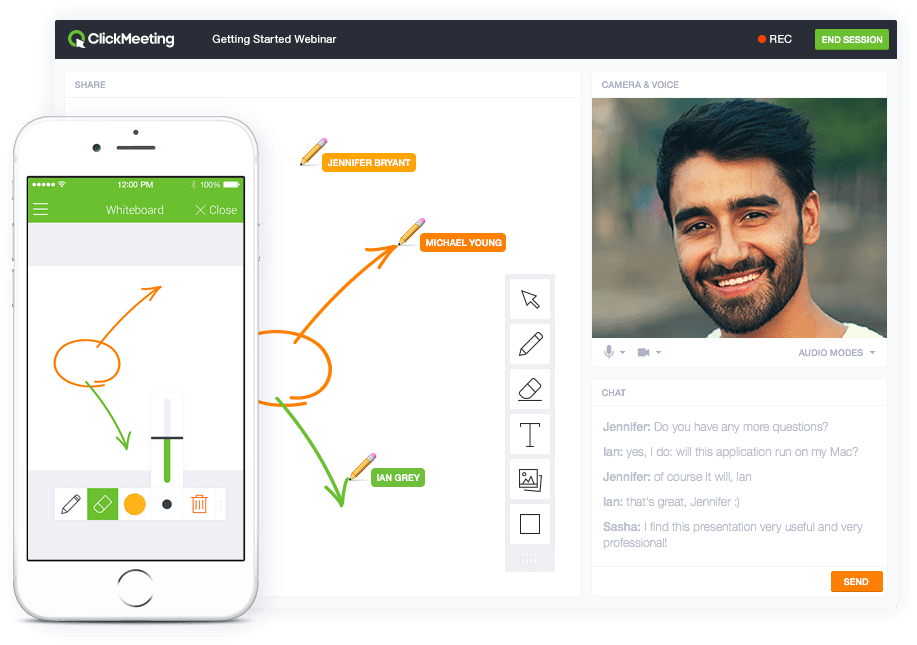
Screenshot of Whiteboard featureScreenshot of Presentation featureScreenshot of Responsive designScreenshot of Webinar roomScreenshot of Webinar room 2Screenshot of Webinar room 3

ScreenConnect Screenshots

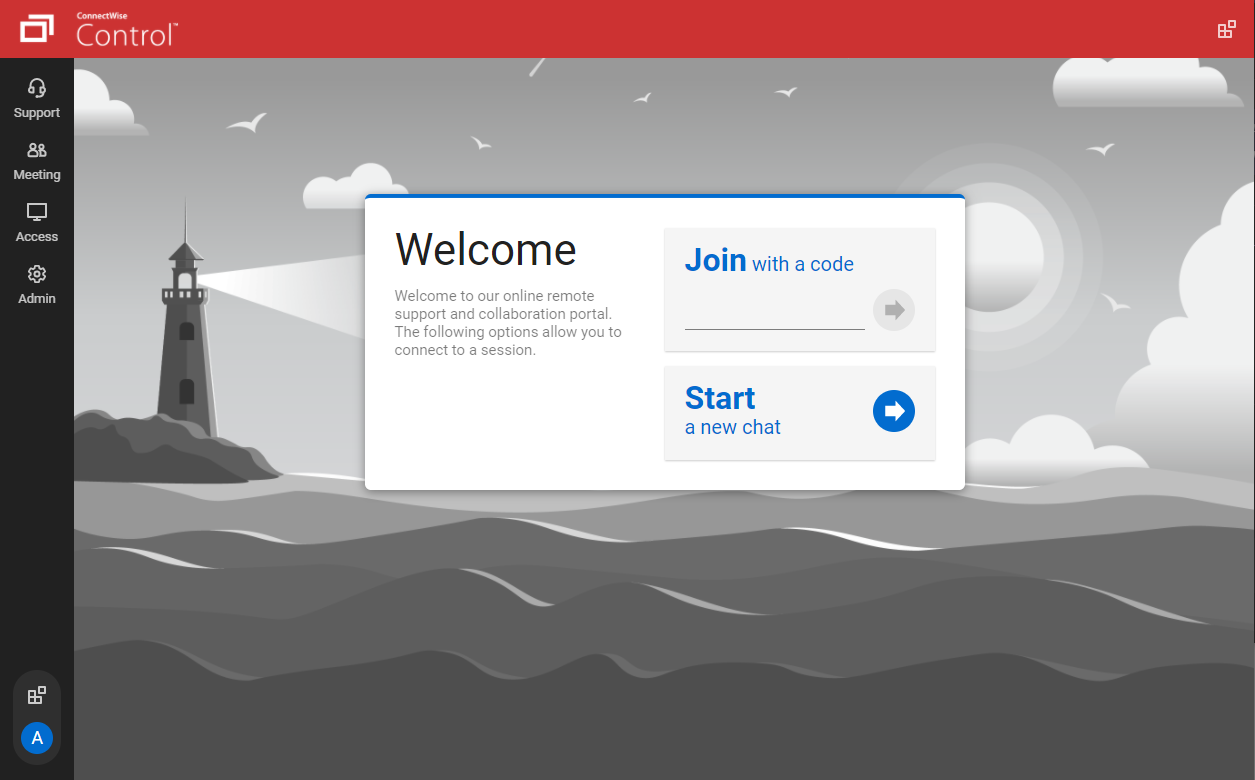
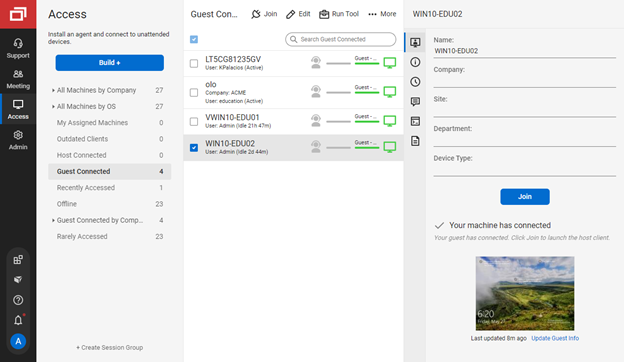
Screenshot of the guest page, where end-users enter a code to join a session with a technicianScreenshot of connecting from a Windows machine to a macOS machineScreenshot of the Extension Marketplace, where administrators can install and configure new features and integrationsScreenshot of the Access view of the Host page, where a technician can connect to unattended machinesScreenshot of the toolbox menu, which allows technicians to store and run executables, scripts, and other frequently-used filesScreenshot of the Host page, where a command can be run directly without connecting to the machine

TeamViewer Screenshots

Screenshot of how TeamViewer lets users connect to devices and provide remote support.Screenshot of AI, automation and remediation.Screenshot of the interface to monitor and manage devices proactively.Screenshot of some of TeamViewer's integrations.