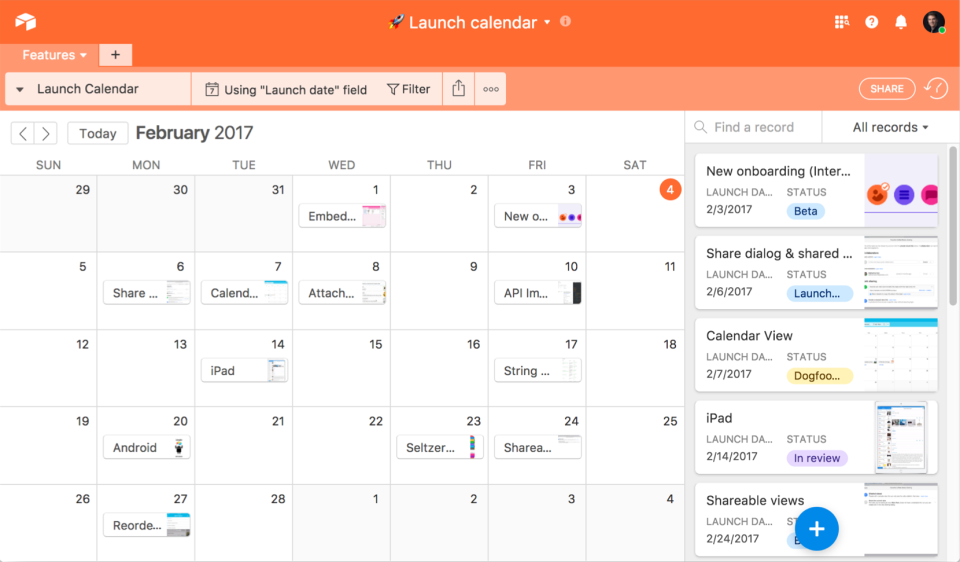
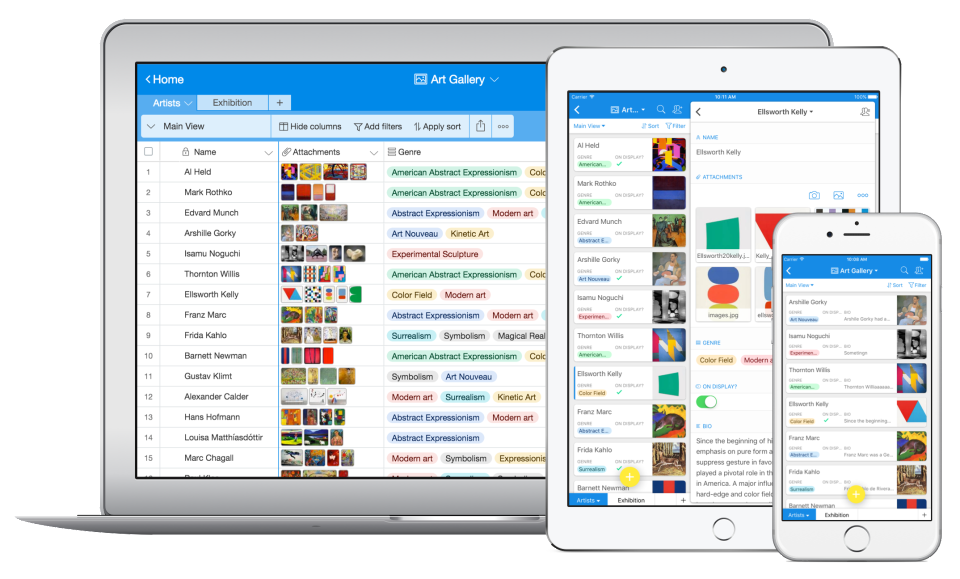
Airtable is a web-based application builder that combines spreadsheet usability with relational database architecture. The platform enables users to construct custom operational applications, configure automated workflows, and design tailored interfaces without traditional software development.
$24
per month per seat
Intuit Mailchimp
Score 8.4 out of 10
N/A
Mailchimp is an email marketing and marketing automation platform. Beyond just tracking how campaigns perform, Mailchimp takes it a step further by analyzing data from over half a billion emails to show why campaigns perform, driving informed decisions.
$0
per month
Agentforce Marketing
Score 7.6 out of 10
N/A
Marketing Cloud is a cloud-based digital marketing platform, used by marketers can segment their audience, deliver personalized messages, track campaign performance, engage leads and accounts, and optimize strategies based on real-time insights.
There's a load of free functionality available with Airtable, so it's less expensive. It's also way more intuitive and user-friendly compared to Insightly. As for Asana, I don't need that level of team collaboration at the moment, but I like that I can share whatever I create …
None of the other "art gallery" software programs that I researched (for three days) had the capability of being able to manipulate the database file input like AirTable does. Wix uses third party form generators which do not do the job as well as Airtable and even costs more …
Airtable is in a class of their own making. I don't know of another product that compares to them. They look like a spreadsheet and act like a database. It's perfect.
Podio- From our perspective, Podio was the most familiar product to Airtable, however ultimately we found the user interface of Airtable far more engaging and familiar to work with. Furthermore, Podio really struggled when trying to interact with greater volumes of data, the …
I have used a lot of email marketing tools over the years and Intuit Mailchimp is one that I keep going back to, it simple and easy to use, no messing around and it does what it says one tin.
The free plan of Mailchimp works well for middle and small scale businesses. It offers a rich library of email templates and powerful analytics to support the lead generation and brand awareness initiatives of the organization. Customization of templates is a piece of cake …
Constant Contact is antiquated and clunky. Pardot is a huge solution and tied to Salesforce so it’s not aimed at the same user audience. I think Mailchimp is generally just easier to use and costs less than the alternatives on the market currently.
Mailchimp was usually already in place and needed to be set up for growth. In general, I found that the lack of phone support at the lower tiers and the rigidness for opt-in rules made working with it long term not that easy.
As I mentioned earlier, Mailchimp is a great entry point for small businesses that are looking to target their customer and contact list with segmented email marketing. It is easy enough to use and the price is usually right for the return that is possible when used correctly. …
Mailchimp focuses on email and they do a good job overall compared to the competition. The platform is easy to use and makes sending emails a breeze. If you need something more robust then I would recommend Marketo as you can do anything you can imagine. However, you will need …
Mailchimp is what I inherited from my predecessor in the marketing department. It is more specialized into email marketing than Pardot or Marketo (though both have other benefits that make them really stick out for overall marketing automation), and is vaguely less expensive. Ye…
Mailchimp has fast and helpful customer service as compared to these competitors. While the feature set might be more limited, the price is significantly less. I have also found the platform to be much more intuitive.
MailChimp is fairly simple in functionality compared to competitors. Pardot was something I used for a B2B Saas company I worked for. Drip is what I used for eCommerce. Both are preferred in my current situations. I don't think I would recommend either over MailChimp for a …
Mailchimp is not for large organizations with complicated campaigns and conversion labels. It's for simple companies - I wouldn't advise communications teams to use it.
We selected MailChimp over these competitors for the following reasons:
Price We're small, so pricing is very important to us.
Agentforce Marketing
Verified User
Employee
Chose Salesforce Agentforce Marketing
Pardot is far better, but used basic level with MailChimp. Prefer MailChimp's email design capabilities.
Verified User
Employee
Chose Salesforce Agentforce Marketing
My previous company was using MailChimp because we did not have the data volume needed for deep integrations. I would say that MailChimp’s interface is considerably more user friendly. Templates are better (and often used by Pardot if you view the source html code) and are less …
Pardot out-ranks the competition in regards to the integration with Salesforce. It is hard to beat the ability to use your already-made customer profiles and contact information in your marketing campaigns. Where it is lacking is the usability. MailChimp is a much more user …
We use Mailchimp for email campaigns that are not sales-specific, i.e., press releases. While Mailchimp is good for tracking opens, click-throughs, embedding photos, embedding videos, etc., Pardot works best when integrated both with Google Analytics as well as Salesforce. It …
I MUCH prefer Pardot to Mailchimp and Mailjet. It feels more like a professional product and behaves as such with a more advanced feature set and customizability. For instance, I have not found a good way in either of the competing products to do branded preference center …
Pardot offers equal or better performance when compared to other industry leaders. It's as user-friendly as Emma and Mailchimp and outpaces others like Blackbaud Luminate. The WYSIWYG (like all other email platforms) has some quirks to navigate around, but it's generally easy …
Mailchimp is great for simple email use. It's straightforward and great for beginners in the email space. It does not offer nearly as much in the way of complexity as Salesforce Marketing Cloud does, so is limited with what it can do. Salesforce Marketing Cloud is much more …
I think that all of the marketing platforms I have evaluated and used in the past serve different markets and purposes. Salesforce Marketing Cloud was more palatable to our team because of our existing tech stack where we had Salesforce CRM already deployed and in use. Compared …
My previous organization used Pardot and also Mailchimp. Salesforce Marketing Cloud is more powerful than both of those tools and integrates more deeply with Salesforce CRM.
We use these both in conjunction together now rather than rivals as the data that can be held in both does differ slightly and one platform email maker is slightly better so we do a lot of the creative in one platform and then have it link in and have all the data flow into the …
Salesforce Marketing Cloud offers many opportunities for personalization and supports big data integration. It features powerful tools like SQL for data and AMPscript for email creation. If someone wants to master the platform, it might require some initial learning, which I …
As a user of Infusionsoft and SharpSpring, I wouldn't say that Pardot is the best. Infusionsoft is better overall. Pardot is used by one client of ours. Pardot's lack of good email builder is what puts it lower on the totem pole. It is a bit stronger with reporting and …
While Pardot's integration with Salesforce, segmentation functionality, and automation rules are much more robust than any of its competitors, the email builder lacks even compared to free versions of marketing automation software. For us, the integration and being able to …
Pardot is a player in that it is one of the older products on the forefront of email marketing. This is good and bad in that it has been established but bad in that it isn't as robust as some of the other products on the market. Adobe can be good but is new to the market and …
Pardot is a good tool for medium-sized and smaller sized companies. Working with larger companies I have seen more lean towards Marketo. I have also worked with e-commerce brands that have no use for a marketing automation tool that connects to Salesforce. Starting at a company …
I have used parts of the marketing cloud. While certain components of the marketing cloud are better (like social studio), the marketing automation and email marketing components of pardot are better and best suited for our business.
Verified User
Director
Chose Salesforce Agentforce Marketing
We selected Pardot for the SalesForce CRM connector, as a SalesForce CRM company we needed that first and foremost. Overall Pardot is a good e-mail platform that offers robust customization and is meagerly intuitive. MailChimp has less flexibility, but overall is an easier …
Verified User
Employee
Chose Salesforce Agentforce Marketing
Not sure, Pardot was at this company before I started.
Airtable is an ideal platform for small and growing businesses to keep track of just about EVERYTHING they need to keep things running smoothly. It's a great way to keep tasks organized, and keep everyone on the same page with progress on all things. Our company finds the kanban particularly useful, as products go through a lifecycle from ideation to retirement, it's good to keep a database of what is in production, what's working, and what we've tried before. I can see the platform being challenging with much larger businesses, but for the small to medium businesses I've used the platform with, it is ideal.
Mailchimp is fairly easy to onboard, even for those who would consider themselves less technologically inclined. It can be as simple as plug-and-play for simpler campaigns or scale up as needed. It also makes it easy to build, send out for internal review and feedback, and track all the needed changes.
I think the product, by definition, is meant for marketing — and we use it exactly for that, for running campaigns. That’s the best-suited use case for the product. I don’t think it’s really meant to be used for anything else — that’s just not how it’s designed.
Airtable has capabilities commonly found in spreadsheet applications, but also has some of the features found in databases.
The ability to filter fields. I set up a filter on the status field, so when a project is marked, complete, on hold, or canceled, that record is hidden from my current projects table view. If it is marked complete, the record is moved to the completed projects table view. In this way I can easily access a record of past projects
Being able to duplicate tables and create alternate views
Collapse and expand records. When I collapse the rows, I can easily scan current projects, next steps, project status, and due dates. When I expand the row, or field, I can see more detailed information about that field or record very easily. I can also expand or open the entire record. This is is helpful, when I am entering a lot of information to multiple fields in that record.
Mailchimp allows you to manage your mailing list really well. You can subscribe people, unsubscribe people manage the mailing list directly into segments, and what not.
Mailchimp has features where you can create campaigns based on your mailing lists and send out newsletters to your subscribers based on a multitude of parameters that you can setup. Such as send email daily, weekly, monthly and they also have event based mails that you can send out.
Mailchimp also has a feature where you can design your emails. The look and aesthetics are very important when sending emails to your subscribers and all those needs are addressed here.
We will 10/10 renew the use of Airtable because it has brought great value to our team. Not only is Airtable affordable, but it's also user-friendly and helps our team be efficient. We no longer need to rely on Excel spreadsheets being passed from person to person via email. Furthermore, we aren't dealing with corrupt Excel spreadsheets and the need to salvage data when a file is accidentally altered.
We've had Mailchimp for about ten years, I want to say. I started with the company about four years ago, and I don't see us ever diverting to another source. It's easy for us to use, and we have all our clients already built into the database. I imagine we'll use them for as long as we have the company.
As of right now we have not seen any other program that integrates as seamlessly into our Salesforce platform. We have barely scratched the surface of all the features and use cases. It would be irresponsible to make a move to another platform in the near future. We have not come up against any limitations that would prompt a need to switch
IMO the usability of this product is its greatest asset. The UI is clean and the menus are intuitive to the point where I'd feel confident having a non-spreadsheety colleague take on building an Airtable for the first time with next to no training. I can't say that about every table-like software product that I've used such as Notion.
It is easy, but some things you need to learn from their resources. Mailchimp is one of the most popular email marketing platforms because it combines email marketing, automation, audience management, and analytics into a single tool that's easy to use and scale. Simple solutions and drag-and-drop edits make it easy.
You won't find another solution that has as many features as Salesforce Marketing Cloud Interaction Studio. We all know Salesforce, we all know how big they are and it's not for nothing... Their tools do most of the things you want, need and even imagine. Using it is complicated, but the usability is infinite.
I have rarely experience downtime, compared to other tools, and given how much time we spend on the tool. Even if there were to be, their updates on it are very timely, and our support team are able to provide any questions regarding
I have, in the 4+ years that I've used Mailchimp, never seen an issue that restricted the use of their software/tools. I don't know of a single time when they're system crashed or went down. I could be wrong, but I honestly haven't experienced any issues with outages, errors or unplanned downtime
Upgrades and timing of the upgrades were communicated well and planned during off hours for our work. If we did have a campaign scheduled during that time, it would kick-off after the system was back active. There were a few unplanned system down times, but it was a rare occurrence and those times were also short in duration.
I never had any issues with load time, even with the integrations that we use today (google sheets) However, I'm curious if adding additional layers of integrations would slow down performance. We do carry quite a bit of data in Airtable, but, again, no impact on overall performance
I haven't noticed any slow speeds from Mailchimp or their tools. I think the landing pages load quickly and look nice. The email reports and editing operates smoothly and doesn't take time to load. Additionally, when I use Mailchimp in conjunction with Zapier + Hubspot I don't notice any drag between any of these tools
Though the make up of MA apps is not built this way today, it would be nice to see them become more real-time. The integration between Salesforce and Pardot is not a true real-time integration. If I modify something in Salesforce, those changes are not automatically reflected in Pardot immediately. There is a delay of about 15 minutes before the systems sync. This delay, although not long, is less than ideal We would love the systems to be integrated real time such that changes are propagated from one system to the other immediately.
Airtable has great support. They have a variety of support features to answer any questions. They have great self teaching instructions for templates and product tours. They also have support for teams and project management. They also have a fantastic customer help line. They are able and willing to answer customer questions and never have customers waiting long
Website tools were easy to use and understand so a novice can easily meet or exceed their client's expectations! Loved that we were able to totally customize so that the e-mail we created conveyed our client's overall messaging consistent with their branding! Client love that we can provide turnkey services to support their sales and marketing teams!
They are really responsive and more than not solve the problem or give you insight to how you can manage the solution yourself. I do find however sometimes a long delay on the more complex issues when they need to loop in other departments. but overall a good experience with support
The trainers at the Pardot user conference (Elevate and Connections) were very knowledgeable and presented the material well. Again, the content was targeted to more of a new user audience, and was not really relevant for folks who had been using the product for 2+ years.
Recorded trainings were provided by the Airtable team. Great as an evergreen resources to new team members and for anyone that wants to refresh their Airtable knowledge
Pardot's online training touches on all topics briefly and vaguely without much indepth exploration into how a final outcome could look, such as Nurturing Campaigns, Email templates, landing page templates, etc... The only true way to uncover Pardot's full capabilities is to have Front End design and coding experience. Without this key skill set, I would not recommend Pardot to another business.
Training all users was an important part of the implementation, which did take considerable time and effort. At first glance without training, the content calendar can be overwhelming because of the amount of data. The features within Airtable seem to be endless but our team was able to identify the most important to be successful.
It's pretty easy to get up and running! There's a slight learning curve on a few things, but once you find where everything is located, you can import your list and send your first email. It really makes our clients feel great to see how quickly they can get that first email out.
From an IT perspective, once you set up the Javascript beacon and start collecting data there is a waiting game. During this time you can start labeling your site actions which can be labor intensive for a single person, but you don't really have the final end-users on the platform yet. We did a lot of training so users were experienced, but it wasn't until they had their first tasks to accomplish that they started using the system and had questions. I'd recommend setting up some immediate goals for an end-user to start segmenting for the purpose of displaying message campaigns so you can jump start end-user action.
Airtable was a really good fit for this specific use case as it provided a huge number of collaboration features in an intuitive and pleasant-to-use interface. The free tier worked initially with our work, and the upgrade pathway was fair and made sense for us.
I used Intuit Mailchimp, and I would say other software I used is equally good and competes with Intuit Mailchimp. Well, Intuit Mailchimp's reporting is better, and ActiveCampaign has more affordable pricing, so in the end, it all comes to what you need. What we needed was available in cheaper price in other software as well. But I would definitely say Intuit Mailchimp has its own advantages too.
We use Salesforce Marketing Cloud for lead management, generating reports, tracking customer and dealer information, inputting orders, and more. I prefer HubSpot for email marketing and automation because it is easier to use and the emails are designed much better. We currently use Salesforce and HubSpot, and we are very happy to have both, as they have different pros/cons.
There are TONS of opportunity to scale, but I think it's a matter if you have the time and resources to do so because the initial setup can be fairly time consuming and prioritized dedication
Mailchimp over the years I've used it has grown in leaps and bounds. They have added so many additional features than were previously available. They are truly an all-in-one marketing platform now. If you're a small operation and just want to add email to your marketing efforts, they're there for you. If you're a larger operation and want to start sending postcard advertisements, they can do that. If you'd good with that and want to kick up your marketing by going social, you can do that on their platform. They are truly able to be as small as you need, but also get quite large in whatever it is you'd like to do through their system.
Prior to this, we had no solution and literally were doing things on paper in a world where technology is outpacing paper. Having this process optimized has made it easier for the sales and marketing people to change information. From the training perspective, it has allowed us to see holes in where we could create additional support training, so the ROI here has been a lot more than just the optimization of a process.
Through this platform, I always have the idea bout which of my team member is working on which particular part of the project, I can easily track their progress, and also I can easily correct them where it is required by adding sticky notes, by sending the attachments and URLs.
One of my retail web store clients was sending out email specials and notices about once a month. After clicking the send button, we would watch Google Analytics and the current site users would light up immediately. Often, the current site visitors would pop up to 20, 30 or more after the email was sent. On a normal day, seeing 1 or 2 online users would be OK.
Pretty much in all cases, we could see an uptick in positive activity after sending out a Intuit Mailchimp email to a list.
Salesforce Marketing Cloud allows us to more efficiently reach out to a higher number of prospects.
Salesforce Marketing Cloud allows us to nimbly communicate important messages in a timely fashion to facilitate conversion.
Salesforce Marketing Cloud allows us to track who is opening our messages so that we can stop sending to those not interested and focus on the most engaged audiences.