
Daniel Berry
Digital Marketing Manager
Chose Google Analytics

| Product | Rating | Most Used By | Product Summary | Starting Price |
|---|---|---|---|---|
 Google Analytics | N/A | Google Analytics is perhaps the best-known web analytics product and, as a free product, it has massive adoption. Although it lacks some enterprise-level features compared to its competitors in the space, the launch of the paid Google Analytics Premium edition seems likely to close the gap. | $0 per month | |
 Moz Pro | N/A | MozPro , from Moz in Seattle, Washington, is an SEO platforms for tracking the performance of all inbound marketing efforts comprehensively. It reveals how content is being shared through social channels and how that drives traffic to a website, and features a broad toolset for search engine optimization: rank tracking, link opportunites, site audit via Moz Analytics, prospective keyword analysis and content grading, as well as a crawl test to find broken or poorly designed site elements. Moz… | $99 per month | |
 Sprout Social | N/A | Sprout Social provides social media management, marketing, customer care, data and intelligence, and employee advocacy solutions for brands and agencies, including Ticketmaster, Chipotle, Grubhub, Subaru, and Zendesk. Sprout’s platform is used to simplify social publishing, engagement, reviews, analytics and listening for customers. Sprout also provides customer success and technical support, to deliver consistent value to all users. Any organization, regardless of size or industry, receives… | $249 per month per user |
| Google Analytics | Moz Pro | Sprout Social | ||||||||||||||||||||||
|---|---|---|---|---|---|---|---|---|---|---|---|---|---|---|---|---|---|---|---|---|---|---|---|---|
| Editions & Modules |
|
|
| |||||||||||||||||||||
| Offerings |
| |||||||||||||||||||||||
| Entry-level Setup Fee | No setup fee | No setup fee | No setup fee | |||||||||||||||||||||
| Additional Details | — | Discount available for annual billing. | — | |||||||||||||||||||||
| More Pricing Information | ||||||||||||||||||||||||
| Google Analytics | Moz Pro | Sprout Social | |
|---|---|---|---|
| Considered Multiple Products |  Google Analytics Daniel Berry Digital Marketing Manager Chose Google Analytics  Chris Williams Marketing Director Chose Google Analytics All of these products are geared at tracking your website performance among many other things that Google Analytics does not do. But all of these products need to connect to Google Analytics to track the actual traffic and analytics to make their platforms work. When it comes …  Meredith Lea Barber Senior Web Developer Chose Google Analytics |  Moz Pro  Katie Bodell Freelancer Chose Moz Pro To be totally honest, the user-interface with Google Analytics is so terrible that I could hardly ever figure out what it was communicating. Moz was easy to use from day one and I can feel like I understand SEO a bit after using the site for just a short time.  Scott Buresh Owner Chose Moz Pro Moz Pro and Ahrefs each have their own strengths, and we use both. There is a lot of overlap between the two, but I find that there are certain things that each does better. For keyword research, backlink analysis, and site crawls, we generally gravitate toward Moz Pro because …  Max Shtefan Search Marketing Manager Chose Moz Pro Moz tends to be more consistent with their data/metrics. Their crawler is also pretty powerful and able to pick up large sets of pages where some other tools may fall short.  Kevin Gamache Senior Web Analyst Chose Moz Pro Moz had all the features that I was looking for to help us scale our in-house SEO and content marketing strategy. We had previously reviewed several other vendors but the price point and the features offered did not match up to our needs. The ease of use and the time to …  Rodrigo Stockebrand Associate Search Director Chose Moz Pro I've recently noticed we're using SEM Rush a whole lot more nowadays for rank tracking. In fact, it's the first time we've gone to the highest package across multiple client accounts due to the ability to plot rankings amongst competitors in a cool visual way, the ability to …  Mike Tekula Senior Consultant Chose Moz Pro We do continue to use several of these tools alongside Moz, for various purposes (including validating findings with Moz's tools). But the Moz tool set is simply more comprehensive in its functionality. Moz also offers some basic pieces that these competitors have not been able …  Mackinley Levine Asst. Editor and SEO Analyst Chose Moz Pro
 Jeff Bedford Analytics & Optimization Specialist Chose Moz Pro My favorite tool is SEMrush. I selected Moz to help with link-based research because SEMrush is more focused on keyword data. For the link-based data, Ahrefs is probably the biggest threat to Moz. It has an amazing amount of data, and from the chatter I hear the data is more …  Colin Hagan Marketing Manager Chose Moz Pro Google AdWords, though not a direct competitor, and Google Analytics, used in combination and with expertise, can cover many of the SEOmoz features, for free.  Sean Smith Internet Marketing Specialist Chose Moz Pro RavenTools I've used and has a great approach to the same problems, the only major difference is SEOmoz's availability of incredible data. If you want more recommendations for improvements on site and SEOmoz is too expensive, try RavenTools – otherwise SEOmoz is a better bet. … |  Sprout Social  Adrienne Hardin Content Specialist-Social Media Chose Sprout Social  Michelle Lynn Marketing Project Manager Chose Sprout Social Better for our business model right now.  Pilcher, MBA Laura Owner/Designer Chose Sprout Social Sprout Social outdoes the competition in ease of posting, their queue capabilities, excellent customer service and amazing design and functionality of the actual software. It is a much easier platform to use and navigate than any other I have used.  Michelle Hebert E-Commerce Manager / Social Media Strategist Chose Sprout Social It's clean design and user-friendliness. |
| Google Analytics | Moz Pro | Sprout Social | |||||||||||||||||||||||||||||||||||
|---|---|---|---|---|---|---|---|---|---|---|---|---|---|---|---|---|---|---|---|---|---|---|---|---|---|---|---|---|---|---|---|---|---|---|---|---|---|
| Web Analytics |
| ||||||||||||||||||||||||||||||||||||
| SEO |
| ||||||||||||||||||||||||||||||||||||
| SEO Channels |
| ||||||||||||||||||||||||||||||||||||
| SEO Platform & Account Management |
| ||||||||||||||||||||||||||||||||||||
| Listening/monitoring |
| ||||||||||||||||||||||||||||||||||||
| Publishing |
| ||||||||||||||||||||||||||||||||||||
| Engagement |
| ||||||||||||||||||||||||||||||||||||
| Marketing |
| ||||||||||||||||||||||||||||||||||||
| Channel coverage/integration |
| ||||||||||||||||||||||||||||||||||||
| Reporting/analytics |
| ||||||||||||||||||||||||||||||||||||
| Account management |
|
| Google Analytics | Moz Pro | Sprout Social | |
|---|---|---|---|
| Small Businesses |  StatCounter Score 9.0 out of 10 |  Nozzle Score 10.0 out of 10 |  CoSchedule Marketing Suite Score 10.0 out of 10 |
| Medium-sized Companies |  Siteimprove Score 9.1 out of 10 |  Advanced Web Ranking Score 8.2 out of 10 | CoSchedule Marketing Suite Score 10.0 out of 10 |
| Enterprises |  Optimal Score 9.1 out of 10 |  Dupli Checker (DupliChecker.com) Score 8.5 out of 10 |  Social Suite by Reputation.com Score 9.4 out of 10 |
| All Alternatives | View all alternatives | View all alternatives | View all alternatives |
| Google Analytics | Moz Pro | Sprout Social | |
|---|---|---|---|
| Likelihood to Recommend | 8.5 (192 ratings) | 8.1 (78 ratings) | 8.4 (176 ratings) |
| Likelihood to Renew | 9.0 (51 ratings) | 7.0 (38 ratings) | 9.5 (65 ratings) |
| Usability | 7.4 (19 ratings) | 7.0 (3 ratings) | 8.6 (103 ratings) |
| Availability | 10.0 (4 ratings) | 10.0 (1 ratings) | 7.7 (8 ratings) |
| Performance | 10.0 (2 ratings) | - (0 ratings) | 8.0 (7 ratings) |
| Support Rating | 7.0 (42 ratings) | 9.5 (7 ratings) | 4.6 (38 ratings) |
| Online Training | 10.0 (2 ratings) | 7.0 (1 ratings) | 7.3 (3 ratings) |
| Implementation Rating | 9.0 (7 ratings) | - (0 ratings) | 10.0 (11 ratings) |
| Configurability | 6.0 (2 ratings) | - (0 ratings) | - (0 ratings) |
| Ease of integration | 10.0 (1 ratings) | - (0 ratings) | 7.8 (27 ratings) |
| Product Scalability | 10.0 (2 ratings) | - (0 ratings) | - (0 ratings) |
| Vendor post-sale | 10.0 (1 ratings) | - (0 ratings) | 9.1 (1 ratings) |
| Vendor pre-sale | 9.0 (1 ratings) | - (0 ratings) | 9.1 (1 ratings) |
| Google Analytics | Moz Pro | Sprout Social | |
|---|---|---|---|
| Likelihood to Recommend | Google
 sandro merkvilishvili Head of e-commerce deparment | iContact
| Sprout Social
|
| Pros | Google
| iContact
 Joseph Kahn Head RankingZealot at Hum JAM | Sprout Social
 Linda Bernstein Social Media Manager |
| Cons | Google
| iContact
| Sprout Social
 Cherlon Seecharran Marketing Operations Analyst |
| Likelihood to Renew | Google
| iContact
 Kyle Claypool Digital Director | Sprout Social
|
| Usability | Google
 Victor Campos Web Developer | iContact
| Sprout Social
|
| Reliability and Availability | Google
| iContact
 Ingo Grammel Sr. Digital Marketing Manager | Sprout Social
|
| Performance | Google
| iContact No answers on this topic | Sprout Social
 Sarah Zibanejadrad Social Marketing Director |
| Support Rating | Google
 Sarah Hoffman Media Director | iContact
| Sprout Social
|
| Online Training | Google
 Roy Morejon President | iContact No answers on this topic | Sprout Social
 Ryan Montano Social Marketing Manager |
| Implementation Rating | Google
 Joshua Van Horsen Marketing Manager | iContact No answers on this topic | Sprout Social
 Valentin Vesa Social Media Manager |
| Alternatives Considered | Google
| iContact
 Phil Parrish Co-founder, Managing Director | Sprout Social
|
| Scalability | Google
| iContact No answers on this topic | Sprout Social No answers on this topic |
| Return on Investment | Google
 Heide Rembold Director of Marketing & Analytics | iContact
 Preeti Gautam Social Media Executive & Content Editor | Sprout Social
|
| ScreenShots | Moz Pro Screenshots  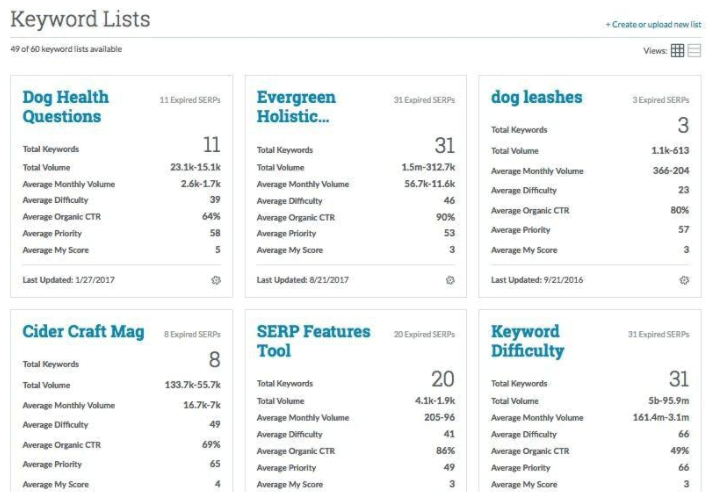   | Sprout Social Screenshots |