Act-On is an adaptive marketing platform designed to drive personal and purposeful multi-channel marketing. Its foci are inbound and outbound marketing, for enabling a tighter alignment with sales and turning data into actionable insights.
$900
per month
Intuit Mailchimp
Score 8.3 out of 10
N/A
Mailchimp is an email marketing and marketing automation platform. Beyond just tracking how campaigns perform, Mailchimp takes it a step further by analyzing data from over half a billion emails to show why campaigns perform, driving informed decisions.
$0
per month
Webtrends Analytics
Score 4.4 out of 10
N/A
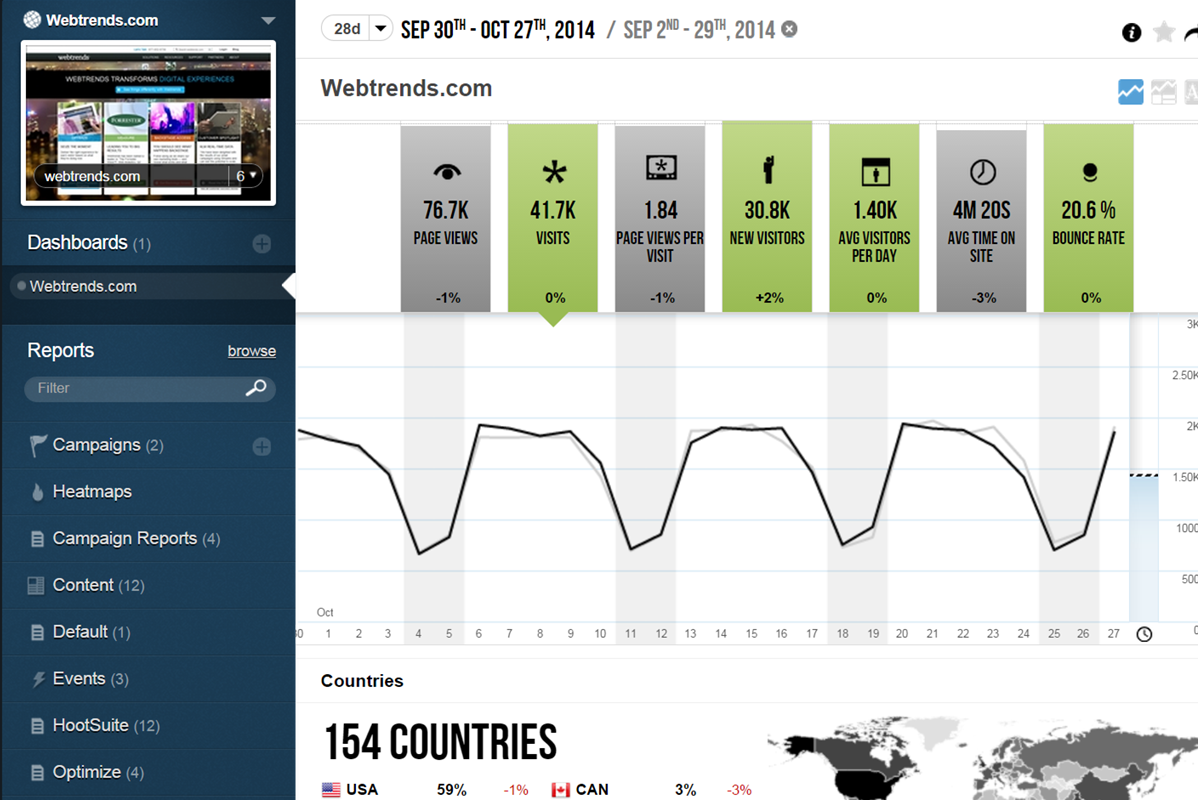
WebTrends provides an enterprise web analytics platform and, according to Forrester, has a strong focus on support for mobile and social channels and a very open platform. Webtrends competes directly with Adobe Site Catalyst, IBM Coremetrics. and comScore DigitalAnalytix.
N/A
Pricing
Act-On Software
Intuit Mailchimp
Webtrends Analytics
Editions & Modules
Professional
$900
per month
Enterprise
$2,000+
per month
Free
$0
Essentials
starts at $13
per month
Standard
starts at $20
per month
Premium
starts at $350
per month
No answers on this topic
Offerings
Pricing Offerings
Act-On
Intuit Mailchimp
Webtrends Analytics
Free Trial
No
Yes
No
Free/Freemium Version
No
Yes
No
Premium Consulting/Integration Services
Yes
Yes
No
Entry-level Setup Fee
No setup fee
No setup fee
No setup fee
Additional Details
The Professional package starts at 2,500 active contacts, 3 marketing users, 50 sales users and 30,000 API calls per day.
The Enterprise allows for much more customization, the package starts at 2,500 active contacts, 6 marketing users, 100 sales users and 30,000 API calls per day.
Annual contract required for all packages.
I have used GetResponse, MailChimp and AWeber as email marketing platforms and must say Act-On is the best and most complete for businesses who are well established and looking to grow even further.
Act-On was a much more price competitive product than Marketo and similair providers and had by far the best customer service and support. Act-On had no hidden costs and we were able to scale up when we needed to with ease. Other colleagues have advised that Act-On is also much …
Act-On has similar features as SharpSpring, but in my opinion, delivers better. While their customer service is not excellent, it is better than my experience with SharpSpring. As for MailChimp, Act-On has more robust features. But, it is also dramatically more challenging to …
I think that if you're just starting out in email marketing, you'll probably navigate to a tool like Mailchimp. When you've gotten a good base of what the industry is and you want to do a little bit more, then you'll upgrade to HubSpot and then to Act-On. I feel like Act-on is …
Mailchimp is a joke in my opinion. Super manual and feels too sparse. Not designed by programmers. ConvertKit is even worse. Super limited templates for a company that...is selling email templates. Shitty integration options.
We looked at using Pardot and decided to use Act-On due to pricing and ease of use. Pardot had a better Salesforce connection since they are owned by Salesforce. Pardot was very expensive and didn't offer some of the functionality we were looking for. For example, Pardot does …
Act-On has a much more hands-on customer support focus than any of the other companies that we have worked with that do similar things. They also have a really easy to use platform (however I know they all do). It's one of those products that you feel good when you are using it.
I didn't specifically select Act-On over the competitors I listed, since I implement these packages for our clients. As I described in other questions though, the difference is clear: Act-On is a great tool for organisations just getting started with marketing automation, who …
These other products do not hold a candle to all of the functionality of Act-On. Their technical support is slow and very impersonal. The ability to get adequate reporting, keep bounce rates low, and foster lead development are major benefits to the Act-On tool. Tool …
These systems are all great and very robust, but they count each email sent against the monthly count, which is not always ideal for a company that sends high volume, and high frequency marketing campaigns each month. That is probably the greatest selling point of Act-On, that …
Web Developer, Search Engine Optimization and Social Media Consultant
Chose Act-On Software
The bottom line is that IMHO Act-On provides the best bang for the buck in the sector. There are other companies that might have prettier email templates, or fancier interfaces, but when push comes to shove Act-On meets the price-point vs. value issue very well. To get even …
Price was definitely better, but the ease of use sold us on the product. It also provided just the functionality we wanted without making it complicated to use. We also liked their social media integration abilities and how easy it was to create landing pages and tracking codes.
Mailchimp has fast and helpful customer service as compared to these competitors. While the feature set might be more limited, the price is significantly less. I have also found the platform to be much more intuitive.
Mailchimp is something that's carried over from previous leadership. We are planning to deprecate it in my current role in the future and transition our email marketing efforts completely over to our marketing automation software, which had lacked a subscription management …
MailChimp just seems easier to use as a whole. Their marketing and support seems to be more user friendly as well. I also like the fact that the integration with Workbooks CRM that we use brings the analytics back into our CRM so sales doesn't need access to MailChimp to view …
We often have quick turnaround time requests, and Act-On's new composer is great because it is easy to make an email look great in desktop or mobile views. This has been a huge time-saver for us! We have benefited from using Act-On for many years and are accustomed to where everything is and how to use it. For the new accounts we train, we will sometimes hear that the organization of where things are could be improved.
For any E-commerce related needs, like you need to see a list of customers who have added products to cart but did not purchase, this can be done really easily, but if your e-commerce provider provides integration, then it is best suited. Most of the systems in the Market provide out-of-the-box integration. Their API is also very easy it can be integrated to any language. You can integrate it into your custom developed system and use the features, like adding customers to specific lists. Also, if your lists become really big, then their system can get a bit slow to respond via API, so you might need a strategy for how you are gonna fetch the data using API.
Scenarios 1. If you want to use web server log files as input to your web analytics, then Webtrends will provides a good product, with great ease of implementation. Don't even think about being cheap on hardware, and make sure Webtrends runs on real servers, not in a VM environment. 2. If you want to use Data Tagging, similar to Google Analytics or Site Catalyst, Webtrends has a powerful product, just be prepared to pay. 3. If you are new to Web Analytics, but it is the strategic direction, start with Webtrends on Premises. Questions to Ask 1. What are you trying to accomplish? 2. Can you place a dollar value on the benefit that you expect/need from Webtrends? 3.Can you live with Webtrends running SaaS?
Mailchimp allows you to manage your mailing list really well. You can subscribe people, unsubscribe people manage the mailing list directly into segments, and what not.
Mailchimp has features where you can create campaigns based on your mailing lists and send out newsletters to your subscribers based on a multitude of parameters that you can setup. Such as send email daily, weekly, monthly and they also have event based mails that you can send out.
Mailchimp also has a feature where you can design your emails. The look and aesthetics are very important when sending emails to your subscribers and all those needs are addressed here.
Control privacy, data sharing and competitive industrial knowledge using Webtrends on premises
Great control over custom reports, custom dimensions and metrics
Flexible tool which allows multiple methods of data capture. To my knowledge it was the first tool with a Tag Builder / Tag Management function built in via a supporting website.
The designer tools, especially for emails, were often difficult to use. The formatting of the text would be all over the place and change / refuse to change at random. Moving boxes around was shifty and sometimes nearly impossible. It just wasn't customizeable enough. No "undo" functionality either.
The only way to collect information expansively over time (there's a term Act-On uses for it, I can't recall) where it adds questions to the form each time a user fills it out, is if the person were to fill out the same form multiple times. I know this does happen for some websites/resources, but as a company that wanted to collect new information each time someone filled out any form, regardless of the resource or the URL, that was simply not an option, and that doesn't really make a lot of sense. I know it's not really possible to track someone but if they filled out the first part of the form and then it added new questions to answer, and then they submitted and got through the gating, that would actually be helpful.
There was no "trash can" of sorts in case you deleted something by mistake. This could be so stress-inducing if it was a major project. My coworker did this once, contacted Act-On, they couldn't even recover it.
The big downside, the elephant in the room, is that it does not (as of right now) have on-demand segmenting, drilldowns, etc. You have to think of what you want in advance and create those reports then analyze some data. This is huge. You can, of course, re-analyze old data after creating new reports but you still have to wait. (This deficiency may become obsolete with the release of Webtrends Explore later this month (May 2014).)
It has fewer mature integrations with other products and databases than competitors do, although I'm told it works with SharePoint better than anything else does.
Its attribution modeling capability is behind Google Analytics'. In my humble opinion, this could be changed quickly if Webtrends would make some tweaks to its standard visitor history files (i.e. preserve the order in which past visits were sourced beyond the single most recent one, rather than storing all those past sources as a randomized list).
It doesn't incorporate statistical tests, confidence intervals, or statistical associations. However, this same criticism can be applied to its competitors (other than A/B Testing products). It's a tabulation program, as they all are. In this respect, web analytics tools as a group are relatively primitive. Sorry to bring this up as a criticism of Webtrends but it's my pet peeve about the whole industry and I just have to say it. (p.s. take advantage of the heavy-duty Webtrends Scheduled Export functionality to get really granular data that you can feed to a stats program to get significances.)
Although the documentation, help screens, phone support and the knowledge base have improved tremendously in recent years, there is still a pretty steep learning curve because it is different from the tools that entry-level users may have already been exposed to. This can be a shock and many users are alienated at first because they just don't get some of the fundamentals at first. I'd like to see much better help screens that are thoroughly interlinked with the KB and documentation. Having superb online support would make a world of difference with the adoption of this basically powerful tool.
It's my single biggest asset in my current role. With limited resources, its enabled Anachron to punch well above our weight marketing wise and although we're still at the beginning of our journey I know the system can scale with us
We've had Mailchimp for about ten years, I want to say. I started with the company about four years ago, and I don't see us ever diverting to another source. It's easy for us to use, and we have all our clients already built into the database. I imagine we'll use them for as long as we have the company.
I would be willing to try Webtrends again AFTER some research from other users. I would need to see that users mention better and faster customer support on questions and issues that arise while using the software. The software is capable of vast and incredible things, but if it isnt properly set up and supported during use, it is just a big hassel and waste of everyones time and money.
It's a great tool for our business, and we get a fantastic ROI on it every year based on wins for customer service and automation responses. It's save projects, repaired salesperson/customer relationships and generated new sales and interest yearly. We really wouldn't hesitate to recommend this platform at all.
The interface is a bit complicated, and I need to spend some time to learn new functions and understanding how it works. I don't like working with email templates because of the limited customization options. However, functions like AI for generating emails, segmentation, and analytics still work well and are very useful.
If I could give it a 0, I would. Not having an intuitive user interface made it impossible to convince non-analytic business users to use the tool on their own. Even as a seasoned analyst, frequent calls were needed to get what should be simple tasks done. Account managers don't understand the tool either, and have to refer you to technical support
I have always found them quick to respond to my query by web inquiry. In those instances when I call, I have always reached help quickly. They are conscientious and skilled in discussing my concern and finding a solution to my problem. Other tech organizations should use Act-On as a model for top-notch customer service.
I have, in the 4+ years that I've used Mailchimp, never seen an issue that restricted the use of their software/tools. I don't know of a single time when they're system crashed or went down. I could be wrong, but I honestly haven't experienced any issues with outages, errors or unplanned downtime
I haven't noticed any slow speeds from Mailchimp or their tools. I think the landing pages load quickly and look nice. The email reports and editing operates smoothly and doesn't take time to load. Additionally, when I use Mailchimp in conjunction with Zapier + Hubspot I don't notice any drag between any of these tools
The v9 admin interface and v10 reporting interface work as well as expected, but have a tendency to be pokey, especially for bulky reports and whenever you're connected to wifi. I much prefer using the REST API for all reporting for this reason, which simply dumps out the data and doesn't bother with the user interface.
Since we start using Act-on for ourselves and our clients, we have been supported very well. Often we need to integrate with legacy systems and we find the support team on our side during the whole endeavor. Always asking if they can help us further, always willing to do a better job. The support of Act-On is one of the main differentiators
Website tools were easy to use and understand so a novice can easily meet or exceed their client's expectations! Loved that we were able to totally customize so that the e-mail we created conveyed our client's overall messaging consistent with their branding! Client love that we can provide turnkey services to support their sales and marketing teams!
I once went on to Twitter to ask for help from my network of analytics people, and Webtrends themselves responded. They have been an excellent partner in making sure that their product is being used to the best of it's ability and I greatly appreciate that. Both Omniture and Google Analytics, do not have that level of support over social media
The in-person training was comprehensive enough to get you started, but I strongly recommend having a more experienced person when beginning with the tool.
Act-On had a lot of resources, and their staff was great at answering any questions I had to make sure we got started on the right foot. Looking back, I would have preferred some additional training sessions since we didn't have any previous experience with Marketing Automation and best practices.
Webtrends provides several free webinars over the course of the year, many of which I would expect to pay for. The people providing the webinars seem to have a good feel for real-world application of the product.
What impressed me most is that Act-On showed full committment in making our implementation successful, even when it required additional support from their team. This gave me a lot of warm and fuzzy feelings. Most other software software vendors are not anywhere close to being this responsive and effective
It's pretty easy to get up and running! There's a slight learning curve on a few things, but once you find where everything is located, you can import your list and send your first email. It really makes our clients feel great to see how quickly they can get that first email out.
Careful planning and patience. Use a non-public test site to fine tune tags and reporting. Despite best laid plans, there will be surprises when you collect the data, run the analysis and begin generating reports using the tool. Perform a tag audit to ensure tags fire as desired.
Act-On is easier to use than Marketo, but not as visually appealing and user-friendly as HubSpot. It's much better than Pardot, as Pardot feel clunky every step of the way. SharpSpring is comparable because of its price point but surpasses Act-On in its tools and intuitive interface. We selected Act-On because of the pricing model and thought all things would be close to parity with other options. It depends on the team you have. If you have developers and a marketing team that knows some html/css, you can get by with Act-On.
I don't think they are comparable; we use Google Ads to put our website at the top of the list when someone googles certain words. We use meta business to manage our social media. Google aims to gain customers, while Mailchimp is used to interact with both existing and new customers.
Webtrends has its work cut out for itself considering you have the behemoth Google Analytics and Google Analytics Premium having a strong offering and brand recognition for the price of free. After reviewing the paid service I'd suggest you start off with GA as a cheaper alternative that is just as robust, if not much more flexible in regards to the reporting and goal tracking needs for our company.
Mailchimp over the years I've used it has grown in leaps and bounds. They have added so many additional features than were previously available. They are truly an all-in-one marketing platform now. If you're a small operation and just want to add email to your marketing efforts, they're there for you. If you're a larger operation and want to start sending postcard advertisements, they can do that. If you'd good with that and want to kick up your marketing by going social, you can do that on their platform. They are truly able to be as small as you need, but also get quite large in whatever it is you'd like to do through their system.
With the Automated Series, we were able to put in place campaigns that generated revenue that took no time to continue running once set up. This was a positive feature allowing employees to work on another project while the campaign ran on their own.
One of my retail web store clients was sending out email specials and notices about once a month. After clicking the send button, we would watch Google Analytics and the current site users would light up immediately. Often, the current site visitors would pop up to 20, 30 or more after the email was sent. On a normal day, seeing 1 or 2 online users would be OK.
Pretty much in all cases, we could see an uptick in positive activity after sending out a Intuit Mailchimp email to a list.
Webtrends has had a positive impact on site visitation because it allowed us to understand the sources by domain for site traffic and find out ways to increase visits from those domains.
Webtrends has also allowed us to understand areas of optimization on the site, which has had a positive impact on the overall user journey on the site, likely leading to longer site duration and engagement.