Overview
ProductRatingMost Used ByProduct SummaryStarting Price
EZ Texting
Score 9.1 out of 10
N/A
EZ Texting provides businesses and organizations with a text marketing solution, including features and integrations to keep conversations going. The solution can be used by businesses to connect with their audiences. It can be used to send promotions, promote a new product, build brand awareness, or drive traffic to websites or storefronts. EZ Texting Key Features EZ Texting's features are designed to enhance the effectiveness of text marketing efforts.…
$25
per month
iContact
Score 6.8 out of 10
N/A
iContact is an email marketing solution that was acquired by Vocus in 2012. The product is integrated with Facebook and Twitter and is aimed at SMBs with unlimited sending as a key feature.
$14
per month
Intuit Mailchimp
Score 8.3 out of 10
N/A
Mailchimp is an email marketing and marketing automation platform. Beyond just tracking how campaigns perform, Mailchimp takes it a step further by analyzing data from over half a billion emails to show why campaigns perform, driving informed decisions.
$0
per month
Pricing
EZ TextingiContactIntuit Mailchimp
Editions & Modules
Launch
Starting at $25
per month
Boost
Starting at $75
per month
Scale
Starting at $125
per month
Enterprise
Starting at $3,000
per month
1500 Users
$15.00
per month
2500 Users
$25.00
per month
5000 Users
$45.00
per month
Free
$0
Essentials
starts at $13
per month
Standard
starts at $20
per month
Premium
starts at $350
per month
Offerings
Pricing Offerings
EZ TextingiContactIntuit Mailchimp
Free Trial
YesNoYes
Free/Freemium Version
NoYesYes
Premium Consulting/Integration Services
NoNoYes
Entry-level Setup FeeNo setup feeNo setup feeNo setup fee
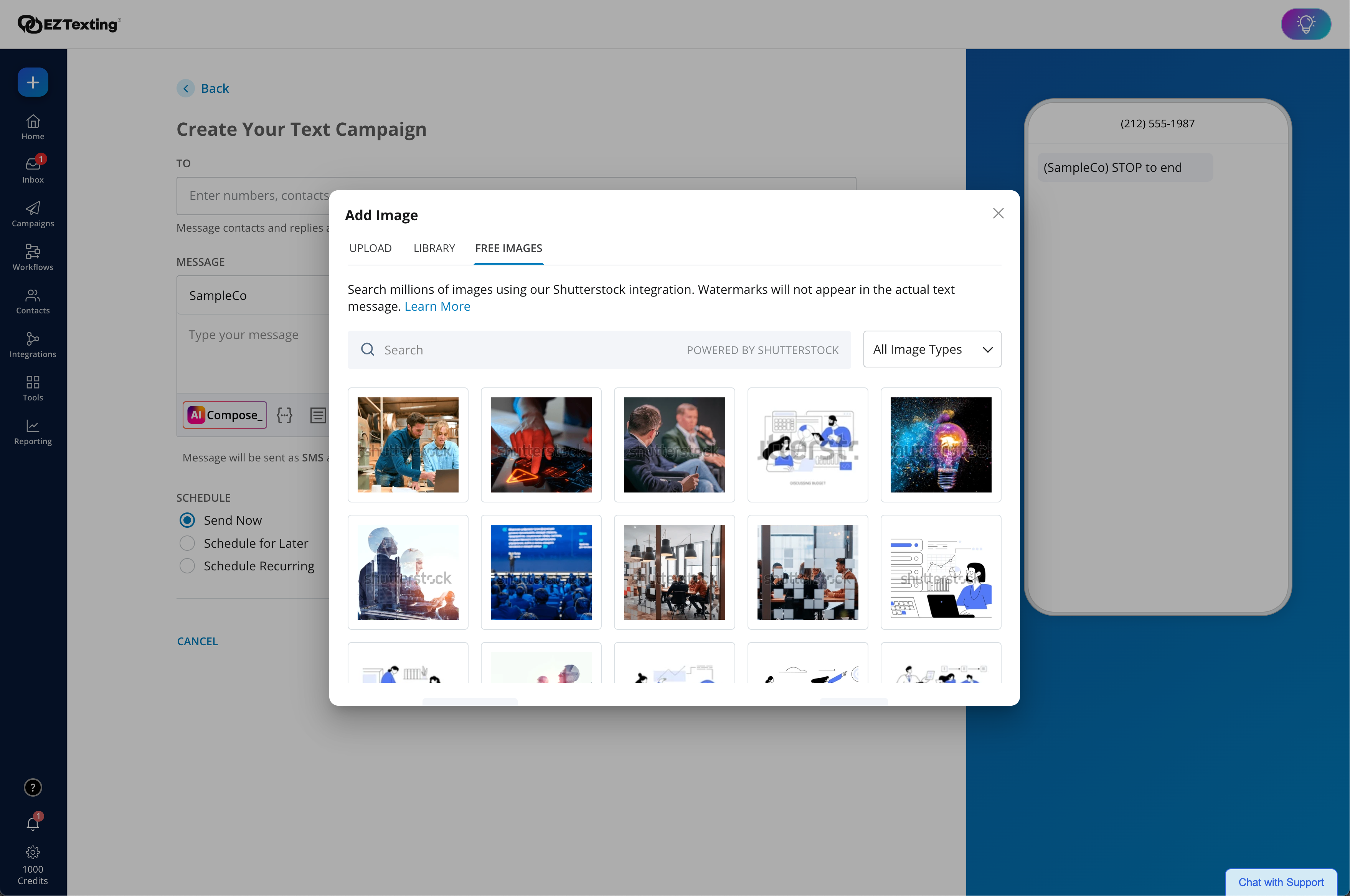
Additional DetailsLAUNCH PLAN: Recommended for up to 500 contacts. Local EZ Textable Number. Max Speed: up to 500/day. Cost Per Msg:$0.030. Delivery Rate: 95% Includes 500 free msg/mo or 6k annually. BOOST PLAN: Recommended for 501-2,000 contacts. Local EZ High-Volume Number. Max Speed: up to 2,000/day. Cost Per Msg: $0.025. Delivery Rate: 95% Includes 500 free msg/mo or 6k annually. SCALE PLAN: Recommended for 2,000-50,000 contacts. Local EZ High-Volume, High-Speed Number. Max Speed: up to 50,000/day. Cost Per Msg: $0.020. Delivery Rate: 95%. Includes 500 free msg/mo or 6k annually. ENTERPRISE PLAN: Recommended for 50,000+ contacts. This Plan offers. Dedicated Short Codes. Max Speed: up to 1 MM/day. Cost Per Msg: $0.010. Delivery Rate: 99%. Includes 200k msg/mo. Pricing information for EZ Texting is supplied by the software provider or retrieved from publicly accessible pricing materials. Final cost negotiations to purchase EZ Texting must be conducted with the seller. Included in All Plans: Unlimited Incoming Messages, Contacts, & Keywords. New Features: Realize ROI faster with AI Compose & Team Inbox with AI Reply. Live Support Chat: Monday-Friday 8am-8pm ET and Saturday-Sunday 9am-5pm ET. Growth Tools: QR Codes, Keywords & Signup Forms. MMS Edge: Enhanced Image Library + Editor powered by Shutterstock. CRM-Lite: Upload, Management, Groups & Personalization.
More Pricing Information
Community Pulse
EZ TextingiContactIntuit Mailchimp
Considered Multiple Products
EZ Texting
Chose EZ Texting
EZ Texting allows us to quickly communicate with our members and stay in touch with them if they move, switch jobs, or their emails are sent to spam or junk.
Chose EZ Texting
The onboarding process for ez texting is more straightforward and less cumbersome than other texting options. Ez texting lets you know what documentation is needed, typical response times, what party you are waiting on (the phone carriers, for example), that you have to provide …
Chose EZ Texting
We had been using an in-house, homegrown solution before we outgrew it and needed a specialized service. EZ Texting was selected because it came to the top of a Google search and has a pay-as-you-go option so if we didn't like it, it would be easy to move to something else.
Chose EZ Texting
I think I started with EXtexting first, after googling around and talking to a couple of people. Back in 2016 or 17.
Chose EZ Texting
We use a lot of communications platforms, some of which I like more on the whole than I do EZ Texting. Those platforms are primarily used for email messaging, however. When it comes to text messaging, I have not yet found a platform that outperforms EZ Texting. It's …
Chose EZ Texting
I haven't used other products besides EZ Texting.
Chose EZ Texting
AWS Texting. We built our own tool and primarily use this for mass text now. It is a lot cheaper and the tool we built has the same core functionality.
Chose EZ Texting
It's been so long since I researched mass texting products. I found EZ Texting on the recommendation of a colleague and have stuck with them for about 3 years. I don't see any reason to switch to another product at this time.
Chose EZ Texting
We looked at Remind.com and Group Texting and decided that EZ Texting had all of the features we needed and the best user interface.
iContact
Chose iContact
I have personally used MailChimp and Constant Contact. Plus, a back-end WordPress plug-in that I've since forgotten the name of as well as Active.com's email platform.
Chose iContact
iContact was the solution in use when I entered the organization. I have heard very good things about MailChimp and Constant Contact, the other two big names in this field. We have chosen to remain with iContact since then, but would be open to moving. However, it is fulfilling …
Chose iContact
We selected iContact because it was available at the time, and in our price range. I inherited it at the school. If it had been the program it is now back then, I would not have chosen it. At the moment, we are too busy to fully vet another program, so we are stuck with this …
Chose iContact
I haven't used other products for the same features that iContact offers, but I have used products like Mailchimp which sends out massive emails or postcards and such. Personally, I prefer iContact because you're able to personalize it and have the ability to send the emails …
Chose iContact
iContact and Constant Contact are very similar products, however I prefer the iContact interface. Mailchimp may have more features but is harder to train users who are not familiar with email campaigns.
Chose iContact
In my opinion, Mailchimp is the top contender to iContact and really gives them a run for their money. Mailchimp offers users more features, and costs less. Of course, they both have their advantages and disadvantages. Overall, it is a tough decision to make between the two, …
Chose iContact
IContact offered more flexibility, the ability to designate more users in different departments, and better-looking templates. The ability to ask for support and customized templates is also a key, and their account manager is available to respond to issues, offer advice, etc. …
Chose iContact
It offered the best cost to feature ratio and was easy to use. The other systems were great as well, but the potential integration with our CRM (Salesforce), was one of the key deciding factors. Also, icontact was included with the Vocus marketing suite which offered other …
Chose iContact
iContact far outperformed emailbrain in getting my emails to our subscribers (delivery rate) but with emailbrain I could easily send hyperlinks that opened pdf. documents, see how my email was going to look in a couple dozen different variations (gmail, yahoo, desktop, mobile), …
Chose iContact
I plan to use MailChimp going forward. I understand from trusted colleagues that it is as good as IContact and FREE.
Chose iContact
the user friendly interface
Intuit Mailchimp
Chose Intuit Mailchimp
I recommend MailChimp because of its solid and growing market share. In some cases, small and medium-sized businesses may find the same solutions within Constant Contact, iContact, or MailChimp. It may be a simple matter of preferences that determine which email marketing …
Chose Intuit Mailchimp
Mailchimp has more robust functionality than iContact. There's a higher price tag, but it's worth it if you need to set up email automation campaigns.
Chose Intuit Mailchimp
Mailchimp is the most cost effective solution. The ease of use, the look of the emails, the options Mailchimp gives you, and the price of it all. There is no reason you should go with iContact or Constant Contact when Mailchimp is an option. They are just too easy to use and …
Chose Intuit Mailchimp
Generally, Mailchimp is substantially cheaper for smaller companies compared to the Enterprise level email marketing systems. Additionally, Mailchimp offers the agency-focused advantages of programs like Campaign Monitor, but with an easier billing system and lower monthly …
Chose Intuit Mailchimp
If you need a program that allows you to visualize your content in a way which is easier to manipulate, then you will do well with this program. The lists and the automation aspects will be hard for a new learner of the program, and they do dive too much into their own hubris …
Chose Intuit Mailchimp
For us, Mailchimp was the right choice because of a variable of reasons but ultimately price. For the features that Mailchimp has, we weren't able to find a comparable solution within our price range. Our decision was also influenced by our experience with Mailchimp using its …
Chose Intuit Mailchimp
More people use MailChimp and also it is easy to integrate with social media more easily than other competitors.
Features
EZ TextingiContactIntuit Mailchimp
Email & Online Marketing
Comparison of Email & Online Marketing features of Product A and Product B
EZ Texting
-
Ratings
iContact
6.6
26 Ratings
19% below category average
Intuit Mailchimp
8.1
577 Ratings
6% above category average
WYSIWYG email editor00 Ratings7.024 Ratings8.3529 Ratings
Dynamic content00 Ratings7.021 Ratings8.0511 Ratings
Ability to test dynamic content00 Ratings5.021 Ratings8.0491 Ratings
Landing pages00 Ratings7.014 Ratings8.3397 Ratings
A/B testing00 Ratings5.017 Ratings7.7427 Ratings
Mobile optimization00 Ratings7.021 Ratings8.1527 Ratings
Email deliverability reporting00 Ratings7.025 Ratings8.6560 Ratings
List management00 Ratings8.025 Ratings8.2556 Ratings
Triggered drip sequences00 Ratings6.015 Ratings7.9379 Ratings
Reporting & Analytics
Comparison of Reporting & Analytics features of Product A and Product B
EZ Texting
-
Ratings
iContact
8.0
26 Ratings
4% above category average
Intuit Mailchimp
8.3
557 Ratings
12% above category average
Dashboards00 Ratings8.026 Ratings8.5221 Ratings
Standard reports00 Ratings8.025 Ratings8.5552 Ratings
Custom reports00 Ratings8.015 Ratings7.8122 Ratings
Pre-Send Testing
Comparison of Pre-Send Testing features of Product A and Product B
EZ Texting
-
Ratings
iContact
7.0
1 Ratings
14% below category average
Intuit Mailchimp
-
Ratings
URL Validation00 Ratings7.01 Ratings00 Ratings
Link Tracking00 Ratings7.01 Ratings00 Ratings
Image Validation00 Ratings7.01 Ratings00 Ratings
Inbox Display00 Ratings7.01 Ratings00 Ratings
Email Accessibility Tools00 Ratings7.01 Ratings00 Ratings
Spelling and Grammar Check00 Ratings7.01 Ratings00 Ratings
Spam Testing00 Ratings7.01 Ratings00 Ratings
Email Previews00 Ratings7.01 Ratings00 Ratings
Lead Management
Comparison of Lead Management features of Product A and Product B
EZ Texting
-
Ratings
iContact
-
Ratings
Intuit Mailchimp
8.9
69 Ratings
13% above category average
Lead nurturing automation00 Ratings00 Ratings7.460 Ratings
Lead scoring and grading00 Ratings00 Ratings10.01 Ratings
Data quality management00 Ratings00 Ratings8.266 Ratings
Automated sales alerts and tasks00 Ratings00 Ratings10.01 Ratings
Campaign Management
Comparison of Campaign Management features of Product A and Product B
EZ Texting
-
Ratings
iContact
-
Ratings
Intuit Mailchimp
8.0
120 Ratings
8% above category average
Calendaring00 Ratings00 Ratings7.648 Ratings
Event/webinar marketing00 Ratings00 Ratings8.5106 Ratings
Social Media Marketing
Comparison of Social Media Marketing features of Product A and Product B
EZ Texting
-
Ratings
iContact
-
Ratings
Intuit Mailchimp
8.2
117 Ratings
11% above category average
Social sharing and campaigns00 Ratings00 Ratings8.2109 Ratings
Social profile integration00 Ratings00 Ratings8.2102 Ratings
Platform & Infrastructure
Comparison of Platform & Infrastructure features of Product A and Product B
EZ Texting
-
Ratings
iContact
-
Ratings
Intuit Mailchimp
7.8
125 Ratings
5% above category average
API00 Ratings00 Ratings7.9100 Ratings
Role-based workflow & approvals00 Ratings00 Ratings8.265 Ratings
Customizability00 Ratings00 Ratings5.62 Ratings
Integration with Salesforce.com00 Ratings00 Ratings8.451 Ratings
Integration with Microsoft Dynamics CRM00 Ratings00 Ratings8.144 Ratings
Integration with SugarCRM00 Ratings00 Ratings8.12 Ratings
Third-party software integrations00 Ratings00 Ratings8.0103 Ratings
Best Alternatives
EZ TextingiContactIntuit Mailchimp
Small Businesses
OneSignal
OneSignal
Score 8.0 out of 10
Mad Mimi
Mad Mimi
Score 10.0 out of 10
Vbout
Vbout
Score 9.9 out of 10
Medium-sized Companies
Flurry Analytics (discontinued)
Score 9.0 out of 10
VerticalResponse
VerticalResponse
Score 10.0 out of 10
PFL Direct Mail Platform
Score 9.0 out of 10
Enterprises
Flurry Analytics (discontinued)
Score 9.0 out of 10
Emma by Marigold
Emma by Marigold
Score 8.7 out of 10
PFL Direct Mail Platform
Score 9.0 out of 10
All AlternativesView all alternativesView all alternativesView all alternatives
User Ratings
EZ TextingiContactIntuit Mailchimp
Likelihood to Recommend
9.0
(278 ratings)
8.0
(45 ratings)
8.6
(565 ratings)
Likelihood to Renew
10.0
(12 ratings)
3.4
(19 ratings)
10.0
(53 ratings)
Usability
9.1
(116 ratings)
8.0
(6 ratings)
8.5
(434 ratings)
Availability
9.9
(3 ratings)
9.0
(1 ratings)
9.5
(6 ratings)
Performance
9.0
(3 ratings)
8.0
(1 ratings)
8.9
(7 ratings)
Support Rating
9.6
(112 ratings)
9.9
(9 ratings)
8.9
(19 ratings)
Online Training
-
(0 ratings)
1.0
(1 ratings)
-
(0 ratings)
Implementation Rating
7.0
(5 ratings)
8.5
(2 ratings)
7.4
(22 ratings)
Configurability
8.0
(3 ratings)
-
(0 ratings)
10.0
(2 ratings)
Contract Terms and Pricing Model
9.0
(2 ratings)
-
(0 ratings)
-
(0 ratings)
Ease of integration
8.0
(5 ratings)
-
(0 ratings)
8.0
(4 ratings)
Product Scalability
8.9
(3 ratings)
7.0
(1 ratings)
9.5
(6 ratings)
Professional Services
8.1
(2 ratings)
-
(0 ratings)
-
(0 ratings)
Vendor post-sale
9.0
(3 ratings)
-
(0 ratings)
10.0
(2 ratings)
Vendor pre-sale
8.1
(3 ratings)
-
(0 ratings)
10.0
(2 ratings)
User Testimonials
EZ TextingiContactIntuit Mailchimp
Likelihood to Recommend
CallFire
EZ Texting would be well suited for a small business that doesn't have the man power to be able to contact all of the leads they have coming in or who struggles to maintain communication with current clients at times. It would not be appropriate for a business who is looking to send phishing texts out to a large group of people.
Read full review
iContact
I would only recommend it if someone was a small business. I think they are the best suited for companies who will send out a coupon or offer here and there. The most recent updates made it more complicated to use for more complicated processes. It is easy to train someone on the program, and so quick to learn. But I would also only stick to the simpler things. I also think the colorful templates are great, and show great creativity. But again, it is hard to justify recommending the program when it isn't WYSIWYG.
Read full review
Intuit
For any E-commerce related needs, like you need to see a list of customers who have added products to cart but did not purchase, this can be done really easily, but if your e-commerce provider provides integration, then it is best suited. Most of the systems in the Market provide out-of-the-box integration. Their API is also very easy it can be integrated to any language. You can integrate it into your custom developed system and use the features, like adding customers to specific lists. Also, if your lists become really big, then their system can get a bit slow to respond via API, so you might need a strategy for how you are gonna fetch the data using API.
Read full review
Pros
CallFire
  • I appreciate the detailed delivery reports.
  • The support team’s quick responses are appreciated.
  • The automation feature is incredibly handy for instantly messaging leads right after they sign up.
  • The onboarding process is straightforward.
  • Genuine customer inquiries show up in the inbox, organizing important messages in one place.
  • You can avoid the email spam folder by using ez texting!
  • Opt-outs resolve themselves.
Read full review
iContact
  • Contact management. iContact is really great for entering all your contact. You are able to put them onto different lists, and let them choose which lists they would like to be a part of as well. There are many data fields provided to fill in information.
  • Emailing. We use the email feature at least once a month. They are always improving and adding new features, which is very helpful in presenting content in a new and exciting way to our readers. There are many options with remade templates and themes, or you can add your own.
  • Insights. It is really helpful being able to have the data to see what is working and what isn't. It is nice to be able to go back and see how things went in the past compared to now. Opens, clicks, shares, etc.
Read full review
Intuit
  • Mailchimp allows you to manage your mailing list really well. You can subscribe people, unsubscribe people manage the mailing list directly into segments, and what not.
  • Mailchimp has features where you can create campaigns based on your mailing lists and send out newsletters to your subscribers based on a multitude of parameters that you can setup. Such as send email daily, weekly, monthly and they also have event based mails that you can send out.
  • Mailchimp also has a feature where you can design your emails. The look and aesthetics are very important when sending emails to your subscribers and all those needs are addressed here.
Read full review
Cons
CallFire
  • Drafts don't save well, seemed like I kept having to redo the same text because a draft wouldn't save.
  • I want to be able to click and update users quickly, but there were too many steps to add/remove people from lists.
  • The app didn't work if I used google SSO - i couldn't ever get signed in.
Read full review
iContact
  • We also would like to send transactional messages which don't require an opt-out, this is a challenge with iContact. (May be a feature with pro?)
  • The regular version of iContact doesn't support event management or logic flows for automated messaging.
  • Custom form fields have limited field type options (can't build a drop-down).
Read full review
Intuit
  • The pricing tiers do scale quickly so if you have a free newsletter it may get expensive
  • The pricing is based on total emails so if you have users who you only email rarely it might not make sense to use Intuit Mailchimp
  • Customer support can be a bit lacking at times and their docs aren't always the best
Read full review
Likelihood to Renew
CallFire
We're excited about EZ Texting and what it does for us. We want to get more into automation with campaigns dealing directly with web sales so a more robust solution will likely leave EZ Texting as our event activation partner and only be used during select times of the year.
Read full review
iContact
iContact has been a quick and easy way to send any announcements and news directly to email and social media subscribers. Its tracking and reporting capabilities turn a simple email into a marketing campaign that can be used as a tool to efficiently gauge reader response and customer satisfaction, and ultimately to reach potential customers. The consistency and excellent customer service is what makes this program a pleasant experience.
Read full review
Intuit
We've had Mailchimp for about ten years, I want to say. I started with the company about four years ago, and I don't see us ever diverting to another source. It's easy for us to use, and we have all our clients already built into the database. I imagine we'll use them for as long as we have the company.
Read full review
Usability
CallFire
EZ Text was very easy to set up and very intuitive. It does not take long at all to add your contact lists or to set up templates. It takes a second to get used to when it comes to sending mass group texts, but all in all, it does what we need to do and was easy to implement. We were able to do it ourselves.
Read full review
iContact
I rate iContact as an easy to use program due to its user friendly dashboard and user interface. Most companies of small to medium size do not have a dedicated marketer, therefore it is someone multitasking who may or may not have this kind of experience. iContact makes it relatively simple and can actually expand one's knowledge in the area of business promotion.
Read full review
Intuit
The interface is a bit complicated, and I need to spend some time to learn new functions and understanding how it works. I don't like working with email templates because of the limited customization options. However, functions like AI for generating emails, segmentation, and analytics still work well and are very useful.
Read full review
Reliability and Availability
CallFire
We have never needed to use the system and it be unavailable. They seem to schedule their server maintenance perfectly (at least for us!).
Read full review
iContact
iContact is regularly up and running. Only once has it been unavailable for maintenance, which is to be expected and even desired for optimal performance when needed.
Read full review
Intuit
I have, in the 4+ years that I've used Mailchimp, never seen an issue that restricted the use of their software/tools. I don't know of a single time when they're system crashed or went down. I could be wrong, but I honestly haven't experienced any issues with outages, errors or unplanned downtime
Read full review
Performance
CallFire
It works pretty well but sometimes things don't work the way you would assume, IE marking messages as read is not as intuitive
Read full review
iContact
No answers on this topic
Intuit
I haven't noticed any slow speeds from Mailchimp or their tools. I think the landing pages load quickly and look nice. The email reports and editing operates smoothly and doesn't take time to load. Additionally, when I use Mailchimp in conjunction with Zapier + Hubspot I don't notice any drag between any of these tools
Read full review
Support Rating
CallFire
EZ Texting "gets it"! When I have had something I needed customer service to help me with, they returned my emails and calls promptly. I have a smaller business and they came through as if I was a huge corporate entity. They really care about all sizes of customers!
Read full review
iContact
They have always been responsive to any issues or concerns that have arisen with our account. Our customer account manager participates in our monthly county-wide communicators meetings via telephone to ensure that we are getting the most from the service. He also analyzes our lists to help us weed out inactive contacts.
Read full review
Intuit
Website tools were easy to use and understand so a novice can easily meet or exceed their client's expectations! Loved that we were able to totally customize so that the e-mail we created conveyed our client's overall messaging consistent with their branding! Client love that we can provide turnkey services to support their sales and marketing teams!
Read full review
Online Training
CallFire
No answers on this topic
iContact
The templates are difficult to customize, and they don't render well in email platforms
Read full review
Intuit
No answers on this topic
Implementation Rating
CallFire
The most important aspect of implementation was selecting a valuable keyword. When we first started using EZ Texting, we were able to grab a simple, easy word to use to connect people to our texts. That proved invaluable in our marketing and selling people on using the service. If we didn't have a good word, I would imagine it wouldn't have been as successful.
Read full review
iContact
i wouldn't be using it if i wasn't satisfied. time is money
Read full review
Intuit
It's pretty easy to get up and running! There's a slight learning curve on a few things, but once you find where everything is located, you can import your list and send your first email. It really makes our clients feel great to see how quickly they can get that first email out.
Read full review
Alternatives Considered
CallFire
We chose EZ Texting over enterprise solutions because of it's ease of set up, ease of use, and low barrier to entry. We had discussions with other companies, and it seemed very complicated and would require a lot of set up on our end. We don't have a dedicated IT or marketing team. We are a small business. So those barriers were just too complicated and we decided to go with an easier solution.
Read full review
iContact
I didn't have a say in the decision because I wasn't with the company at the time. I listed HubSpot here because I know we used it in conjunction with iContact for email automation, but HubSpot Email was only recently built-out to the point where it is today. Now, iContact and HubSpot are no longer integrated.
Read full review
Intuit
I don't think they are comparable; we use Google Ads to put our website at the top of the list when someone googles certain words. We use meta business to manage our social media. Google aims to gain customers, while Mailchimp is used to interact with both existing and new customers.
Read full review
Contract Terms and Pricing Model
CallFire
We have been grandfathered into our old package, but I wish there were better package options offered now.
Read full review
iContact
No answers on this topic
Intuit
No answers on this topic
Scalability
CallFire
We haven't really utilized it for this purpose but it does seem like there are a lot of great options you can utilize.
Read full review
iContact
iContact stays the same with the number of users added or taken away. It certainly remains reliable despite increased usage, and so, can be considered scaleable in that aspect.
Read full review
Intuit
Mailchimp over the years I've used it has grown in leaps and bounds. They have added so many additional features than were previously available. They are truly an all-in-one marketing platform now. If you're a small operation and just want to add email to your marketing efforts, they're there for you. If you're a larger operation and want to start sending postcard advertisements, they can do that. If you'd good with that and want to kick up your marketing by going social, you can do that on their platform. They are truly able to be as small as you need, but also get quite large in whatever it is you'd like to do through their system.
Read full review
Professional Services
CallFire
easy access
Read full review
iContact
No answers on this topic
Intuit
No answers on this topic
Return on Investment
CallFire
  • Customers, as well as potential customers, do not seem to have any issue, providing their phone numbers for text messages as opposed to receiving countless emails.
  • Upselling items has improved considerably due to our ability to notify customers of new products and specials that we are offering in the store.
Read full review
iContact
  • We have a template for webinars that we send every month. We just edit it and send. This couldn't be easier (once you know where to find it).
  • We like the breakdown of statistics in the dashboard. They're easy to read.
  • iContact isn't a comprehensive solution, so it is only one of a few products we use for marketing.
Read full review
Intuit
  • One of my retail web store clients was sending out email specials and notices about once a month. After clicking the send button, we would watch Google Analytics and the current site users would light up immediately. Often, the current site visitors would pop up to 20, 30 or more after the email was sent. On a normal day, seeing 1 or 2 online users would be OK.
  • Pretty much in all cases, we could see an uptick in positive activity after sending out a Intuit Mailchimp email to a list.
Read full review
ScreenShots

EZ Texting Screenshots

Screenshot of EZ Texting Dashboard: View recent activity, upcoming campaigns, and access AI Assistant.Screenshot of Enhanced Image Library + Editor: Our enhanced Shutterstock integration helps you unlock and edit 450+ million free images and 20k design templates, giving you the license to create more scroll-stopping texts.Screenshot of AI Compose: Create engaging messages instantly with emojis, helpful templates, easy editing, multilingual translations, and more.Screenshot of Workflows: Effortlessly send texts triggered by actions and events to boost engagement and drive conversions. With a drag & drop editor, technical expertise or code is never required.Screenshot of Quickly create engaging texts with built-in tools, including AI Compose, to add personalization, trackable URLs, media, and more! Stay compliant with EZ Texting's SafeSTOP® feature.Screenshot of Reporting Made Easy: Get delivery confirmations, check on bounce rates and view opted-outs.

Intuit Mailchimp Screenshots

Screenshot of Mailchimp's advanced analytics and reporting tools. These are used to monitor trends, track performance, and get actionable insights that help users to create better campaigns and drive customer engagement.Screenshot of Mailchimp's precise audience segmentation. Its AI simplifies the workflow by generating complex customer segments for highly personalized campaigns.Screenshot of omnichannel marketing. Campaigns can be built across multiple channels, and then managed from one convenient place.Screenshot of marketing automations with the Customer Journey Builder. This is used to reach the right people with the right message at exactly the right time, which helps to drive more repeat business, increase customer retention, and see more orders.Screenshot of Mailchimp's SMS marketing. SMS can be integrated into email, automations, and social campaigns.Screenshot of Mailchimp's AI, used to deliver relevant content faster. It can generate professionally written, on-brand marketing emails with the press of a button. The user only needs to review, edit, and send.