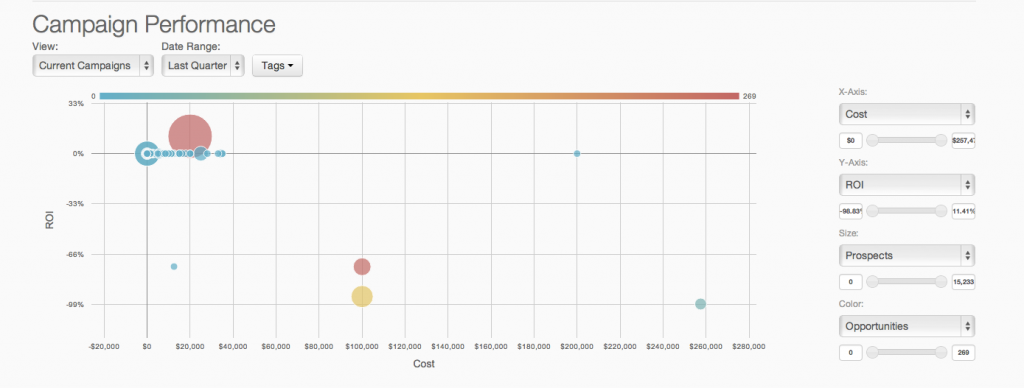
Google Analytics is perhaps the best-known web analytics product and, as a free product, it has massive adoption. Although it lacks some enterprise-level features compared to its competitors in the space, the launch of the paid Google Analytics Premium edition seems likely to close the gap.
$0
per month
Heap
Score 8.2 out of 10
Mid-Size Companies (51-1,000 employees)
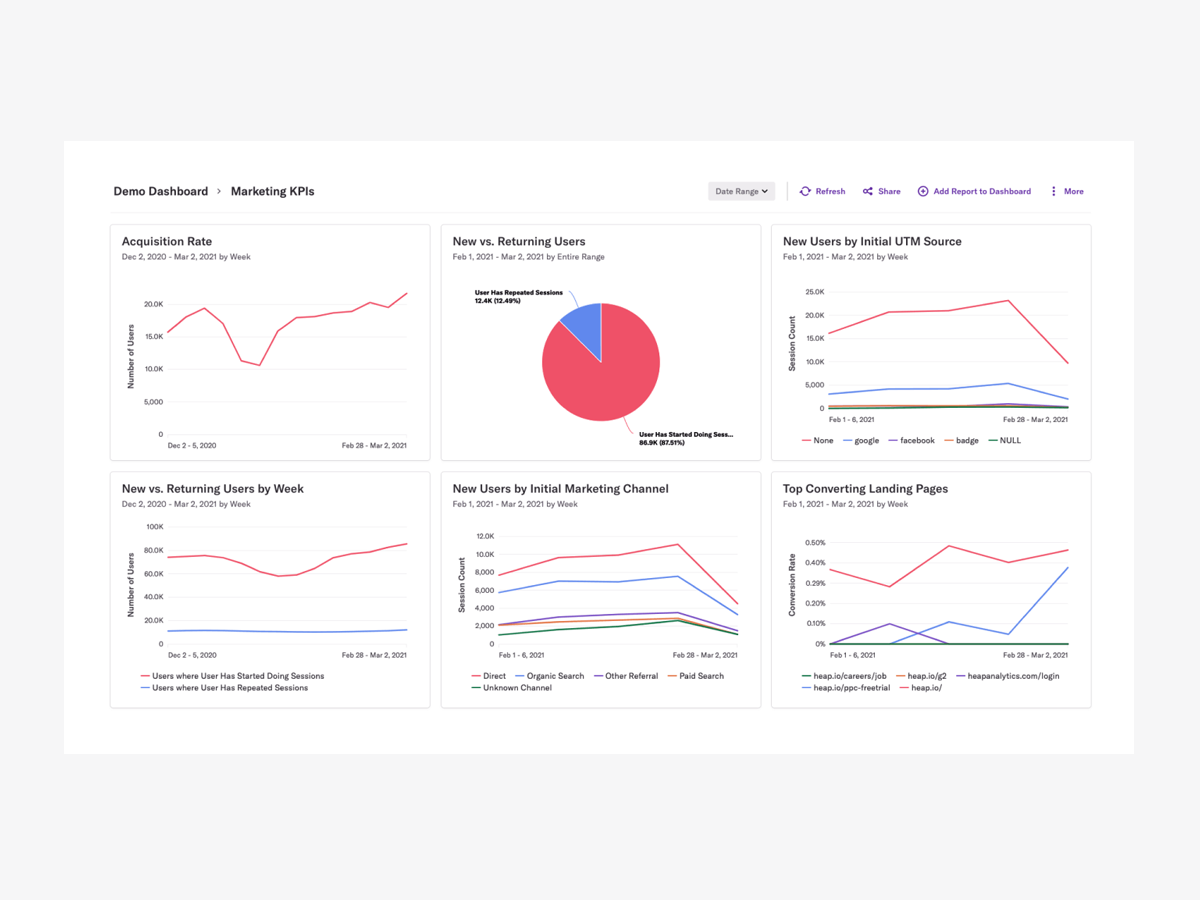
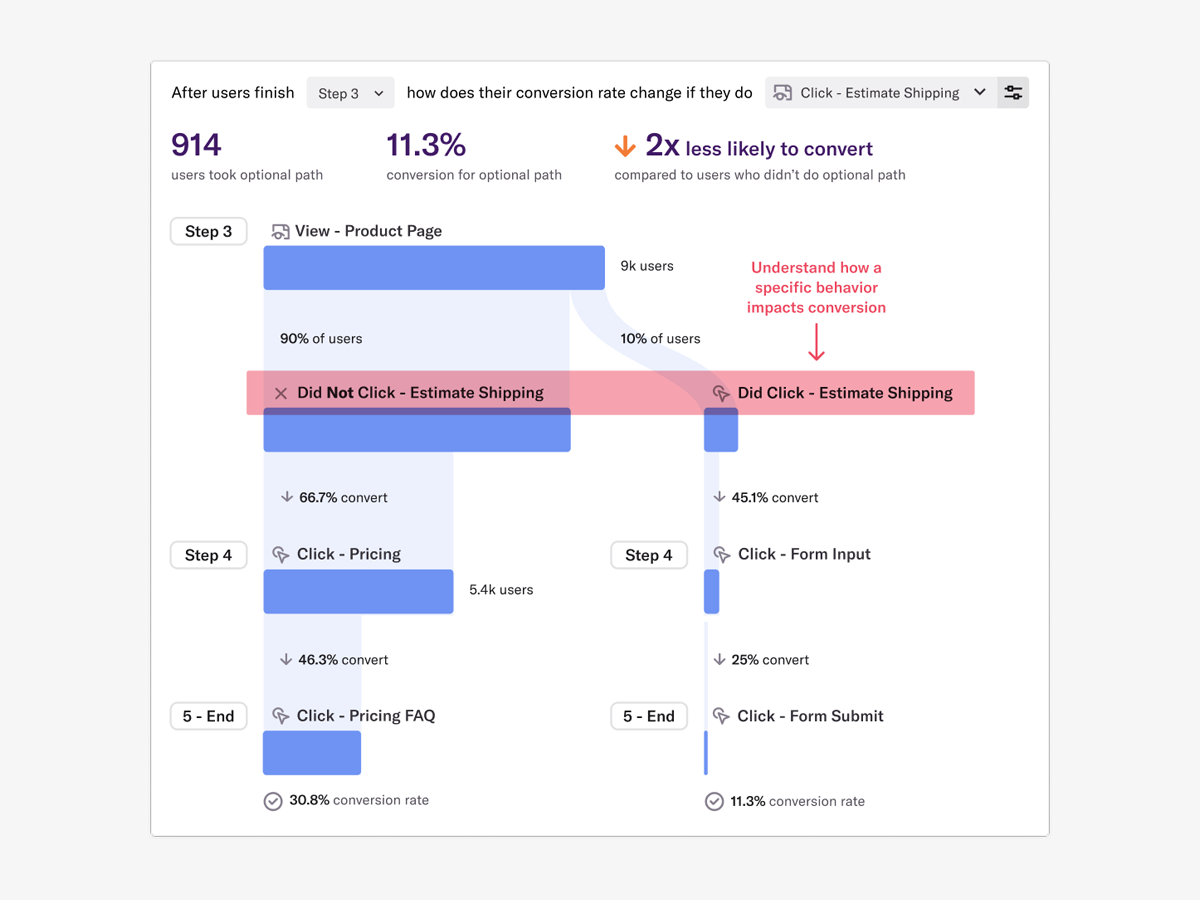
Heap is a web analytics platform captures every user interaction on web iOS with no extra code. The tool allows you to track events and set up funnels to understand user flow and dropoff. It also provides visualization tools to track trends over time.
$0
per month
Agentforce Marketing
Score 7.7 out of 10
N/A
Marketing Cloud is a cloud-based digital marketing platform, used by marketers can segment their audience, deliver personalized messages, track campaign performance, engage leads and accounts, and optimize strategies based on real-time insights.
$1,250
per month per installation
Pricing
Google Analytics
Heap
Salesforce Agentforce Marketing
Editions & Modules
Google Analytics 360
150,000
per year
Google Analytics
Free
Free
$0
Up to 10k sessions/month
Growth
Starting at $3,600 annually
Up to 300k sessions/year
Pro
Contact Heap Sales
Custom sessions per month and unlimited projects
Premier
Contact Heap Sales
Custom sessions per month
Account Engagement
$1,250
per month
Engagement
$1,250
per month
Intelligence
$3,000
per month
Loyalty Management
$20,000
per month
Personalization
$100,000
per year
Data Cloud for Marketing
$108,000
per year
Offerings
Pricing Offerings
Google Analytics
Heap
Agentforce Marketing
Free Trial
No
Yes
Yes
Free/Freemium Version
Yes
Yes
No
Premium Consulting/Integration Services
No
Yes
Yes
Entry-level Setup Fee
No setup fee
Optional
No setup fee
Additional Details
—
Heap pricing is based on session volume. A session is a period of activity from a single user on your app or website. It can include many pageviews or events.
Google Analytics is the only tool of its kind (that I'm aware of). Other tools, like website builders, may have built-in analytics, but they're nothing compared to what Google Analytics offers.
I have used Moz and Google Analytics. They provide overlapping information, but they also provide unique information. I like that Moz shares broken images and links and points out problems on the site that are slowing down the site and effecting the site's performance and …
We also use Pardot to monitor traffic to our site. Google Analytics gives you a lot more data. Pardot is more focused on once the traffic to our site identifies themselves (by filling out a form) and how they engage with us after that (email opens, website views, etc.).
From a startup perspective, Heap is one of the best and fastest ways to go from 0 analytics to nearly all of what one would need with the least amount of effort. It's faster and easier to implement than many above and it's better suited for quick quantifiable analytics that …
Heap is way, way more intuitive, and easy to use than Google Analytics 4. It took so much effort to set up the simplest reports in the GA4 interface, which is also a huge mess at the moment. Heap obviously lacks the tighter integration with Google products, meaning you have to …
We evaluated Heap against Mixpanel but realized that Mixpanel was a non-starter for us. (Kudos to their sales rep, who quickly identified this and told us.) We inherited a Google Analytics implementation but have since had to stop using it due to GDPR restrictions.
I prefer Google Analytics to Heap, but that's probably because I used it first and for longer, so I've gotten very used to it. Heap is about as similar to Google Analytics as cheese is to filing your tax return, so switching from one to the other was difficult, and, as I said …
During the procurement process, we looked at Google Analytics and Amplitude. Google Analytics is free, and it is a platform we are already using frequently at my company; however, it does not have the dynamic product analytics capabilities that we need. Amplitude is more …
I didn't select heap. Someone else did. I wasn't consulted during the process either, it was there before I arrived and we recently renewed, but I wasn't part of that process. Hotjar was alright, the heapmap is a neat way to quickly show non-experts where we might have an …
Heap is much easier to use versus Google Analytics. Previously, I was using Segment to get channel level data. However, Segment is not a customizable tool to understand top of funnel/web performance in the same way Heap does. Heap Connect is excellent when it comes to creating …
Heap blows away the competition in this space in my opinion. Amplitude was the closest competitor but did not have the ease of instrumentation that Heap offers out of the box. Google Analytics has gotten worse year after year and was borderline worthless for our business, as …
Heap had an edge over Google Analytics in many ways. Few points to consider Heap over GA. 1. Low code implementation and less involvement of engineering team. 2. Great reporting dashboard with additional feature of of showing user journey, that helps understand user behaviour
Google Analytics stacks up for high level traffic and marketing data but not ideal for enterprises looking user level product interactions in detail. On the other hand Heap stood out for its automatic data capturing, faster onboarding, easy to use dashboards, Highly integrable …
For me, Heap is much simpler to utilize. I've previously used Google and Adobe Analytics but switched to Heap because it provide better features and is easy to integrate. Without a specialist's assistance, I am able to construct dashboards and am convinced that they are useable …
The ability to view events in real time as they occur, restrict them to just show mine, and then create dashboards using those events is the finest feature for me. It eliminates the requirement for constant 100% accuracy in documentation maintenance and guessing. I can monitor …
Heap was the clear winner in our comparison as it had a clear interface which allows for easy graph and table making. The best part of Heap is that it saves each and every action performed on all of our webpages. Even if a certain event is not defined, it can still be created …
We didn't choose Heap over the others listed above. But we use Heap in conjunction with several other platforms in order to better understand our user base. Heap has been a great addition to our repertoire of usable tools and we love how it has integrated with other …
Compared to GA, Heap provides a much better UI, and its a much better product analytics tool (considering GA's main functionality is not for Product analytics) Overall, of you, are searching for Product analytics I would choose Heap instead of GA.
Heap is much easier for me to use. With Adobe Analytics, I needed to work exclusively with a product analyst whose whole job is working in Adobe Analytics. I can create dashboards without help from a specialist and feel confident that they are functional, actionable, and usable …
Mix panel did not have automated event tracking so a developer would need to manually add every single event which was not functional. Outside of that, many core features were the same although mix panel did allow for custom reporting and querying. Mix panel felt much more …
One of the key features of Heap compared to other tools is auto-capture. Heap is now introducing session recordings, thereby covering features from other competitors as well.
Pardot out-ranks the competition in regards to the integration with Salesforce. It is hard to beat the ability to use your already-made customer profiles and contact information in your marketing campaigns. Where it is lacking is the usability. MailChimp is a much more user …
The only other product we evaluated was HubSpot. We felt that for the cost, Pardot was a better option for us.
Verified User
Employee
Chose Salesforce Agentforce Marketing
I have used Bitly to track the performance of social media links. I found Pardot to be superior because of its capability to identify and track individuals. I prefer using Pardot to Adobe because it provides details about individual customers. I also prefer Pardot over Google …
We used HubSpot before and it performed well. However, as we were planning to adopt NetSuite as our ERP, we needed a marketing solution that integrated well with it. That's where HubSpot fell short. Pardot had a built in integration with NetSuite via a Pardot connector. Also, …
Eloqua was too expensive. Marketo, is a very slick product, and the pricing they offered us for the lowest-level version (Small and Medium Business) was competitive, but still about $3,000 per year more than Pardot. One big issue with Marketo though was …
Features
Google Analytics
Heap
Salesforce Agentforce Marketing
Web Analytics
Comparison of Web Analytics features of Product A and Product B
Google Analytics
8.4
11 Ratings
4% above category average
Heap
-
Ratings
Salesforce Agentforce Marketing
-
Ratings
Lead Conversion Tracking
8.110 Ratings
00 Ratings
00 Ratings
Bounce Rate Measurement
8.410 Ratings
00 Ratings
00 Ratings
Device and Browser Reporting
9.211 Ratings
00 Ratings
00 Ratings
Pageview Tracking
9.111 Ratings
00 Ratings
00 Ratings
Event Tracking
8.311 Ratings
00 Ratings
00 Ratings
Reporting in real-time
7.910 Ratings
00 Ratings
00 Ratings
Referral Source Tracking
8.510 Ratings
00 Ratings
00 Ratings
Customizable Dashboards
7.910 Ratings
00 Ratings
00 Ratings
Email & Online Marketing
Comparison of Email & Online Marketing features of Product A and Product B
Google Analytics
-
Ratings
Heap
-
Ratings
Salesforce Agentforce Marketing
7.4
171 Ratings
3% below category average
WYSIWYG email editor
00 Ratings
00 Ratings
7.5122 Ratings
Dynamic content
00 Ratings
00 Ratings
8.1153 Ratings
Ability to test dynamic content
00 Ratings
00 Ratings
6.5112 Ratings
Landing pages
00 Ratings
00 Ratings
7.6121 Ratings
A/B testing
00 Ratings
00 Ratings
7.1151 Ratings
Mobile optimization
00 Ratings
00 Ratings
6.8111 Ratings
Email deliverability reporting
00 Ratings
00 Ratings
7.4132 Ratings
List management
00 Ratings
00 Ratings
8.2129 Ratings
Triggered drip sequences
00 Ratings
00 Ratings
7.395 Ratings
Lead Management
Comparison of Lead Management features of Product A and Product B
Google Analytics
-
Ratings
Heap
-
Ratings
Salesforce Agentforce Marketing
8.1
124 Ratings
4% above category average
Lead nurturing automation
00 Ratings
00 Ratings
8.7109 Ratings
Lead scoring and grading
00 Ratings
00 Ratings
8.1110 Ratings
Data quality management
00 Ratings
00 Ratings
7.4116 Ratings
Automated sales alerts and tasks
00 Ratings
00 Ratings
8.2101 Ratings
Campaign Management
Comparison of Campaign Management features of Product A and Product B
Google Analytics
-
Ratings
Heap
-
Ratings
Salesforce Agentforce Marketing
7.4
114 Ratings
0% above category average
Calendaring
00 Ratings
00 Ratings
7.5103 Ratings
Event/webinar marketing
00 Ratings
00 Ratings
7.397 Ratings
Social Media Marketing
Comparison of Social Media Marketing features of Product A and Product B
Google Analytics
-
Ratings
Heap
-
Ratings
Salesforce Agentforce Marketing
7.4
88 Ratings
1% above category average
Social sharing and campaigns
00 Ratings
00 Ratings
7.483 Ratings
Social profile integration
00 Ratings
00 Ratings
7.539 Ratings
Reporting & Analytics
Comparison of Reporting & Analytics features of Product A and Product B
Google Analytics
-
Ratings
Heap
-
Ratings
Salesforce Agentforce Marketing
7.7
124 Ratings
5% above category average
Dashboards
00 Ratings
00 Ratings
8.1118 Ratings
Standard reports
00 Ratings
00 Ratings
7.5123 Ratings
Custom reports
00 Ratings
00 Ratings
7.4100 Ratings
Platform & Infrastructure
Comparison of Platform & Infrastructure features of Product A and Product B
Google Analytics is particularly well suited for tracking and analyzing customer behavior on a grocery e-commerce platform. It provides a wealth of information about customer behavior, including what products are most popular, what pages are visited the most, and where customers are coming from. This information can help the platform optimize its website for better customer engagement and conversion rates. However, Google Analytics may not be the best tool for more advanced, granular analysis of customer behavior, such as tracking individual customer journeys or understanding customer motivations. In these cases, it may be more appropriate to use additional tools or solutions that provide deeper insights into customer behavior.
Scenarios when Heap was well suited: It is when a user claims that he encountered a bug without giving us the details of the error message. Scenarios where it is less appropriate: Its when we try to capture user interaction in our mobile app
I think the product, by definition, is meant for marketing — and we use it exactly for that, for running campaigns. That’s the best-suited use case for the product. I don’t think it’s really meant to be used for anything else — that’s just not how it’s designed.
We will continue to use Google Analytics for several reasons. It is free, which is a huge selling point. It houses all of our ecommerce stores' data, and though it can't account for refunds or fraud orders, gives us and our clients directional, real time information on individual and group store performance.
It's a great platform. I'm glad that one of our product managers introduced it because it has allowed us to create all kinds of new functionality. We're not only able to create a better product experience from our communications because of Heap, but we're also able to generate all kinds of helpful analysis.
As of right now we have not seen any other program that integrates as seamlessly into our Salesforce platform. We have barely scratched the surface of all the features and use cases. It would be irresponsible to make a move to another platform in the near future. We have not come up against any limitations that would prompt a need to switch
Google Analytics provides a wealth of data, down to minute levels. That is it's greatest detriment: find the right information when you need it can be a cumbersome task. You are able to create shortcuts, however, so it can mitigate some of this problem. Google is continually refining Analytics, so I do not doubt there will be improvements
On a scale from 1-10, I find Heap to be incredibly user-friendly and easy to use. I enjoyed the training videos available and was quickly able to pick up how to create events and reports to track user interactions on our product. I would recommend Heap for its usability first and foremost.
You won't find another solution that has as many features as Salesforce Marketing Cloud Interaction Studio. We all know Salesforce, we all know how big they are and it's not for nothing... Their tools do most of the things you want, need and even imagine. Using it is complicated, but the usability is infinite.
We all know Google is at top when it comes to availability. We have never faced any such instances where I can suggest otherwise. All you need is a Google account, a device and internet connection to use this super powerful tool for reporting and visualising your site data, traffic, events, etc. that too in real time.
I've never run into any issues with Heap's availability, Heap is always there when I need it. I haven't run into any issues like application errors or unplanned outages during my 2+ years of using Heap. Each and every time I log in to Heap I have a completely functional experience
Upgrades and timing of the upgrades were communicated well and planned during off hours for our work. If we did have a campaign scheduled during that time, it would kick-off after the system was back active. There were a few unplanned system down times, but it was a rare occurrence and those times were also short in duration.
This has been a catalyst for improving our site's traffic handling capabilities. We were able to identify exit% from our sites through it and we used recommendations to handle and implement the same in our sites. We have been increasing the usage of Google Analytics in our sites and never had any performance related issues if we used Analytics
Heap doesn't affect page load times considerably nor has a large impact [on] our overall score, as far as page loading times inside of the tool its pretty reliable to retrieve data as much as "instant" that it can be the delay seems to be on data getting tracked into the servers to be read but it's not significant.
Though the make up of MA apps is not built this way today, it would be nice to see them become more real-time. The integration between Salesforce and Pardot is not a true real-time integration. If I modify something in Salesforce, those changes are not automatically reflected in Pardot immediately. There is a delay of about 15 minutes before the systems sync. This delay, although not long, is less than ideal We would love the systems to be integrated real time such that changes are propagated from one system to the other immediately.
The Google reps respond very quickly. However, sometimes they can overly call you to set up an apportionment. I'm very proficient and sometimes when I talk to reps, they give beginner tutorials and insights that are a waste of time. I wish Google would understand my level of expertise and assign me to a rep (long-term) that doesn't have to walk me through the basics.
Heap support has allowed us to troubleshoot and test a lot of different items. Their support team is always helpful and friendly, even when we come to them with the most complicated questions. I think this greatly improves the value proposition of the product because their support team is knowledgable and friendly.
They are really responsive and more than not solve the problem or give you insight to how you can manage the solution yourself. I do find however sometimes a long delay on the more complex issues when they need to loop in other departments. but overall a good experience with support
The trainers at the Pardot user conference (Elevate and Connections) were very knowledgeable and presented the material well. Again, the content was targeted to more of a new user audience, and was not really relevant for folks who had been using the product for 2+ years.
love the product and training they provide for businesses of all sizes. The following list of links will help you get started with Google Analytics from setup to understanding what data is being presented by Google Analytics.
Pardot's online training touches on all topics briefly and vaguely without much indepth exploration into how a final outcome could look, such as Nurturing Campaigns, Email templates, landing page templates, etc... The only true way to uncover Pardot's full capabilities is to have Front End design and coding experience. Without this key skill set, I would not recommend Pardot to another business.
I think my biggest take away from the Google Analytics implementation was that there needs to be a clear understanding of what you want to achieve and how you want to achieve it before you start. Originally the analytics were added to track visitors, but as we became more savvy with the product, we began adding more and more functionality, and defining guidelines as we went along. While not detrimental to our success, this lack of an overarching goal resulted in some minor setbacks in implementation and the collection of some messy data that is unusable.
The implementation was smooth and easy. The Heap team helped us with implementation and it went great! Within a few weeks, we were fully up and running and utilizing the platform to its full capability. This is an additional thing that has made this platform so great and we couldn't recommend it enough.
From an IT perspective, once you set up the Javascript beacon and start collecting data there is a waiting game. During this time you can start labeling your site actions which can be labor intensive for a single person, but you don't really have the final end-users on the platform yet. We did a lot of training so users were experienced, but it wasn't until they had their first tasks to accomplish that they started using the system and had questions. I'd recommend setting up some immediate goals for an end-user to start segmenting for the purpose of displaying message campaigns so you can jump start end-user action.
I have not used Adobe Analytics as much, but I know they offer something called customer journey analytics, which we are evaluating now. I have used Semrush, and I find them much better than Google Analytics. I feel a fairly nontechnical person could learn Semrush in about a month. They also offer features like competitive analysis (on content, keywords, traffic, etc.), which is very useful. If you have to choose one among Semrush and Google Analytics, I would say go for Semrush.
Heap offers a ton of functionality on a single platform.It also has an smart data science layer to offers suggestions for next steps in the analysis, allowing us to explore alternative paths we may not think to take. The low-code option for updating data is appealing, and there is a lot of automation with minimal engineering effort.
We use Salesforce Marketing Cloud for lead management, generating reports, tracking customer and dealer information, inputting orders, and more. I prefer HubSpot for email marketing and automation because it is easier to use and the emails are designed much better. We currently use Salesforce and HubSpot, and we are very happy to have both, as they have different pros/cons.
Google Analytics is currently handling the reporting and tracking of near about 80 sites in our project. And I am not talking about the sites from different projects. They may have way more accounts than that. Never ever felt a performance issue from Google's end while generating or customising reports or tracking custom events or creating custom dimensions
The most challenging part of using Heap in a growing organization is the naming and structure in which reports and dashboards are organized. I work within the marketing department and our Heap leader internally works within the IT/Product department, which makes it challenging because we often don't speak the same language, so the learning curve has been steep without any specific use-case examples to leverage online.
Prior to this, we had no solution and literally were doing things on paper in a world where technology is outpacing paper. Having this process optimized has made it easier for the sales and marketing people to change information. From the training perspective, it has allowed us to see holes in where we could create additional support training, so the ROI here has been a lot more than just the optimization of a process.
Salesforce Marketing Cloud allows us to more efficiently reach out to a higher number of prospects.
Salesforce Marketing Cloud allows us to nimbly communicate important messages in a timely fashion to facilitate conversion.
Salesforce Marketing Cloud allows us to track who is opening our messages so that we can stop sending to those not interested and focus on the most engaged audiences.