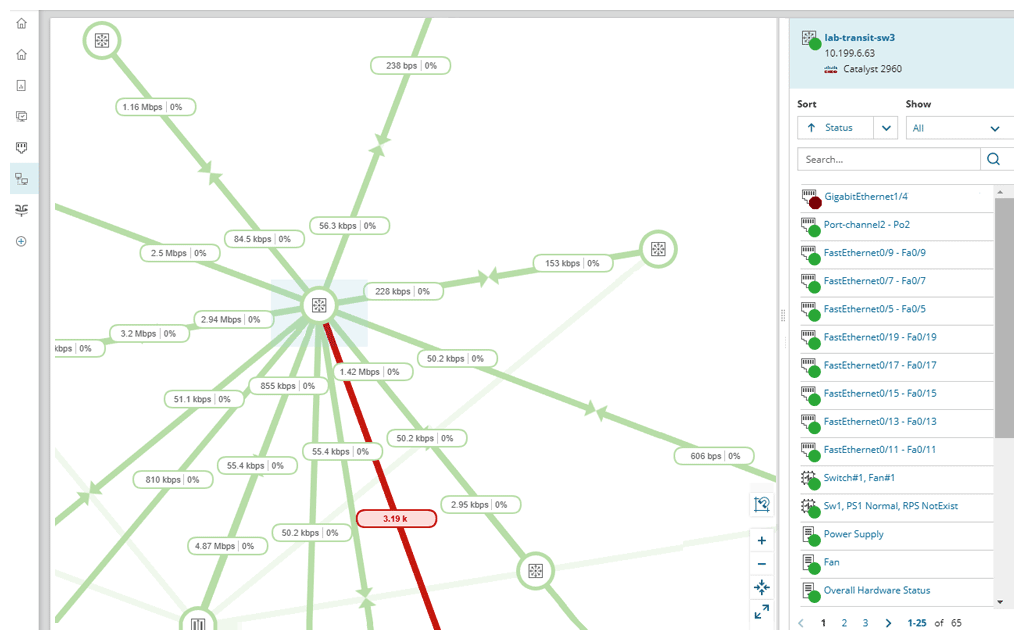
SolarWinds NPM is a monitoring and performance management platform. It provides performance troubleshooting support, auto network discovery, customizable thresholds, and can be rapidly deployed.
$1,638
per year
Spiceworks Help Desk
Score 8.2 out of 10
N/A
Spiceworks offers a set of free tools for IT network management and help desk support ticketing. The inventory management system essentially provides comprehensive device information for asset management. The Spiceworks Network Monitor provides information on observed IT for problem tracking and server performance monitoring. And finally, the Spiceworks Help Desk Software lets IT personnel stay on top of issues across the network with a ticketing system. Help desk roles with role-based…
Given SolarWinds' popularity we actually ended up not trying any other products. Over time we have tried to use other systems, such as Spiceworks, for other small things and found it to not be as powerful. Some of the alerting was the same but there was no way to deep dive into …
Other products I've used (Spiceworks, Mikrotik's The Dude) are good at their jobs but ultimately don't have the scalability of NPM or the more advanced network visibility features that make NPM so great. Other products (like Spiceworks especially) are also built as several …
They each have their place, but SolarWinds allowed us more and better features and alerts than the implementations of the other two that we were using.
Solar Winds is usually high rated by most users. Pricing is all over the board and depends on the day of the month. It has the main features we were looking for. They are always adding things to it.
In the past I have "tried" to utilize a couple of different "free" alternatives, including Spiceworks and OpsView. I found both hard to configure and quick to overwhelm me with what I considered useless information. I have also looked at larger network management systems like HP…
SolarWinds is far superior but it is a locally installed application. I think each does things well. For a free or paid no-ad version legacy style it was great. As for cloud-only options, I think there are still some things that need to be improved on. There needs to be …
Solarwinds NPM is well suited for medium to large networks, it may be a bit heavy for the SOHO environment as most of the tools and reports are designed for monitoring KPIs which may not be critical for a small shop. NPM can handle large networks with several sites and mixed technologies ranging from networks, server systems, storage devices and SLA reporting.
It's a great helpdesk solution - we currently have five years of data within it, roughly 25,000 tickets. The older edition is a great inventory and software license tracking tool. It is easy for users to use the interface and submit tickets and requests on the web, and its email integration is solid. The new version is a below-average system monitoring tool, only giving up/down status and a few other metrics.
The entire IT staff relies on NPM in its daily operations. It would be impossible for us to maintain our level of service without it. If SolarWinds gets to proud of their product and begins to over charge for it, we would be forced to reconsider and use a different product. But as it stands it is worth the price to renew it.
Spiceworks is a free tool, so there would be no hesitation if we are required to upgrade it. We have installed Spiceworks on a dedicated server with more than enough resources to get the most from this tool, so we will have this running in our department for years to come.
SolarWinds Network Performance Monitor (NPM) is quite an extensive product, covering all our bases and requirements. There are a lot of customizable options and features which you can work with for their alerting which is really useful. I haven't found anything yet which I thought SolarWinds Network Performance Monitor (NPM) could do, but it actually couldn't so overall it works nicely and does the job.
Spiceworks is user friendly and easy to set up. It can be customized to suit your needs. If there are any problems, you can go to the community forums for support and be in contact with many IT Pros, as well as the Spiceworks support staff and development teams who are always happy to help users out
In all of the times that we called support, someone at SolarWinds had the answer for us in a timely manner. Through thwack and other internet searching, we have been able to resolve all of our issues that arose to our satisfaction. The support staff have always been knowledgeable of their products or had a fellow support staff member to rely on to get the needed answers.
Spiceworks has been working out of the box, and some of the basic customizations have been successful with just our internal staff handling. We don't have any other issues with the tool. It provides us with the inventory information we want in a quick and concise report in a variety of formats for our team.
The training is good but during the implementation, you can get situations not learned during the training. The trainer was very open to hearing the questions about use cases and always sharing his experience. I really recommend having official training to take advantage of all features that the NPM can bring.
Make sure your inventory is accurate. Stand up some virtual machines for testing prior to installation. Make sure your database and its credentials are setup. Think about things you want to monitor that may not be obvious - UPS units, Door hardware, PBX systems, Fabric Channel switches, firewalls, routers, switches. Try to setup SNMP on these devices and have an IP that you will assign to the new server. If you do that it will go well.
If you can spin up a VM to run it on, you'll thank yourself later. If you have remote sites, set up a local server (or dedicated computer) at each site and set them up as remote collectors for the main site. You'll save time and bandwidth
We selected SolarWinds Network Performance Monitor because of the capabilities of the product versus the price. The tools also work well with their other products and support is fairly good. We have never had a problem when we needed to make a call.
EGroupware UI is clunky and hard to use, Jira is great but the pricing is expensive in comparison with spice works that has a free version and you can test it out properly before buying and make a correct decision based on your business plan and company objectives with the right software.
SolarWinds allows us to proactively address hardware issues before they impact the business. We recently had a server that was experiencing issues sporadically and we were able to use the data from SolarWinds to track down and correct the issue before it tanked the server.
SolarWinds gives our IT department some piece of mind knowing that they'll be alerted of any issues real time.
We can use SolarWinds data to justify needed to replace or upgrade certain equipment that is key to our core business.