TrustRadius: an HG Insights company

IBM Cognos Analytics

Score7.5 out of 10

621 Reviews and Ratings

What is IBM Cognos Analytics?

IBM Cognos is a full-featured business intelligence suite by IBM, designed for larger deployments. It comprises Query Studio, Reporting Studio, Analysis Studio and Event Studio, and Cognos Administration along with tools for Microsoft Office integration, full-text search, and dashboards.

Media

A natural language query, used in IBM Cognos Analytics to get AI-powered insights from data.
AI-generated insights and forecasts that can be added with just a click of a button.
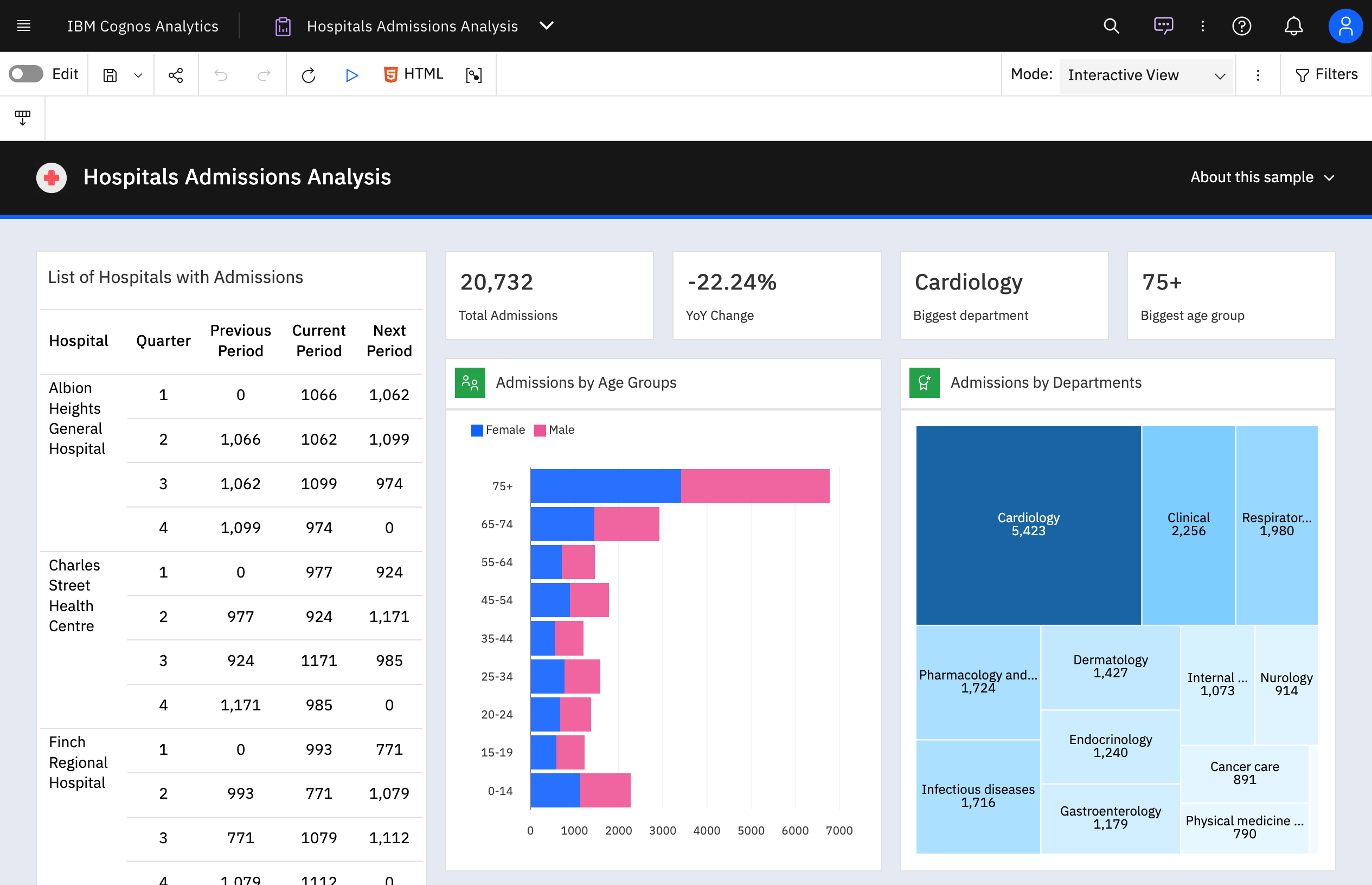
A dashboard that can be generated automatically using IBM Cognos Analytics by uploading or selecting data.
An AI-generated dashboard from a spreadsheet that was just uploaded. This offers a great starting point for the creative process.
Where to import data to IBM Cognos Analytics from CSV files and spreadsheets. Users can connect to cloud or on-premises data sources, including SQL databases, Google BigQuery, Amazon, and Redshift.

1 / 5

Top Performing Features

  • Report Versioning

    Report versioning is the assignment of version numbers to each version of a report to help in tracking.

    Category average: 7.9

  • Publish to Web

    Category average: 8

  • Report Delivery Scheduling

    Report Delivery Schedule is the ability to have reports delivered to a destination at a specific data and time.

    Category average: 8.3

Areas for Improvement

  • Mobile Application

    A dedicated app for iOS and/or Android.

    Category average: 7.2

  • Predictive Analytics

    Predictive Analytics is the ability to build forecasting models based on existing data sets.

    Category average: 7.2

  • Pattern Recognition and Data Mining

    Pattern recognition and data mining mean the ability to recognize hidden patterns in large quantities of data.

    Category average: 7.1

IBM Congnos Analytics tool

Use Cases and Deployment Scope

It addresses problems related to data warehousers, help with poor decision making, and difficulties in identifying trends and other potential opportunities. We utilize the tool within our organization to better understand data, make informed decisions, and that advantage of other features like reporting, modeling, analysis, dashboards, and AI powered insights to better track trends.

Pros

  • We can make dozens of dispatchers all focusing on different types of workloads.
  • Friendly user interface, without the need for coding or complicated editing.
  • Highly functionality reporting tools.
  • We can easily create trigger when a certain threshold are met sending reports or alerts to needed parties.

Cons

  • Have to regularly checking official IBM channels or newsletters for updates and changes.
  • The availability to work in a sandbox environments or trial versions of IBM Cognos Analytics to practice.
  • Better for On-Prem vs cloud.
  • The pricing is higher than some of their competitors.

Return on Investment

  • The platform can be pretty pricey.
  • Convoluted contracts and they fine you for any breach during audits.
  • Things are changed between releases without any warning and break.
  • It is second to none at being able to customize list and crosstab type reports.
  • You can easily set up a report to be emailed out every day and even have it export the report to a shared folder.
  • On-prem environments can be scaled up pretty much as much as you would like.

Alternatives Considered

Microsoft Power BI and Tableau Cloud

Other Software Used

Microsoft Power BI, Tableau Desktop, QuickBooks Desktop Enterprise

Powerful tool for enterprise grade structured reporting

Use Cases and Deployment Scope

I use IBM Cognos Analytics for its business intelligence (BI) functionality in complex reports preparation, data analysis, dashboard formulations, and monitoring business unit's sales performance over the period. IBM Cognos Analytics, helped us in solving various problems ranging from manual reports creation leading lost of hours of turnaround and human error, dealing with data silos within various departments, delay in decision making. Bing business analyst, my scope of use case for Cognos centres around turning scattered data into actionable insights by creating sales insights reports, interactive dashboards for seniors consumption, and data exploration, validation, analysis and storytelling.

Pros

  • Enterprise reporting - Create, customise, and run reports on sales trends, consumer sentiment, etc.
  • Dashboard creation and data exploration & analysis - Using drag and drop feature to create ad-hoc visualisation. Additionally, using AI powered natural language query feature for data analysis and dashboard input (formation of pie, bar, line charts). It's useful for no-technical person to put queries around the spreadsheet data to get quick answers.
  • Building insights for accurate decision making - Package reports with data backed insights for stakeholders in pdf, and Excel format to support business ad-hoc cases, forecasting and strategic recommendations on relevant asks.

Cons

  • Limited real-time data connectivity - IBM Cognos Analytics relay on scheduled data refresh leading issues in real-time or streaming data access, especially for live sales data updates.
  • End point experience (Mobility) - Although it supports mobile but its experience can be improved as the app is not fully responsive or fluid like interactive filtering and dashboard creation are not user-friendly on small screen. It would be great if mobile UX is improved with better touch friendly controls and offline viewing options.
  • Limited data blending - There exist some struggle to blend or join data from different sources on the fly. If it had technical capabilities like Excel based data joining in dashboard or explorations without data module requiring creation upfront, would have been great for analysts.

Return on Investment

  • Report preparation - IBM Cognos Analytics reduced report formulation time by 60% specially for templated re-occurring reports like the monthly sales report
  • Improved decision making - The decision making speed has improved with Cognos's self service dashboards and AI driven data exploration
  • Automated distribution and uptime - Scheduled report delivery and bursting have eliminated various manual emailing and delays

Alternatives Considered

Microsoft Power BI

Other Software Used

SAP BusinessObjects Business Intelligence

IBM Cognos Analytics Review

Use Cases and Deployment Scope

IBM Cognos Analytics serves as a central platform for data analysis and visualization. It allows for me access and analyze data across different departments allowing me to interpret data sets and make informed business decisions.

Pros

  • access data across different platforms
  • create reports and dashboards
  • create visualization of data

Cons

  • allow for quicker learning curve for new users

Return on Investment

  • IBM Cognos Analytics with Watson delivers significant positive ROI
  • Significant Time Savings and Operational Efficiency

Other Software Used

Tableau Desktop

IBM Cognos Analytics - The Best BI Platform on the Market

Use Cases and Deployment Scope

In our organization, we use IBM Cognos Analytics for Inventory, financial, and historical reporting and dashboarding.

Pros

  • Scheduling
  • Modeling
  • Interoperability

Cons

  • 2FA with other authenticators
  • Interconnection with other applications like PA on Cloud Hosted

Return on Investment

  • Significant time savings in report distribution
  • Ease of administration
  • Savings by keeping things secured

Alternatives Considered

Microsoft Power BI

Other Software Used

IBM Planning Analytics

Usability

Good BI tool for advanced analytics.

Use Cases and Deployment Scope

We use IBM Cognos Analytics is a business intelligence and analytics platform to gather and aggregate data from multiple parts of our organization, then analyze and visualize data to make business decisions (mainly to improve B2B sales and customer satisfaction, but also as a hint for developing new products/solutions for our clients).

Pros

  • Data Visualization: Plenty of options exist for multiple use cases, and dashboards are easy to implement and customize.
  • Integration with IBM Watson: makes it easy to use Watson AI features (NLP etc.) on your data.
  • Its advanced analytics functionalities with powerful pattern detection/prediction models.

Cons

  • Steep learning curve for beginners. It takes time to understand what can be done and how.
  • The user interface feels old and not easy to use, especially compared to recent solutions.
  • Limited options for user identification (LDAP only).

Return on Investment

  • Helped improve the KPIs for sales/customer satisfaction.
  • Eliminated the need for manual reporting in several use cases.
  • However we needed quite some time to learn how to use BI functionalities.

Alternatives Considered

Tableau CRM and Salesforce Sales Cloud

Other Software Used

Slack, IBM watsonx Assistant, Microsoft Teams
