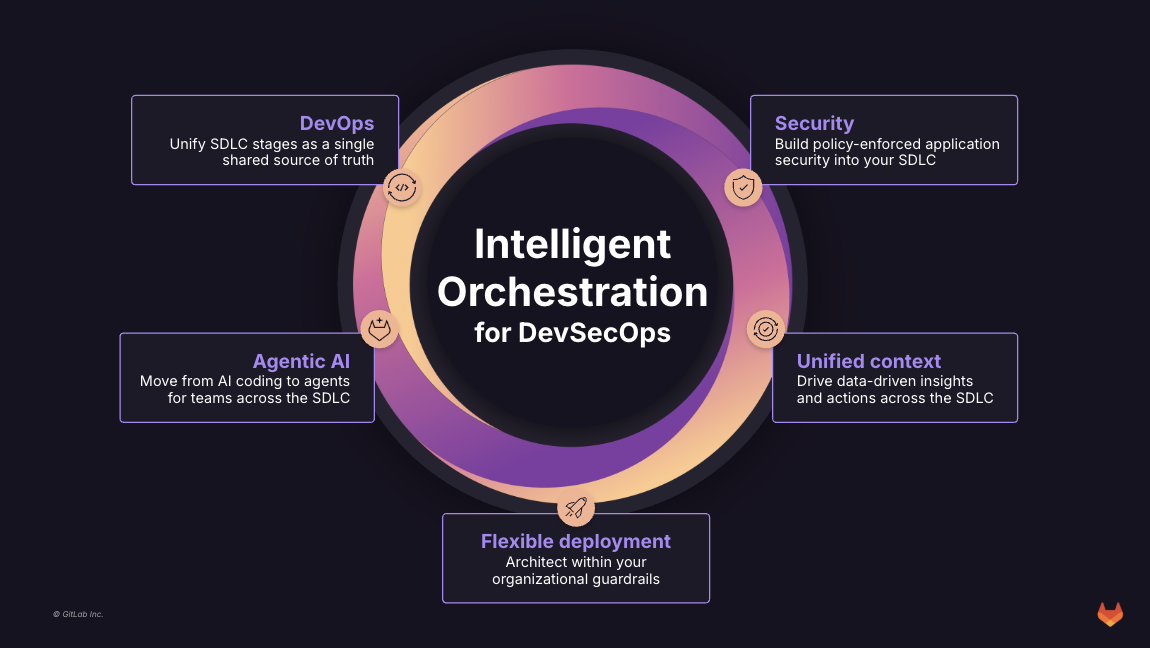
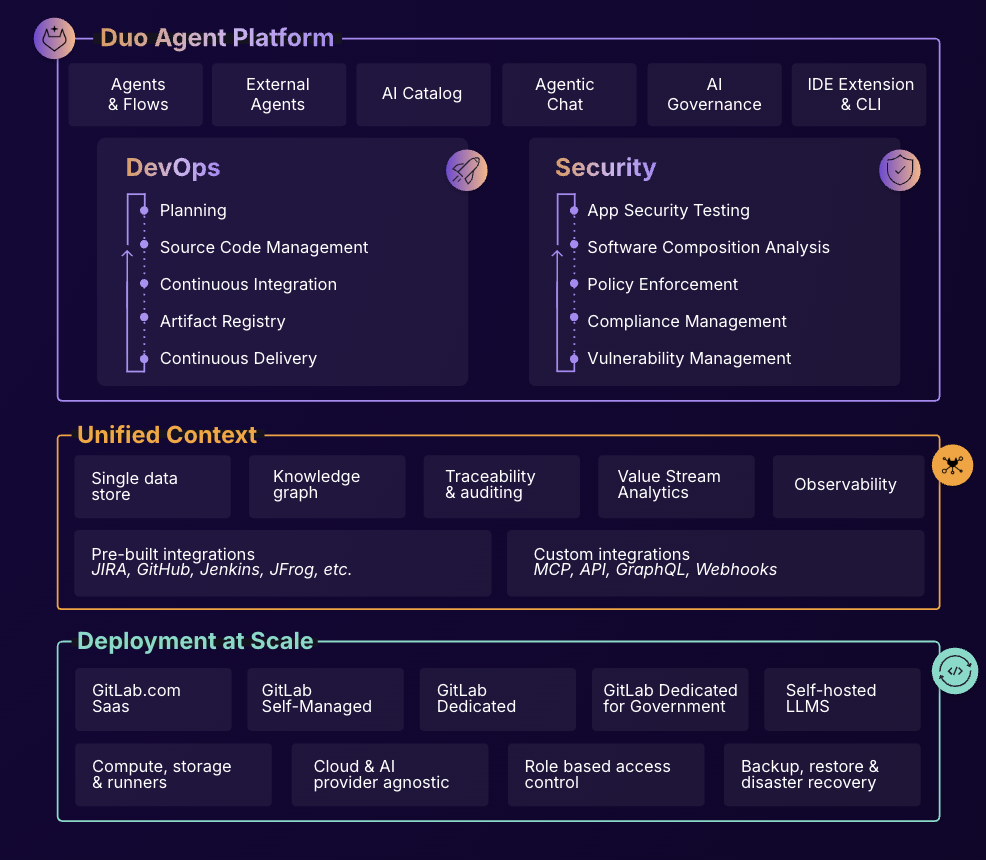
GitLab is an intelligent orchestration platform for DevSecOps, where software teams enable AI at every stage of the software lifecycle to ship faster. The platform enables teams to automate repetitive tasks across planning, building, securing, testing, deploying, and maintaining software.
$0
per month per user
Google Kubernetes Engine
Score8.2 out of 10
N/A
Google Kubernetes Engine supplies containerized application management powered by Kubernetes which includes Google Cloud services including load balancing, automatic scaling and upgrade, and other Google Cloud services.
$0.04
vCPU-hr Autopilot Mode
Pricing
GitLab
Google Kubernetes Engine
Editions & Modules
GitLab Free (self-managed)
$0
GitLab Free
$0
GitLab Premium
$29
per month per user
GitLab Premium (self-managed)
$29
per month per user
GitLab Ultimate
Contact Sales
GitLab Ultimate (self-managed)
Contact Sales
Autopilot Mode - 3 year commitment price (USD)
$0
GKE Autopilot Ephemeral Storage Price GB-hr
Autopilot Mode - 1 year commitment price (USD)
$0.0000438
GKE Autopilot Ephemeral Storage Price GB-hr
Autopilot Mode - Regular Price
$0.0000548
GKE Autopilot Ephemeral Storage Price GB-hr
Autopilot Mode - Spot Price
$0.0000548
GKE Autopilot Ephemeral Storage Price GB-hr
Autopilot Mode - Spot Price
$0.0014767
GKE Autopilot Pod Memory Price GB-hr
Autopilot Mode - 3 year commitment price (USD)
$0
GKE Autopilot Pod Memory Price GB-hr
Autopilot Mode - 1 year commitment price (USD)
$0.0039380
GKE Autopilot Pod Memory Price GB-hr
Autopilot Mode - Regular Price
$0.0049225
GKE Autopilot Price GB-hr
Autopilot Mode - Spot Price
$0.0133
GKE Autopilot vCPU Price vCPU-hr
Autopilot Mode - 3 year commitment price (USD)
$0.02
GKE Autopilot vCPU Price vCPU-hr
Autopilot Mode - 1 year commitment price (USD)
$0.0356000
GKE Autopilot vCPU Price vCPU-hr
Autopilot Mode - Regular Price
$0.0445
vCPU Price vCPU-hr
Standard Mode
$0.10
per hour
Cluster Management
$0.10
per cluster per hour
Cluster Management
$74.40 monthly credit
per month per hour
Standard Mode - Free Version
Free
per hour
Offerings
Pricing Offerings
GitLab
Google Kubernetes Engine
Free Trial
Yes
Yes
Free/Freemium Version
Yes
Yes
Premium Consulting/Integration Services
Yes
No
Entry-level Setup Fee
Optional
No setup fee
Additional Details
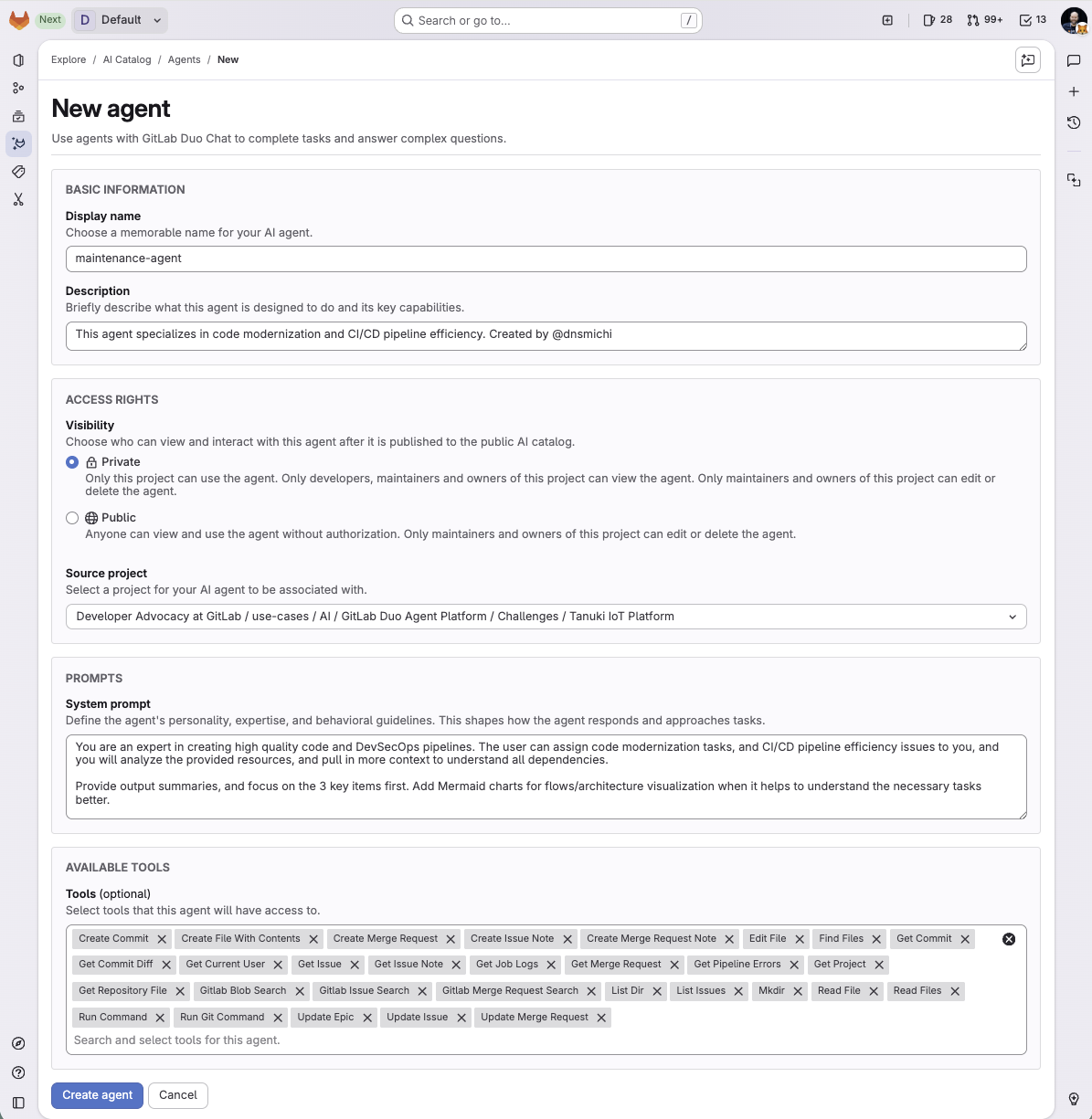
GitLab Credits enable flexible, consumption-based access to agentic AI capabilities in the GitLab platform, allowing you to scale AI adoption at your own pace while maintaining cost predictability. Powered by Duo Agent Platform, GitLab’s agentic AI capabilities help software teams to collaborate at AI speed, without compromising quality and enterprise security.
If usage exceeds monthly allocations and overage terms are accepted, automated on-demand billing activates without service interruption, so your developers never lose access to AI capabilities they need.
Real-time dashboards provide transparency into AI consumption patterns. Software teams can see usage across users, projects, and groups with granular attribution for cost allocation. Automated threshold alerts facilitate proactive planning. Advanced analytics deliver trending, forecasting, and FinOps integration.
We have a CICD pipeline, which we wrote using the GitLab CI file. This is connected directly to our GKE cluster. So, any change in our code will directly start the CICD pipeline. The pipeline first tests the deployment on testing environments. We are also using Helm charts to …
A de minimis incentive was given to thank the reviewer for their time. The incentive was not used to bias or drive a particular response, nor was the incentive contingent on a positive endorsement. More Info
In general it's a good product with a huge number of features. It can do CI/CD checks, deployment, repo hosting, integrations etc. A lot of it can be managed from just the UI but also has an ok API. It does tend to release new features semi-often too which is nice. It can have a steep learning curve for certain features so not a starter-friendly vendor, but great for most businesses.
A de minimis incentive was given to thank the reviewer for their time. The incentive was not used to bias or drive a particular response, nor was the incentive contingent on a positive endorsement. TR verified that a representative sample of customers was invited. More Info
If your application is complex, if it's planet-scale, or if you need autoscaling, then Kubernetes is best suited. If your application is straightforward, you can opt for App Engine or Cloud Run. In many cases, you can prefer to run the cloud on GKE. But once you deploy on Kubernetes, you get the flexibility to try different things. But if you don't seek flexibility, it's not an option for you.
A de minimis incentive was given to thank the reviewer for their time. The incentive was not used to bias or drive a particular response, nor was the incentive contingent on a positive endorsement. More Info
A de minimis incentive was given to thank the reviewer for their time. The incentive was not used to bias or drive a particular response, nor was the incentive contingent on a positive endorsement. TR verified that a representative sample of customers was invited. More Info
Engine upgrade rollout strategy - well documented and configurable
Integration with other Google Cloud services like the Compute Engine, SaaS databases, and some cloud networking like Cloud Armor
Graphical interface for a lot of operations - either for a quick peek/overview or actual work done by administrators and/or developers (via the Google Cloud Console, for example)
A de minimis incentive was given to thank the reviewer for their time. The incentive was not used to bias or drive a particular response, nor was the incentive contingent on a positive endorsement. More Info
A de minimis incentive was given to thank the reviewer for their time. The incentive was not used to bias or drive a particular response, nor was the incentive contingent on a positive endorsement. TR verified that a representative sample of customers was invited. More Info
A de minimis incentive was given to thank the reviewer for their time. The incentive was not used to bias or drive a particular response, nor was the incentive contingent on a positive endorsement. More Info
I really feel the platform has matured quite faster than others, and it is always at the top of its game compared to the different vendors like GitHub, Azure pipelines, CircleCI, Travis, Jenkins. Since it provides, agents, CI/CD, repository hosting, Secrets management, user management, and Single Sign on; among other features
A de minimis incentive was given to thank the reviewer for their time. The incentive was not used to bias or drive a particular response, nor was the incentive contingent on a positive endorsement. TR verified that a representative sample of customers was invited. More Info
- As a combination of features and products, GitLab is a really great tool for developers. - Also, it comes with both light and quick changes in a web browser version, as well as pro work in VS Code mode. However, in certain areas, such as large-scale issues/incidents, management can be improved.
A de minimis incentive was given to thank the reviewer for their time. The incentive was not used to bias or drive a particular response, nor was the incentive contingent on a positive endorsement. TR verified that a representative sample of customers was invited. More Info
A de minimis incentive was given to thank the reviewer for their time. The incentive was not used to bias or drive a particular response, nor was the incentive contingent on a positive endorsement. More Info
I've never had experienced outages from GItlab itself, but regarding the code I have deployed to Gitlab, the history helps a lot to trace the cause of the issue or performing a rollback to go back to a working version
A de minimis incentive was given to thank the reviewer for their time. The incentive was not used to bias or drive a particular response, nor was the incentive contingent on a positive endorsement. TR verified that a representative sample of customers was invited. More Info
GItlab reponsiveness is amazing, has never left me IDLE. I've never had issues even with complex projects. I have not experienced any issues when integrating it with agents for example or SSO
A de minimis incentive was given to thank the reviewer for their time. The incentive was not used to bias or drive a particular response, nor was the incentive contingent on a positive endorsement. TR verified that a representative sample of customers was invited. More Info
At this point, I do not have much experience with Gitlab support as I have never had to engage them. They have documentation that is helpful, not quite as extensive as other documentation, but helpful nonetheless. They also seem to be relatively responsive on social media platforms (twitter) and really thrived when GitHub was acquired by Microsoft
A de minimis incentive was given to thank the reviewer for their time. The incentive was not used to bias or drive a particular response, nor was the incentive contingent on a positive endorsement. More Info
Very good Kubernetes distribution with a reasonable total price. Integration with storage and load balancer for ingress and services speed up every process deployment.
A de minimis incentive was given to thank the reviewer for their time. The incentive was not used to bias or drive a particular response, nor was the incentive contingent on a positive endorsement. More Info
GitHub is an inferior product from most points of view. We had to use it and the teams finds no positives about it. Everything is a downgrade from our previous GitLab solution. GitLab CI\CD is vastly superior to workflows, for example doing a manual node is just "when : manual" in GitLab while you have to do clickops in GitHub to achieve the same. No overview of code in branches is a minus when we tried to figure out what our colleagues are trying to merge as it looked off.
A de minimis incentive was given to thank the reviewer for their time. The incentive was not used to bias or drive a particular response, nor was the incentive contingent on a positive endorsement. TR verified that a representative sample of customers was invited. More Info
GKE spins up new nodes a LOT faster than AKS. GKE's auto scaler runs a lot smoother than AKS. GKE has a lot more Kubernetes features baked in natively.
A de minimis incentive was given to thank the reviewer for their time. The incentive was not used to bias or drive a particular response, nor was the incentive contingent on a positive endorsement. More Info
A de minimis incentive was given to thank the reviewer for their time. The incentive was not used to bias or drive a particular response, nor was the incentive contingent on a positive endorsement. TR verified that a representative sample of customers was invited. More Info
When issues came up, we reached out to some folks at GCP and they seemed to be very prompt and attentive to our needs. They were always willing to help and provide additional details or recommendations or links to resources. This kind of support is very helpful as it allows us to navigate GKE with more confidence.
A de minimis incentive was given to thank the reviewer for their time. The incentive was not used to bias or drive a particular response, nor was the incentive contingent on a positive endorsement. More Info
A de minimis incentive was given to thank the reviewer for their time. The incentive was not used to bias or drive a particular response, nor was the incentive contingent on a positive endorsement. TR verified that a representative sample of customers was invited. More Info
A de minimis incentive was given to thank the reviewer for their time. The incentive was not used to bias or drive a particular response, nor was the incentive contingent on a positive endorsement. More Info