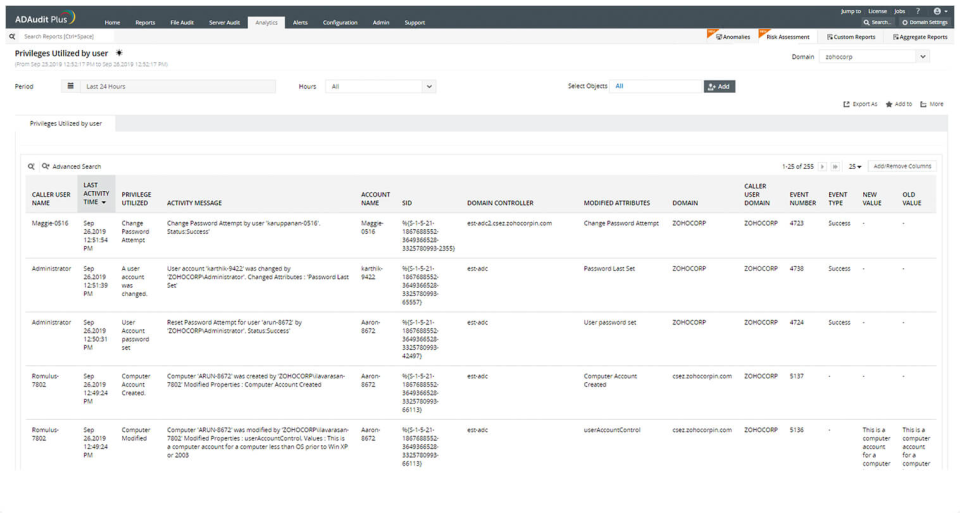
ADAudit Plus offers real-time monitoring,
user and entity behaviour analytics, and change audit reports that helps users keep AD and IT infrastructure secure and compliant. Track all changes to Windows AD objects including users, groups,
computers, GPOs, and OUs. Achieve hybrid AD monitoring with a single, correlated view of all
the activities happening across both on-premises AD and Azure AD. Monitor every user's logon and logoff activity, including…
$595
per year
PRTG
Score 8.5 out of 10
N/A
PRTG Network Monitor is the flagship offering from German software company Paessler, for monitoring local and wide area networks (LANs & WANs), servers, websites, apps, and more.
$2,149
per year
Pricing
ManageEngine ADAudit Plus
PRTG Network Monitor
Editions & Modules
Standard
$595
per year
Professional
$945
per year
PRTG 500
$2,149
per year
Hosted 500
$2,149
per year
PRTG 1,000
$3,899
per year
Hosted 1000
$3,899
per year
PRTG 2,500
$8,099
per year
Hosted 2500
$8,099
per year
PRTG 5,000
$14,199
per year
Hosted 5000
$14,199
per year
PRTG 10000
$17,899
per year
PRTG Enterprise
Custom Pricing
subscription license
Offerings
Pricing Offerings
ManageEngine ADAudit Plus
PRTG
Free Trial
Yes
Yes
Free/Freemium Version
No
No
Premium Consulting/Integration Services
No
Yes
Entry-level Setup Fee
No setup fee
No setup fee
Additional Details
Pricing is dependent on the number of domain controllers and starts at $595/year for the Standard edition, and $945/year for the Professional edition.
ManageEngine is very cheaper to get into and expand its use. It's a robust but not quite as powerful application as something like Quest or others. But for the most prevalent and needed, AD reporting requirements will meet your needs and expectations.
Fairly intuitive GUI however that could be improved, great insight and reporting on changes to AD but notifications could be better streamlined; A wizard of key indicators of compromise upon initial setup would help expedite the use of the product.
PRTG
No answer on this topic
Features
ManageEngine ADAudit Plus
PRTG Network Monitor
Monitoring Tasks
Comparison of Monitoring Tasks features of Product A and Product B
ManageEngine ADAudit Plus
7.0
51 Ratings
12% below category average
PRTG Network Monitor
-
Ratings
Remote monitoring
6.631 Ratings
00 Ratings
Network device monitoring
4.321 Ratings
00 Ratings
Multiple Server Monitoring
8.640 Ratings
00 Ratings
Multi-device monitoring
8.526 Ratings
00 Ratings
Automated alerts and notifications
7.145 Ratings
00 Ratings
Management Tasks
Comparison of Management Tasks features of Product A and Product B
ManageEngine ADAudit Plus
8.3
33 Ratings
9% above category average
PRTG Network Monitor
-
Ratings
Service configuration management
7.128 Ratings
00 Ratings
Software and hardware inventory
10.01 Ratings
00 Ratings
Policy-based automation
7.925 Ratings
00 Ratings
Reporting
Comparison of Reporting features of Product A and Product B
ManageEngine ADAudit Plus
8.1
48 Ratings
4% above category average
PRTG Network Monitor
-
Ratings
Performance data reports
8.037 Ratings
00 Ratings
Customizable reporting
7.547 Ratings
00 Ratings
Data visualization
8.442 Ratings
00 Ratings
Risk analysis
8.436 Ratings
00 Ratings
Security
Comparison of Security features of Product A and Product B
ManageEngine ADAudit Plus
6.4
45 Ratings
5% below category average
PRTG Network Monitor
-
Ratings
Data backup and recovery
5.02 Ratings
00 Ratings
Antivirus and malware management
6.01 Ratings
00 Ratings
Administrator access control
8.145 Ratings
00 Ratings
Network Performance Monitoring
Comparison of Network Performance Monitoring features of Product A and Product B
ManageEngine is mostly a "check the box" solution for SIEM systems. We needed something that satisfied our customer and was cost-effective. I would highly rate the system on "worth what paid for". Support is eager to please and prompt. My only issue is that it's mostly based outside the US with helpful, but non-native speakers so it's hard to understand them. I wish they would spring for better help "phone lines" so I'm not dealing with difficult to understand and unclear speakers.
integrates seamlessly with Windows servers via WMI and PowerShell, providing deep insights into resource usage, performance metrics, and system health. It's excellent at tracking CPU, memory, disk space, and event logs, enabling rapid troubleshooting and proactive maintenance. PRTG Network Monitor also effectively monitors Fortigate devices, providing detailed data on firewall health, traffic patterns, bandwidth utilization, VPN status, and security alerts. This visibility helps detect and resolve network security issues promptly.
ManageEngine ADAudit Plus changes for user and group management can be looked up in builtin reports
You can build your own reports based on almost every logic you can think of
You have the ability to create alerts based on logic and filters and sendout custom alerts to email, SMS or other means.
First you need to understand the basics of the software, after that the software itself is very helpfull in configuring specific items.
I really love the support that ManageEngine is giving the customer, for all questions I use the chat on their website. This is for me the best remote support I ever saw, and I saw a lot in my 20 years of experience in IT.
In earlier releases there were quite a few bugs and performance issues. These have since been resolved.
When integrated with the Log360 Suite, it can be confusing on whether EventLog Analyzer or ADAudit Plus are "managing"/"Ingesting" the data from a given endpoint.
Licensing on a per entity basis can be cumbersome for devices which have a ton of monitoring points like network switches\routers. Each sensor may count against a license, which could be a lot of you were monitoring every TX\RX of an SFP for example
A better method to easily template\copy monitors across devices
The navigation in the web GUI could be a little more straightforward in terms of the hierarchy
It works great for everything we need and use. Any issues in the software are pretty easy to resolve with tech support. And they are very responsive to resolving issues. Even ones where a fix/patch are required. At present, the software does everything we need it to for compliance, audit, and account review.
I would renew it because the platform has brought us many technical and economic benefits that make the cost-benefit ratio very good. Additionally, to do so does not require large investments in training, licensing or infrastructure, and at the administration level, extensive knowledge is not required to be able to bear it.
ADAudit with its cloud and on prem install option allows any organization to get in on AD report management. Whether you need to report internally only for for external audit controls its a great tool with flexibility to handle most any user or group report capability. Since this also includes m365 integration it enables IT pros to administer usage, license, cost control and permission access to most anything in Microsoft's portfolio. Its a great tool all around for AD integrated access needs.
The tool is very intuitive to use and it is Windows-based (everybody knows how to use Windows) so it's easy to get into. Every time is setup in a hierarchy so if you have a good initial hierarchy design, it will really reduce administrative effort down the road.
The attention to cases or situations with the tool has been exceptional. being able to count on the manufacturer either by mail, call or chat. generate cases directly from the application allows you to have personalized support in order to solve problems that has been able to appear.
PRTG does everything we need it to do and more. Ease of use, ease of management and maintenance and clarity of monitoring of hundreds of different types of device and service gives this a large advantage over other products on the market that I have tried. I would definitely recommend it to anyone who needs a network monitoring product in their environment and even to people who don't know they need a solution yet!
The remote setup team helped when i needed it and setup weas very straight forward and easy. The advanced setup for an external db and customizations for our latest version AD environment went pretty easy once they found documentation on customization.
It's very important that de project's teams have different member of the TI. We have learned too late the importa of Security Analyst at the design architecture moment. We have to rebuild part of the implementation for made this big mistake.
In terms of features, ADAudit Plus offers a comprehensive set of features for monitoring and auditing Active Directory, including real-time alerts, detailed reports, and user behavior analytics. The platform also offers support for multiple platforms, including Windows, UNIX, and Linux, as well as integration with other ManageEngine tools.
PRTG offers more versatility in monitoring when compared to the other solutions we tested. The other solutions were also limited as far as customization options, which made them less adaptable to our networks. When compared to Auvik, for instance, we prefer PRTG as it offers immediate notifications through the desktop client - not limited to email notifications as with Auvik. We also appreciate the fact that PRTG can be self/on-prem hosted vs Auvik's cloud model. This makes for an easier deployment and less firewall adjustments to allow traffic to cloud-hosted solutions.
The ability to analyze multiple pieces of information in one place, especially with historical data, has saved our IT department time and headaches. It would be so much more difficult to trace an issue without PRTG, just relying on event logs and an open task manager window.
The cost is not cheap, so it's an expense that hits the bottom line like everything else. Figure in hardware costs as well, ideally a server outside of your main environment.
I keep saying this, but the historical data piece is worth so much. There's really no good way to collect all of that information in one place without something like PRTG. And that definitely saves time and money in the long run.