Adobe acquired Omniture in 2009 and re-branded the platform as SiteCatalyst. It is now part of Adobe Marketing Cloud along with other products such as social marketing, test and targeting, and tag management.
SiteCatalyst is one of the leading vendors in the web analytics category and is particularly strong in combining web analytics with other digital marketing capabilities like audience management and data management.
Adobe Analytics also includes predictive marketing capabilities that help…
N/A
Adobe Customer Journey Analytics
Score 8.2 out of 10
N/A
Adobe's Customer Journey Analytics is a service built on Adobe Experience Platform that lets the user join all data from every channel into a single interface for real-time, omnichannel analysis and visualization, allowing users to make better decisions with a holistic view of the business and the context behind every customer action.
N/A
Heap
Score 8.2 out of 10
Mid-Size Companies (51-1,000 employees)
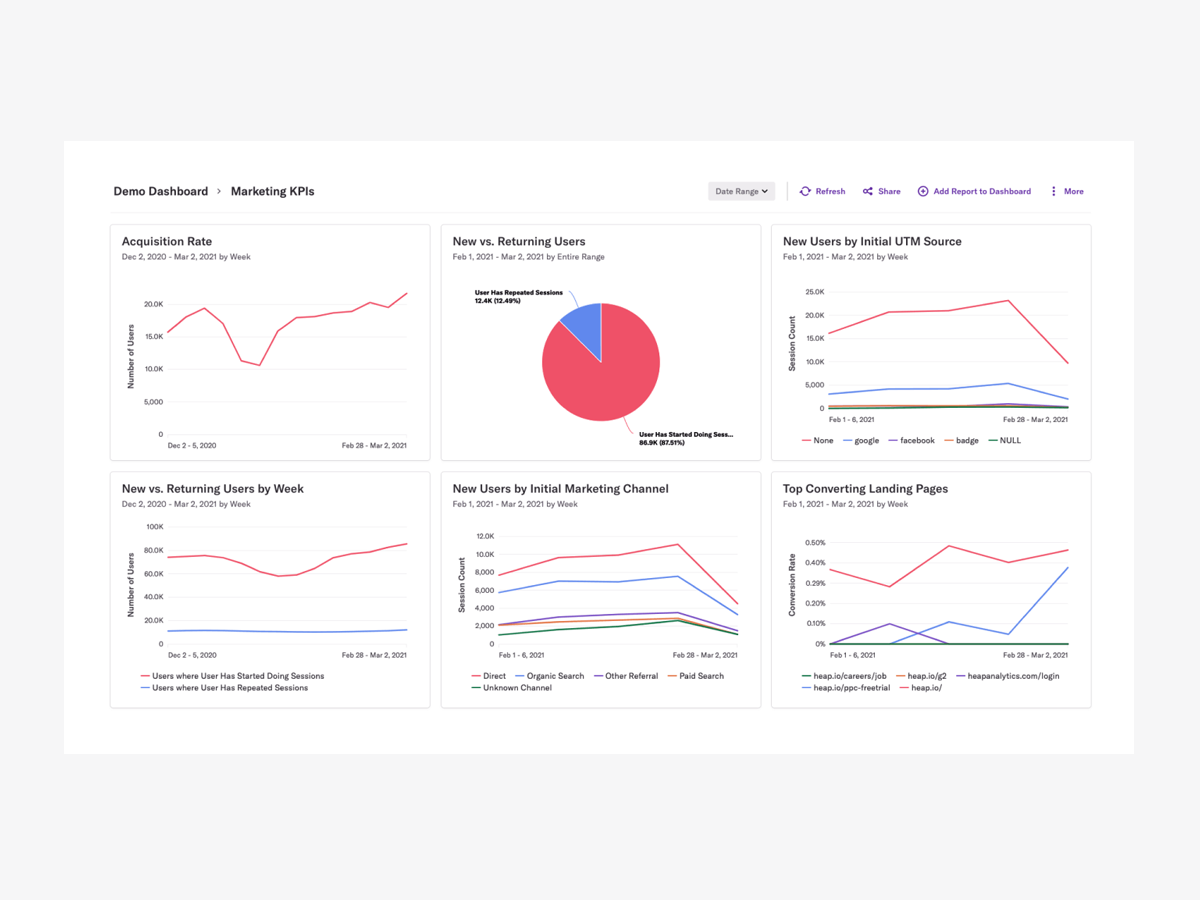
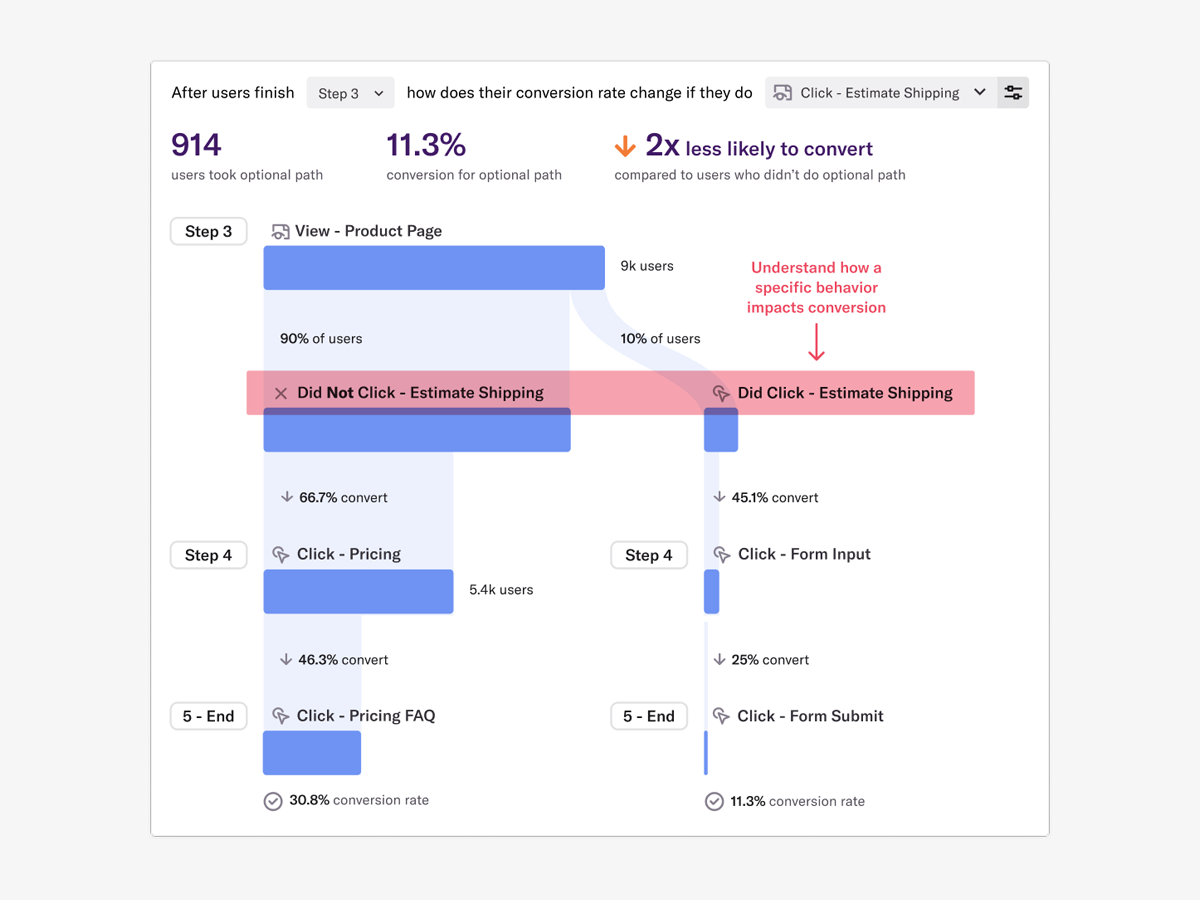
Heap is a web analytics platform captures every user interaction on web iOS with no extra code. The tool allows you to track events and set up funnels to understand user flow and dropoff. It also provides visualization tools to track trends over time.
$0
per month
Pricing
Adobe Analytics
Adobe Customer Journey Analytics
Heap
Editions & Modules
No answers on this topic
No answers on this topic
Free
$0
Up to 10k sessions/month
Growth
Starting at $3,600 annually
Up to 300k sessions/year
Pro
Contact Heap Sales
Custom sessions per month and unlimited projects
Premier
Contact Heap Sales
Custom sessions per month
Offerings
Pricing Offerings
Adobe Analytics
Adobe Customer Journey Analytics
Heap
Free Trial
No
No
Yes
Free/Freemium Version
No
No
Yes
Premium Consulting/Integration Services
Yes
Yes
Yes
Entry-level Setup Fee
Optional
Optional
Optional
Additional Details
—
—
Heap pricing is based on session volume. A session is a period of activity from a single user on your app or website. It can include many pageviews or events.
The best way to describe Adobe Analytics is that it's the enterprise-level of analytics platforms, in every sense of the word. From the sales process, through to the cost to purchase and implement, the need for ongoing training, and the fact that it really takes an Analytics …
Adobe Analytics has a more modern and friendlier user interface and it's easier to use for me. Google analytics has better compatibility with other Google products
Adobe Customer Journey Analytics is poised to become the future of Adobe Analytics - it is more powerful, allows for greater customization and immediate feedback. Its ability to stitch on row or fields is far greater than Analytics, and ability to interpret events in a …
Adobe Analytics is limited to Web Data only. Adobe Customer Journey Analytics allows you to combine mutliple data sources and conduct analysis that otherwise would not be possible. Bridges the gap in data silos.
The main reason to select Adobe Customer Journey Analytics was due to its ability to merge online and offline data to show some insights. We did not have this ability to view both of these datapoints combined in one report. It helps with better storytelling to our leadership …
It is the evolution of analytics. Almost everything included in AA is available in Adobe Customer Journey Analytics, but more functionality is provided.
Adobe Customer Journey Analytics has much more flexibility and power than AA. Workspace skills port over easily. However, there are some key AA functions that work differently in CJA and teams well entrenched in AA should be aware before switching. These include marketing …
Adobe Customer Journey Analytics stands out due to its ability to consolidate data from various sources into a unified view, making it easier to analyze customer interactions across all touchpoints. Compared to other analytics platforms, CJA offers a high level of …
Verified User
Employee
Chose Adobe Customer Journey Analytics
One major reason is no one can beat adobe in customer service even if we have problem they are their to help you out immediately. The amount of features and the ease of using tool customer journey analytics provide is sufficient for my organisation as other platforms are bit …
Alas, Heap was selected before I got here, but I will say that its chief virtue is ease of implementation. Adobe Analytics is the ultimate workhorse of web analytics and I could make it do absolutely anything I needed it to. Ad Hoc Analysis allowed me enough drill downs, …
I have worked with Adobe Analytics before using Heap. I think Heap is better at getting your hand on quicker comparisons [than] Adobe. However, Adobe does have more analytical power compared to Heap.
For web analytics, I prefer Heap over some of its competitors like Adobe Analytics, Looker, or Google Analytics, primarily because I find it more intuitive to use. For mobile, I actually prefer Amplitude as I'm not sure that has been a priority for Heap (yet) and Amplitude does …
Heap is much easier for me to use. With Adobe Analytics, I needed to work exclusively with a product analyst whose whole job is working in Adobe Analytics. I can create dashboards without help from a specialist and feel confident that they are functional, actionable, and usable …
For me, Heap is much simpler to utilize. I've previously used Google and Adobe Analytics but switched to Heap because it provide better features and is easy to integrate. Without a specialist's assistance, I am able to construct dashboards and am convinced that they are useable …
What really stood out was the auto capture functionality and the ability to do as many custom reporting as we can, and it had very comparable features to a lot of other user analytics tools, but we liked how clean it was at pulling in data as well. definitely recommend for …
From a startup perspective, Heap is one of the best and fastest ways to go from 0 analytics to nearly all of what one would need with the least amount of effort. It's faster and easier to implement than many above and it's better suited for quick quantifiable analytics that …
While Heap is more expensive than the free version of Google Analytics, we find that the cost is well worth it for the unlocks it provides to our product management and analytics team to regularly modify tracking and build reporting.
Maybe for a small company with small products for their thing, Adobe may be bit of an implementation too much for them, but when it comes to companies like us, like a life sciences or large enterprises and even small enterprises, but with more products, more analysis that they need to make their marketing experience better, maybe Adobe product is the best suitable.
I think what Adobe Customer Journey Analytics does well is when you want to see and analyse a full user journey across multiple systems. Almost a 'what happened to this user across my entire site?' and includes other systems and applications like our CRM, our Student App, and our core website. We use the system to build dashboards that span the entire user lifecycle.
Scenarios when Heap was well suited: It is when a user claims that he encountered a bug without giving us the details of the error message. Scenarios where it is less appropriate: Its when we try to capture user interaction in our mobile app
It summarizes large complex data better than any other analytics solution I've dealt with without the need for sampling, gives the right level of detail, does the right level of breakdowns, aggregation. I consistently not only use Adobe Analytics, but I use other data sets and compare against Adobe Analytics. And as I go into Adobe Analytics and compare, as long as I've done the query right and the other systems, they're very, very close. And if anything, with a lot of Adobe's newer products, they've gotten more accurate over time. So that's basically, you asked me what I liked about it. I like that it's accurate. I like that I don't have to do a lot of explaining. There's enough explaining in the world of web analytics to have to go back and explain why data's problematic. And so like I said, provided that the implementation is correct, it's a very easy conversation. Even if people may not like the answer.
Customer journey analytics can be used to analyse data from a range of data sources and the data can be visualised, filtered etc. by users.
It also allows users to handle custom data to handle their specific needs and the data can be catered as per users need its like your own customised platform.
The best part is the integration users can connect this to various other platforms with one ID. This helps the user with easier usage and less hassle as everything is kind off a click away.
Support. I mentioned this earlier and we don't know what we don't know. Researching the massive amounts of documentation isn't realistic with bandwidth constraints, and our rep getting frustrated with us when we go through what we are seeing is disappointing.
Education. More please, and designed more towards the "business side". I get with the many many many different implementations (every company is different!), that it's tough, but even a basic of the basics would be nice for situations that everyone is looking at, like the engagement with the merchandising on the home page (or any certain page).
Journey Canvas UI, when using a mouse with scroll wheel, it defaults to zooming in or out of the map, and not up and down if the map is very extensive.
When trying to break down a dimension by a second dimension and third dimension. If you are replacing the 2nd dimension breakdown, it would be beneficial to keep the 3rd breakdown instead of wiping it out.
We've found multiple uses for Adobe Analytics in our organization. Each department analyzes the data they need and creates actionables based off of that data. For E-Commerce, we're constantly using data to analyze user engagement, website performance and evaluate ROI.
It's the most customizable and flexible analytics tool I've used. While the tool can be slow and clunky at times, the value it provides far outweighs those issues. Being able to bring offline data and merge with web data to combine in one place is where clients need to be get the most success out of their data
It's a great platform. I'm glad that one of our product managers introduced it because it has allowed us to create all kinds of new functionality. We're not only able to create a better product experience from our communications because of Heap, but we're also able to generate all kinds of helpful analysis.
Sometimes the processing times are very long. I have had reports or dashboards time out multiple times during presentations. It could be improved. It is understandable since there is a huge data set that the tool is processing before showing anything, however for a company that large they should invest in optimizing processing times.
It is a very simple to use interface and for those users who have been familiar with Adobe Analytics, it is the same user interface and there is no real learning curve for them. As for new users, it is pretty simple to use and there are plenty of videos on experience league to help someone new get started
On a scale from 1-10, I find Heap to be incredibly user-friendly and easy to use. I enjoyed the training videos available and was quickly able to pick up how to create events and reports to track user interactions on our product. I would recommend Heap for its usability first and foremost.
I do not ever recall a time when Adobe Analytics was unavailable to me to use in the 8 or so years I have been an end user of the product. My most-used day-to-day analytics tool Parse.ly however, generally has a multiple hours planned offline maintenance every two to four weeks, and sometimes has issues collecting realtime analytics that last anywhere between 15 minutes to an hour, and happen anywhere between 1 to 5 times a month.
For the most part, CJA is available. There are instances where the product is experiencing an outage but I haven't found this to be super frequent to the point where it really impedes my work
I've never run into any issues with Heap's availability, Heap is always there when I need it. I haven't run into any issues like application errors or unplanned outages during my 2+ years of using Heap. Each and every time I log in to Heap I have a completely functional experience
Again, no issues here. Performance within the day updates hourly. other reports are updated overnight and available to access by the next morning. Pages load quickly, the site navigates easily and the UX is quite straightforward to get command over. On this front, I give Adobe kudos for building a great experience to work within
It does a pretty great job, given that it isn’t a full LMS. Obviously an LMS is going to have a lot more data to pull in, but again, this is a great light tool that helps us gather early user experience data. This is great to refine our materials and make sure they are excellent and ready for rollouts.
Heap doesn't affect page load times considerably nor has a large impact [on] our overall score, as far as page loading times inside of the tool its pretty reliable to retrieve data as much as "instant" that it can be the delay seems to be on data getting tracked into the servers to be read but it's not significant.
I barely see any communication from Adobe Analytics. The content on the web is also not that great or easy to read. I would recommend a better communication about the product and the new addons information to come to its user by a better mean.
Good enough tools and offline support. We had a model of "hypercare" that was mostly good, sometimes not good. But that was more personality/people based, rather than established processes. Overall the support was timely and effective
Heap support has allowed us to troubleshoot and test a lot of different items. Their support team is always helpful and friendly, even when we come to them with the most complicated questions. I think this greatly improves the value proposition of the product because their support team is knowledgable and friendly.
It was a one-day training several years ago that cost the organization several thousand dollars. There were only about 10 people in the training class. Adobe tried to cram so much information into that one-day class that none of our users felt like they really learned anything helpful from the experience. Follow-up training is too expensive
Should be staged differently. It should be Do online stuff, get basic skills/qual. Then do "homework" type tasking, then come to class with an instructor. We got the traditional "start from 0, then step 1, then step 2..." training. This usually saps energy/focus. All training should be like a lab/practice session. If someone needs information or basic knowledge ... put it in a elearning, FAQ, job aid, or resource page.
The online training for Adobe SiteCatalyst consists of short product videos. These are ok, but only go so far. For a while Adobe charged a fee for this, but recently made these available for free. There are many great blog posts that help users learn how to apply the product as well.
Should have more of this for the 101-level stuff. No one needs a Zoom class covering the basics. I need a "guide on the side" when I'm learning new stuff. I want support while I practice.
One of the benefits and obstacles to successfully using Adobe Analytics is a great / more accurate implementation, make sure your analytics group is intimate with the details of the implementation and that the requirements are driven by the business.
The implementation was smooth and easy. The Heap team helped us with implementation and it went great! Within a few weeks, we were fully up and running and utilizing the platform to its full capability. This is an additional thing that has made this platform so great and we couldn't recommend it enough.
Google Analytics comes across more of a reporting tool whereas Adobe Analytics is more of an Enterprise level analytics tool. Contentsquare provides some traffic and flow capabilities but not to the same level as Adobe Analytics. However, Contentsquare's major advantage is its Zoning (Heatmapping), Impact Quantification and Find 'n' Fix modules; none of which are knowingly available in Adobe Analytics.
Adobe Customer Journey Analytics is poised to become the future of Adobe Analytics - it is more powerful, allows for greater customization and immediate feedback. Its ability to stitch on row or fields is far greater than Analytics, and ability to interpret events in a serialized fashion unlocks more insights than what was previously capable in this tool. Adobe Customer Journey Analytics is easier to understand and requires less coding knowledge than Tableau, but users must adopt most Adobe offerings to realize any benefit whereas Tableau is more system-agnostic.
Heap offers a ton of functionality on a single platform.It also has an smart data science layer to offers suggestions for next steps in the analysis, allowing us to explore alternative paths we may not think to take. The low-code option for updating data is appealing, and there is a lot of automation with minimal engineering effort.
Adobe Analytics is relatively affordable compared to other tools, given it provides a range of flexible variables to use that I have not found in any other tools so far. It is worth investing in if your company is medium or large-sized and brings a steady flow of revenue. For small companies, it can be overpriced.
My organization uses Adobe Analytics across a multitude of brand portfolios. Each brand has multiple websites, mobile apps and some even have connected TV apps/channels on Roku and similar devices. Adobe can handle the multitude of properties that have simple, small(ish) websites and the larger brand properties that include web, mobile and connected TVs/OTT devices.
Each of those larger brands has multiple categories and channels to keep track of. We can see the data by channel/device or aggregate all the data together. This gives our executive teams the full picture and the departmental teams the view they need to see their own performance.
You have the ability to create 'user groups' with different levels of access in CJA. We helped set this up for a large organiztion where they had marketers, executives, devs and analysts all having different levels of access to use CJA but with the appropriate guardrails in place for each user group. It worked out really well for their organization.
The most challenging part of using Heap in a growing organization is the naming and structure in which reports and dashboards are organized. I work within the marketing department and our Heap leader internally works within the IT/Product department, which makes it challenging because we often don't speak the same language, so the learning curve has been steep without any specific use-case examples to leverage online.
The professional services team is one of the best teams for complex adobe analytics implementations, especially for clients having multiple website and mobile applications. However, the cost of professional services is a bit high which makes few clients opt out of it, but for large scale implementations they are very helpful
Adobe Analytics impacts nearly every aspect of a billion plus dollar revenue eCommerce business. From measuring the impact of new build features to marketing campaigns.
We are saving substantial money and resource effort by consolidating all of our properties to Adobe Analytics from alternative solutions, at which point we will finally be able to report on Total Digital, rather than disparate reports.
We support experimentation on every platform and the performance is only known through Adobe Analytics tagging.
Currently, the ROI is a bit extended as our use cases are a bit more complex than the average use case (but we are in active discussions with Adobe Product to improve)
The Adobe Customer Journey Analytics implementation has directly contributed to our company's ability to speak to enterprise orientation, we have seen customer omni-channel presence go up 5% in just one year