Overview
ProductRatingMost Used ByProduct SummaryStarting Price
Basecamp
Score 8.7 out of 10
N/A
Basecamp is a web-based project-management tool. Basecamp offers features standard to project management platforms, as well as mobile accessibility, unlimited users, and 3rd party integrations. Basecamp is priced by space requirements and concurrent projects.
$15
per month per user
Planview AdaptiveWork
Score 8.1 out of 10
N/A
Planview AdaptiveWork is a web-based collaborative work management software. Planview AdaptiveWork enables users to connect employees and partners and create documents, reports and specialized workflow automation. Planview AdaptiveWork is designed to work across multiple teams to enable cross-company task, project, and resource management.N/A
Trello
Score 8.4 out of 10
N/A
Trello from Atlassian is a project management tool based on a Kanban framework. Trello is ideal for task-management in a to-do list format. It supports sharing boards and cards across users or teams. The product offers a free version, and paid versions add greater automation, collaboration, and administrative control.
$6
per month per user
Pricing
BasecampPlanview AdaptiveWorkTrello
Editions & Modules
Basecamp Plus
$15
per month per user
Basecamp Pro Unlimited
$299
per month (billed annually)
Basecamp Free
Free
Limited Capabilities
No answers on this topic
Standard
$6
per month per user
Premium
$12.50
per month per user
Enterprise
$17.50
per month per user
Free
Forever Free
Offerings
Pricing Offerings
BasecampPlanview AdaptiveWorkTrello
Free Trial
YesYesNo
Free/Freemium Version
YesNoYes
Premium Consulting/Integration Services
NoYesNo
Entry-level Setup FeeNo setup feeOptionalNo setup fee
Additional DetailsA discount is offered for annual billing and for larger numbers of users.
More Pricing Information
Community Pulse
BasecampPlanview AdaptiveWorkTrello
Considered Multiple Products
Basecamp
Chose Basecamp
JIRA is a project management tool for IT developers built on the Agile principle, while Trello is built on a board style methodology. monday is a grid style project management tool that works great for visual project management. Basecamp on the other hand is all about team …
Chose Basecamp
Basecamp is more entry level and has a much easier set up than most of the competitors. I greatly prefer Trello, but when I am working with new marketers they always suggest Basecamp. Basecamp is good, but it is just so easy to get the multiple pieces of a project jumbled …
Chose Basecamp
I have made the switch to Trello - I prefer the templates and community aspect; my organization uses JIRA to manage the tasks and handoffs between the various stages of a client project; we are using BetterWorks to manage overall business goals and quarterly objectives.
Chose Basecamp
Workfront was way too robust for our team to manage, while Basecamp is very easy for any user to set up and does not require lengthy training sessions. Communication within Basecamp (at the project or company level) is much easier to facilitate than in Workfront or Trello. …
Chose Basecamp
Basecamp is probably towards the bottom of the totem pole here based on what our needs were. Trello lacks reporting as well, but there's much more customization with Trello. Asana has more reporting and integration capabilities. monday.com is my favorite so far. The amount of …
Chose Basecamp
Basecamp works better than Trello because it keeps more efficient and powerful features and functions. It is completely organized product and also gives us easy to use and understand advanced interface.
Chose Basecamp
Asana has lots of features but no Gantt charts which is kind of the basis for a lot of work that we do. On the other hand, the campfire discussion here is an absolute innovation.

Trello is heavy on features but locks us to a certain view which may not be suitable for all the …
Chose Basecamp
I love both of these other products and would use them specifically for my own personal use or in other situations but hands down, I believe that Basecamp offers better flexibility and ease of use for an organization that has never used a project management tool before. …
Chose Basecamp
Trello is less expensive and the free version works pretty well. For the paid version, Trello is also a really great tool. Overall, I do like Basecamp better. It's a more simple layout and structure to the software. I like the communication threads better on Basecamp. Trello
Chose Basecamp
I like Trello too, but our organization prefers Basecamp so that's what I stick to
Chose Basecamp
in my opinion, it is Inferior, clunky, ugly product as compared to the others. I only selected Basecamp on recommendations from someone else who was using it, and have moved on to ClickUp. This Basecamp app failed to notify myself, my teammates and the client so many times, …
Chose Basecamp
Although I favored the alternative products' price models, Basecamp is unrivaled in terms of user-friendliness.
Chose Basecamp
Both programs are good. We went with the one that most people on the team felt comfortable with so we would have the most buy-in. I also like the continual updates and feedback Basecamp takes to heart. Basecamp also has some functionality that met the needs of the organization …
Chose Basecamp
Basecamp is the best application we've found for our team to interface with external clients. It makes project management simple, and allows our clients visibility into their projects, which in turn builds trust, fosters open communication, and improves customer satisfaction. …
Chose Basecamp
Basecamp is clean, simple, and easy to use.
Chose Basecamp
We tried other software while selecting paid plans of Basecamp; its customer service is fast and very prompt in comparison to others. Interface and UI & UX is also very good, which is very good for team members. The team loves this product and they are very happy with it. We …
Chose Basecamp
There is a simplicity that basecamp offers where most other project management systems seem to miss. They've worked hard at keeping the right things in place and not adding so many of the extra features that just get in the way of getting work done. The thing I liked most …
Chose Basecamp
Basecamp is perfect for small-time collaboration. It's suited for projects that need organization but not granular detail. When you need more than a simple little bit of help, you'll be looking at other solutions at that point. Very straight forward and to the point but that is …
Chose Basecamp
Our team selected Basecamp because it has a simple design, is easy to use and has all the tools we need to follow up on our projects. Allowing our team to stay organized, communicate effectively and perform tasks from a single platform.
Chose Basecamp
Like I said, when I worked for a small company, it worked great, but now we are using HubSpot where it has its own project management tool for us to use, so it's just easier to have one platform for everything we do.
Chose Basecamp
Basecamp links all of the functionalities of a messenger feature (thanks to Pings) with task delegating and managing the project. Marketer's life became much easier with Basecamp.
Chose Basecamp
I have used both Asana and Basecamp and have liked both for different reasons. I like Asana for solo projects and to keep a running to do list. I think the layout and interface just works well for that. For client projects, I think Basecamp is better because it's a bit easier …
Chose Basecamp
It is an easy tool to use, organize your activities so that you can complete your projects, and allows you to do what is necessary to achieve it, unify your work team, assign tasks, reminders in a simple way, makes you more productive, you manage to plan in such a way that your …
Planview AdaptiveWork
Chose Planview AdaptiveWork
I did not select Clarizen but would not, given the task in the future. It was not user-friendly to the employees, as mentioned before, and seemed to have a lot of gratuitous features that go unused. We now use Open Air for time sheets and Slack for office communication and Trell…
Chose Planview AdaptiveWork
We felt that Planview AdaptiveWork had the most potential to grow into the system and really liked that we could add on other Planview products if needed in the future. The system also felt more approachable for colleagues who might be less familiar with project, program, and …
Chose Planview AdaptiveWork
More elaborate system in managing a project.
Trello
Chose Trello
Google Docs is ok for sharing items/documents/files with your team, but the interface is clunky to me. It's hard to know right off which things are connected to what project and to each other. Also, assigning tasks to team members is not possible directly (not that I know of).
Ba…
Chose Trello
Trello was easier to use for some team members than Basecamp, and the feature set (save the Notes feature in Basecamp) was similar. More customization was required for some things in Trello, however, and it did not send out emails in the same way Basecamp did (where a thread of …
Chose Trello
I used JIRA, Basecamp and Redmine. JIRA is for big/huge projects, very technical ones. Redmine is fine and used by another team. It needs more rules for a good Agile use and you can do what you want (more than with Trello, too much). And the visual interface is not as useful as …
Chose Trello
Having used Basecamp for years, I was pleasantly surprised with Trello and how user-friendly it was. It was easier to introduce into current workflows and with users that had not used workflow tools previously. Basecamp is slightly more simple in its approach and integration …
Chose Trello
Basecamp has a broader set of functions and allows for client interaction. It has the task segment that Trello has but it also has many other options for collaboration and organization. Bigger product with a price tag that goes with it.
Chose Trello
Without a doubt, Trello is the easy one of the bunch to use. It is beautiful to look at and easy to interact with. It does for sure lack some features that other software has like Wrike, Basecamp, and Slack. But for simple smooth task management, it is the go-to.
Chose Trello
I would say Trello is very well suited for my team's needs as we are relatively small in size but frequently scale up based on the project's size and needs. We tend to use it at a basic level for organizing internal tasks and to-dos, but also develop large complicated boards …
Chose Trello
monday.com is by far my favorite project management tool out there. It's so powerful, customizable and the reporting is great. Trello works better for us currently because it's free. Asana is okay, but the overall UI is a bit confusing and boring. Airtable is good, but pales in …
Chose Trello
Trello provides precise goal setting, targets, and activity tracking with minimal human intervention, while Trello provides tags and tasks to add users and communicate visual task organization. Trello also offers real-time updates, team collaboration, and project progress …
Chose Trello
When it’s a project on the go, Trello gives you the easiest and fastest experience with assigning tasks and following up with each task and each member’s work progress.
Chose Trello
Trello is easier and quicker to get started with! You don't even need to train your team before you start, and the free version is awesome.
Chose Trello
Really never used another of the alternatives mentioned, but from surveying others tools, Trello has many advantages, and its greatest strength versus other project management tools is its simplicity and ease-of-use. You don't need any type of training or previous set up. You …
Chose Trello
Trello's greatest strength versus other project management tools is its simplicity and ease-of-use. You don't need any type of training or previous set up. You can literally start using it within seconds after setting up an account.
Chose Trello
We were huge fans of Clarizen back in the bad old days of waterfall methodology. Clarizen definitely had more robust reporting capabilities, where Trello is completely lacking in resource and financial management capabilities and even basic dashboarding. That said, for simple …
Chose Trello
For the price, value, and support, Trello has always been the standard. What it doesn't have native, you can usually find a workflow plugin. I find Trello already in use, at many jobs before I even get there.
Chose Trello
Based on the size and needs of our organization, the main reason we chose Trello of other alternatives simply comes down to cost. We use the free version and it meets our needs and then some. We've had team members use some alternatives and for the most part, the feature set of …
Chose Trello
Todoist - There's good functionality here but you really need the paid version to get the most out of it. This isn't set up for kanban.
Remember the Milk is really for personal lists.
Evernote - This is incredibly free form. I loved it at first but honestly, you can just use a …
Chose Trello
Trello is a simple-to-use tool that makes organization and task management easier. It has a myriad of integrations and fits easily into my day-to-day. It feels as easy as moving post-its across a wall.
Chose Trello
Trello is by far the most advanced and integrated program out there in the task management sector. Trello does what Basecamp and dapulse do and way more. Trello is great for teams that don't work right next to each other in an office. It's the best for virtual teams and offices.
Chose Trello
Trello is better than the other two mentioned in my opinion because of its flexibility as a tool, as well as its price (or lack thereof). We used the other two tools for a while before Trello and left them because of pricing (having to pay per user or per project) and because …
Chose Trello
Trello is an all-in-one communication/file transfer/project management system. It's fresh, intuitive, easy to learn, and beautifully designed.
Chose Trello
Trello is by far the simplest platform, which we loved. It also had a free version so we decided to start there and switch platforms once we outgrew Trello. While our organization has switched over to a different system, I still use Trello for personal projects because I like …
Chose Trello

Trello is way more flexible than the other tools I've used. Workflows can be created in numerous ways. Usually, if Trello does not do what I want it to, I can find a way to make my idea work in their system. With other tools, it can be more limiting and too structured.

Trello …

Features
BasecampPlanview AdaptiveWorkTrello
Project Management
Comparison of Project Management features of Product A and Product B
Basecamp
8.9
124 Ratings
14% above category average
Planview AdaptiveWork
-
Ratings
Trello
8.5
222 Ratings
9% above category average
Task Management9.3123 Ratings00 Ratings9.5222 Ratings
Resource Management9.1103 Ratings00 Ratings9.3185 Ratings
Gantt Charts6.743 Ratings00 Ratings7.173 Ratings
Scheduling8.599 Ratings00 Ratings9.1168 Ratings
Workflow Automation8.672 Ratings00 Ratings8.2142 Ratings
Team Collaboration9.7123 Ratings00 Ratings9.0218 Ratings
Support for Agile Methodology9.351 Ratings00 Ratings8.9147 Ratings
Support for Waterfall Methodology8.748 Ratings00 Ratings7.6115 Ratings
Document Management9.6115 Ratings00 Ratings8.2159 Ratings
Email integration8.4101 Ratings00 Ratings7.7146 Ratings
Mobile Access8.8100 Ratings00 Ratings9.1192 Ratings
Timesheet Tracking9.248 Ratings00 Ratings9.388 Ratings
Change request and Case Management9.458 Ratings00 Ratings8.7102 Ratings
Budget and Expense Management8.342 Ratings00 Ratings7.773 Ratings
Professional Services Automation
Comparison of Professional Services Automation features of Product A and Product B
Basecamp
8.0
42 Ratings
3% above category average
Planview AdaptiveWork
-
Ratings
Trello
5.9
72 Ratings
27% below category average
Quotes/estimates10.030 Ratings00 Ratings6.149 Ratings
Invoicing10.026 Ratings00 Ratings5.042 Ratings
Project & financial reporting8.034 Ratings00 Ratings6.658 Ratings
Integration with accounting software4.028 Ratings00 Ratings6.144 Ratings
Best Alternatives
BasecampPlanview AdaptiveWorkTrello
Small Businesses
Stackby
Stackby
Score 8.9 out of 10
Teamwork.com
Teamwork.com
Score 8.5 out of 10
Stackby
Stackby
Score 8.9 out of 10
Medium-sized Companies
InEight
InEight
Score 8.4 out of 10
Teamwork.com
Teamwork.com
Score 8.5 out of 10
InEight
InEight
Score 8.4 out of 10
Enterprises
InEight
InEight
Score 8.4 out of 10
Wrike
Wrike
Score 8.6 out of 10
InEight
InEight
Score 8.4 out of 10
All AlternativesView all alternativesView all alternativesView all alternatives
User Ratings
BasecampPlanview AdaptiveWorkTrello
Likelihood to Recommend
9.8
(150 ratings)
7.7
(78 ratings)
9.4
(222 ratings)
Likelihood to Renew
10.0
(26 ratings)
7.5
(26 ratings)
10.0
(6 ratings)
Usability
9.3
(20 ratings)
7.3
(5 ratings)
9.4
(60 ratings)
Availability
10.0
(5 ratings)
8.2
(3 ratings)
10.0
(1 ratings)
Performance
7.3
(4 ratings)
9.1
(5 ratings)
10.0
(1 ratings)
Support Rating
8.8
(28 ratings)
10.0
(7 ratings)
9.9
(81 ratings)
In-Person Training
-
(0 ratings)
8.2
(2 ratings)
10.0
(1 ratings)
Online Training
5.0
(1 ratings)
5.4
(5 ratings)
-
(0 ratings)
Implementation Rating
7.7
(4 ratings)
8.2
(4 ratings)
8.0
(2 ratings)
Configurability
8.0
(1 ratings)
8.0
(1 ratings)
5.0
(1 ratings)
Ease of integration
-
(0 ratings)
8.2
(1 ratings)
-
(0 ratings)
Product Scalability
-
(0 ratings)
-
(0 ratings)
10.0
(1 ratings)
Vendor post-sale
-
(0 ratings)
9.1
(1 ratings)
10.0
(1 ratings)
Vendor pre-sale
-
(0 ratings)
9.1
(1 ratings)
-
(0 ratings)
User Testimonials
BasecampPlanview AdaptiveWorkTrello
Likelihood to Recommend
37 Signals
Basecamp is a wonderful tool for teams of varying degrees of technical knowledge, teams managing lots of different types of "agifall" and waterfall projects, and teams that are remotely distributed. It's probably less useful for more strictly agile-focused development teams, compared to other more flexible software applications like Jira and Asana.
Read full review
Planview
I've been an AdaptiveWork (Clarizen) admin for the past 14 years, so I've seen much improvement since I started working with the product. I'm very happy we can utilize the hybrid mode by using the cards, I think this was long overdue but it works very well.
Read full review
Atlassian
For teams or individuals with lots of individual tasks/details to track, Trello is perfect! It basically removes the need for a paper checklist. For those that need an overall project management tool that requires less tasks and more overarching goals, collaboration amongst various teams, and gantt charts I would suggest monday.com
Read full review
Pros
37 Signals
  • Task management - It is very easy to add, organize and discuss tasks within Basecamp's interface.
  • The "Campfire" function is great for communicating when you just have a quick question for someone on the team.
  • Notifications - Basecamp lets you decide how often and about what you'd like to be notified. The ability to respond to messages in Basecamp directly via email saves a lot of time.
Read full review
Planview
  • Many ways to acclimate to the system; documentation, videos, community, and contacts.
  • Planview provides scalable customization options tailored to the unique needs of each business unit or department. Easily add or remove fields in the system. As the admin, it was easy to learn how to configure.
  • Offers flexibility to adapt to existing systems and align with organizational workflows and processes. There are multiple ways to customize each part of the system to meet our needs.
Read full review
Atlassian
  • Helps track employees "to do before hire", "to do after hired," and "to do when employee leaves"
  • Provides important information on each employee like personal information along with data collected during the time of hire and during employment time
  • Allows more than one person to be assigned to a task per employee and will remain open until everyone involved has completed their task
Read full review
Cons
37 Signals
  • High Learning Curve. It's true that it can be easy to use, but to use well and effectively takes some time to learn. It's recommended to have an agreed-upon system in your team of what tools to use and when.
  • Notification Overload. If people aren't careful they could send a notification to everyone when only a couple people were meant to be prompted. And since emails are sent by default, you could have your mailbox overloaded with unnecessary updates. This is where it takes a bit of training in your team to have an agreed-upon system.
  • Lack of organization with Archived Projects. I will often need to reference an archived project to make a new one, but there is only a list of archived projects in alphabetical order, with no way to organize by archive date, or even search.
Read full review
Planview
  • When it comes to reports, it would be great if there was an easy way to roll-up the results instead of having to create configurations to summarize data.
  • The consultant experience has not been great when it comes to more advanced needs for configurations. The consultants are in a different timezone which limits hours to work together and it seems hours are spent trying to determine what the requirement is and when the initial thought is that the configuration is possible, it may result in not being able to assist.
  • Charts in the reports section are not able to be exported
  • When pulling a report together, you need to make sure you pull from the right "item" or level. If you decide you need data that resides in another "item" or level, you need to re-do the report from the beginning.
  • Because the system is so configurable and I imagine different clients use the system differently, when you need something automated in your account, where you need to pull a consultant or SME in, the person doesn't necessarily understand your configurations and how things work so they are unable to give recommendations on how to solve problems that don't impact other configurations you already have set up in the system.
  • Templates cannot be updated unless they are pulled into a project and then re-saved. In the templates module, you are not able to open a template and edit to re-save. Therefore, making updates to a template can be very time consuming having to find a project to use to pull it in, make updates, re-save and then pull out. It would be great if the templates module allowed you to edit the templates and re-save.
Read full review
Atlassian
  • I use colour coding a lot so I would like a wider range of colour options.
  • Also as a visual thinker I would like to be able to easily add images to cards.
  • I would like to be able to attach a wider range of file formats to cards.
Read full review
Likelihood to Renew
37 Signals
When I bring new people onto a project, it's immediately obvious how to use Basecamp. I don't have to worry about teaching them the features or walking them through it, it's just incredibly user-friendly. For this reason, I'll continue to renew my subscription even as new people are brought onto production jobs or the client changes.
Read full review
Planview
I give my renewal of this product a 9. It's only because we never know what product may come out next and how other factors in our office political environment may cause impact upon this. If I always had my way, this is what we'd settle on as our de facto project management system.
Read full review
Atlassian
I am very likely to renew Trello, because it doesn't cost anything to do so. I am also very likely to use Trello's upgraded features in the future because a lot of my team's data is stored on there and they have already gotten used to the platform. Trello is very easy for new team members to pick up, making the onboarding and usability very streamlined.
Read full review
Usability
37 Signals
It is easy to use, even for clients who have no experience with the platform. It can only get a little cumbersome to ensure that a client can't see certain documents you might want to keep in the Docs & Files folders. And sometimes, getting a client to actually use an unfamiliar platform can be a challenge.
Read full review
Planview
It is easy to configure, intuitive. The customization process is in some ways better than Salesforce.com. It has a great UI. It does however depend on how it's implemented.

The design of it is generally fine, however the ability to data upload people from a spreadsheet is an obvious miss.
Read full review
Atlassian
Trello is incredibly intuitive, both on desktop and mobile right away. It is also full of helpful features that make it even easier to use, and is flexible enough to suit almost any organizational need. Onboarding for the software is thorough, but concise, and the service is frequently updated with even more QOL improvements.
Read full review
Reliability and Availability
37 Signals
I've never experienced downtime while using Basecamp, or been unable to access it when I needed it. That's not to say they've never had downtime, but I've been lucky enough not to encounter any, and I work odd hours, including late nights when maintenance is often undertaken.
Read full review
Planview
Sometimes it is slow when everyone is entering their time on Fridays or Mondays but other than that we rarely see downtime and maintenance notifications are well in advance.
Read full review
Atlassian
yes always support available when I need it!
Read full review
Performance
37 Signals
No answers on this topic
Planview
Reports: Quick to Reasonable

Most Ancillary Pages: Quick to Reasonable
(By "ancillary" I mean lesser used/master data maintenance pages - e.g. People, Customers, Individual Tasks, Milestones, etc.)

Work Plan (with 100 sub items): Reasonable to Slow
Read full review
Atlassian
Never experienced issues with the above!
Read full review
Support Rating
37 Signals
For the many reasons I've given, Basecamp is a very strong program. There are a few features I can imagine that might make it even better, but I don't have a basis for comparison to be able to say that there is definitely a better one out there. I've noticed that Basecamp has evolved a bit from the time I started using it until now, so that makes me think that the producer of this program values it and believes in continuous improvement. If you could use the features offered by Basecamp, I would think you could use it with confidence.
Read full review
Planview
It's a good experience overall. Clarizen was useful when needed. It's mostly needed for advice on how to do more sophisticated actions or how to change something that was set up administratively. It's seldom used otherwise. The product consistently works, the documentation is acceptable, and the generally intuitive product is easy enough for most staff to pick up without much issue.
Read full review
Atlassian
I haven't reached out to their support very often and their support is very limited anyway for the free users. They do have tons of great articles and videos in their Help Center and constantly send emails with updates and add-ons to the product. The fact that I've barely ever had to contact their support team means that they've developed a great product.
Read full review
In-Person Training
37 Signals
No answers on this topic
Planview
• We worked with a Project Manager on their side. He was very good about developing a project plan to hit our goal. I think we had weekly or twice weekly calls – very steady cadence over 3 month period.
• Their PM skills were great – kept us on task. For the last week, they sent 2 people on site and they did training for power users. After that a couple of them revisited here
Read full review
Atlassian
It was helpful and informative! It was back before the pandemic in 2019 so I'm not sure if they still do it but I really enjoyed the experience
Read full review
Online Training
37 Signals
No answers on this topic
Planview
Our trainer, Alex, is exceptional and knows the product really well. I swear he must have wrote the product himself! His manner with training is very easy going, gives you homework that is applicable to what you need to learn and stages it correctly for you. It was a pleasure to be trained by him.
Read full review
Atlassian
No answers on this topic
Implementation Rating
37 Signals
Decide the process before implementation - i.e. when it's due 8/9 does that mean 8am, noon, 5pm, 11:59pm? Check your to-do list frequently Set-up templates - just not with the dates (they can be funky)
Read full review
Planview
We have been able to implement AdaptiveWork pretty easily but it requires updating of resource availability and continuous training as roles change and new people join the company. Other documentation is used such as spreadsheets for longer range planning and project approval
Read full review
Atlassian
For our small business, getting a few of us started well on Trello was the key, I think. As long as a couple of us were really comfortable with the interface, we could lead others and help them with any questions. From now on, anyone who works with us just naturally uses Trello for information sharing - it's just part of what we do.
Read full review
Alternatives Considered
37 Signals
Pretty good, but [Basecamp] has its drawbacks. Honestly I find the interface non-intuitive and sometimes have trouble figuring out how to change the status of a task. Perhaps it has something to do with the way it was originally set up by the admin, but I'm not sure. I liked Jira's drag and drop obvious functionality, but the project management side of the software was lacking. Smartsheet has excellent project management functionality, but the task management isn't as good.
Read full review
Planview
Planview AdaptiveWork was the right size, at the right price point that fit our customization and integration flexibility. It is intuitive to use but allowed us to add complexity as our needs grew
Read full review
Atlassian
Trello is more simple and not as "robust" as the other tools, but it's easier to use and manage and understand and ACTUALLY get stuff done with. It's simplicity is part of the beauty of using it. You don't need a million options that nobody uses, you just need to get stuff done.
Read full review
Scalability
37 Signals
No answers on this topic
Planview
No answers on this topic
Atlassian
Feels like anyone across the org (no matter their location) can use the tool easily!
Read full review
Professional Services
37 Signals
No answers on this topic
Planview
No answers on this topic
Atlassian
Not sure if we use those
Read full review
Return on Investment
37 Signals
  • It has saved me time when having to get the same message out to multiple restaurants
  • It has helped us make smarter operational decisions because we can all collaborate on an answer in a shorter amount of time (instead of calling a meeting!!!)
  • The calendar function allows us to plot out our marketing agenda for the month and add/change it together as needed. The chef will post his recipe, the managers will cost it out, the social media manager will post pictures on it, and ultimately we will get that information out on an info sheet to the staff by printing the page.
Read full review
Planview
  • By implementing Planview AdaptiveWork on a company-wide level, we have been able to remove the other project management tools we have been using and consolidate our costs for technology down to a single tool
  • The ability to incorporate cross-departmental work and communication has streamlined our project management processes to a point where we can work seamlessly together without interruption trying to consider the gaps between tools
  • Reporting capabilities from the unified tool has given our leadership insight and the ability to make strategic business decisions more effectively than ever
Read full review
Atlassian
  • Trello keeps me organized, focused, and on track. I could filter the Trello board to only see my issues and understand what I needed to work on and when.
  • Trello helped our team implement an agile structure. It's a very simple kanban method of viewing all of your team's tasks and statuses. You can completely customize the columns to your team's specific workflow and create tags relevant to your work.
  • Trello helps reduce unnecessary communications between teams. When I want to request translations, I simply create a card on the localization Trello board -- no need to directly message anyone on the team, and I can watch the status of the card change from "in progress" to "in review" to "translated," all without having to directly ask for updates.
Read full review
ScreenShots

Planview AdaptiveWork Screenshots

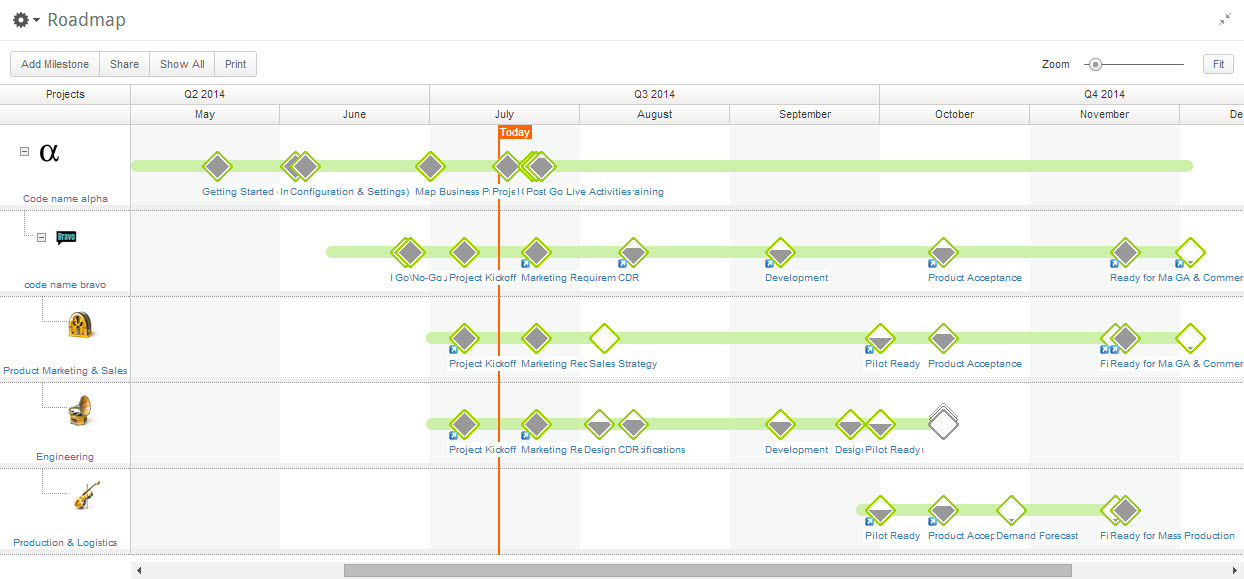
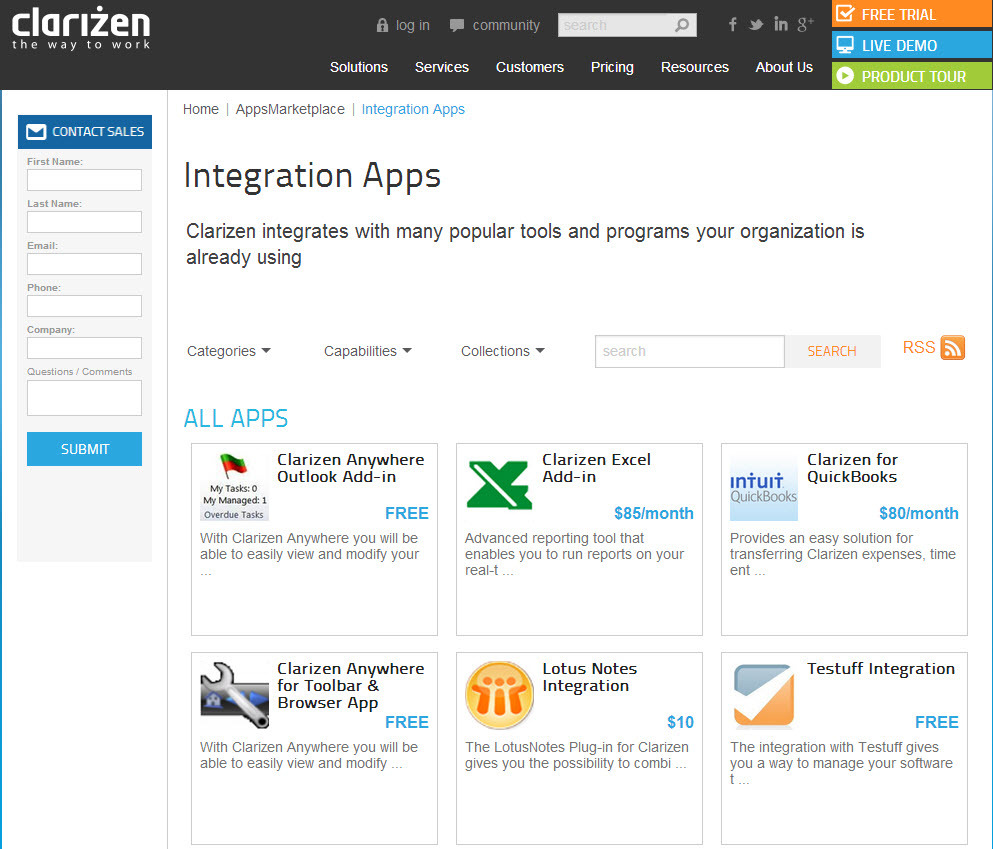
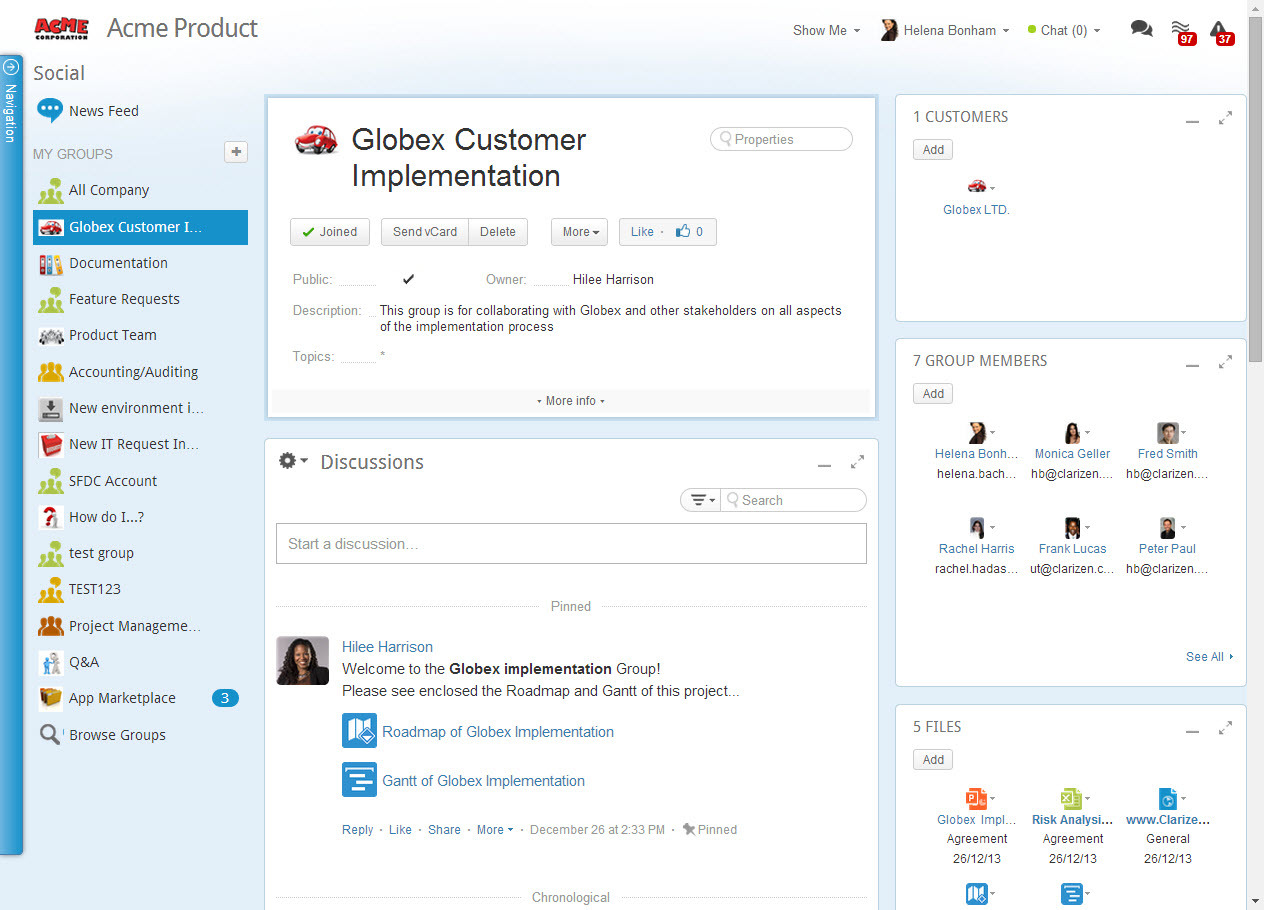
Screenshot of AdaptiveWork's Portfolio ManagementScreenshot of Integration Through an Array of AppsScreenshot of Real-Time Project ManagementScreenshot of Social Collaboration - From Ideation to Project Delivery