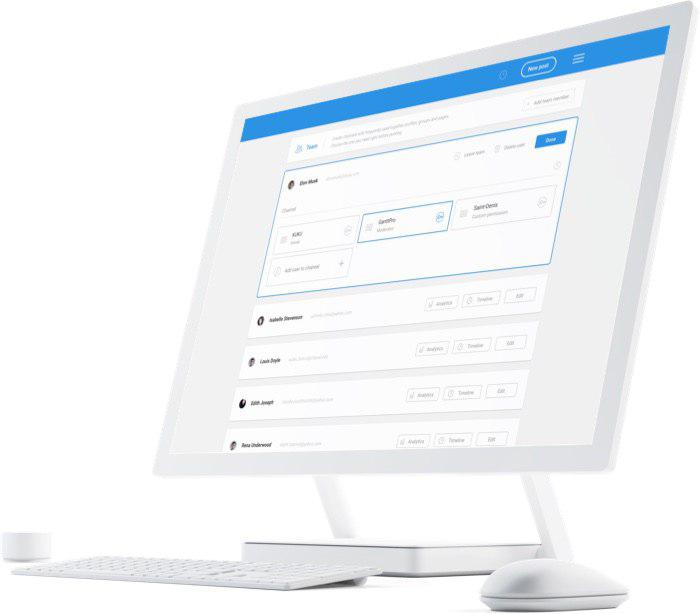
KUKU.io social media tools allow users to schedule posts on 10 social networks, including Instagram, Facebook, Linkedin, Telegram, Twitter, Pinterest, Google+, OK.ru, Vk.com, and Tumblr, without any risks of a ban. KUKU.io is an official partner of these social networks. In KUKU.io social media analytics users can analyze content engagement compare posts with special filters (by clicks, likes, comments, shares), count reach and monitor team performance. Users can add colleagues in KUKU.io…
$400
per 200+ user accounts
Twitter Counter (discontinued)
Score6.8 out of 10
N/A
Twitter Counter provided insights from Twitter for users from individuals to agencies and large corporations. Features included optimized tweet timing, audience insights and engagement, and competitor monitoring. The service is discontinued.
N/A
Pricing
KUKU.io
Twitter Counter (discontinued)
Editions & Modules
White label solutions
$400.00
per 200+ user accounts
No answers on this topic
Offerings
Pricing Offerings
KUKU.io
Twitter Counter (discontinued)
Free Trial
Yes
No
Free/Freemium Version
Yes
No
Premium Consulting/Integration Services
Yes
No
Entry-level Setup Fee
$7 per 5 accounts and 500 posts
No setup fee
Additional Details
—
—
More Pricing Information
Features
KUKU.io
Twitter Counter (discontinued)
Publishing
Comparison of Publishing features of KUKU.io and Twitter Counter (discontinued)
Feature
KUKU.io
4.2
2 Ratings
64% below category average
Twitter Counter (discontinued)
-
Ratings
Content planning and scheduling
1.12 Ratings
00 Ratings
Workflow management
7.31 Ratings
00 Ratings
Channel coverage/integration
Comparison of Channel coverage/integration features of KUKU.io and Twitter Counter (discontinued)
Feature
KUKU.io
2.4
2 Ratings
110% below category average
Twitter Counter (discontinued)
-
Ratings
Twitter
1.12 Ratings
00 Ratings
Facebook
1.01 Ratings
00 Ratings
LinkedIn
1.12 Ratings
00 Ratings
Google+
9.11 Ratings
00 Ratings
Instagram
1.12 Ratings
00 Ratings
Pinterest
1.01 Ratings
00 Ratings
Reporting/analytics
Comparison of Reporting/analytics features of KUKU.io and Twitter Counter (discontinued)
Feature
KUKU.io
1.0
1 Ratings
154% below category average
Twitter Counter (discontinued)
-
Ratings
Campaign success analytics
1.01 Ratings
00 Ratings
Account management
Comparison of Account management features of KUKU.io and Twitter Counter (discontinued)
Feature
KUKU.io
1.0
1 Ratings
155% below category average
Twitter Counter (discontinued)
-
Ratings
Mobile access
1.01 Ratings
00 Ratings
Best Alternatives
KUKU.io
Twitter Counter (discontinued)
Small Businesses
Sendible
Score7.1 out of 10
Talkwalker by Hootsuite
Score8.1 out of 10
Medium-sized Companies
Emplifi
Score8.9 out of 10
Talkwalker by Hootsuite
Score8.1 out of 10
Enterprises
Salesforce Marketing Cloud Social Studio (discontinued)
If you would like a reliable scheduling tool, KUKU.io is not the one to use. If you like to share lots of industry news, secondary content, or content from your website/blog, be aware that KUKU.io will corrupt the preview headline. You would be far better off using another scheduling tool. I have now changed to a free tool and it has all the same capabilities without this corruption issue. I also used paid ones which are equally good.
Twitter Counter is the best tool for surveying your brand's and campaigns' performance. It gives a good statistical analysis. This analysis of tweets will help you to grow your account, determine when to tweet and what to tweet, and help you with overall growth. Though it is little difficult to understand (you have to navigate through all the features to learn the tool), once you learn it, it is easy to use. It will help you understand the market requirement.
Something very comfortable is that you do not have to open another account, just with the username on Twitter access to the tool and you can see the evolution of the profile every day, I can see if the number of users increased or not.
In addition, I can observe data of my followers, the data of who I follow, and something very important: I can see my tweets and compare data.
its interface allows to observe weekly, monthly and if desired data and for a better analysis a quarterly of all this data.
In terms of analysis, we use it to achieve media monitoring work in a political campaign. This allowed us to evaluate and verify the strategy that was used was the correct one.
A de minimis incentive was given to thank the reviewer for their time. The incentive was not used to bias or drive a particular response, nor was the incentive contingent on a positive endorsement. More Info
io corrupts headlines of articles you reshare. When you schedule a post with a URL in it, the Title of the blog post that is displayed below the picture/preview gets corrupted. So if you add any text in with the URL, that will replace the headline. I have noticed this on both LinkedIn and Twitter.
Very poor support team. I have found that the support team at KUKU.io are extremely rude, unwilling to help you and take a long time to reply. On some occasions I have had to message them three times in the chatbot for them to even reply. None of these times has the issue been resolved. When I reported to them that KUKU.io was corrupting headlines, at first they refused to take responsibility. Finally, they admitted it was the platforms fault but said they were not doing anything at that time to fix it.
Analytics are poor. The analytics suite in KUKU.io does not give you anything analytics for LinkedIn. The ones it provides for Twitter you can get directly from Twitter. So no value is added there.
You cannot tag LinkedIn accounts. I use HubSpot to schedule social media posts which allows you to tag companies at least. KUKU.io cannot.
Inaccurate Prediction: Twitter predictions are usually ineffective. For instance, Twitter Counter has always wrongly predicted the number of Twitter followers we will gain from a Twitter campaign or at a certain date.
Poor customer support; Takes an average of two weeks to get a response from Twitter support. There is also no Live help desk team to talk to when you need an immediate assistance.
A de minimis incentive was given to thank the reviewer for their time. The incentive was not used to bias or drive a particular response, nor was the incentive contingent on a positive endorsement. More Info
it is not complicated to use, ideal to have an image of the account, in a short time. You can predict the future if you consider that you have a good strategy.
A de minimis incentive was given to thank the reviewer for their time. The incentive was not used to bias or drive a particular response, nor was the incentive contingent on a positive endorsement. More Info
in general it is a tool not very complicated, it is more difficult for those who do not master the English language, but even without mastering the language in its free phase you can immediately interpret the data it offers.
A de minimis incentive was given to thank the reviewer for their time. The incentive was not used to bias or drive a particular response, nor was the incentive contingent on a positive endorsement. More Info
The support team are extremely rude and often unresponsive. All of the issues I have reported to Kuku has been responded to with "we are not looking to resolve this issue at this time." On a few occasions, they have tried to deny the issue lies with them, before evidence has been provided. Then, they have refused to fix the issue.
A de minimis incentive was given to thank the reviewer for their time. The incentive was not used to bias or drive a particular response, nor was the incentive contingent on a positive endorsement. More Info
A de minimis incentive was given to thank the reviewer for their time. The incentive was not used to bias or drive a particular response, nor was the incentive contingent on a positive endorsement. More Info
I've used AgoraPulse and Hootsuite for analytics in the past. For a small organization that needs to keep a relatively tight budget control while still being able to delve into its analytics over the past year, Twitter Counter has the edge over AgoraPulse and Hootsuite. Both require much higher monthly payments for analytics that cover that length of time. Twitter Counter doesn't try to be an all-in-one solution, and in that regard, it stands out for reporting, especially for smaller organizations that do not need the full functionality of more expensive AgoraPulse or Hootsuite packages.
A de minimis incentive was given to thank the reviewer for their time. The incentive was not used to bias or drive a particular response, nor was the incentive contingent on a positive endorsement. More Info
A de minimis incentive was given to thank the reviewer for their time. The incentive was not used to bias or drive a particular response, nor was the incentive contingent on a positive endorsement. More Info