LinkedIn Sales Navigator is a sales intelligence software solution offered by LinkedIn.
$79.99
per month
People.ai
Score 8.5 out of 10
Enterprise companies (1,001+ employees)
People.ai is a revenue intelligence platform for go-to-market teams. The platform promises to help sales, marketing and customer success teams uncover every revenue opportunity from every customer. Customers include: Lyft, Gainsight, Tanium and Palo Alto Networks. People.ai helps them capture contacts, activity and engagement and drive actionable insights across all their revenue generation. Founded in 2016, People.ai is based in San Francisco and is backed by Y Combinator and…
Flexible Saved Searches: I love how we can save a very complex search created for future use so that we don't have to repeat it again and again. The cherry on the top is that you can even share this saved search with your other colleagues having the LinkedIn Sales Navigator license. Access to Decision Makers: With a single click, I can filter out decision-makers in any company. This is again a time saver in many ways. Alerts and Reminders: which can be set custom-based covering specific use cases. For example - if prospect A changes companies today, I can get an alert for it on my email (the only drawback being I need to manually save this prospect in a list first).
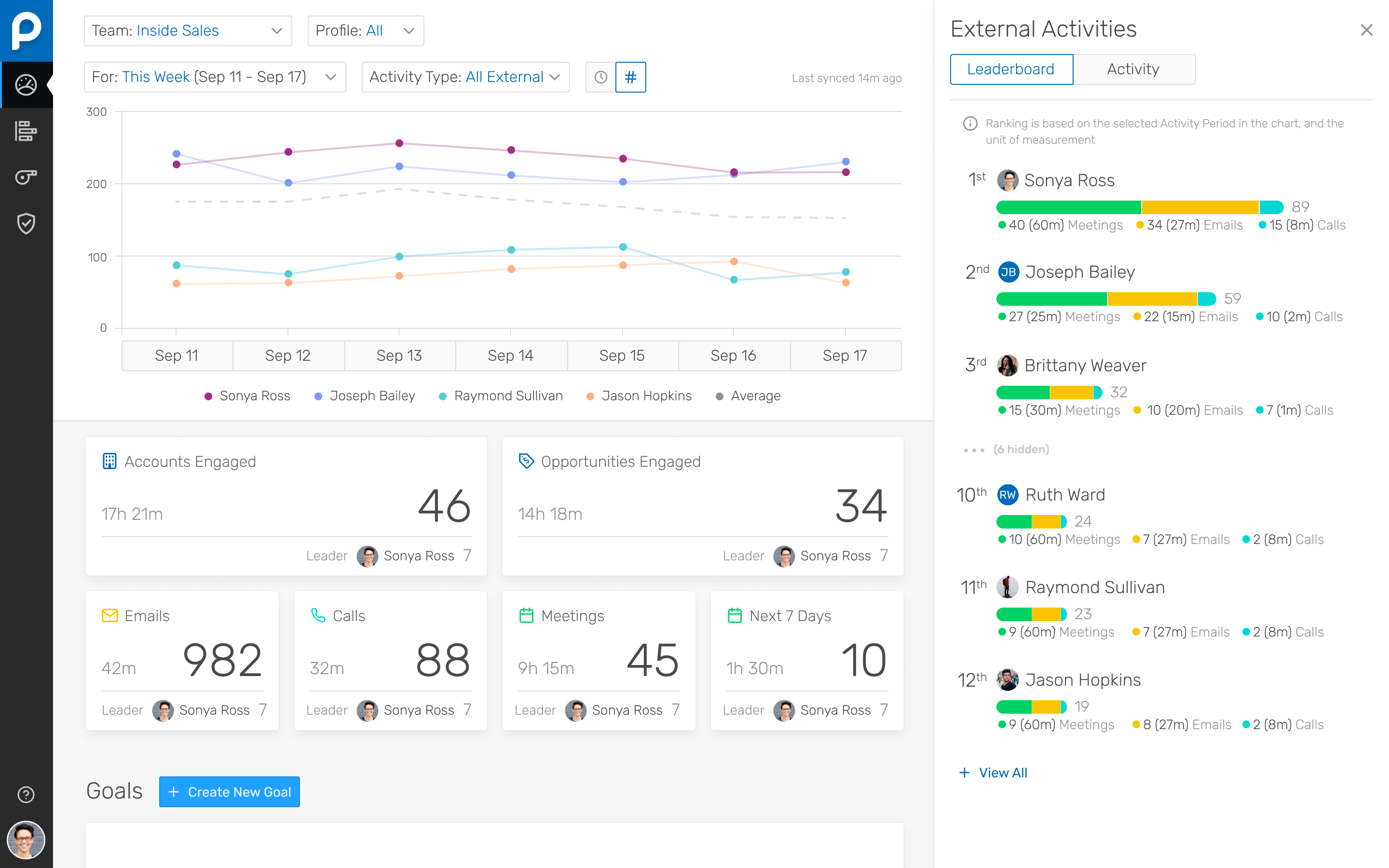
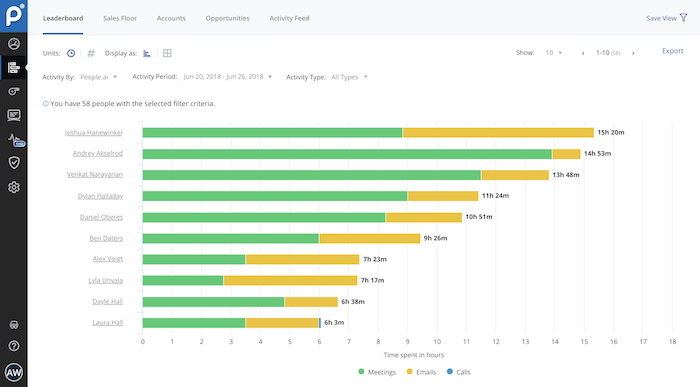
I've been using People.ai for a bit now, and I've been consistently impressed. I use it to track how my team is doing, how my clients are doing, and how I'm doing. I can create custom dashboards with any metric I want to see. I can set goals, and they'll track my progress towards those goals. I can set up competitions between my team, and they'll tell me who's winning and who's losing. You can share these dashboards with your team, which means that everyone can see how everyone else is doing.
Their Deal Room presents times when you are multi-threaded, engaged with executives, and have an upcoming meeting scheduled rather than stalking your reps calendar and salesforce activities.
They allow you to create areas performance dashboard with custom KPIs you want to measure
People.ai has a robust platform, however, this requires sales reps to log into one more platform and the People.ai platform is not customizable for selecting what can be viewed by users. If People.ai were to make the features in their platform available in Salesforce it would be a huge win for leveraging the data they aggregate. Hoping an API will soon be on the Roadmap
Time Spent. People.ai uses some logic to attribute values on the "time spent" on the activities being captured. They did improve their meeting aggregations so that they were not "double counting" time when multiple meetings were booked in the same time slot for a rep. Email time spent still seems to have some errors as the time spent on emails can show in excess of the weekly working hours of the reps.
This question is a no-brainer. The tool is the industry standard for anyone tied to sales and marketing. The name "LinkedIn Sales Navigator" is synonymous with streamlining relevant customer and account data in an easy to use format that is actionable and intelligent. The focus on continuous improvement and richer means of communicating with customers and prospects is evident each time new features are rolled out. The social component of the tool even includes a gamification component to ensure that peers remain relevant among each other, which is refreshing and enjoyable for those who engage the tool on a daily basis.
It lets you pull people with specific titles in specific areas and with the criteria you choose--job changes, mutual connections based on schools, roles, and companies, etc. It is easy to upload these lists into other software or download and save them to a drive.
The tool speaks for itself, but the support is definitely a significant portion of why we use the tool. The company cares about their customer's success and it shows. We do not have to wait for long periods of time for the support team to respond; they do so in a timely manner, and virtually always with relevant insights and solutions.
I am unsure of the rollout, as I was not involved. I was an early adopter, and I have had a lot of success with the tool personally at multiple organizations, but I have no idea whether the implementation process encountered any errors. I can personally say that it works, and that I have not encountered significant issues with the tool since adoption, although a few issues like messages showing up as being unread even though they have been opened have been an on-again/off-again issues throughout the past few years. Overall, the company is doing a great job, and our implementation seems to have been effective.
linkedin has way better data cleanup and relevant contact information. It provides a great insight into how to target personally your prospects, and gives great engagement highlights. ZoomInfo is sometimes outdated, the prospect has moved companies or is no longer employed there-- alot of filtering through the weeds can be hard if you are trying to hit high metrics and make your time valuable
The easiest comparison would be to email automation vendors like a SalesLoft, Outreach, or Groove. But People.ai doesn't have a template email send like a sequence or cadence feature you would find with them. It is more of a compliment to the email automation vendors than a competitor in my opinion. We want our SDRs to have the ability run sizable outbound campaigns so they still use Outreach. However, we deactivated the Outreach activity sync and run activity syncing through People.ai. If someone gets added into the email CC, People.ai will grab that person and create them as a contact against the matching Salesforce account. For our Sales reps, we want them to have the ability to track opens, link clicks, and send templated emails so we have them use Groove. Again, we deactivated the Salesforce sync and use People.ai syncing. This is a great way to automate the pain away from creating Opportunity Contact Roles and create all relevant contacts in Salesforce from CC's on emails to people added last minute on a calendar invite. My favorite part is how it ingests data directly from Google and doesn't allow a Sales Rep to not to sync an activity to Salesforce, it happens automagically