Kaseya Virtual System Administrator (VSA) is a cloud-based Remote Monitoring and Management software. VSA unifies the monitoring of system infrastructure and endpoints and is designed for use by IT teams and MSP’s. It offers a robust crowd-source automation scripts library, as well as antivirus and malware capabilities with real-time threat alerts.
N/A
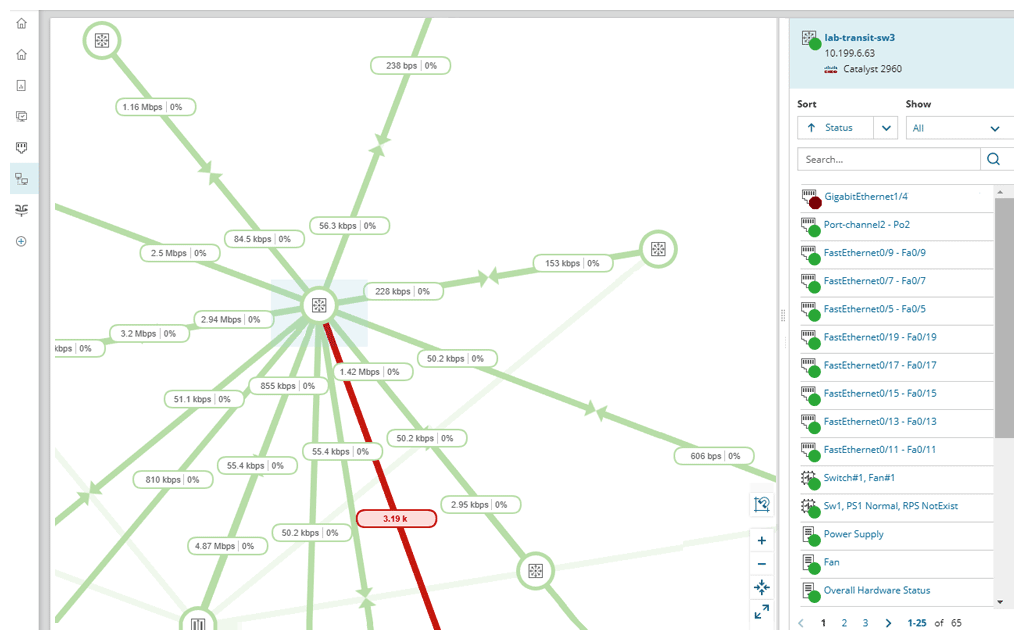
SolarWinds NPM
Score 8.3 out of 10
N/A
SolarWinds NPM is a monitoring and performance management platform. It provides performance troubleshooting support, auto network discovery, customizable thresholds, and can be rapidly deployed.
If the software functioned as it was intended, it would be probably a 7 out of 10. It lacks the majority of customization that SolarWinds N-central supplies, but also supports some customization that other solutions we have tried do not. Again, if the software didn't consistently break, the ability to implement automated scripting via PowerShell and the capacity to manage 10+ endpoints at once in different windows is great.
Solarwinds NPM is well suited for medium to large networks, it may be a bit heavy for the SOHO environment as most of the tools and reports are designed for monitoring KPIs which may not be critical for a small shop. NPM can handle large networks with several sites and mixed technologies ranging from networks, server systems, storage devices and SLA reporting.
Being able to see systems that are not within the local network allows us to be able to troubleshoot and work with the end users no matter where they are or where we are as it is cloud based.
Several functions can be "automated" so staff do not have to keep going back and scanning for updates, push Windows updates and or push sensor updates.
VSA offers a variety of system information about all of the assets that have the endpoints installed on them so we can easily see the system specs without having to actually connect to them and pull up the SysInfo on each unit.
Support - Like all other competitors support is OK but the product is robust enough to reduce support requirements.
Customer Service - another team that is a bit poor especially when the issue involves multiple departments. Otherwise, the direct rep is very friendly and professional.
The entire IT staff relies on NPM in its daily operations. It would be impossible for us to maintain our level of service without it. If SolarWinds gets to proud of their product and begins to over charge for it, we would be forced to reconsider and use a different product. But as it stands it is worth the price to renew it.
SolarWinds Network Performance Monitor (NPM) is quite an extensive product, covering all our bases and requirements. There are a lot of customizable options and features which you can work with for their alerting which is really useful. I haven't found anything yet which I thought SolarWinds Network Performance Monitor (NPM) could do, but it actually couldn't so overall it works nicely and does the job.
It was lots of back and forth email communication whenever I tried to solve my connection issues. I would send them detailed logs of the date, time, computer, and more of when I was experiencing connection issues. All I would get is an email back a few days later saying that they didn't find an issue in the service
In all of the times that we called support, someone at SolarWinds had the answer for us in a timely manner. Through thwack and other internet searching, we have been able to resolve all of our issues that arose to our satisfaction. The support staff have always been knowledgeable of their products or had a fellow support staff member to rely on to get the needed answers.
The training is good but during the implementation, you can get situations not learned during the training. The trainer was very open to hearing the questions about use cases and always sharing his experience. I really recommend having official training to take advantage of all features that the NPM can bring.
Make sure your inventory is accurate. Stand up some virtual machines for testing prior to installation. Make sure your database and its credentials are setup. Think about things you want to monitor that may not be obvious - UPS units, Door hardware, PBX systems, Fabric Channel switches, firewalls, routers, switches. Try to setup SNMP on these devices and have an IP that you will assign to the new server. If you do that it will go well.
There are other products that do some of what Kaseya does, but I've not personally worked with another product that does everything Kaseya does. Sure there are plenty of remote control products, but products that do as much as Kaseya are few and far between. Hard to go wrong with the sheer scope of functionality!
We selected SolarWinds Network Performance Monitor because of the capabilities of the product versus the price. The tools also work well with their other products and support is fairly good. We have never had a problem when we needed to make a call.
SolarWinds allows us to proactively address hardware issues before they impact the business. We recently had a server that was experiencing issues sporadically and we were able to use the data from SolarWinds to track down and correct the issue before it tanked the server.
SolarWinds gives our IT department some piece of mind knowing that they'll be alerted of any issues real time.
We can use SolarWinds data to justify needed to replace or upgrade certain equipment that is key to our core business.