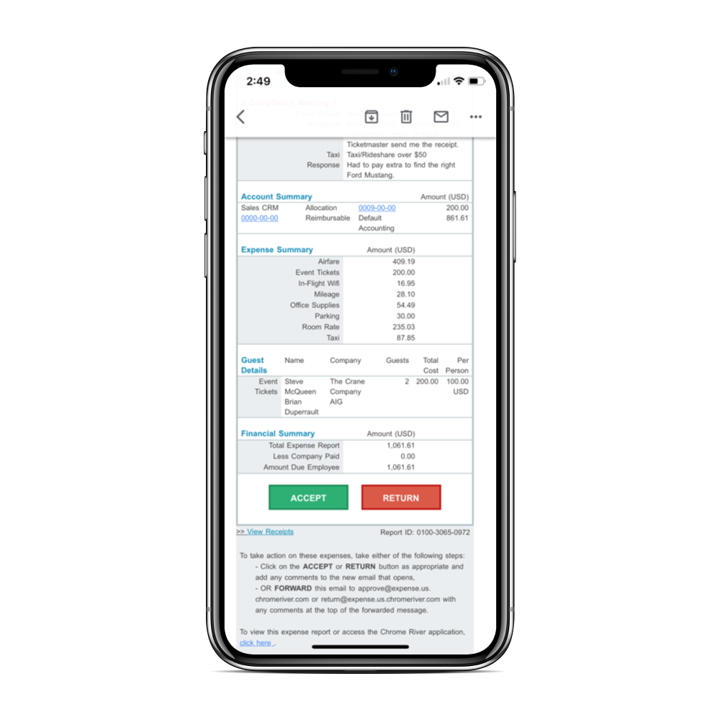
Chrome River EXPENSE is expense management software, from Chrome River Technologies in Los Angeles, California.
N/A
SAP Concur
Score 8.3 out of 10
N/A
SAP Concur is a SaaS expense report management product, and handles corporate travel booking, expense report automation, reimbursement, audit, and business intelligence, and corporate card integration.
$9
per month
Webexpenses
Score 8.7 out of 10
N/A
Webexpenses is a global provider of spend management solutions, combining integrated Expense Cards with cloud-based software for businesses of all sizes across 70+ countries. Serving industries such as retail, finance, technology, construction, and not-for-profit, Webexpenses gives businesses control over company spending by automating processes, proactively enforcing policies, and controlling costs. Features The Webexpenses…
$54
per month (up to 15 users on the small business plan)
Pricing
Emburse Chrome River
SAP Concur
Webexpenses
Editions & Modules
No answers on this topic
Concur Travel and Expense
$9.00
per report (average price)
No answers on this topic
Offerings
Pricing Offerings
Emburse Chrome River
SAP Concur
Webexpenses
Free Trial
No
Yes
Yes
Free/Freemium Version
No
No
No
Premium Consulting/Integration Services
No
No
Yes
Entry-level Setup Fee
No setup fee
No setup fee
$250 undefined
Additional Details
We offer three cost-effective, subscription-based pricing models:
A transaction-based model, priced according to expense report volume
A submitter-based model, priced according to an average number of monthly submitters
An enterprise-level model that includes unlimited expense reports. Pricing for this model is based on total employee headcount
Feel free to contact us to discuss the best one for your organization.
The overall user interface was easy to use and it made the task of the reporting very easy. Compliance rules are guiding the users to correctly upload and enter receipts, which are already uploaded and recognized via OCR during the business trip. Uploading can easily done via …
The user interface and features surpass the experience and similar features of other products because of the following. Good customer support to also make the program better. Also, a good interface to navigate the expense creation process.
We currently use Concur for travel bookings. I was not impressed with Concur when our procurement department was getting this product set up. Not very flexible. I imagine (and have heard stories from other current Chrome River organizations) that this is similar for their …
Chrome River was selected for ease of use and price per report. One of our affiliates was already using Chrome River and it came highly recommended and we were able to negotiate a price per report that was within our budget. Most of the expense systems have the same features …
Concur was a very detailed platform that we used at my old company, but it was not very user friendly. The compliance rules set up required heavy detail from the employee that leadership or managers would not even read. the rules set in place resulted in slow processing times …
Chrome River is better than paper expense reimbursement reports. Paper reports can provide more flexibility and customization than Chrome River in some aspects though Chrome River also allows for some things not available with paper processing. The efficiency, accuracy, …
Chrome River Expense is much easier to use and implement, much less expensive, and the people are much more passionate about their product and company.
Chrome River [EXPENSE] is globally deployable. Furthermore, a good connection between cytric Travel and Chrome River [EXPENSE] is available and working smoothly. Additionally, travel data are transferred into Chrome River [EXPENSE]. We installed a connection to our credit card …
What I like about Chrome River EXPENSE is the access the administrator has to making updates. With Concur I had to reach out to someone our IT team to make any changes. I also like that I get to test the updates in a sandbox before moving to production, this reduces the amount …
Accounts Payable and Financial Services Coordinator
Chose Emburse Chrome River
I think Chrome River is much more intuitive and user-friendly. Also, I love the ease of pulling data and diving into analytics with Chrome River. The system is very dynamic and changes in real-time. As far as Concur goes, I had a lot of difficulty and redundant motions when …
It's been a long time since we compared expense platforms. Ultimately we decided that Chrome River was the best option for us, and we believe we made the right choice. I don't remember specifics about other platforms unfortunately.
We were an existing Concur customer looking to expand our current implementation. We made the choice to evaluate other platforms and pricing prior to committing to such a large endeavor. When comparing Chrome River to Concur, everything about Chrome River was superior: customer …
Verified User
Supervisor
Chose Emburse Chrome River
I have not reviewed or evaluated any products recently. When we were looking at vendors for a T&E package, we did meet with Concur. They were a much larger vendor, but we felt that we might get lost in their world. We chose [Emburse] Chrome River because they seemed more …
Chrome River EXPENSE attracted business due to its end-user interface simplicity. The navigation, expense type menu (mosaic made of the icons/tiles) was a winning element. Mobility (laptop/PC/iOs/Android), approval routing, and receipt scanning via OCR were huge contributors to …
Concur was more expensive and didn't seem to have an much flexibility to customize.
Verified User
Employee
Chose Emburse Chrome River
Chrome River was much more intuitive while also very flexible to customize, which was necessary for our company. Other programs did not even come close to meeting our needs. Chrome River was our last stop, and we were thrilled to finally find a company that met our exact needs.
Verified User
Administrator
Chose Emburse Chrome River
We initially looked at Concur, Chrome River, and Certify as potential products for our company in 2017. Since that time, Chrome River and Certify are now owned by Emburse, so they are together...though separate. Concur did not offer as much for the money and seemed more …
SAP Concur is vastly superior to Chrome River EXPENSE. SAP Concur allows for easier expense to charge matching, mobile use, and end user ease of access and use. However, Abacus is again that much better than SAP Concur, including better department level management tools. The …
Webexpenses charges per user, so it can get very expensive for large organizations. However, Webexpenses does have superior mobile usability, with a convenient app with receipt upload function that can easily be done immediately after the receipt is issued. Webexpenses also has …
SAP Concur has capabilities for all sorts of agencies from SMEs to global enterprise organizations and has robust backend integration tools for SAP and non-SAP services unlike alternatives like Webexpenses and FreshBooks.
Verified User
Administrator
Chose SAP Concur
Concur Travel and Expense was more user friendly with stuff such as calculating per diem and figuring out hotel itemizations. Chrome River had more categories when it came to expenses though. Concur looked a little older based on user interface, Chrome River looked a little …
Travel & Expense - Global Process Owner/Real Estate and Fleet Finance Partner - SUEZ Water Technolog
Chose SAP Concur
Concur is integrated with Travel so it's a more useful tool. Data is much richer with the integrated solution as is the auto-creation of expense reports and the auto-itemization of hotel folio.
From the employee perspective, Chrome River is a far superior product. It's modern-looking, easy to use, and so intuitive you almost don't need the contextual help.
2 different platforms and depending on the needs and connectivity of the business. Both platforms are excellent choice. webexpenses or more targeted and used in Services industry whereas SAP Concur is more productive for tangible industry where other SAP products are used and …
SAP Concur is a very similar product and I had two company credit cards whilst using the programme so I'm not sure how this compares but I'm sure the integration is similar.
I think Webexpenses' core strength is VAT reclaim and compliance, especially for UK/EU businesses. Unlike Expensify or card-centric Pleo, Webexpenses' system and dedicated local support are built to maximize recovery by automatically capturing and applying correct VAT rates, …
I believe Webexpenses is much more user-friendly than other similar systems. The mobile app mirrors the web browser, and the system works in exactly the same way, meaning I can use the app on the go and keep track of my expenses, ensuring I never miss one, as it can be added at …
The biggest difference between Webexpenses and Concur honestly lie in the simplicity of what is needed from the employee and their expenses. Concur asks for a lot of itemization sometimes and may even have to import other receipts and invoices that are spent by the employee and …
I much prefer Web Expenses to Concur. Although one functionality that Concur had, a user could email their receipts from the registered user email to Concur then these receipts would be available for the user add to their expense claim.
The ease of use of the platform has been the biggest benefit of this system. We didn't need to provide any structured training to our staff, we just sent out the link and people were able to intuitively use the platform. Other competitors were harder to navigate and to use.
Many companies have had their own internal systems created by their own depts, some were very basic. Webexpenses is more efficient and includes a lot more useful features than any system I have used in the past. I would say that Concur is about 'as good' but certainly no better …
Poorly. We will be looking at leaving Webexpenses for Concur in coming months. It will be nice to use a program that functions correctly and achieves the goals.
Verified User
Consultant
Chose Webexpenses
The other tools mentioned are usually harder to understand and both are quite slow in performance. What I liked more was the direct connection to certain apps / providers like UBER that helped directly import receipts.
The Emburse Chrome River is well suited for tracking expenses and reimbursement. The compliance part of the software makes the task very easy to ensure all the reports that are being used within the company are updated and easy to verify. The Automating invoice processing makes some redundant task easy to execute.
SAP Concur is great for large organizations because of it's built in approval process functions. It is great tool for expense reports and any company where employees need to book travel. I imagine that the tool would be more tricky to use for those who are less technically savvy since there are many tabs and it is sometimes tricky to navigate.
Webexpenses is well suited for payroll to easily track workforce expenses and reducing hours of manual work from approving and processing the submitted claims. I have to highlight the automated custom report generating, which suits any needs to see reports for our teams. At our organization there is no sceniario, where Webexpenses would be less appropriate.
[Emburse] Chrome River listens to its customer's needs and does its best to match current products to those needs, or collaborate internally to determine if an enhancement can be made available that will not only benefit that customer, but will be a good use case for all Chrome River customers.
The [Emburse] Chrome River customer service team is great. Unlike most companies, you can speak to a liver person!
[Emburse] Chrome River's training offerings are relevant and pertinent to the day to day operations of the software.
Would be great to have pre-saved templates available to apply to line items at the expense report header level rather than having to go into each line.
Would be nice to have a mass upload functionality for things like cost codes, allocations, and credit card users.
For a new user of SAP Concur, it becomes difficult to file the first reimbursement as that person is new to the application and probably, one needs to to go through the instructions to get used to it. So, user interface can be improved and could be tried to make more interactive. Other than that, it's all good to go.
Would be nice if claims could be organised into certain chronological orders i.e. ordered by date so I don't have to copy and delete claims when adding a claim in that has an earlier date
Would be ideal to have an option to save full routes rather than just addresses maybe?
Chrome River is easy to use. We needed little training for our users and instead pointed them to Chrome River's Help Guides which are clearly written and easy to understand. With tools SNAP and the ability to email receipts means we can be completely remote when submitting reports.
Now that we are fully on Concur, switching is not an option. Concur has become ingrained in our expense reporting process. Furthermore, Concur continues to improve its offering. Each month, they release updates and changes, many of which were client requested. Concur's constant evolution means it is adapting with my business
There doesn't seem to be anything in the market at the same price point that is better, however if there is an interrupter in the market that provides better value, then we would heavily assess the cost of change to see if we should move on to the alternative offering.
I would rate Chrome River Expense a 10 because, as I mentioned before, it is very simple and easy to use. This is important from an administrative point-of-view as well as for the field employee. Being a general contractor, it makes it all the better for our employees to use a program that is easy to understand and requires little time and effort. It has made tracking expenses very simple and has been well received by the entire company.
I think it is very easy to use, especially once you are acquainted with it. I think the UX could be improved so some things, like accessing old reports, are more intuitive once you learn it though it is not difficult to replicate.
I think this is an easy to use and effective system for expense management. I like how I can upload images and documents directly from my phone onto the mobile app. It's beneficial for continuity that the app and the web browser work the same, and I can save claims to come back to later if I wish.
In prior years I would have given them a 9.5 for availability. Unfortunately in 2015 so far this rating has dropped to a 7 overall. We have experienced far too many interruptions - from admins to employees who rely on it for day to day booking of travel and submission of expense reports. Server errors, slow system response time and spinning wheels are too common place. Those things should be a rare occurrence, not a daily interruption.
While Conur still has great product offerings overall, they are currently not offering world class or best in class product (and customer service) availability. Remaining hopeful they step up and get their A game going again soon.
The soft ware is reliable. The phone app works well and allows you to upload evidence, receipts, log mileage and log expenses. It works well and is rarely locked or there are very few times the app is down. The laptop based software is easy to access and again is always available
Performance-wise, it's good, loads pages quickly, and reports are highly accurate and easy to understand. Also, we can generate custom reports as needed, and we have integrated with a few other apps, and we have not seen any downgrade in performance.
The phone based app and the laptop based app always load quickly. It is easy to access. It is quick to use. It easy and quick to upload information and evidence. It is easy to log details. The information goes off to accounting and payroll quickly resulting in prompt payments for staff
This has been easy for me because we have a rep that contacts the supporters for this product to correct any issues we may have with the software or changes needed to help out employees use Chrome River easier. This from my understanding has been a hit or miss kind of interaction with our rep and Chrome River.
I have never had to use customer support when using Concur Expense - the UX could be a bit nicer on the eyes or easier to understand, but there have never been any problems when using Concur Expense that I have had to ask or reach out to customer support to help me with anything.
The support for the initial setup was great, but since then we have only had to contact support once when we had problems uploading credit card files. The help we received at this time was not good and we ended up trying various things until we resolved the problem ourselves. The online support tutorials are good, but searching for a specific issue is difficult.
My Seniors were the ones who taught me about Concur. Concur Support team has sent me training links and answered me in their tickets too. Usually they are helpful and knows their stuff. There are times when webex meetings is conducted for reporting training. They were very patient and took down all the details from me.
It was difficult to train multiple people via video, as they learned at different speeds, and most of the user champions were not as capable with systems and finance processes as our dept.
Before implementation begins, make sure you have a plan on how you would like your workflow and platform setup for a system like Chrome River. It will speed the process and eliminate the need to make changes when you go live.
There are different implementation teams for each module of the product you purchase, so implementation is not a 'one size fits all' environment. Also, the different implementation teams have different ways of doing things, so Concur could stand some standardization and streamlining in this area. A Project Manager can make or break an implementation so don't be scared to ask for a new one if things are rocky.
It's the [industry-leading] software for Enterprise level organizations with [large-scale] teams and financial responsibilities. The software has the most robust set of tools and pays for itself with the amount of time it saves. Many newer alternatives have sprouted up but I don't know that we would ever trust another software to do our Expense Tracking and Management.
Expensify and Zoho Expense work for small and mid-size businesses. Big multinationals do not receive benefits from the apps. Coupa is good as a solution for organizations with non-SAP leading systems. If you plan to use SAP ERP as the main/lending system then SAP Concur is the best solution, mainly for its native integration with SAP ecosystem.
I would have to say that Webexpenses does not stack up well in comparison to Expensify. If given a choice, I would choose Expensify for the best user experience and mobile / desktop being more seamless. It accomplishes the same thing but has a more modern, minimal, and streamlined feel to it.
This program has been very helpful, user friendly and has been a great asset to use to assist with time management. Not only are leadership involved with using this program but all staff as well. This is also a great way to hold each accountable. Easy startup with not many means for hands on training
Every department in my organization uses webexpenses. My role and the role of others involves travel, expenses and mileage. Everyone uses the app to log details, upload receipts and to claim allowable expenses. having spoken to everyone within my team and wider directorate, i do not know of anyone who has had issues with the app