Fullstory’s behavioral data platform helps technology leaders make better, more informed decisions by injecting digital behavioral data into their analytics stack. The technology's behavioral data transforms digital visit into actionable insights.
N/A
Piano Analytics
Score7.2 out of 10
Mid-Size Companies (51-1,000 employees)
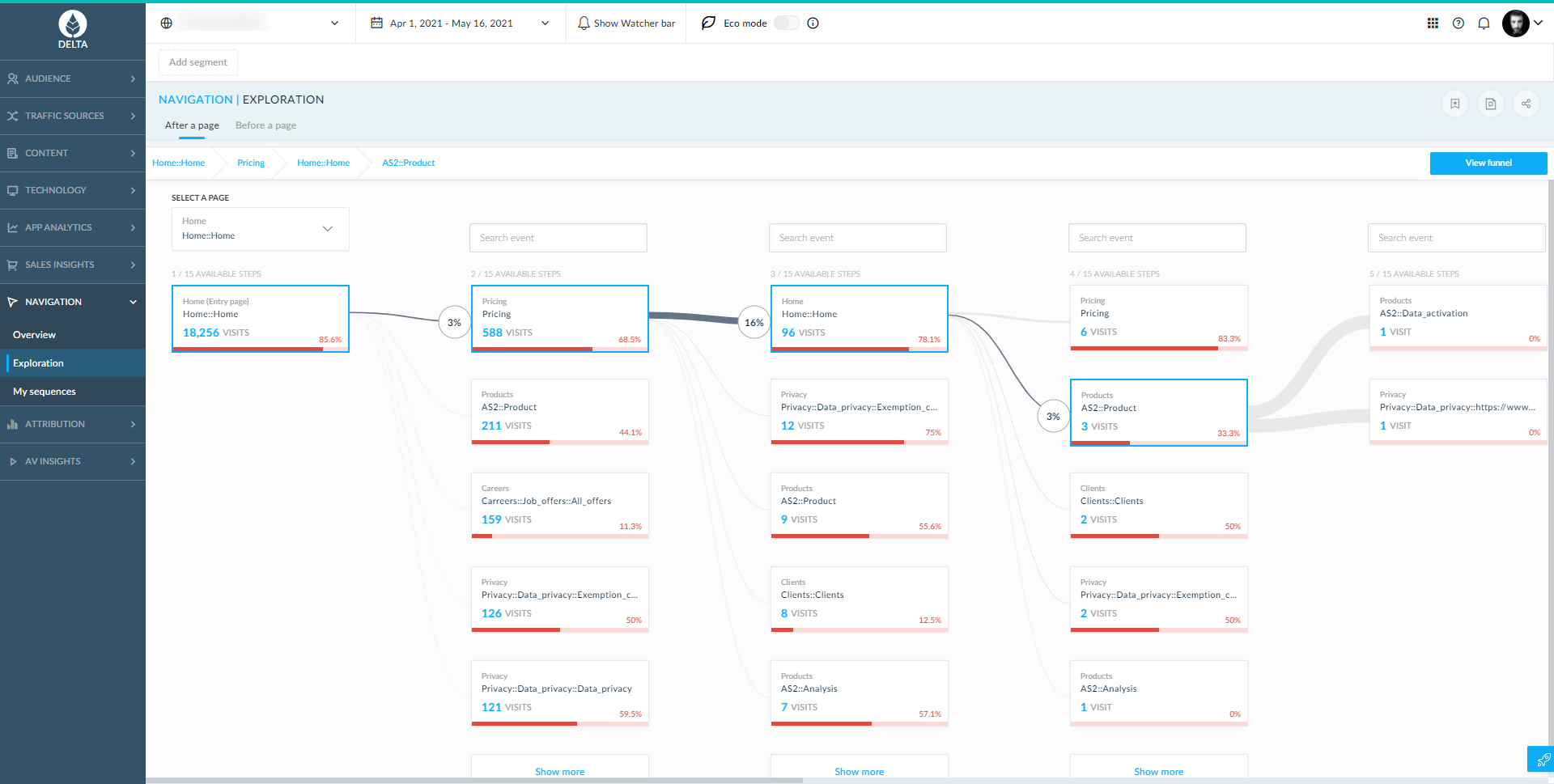
Piano Analytics, formerly AT Internet, provides digital analytics to help customers measure their audience, optimise their digital performance and create value. From data collection to exploration, activation, and the sharing of actionable insights, the Piano Analytics Suite is designed to provide reliable high-quality data to enhance decision-making company-wide. Adapted to e-commerce, media, finance/banking, and corporate websites & mobile apps, the vendor promises an easy-to-use solution…
It was extremely useful in identifying places in our product where things weren't functioning, or where it looked like action was available to the end user but in reality, it was not and therefore caused lots of confusion. It doesn't help as much in other scenarios to see what catches a user's Eye or where they go if they leave our application as well as an actual in-person interview would help with eye-tracking software.
A de minimis incentive was given to thank the reviewer for their time. The incentive was not used to bias or drive a particular response, nor was the incentive contingent on a positive endorsement. More Info
When it comes to web analytics AT Internet is well suited. We introduced AT Internet in 2017 after an evaluation project with other professional analytics solutions. Starting with our corporate website we quickly rolled it out to our customer experience platform, our webshops, and our corporate intranet based on SharePoint 2013. Especially the use in our intranet brought significant improvements over the standard analytics features SP 2013 is offering. The ATI tag systems with their flexibility allow us to include company-specific properties and thus making it possible for us to analyze our intranet usage on segments such as locations, branches, and so on.
A de minimis incentive was given to thank the reviewer for their time. The incentive was not used to bias or drive a particular response, nor was the incentive contingent on a positive endorsement. TR verified that a representative sample of customers was invited. More Info
A de minimis incentive was given to thank the reviewer for their time. The incentive was not used to bias or drive a particular response, nor was the incentive contingent on a positive endorsement. More Info
A de minimis incentive was given to thank the reviewer for their time. The incentive was not used to bias or drive a particular response, nor was the incentive contingent on a positive endorsement. TR verified that a representative sample of customers was invited. More Info
The ramp-up time to learn the entire product can take a little while. There are just so many absolutely wonderful tools and different ways to look at the same type of information that it can take a new user a few weeks to understand and then more time to master. However, FullStory has a ton of training resources to help with that! A lot of my own teammates have taught themselves FullStory through those training resources.
The UX of the product is totally wonderful, but there are tiny things that make getting to certain parts of the product slightly more challenging (like clicking into a modal in a modal). Sometimes buttons or links are placed out of my field of view, but those are minor things I notice because I work in UX.
A de minimis incentive was given to thank the reviewer for their time. The incentive was not used to bias or drive a particular response, nor was the incentive contingent on a positive endorsement. More Info
Integrations with outside vendors: there are many ways to integrate data from outside vendors, however you can't display this information in every application unless you create a custom field, which can sometimes be limiting.
Access rights: there are two places to assign access rights and each place has slightly different functionality. You can get really granular with what each person has access to, but it is easy to miss a check box and have to go back and correct it.
Visualizations across applications: there are some really cool visualizations in the oldest application they support that includes predictive traffic estimates, automatic multi-period variations, etc., that aren't available yet in the newer applications.
It's been a phenomenal tool for us; every department that uses it has found something new and unexpected that it can do that they're really excited about. Even if we *only* used it for bug triage, it would be worth our time and money. The fact that we can use it for so many other things as well--gauging how customers interact and use our site, identifying UI problems, etc.--is above and beyond
A de minimis incentive was given to thank the reviewer for their time. The incentive was not used to bias or drive a particular response, nor was the incentive contingent on a positive endorsement. More Info
I gave this rating because I think that AT Internet is a good tool, user-friendly easy for onboarding and simple dashboards, however the majority of people use Google Analytics, especially media agency, it is easier for them to use Google Analytics.
A de minimis incentive was given to thank the reviewer for their time. The incentive was not used to bias or drive a particular response, nor was the incentive contingent on a positive endorsement. TR verified that a representative sample of customers was invited. More Info
A de minimis incentive was given to thank the reviewer for their time. The incentive was not used to bias or drive a particular response, nor was the incentive contingent on a positive endorsement. More Info
Overall the experience is very good, it's quick, relaiable and does everything I would want. The only problems I have are matching the correct stats to what I want. It can be painful trying to find the right thing and the explanations are not always the clearest. That's the only issue i've found though.
A de minimis incentive was given to thank the reviewer for their time. The incentive was not used to bias or drive a particular response, nor was the incentive contingent on a positive endorsement. More Info
A de minimis incentive was given to thank the reviewer for their time. The incentive was not used to bias or drive a particular response, nor was the incentive contingent on a positive endorsement. More Info
I don't have any exemple in mind where AT Internet interface hasn't been available, i have always been able to use AT Internet when i needed it. The only issues to notice is that it happens sometimes that real time or D-1 datas are partially delayed.
A de minimis incentive was given to thank the reviewer for their time. The incentive was not used to bias or drive a particular response, nor was the incentive contingent on a positive endorsement. TR verified that a representative sample of customers was invited. More Info
A de minimis incentive was given to thank the reviewer for their time. The incentive was not used to bias or drive a particular response, nor was the incentive contingent on a positive endorsement. More Info
A de minimis incentive was given to thank the reviewer for their time. The incentive was not used to bias or drive a particular response, nor was the incentive contingent on a positive endorsement. TR verified that a representative sample of customers was invited. More Info
They have been overall pretty responsive and proactive. The tool is pretty straightforward to use. Most of the questions we have had to work with them on our how to use new features or adjust our integration to ensure we are gathering all the data from all of our tools.
A de minimis incentive was given to thank the reviewer for their time. The incentive was not used to bias or drive a particular response, nor was the incentive contingent on a positive endorsement. TR verified that a representative sample of customers was invited. More Info
I have not used the Support Team thereby I am unable to review how their Support Teams works. However, in an instance where I had an issue, my concerned department contacted their support team and I was provided with the solution of the problem I was facing within a short span of time.
A de minimis incentive was given to thank the reviewer for their time. The incentive was not used to bias or drive a particular response, nor was the incentive contingent on a positive endorsement. TR verified that a representative sample of customers was invited. More Info
The in-person training unfortunately does not match to our expectations, was too much focus on digital basis and not on AT Internet functionnalties and how to use it. We paid for one day and only 15 minutes at the end was focused on our real needs in terms of media analytics.
A de minimis incentive was given to thank the reviewer for their time. The incentive was not used to bias or drive a particular response, nor was the incentive contingent on a positive endorsement. TR verified that a representative sample of customers was invited. More Info
A de minimis incentive was given to thank the reviewer for their time. The incentive was not used to bias or drive a particular response, nor was the incentive contingent on a positive endorsement. TR verified that a representative sample of customers was invited. More Info
To successfully implement FullStory, it is important to plan your implementation carefully by defining your goals and user segments. You should also use tags and filters to analyze your user data, train your team to use FullStory effectively, and use FullStory in conjunction with other analytics tools to get a more complete picture of your user's behavior. By following these tips, you can gain valuable insights into your users' behavior and experiences, and use this information to improve your website or application.
A de minimis incentive was given to thank the reviewer for their time. The incentive was not used to bias or drive a particular response, nor was the incentive contingent on a positive endorsement. More Info
A de minimis incentive was given to thank the reviewer for their time. The incentive was not used to bias or drive a particular response, nor was the incentive contingent on a positive endorsement. TR verified that a representative sample of customers was invited. More Info
Smartlook is software that records users on a website and mobile app. Finding useful information within thousands of recordings is made quick and easy with features that help you accomplish this. I have chosen FullStory because it is easier to use and has more advanced features compared to Smartlook.
A de minimis incentive was given to thank the reviewer for their time. The incentive was not used to bias or drive a particular response, nor was the incentive contingent on a positive endorsement. TR verified that a representative sample of customers was invited. More Info
AT Internet shows a deep understanding of our business objectives and provide us with ideas on how to solve them. They grant us enough time to try their tools and to be sure the tools are helpful. The data we've got in the Analyzer was manually checked and it was completely correct. Their roadmap was clean and aligned with our strategy
A de minimis incentive was given to thank the reviewer for their time. The incentive was not used to bias or drive a particular response, nor was the incentive contingent on a positive endorsement. More Info
Regarding AT Internet possibilities, it could be adapted to small or large organizations, easy to set up. We can add sites in makets that we launch e-commerce.
A de minimis incentive was given to thank the reviewer for their time. The incentive was not used to bias or drive a particular response, nor was the incentive contingent on a positive endorsement. TR verified that a representative sample of customers was invited. More Info
A de minimis incentive was given to thank the reviewer for their time. The incentive was not used to bias or drive a particular response, nor was the incentive contingent on a positive endorsement. More Info
Unfortunately, I do not have precise results to give, but the statistics provided by AT Internet make it possible to carry out in-depth analyses and to make good decisions.
You just have to know how to find the information and interpret it.
A de minimis incentive was given to thank the reviewer for their time. The incentive was not used to bias or drive a particular response, nor was the incentive contingent on a positive endorsement. TR verified that a representative sample of customers was invited. More Info