Apollo is a sales platform that helps revenue teams find and engage leads, automate outreach, manage deals, and enrich data.
$59
per month per user
Cirrus Insight
Score8.8 out of 10
Mid-Size Companies (51-1,000 employees)
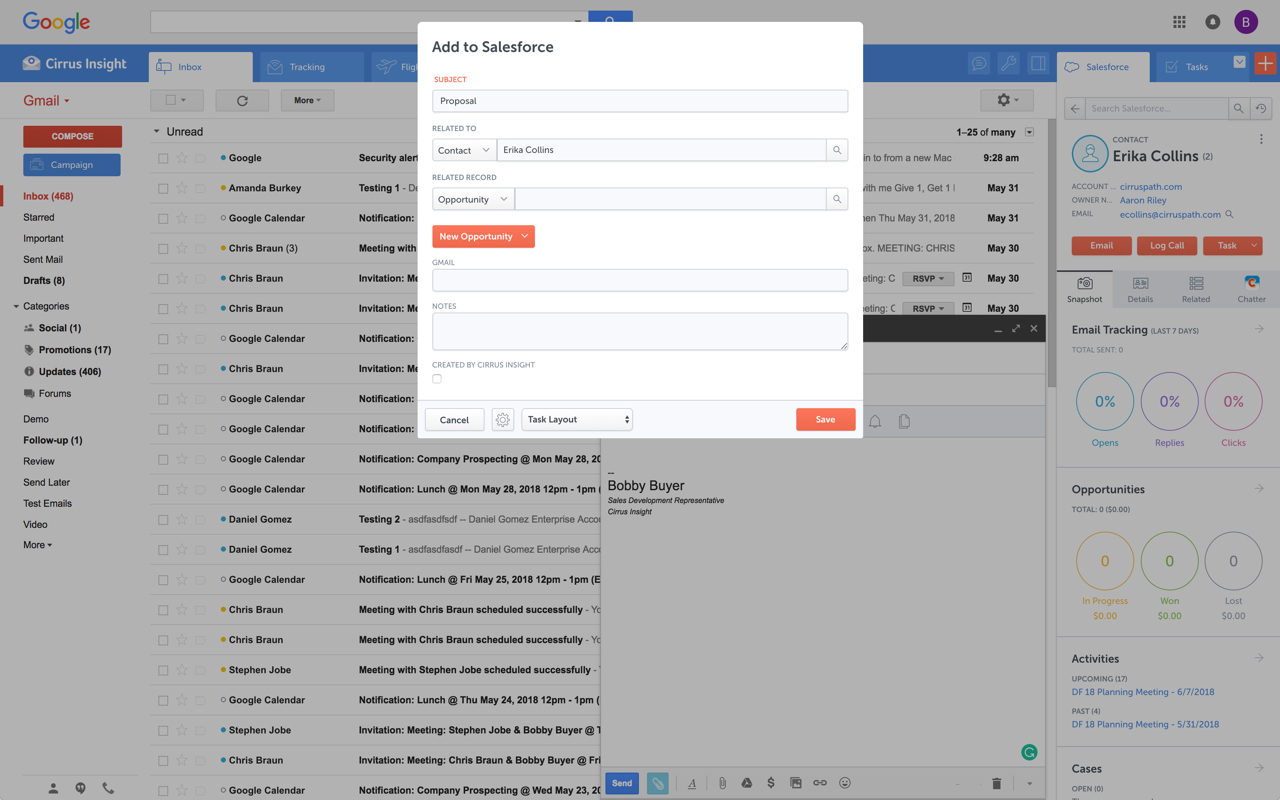
Cirrus Insight integrates Salesforce with Gmail, Google Calendar, and Google Contacts. Instantly View Contextual Salesforce Information in Your Inbox. Save Emails & Attachments to Salesforce with a Click. Sync Your Google & Salesforce Calendars. Create & Edit Salesforce Records on the Fly. Customize Your Salesforce Workflow in Gmail. Add Google Contacts to Salesforce. Salesforce Tasks Integration. Salesforce Templates Integrated with Gmail.
$15
per month
Pricing
Apollo.io
Cirrus Insight
Editions & Modules
Basic
$59
per month per user
Professional
$99
per month per user
Organization
$1,188
per year per user
Starter
$27
per user/month
Closer
$45
per user/month
Rainmaker
$72
per user/month
Offerings
Pricing Offerings
Apollo.io
Cirrus Insight
Free Trial
Yes
Yes
Free/Freemium Version
Yes
No
Premium Consulting/Integration Services
Yes
Yes
Entry-level Setup Fee
Optional
$500 per installation
Additional Details
20% discount for annual billing on the Basic and Professional plans.
Based on my experience using Apollo.io, it is well-suited for organizations like startups that are actively looking to generate new leads to market their products, and for direct marketing using the Apollo.io mail system and filtering leads by locality, sector, or designation.
A de minimis incentive was given to thank the reviewer for their time. The incentive was not used to bias or drive a particular response, nor was the incentive contingent on a positive endorsement. More Info
For someone who uses both Gmail and Salesforce as part of their main role, this software is an invaluable connector for them both. Some of the features are also not Salesforce specific - such as the Meeting Scheduler, which has proved invaluable to me, and I would recommend to any Gmail user who frequently set up meetings (either internally or externally).
A de minimis incentive was given to thank the reviewer for their time. The incentive was not used to bias or drive a particular response, nor was the incentive contingent on a positive endorsement. More Info
A de minimis incentive was given to thank the reviewer for their time. The incentive was not used to bias or drive a particular response, nor was the incentive contingent on a positive endorsement. More Info
Log email to Salesforce. You click one button and it logs for you. This is easier than adding the BCC email address that Salesforce provides as a way to log email.
Track views and engagement on these emails. It's nice to know if the email was opened and if links were clicked.
Update quick fields in Salesforce directly from their inbox using Cirrus. This prevented reps from needing to click into Salesforce, wait for it to load, then update fields like the phone number or name.
If the rep did need to open Salesforce, Cirrus provides a quick button to navigate to the Lead/Contact/Opportunity page quickly.
A de minimis incentive was given to thank the reviewer for their time. The incentive was not used to bias or drive a particular response, nor was the incentive contingent on a positive endorsement. More Info
A de minimis incentive was given to thank the reviewer for their time. The incentive was not used to bias or drive a particular response, nor was the incentive contingent on a positive endorsement. More Info
Outlook for Mac could use some work as an add-on because it's hard to read sometimes on my laptop. It's not a sidebar, like the Windows functionality, so it's harder to read.
Doesn't always find an opportunity, even though I know it's in our Salesforce system.
Randomly shuts down and doesn't log in properly at times. I've had to remove and re-download more than once.
A de minimis incentive was given to thank the reviewer for their time. The incentive was not used to bias or drive a particular response, nor was the incentive contingent on a positive endorsement. More Info
A de minimis incentive was given to thank the reviewer for their time. The incentive was not used to bias or drive a particular response, nor was the incentive contingent on a positive endorsement. More Info
It is the best google to salesforce integration on the market. support is incredibly responsive and very helpful. They are constantly adding new features, and the current feature set is well beyond anything else that is currently offered in the market
I gave it a 7 because it doesn't help you out if you're an organization that's call-heavy, because a lot of times the numbers aren't the best. It's not accurate. If you're somebody who's email and outbound and your goal is to find that, then that's cool. It works well for it. Some of the features, the AI tools, and some additional features they have are just too complex. Sometimes it's easy to use, but at the same time, there are tools that are not efficient, and it's like, "Where is this coming from?"Especially if you're looking for your niche, whatever industry you're in, and the target word, sometimes it can't find it. You can see what people are searching for, and it just doesn't add up. If you're trying to get very, very detailed, it's not the best. Sometimes it's going to depend on your industry, of course.
A de minimis incentive was given to thank the reviewer for their time. The incentive was not used to bias or drive a particular response, nor was the incentive contingent on a positive endorsement. More Info
Very easy to use. Everything opens in a familiar interface right inside the google apps sidebar. It brings in salesforce records, so as long as you know google apps / gmail and salesforce you'll be all set. It's point and click.
The team wants to solve probelms, but we are finding that they don't know how to solve the more technical issues quickly. I suspect that they don't have a mature process for escalations, and they don't have a usable knowledge base article repository. They seems to push emails around to let us know that people are working on the issues to find solutions, but this takes weeks and oftentimes still leaves us without a resolution.
A de minimis incentive was given to thank the reviewer for their time. The incentive was not used to bias or drive a particular response, nor was the incentive contingent on a positive endorsement. More Info
The plugin is installed inside your internet browser as an extension/add-on. It can be found in most add on stores and is easy to install. Usually just a few clicks. It handles authorization for you once you sign in, and then takes care of all the rest. It couldn't be easier to get working right out of the box. You're up in running in less than 5 minutes.
We found the contact data from Apollo.io was more reliable than Instantly.ai. We used Instantly.ai for about 6 months before stopping our use of it. Growbots doesn't give you as much volume for the same price at Apollo.io. However, we did close sales with Growbots, and we did not with Apollo.io. It could have just been our unique experience, but that's what happened.
A de minimis incentive was given to thank the reviewer for their time. The incentive was not used to bias or drive a particular response, nor was the incentive contingent on a positive endorsement. More Info
Yesware regularly sent me alerts that my emails had been opened by someone who I hadn't sent them to, from locations they couldn't possibly have been. I also don't recall its Salesforce activity logging working as smoothly, though I last used Yesware more than 12 months ago so my memory isn't as fresh as it could be
A de minimis incentive was given to thank the reviewer for their time. The incentive was not used to bias or drive a particular response, nor was the incentive contingent on a positive endorsement. More Info
Apollo.io has helped me find a good set of new target audience for the business that I am in, essentially helping me build a prospective line and grow my lead database by 25 to 30% where I lack a certain skill
The Apollo.io quality of the data that it has is significantly better through other competitors like Lusha and others
In terms of the revenue increase, there have been certain instances where I have found a new acquirer that essentially I would not have found in a general scenario and that has help me generate from the new identified lead
A de minimis incentive was given to thank the reviewer for their time. The incentive was not used to bias or drive a particular response, nor was the incentive contingent on a positive endorsement. More Info
A de minimis incentive was given to thank the reviewer for their time. The incentive was not used to bias or drive a particular response, nor was the incentive contingent on a positive endorsement. More Info